2014 AUDI R8 SPYDER light
[x] Cancel search: lightPage 28 of 244

26 Driver information system
Displaying intermediate time and pausing
timing
• To display an intermediate time, press the
l ower section of the w iper switch @. T he in
termediate time appears in line
CD and is
marked with*.
• To pause tim ing, press the lower section of
the wiper switch @again.
• To continue timing, press the upper section
of the w iper switch @.
If t iming is paused, you can conti nue it later
even if you switch the ign it ion off.
Evaluating times and continuing or
resetting timing
You can evaluate the fastest, slowest and
average lap times.
Fig. 18 Display : lap time eva luation
• To eva luate lap times, press and hold the
I RESET I 9 page 2 5, fig. 16 @ button for ap
proximate ly 2 seconds. The display shows
the fastest lap"+", the s lowest lap"-" and
the average lap time
"0" .
• To continue t iming for addit ional laps , press
the wiper switch @.
• To reset the timer to zero, press and hold
the
I RESE T! button again for approximately
2 seconds .
• To switch the lap timer off comp letely, press
the
I RESET ! button briefly.
(D Tips
-Saved lap times cannot be individually
deleted from the total results.
- The saved lap timer values will not be
l ost after turning the ignition off .
On-Board Diagnostic
system (OBD)
Malfunction Indicator Lamp (MIL)
The Ma lfunction Indicator Lamp (MIL) &iJ is
part of the On -Board Diagnostic (OBO II) sys
tem.
T he wa rning light ill uminates when the re is a
malfunction in the engine electronic system.
A malfunction may have various causes :
- The f uel filler cap may be improperly closed
,=;,page 169.
-There is a leak in the fuel vapor recovery sys
tem.
- The engine control receives faulty vehicle
roadspeed signals.
Contact your nearest authorized Audi dealer
for assistance.
If the light illuminates, the catalytic converter
could be damaged . Continue driving
with re
duced power
(avoiding sustained high speeds
and/or rapid accelerations) and have the con
di tion cor rected.
An improperly closed fuel filler cap may also
cause the MIL light to illuminate
r=;, page 169 .
On-Board Diagnostics
Fig. 19 Locat io n of Data Li nk Conn ecto r (D LC)
On-Board D iagnostics monitors the compo
nen ts of your emission control system . Each
monitored component in your engine system
has been ass igned a code . In case of a mal
funct ion, the component will be identified
and the fault stored as a code in the control
module memory.
Page 30 of 244
28 Opening and closing
Opening and closing
Keys
Key set
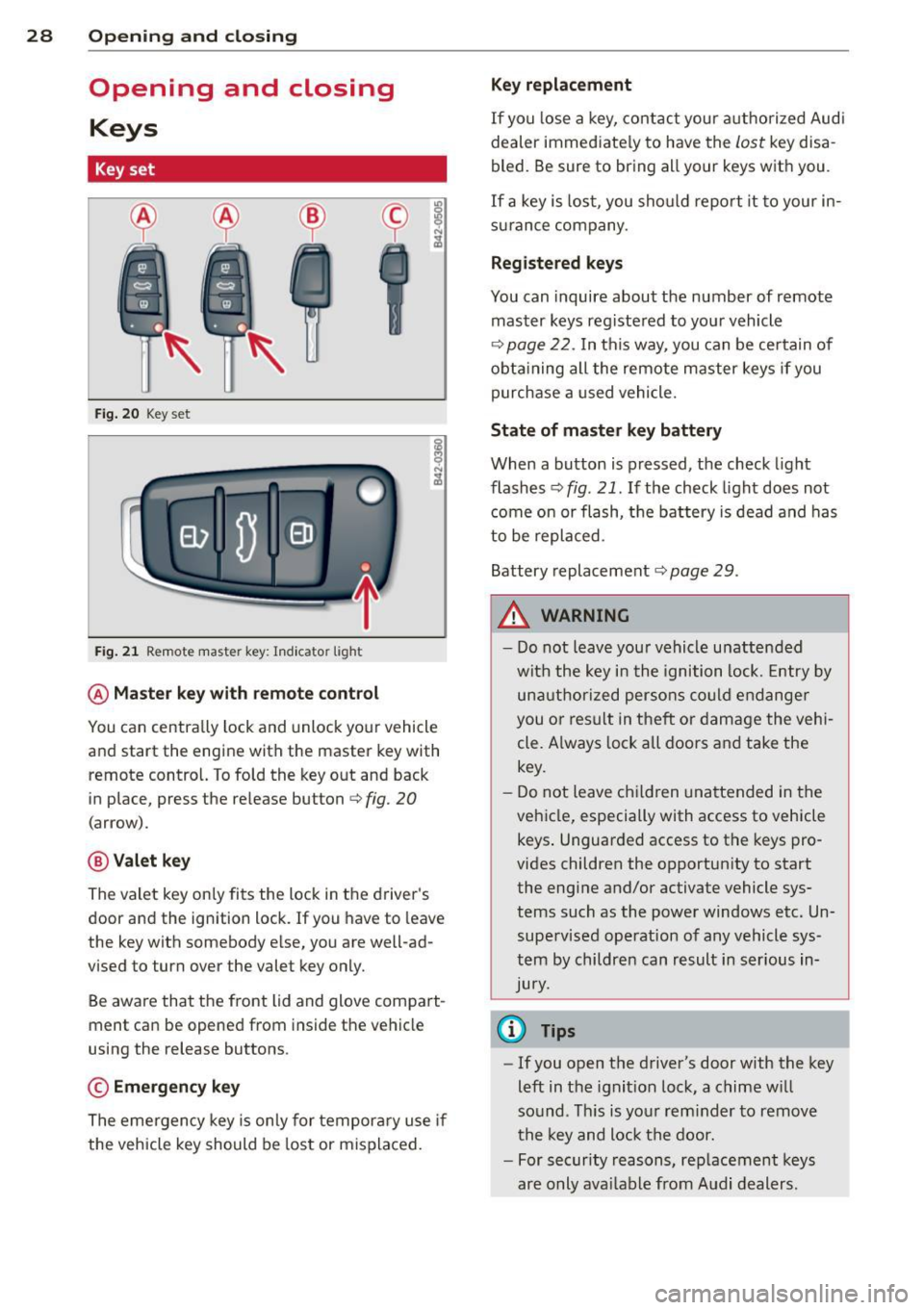
Fig. 20 Key set
Fig. 21 Remot e mas ter key : Indicator ligh t
@ Master key with remote control
You can centrally lock and unlock your vehicle
and start the engine with the master key with
remote control. To fold the key out and back
in place, press the re lease button
c:> fig. 20
( a rrow).
@ Valet key
The valet key on ly fits the lock in the driver's
door and the ignition lock . If you have to leave
the key with somebody e lse, you are well-ad
vi sed to tu rn over the valet key only.
Be aware that the front lid and glove compart
ment can be opened from inside the vehicle
using the release buttons .
© Emergency key
The emergency key is only for temporary use if
the vehicle key should be lost or misplaced.
Key replacement
If you lose a key, contact your authorized Audi
dealer immed iate ly to have the
Lost key disa
bled. Be sure to bring all your keys with you .
If a key is lost, you should report it to your in
surance company .
Registered keys
You can inquire about the number of remote
master keys registered to your vehicle
c:> page 22 . In this way , you can be certain of
obtaining all the remote master keys if you
purchase a used vehicle.
State of master key battery
When a button is pressed, the check light
flashes
c:> fig . 21 . If the check light does not
come on or flash, the battery is dead and has
to be replaced.
Battery replacement
c:::;, page 29 .
.&_ WARNING ~
- Do not leave your vehicle unattended
with the key in the ignition lock. Entry by
unauthorized persons could endanger
you or result in t heft or damage the vehi
cle. A lways lock all doors and take the
key.
- Do not leave children unattended in the
vehicle, especially with access to vehicle keys . Unguarded access to the keys pro
vides children the opportunity to start the engine and/or activate vehicle sys
tems such as the power windows etc. Un supervised operation of any vehicle sys
tem by children can result in serious in
Jury.
{l) Tips
- If you open the driver's door with the key
left in the ignit ion lock, a chime will
so und . This is your reminder to remove
the key and lock the door.
- For security reasons, replacement keys
are only available from Audi dealers.
Page 32 of 244

30 Opening and closing
Power locking system
General description
The power locking system locks or unlocks all
doors simultaneously.
The power lock ing system in your ve hicle in
corporates the fo llow ing funct ions:
- Central locking function
- Remote con tro l feature q page 29.
- Anti -Theft Alarm Sys tem q page 34.
A ll the doors and the fron t lid are loc ked by
the central locking system when you lock the
ve hicl e.
The unlocking a nd lock ing mode * can be
cha nged in t he d river i nfo rmation system
qpage22.
Unlocking the vehicle
You can un lock the vehicle from outs ide e ither
by using the remote control
or by insert ing
a nd turning the key in t he d river's doo r lock.
When you
unlock your veh icle:
- The anti-theft alarm system is deactivated br iefly.
- The veh icle inter ior lights ill uminate for ap
proximate ly 30 seconds.
- All turn signa l lights will f lash twice w hen
the car is unlocked.
- After unloc king the vehicle, yo u have 30 sec
onds t o open a door or the front lid. After 30
seconds, the vehicle automatically locks and
the ant i-theft a larm system activates again.
The front lid can be locked or u nlocked e it h er
by using the remote control
or by insert ing
a nd turning the key in the driver's door lock.
Unlock ing the ve hicle w ith the remote co ntrol
c::::5 will only unlock the front lid, to open it,
the lid handle needs to be p ressed.
Locking the vehicle
You can lock the vehicle from o utside e ither by
using the remote control
or by insert ing and
turning the key in t he d rivers's door lock.
When you
lo ck the vehicle:
- All doors and the front lid are locked. -
All turn signal lights wi ll flash once when
the car is loc ke d.
- The ant i-theft alarm system is ac tiva ted.
The ho rn of the anti -theft alarm system wi ll
sound and the anti-theft a la rm system read
iness light, located in the center of the in
strument panel be low the w indshield on the
r ight side of the a ir vent, will start to blink.
- The vehicle interior lights turn off.
Automatic lock ing*
T he au tom atic locking fea ture locks a ll the ve
hicle doors and the fron t lid when yo u drive
faster than
9 mph (15 km/h).
You can unl ock t he vehi cle from the inside by:
- remov ing the key from the igni tion swi tc h
(the vehi cle w ill automatically u nlock itself)
or
- pressi ng the un lock pa rt of the power lock
sw itch
ll:D or
pull ing the door handle (to open the doo r).
If you wish, yo u can have an autho rized Aud i
dealer convert your power doo r lock system to
automat ic locking.
Unintentionally locking yourself out
T he vehicle does not lock with t he centra l
l ocking switch
¢ page 3 2 if the driver's door
is open .
D o no t lock your ve hicle w ith the
remote mas
ter key
un til a ll doo rs and t he front lid a re
closed. In this way yo u avoid locking yourse lf
o ut acc identally .
_& WARNING
- When you lock yo ur vehicle from o utside,
nobody- espec ia lly children -shou ld re
main inside the vehicle. Remember,
when yo u lock th e vehicle from the out
side th e wi ndows canno t be o pened from
the inside.
- W hen you leav e th e ve hicle, always r e
move the ign ition key an d take it with
you. This will preven t passe ngers (chil
d ren, f or example) from a ccidenta lly be
i ng l ocke d in the vehicle s hould they
Page 33 of 244

accidentally press the power locking
switch in one of the doors.
- Do not leave children inside the vehicle
unsupervised. In an emergency it would
be impossible to open the doors from
the outside without the key.
@ Tips
- The dr iver's door can be locked and un
locked with the key if the power locking
system fails. The passenger's door can be locked manually
o page 33.
- In the event of a crash with airbag de
ployment all locked doors will be auto
matically unlocked to give access to the
vehicle occupants from the outside.
- The anti-theft alarm system cannot be
activated if the power locking system is
not activated.
- You are well advised not to keep valua
bles inside an unattended vehicle, visible
or not . Even a properly locked vehicle
cannot provide the security of a safe!
Unlocking and locking the vehicle with
the remote control
How the remote control works.
Fig. 23 Remote control: fu nctio n buttons
Whether only the driver's door or the entire
vehicle is unlocked when the opening button
@ is pressed once, depends on the settings in
the Driver information system
Central locking
menu o page 22.
To unlock the vehicle m
.. Press button @.
Opening and closing 31
.. Press button @ two times within two sec
onds
to unlock all doors and the front lid.
To lock the vehicle i'.'fl
.. Press button @ o &_ in General description
on page 30.
.,. Watch that all tu rn signal lights flash once.
To unlock front lid only C::$
.. Press button © for approximately one sec
ond.
PANIC Button
.,. Push the red button @to activate the panic
function . The horn sounds and the turn sig
nals flash.
.. Push the button @again to deact ivate the
pan ic function.
The remote controls allows you to:
- lock or unlock the vehicle
- selectively un lock the front lid.
The turn signals will flash briefly whenever
you lock or unlock the vehicle. Also, the interi
or light will come on or go off whenever you
open or close the driver's door .
The transmitter and battery are located in the
head of the remote control. The receiver is lo
cated inside the vehicle. The maximum effec
tive range depends on several things . Remem
ber, if the battery is weak, the effective range
decreases.
The remote-contro l key contains a fo ld-out
key that you can use to manually lock or un
lock the vehicle and to start the engine.
If you need to replace the remote control, or if
you need to have it repaired, you must see
your authorized Audi dea ler . Only then can
you use the key again.
A WARNING
Read and follow all WARNINGS o .&. in
General description on page 30.
Page 35 of 244

If you lock the vehicle using the power locking
switch, please note the fol lowing :
- You canno t open the doors from the
ou tside
(in cre ased sec urity, fo r example when you
are stopped at a red light) .
- The L ED in the swi tch ~ ligh ts up when all
the doors and the front lid are closed and
locked.
- You can unlock and open the doors from the
i nside by pull ing o n the doo r hand le.
- You canno t lock the vehicle wi th the centr al
locking switch when the driver's door is
open .
-If you have a crash and the a irbag is acti va t
ed, the doors au tomati cally un lock .
_& WARNING
-If you use the powe r locking switch with
the doors closed , remember that a ll the
vehicle doors will lock.
- Locked doors make it more diffic ult for
emergency workers to get into the vehi
cle, which p uts lives at r isk. Do not leave
anyone beh ind in the vehicle, especially
c h ildren.
Emergency locking
If the power locking system fails (power fail ure) , you will need to lock the passenger door
separately.
; 0
"' ... m
F ig. 26 Passenger 's door : eme rge ncy re lease
F or this purpose, a mecha nic a l loc kin g device
i s pr ovided on t he end panel of the p assenge r
door (on ly visible when the door is open).
• Remove the cap
¢ fig . 26 .
Opening and clo sin g 33
• Insert the key into the inne r slo t and turn it
to the right as far as it can go.
A ft er yo u close the door yo u will no lo nger be
able to open it from the o utsi de. You can o pen
it from the inside, however, by p ulling on the
door latch twice.
Front lid
Opening /closing the front lid
1/
Fi g. 27 Drivers door : remo te front lid re lease
Fi g. 28 Release leve r un de r the fro nt l id
When opening the front lid, the windshield
wipers must be sw itched off and the w iper
arms m ust be folded against the windshie ld.
Otherwise the paint could be damaged .
Opening the front lid • Press the ce nte r button on the master key o r
• Pull the re lease button in the dr iver's door
¢ fig.27 .
• Pull up on the release u nder the front lid
¢ fig. 28 (arrow). Th is re leases t he catch .
• Open the front lid a ll the way .
Closing the front lid
... Pull the front lid down unt il the pressure
from the struts is reduced.
• Close the front lid.
Page 39 of 244
Convertible top
Convertible top
General information
The fabric convertible top opens and closes
automatically . When it is open, it is stored in
the convertible top storage bay. The converti
b le top may be opened or closed at speeds up
to 31 mph (SO km/h) .
The convertible top is wind- and waterproof
under normal conditions. Some moisture may
collect in the vehicle interior, but only under
extreme ly adverse weather conditions such as
torrential rain. That is normal and no cause
for concern.
F ollow the clean ing and maintenance instruc
tions
Q page 159 to ensure the convertible
top remains wind- and waterproof . Also note
the following points:
- Only stow the convert ible top when it is
clean and dry . Grains of sand or coarse dirt
particles can cause abrasions on the conver
tible top when stowed that can lead to dam
age to the fabric over time. Stowing the con
vertible top when it is damp can cause
marks or permanent mildew spots to form .
- Do not leave the convertible top open for
several weeks or the creases in it may be
come discolored . This is especia lly true if the
top was stowed when damp .
- Remove ice and snow before opening the
convertible top. Do not use any sharp edged
objects to remove ice and snow or the con
vertible top could be scratched or damaged.
The rear window may be cleared with a
standard ice scraper.
- Th e fabric in the convertible top loses elas
t icity in sub-zero temperatures. We recom
mend not opening or closing the convertible
top when the temperature is below 32 °F
(0 QC). The convertib le top will not open
when the temperature is 5 °F (-15
Q() or be
low .
Convertible top 3 7
Opening/closing the convertible top
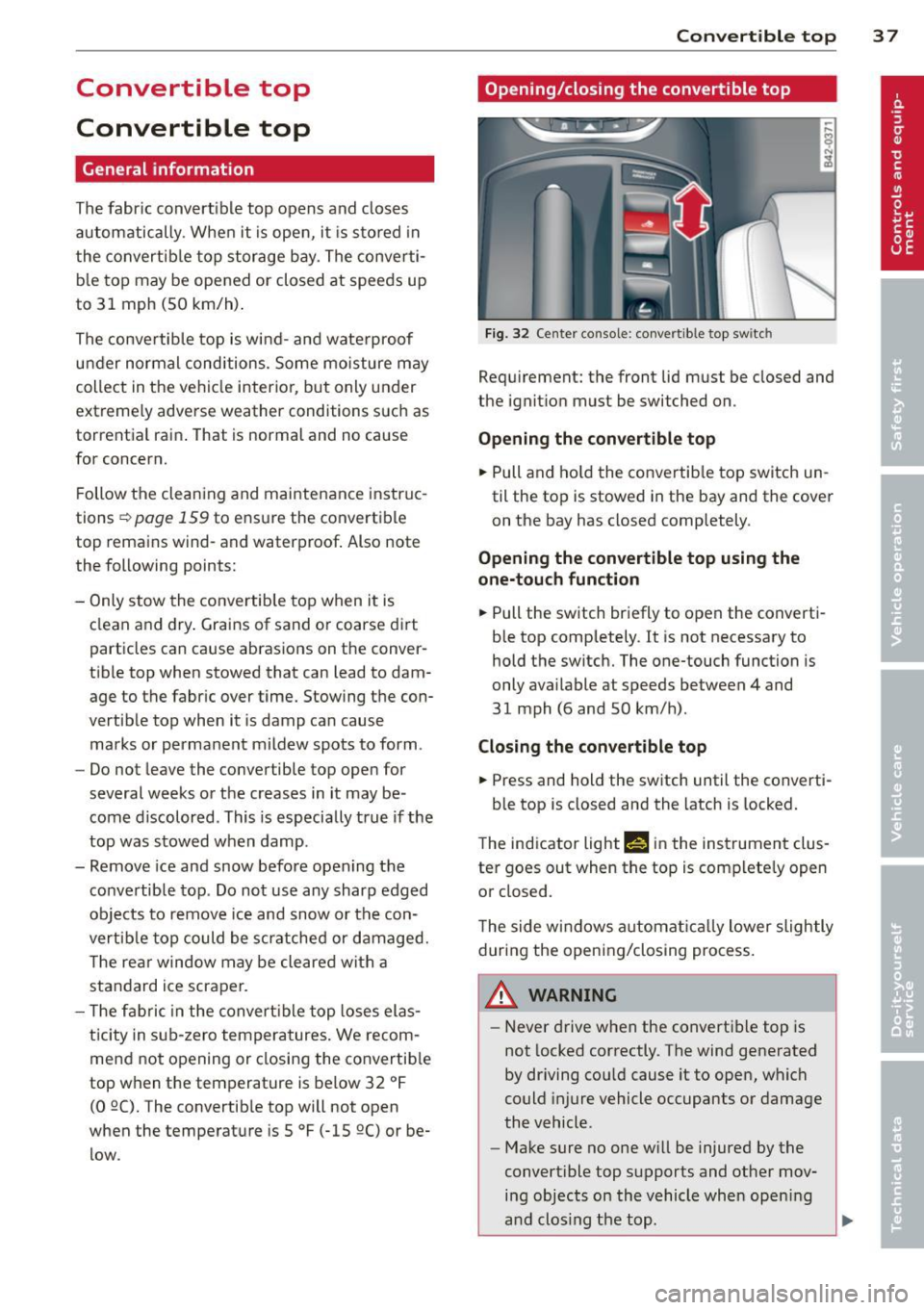
Fig. 32 Center console: convertible top switc h
Requ irement: the front lid must be closed and
the ignition must be switched on .
Opening the convertible top
... Pull and hold the convertib le top switch un
til the top is stowed in the bay and the cover
on the bay has closed completely .
Opening the convertible top using the
one-touch function
... Pull the switch briefly to open the converti
ble top comp letely.
It is not necessary to
hold the switch. The one-touch function is
only available at speeds between 4 and
31 mph (6 and 50 km/h) .
Closing the convertible top
... Press and hold the switch until the converti-
ble top is closed and the latch is locked.
T he ind icator light Nin the instrument clus
ter goes out when the top is complete ly open
or closed.
The side windows a utomat ically lower slightly
during the opening/closing process.
A WARNING
-Never drive when the convert ible top is
not locked correctly. The wind generated
by driving cou ld cause it to open, which
could injure vehicle occupants or damage
the vehicle .
- Make sure no one will be injured by the
convert ible top supports and other mov
ing objects on the vehicle whe n opening
a nd clos ing the top.
Page 41 of 244
Wind deflector
The wind deflector reduces turbulence in the
passenger compartment and makes driving
more comfortable.
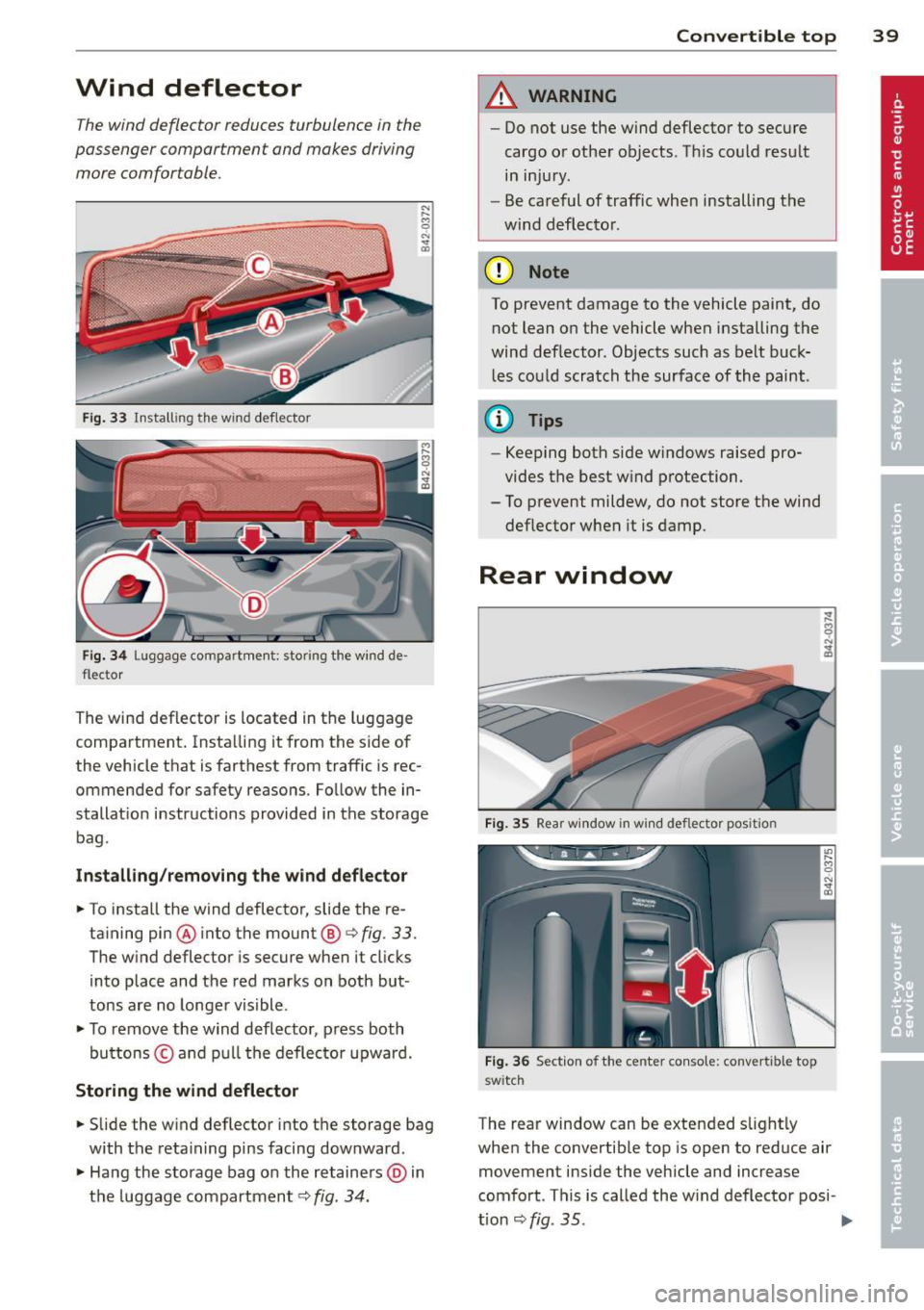
Fig. 33 Install ing the wind deflector
Fig. 34 Luggag .e compart ment: stor ing the wind de ·
flector
The wind deflector is located in the luggage
compartment . Insta lling it from the sid e of
the vehicle that is farthest from traffic is rec
ommended for safety reasons . Fo llow the in·
stallat ion instructions provided in the storage
bag .
Installing /removing the wind deflector
.. To install the wind deflector, slide the re-
taining pin ® into the mount ®~
fig. 33 .
The wind deflector is secure when it clicks
into place and the red marks on both but
tons are no longer visible .
.. To remove the wind deflector , press both
bu ttons © and pull the deflector upward.
Storing the wind deflector
.. Slide the wind deflector into the storage bag
with the retaining pins facing dow nward .
.. Hang the storage bag o n the retainers @) in
the luggage compartment ~
fig. 34.
Convertible top 39
A WARNING
-Do not use the wind deflector to secure
cargo or other objects . Th is could result
in injury.
- Be careful of traffic when installing the
wind deflector.
(D Note
To prevent damage to the vehicle paint, do not lean on the vehicle when installing the
wind deflector . Objects such as belt buck
les could scratch the surface of the paint .
(D Tips
-Keeping both side windows raised pro
vides the best wind protection.
- To prevent mildew, do not store the wind
deflector when it is damp.
Rear window
Fig. 35 Rear window in win d deflecto r position
Fig. 36 Section of the center console: convertible top
swi tc h
The rear window can be extended s light ly
when the convertible top is open to reduce air
movement inside the vehicle and increase
comfort . This is called the w ind deflector posi -
t ion
~ fig. 35 . ..,.
Page 47 of 244

Step 9: Extend the rear window
~ 0 N ... a,
Fig. 51 Upper storage compartment between the seat
backrests: extending the rear w indow
... Press the Allen wrench from the vehicle tool
kit firmly into the opening until it clicks into
place
r::;, fig. 51 .
... Turn the bolt counterclockwise unti l the rear
window is extended. Press the rear window
back lightly whi le doing this.
(D Note
To prevent damage to the vehicle, make
sure the rear w indow is in the guide in the
convert ible top when extending the win
dow and the fins are secured on the body.
Con vert ible top 45