2014 AUDI R8 SPYDER ignition
[x] Cancel search: ignitionPage 31 of 244

Master key with remote control
The remote control allows you to lock or un
lock the vehicle electronically .
The transmitter and battery are located in the
head of the remote control. The receiver is lo
cated inside the vehicle. The maximum effec
tive range depends on several things . Remem
ber, if the battery is wea k, the effective range
decreases.
If you need to replace the remote control, or if
you need to have it repaired, you must see
your author ized Audi dealer. Only then can
you use the key again.
(D Tips
- If the ignition is sw itched on, the remote
control system is deactivated .
- The remote control system can be affect ed by other systems operating in the
same frequency range close to the vehi
cle, such as mobi le telephones, televi
sion broadcasting stations, etc.
- Fo r De clarat ion of Compliance to United
Sta tes FCC and Indus try Canada regula
tions ¢
page 230.
Master key battery replacement
Each master key contains a battery housed
under the cover .
Fig . 22 Remote master key: opening the cover
.. Pry apart the base¢ fig. 22@and the cover
@ care full y with a coin .
.,. Remove the cover (arrow) .
.,. Remove the dead battery from the cover .
.. Install the new battery . Please make certain
that the" +" sign on the batte ry faces down
Op enin g an d clos ing 29
in the cover . Correct polarity is shown on the
cover .
.. Place the cover with the new battery on the
key base and press both parts together .
@ For the sake of the env ironment
Dispose of dead batteries properly so as
not to pollute the environment.
(D Tips
The replacement battery must be the
same specification as the origina l.
Electronic immobilizer
The immobilizer helps to prevent unauthor
ized use of your vehicle.
A computer chip ins ide your key automatica lly
deactivates the electron ic immobilizer when
you insert the key in the ign ition lock. When
you remove the key from the ignition lock, the
electronic immobilizer is automatically acti
vated once again.
A WARNING
---
Always take the key with you when you leave the vehicle. The key can disarm the
electronic engine immobilizer and permit
an unauthorized person to start the engine
and enable operation of the vehicle sys
tems such as power w indow leading to se
rious pe rsonal injury.
(D Tips
- T he ve hicle cannot be started if an unau
thorized key is used. The vehicle may not
start if another radio device s uch as a key
for another vehicle or a transponder is
located on the key ring .
- For Declaration of Compliance to United
States FCC and Industry Canada reg ula
tions¢
page 230 .
Page 34 of 244

32 Opening and clo sing
@ Tips
- The remote control key is automatica lly
deactivated when the ignition is sw itch
ed on.
- The operation of the remote contro l key
can be temporarily disrupted by interfer
ence from transmitters in the vicinity of
the vehicle work ing in the same frequen
cy range (e.g. a cell phone, radio equip
ment) .
- In order to make sure the locking func
tion is working, you shou ld always keep
you r eye on the vehicle to make sure it is
proper ly locked.
- Do not use the remote control if you are
i ns ide the car, otherwise you may unin
tentiona lly lock the vehi cle, and then you
would set off the anti-theft alarm when
you try to start the engine or open a
door . In case this happens anyhow, push
the un lock button @.
- Use the panic funct ion only if you are in
an emergency situation.
Resetting the remote control
The remote control must be reset if the vehi
cle does not unlock .
• Pres s the unlock button ffi on the remo te
control.
• Manua lly unlock the drive r's door lock with
the mechanical key within 30 seconds.
• Press e ither the lock-
ffi or the unlock @ but
ton to complete the reset sequence.
Operating locks with the key
To lock and unlock the vehicle from the out
side, turn the key in the lock of the driver's
door.
F ig . 24 Key turns for opening and dosing
• To unlock the vehicle, turn the key to the
opening position@¢
fig. 24 .
• To lock the vehicle, tu rn the key in the lock
of the driver's door to the lock pos ition @
¢ .&.-
A WARNING
=
Always read and heed WARNING¢.&. in
General description on page 30 .
Locking and unlocking the vehicle from
inside
The vehicle can be locked or unlocked from
the inside using the power locking switch .
Fig . 25 Sect ion fro m driver's door: Power locking
switc h
• Press the upper part of the power lock ing
sw itch@ to lock the vehicle ¢_&. .
• Press lower pa rt of the switch
al to unlock
t he vehicle.
-
Page 37 of 244

The indicator li ght q fig . 30 starts flashing
rapidly fo r 2 seconds and then blinks slowly.
How is the anti-theft alarm system
switched off?
The anti -the ft alarm system is switched off
on ly when you unlock your vehicle. If yo u do
not open a door with in 30 seconds after yo u
have unlocked with the remote control, the
ve hicle w ill lock itse lf again a utomat ically.
When will the anti theft alarm system be
triggered?
When the veh icle is locked, the alarm system
monitors and protects the following parts of
the vehicle:
- engine compartment
- luggage compartment
- doo rs
- ignition
When the system is activated , the alarm wi ll
be tr iggered if one of the doors, the eng ine
compa rtment lid or the front lid are opened .
The anti-theft a larm system will also go off
when the battery is disconnected .
You can a lso trigger the alarm by pressing t he
PANIC button on your remote-control key .
This will a lert other peop le in case of emer
gency . Press the
PANIC button again to tu rn
off the alarm .
How is the ant i-theft alarm switched off
when triggered?
The alarm system is switched off w hen you
u nl ock the vehicle us ing the remote-control
key or when the ignition is sw itche d on . T he
a larm w ill also switch itse lf off when it comes
t o the en d of its cycle.
Emergency flasher
The emergency f lasher w ill blink b riefly w hen
the doors, e ngine compartment l id and fron t
lid are properly clos ed .
If the emergency flashers do not blink, check
the doors, e ngine compartment l id and front
l id to make sure t hey a re p roperly closed . If
Opening and clo sin g 35
you close a doo r, the eng ine compartment lid
o r the fro nt lid with the anti -theft alarm
switched on, the eme rgency flashers w ill blink
o nl y after yo u have closed the door or lid.
@ Tips
For the a nti-theft alarm system to f unc
tion properly, make sure all ve hicle do ors
and windows are closed bef ore leaving t he
vehicle.
Power windows
Controls
Th e driver can opera te all windo ws.
F ig. 31 Driver 's doo r: power w indow sw it ches
T he powe r window swi tc hes have a two-posi
tion function :
Opening the windows
.,. Press the swit ch and hold it down u nt il the
w indow h as reached the desired posi tio n.
.,. Press t he swi tch
briefly to open the win dow
automatically .
... By briefly press ing/p ulling the sw itch again,
the downward t ravel of the window can be
stopped in any pos ition
¢ ,& .
Closing the windows
.,. Pull the sw itch and hold it until the w indow
has reached the desire d posi tion .
... Pull the sw itch
briefly to close t he window
automatically.
... By briefly pressing/pull ing the sw itch again,
the upwa rd trave l of the w indow can be
stopped in any pos it ion
¢ ,& . .,.
Page 38 of 244

36 Openin g and clo sing
A WARNING
- Do not leave children unattended in the
vehicle, especially with access to vehicle
keys . Unsupervised use of the keys can
result in starting of the engine and use
of vehicle systems such as powe r win
dows , etc. which cou ld result in serio us
injury.
- Remember -you can still open or close
the power w indows for abou t ten m i
nutes after the ignition is sw itched off .
Only when either of the front doors are
opened are the power windows switched
off.
- Be careful when closing the windows .
Check to see that no one is in the way, or
serious injury could result!
- Always remove the ignition key whenever
you leave your vehicle.
- If you lock your vehicle from the outside,
no one, especia lly children, sho uld re
ma in in the vehicle .
- Do not stick anything on the windows or
the windsh ield that may interfere with
the driver's fie ld of vision.
@ Tips
- When the doors are opened, the w in
dows are a utomatica lly lowered 0.4 in
(10 mm) .
Reactivating the system after battery
disconnection
If the vehicle ba ttery i s disconnected and
then reconnected, the automatic closing and
opening function will not work until it is reac
tivated .
• Pull and hold the power w indow swi tch un til
the window is completely clo sed .
• Release the switch and pull it again for one
second.
Page 39 of 244
Convertible top
Convertible top
General information
The fabric convertible top opens and closes
automatically . When it is open, it is stored in
the convertible top storage bay. The converti
b le top may be opened or closed at speeds up
to 31 mph (SO km/h) .
The convertible top is wind- and waterproof
under normal conditions. Some moisture may
collect in the vehicle interior, but only under
extreme ly adverse weather conditions such as
torrential rain. That is normal and no cause
for concern.
F ollow the clean ing and maintenance instruc
tions
Q page 159 to ensure the convertible
top remains wind- and waterproof . Also note
the following points:
- Only stow the convert ible top when it is
clean and dry . Grains of sand or coarse dirt
particles can cause abrasions on the conver
tible top when stowed that can lead to dam
age to the fabric over time. Stowing the con
vertible top when it is damp can cause
marks or permanent mildew spots to form .
- Do not leave the convertible top open for
several weeks or the creases in it may be
come discolored . This is especia lly true if the
top was stowed when damp .
- Remove ice and snow before opening the
convertible top. Do not use any sharp edged
objects to remove ice and snow or the con
vertible top could be scratched or damaged.
The rear window may be cleared with a
standard ice scraper.
- Th e fabric in the convertible top loses elas
t icity in sub-zero temperatures. We recom
mend not opening or closing the convertible
top when the temperature is below 32 °F
(0 QC). The convertib le top will not open
when the temperature is 5 °F (-15
Q() or be
low .
Convertible top 3 7
Opening/closing the convertible top
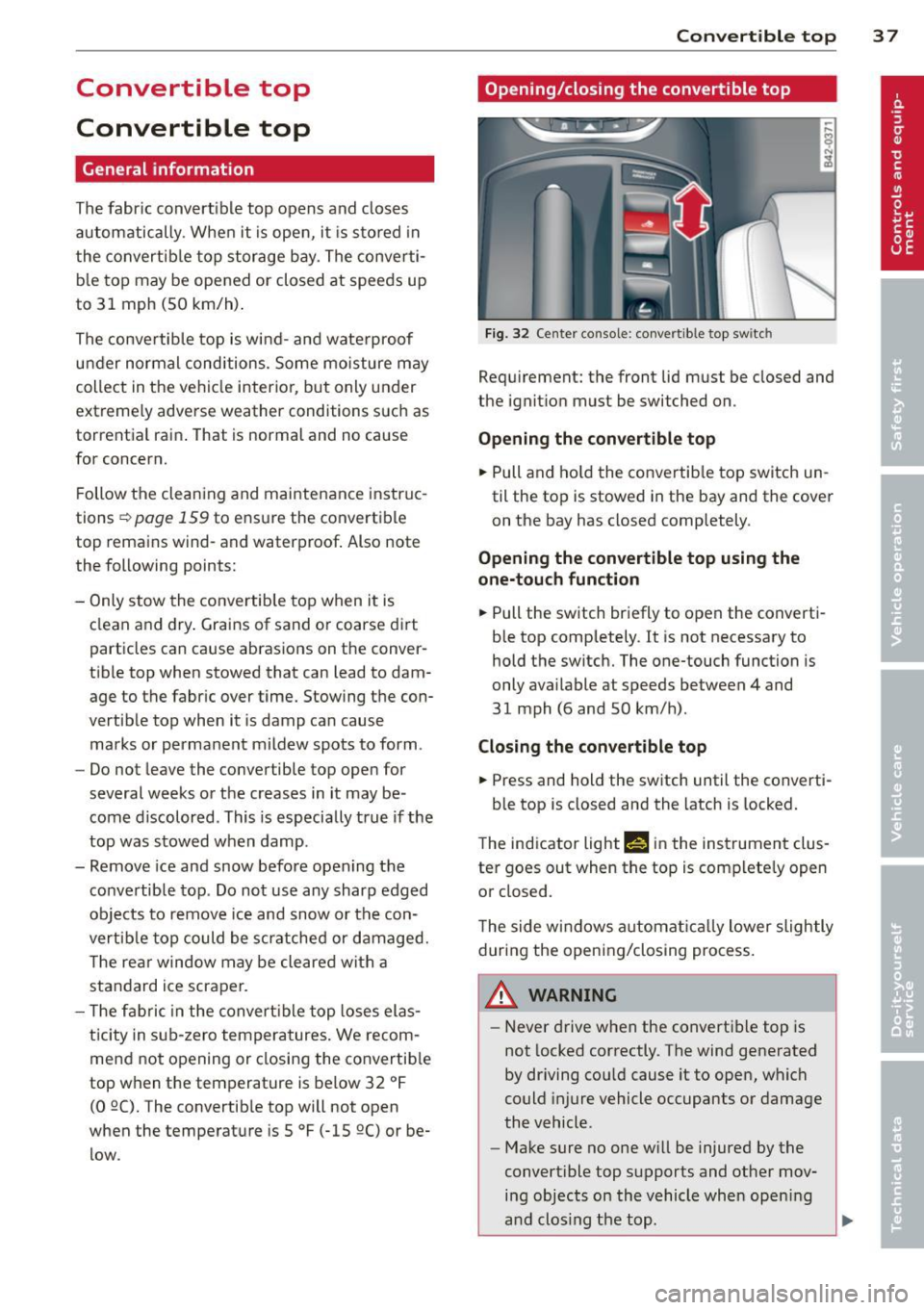
Fig. 32 Center console: convertible top switc h
Requ irement: the front lid must be closed and
the ignition must be switched on .
Opening the convertible top
... Pull and hold the convertib le top switch un
til the top is stowed in the bay and the cover
on the bay has closed completely .
Opening the convertible top using the
one-touch function
... Pull the switch briefly to open the converti
ble top comp letely.
It is not necessary to
hold the switch. The one-touch function is
only available at speeds between 4 and
31 mph (6 and 50 km/h) .
Closing the convertible top
... Press and hold the switch until the converti-
ble top is closed and the latch is locked.
T he ind icator light Nin the instrument clus
ter goes out when the top is complete ly open
or closed.
The side windows a utomat ically lower slightly
during the opening/closing process.
A WARNING
-Never drive when the convert ible top is
not locked correctly. The wind generated
by driving cou ld cause it to open, which
could injure vehicle occupants or damage
the vehicle .
- Make sure no one will be injured by the
convert ible top supports and other mov
ing objects on the vehicle whe n opening
a nd clos ing the top.
Page 42 of 244

40 Convertible top
The rear window can be extended comp lete ly
for cleaning. This is ca lled the cleaning posi
tion.
E xtendin g the rear w indow into th e w ind
d efl ector po sit io n
.. Pull and hold the rear window switch
¢ fig. 36 .
.. Re lease the switch once the rea r window has
reached the wind deflector position.
E xte nding th e rear window into th e
cle aning po sition
.. Pull and hold the rear window switch
¢ fig . 36.
.. Release the switch once the rear window has
reached the wind deflector position .
.. Pull and hold the rear w indow switch again .
.. Pull and hold the convertible top switch
within one second
¢ page 37, fig . 32.
Re tra cting the re ar w indow
.. Press and hold the rear window sw itch until
the window has been retracted .
Retra cting the re a r wi ndow using the one
t ouch function
.. Press the rear window switch briefly . There
is no need to hold the switch .
The rear window can only be operated when
t he igni tion is switched on.
The rear window can also be extended or re
tracted when the convertib le top is closed.
A WARNING
- Do not use the rear window to secure car
go or other objects. This could result in
mJury .
- Always pay attention and be careful
when extending or retracting the rear
window . It could cause injury by pinch
ing .
(D Tips
-Keeping all of the w indows raised pro
v ides the best wind protection . - The vehicle must be stationary to bring
the rear window into the cleaning posi
tion . The rear window will retract once
you begin dr iv ing .
Convertible top
emergency operation
General information
The convertible top can be closed by hand if
there is a malfunction .
First check if overload protection is active
¢ page 38. If this is the case, the convertible
top wi ll operate again afte r a short de lay. Oth
erwise the fo llowing steps must be completed
before closing the convertib le top:
.. Activate the pa rking brake .
.. Open the side w indows, if necessary.
.. Remove the key from the ignition.
E mergency loc king is not intended for long
term use or long d rives . The convertible top
will not be completely waterproof after using
the emergency locking procedure because the
seals wi ll not be seated correctly. Only close
the convertible top manually in an emergency .
Please see an authorized Audi R8 dealer to
have the cause of the malfunction corrected .
A WARNING
-The ignition must be sw itched off d uring
the entire closing p rocedu re.
- When pos itioning the convertible top,
avoid contact with the supports or other
movi ng parts. Otherwise you could p inch
your hands.
- Never drive when the convert ible top is
not locked correctly . The wind from d riv
ing could cause the convertible top to
open . This can resu lt in injuries and dam
age to the vehicle.
(D Tips
Have a second person assist when clos ing
the convert ible top. Opening the storage
bay lid and positioning the convertible top
i s easier when a second person is assisting.
Page 43 of 244

Step 1: Retract the rear window
Fig. 37 Upper storage compartment: removing the
cover
Fig. 38 Upper storage compartment: using the Allen
wrenc h as a crank to lower the rear window
~ 0 N ... a,
,__ ,-. M C)
"' ... a,
The rear window must be retracted in order to
close the convertible top. If the rear window
switch is not functioning ¢
page 39, the rear
window can be cranked .
.. Open the upper storage compartment be
tween the seat backrests ¢
page 61 .
.. Remove the cover using the screwdriver
from the vehicle tool kit¢
fig. 37 .
.. Press the Allen wrench from the veh icle tool
k it firmly into the opening until it cl icks into
place¢
fig. 38.
.. Turn the bolt clockw ise until the rear win
dow is lowered.
Step 2: Release the pressure in the
hydraulic system
The pressure in the hydraulic system must be
released before the convertible top can be
closed.
.. Switch the ignition
off.
.. Pull or press the convertible top switch
¢page 37, fig. 32 for approximately 10 sec
onds.
Convertible top 41
A WARNING
If convertible top operat ion fa ils when
opening or closing the top, do not hold or
touch the supports or other moving parts
when releasing the pressure. The converti ble top will sink down and could pinch your
hands.
Step 3: Open the convertible top storage
bay lid
Fig. 39 Engine compartment: install ing the emergency
operation bolts
Fig. 40 Raising t he storage bay lid and pulling it back
The engine compartment lid must be released
using the emergency procedure in order to re
lease the storage bay lid
¢page 172 .
Releasing the convertible top storage bay
lid
.. Turn the emergency operation bolts on the
left and right sides of the engine compart
ment¢
fig. 39 clockwise using the open end
wrench from the vehicle too l kit until the
bolts are installed completely . The converti
ble top storage bay lid will raise approxi
mately 0.4 in (1 cm) from the vehicle when
the bolts are insta lled comp letely.
.. Close the engine compartment lid
¢page 174.
Page 48 of 244

46 Clear vision
Clear vision Lights
Switching the headlights on/off
F ig . 52 Instr ument pane l: light sw itch (automat ic
head· and ta illight control)
Switching on the side marker lights
• Turn the light switch to :oo:.
Switching on the headlights and high
beam
• Turn the light switch to ;D .
• Push the high beam lever forwa rd towards
the instrument panel~
page 47 .
Switching off the lights
• Turn the light switch to 0 .
Switching on automatic head -and
taillight control
• Turn the light switch to AUTO q fig. 52.
The headlights and taillights will come on au·
tomatically when the ignition is switched on
and the light switch is in the position AU TO
(on ly in nighttime conditions). When switch·
ing off the ignit ion, the headlights will go off
and only the side marker lights will remain lit.
Daytime running lights
USA models: The daytime running lights will
come on automatica lly when the ignition is
switched on and the light switch is in the posi·
tion
AUTO (only in daylight cond itions).
Canada models: The daytim e running lights
will come on automatically when the ignition
is switched on and the light switch is in the position
0
, AUTO (on ly in daylight condit ions)
or
:oo:.
Automatic head- and taillight control
In the switch position AUTO the automatic
head· and ta illight control is activated. Light
senso rs are located in the inside mirror hous
ing and constantly check the light conditions
surrounding the vehicle. If ambient bright·
ness falls below a factory set value (e.g. when
driv ing into a tunnel), the head- and taill ights
including the license plate illumination are
automat ically turned on. When amb ient
brightness increases aga in, the external lights
are turned off aga in
q ,&. . In the sw itch posi
t ion
AUTO , the low beams are turned off when
the ignition is switched off. The remaining
lights are turned off when the key is ta ken out
of the ignition lock.
With aut omat ic head- and taillight control,
the high-beam function is also available, but
with one restriction: If you have not switched
the high beams back to low beams during a u
tomat ic head light operation (for examp le, af
ter driving through a tunnel), on ly the low
beams come on the next time automatic
headlights are switched on. To use the high
beams, you first have to pull the h igh beam
lever back and then push the lever forward
again.
The side marker lights and headlights can be
switched on manually by turning the light
switch to the desired position .
Light sensor malfunction
If there is a light sensor ma lfunction, the
symbol
tal comes on in the display. For safety
reasons, the low beams are turned on perma
nently with the sw itch in
AUTO. However, you
can continue to turn the lights on and off us
ing the light switch. Have the light sensor
checked as soon as possible at an authorized
A udi dealer.
Coming home/leaving home function
The function is sw itched on when the sw itch is
i n the
AUTO position and the function is ...,