2014 AUDI Q5 light
[x] Cancel search: lightPage 39 of 316

@ Tips
-The operation of the remote contro l key
can be temporarily disrupted by interfer
ence from transmitters in the vicinity of
the veh icle work ing in the same frequen
cy range (e .g . a cell phone, radio equip
ment) .
- If you open the dr iver's door with the key
left in the ign ition lock, a chime will
sound . This is your reminder to remove
the key and lock the door .
- For security reasons , replacement keys
are only available from Aud i dea lers .
- For Decla rat ion of Compliance to United
States FCC and Industry Canada regula
tions
c::;, page 296 .
Check light and battery in the master
key
Fig. 26 Remote master key
Check light in the m aster ke y
"' 0 N ,;, (0 a:,
The check light@¢ fig. 26 in the master key
prov ides informat ion about d ifferent cond i
tions.
.. The check light comes on briefly once when
a button is pressed, and during an "inquiry"
by the conven ience key system .
.. If the check light does not come on, the bat
tery is dead and has to be replaced. I n add i
t ion, when the battery is dead the
I!! sym
bol appears in the instrument cluster dis
play as well as the message:
Ple ase c ha ng e
ke y batt ery.
M aster key batt ery repla cement
.. Pull the mechan ica l key out of the master
key
c::;, page 37. Op
enin g an d clos ing 3 7
.. Press the release button ® c::;, fig. 26 on the
battery ho lder and at the same time pull the
battery ho lder out of the master key in the
direction of the arrow.
.. Install the new battery CR 2032 with the
"+" sign facing down.
.. Push the battery holder carefully into the
master key .
.. Insta ll the mechan ical key.
@) For the sake of the environment
D ispose of dead batteries prope rly so as
not to pollute the environment.
(j) Tips
The replacement battery must be the
same specification as the origina l.
Removing the mechanical key
Fig. 27 Remote maste r key : Remov ing the mec hanic al
key
.. Press the release button @¢ fig. 27.
.. Pull the mechanical key ® out of the master
key.
Using the mechanical key, you can :
- Lock and unlock the glove compartment
c::;, page 76 .
-Lock and unlock the vehicle manually
c::;, page 41 if this should not be possible
w it h the master key .
Page 44 of 316

42 Opening and clo sing
locking and unlocking the vehicle from
inside
Fig . 32 Driver 's door : powe r locking switc h
.. Press the button CD to un lock the vehicle
<=:> fig . 32.
.. Press the button G'.l to lock the vehicle~&, .
You will find a power locking switch in each
door . You can
lo ck and unl ock the veh icle us
ing the switches in the driver's or passenger's
door
r.:::> fig. 32. You ca n only loc k the veh icle
usi ng the switches in the rear doors. If you
l ock the vehicle using the power locking
switch, please note the following:
- You canno t open the doors o r the rear l id
from the
outside (increased security, for ex
amp le when you are s topped at a red light).
- The diodes in the power lock ing swi tches il-
lu minate when a ll the doors are closed and
l ocked.
- Front doors: you ca n un lock and ope n the
doors from the inside by pu lling on the door
hand le .
- Re ar doors: p ull the door handle
once to re
l ease the lock. Pull the hand le
again to open
the door .
- If you have a crash and the airbag is activat
ed, the doors automatically un lock .
A WARNING
-The power locking sw itch works with the
ignition off and automatically locks the
entire vehicle when it is actuated .
- On a vehicle locked from the outside the
power locking system switch is inopera
t ive.
- Locked doors make it more diffic ult for
emergency workers to get into the vehi- cle, which puts lives at risk. Do not
leave
anyone behind in the vehicle, especially
children.
(D Tips
Your ve hicle is locked a utomat ica lly at a
speed of 9 mph (15 km/h) (Auto locking)
<=> page 38. You can unlock the vehicle
again using the opening function in the
power lock ing system sw itch.
Emergency locking of the doors
Each door must be locked separa tely if the
power locking system fails .
F ig. 33 Door: Em ergency locking
An emergency lock is located on the front end
of the passenge r's door and the rear doors
(only v isible when door is open) .
.. Take the mechanical key out of the maste r
key
r.:::> page 3 7.
.. Pull the cover cap out of the opening
r.:::> fig.33 .
.. Insert the key in the inside s lot and turn it
all the way to the r ight (right door) or left
(left door).
Once the door has been closed, it can no lon
ger be opened from the outs ide. The door can
be opened from the inside by pulling the door
hand le.
If the child safety lock in a rear door is
activated, you must f irst pu ll the door handle
on the inside. Then you can open the door
from the outside .
Page 46 of 316

44 Opening and closing
Automatic rear lid/
trunk lid operation
App lies to vehicles: with automat ic rear l id/trunk lid oper ·
ation
The trunk lid con be opened and closed auto
matically.
Fig. 36 Driver's doo r: Unlock ing the rear lid
Fig. 37 Locking switch in the rear lid
Opening the luggage compartment lid
.,. Press the button c::5 on the master key for at
least one second, or
.,. Pull the release button
c::5 in the dr iver's
door ~
fig. 36, or
.,. Press the handle in the lu ggage compart
ment lid~
page 43, fig . 35 .
Closing the luggage compartment lid
.,. Press the button in the luggage compart
ment lid
~ fig . 3 7 . The lid will automat ica lly
close and lock ¢.&, .
Setting the luggage compartment lid
open position
.,. Bring the luggage compartment lid into the
desired open position. The position can be
stored at only one specific height.
.,. Press and ho ld the ¢
fig. 3 7 button for at
least four seconds until the lights blink to
store the desired open position. .,.
Push the luggage compartment lid by hand
against the resistance if you want to set a
higher open posit ion .
.,. Press and hold the¢
fig. 37 button again for
at least four seconds and this will store the
new open position .
Opening will be stopped immediately when:
- You press the
c::5 button on the remote key
for at least of one second, or
- press the unlock button
c::5 in the dr iver
door, or
- press the lock button the in the luggage
compartment lid, or
- push the hand le in the luggage compart
ment lid, or
- when something blocks the rear lid or
makes it d ifficul t for the lid to move.
By pressing one of the button
c::5 repeatedly ,
you can stop or continue the opening process .
The pressing the lock button or the handle re
peatedly, you can open/stop the lid ¢
,&..
Opening will be stopped immediately when:
- press the lock button the in the luggage
compartment lid, or
- push the handle in the luggage compart
ment lid, or
- when something blocks the rear lid or
makes it difficult for the lid to move .
The pressing the lock button or the handle re
peatedly, you can open/stop the lid ¢
& .
You can manua lly stop the automatic open
ing/closing of the luggage compartment lid.
In this situation, the lid can be manually
opened. Press down on the lid and the auto
matic closing will resume once again.
A WARNING
-- Never close the rear lid inattentively or
without checking first . Al though the
clos ing force of the rear lid is limited,
you can still seriously injure yourself or
others .
-
Page 48 of 316

46 Opening and clo sing
Child safety locks
Child safety locks in the rear doors
The child safety locks t prevent the rear
doors from opening from the inside .
Fig. 39 Child safety locks on th e rear doors
I ti:: 00 (0
The rear doors are equipped with c hild safety
l ocks . The lock is only v is ible when the door is
open . Take the mechan ica l key out of the mas
ter key ¢
page 3 7.
Switching the child safety locks on
.,. Turn the key i n the direction of the ar row
Qfig. 39.
Switching the child safet y locks off
.. Turn the key in the opposite d irection of the
arrow .
When the child safety locks are activated, the
i n side door handles do not work and the doors
can only be opened from the outside .
Power windows
Controls
The driver can control all power windows.
Fig . 40 Sect io n of the driver's door: Controls
All power window switches are provided with
a two-position fun ction :
Opening the windows
.. Press the switc h to the fir st stop and ho ld it
until the window re aches the desired posi
tion.
.. Press the switch briefly to the
second stop
to automatically open the window .
Closing the windows
.,. Pull the sw itch to the fir st stop and hold it
until the window reaches the desired posi
tion .
.. Pull the switch briefly to the
s e cond stop to
automatically close the windo w.
Power window switches
@ Driver's door
® Passenger's door
© Left rear door
@ Right rear door
® Safety button
Child safety locks
When the safety button® Q fig. 40 is p ress
ed, the@symbo l in the button lights up. The
power window switches in the rear doors are
switched off.
A WARNING
-
-When you leave your vehicle -even if on-
ly br iefly -always remove the ignition
key . T his app lies pa rticularly when chil
dren remain i n th e vehicle . Othe rwis e the
children could start the eng ine or ope r
a te elec trical eq uipment (e.g. power win
dows) . The power w indows are func tion
al until the dr iver's door or passenge r's
door has bee n opened .
- Pay close attention when closing the win
dows to p revent pinching of hands or
lim bs.
- When locking the vehicle from outside ,
the vehicle must be unoccupied since the
windows can no longer be opened in an
emergency.
Page 51 of 316
Clear vision Lights
Switching the lights on and off
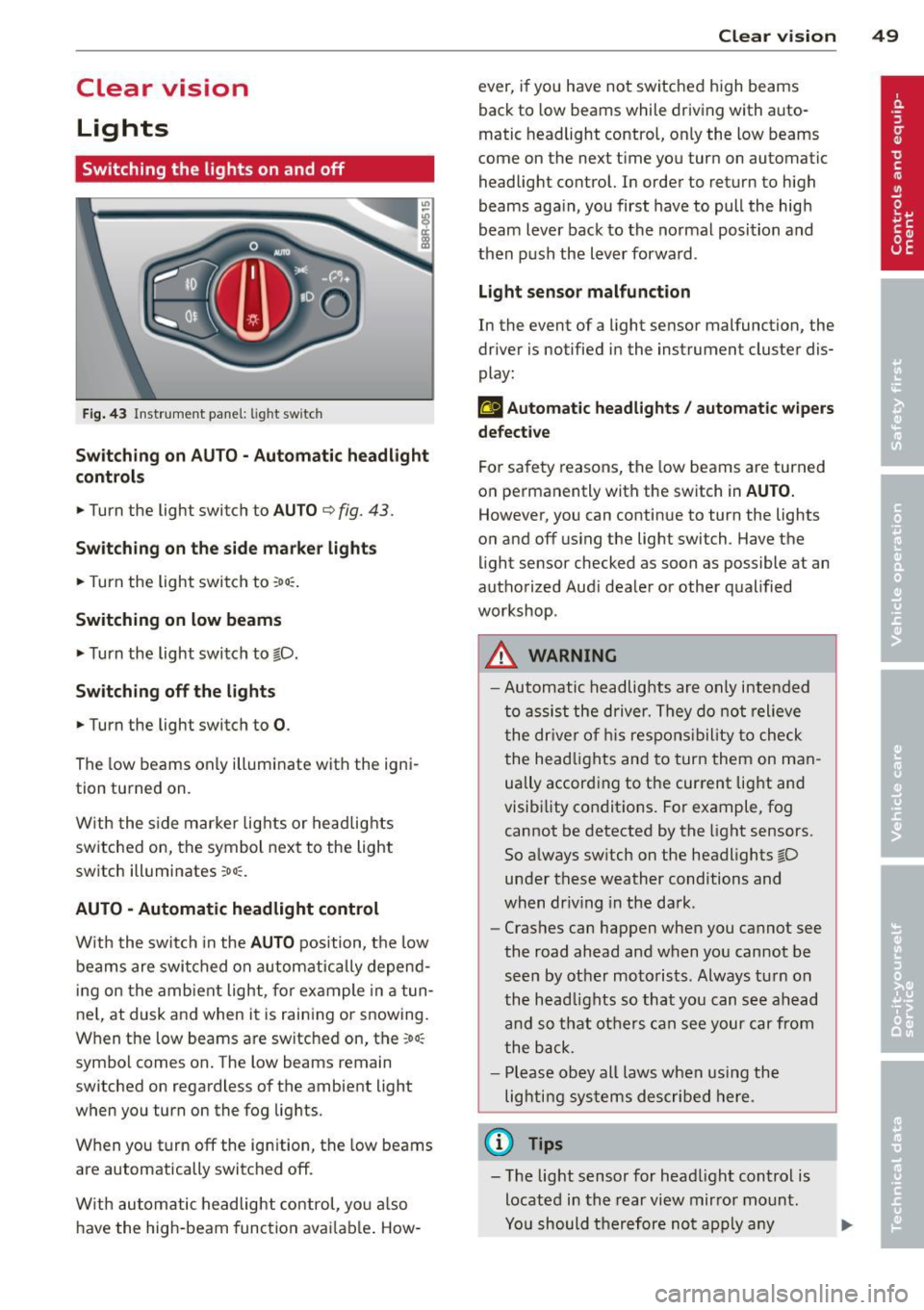
F ig . 43 Instrument pane l: light sw itch
Sw itching on AUTO - Automatic headlight
contr ols
• Turn the light switch to AUTO ¢ fig. 43.
Switchin g on the side m arker light s
• Turn the light switch to :oo:.
Switching on low beams
• Turn the light switch to @.D.
Swi tching off the lights
• Turn the light switch to 0 .
The low beams only illuminate with the igni
tion turned on.
With the s ide marker lights or headlights
switched on, the symbol next to the light
switch illuminates
:oo:.
AUTO -Automatic headlight control
With the switch in the AUTO position, the low
beams are swi tched on a utomatica lly depend
ing on the amb ient light, for example in a tun
ne l, at dusk and when it is raining or snowing.
When the low beams are switched on, the
:oo:
symbol comes on. The low beams remain
switched on regardless of the ambient light
when you turn on the fog lights.
When you turn
off the ign ition, the low beams
are automatically switched
off.
W ith automatic headlight control, yo u also
have the high-beam function avai lab le . How -
Clear vi sion 49
ever, if you have not switched high beams
back to low beams while driving with auto
matic headlight control, only the low beams
come on the next time you turn on automatic
headlight control. In order to return to high
beams aga in, you first have to pull the high
beam lever back to the normal position and
then push the lever forward .
Light sen so r malfunct ion
In the event of a light sensor malfunction, the
driver is notified in the instrument cluster dis
play :
fal Autom atic he adlights / autom ati c wi pers
defecti ve
For safety reasons, the low beams are turned
on permanently with the switch in
AUTO.
However, you can continue to turn the lights
on and
off us ing the light switch . Have the
light sensor checked as soon as possible at an
authorized Audi dealer or other qualified
workshop.
A WARNING
- Automatic headlights are only intended
to assist the driver. They do not relieve
the dr iver of h is respons ibility to check
the head lights and to turn them on man
ually accord ing to the current light and
visibility conditions. For example, fog cannot be detected by the light sensors.
So always sw itch on the headlights @.D
under these weather conditions and
when dr iv ing in the da rk .
- Crashes can happen when you cannot see
the road ahead and when you cannot be
seen by other motorists. Always tu rn on
the head lights so that you can see ahead
and so that others can see your car from
the back.
- Please obey all laws when using the
lighting systems described here.
(l'} Tips
- T he light sensor for head light control is
located in the rear view mirror mount.
Yo u should therefore not apply any
Page 52 of 316

50 Clear vis ion
stickers to the windshield in this area in
or der to prevent malfunctions or fai l
u res .
- Some exte rior lig hti ng f unctions can be
adjusted
c> page 50 .
-When yo u remove yo ur key from the igni
tion while the vehicle's lights are turned
on, a buzze r sounds as long as the driv
er's door is open .
- In coo l or damp weather , the ins ide of
the headlights, t urn signa ls and tail
li ghts can fog over due to the tempera
ture difference between the inside and
outside. They will clea r sho rtly after
switching them on . T his does not affect
the service life of the lighting .
- In the even t of a light sensor malfunc
t ion, the d river is no tified in th e inst ru
ment cluster disp lay
c> page 33.
Fog lights
Fig . 44 Fog light sw it c h
.,. To turn on the fog lights }D, press button @
c>fig . 44 .
.,. To turn on the rear fog ligh ts 0$, p ress but-
ton @.
Fog lights
The s ide marker lig hts or low beams must be
switched on . When the fog lights a re switched
on, the green check light at the edge of the
sw itch comes on.
If automatic driving light control AUTO is act i
vated, the low beams are switched on when
the fog lights are tur ned on .
Rear fog lights
Low be ams o r sid e mar ker lig hts wi th fog
li gh ts m ust be t urned on .
When the rear fog lights a re turned on, the
yellow check ligh t a t the edge of the switch
comes on.
(D Note
The rear fog lights s houl d only b e turned
o n in acc ord ance wi th t raff ic reg ulation, a s
the lights are brig ht for following tra ffic.
Adjusting exterior lighting
The functions are sele cted in the radio or in
the MM I*.
.,. Select: I CAR I function button > Ext erior
lighting .
Or
.,. Sele ct: !CARlfunc tion button>
Car sy stem s*
contro l butto n > Vehicle setting s > Exterior
light ing .
Coming home (Lights when leaving car ),
Leaving home (Lights when unlocking car )
The coming home f unct ion ill umin ates the
are a outside the vehicle when you tu rn t he ig
nit ion off and o pen the d river's doo r. Depend
ing on vehicle equ ipment, the f unction can be
switched on and off or the length of t i me the
lights remain on* can be adjusted .
T he leaving home illum inates the area o utside
the ve hicle when you un lock the vehicle . This
funct ion can be switched on and off .
T he Comi ng home and Leaving home f unc
tio ns only ope rate when it is dark and the
light switch is in the
AUTO position .
Auto headlights
When the lig ht sw itch i s in the AU TO
c> page 49 position, the switc h-on point of the
li gh ts can be changed i n the automa tic driving
light function.
Daytime running lights
USA models: You can swi tch the daytime run-
ning lights
On and Off . .,..
Page 53 of 316

Canada models : The function cannot be
turned off.
It is activated a utomatica lly each
time the ignition is switched on.
Travel mod e (Canada models)*
The headlight beam is asymmetrical. This pro
vides stronge r illum ination on the s ide of the
road on which you are driving . If you are driv
ing in a co untry that drives on the opposite
side of the road from your own country, this
will cause glare for oncoming drivers. To pre
vent glare:
- Trave l mode must be selected in vehicles
with Xenon headlights*.
- In vehicles with halogen headlights, certain
areas of the head light lenses must be cov
ered with waterproof adhesive covers that
prevent light from passing through. For
more information, please see your author
ized Audi dealer or author ized repair facility .
@ Tips
When travel mode* is activated, a d isp lay
in the drive r information system ind icates
this each time you switch the ignit io n on .
Instrument lighting
The basic brightness of the illumination for
the instruments, the center console and the
display can be adjusted .
Fig. 45 Inst rume nt lighting
.. Press the knob to release it.
.. Ro ta ting t he knob to the right" +" will in
crease the basic brightness when it is dark .
.. Rotating the knob to the left"-" will de
crease the basic br ightness when it is dark. Clear vi
sion 51
.. Pressing the knob will p revent unintentional
changes.
(D Tips
T he ill umination for the inst rument cluster
lights up w henever you switch on the igni
tion with the vehicle headlights off. As the
day light fades, the instrument cluster i llu
mination likewise dims automatically and
will go out completely when the outside light is very low. This feature is meant to
r emind you to switch on the head lights
whe n outs ide light conditions become
p oor .
Adaptive light
Applies to vehicles: wi th adaptive light
Wh en driving around bends, the relevant area
of the road is be tter illuminated.
Fi g. 4 6 Adapt ive light w hen driv ing
Switching on adapt ive light
.. Tu rn the light sw itch to AUTO ~ page 49,
fig. 43 .
The adaptive lig ht system is a combin ation o f
the dynam ic and the static corneri ng lights.
Wi th the lights switched on, the dynamic cor
ner ing light adapts to driving on curves. This
is dependent upon t he vehicle speed and
steering ang le. This provides better lighting
through the curve. The system operates in a
speed range from approximate ly 6 mph
(10 km/h) to 68 mph (110 km/h) .
The static cornering light switches on at
speeds of up to approximately 25 mph
Page 54 of 316

52 Clear vis ion
(40 km/h) when a certain steer ing whee l an
g le is reached or when a turn signa l is activat
ed . The area to the side of the vehicle is illu
minated better when turning .
Emergency flashers
The emergency flashers makes other moto
rists aware that you or your vehicle are in an
emergency situation.
Fig . 4 7 Eme rg ency flashe r switc h
"" Pr ess the switch ~ ~ fig. 47 to turn the
eme rgency flas hers on or off.
~
9 a: (X) a:,
When the emergency flashers a re on, all four
turn signals blin k at the same time. The tu rn
signal in dicator lights
BB in the ins trument
cluster, as we ll as the lig ht in t he emerge ncy
fla sher swi tch ~ blink likewise . T he emerge n
cy flashers also w ork whe n the ignition is
turned off.
The emergen cy flashers w ill turn on autom ati
cally if you are in an a cci den t w here the a irba g
has de ployed .
@ Tips
You shou ld tur n on t he emerge ncy fl ashe rs
w hen :
- you are the last vehicle st anding in a traf
fi c ja m so t hat an y oth er veh icles com ing
c an see you, or when
- you r vehicle has broken dow n or yo u are
in an emerge ncy si tu ati on, or when
- you r vehi cle is bei ng towe d by a tow
truck o r if you are towi ng an othe r vehicle
b ehin d you. Turn signal and high beam lever
The lever on the left side of the steering col
umn is used to operate the turn signals and
the high beam as w
ell as the headlight flash
er.
Fi g. 48 Tu rn signal and high beam lever
The turn signa l and high beam lever has the
fo llowing functions:
Turn signals ¢¢
s
"" '? X co a,
"" Lift the leve r up a ll th e way ~ fig. 48 (D to
use the right turn s ign als, or push the leve r
down a ll th e way @ to use the left tur n sig
n a ls.
Auto-blink .,. Move the lever (up or down) just to the point
of resistance t o use the tur n sign als fo r as
long as you need them, for e xamp le when
chang ing lanes .
.,. Move the lever (up or down) just to the point
of resistance and then re lease it rig ht away
to make the turn s ignals b link
three times .
You can use this featu re for example when
chang ing lanes on highways .
High beam
[D
"" Push the lever forward @ to switch o n the
high beam .
.,. Pull the lever back towards you to switch off
the high beam.
Headlight fla sher
[D
.. Pull the lever toward the steering wheel@
to use the headlight flasher .
IJJ>