2014 AUDI Q5 mirror
[x] Cancel search: mirrorPage 118 of 316

116 Audi side assist
Audi side assist
Lane change assistant
Description
App lies to vehicles: with Audi side assist
D
Fig. 124 Sensor detectio n ran ge
Fig. 125 Disp lay on the exterio r mirro r
Side assist he lps you monitor your blind spot
and traffic behind your veh icle. W ith in the
limits of the system, it warns you about
vehicles that are coming closer or that are
traveling with you within sensor range
(D
c:> fig . 124. If a lane change is classified as
critical, the display @in the exterior mirror
¢ fig.125turnson.
The display in the left exterior mirror provides
assistance when mak ing a lane change to the
le ft, while the display in the right exter ior mir·
ror provides assistance when making a lane
change to the right.
Information stage
As long as you do not activate the turn signal,
side assist
informs you about vehicles that are
detected and class ified as critical. The display
in the respective mirror turns on, but is d im. T
he display remains dim intentionally in the
information stage so that your view toward
the front is not disturbed .
Warning stage
If you activate the turn s ignal, s ide ass ist
warns you about vehicles that are detected
and class ified as critical. The display in the re
spective mirror blinks brightly . If this hap
pens, check traffic by glancing in the rearview
mirror and over your shoulder c:>
.&. in General
information on page 117.
(D Tips
- You can adjust the brightness of the dis
play @c:>
poge 118.
-Please refer to the instructions for tow·
ing a trailer located in ¢
page 117.
Page 119 of 316

General information
Applies to vehicles: with Audi side assist
®
Fig . 126 Driving situations
Fi g. 1 27 Rear of t he ve hicle: Pos it ion of the sensors
M
m 0 ci: .. a,
Side assist functions at speeds above approx i
mately 19 mph (30 km/h).
@ Vehicl es th at ar e approaching
In certain cases, a vehicle will be classified as
cr itical for a lane change even if it is still
somewhat far away. The fas ter a vehicle ap
p roaches, the sooner the display in the exteri
or m irror will t urn on.
@ Vehicles traveling with you
Vehicles traveling w ith you are indicated in the
exterior m irror if they are classified as cr itical
for a lane change. All vehicles detec ted by
side assist are indicated by the time they en
ter your "blind spot", at the latest.
Audi side assist 11 7
@ Vehicle s left behind
If you s low ly pass a vehi cle that s ide assist has
detected (the difference in speed between the
vehicle and you r vehicle is less than 9 mph or
15 km/h), the display in the exterio r mir ror
turns on as soon as the vehicle enters your blind spot.
T he disp lay will not t urn on if you quickly pass
a vehicle that side assist has detected (the dif
ference in speed between the veh icle and your
vehicle is greater than 9 mph or 15 km/h).
Functi onal limitations
The radar sensors are designed to detect the
left and right adjacent lanes when the road
lanes are the normal width. In certain situa
tions, the d isp lay in the exterior mirror may
turn on even though there is no veh icle locat
ed in the area that is cr itical for a lane change.
For example:
- if the lanes are narrow or if your are dr iving
on the edge of your lane.
If this is the case,
the system may have detected the vehicle in
another lane that is
not adjacent to you r
current lane .
- if you a re driving through a curve. Side assist
may react to a vehicle that is one lan e ove r
from the adjacent lane.
- if side assist reacts to other objects (such as
high or d isp laced guard rails) .
- In poor weather conditions. The side assist
functions are l imited .
Do not
cover the radar sensors¢ fig. 127 with
stickers, depos its, bicycle wheels or other ob
jects, because this will affect the funct ion. Do
not use s ide ass ist when towing a trailer. For
i nformation on cleaning, refer to ¢
page 217.
_&. WARNING
-Always pay attention to traffic and to t he
area a round your ve hicl e. S ide assist can
not replace a driver's attention. T he driv
er a lone is always responsible fo r lane
changes and similar driving mane uvers.
Page 120 of 316

118 Audi sid e as sist
- Improper reliance on the side ass ist sys
tem can cause co llisions and serious
persona l injury:
- Never rely only o n side assist when
ch anging lanes.
- Always check rear view m irrors to make
sure that it is safe to change lanes.
- Side ass ist cannot detect a ll vehicles un
der all cond it ions -danger of ac cident!
- Please note that side assist indicates
there are approachi ng veh icles, o r
vehicles in your blind spot, on ly afte r
yo ur vehicle has rea ched a driving speed
of at least 19 mph (30 km/h).
- In certain s ituations, the system may not
f unc tion o r its fun ct io n may be lim ite d.
For example:
- if veh icles are approaching or being left
behind very quick ly . The display may
not turn on in time.
- in poor weather co ndit ions such as
heavy ra in, snow or heavy m ist .
- on very wide lanes, in tight curves or if
there is a rise in the road surface.
Vehicles in the adjacent lane may not be detected because they are outside
of the sensor range.
(D Note
The sensors ca n be displaced by impacts or
damage to the bumpe r, wheel housing and
unde rbody . This can affect the system.
Have your author ized Audi dealer or au
thori zed A udi Se rvice Facility check the ir
function.
@ Tips
- If the window g lass in the driver 's door
o r fro nt passenger's door has been tin t
ed, the disp lay in the exterior mirror may
be misinterp reted.
- Fo r De clarat ion of Compliance to Uni ted
Sta tes FCC and Industry Canada regu la
tions¢
page 296.
Activating and deactivating
Applies to vehicles: with A udi side assist
F ig. 128 D river 's doo r: Side ass ist butto n
.. Press the button c> A in General informa
tion on page 117
to switch the system on/
off. The LED in the button turns on when
side assist is switched on .
Adjusting the display brightness
Applies to vehicles: with Audi side assist
The signal brightness con be set in the radio
or MM!* .
-"' ~ a: co a,
.. Select: I CAR I function button > Audi side a s
s ist .
Or
.. Select: l~c -A ~R~ I function button > C ar systems *
control button > Driver a ss ist > Audi sid e
a ss ist .
The display br ightness adjusts automatical ly
to the brightness of the surroundings, both in
the info rmation and in the warning stage . In
very dark or very bright su rroundi ngs, the dis
play is already se t to the m inimum or maxi
mum leve l by the automatic adjus tme nt. In
s u ch cases, you may notice no change when
adjusting the brightness, or the change may only be noticeable once the surroundings
change.
Adjust the br ightness to a leve l whe re the dis
play in the information stage wi ll not d isrupt
your view forward. If you change the bright
ness, the display in the exterior mirror will
briefly show the br ightness level in the infor
mation stage. The brightness of the warning
stage is linked to the brightness in the infor
mation stage and is adjusted along with the
i nformation stage adjustment.
Page 134 of 316

132 Parking system
Reverse Park ing
App lies to vehicles: with Audi parking system p lus w ith
rea rview camera
Parking mode 1 con be used when parking in
a garage or into a parking space.
Fig. 1 44 MMI display: aiming at a parking spot
Fig. 14 5 MMI display: aligning the vehicle
... Switch the MMI on and se lect reverse gear .
... Turn the steer ing whee l until the orange ori
entation lines @appear in the park ing spot
¢ fig . 144. Use the markings @to help you
estimate the d istance from an obstacle.
Each marking represents 3
ft (1 meter). The
blue area represents an extension of the ve
hicle's outline by approx imately 16
ft (S me
ters) to the rear.
"' While driv ing in reverse gear, ad just the
steering wheel angle to fit the parking space
with the aid of the orange orientation lines
¢ (D. @ marks the rear bumper. Stop the
vehicle when the red orientation line © bor
ders an object¢ _&..
A WARNING
-The rearv iew camera does not show the
entire area beh ind the veh icle
¢ page 129, fig. 140. Watch out espe
c ially for small childre n an d an imals. The rearview camera cannot always detect
them, posing risk of an accident!
- Please note that objects not touching the
ground can appear to be further away
than they really are (for example, the
bumper of a parked vehicle, a trailer
hitch, or the rea r of a truck). In this case,
you shou ld not use the help lines to help
with pa rking, wh ich pos es dange r of an
accident!
(D Note
In the M MI d is play , the direction of travel
of the vehicle rear is represented depend
i ng on the stee ring wh eel angle . T he vehi
cle front swings o ut more than the vehicle
rear. M aint ain ple nty of dista nce so th at
your outside mirror or a corner o f you r ve
hicle does not co llide with any obstacles .
This can damage to your ve hicle .
Parallel Parking
Applies to vehicles: wit h Aud i parking syste m plus with
rearv i ew camera
Use parking mode 2 to help you parallel park
along the side of a stree t .
F ig . 14 6 MMI disp lay : b lue surface in th e parking spot
Fig . 14 7 MM! display: Blue curve on the curb
Page 135 of 316

The following steps apply only when there is
no obstacle such as a wall near the parking
spot. Otherwise, please read the information
prov ided in the "Parking Next to Obstacles"
section.
~ Activate the turn signal.
~ Position yo ur vehicle parallel to the edge of
the street, approxim ately 3 ft (1 meter)
from a parked vehicle .
~ Switch the MMI on and se lect reverse gear .
The parking aid tu rns o n and parking mode
1 appears on the display .
~ Press the control button @¢ fig. 146 on
the MMI contro l conso le. Parking mode
2
appea rs .
~ Backup and align yo ur vehicle so the b lue
area @ borders on the rear end of the vehi
cle or on the parking spot line. The bl ue area
represents an extension of the veh icle's out
line by approximate ly
16 ft (5 meters) to the
rear . The long side of the blue area should
be o n the curb . The entire blue area must fit
i nto the parking spot .
~ With the veh icle s topped, turn the s teer ing
whee l to the right as far as it w ill go.
~ Back into the parking spot until the blue
curve to uches the curb¢
fig. 147. Stop the
vehicle.
~ With the veh icle stopped, turn the steer ing
wheel to the left as far as it will go .
~ Continue to back into the parking spot un til
the vehicle is parked parallel to the curb .@
marks the rear bumper. Stop the vehicle
when the red orientation line@ borde rs an
object ¢.&, . Keep an eye on the fron t of
yo ur vehicle while do ing this
~ CD .
Pa rking n ext to obstacles
When there is an obstacle (such as a wall)
next to the pa rking spot, choose a spot w ith
mo re space on t he sides. Position the long
side of the b lue a rea so that there is sufficient
space from the curb. The a rea m ust no t be on
the c urb. You wi ll also need to start turn ing
the steering wheel much earlie r. T he re should
be a suffic ient amo unt of space between the
curb and the blue curve, and the blue c urve
¢
fig. 147 must not touch the curb.
Par king system 133
A WARNING
- The rearview camera does not show the
entire area behind the vehicle
~ page 129, fig. 140 . Watch out espe
cially fo r small children and anima ls . The
rea rv iew camera cannot always detect
them, posing r is k of an accident!
- P lease note that objects not touching the
g rou nd can appear to be further away
than they really a re (for example, the
bumper of a parked vehicle, a trai ler
hitch, or the rea r of a truck) . In this case,
you shou ld not use the help lines to help
with parking, wh ich poses danger of an
accident!
(D Note
In the MMI display, the direction of travel
of the vehicle rear is represented depend
i ng on the steering wheel angle . The vehi
cle front swings out more than the vehicle rear. Maintain ple nty of d istance so that
your outside mirror or a corner of your ve
hicle does not col lide with any obstacles.
T his can damage to your ve hicle.
(0 Tips
The left o r right orientation lines and su r
faces will be disp layed, depending on the
turn s ignal being used .
Adjusting the display
and warning tones
App lies to v ehicl es: wi th Audi parking sys te m plus wi th
rearv iew camera
The display and warning tones can be adjust
ed in the MMI .
~ Select: !CAR ! function button> Parking s ys
tem .
Or
~ Select: ~IC_ A_ R~I func tio n button> Car sy ste m s*
cont ro l button > Driver as sist > Parking aid.
Display
-Off -when the parki ng system is switched
off, only a udible s ignals a re g iven .
Page 141 of 316

Driving Safely
General notes
Safe driving habits
Please remember -safety first!
This chapter contains important information,
tips, instructions and warnings that you need
to read and observe for your own safety, the
safety of your passengers and others . We have
summarized here what you need to know
about safety belts, airbags, child restraints as
well as child safety. Your safety is for us
priori
ty number 1.
Always observe the information
and warnings in this section - for your own
safety as well as that of your passengers.
The information in this section applies to all
model versions of your vehicle . Some of the
features described in this sections may be
standard equipment on some models, or may
be optional equipment on others. If you are
not sure, ask your authorized Audi dealer.
A WARNING
- Always make sure that you follow the in
structions and heed the WARNINGS in
this Manual. It is in your interest and in
the interest of your passengers.
- Always keep the complete Owner's Liter
ature in your Audi when you lend or sell
your vehicle so that this important infor
mation will always be available to the
driver and passengers.
- Always keep the Owner's literature handy
so that you can find it easily if you have
questions.
Safety equipment
The safety features are part of the occupant
restraint system and work together to help
reduce the risk of injury in a wide variety of
accident situations .
Your safety and the safety of your passengers
should not be left to chance. Advances in
technology have made a variety of features
available to help reduce the risk of injury in an
Driving Safely 139
accident. The following is a list of just a few of
the safety features in your Audi :
- sophisticated safety belts for driver and all
passenger seating positions,
- belt force limiters for the front seats,
- belt pretensioners for the seats,
- belt height adjustment for the front seats,
- head restraints for each seating position,
- front airbags,
- side airbags in the front seats and outer rear
seats*,
- side curtain airbags,
- special LATCH anchorages for child re-
straints,
- adjustable steering column.
These individual safety features, can work to gether as a system to help protect you and
your passengers in a wide range of accidents.
These features cannot work as a system if
they are not always correctly adjusted and cor
rectly used.
Safety is everybody's responsibility!
Important things to do before driving
Safety is everybody 's job! Vehicle and occu
pant safety always depends on the informed
and careful driver.
For your safety and the safety of your passen
gers,
before driving always:
.,. Make sure that all lights and signals are op
erating correctly .
.,. Make sure that the tire pressure is correct .
.,. Make sure that all windows are clean and af
ford good visibility to the outside .
.,. Secure all luggage and other items carefully
qpage 76.
.,. Make sure that nothing can interfere with
the pedals.
.,. Adjust front seat, head restraint and mirrors
correctly for your height .
.,. Instruct passengers to adjust the head re
straints according to their height .
.,. Make sure to use the right child restraint
correctly to protect children ¢
page 178,
and~~~-~
•
•
Page 215 of 316

Trailer towing Driving with a trailer
General information
Your Audi was designed primarily for passen
ger transportation .
If you plan to tow a trailer, please remember
that the additional load will affect durability,
economy and performance .
T railer towing not only places more stress on
the vehicle, it also calls for more concentra
tion from the driver.
For this reason, always follow the operating
and driving instructions provided and use
common sense.
Technical requirements
Trailer hitch
Use a weight-carrying hitch conforming to the
gross trailer weight. The hitch must be suita
ble for your vehicle and trailer and must be
mounted securely on the vehicle's chassis at a
technically sound location. Use only a trailer
hitch with a removable ball mount. Always
check with the trailer hitch manufacturer to
make sure that you are using the correct
hitch.
Do not use a bumper hitch.
T he hitch must be installed in such a way that
it does not interfere with the impact-absorb
ing bumper system. No modifications should
be made to the vehicle exhaust and brake sys
tems . From time to time, check that all hitch
mounting bolts remain securely fastened.
When you are not towing a trailer, remove the
trailer hitch ball mount. This prevents the
hitch from causing damage should your vehi
cle be struck from behind
¢ &. .
Trailer brakes
If your trailer is equipped with a braking sys
tem, check to be sure that it conforms to all
regulations .
Trailer towing 213
The trailer hydraulic brake system must not be
directly connected to the vehicle's hydraulic
brake system
¢ &. .
Safety chains
Always use safety chains between your vehicle
and the trailer.
Trailer lights
Trailer lights must meet all regulations . Be
sure to check with your authorized Audi dealer
for correct wiring, switches, and relays.
Mirrors
If you are unable to see the traffic behind you
using the regular outside mirrors, then you
must install extended mirrors.
It is important
that you always have clear vision to the rear .
.8, WARNING
- If a trailer has electrical brakes please
note that these brakes are not activated
by the factory-fitted control unit -risk of
accident!
- After removing the trailer hitch, do not
store it in your vehicle. In case of sudden
braking, the hitch could fly forward and
injure you or your passengers.
- Never install a "weight distributing" or
"load equalizing" trailer hitch on your ve
hicle. The vehicle was not designed for
these kinds of trailer hitches . The hitch
attachment can fail, causing the trailer
to tear loose from the vehicle .
- The Gross Vehicle Weight Rating for your
vehicle, found on the safety compliance
label on the driver's side B-pillar, must
never be exceeded under any circumstan
ces. Exceeding the Gross Vehicle Weight
Rating of your vehicle is likely to damage
your vehicle, and such damage will not
be covered by your Limited New Vehicle
Warranty. Exceeding the Gross Vehicle
Weight Rating will also change the per
formance and handling characteristics of
your vehicle, which could cause a crash resulting in serious injury or death.
-
•
•
Page 220 of 316
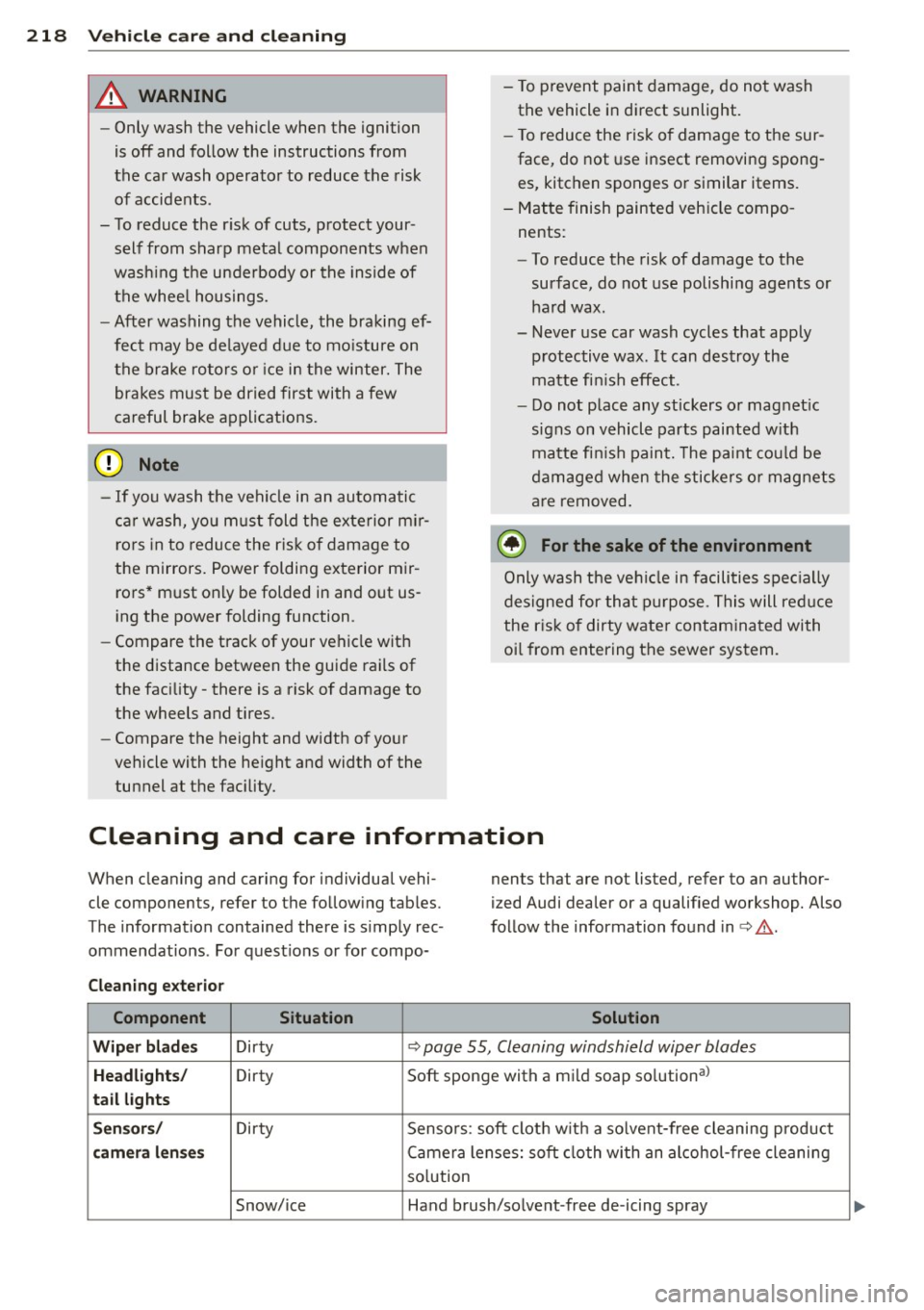
218 Vehicle care and cleaning
A WARNING
- Only wash the vehicle when the ignition
is off and follow the instructions from
the car wash operator to reduce the risk
of accidents .
- To reduce the r isk of cuts, protect your
self from sharp meta l components w hen
wash ing the unde rbody or the inside of
the whee l housings.
- After washing the vehicle, the braking ef
fect may be de layed due to mo isture on
the b rake ro to rs or i ce in the winter. The
brakes must be dried first with a few
careful brake applications.
(!;) Note
- If you wash t he vehi cle in an automatic
ca r wash, yo u m ust fold the exterior m ir
ro rs in to reduce the r is k of damage to
the mirrors. Power folding exte rior m ir
ro rs * must only be folded in and out us
i ng the power folding function.
- Compare the track of your vehicle wit h
the distance between the gui de rails of
the facility - there is a risk of damage to
the wheels and t ires.
- Compare the height and width of your
vehicle with the he ight and width of the
tunnel at the fac ility. -
To p revent paint damage, do not wash
the vehicle in di rect sunlight.
- T o reduce the ris k of damage to the sur
face, do not use insect removing spong
es, kitchen sponges or similar items.
- M atte finish painted veh icle compo
nents:
- To reduce the risk of damage to the
surface, do not use polishi ng agents or
hard wax.
- Never use car wash cycles that apply protective wax.
It can destroy the
matte fi nish effect.
- Do not place any stickers o r magnet ic
signs on v ehicle parts painted w ith
ma tte fi nish paint. The paint cou ld be
damaged when the stickers o r mag nets
a re removed .
@ For the sake of the environment
O nly wash the ve hicl e in facili ties spe cially
d esi gned for that p urpose. This will red uce
the r is k of dirty wate r contam ina ted with
o il from entering the sewer system.
Cleaning and care information
When cleaning and caring for individua l vehi
cle components, refer to the fo llowing tab les .
The information contained there is simp ly rec
ommendat ions . For quest io ns or for compo- nents that are not listed, refer to an author
ized Audi dealer or a qualified workshop. Also
fo llow the information found in <=> & .
Cleaning exterior Component Situation Solution
Wiper blad es Dirty <=> page 55, Cleaning windshield wiper blades
Headlights/ Dirty Soft sponge with a mild soap so
lution al
tail lights
Sen sors / Dirty Sensors : soft clot h w it h a so lvent-free cleaning p roduct
camera l enses Camera lenses: soft cloth with an alcohol -free cleaning
so lution
Snow/ice Hand brush/so lvent -free de-icing spray