Page 30 of 494
28
Deactivation indicator lamps
If one of the following indicator lamps comes on, this confirms that the corresponding system has been switched off intentionally.
T his is may be accompanied by an audible signal and a message on the multifunction screen.
Warning /indicator lampis on Cause Action/Observations
Passenger's
airbag system fixed
in the instrument
p
anel and/or seat belt
a
nd front passenger's
a
irbag
w
arning
lam
ps
d
isplay.The
control switch, located in
t
he glove box, is set to the "OFF "
position.
The
passenger's front airbag is
d
eactivated.Set the control to the "ON"
position to activate the
passenger's
front airbag.
In
this case, do not fit a child seat in the rear ward
f
acing position.
Monitoring
Page 31 of 494

29
Engine oil level
indicator*
Oil level correct
This is indicated by the flashing of "O IL" or the
display of a message, accompanied by the
s
ervice warning lamp and an audible signal.
If
the low oil level is confirmed by a check using
t
he dipstick, the level must be topped up to
a
void damage to the engine.
Refer
to the "Checking levels" section.
Oil level indicator fault
In the event of a fault with the electric indicator, the oil level is no longer monitored.
If
the system is faulty, you must check the
e
ngine oil level using the manual dipstick
l
ocated under the bonnet.
Refer
to the "Checking levels" section.Oil level incorrect
This is signalled by the flashing of "O IL--" or
the display of a message.
Contact
a CITROËN dealer or a qualified
w
orkshop.
On
versions
fitted
with
an
electric
oil
level
i
ndicator,
the
state
of
the
engine
oil
level
is
d
isplayed
in
the
instrument
panel
for
a
few
s
econds,
at
the
same
time
as
the
servicing
i
nformation.
*
Depending
on
version.
The
level
read
will
only
be
correct
if
t
he
vehicle
is
on
level
ground
and
the
e
ngine
has
been
off
for
more
than
30
m
inutes.
1
Monitoring
Page 33 of 494
31
Service overdue
For a few seconds after the ignition is switched on, the spanner flashes to indicate that the service m
ust be carried out as soon as possible.
Example:
the service is overdue by 180 miles
(
300 km).
For
a few seconds after the ignition is switched on,
t
he screen indicates:
A
few seconds after the ignition is switched
o
n, the distance recorder resumes its normal
ope
ration.
T
he spanner remains on .
For
b
l
ueH
di
d
i
esel versions, this alert is also
accompanied
by the fixed illumination of the
S
ervice warning lamp when the ignition is
s
witched on. The
spanner comes on if you have
e
xceeded the specified time interval
s
ince the last service, as indicated in
t
he
ma
nufacturer's
ser
vice
s
chedule.
For
b
l
ueH
di
d
i
esel versions, the
spanner
may also come on before the
n
ormal service point, according to the
l
evel of deterioration of the engine oil,
w
hich
d
epends
o
n
t
he
d
riving
c
onditions
i
n which the vehicle is used.
1
Monitoring
Page 42 of 494

40
"Telephone" menu
With the audio system switched on, this menu allows you to make a call or view the various
t
elephone
d
irectories.
For
more information on the "Telephone"
a
pplication, refer to the "Audio and telematics"
s
ection. This
menu allows you to view information on
t
he status of the vehicle.
Warning log
This summarises the status and warning m
essages for systems (active, not active or
f
aulty), displaying them in succession in the
m
ultifunction
s
creen.
F
P
ress the "MENU" button for access to the
main
menu.
F
P
ress the arrows, then the "OK" button to
select the "Trip computer"
menu.
F
I
n the "Trip computer"
menu, select the
"
Warning log" line and confirm.
"Trip computer" menu
"Multimedia" menu
With the audio system switched on, this m
enu allows you to activate or deactivate the
f
unctions associated with use of the radio
(
RDS, DAB / FM auto tracking, RadioText
(
TXT) display) or to choose the media play
m
ode (Normal, Random, Random all, Repeat).
For
more information on the "Multimedia"
a
pplication, refer to the "Audio and telematics"
s
ection.
"Bluetooth
connection" menu
Wit the audio system on, this menu allows a B luetooth device (telephone, media player)
t
o be connected or disconnected and the
c
onnection mode to be defined (hands-free,
p
laying audio files).
For
more information on the "Bluetooth
c
onnection" application, refer to the "Audio and
t
elematics"
se
ction.
Multifunction screens
Page 73 of 494
71
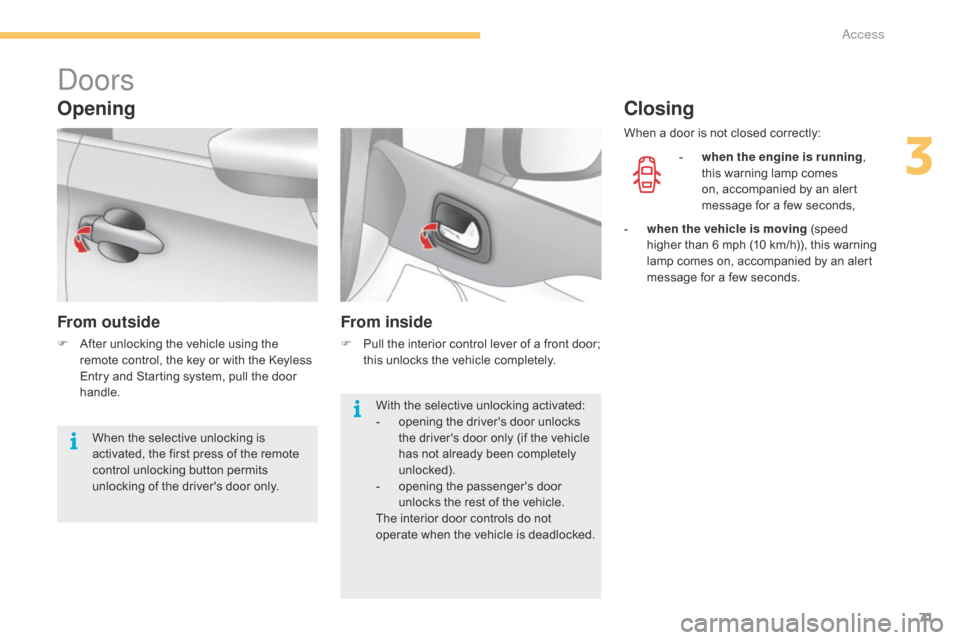
doors
Opening
From outside
F After unlocking the vehicle using the r
emote control, the key or with the Keyless
E
ntry and Starting system, pull the door
han
dle.
From inside
F Pull the interior control lever of a front door; t
his unlocks the vehicle completely.
Closing
- when the engine is running ,
this warning lamp comes
o
n, accompanied by an alert
m
essage for a few seconds,
With
the
selective
unlocking
activated:
-
o
pening
the
driver's
door
unlocks
t
he
driver's
door
only
(if
the
vehicle
h
as
not
already
been
completely
u
nlocked).
-
o
pening
the
passenger's
door
u
nlocks
the
rest
of
the
vehicle.
The
interior
door
controls
do
not
o
perate
w
hen
t
he
v
ehicle
i
s
d
eadlocked.
When
the
selective
unlocking
is
a
ctivated,
the
first
press
of
the
remote
c
ontrol
unlocking
button
permits
u
nlocking
of
the
driver's
door
only. When
a
door is not closed correctly:
-
w
hen the vehicle is moving (speed
h
igher than 6 mph (10 km/h)), this warning
l
amp
comes on, accompanied by an alert
m
essage for a few seconds.
3
access
Page 74 of 494
72
boot
Opening using the remote
control
F After unlocking the boot or the vehicle u
sing the remote control or the key, press
t
he opening control, then raise the tailgate.
Closing
If the tailgate is not closed correctly:
-
w
hen the engine is running ,
this
warning lamp comes on,
a
ccompanied by the display of an
a
lert message for a few seconds,
F
L
ower the tailgate using the interior grab
han
dle.
F
I
f necessary, press down on the tailgate to
f
ully close it.
-
w
hen the vehicle is moving (speed above
6
mph (10 km/h)), this warning lamp comes
o
n, accompanied by an audible signal
and
the display of an alert message for a
f
ew seconds.
access
Page 91 of 494

89
Front demist - defrost
These markings on the control panel indicate the control positions for rapid demisting or defrosting of the windscreen and side windows.
With manual air
conditioning
F Put the temperature, air flow and distribution c
ontrols to the dedicated marked position.
F
P
ut the air intake control to the "Exterior air
i
ntake" position
(
indicator lamp on the control off).
F
S
witch on the air conditioning by pressing
t
he "A /C "
button; the warning lamp in the
b
utton comes on.
With digital dual-zone air
conditioning
Automatic visibility programme
F Select this programme to demist or defrost the windscreen and side windows as quickly as p
ossible.
The
system automatically manages the air
c
onditioning, air flow and air intake, and provides
o
ptimum distribution towards the windscreen and
si
de
w
indows.
F To stop the programme, press either the "
visibility" button again or "AUTO", the
warning
lamp on the button goes off and the
w
arning lamp on the "AUTO" button
comes
on.
The
system starts again with the values in use
b
efore
i
t
w
as
ov
erridden
b
y
t
he
v
isibility
p
rogramme.
With Stop & Start, when demisting has been activated, the STOP mode is not
a
vailable.
With
Stop
&
Start,
when
the
demisting,
a
ir
conditioning
and
air
flow
functions
a
re
activated,
STOP
mode
is
not
a
vailable.
4
Comfort
Page 96 of 494
94
Manual lumbar adjustment
F Turn the knob to obtain the desired level of l
umbar sup port. This
function provides a back massage; it only o
perates when the engine is running.
F P ress the switch to activate the function.
The
warning lamp on the switch comes on and
t
he massage function is activated for a period
o
f 60 minutes. During this time, massage is
p
er formed in 6 cycles of 10 minutes each cycle
(
6 minutes of massage followed by 4 minutes
b
reak).
After
an hour, the function is automatically
d
eactivated. The warning lamp in the switch
g
oes off.
Deactivation
You can deactivate the massage function at any time by pressing the switch. The movement
i
n progress continues until the initial non-
massage
position is reached.
Massage function
Electric lumbar adjustment
F Press the front or rear of the control to obtain the desired lumbar support.
Comfort


