2014.5 Citroen C4 DAG warning
[x] Cancel search: warningPage 28 of 340

26
C4-2_en_Chap01_controle-de-marche_ed01-2014
Warning/indicator lampis onCause Action/Observations
Parking brake fixed.The
parking
brake
is
applied
or
not properly released.Release
the parking brake to switch off
the
warning lamp, keeping your foot on
the
brake pedal.
Observe
the safety recommendations.
For
more information on the parking
brake,
refer to the "Parking brake" and
"Electric
parking brake" sections.
Electric
parking brake fixed.The
electric parking brake is
applied.Release
the electric parking brake to
switch
off the warning lamp: with your
foot
on the brake pedal, pull the electric
brake
control.
Observe
the safety recommendations.
For
more information on the electric
parking
brake, refer to the "Driving"
section.
Deactivation of the automatic functions of the electric
parking brake fixed.The
"automatic application"
(on
switching off the engine)
and
"automatic release"
functions
are deactivated or
faulty
.Activate
the function (according to
country)
via the vehicle configuration
menu
or contact a CITROËN dealer or a
qualified
workshop.
Diesel engine pre-heating fixed.The
key is at position 2
(ignition
on) in the ignition
switch.W
ait until the warning lamp goes off
before
starting.
The
period of illumination of the warning
lamp
is determined by the climatic
conditions
(up to about thirty seconds in
extreme
climatic conditions).
If
the engine does not start, switch the
ignition
off and then on, wait until the
warning
lamp goes off again, then start
the
engine.
1
MONITORING
Page 29 of 340

27
C4-2_en_Chap01_controle-de-marche_ed01-2014
Passenger's
airbag system fixed
in the seat
belt and passenger's
front
airbag
warning
lamps
display.The
control switch, located
in
the glove box, has been placed
in the "ON" position.
The passenger's front airbag
is
activated.
In
this case, do not install a
"rearward
facing" child seat.Move the control switch to the "OFF"
position
to deactivate the passenger's front
airbag.
In
this case, you can install a "rearward
facing"
child seat.
Warning/indicator lamp
is onCause Action/Observations
Stop & Start fixed.
When
the vehicle stops (red
lights,
traffic jams, ...) the
Stop
& Start system has put
the
engine into STOP
mode.The
warning lamp goes off and the
engine
restarts automatically in START
mode,
as soon as you want to move off.
flashes
for a few
seconds,
then
goes
off.STOP
mode is temporarily
unavailable.
or
ST
ART
mode is invoked
automatically
.For
more information on special cases
with
STOP
mode and START
mode, refer
to
the "Stop & Start" section.
Parking space
sensors fixed.
The
parking space sensors
function
is selected.To
start measurement, operate the direction
indicator
on the side of the space to be
measured,
and do not exceed 12 mph
(20
km/h).
A
message is displayed once the
measurement
has been completed.
Automatic
wiping fixed.The wiper control is pushed
downwards.
Automatic
front wiping is activated.
To deactivate automatic wiping, operate
the
control stalk downwards or put the
stalk
into another position.
Lighting dimmer fixed.The lighting dimmer is making
an
adjustment.
You can adjust the level of illumination of
the
instruments between 1 and 16.
1
MONITORING
Page 30 of 340

28
C4-2_en_Chap01_controle-de-marche_ed01-2014
Deactivation indicator lamps
If one of the following indicator lamps comes on, this confirms that the corresponding system has been switched off intentionally.
This
is may be accompanied by an audible signal and a message on the multifunction screen.
Warning/indicator lamp is onCause Action/Observations
Passenger's
airbag system fixed
in the
instrument
panel
and/or
seat
belt
and front
passenger's
airbag
warning
lamps
display.The
control switch, located
in
the glove box, is set to the
"
OFF" position.
The
passenger's front airbag
is
deactivated.Set the control to the "ON" position to
activate
the passenger's front airbag.
In
this
case,
do
not
fit
a
child
seat
in
the
rearward
facing position.
1
MONITORING
Page 31 of 340
29
C4-2_en_Chap01_controle-de-marche_ed01-2014
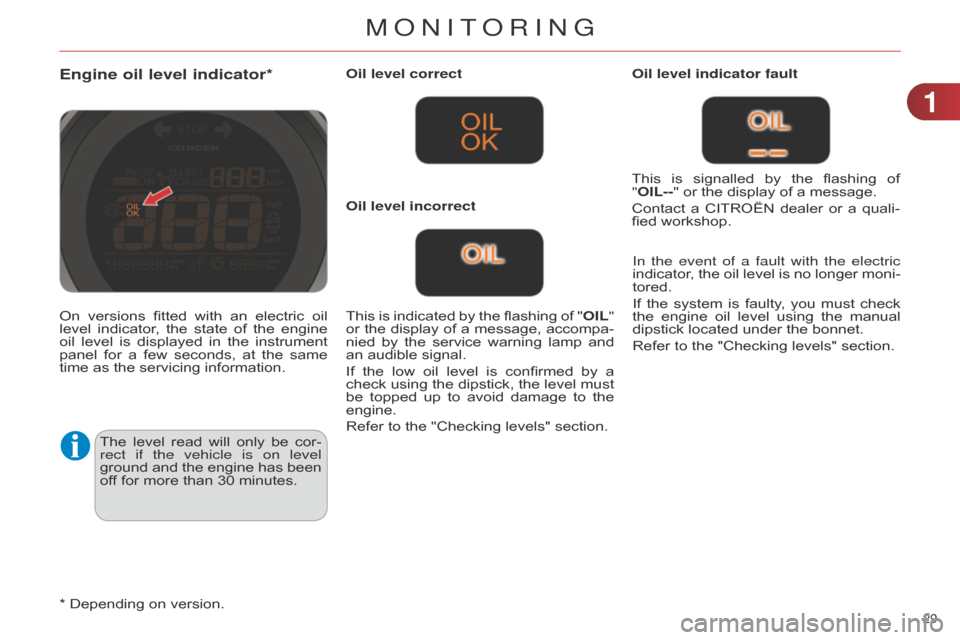
Engine oil level indicator*
The level read will only be cor -
rect if the vehicle is on level
ground
and
the
engine
has
been
of
f for more than 30 minutes.Oil level correct
This
is
indicated
by
the
flashing
of
"
OIL"
or
the
display
of
a
message,
accompa
-
nied
by
the
service
warning
lamp
and
an
audible signal.
If
the
low
oil
level
is
confirmed
by
a
check
using
the
dipstick,
the
level
must
be
topped
up
to
avoid
damage
to
the
engine.
Refer
to the "Checking levels" section.Oil level indicator fault
In the event of a fault with the electric
indicator,
the
oil
level
is
no
longer
moni
-
tored.
If
the
system
is
faulty
,
you
must
check
the
engine
oil
level
using
the
manual
dipstick
located under the bonnet.
Refer to the "Checking levels" section.
Oil level incorrect
This
is
signalled
by
the
flashing
of
"
OIL--" or the display of a message.
Contact
a
CITROËN
dealer
or
a
quali
-
fied workshop.
On
versions
fitted
with
an
electric
oil
level
indicator
,
the
state
of
the
engine
oil
level
is
displayed
in
the
instrument
panel
for
a
few
seconds,
at
the
same
time
as the servicing information.
*
Depending on version.
1
MonIToRInG
Page 33 of 340

31
C4-2_en_Chap01_controle-de-marche_ed01-2014
Service overdue
For
a
few
seconds
after
the
ignition
is
switched
on,
the
spanner flashes to
indicate
that
the
service
must
be
car
-
ried
out as soon as possible.
Example:
the
service
is
overdue
by
180
miles (300 km).
For
a
few
seconds
after
the
ignition
is
switched
on, the screen indicates:
A
few
seconds
after
the
ignition
is
switched
on,
the
distance
recorder
re
-
sumes
its
normal
operation.
The span
-
ner remains on. The
spanner comes on if you
have
exceeded
the
specified
time
interval
since
the
last
ser
-
vice,
as
indicated
in
the
manu
-
facturer's
service schedule.
For
b lueH d i d iesel versions,
the
spanner
may
also
come
on
before
the
normal
service
point,
according
to
the
level
of
dete
-
rioration
of
the
engine
oil,
which
depends
on
the
driving
condi
-
tions
of the vehicle.
Service indicator zero reset This operation cannot be car-
ried
out
while
a
reminder
of
the
servicing
information
is
being
displayed.
Following
this
operation,
if
you
wish
to
disconnect
the
battery
,
lock
the
vehicle
and
wait
at
least
five
minutes
for
the
zero
reset
to
be
registered.
Recalling the service information
You
can
recall
the
service
information
at
any time.
F
Briefly
press
the
".../000"
trip
dis
-
tance
recorder zero reset button.
The
service
information
is
displayed
for
a few seconds.
After
each
service,
the
service
indicator
must
be reset to zero.
If
you
have
carried
out
the
service
on
your
vehicle yourself:
F
switch
off the ignition,
F
press
and
hold
the
".../000"
trip
dis
-
tance
recorder zero reset button,
F
switch
on
the
ignition;
the
distance
recorder
display
begins
a
count
-
down,
F
when
the
screen
indicates
"=/0"
and
the
spanner
disappears,
re
-
lease
the button.
For
b lueH d i d iesel versions, this alert
is
also
accompanied
by
the
fixed
illu-
mination
of
the
Service
warning
lamp
when
the ignition is switched on.
1
MONITORING
Page 40 of 340

22
38
C4-2_en_Chap02_ecran-multifonction_ed01-2014
Define the vehicle parameters
This
menu
allows
you
to
activate
or
de
-
activate
the
following
equipment,
clas
-
sified
in different categories:
-
"Access
to
the
vehicle"
(see
the
"Access"
section):
●
"Plip
action"
(Selective
unlocking
of
the driver's door),
●
"Unlocking
boot
only"
(Selective
unlocking
of the boot).
"Telephone" menu
With the audio system switched on, this menu
allows you to make a call or view
the
various telephone directories.
For
more
information
on
the
"T
elephone"
application,
refer
to
the
"Audio
and
T
elematics" section. This
menu
allows
you
to
view
informa
-
tion on the status of the vehicle.
Warning log
This
summarises
the
status
and
warn
-
ing
messages
for
systems
(active,
not
active
or
faulty),
displaying
them
in
suc
-
cession in the multifunction screen.
F
Press the
"MENU" button for ac-
cess to the main menu.
F
Press the arrows, then the
"OK"
button to select the "Trip computer"
menu.
F In the " Trip computer" menu, se -
lect the "W arning log" line and con -
firm.
"Bluetooth connection"
menu "Trip computer" menu
Wit the audio system on, this menu al -
lows a Bluetooth device (telephone,
media
player)
to
be
connected
or
dis
-
connected
and
the
connection
mode
to
be
defined
(hands-free,
playing
audio
files).
For
more
information
on
the
"Bluetooth
connection" application, refer to the
"Audio
and
T
elematics" section.
"Personalisation-
configuration" menu
This menu gives access to the following functions:
-
"Define
the vehicle parameters",
-
"Choice
of language",
-
"Display
configuration",
-
"Choice
of sounds".
MULTIFUNCTION SCREENS
Page 58 of 340

33
56
C4-2_en_Chap03_confort_ed01-2014
FRONT DEMIST - DEFROST
These markings on the control panel
indicate the control po -
sitions
for
rapid
demisting
or
defrosting
of
the
windscreen
and
side windows.
With manual air conditioning
F Put the temperature, air flow and distribution
controls to the dedicated marked
position.
F
Put
the
air
intake
control
to
the
"Exterior
air intake" position
(indicator
lamp on the control off).
F
Switch
on
the
air
conditioning
by pressing
the
"A/C"
button; the warn-
ing
lamp in the button comes on.
REAR SCREEN DEMIST - DEFROST
The control button is located on
the air conditioning system
control
panel.
Switching on
The rear screen demisting/defrosting can
only operate when the engine is
running.
F
Press
this
button
to
demist/defrost
the
rear
screen
and
(depending
on
version)
the
door
mirrors.
The
indi
-
cator
lamp
associated
with
the
but
-
ton
comes on.
Switching off
The demisting/defrosting switches of f automatically
to prevent an excessive
consumption
of current.
F
It
is
possible
to
stop
the
demisting/de
-
frosting
operation
before
it
is
switched of
f
automatically
by
pressing
the
button again.
The
indicator
lamp
associated with
the button goes off.
F
Switch
of
f
the
demisting/de
-
frosting
of
the
rear
screen
and
door
mirrors
as
soon
as
appropriate, as lower current
consumption
results
in
re
-
duced
fuel consumption.
With digital dual-zone air
conditioning
Automatic visibility programme
F
Select
this
programme
to
demist
or
defrost
the
windscreen
and
side
windows
as quickly as possible.
The
system
automatically
manages
the
air
conditioning,
air
flow
and
air
intake,
and
provides
optimum
distribu
-
tion
towards
the
windscreen
and
side
windows.
F
To stop the programme, press either the "visibility" button again or "AUT O",
the warning lamp on the button goes of
f
and
the
warning
lamp
on
the "AUT
O"
button comes on.
The system starts again with the values in
use before it was overridden by the
visibility
programme.
With
Stop
&
Start,
when
dem
-
isting
has
been
activated,
the
ST
OP
mode is not available.
With Stop & Start, when the
demisting,
air
conditioning
and
air
flow
functions
are
activated,
ST
OP
mode
is
not
available.
COMFORT
Page 62 of 340

33
60
C4-2_en_Chap03_confort_ed01-2014
F Turn the knob to obtain the desired level
of lumbar support. This
function provides a back massage; it
only operates when the engine is run -
ning.
F
Press the switch to activate the
function.
The
warning
lamp
on
the
switch
comes on
and
the
massage
function
is
activated for
a
period
of
60
minutes.
During
this time,
massage
is
performed
in
6
cycles
of
10
minutes
each
cycle
(6
minutes
of massage
followed by 4 minutes break).
After
an
hour
,
the
function
is
automati
-
cally
deactivated.
The
warning
lamp
in
the
switch goes off.
Deactivation
You
can
deactivate
the
massage
func
-
tion
at
any
time
by
pressing
the
switch.
The
movement
in
progress
continues
until
the
initial
non-massage
position
is
reached.
Manual lumbar adjustment
Massage functionElectric lumbar adjustment
F
Press the front or rear of the control
to obtain the desired lumbar support.
COMFORT