2013 VOLVO V60 steering
[x] Cancel search: steeringPage 265 of 422
06 Infotainment system
BluetoothŸŸ handsfree*
06
* Option/accessory, for more information, see Introduction.263
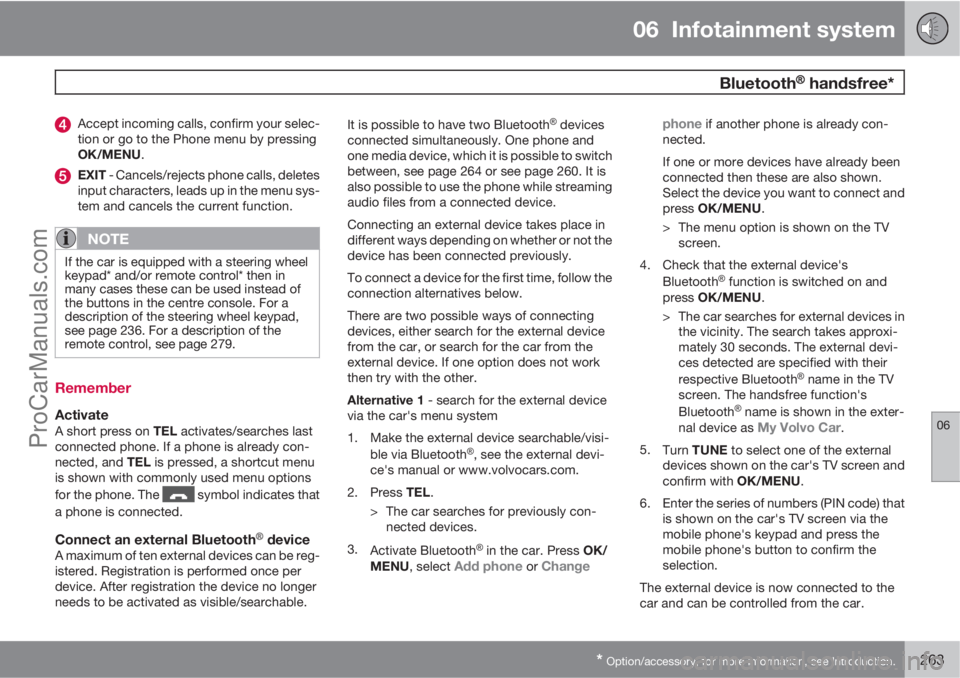
Accept incoming calls, confirm your selec-
tion or go to the Phone menu by pressing
OK/MENU.
EXIT - Cancels/rejects phone calls, deletes
input characters, leads up in the menu sys-
tem and cancels the current function.
NOTE
If the car is equipped with a steering wheel
keypad* and/or remote control* then in
many cases these can be used instead of
the buttons in the centre console. For a
description of the steering wheel keypad,
see page 236. For a description of the
remote control, see page 279.
Remember
ActivateA short press on TEL activates/searches last
connected phone. If a phone is already con-
nected, and TEL is pressed, a shortcut menu
is shown with commonly used menu options
for the phone. The
symbol indicates that
a phone is connected.
Connect an external BluetoothŸ deviceA maximum of ten external devices can be reg-
istered. Registration is performed once per
device. After registration the device no longer
needs to be activated as visible/searchable.It is possible to have two Bluetooth
Ÿ devices
connected simultaneously. One phone and
one media device, which it is possible to switch
between, see page 264 or see page 260. It is
also possible to use the phone while streaming
audio files from a connected device.
Connecting an external device takes place in
different ways depending on whether or not the
device has been connected previously.
To connect a device for the first time, follow the
connection alternatives below.
There are two possible ways of connecting
devices, either search for the external device
from the car, or search for the car from the
external device. If one option does not work
then try with the other.
Alternative 1 - search for the external device
via the car's menu system
1. Make the external device searchable/visi-
ble via Bluetooth
Ÿ, see the external devi-
ce's manual or www.volvocars.com.
2.
Press TEL.
> The car searches for previously con-
nected devices.
3.
Activate Bluetooth
Ÿ in the car. Press OK/
MENU, select Add phone or Changephone
if another phone is already con-
nected.
If one or more devices have already been
connected then these are also shown.
Select the device you want to connect and
press OK/MENU.
> The menu option is shown on the TV
screen.
4. Check that the external device's
Bluetooth
Ÿ function is switched on and
press OK/MENU.
> The car searches for external devices in
the vicinity. The search takes approxi-
mately 30 seconds. The external devi-
ces detected are specified with their
respective Bluetooth
Ÿ name in the TV
screen. The handsfree function's
Bluetooth
Ÿ name is shown in the exter-
nal device as My Volvo Car.
5.
Turn TUNE to select one of the external
devices shown on the car's TV screen and
confirm with OK/MENU.
6. Enter the series of numbers (PIN code) that
is shown on the car's TV screen via the
mobile phone's keypad and press the
mobile phone's button to confirm the
selection.
The external device is now connected to the
car and can be controlled from the car.
ProCarManuals.com
Page 268 of 422
06 Infotainment system
BluetoothŸŸ handsfree*
06
266* Option/accessory, for more information, see Introduction.
there is no number stored then this menu can
be reached with one long press on 1.
Audio settings
Phone call volumeThe phone call volume can only be changed
during a call. Use the steering wheel keypad*
or turn the VOL control.
Audio system volumeProviding there is no ongoing call taking place,
the audio system volume is controlled as usual
by turning VOL.
If an audio source is active during an incoming
call then it can be muted automatically. Acti-
vate/deactivate in phone mode under Phone
menu
Phone settingsSounds and
volume
Mute radio/media.
Ring volume
In phone mode go to Phone menuPhone
settings
Sounds and volumeRing
volume and adjust by turning VOL. Press OK/
MENU to hear the audio volume. Press EXIT
to save.
Ring signalsThe handsfree function has integrated ring sig-
nals that can be selected in phone mode under
Phone menu
Phone settingsSounds
and volume
Ring signalsRing signal 1
etc.
NOTE
For some mobile phones, the ringtone on
the phone connected will not be switched
off when one of the inbuilt signals for the
handsfree system is used.
In order to select the connected phone's ring
signal3, go in phone mode to Phone menu
Phone settingsSounds and volume
Ring signalsMobile phone ring signal.
Phone book
There are two phone books. These are merged
into one in the car and are displayed as a single
phone book in the car.
•The car downloads the mobile phone's
phone book and only displays this phone
book when the mobile phone from whichthis phone book was downloaded is con-
nected.
•The car also has a built-in phone book. This
contains all the contacts stored in the car
irrespective of which phone was con-
nected when saving them. These contacts
are visible for all users, regardless of the
mobile phone that is connected to the car.
If a contact is saved in the car then the
symbol
is shown in front of the con-
tact in the phone book.
NOTE
Changes made from the car to a record in
the mobile phone's telephone book will
result in a new record in the car's telephone
book, i.e. changes will not be saved to the
phone. From the car, this will now look like
you have double records, with different
icons. Note also that when a shortcut num-
ber is saved or a change to a contact is
made, this will result in a new record in the
car's phone book.
All use of the phone book requires that the
symbol appears at the top of the TV
screen and that the handsfree function is in
phone mode.
3Not supported by all mobile phones.
ProCarManuals.com
Page 274 of 422
06 Infotainment system
Voice recognition* mobile phone
06
272* Option/accessory, for more information, see Introduction.
Remember
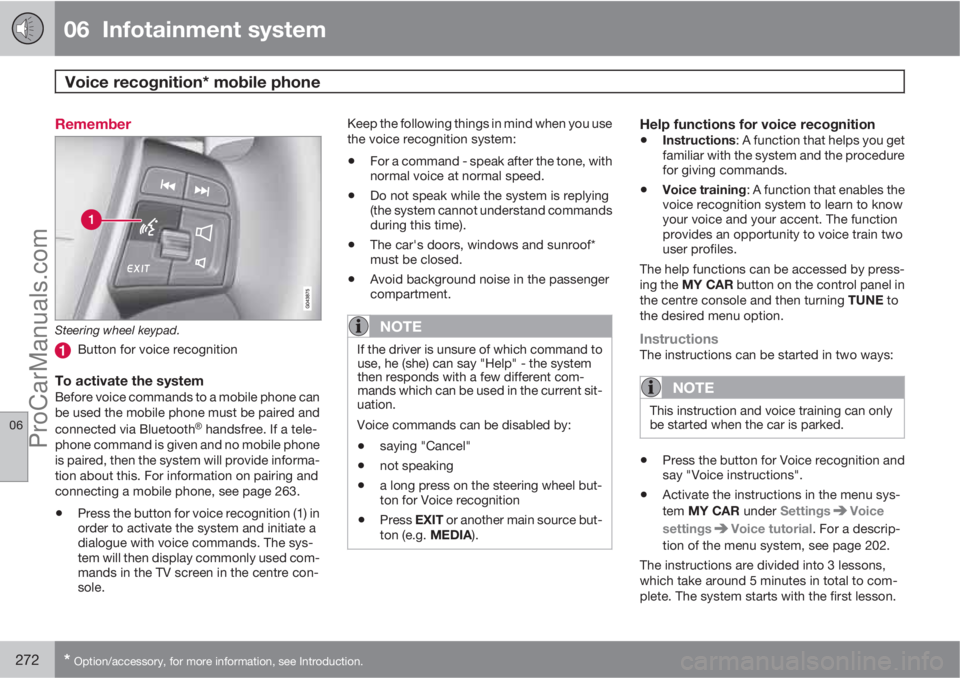
Steering wheel keypad.
Button for voice recognition
To activate the systemBefore voice commands to a mobile phone can
be used the mobile phone must be paired and
connected via Bluetooth
Ÿ handsfree. If a tele-
phone command is given and no mobile phone
is paired, then the system will provide informa-
tion about this. For information on pairing and
connecting a mobile phone, see page 263.
•Press the button for voice recognition (1) in
order to activate the system and initiate a
dialogue with voice commands. The sys-
tem will then display commonly used com-
mands in the TV screen in the centre con-
sole.Keep the following things in mind when you use
the voice recognition system:
•For a command - speak after the tone, with
normal voice at normal speed.
•Do not speak while the system is replying
(the system cannot understand commands
during this time).
•The car's doors, windows and sunroof*
must be closed.
•Avoid background noise in the passenger
compartment.
NOTE
If the driver is unsure of which command to
use, he (she) can say "Help" - the system
then responds with a few different com-
mands which can be used in the current sit-
uation.
Voice commands can be disabled by:
•saying "Cancel"
•not speaking
•a long press on the steering wheel but-
ton for Voice recognition
•Press EXIT or another main source but-
ton (e.g. MEDIA).
Help functions for voice recognition
•Instructions: A function that helps you get
familiar with the system and the procedure
for giving commands.
•Voice training: A function that enables the
voice recognition system to learn to know
your voice and your accent. The function
provides an opportunity to voice train two
user profiles.
The help functions can be accessed by press-
ing the MY CAR button on the control panel in
the centre console and then turning TUNE to
the desired menu option.
InstructionsThe instructions can be started in two ways:
NOTE
This instruction and voice training can only
be started when the car is parked.
•Press the button for Voice recognition and
say "Voice instructions".
•Activate the instructions in the menu sys-
tem MY CAR under Settings
Voice
settings
Voice tutorial. For a descrip-
tion of the menu system, see page 202.
The instructions are divided into 3 lessons,
which take around 5 minutes in total to com-
plete. The system starts with the first lesson.
ProCarManuals.com
Page 277 of 422
06 Infotainment system
TV*
06
* Option/accessory, for more information, see Introduction.275 General
NOTE
This system only supports TV transmissions
in countries which transmit signals in
mpeg-2 format and follow the DVB-T stand-
ard. The system does not support TV trans-
missions in mpeg-4 format or analogue
transmissions.
NOTE
The TV picture is only shown when the car
is stationary. When the car is moving at a
speed over about 6 km/h the picture disap-
pears,
No visual media available while
driving appears on the display screen,
although the audio is heard during this time.
The picture reappears when the car has
stopped.
Cars with RSE do not shut off the rear
screens.
NOTE
The reception is dependent both on how
good the signal strength and signal quality
are. The transmission may be disturbed by
various factors such as tall buildings or the
TV transmitter being far away. Coverage
level can also vary depending on where in
the country you are located.
IMPORTANT
A TV licence is required for this product in
some countries.
MenusThe menus in MEDIA are controlled from the
centre console and the steering wheel key-
pad*. For general information on menu naviga-
tion, see page 238 and menu overview, see
page 241.
Overview
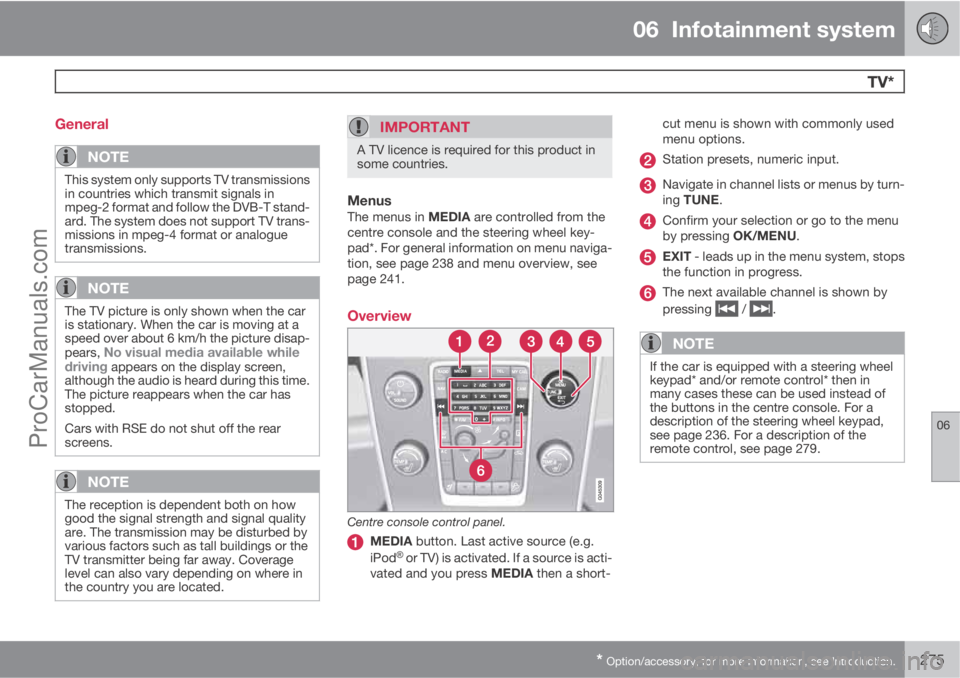
Centre console control panel.
MEDIA button. Last active source (e.g.
iPodŸ or TV) is activated. If a source is acti-
vated and you press MEDIA then a short-cut menu is shown with commonly used
menu options.
Station presets, numeric input.
Navigate in channel lists or menus by turn-
ing TUNE.
Confirm your selection or go to the menu
by pressing OK/MENU.
EXIT - leads up in the menu system, stops
the function in progress.
The next available channel is shown by
pressing
/ .
NOTE
If the car is equipped with a steering wheel
keypad* and/or remote control* then in
many cases these can be used instead of
the buttons in the centre console. For a
description of the steering wheel keypad,
see page 236. For a description of the
remote control, see page 279.
ProCarManuals.com
Page 281 of 422

06 Infotainment system
Remote control*
06
* Option/accessory, for more information, see Introduction.279 General*
Corresponds to TUNE in the centre con-
sole.The remote control can be used for all func-
tions in the infotainment system. The remote
control's buttons have the same functions as
the buttons in the centre console or steering
wheel keypad*.
When using the remote control, first press the
remote control's button
to position F.
Then aim the remote control at the IR receiver,
which is located to the right of the INFO button
(see page 235) in the centre console.
WARNING
Keep loose objects such as mobile phones,
cameras, remote controls for accessories,
etc. in the glove compartment or other com-
partments. Otherwise they may injure peo-
ple in the car in the event of sudden braking
or a collision.
NOTE
Do not expose the remote control to direct
sunlight (e.g. on the instrument panel) - oth-
erwise problems may arise with the batter-
ies.
functions
KeyFunction
F = Front TV screen
Change to navigation*
Change to radio source (AM,FM1 etc.)
Change to media source (Disc,TV* etc.)
Change to BluetoothŸ hands-
free*
Scroll/fast rewind, change track/
song.
Play/pause
Stop
Scroll/fast forward, change
track/song.
Menu
To previous, cancels function,
deletes input characters
ProCarManuals.com
Page 286 of 422

07 During your journey
Recommendations during driving
07
284
General
Economical drivingDriving economically means driving smoothly
while thinking ahead and adjusting your driving
style and speed to the prevailing conditions.
•Drive in the highest gear possible, adapted
to the current traffic situation and road -
lower engine speeds result in lower fuel
consumption.
•Avoid driving with open windows.
•Avoid sudden unnecessary acceleration
and heavy braking.
•Remove unnecessary items from the car -
the greater the load the higher the fuel con-
sumption.
•Use engine braking to slow down, when it
can take place without risk to other road
users.
•A roof load and ski box increase air resis-
tance, leading to higher fuel consumption
- remove the load carriers when not in use.
•Do not run the engine to operating tem-
perature at idling speed, but rather drive
with a light load as soon as possible - a
cold engine consumes more fuel than a
warm one.
•A car with D2, D3, D4 or D5 engine in com-
bination with a 6-speed manual gearbox is
started in 2nd gear.For more information and further advice, see
the pages 12 and 384.
WARNING
Never switch off the engine while moving,
such as downhill, this deactivates important
systems such as the power steering and
brake servo.
Driving in waterThe car can be driven through water at a maxi-
mum depth of 25 cm at a maximum speed of
10 km/h. Extra caution should be exercised
when passing through flowing water.
During driving in water, maintain a low speed
and do not stop the car. When the water has
been passed, depress the brake pedal lightly
and check that full brake function is achieved.
Water and mud for example can make the
brake linings wet resulting in delayed brake
function.
•Clean the electric contacts of the electric
engine block heater and trailer coupling
after driving in water and mud.
•Do not let the car stand with water over the
sills for any long period of time - this could
cause electrical malfunctions.
IMPORTANT
Engine damage can occur if water enters
the air filter.
In depths greater than 25 cm, water could
enter the transmission. This reduces the
lubricating ability of the oils and shortens
the service life of these systems.
In the event of the engine stalling in water,
do not try restart - tow the car from the water
to a workshop - an authorised Volvo work-
shop is recommended. Risk of engine
breakdown.
Engine, gearbox and cooling systemUnder special conditions, for example hard
driving in hilly terrain and hot climate, there is
a risk that the engine and drive system may
overheat - in particular with a heavy load.
For information about overheating when driv-
ing with a trailer, see page 298.
•Remove any auxiliary lamps from in front
of the grille when driving in hot climates.
•If the temperature in the engine's cooling
system is too high the instrument panel's
warning symbol is illuminated and there is
a text message displayed there
High
engine temp Stop safely - stop the car in
a safe way and allow the engine to run at
idling speed for several minutes to cool
down.
ProCarManuals.com
Page 305 of 422
07 During your journey
Driving with a trailer
07
* Option/accessory, for more information, see Introduction.303
G018929
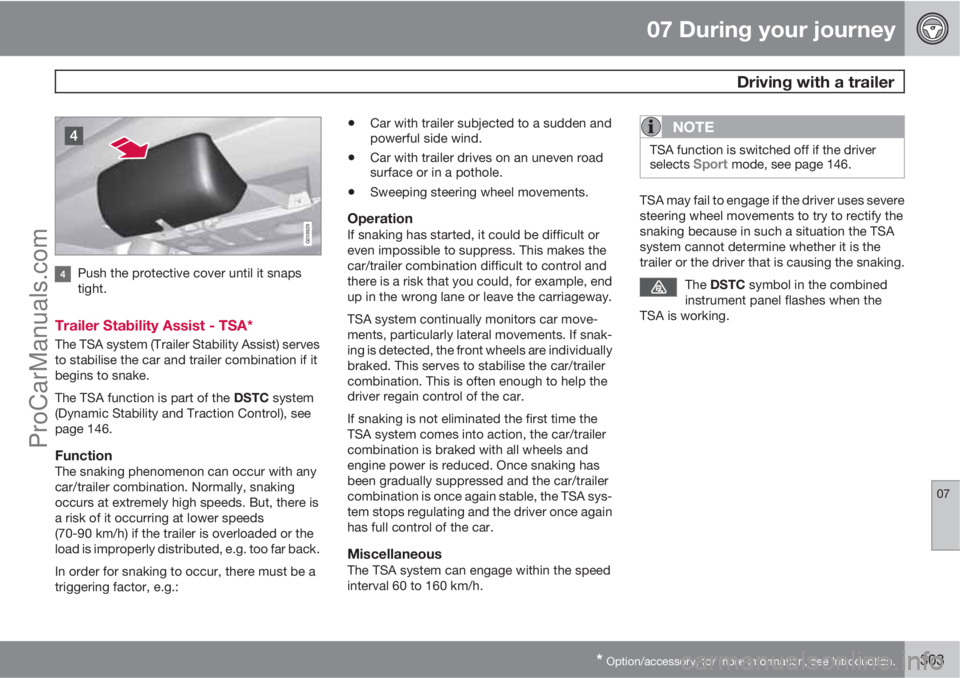
Push the protective cover until it snaps
tight.
Trailer Stability Assist - TSA*
The TSA system (Trailer Stability Assist) serves
to stabilise the car and trailer combination if it
begins to snake.
The TSA function is part of the DSTC system
(Dynamic Stability and Traction Control), see
page 146.
FunctionThe snaking phenomenon can occur with any
car/trailer combination. Normally, snaking
occurs at extremely high speeds. But, there is
a risk of it occurring at lower speeds
(70-90 km/h) if the trailer is overloaded or the
load is improperly distributed, e.g. too far back.
In order for snaking to occur, there must be a
triggering factor, e.g.:
•Car with trailer subjected to a sudden and
powerful side wind.
•Car with trailer drives on an uneven road
surface or in a pothole.
•Sweeping steering wheel movements.
OperationIf snaking has started, it could be difficult or
even impossible to suppress. This makes the
car/trailer combination difficult to control and
there is a risk that you could, for example, end
up in the wrong lane or leave the carriageway.
TSA system continually monitors car move-
ments, particularly lateral movements. If snak-
ing is detected, the front wheels are individually
braked. This serves to stabilise the car/trailer
combination. This is often enough to help the
driver regain control of the car.
If snaking is not eliminated the first time the
TSA system comes into action, the car/trailer
combination is braked with all wheels and
engine power is reduced. Once snaking has
been gradually suppressed and the car/trailer
combination is once again stable, the TSA sys-
tem stops regulating and the driver once again
has full control of the car.
MiscellaneousThe TSA system can engage within the speed
interval 60 to 160 km/h.
NOTE
TSA function is switched off if the driver
selects Sport mode, see page 146.
TSA may fail to engage if the driver uses severe
steering wheel movements to try to rectify the
snaking because in such a situation the TSA
system cannot determine whether it is the
trailer or the driver that is causing the snaking.
The DSTC symbol in the combined
instrument panel flashes when the
TSA is working.
ProCarManuals.com
Page 306 of 422

07 During your journey
Towing and recovery
07
304
Towing
Find out the statutory maximum speed limit for
towing before towing begins.
1. Unlock the steering lock by inserting the
remote control key in the ignition switch
and giving a long press on the START/
STOP ENGINE button - key position II is
activated, see page 78 for more informa-
tion on key positions.
2. The remote control key must remain in the
ignition switch while the car is being towed.
3. Keep the towline taut when the towing
vehicle reduces speed by holding your foot
gently pressed on the brake pedal -
thereby avoiding unnecessary jerking.
4. Be prepared to brake to stop.
WARNING
•Check that the steering lock is unlocked
before towing.
•The remote control key must be in key
position II - in position I all airbags are
deactivated.
•Never remove the remote control key
from the ignition switch when the car is
being towed.
WARNING
The brake servo and power steering do not
work when the engine is switched off - the
brake pedal needs to be depressed
about 5 times more heavily and the steering
is considerably heavier than normal.
Manual gearboxPrior to towing:
–Move gear lever into neutral and release
the parking brake.
Automatic gearbox Geartronic
IMPORTANT
Note that the car must always be towed with
the wheels rolling forward.
•Cars with automatic gearbox must not
be towed at speeds above 80 km/h or
further than 80 km.
Prior to towing:
–
Move the gear selector to position N and
release the parking brake.
Automatic gearbox PowershiftThe model with Powershift transmission
should not be towed as it is dependent on the
engine running in order to receive sufficientlubrication. If towing still has to take place, the
route must be as short as possible and then
with very low speed.
In the event of uncertainty as to whether or not
the car is equipped with Powershift transmis-
sion, this can be verified by checking the des-
ignation on the transmission's label under the
bonnet - see page 370. The designa-
tion ”MPS6” means that it is Powershift – trans-
mission otherwise it is Geartronic automatic
transmission.
IMPORTANT
Avoid towing.
•However, the car can be towed for a
short distance at low speed to move it
from a dangerous position - not further
than 10 km and not faster than
10 km/h. Note that the car must always
be towed with the wheels rolling for-
ward.
•In the event of moving a longer distance
than 10 km, the car must be transported
with the drive wheels raised from the
road - professional recovery is recom-
mended.
Prior to towing:
–
Move the gear selector to position N and
release the parking brake.
ProCarManuals.com