2013 VOLVO V60 stop start
[x] Cancel search: stop startPage 184 of 422
04 Driver support
Driver Alert System - DAC*
04
182* Option/accessory, for more information, see Introduction.
General information on DAC
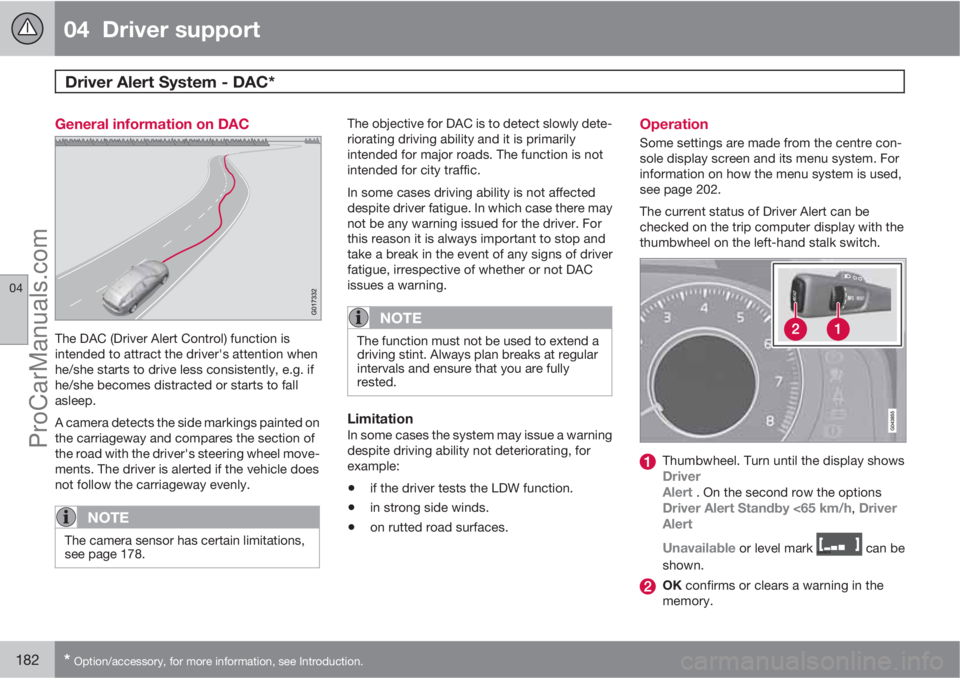
The DAC (Driver Alert Control) function is
intended to attract the driver's attention when
he/she starts to drive less consistently, e.g. if
he/she becomes distracted or starts to fall
asleep.
A camera detects the side markings painted on
the carriageway and compares the section of
the road with the driver's steering wheel move-
ments. The driver is alerted if the vehicle does
not follow the carriageway evenly.
NOTE
The camera sensor has certain limitations,
see page 178.
The objective for DAC is to detect slowly dete-
riorating driving ability and it is primarily
intended for major roads. The function is not
intended for city traffic.
In some cases driving ability is not affected
despite driver fatigue. In which case there may
not be any warning issued for the driver. For
this reason it is always important to stop and
take a break in the event of any signs of driver
fatigue, irrespective of whether or not DAC
issues a warning.
NOTE
The function must not be used to extend a
driving stint. Always plan breaks at regular
intervals and ensure that you are fully
rested.
LimitationIn some cases the system may issue a warning
despite driving ability not deteriorating, for
example:
•if the driver tests the LDW function.
•in strong side winds.
•on rutted road surfaces.
Operation
Some settings are made from the centre con-
sole display screen and its menu system. For
information on how the menu system is used,
see page 202.
The current status of Driver Alert can be
checked on the trip computer display with the
thumbwheel on the left-hand stalk switch.
Thumbwheel. Turn until the display showsDriver
Alert . On the second row the optionsDriver Alert Standby <65 km/h, Driver
Alert
Unavailable
or level mark can be
shown.
OK confirms or clears a warning in the
memory.
ProCarManuals.com
Page 203 of 422
05 Comfort and driving pleasure
Menus and messages
05
201
NOTE
If a warning message appears while you are
using the trip computer, the message must
be read (press OK) before the previous
activity can be resumed.
MessageSpecification
Stop safelyAStop and switch off the
engine. Serious risk of
damage - consult a
workshop
B.
Stop engineAStop and switch off the
engine. Serious risk of
damage - consult a
workshop
B.
Service urgentAContact a workshopB to
check the car immedi-
ately.
Service
requiredAContact a workshopB to
check the car as soon
as possible.
See manualARead the owner's man-
ual.
Book time for
maintenanceTime to book regular
service - contact a
workshop
B.
MessageSpecification
Time for regular
maintenanceTime for regular service
- contact a workshopB.
The timing is deter-
mined by the number of
kilometres driven, num-
ber of months since the
last service, engine run-
ning time and oil grade.
Maintenance
overdueIf the service intervals
are not followed then
the warranty does not
cover any damaged
parts - contact a work-
shop
B.
Transmission
oil Change nee-
dedContact a workshopB to
check the car as soon
as possible.
Transmission
performance
lowThe gearbox cannot
handle full capacity.
Drive carefully until the
message clears
C.
If shown repeatedly -
contact a workshop
B.
MessageSpecification
Transmission
hot Reduce
speedDrive more smoothly or
stop the car in a safe
manner. Disengage the
gear and run the engine
at idling speed until the
message clears
C.
Transmission
hot Stop safelyCritical fault. Stop the
car immediately in a
safe manner and con-
tact a workshop
B.
Temporarily
OFFAA function has been
temporarily switched
off and is reset auto-
matically while driving
or after starting again.
Low battery
Power save
modeThe audio system is
switched off to save
energy. Charge the bat-
tery.
APart of message, shown together with information on where
the problem has arisen.
BAn authorised Volvo workshop is recommended.CFor more messages concerning automatic transmission, see
page 125.
ProCarManuals.com
Page 206 of 422
05 Comfort and driving pleasure
Menu source MY CAR
05
204* Option/accessory, for more information, see Introduction.
My V60
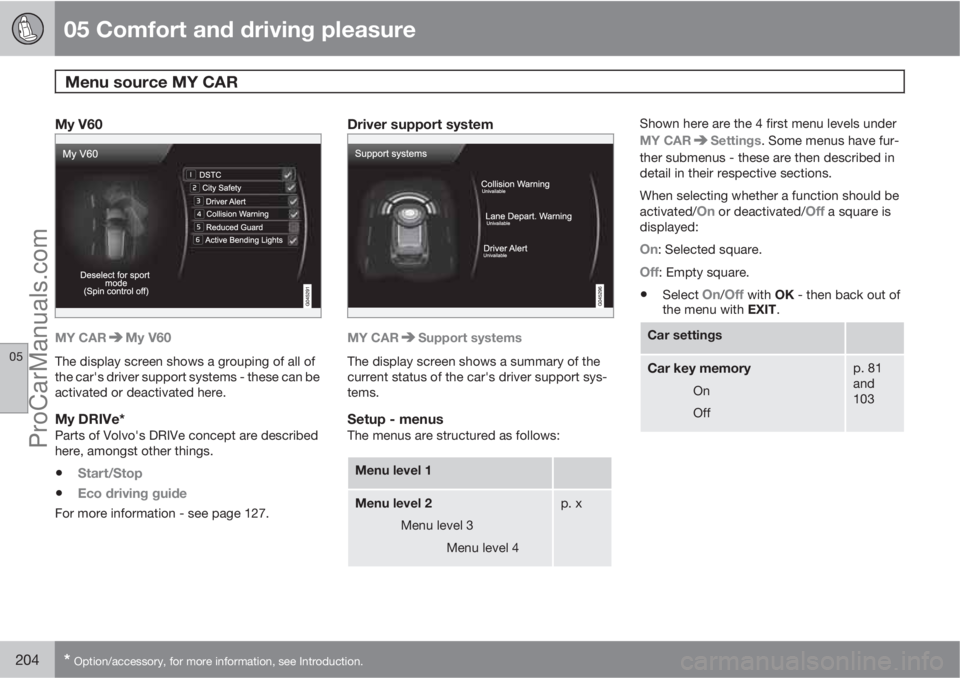
MY CARMy V60
The display screen shows a grouping of all of
the car's driver support systems - these can be
activated or deactivated here.
My DRIVe*Parts of Volvo's DRIVe concept are described
here, amongst other things.
•Start/Stop
•Eco driving guide
For more information - see page 127.
Driver support system
MY CARSupport systems
The display screen shows a summary of the
current status of the car's driver support sys-
tems.
Setup - menusThe menus are structured as follows:
Menu level 1
Menu level 2
Menu level 3
Menu level 4p. x
Shown here are the 4 first menu levels under
MY CAR
Settings. Some menus have fur-
ther submenus - these are then described in
detail in their respective sections.
When selecting whether a function should be
activated/
On or deactivated/Off a square is
displayed:
On: Selected square.
Off: Empty square.
•Select On/Off with OK - then back out of
the menu with EXIT.
Car settings
Car key memory
On
Off
p. 81
and
103
ProCarManuals.com
Page 220 of 422

05 Comfort and driving pleasure
Climate control
05
218* Option/accessory, for more information, see Introduction.
settingsInterior air quality system. For a
description of the menu system, see
page 203.
NOTE
The air quality sensor should always be
engaged in order to obtain the best air in the
passenger compartment.
Recirculation is limited in cold weather to
avoid misting.
If the insides of the windows start misting
up, disengage the air quality sensor, and the
defroster functions for the windscreen, the
side and the rear windows should also be
used to demist the windows.
Cars with Eco Start/Stop DRIVe*With an auto-stopped engine certain equip-
ment has its function temporarily reduced, e.g.
climate control fan speed. For more informa-
tion, see page 127.
ProCarManuals.com
Page 223 of 422
05 Comfort and driving pleasure
Fuel-driven engine block heater and passenger compartment heater*
05
* Option/accessory, for more information, see Introduction.221 Operation
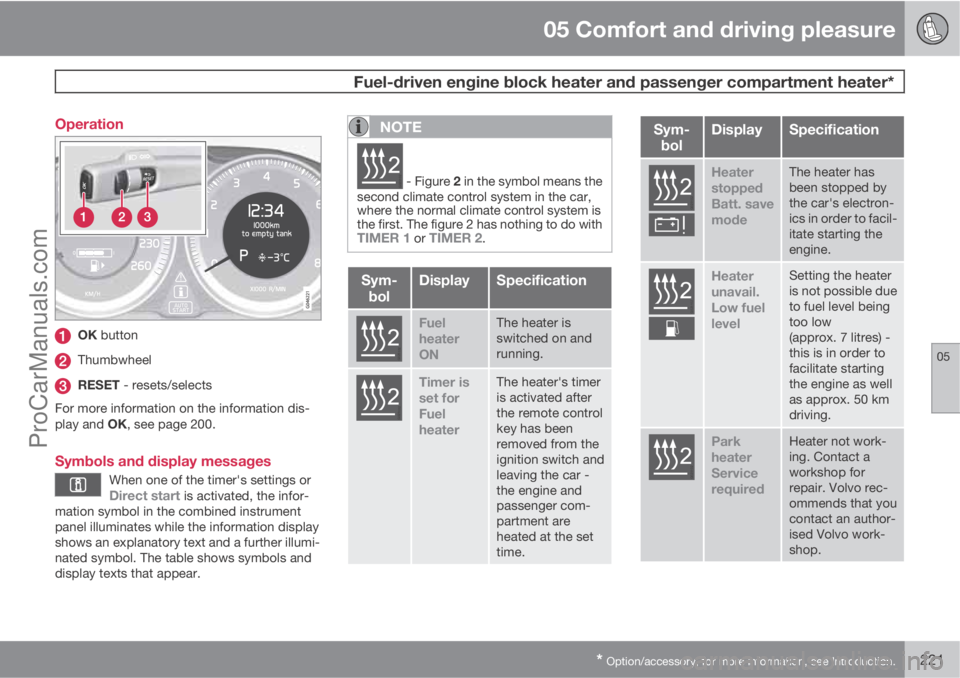
OK button
Thumbwheel
RESET - resets/selects
For more information on the information dis-
play and OK, see page 200.
Symbols and display messages
When one of the timer's settings orDirect start is activated, the infor-
mation symbol in the combined instrument
panel illuminates while the information display
shows an explanatory text and a further illumi-
nated symbol. The table shows symbols and
display texts that appear.
NOTE
G02510
2 - Figure 2 in the symbol means the
second climate control system in the car,
where the normal climate control system is
the first. The figure 2 has nothing to do with
TIMER 1 or TIMER 2.
Sym-
bolDisplaySpecification
G02510
2
Fuel
heater
ONThe heater is
switched on and
running.
G02510
2
Timer is
set for
Fuel
heaterThe heater's timer
is activated after
the remote control
key has been
removed from the
ignition switch and
leaving the car -
the engine and
passenger com-
partment are
heated at the set
time.
Sym-
bolDisplaySpecification
G025102
Heater
stopped
Batt. save
modeThe heater has
been stopped by
the car's electron-
ics in order to facil-
itate starting the
engine.
G025102
Heater
unavail.
Low fuel
levelSetting the heater
is not possible due
to fuel level being
too low
(approx. 7 litres) -
this is in order to
facilitate starting
the engine as well
as approx. 50 km
driving.
G025102
Park
heater
Service
requiredHeater not work-
ing. Contact a
workshop for
repair. Volvo rec-
ommends that you
contact an author-
ised Volvo work-
shop.
ProCarManuals.com
Page 224 of 422

05 Comfort and driving pleasure
Fuel-driven engine block heater and passenger compartment heater*
05
222* Option/accessory, for more information, see Introduction.
A display text clears automatically after a time
or after one press on the indicator stalk OK
button.
Direct start and immediate stop
1.
Scroll with the thumbwheel to Direct start
Park heat.
2.
Press RESET to select between
ON andOFF.
ON: Parking heater switched on manually or
with programmed timer.
OFF: Parking heater switched off.
Following the direct start of the heater it will be
activated for 50 minutes.
Heating of the passenger compartment will
begin as soon as the engine coolant has
reached the correct temperature.
NOTE
The car can be started and driven while the
parking heater is running.
Setting the timer
The time when the car shall be used and heated
is specified with the timer.
Select between
TIMER 1 and TIMER 2.
NOTE
The timer can only be programmed when
the remote control key is in key position I,
see page 78 - programming must therefore
be carried out before starting the engine.
1.
Scroll with the thumbwheel to Park heat
timer 1.
2.
Briefly press RESET to move to the flash-
ing hours setting.
3. Select the required hour using the thumb-
wheel.
4.
Briefly press RESET to move to the flash-
ing minutes setting.
5. Select the required minute using the
thumbwheel.
6.
Briefly press RESET to confirm the setting.
7.
Press RESET to activate the timer.
After setting
Park heat timer 1 a second start
time can be programmed with Park heat timer
2 by scrolling to it with the thumbwheel.Set the alternative time in the same way as
Park heat timer 1.
Deactivating a timer-started heaterA timer-started heater can be switched off
manually before the set time has elapsed. Pro-
ceed as follows:
1.
Press OK.
2. Use the thumbwheel to scroll to the text
Park heat timer 1 or 2.
>
The text
ON flashes on the display.
3.
Press RESET.
>
The text
OFF is shown with a constant
glow and the heater is switched OFF.
A timer-started heater can be switched off in
accordance with the instructions in the section
"Direct start and immediate stop", see
page 222.
Clock/timerThe heater's time is connected to the car's
clock.
NOTE
All timer programming will be cleared if the
car's clock is reset.
ProCarManuals.com
Page 251 of 422

06 Infotainment system
Radio
06
* Option/accessory, for more information, see Introduction.249
Regional radio programmes – REGThis function causes the radio to continue with
a regional transmitter even if its signal strength
is low. The symbol
REG shows that the func-
tion is active.
–
Activate/deactivate in FM mode under FM
menu
Advanced settingsREG.
Resetting RDS functionsAll radio settings can be reset to the original
factory settings.
–The reset is carried out in FM mode under
FM menu
Advanced settings
Reset all FM settings.
Volume control, programme typesThe interrupting programme types, e.g.NEWS or TP, are heard at the volume selected
for each respective programme type. If the vol-
ume level is adjusted during the programme
interruption, the new level is saved until the
next programme interruption.
Scan wavelengthThe function automatically searches for avail-
able channels and takes into account any pro-
gramme type filtering. When a station is found,
it is played for approx. 10 seconds before
scanning is resumed. When a station is playing
back it can be saved as a preset in the usual
way, see the section Preset, page 246.–To start scanning go in FM/AM mode to
FM menu
Scan or AM menuScan.
NOTE
Scanning stops if a station is saved.
Radio system - DAB*
GeneralDAB (Digital Audio Broadcasting) is a digital
broadcasting system for radio. This system
supports DAB, DAB+ and DMB.
NOTE
Coverage for DAB is not available in all loca-
tions. If there is no coverage then the mes-
sage
No reception is shown in the display
screen.
Service and Ensemble
•Service - Channel, radio channel (only
audio services are supported by the sys-
tem).
•Ensemble - A collection of radio channels
on the same frequency.
Storing channel groups (Ensemble learn)When the vehicle is moved to a new broad-
casting area, programming of existing channel
groups in the area may be necessary.Programming of channel groups creates an
updated list of all available channel groups.
The list is not updated automatically.
Programming is carried out in the menu system
in DAB mode under DAB menu
Ensemble
learn. Programming can also take place as fol-
lows:
1.
Turn TUNE one step in either direction.
>
Ensemble learn is shown in the list of
available channel groups.
2.
Press OK/MENU.
> New programming is started.
Programming can be cancelled with EXIT.
Navigation in channel group list
(Ensemble)
To navigate in and access the channel group
list turn TUNE. The name of the Ensemble is
shown in the upper part of the TV screen. When
switching to the new Ensemble the name
changes to the new one.
•Service - Shows channels irrespective of
the channel group to which they are allo-
cated. The list can also be filtered using the
selection of programme type (
PTY
filtering), see below.
ProCarManuals.com
Page 252 of 422

06 Infotainment system
Radio
06
250
ScanningThe function automatically searches the cur-
rent wavelength for strong stations. When a
station is found, it is played for approx. 10 sec-
onds before scanning is resumed. When a sta-
tion is playing back it is saved as a preset in the
usual way. For more information on presets,
see "Preset" below.
–
Go in DAB mode to DAB menu
Scan to
start scanning.
NOTE
Scanning stops if a station is saved.
Scanning can also be selected in DAB-PTY
mode. In which case only channels of the pre-
selected programme type are played.
Programme type (PTY)Various types of radio programmes can be
selected using the programme type function.
There are a number of different programme
types which also include different programme
categories. After selecting a programme type,
navigation only takes place within the channels
that are broadcasting that type.Programme type is selected in DAB mode
under DAB menu
PTY filtering. Exit this
mode as follows:
–
Press EXIT.
> An indicator is shown in the TV screen
when PTY is activated.
In certain cases DAB radio will exit PTY mode
when DAB to DAB linking (see below) is imple-
mented.
Preset10 station presets can be stored per wave-
length. DAB has 2 memories for presets:
DAB1 and DAB2. Storage of presets is made
by means of a long press on the desired preset
button, for more information see page 246. The
stored presets are selected using the preset
buttons.
A preset contains one channel but no sub-
channels. If a subchannel is being played and
a preset is saved then only the main channel is
registered. This is because subchannels are
temporary. At the next attempt to retrieve the
preset, the channel which contained the sub-
channel will be played. The preset is not
dependent on the channel list.A list of pre-selected channels can be shown
5
in the TV screen. The function is activated/
deactivated in DAB mode under DAB menu
Show presets.
NOTE
The audio system's DAB system does not
support all functions available in the DAB
standard.
Radio textSome radio stations transmit information on
programme content, artists, etc. This informa-
tion is shown on the TV screen.
The function is deactivated/activated in DAB
mode under DAB menu
Show radio text.
NOTE
Only one of the functions "Show radio
text" and "Show presets" can be acti-
vated at a time. If one of them is activated
when the other is already activated, then the
previously activated function is deactivated
automatically. Both functions can be deac-
tivated.
5Only applies to High Performance Multimedia and Premium Sound Multimedia.
ProCarManuals.com