2013 VOLVO V60 stop start
[x] Cancel search: stop startPage 140 of 422
03 Your driving environment
Parking brake
03
138
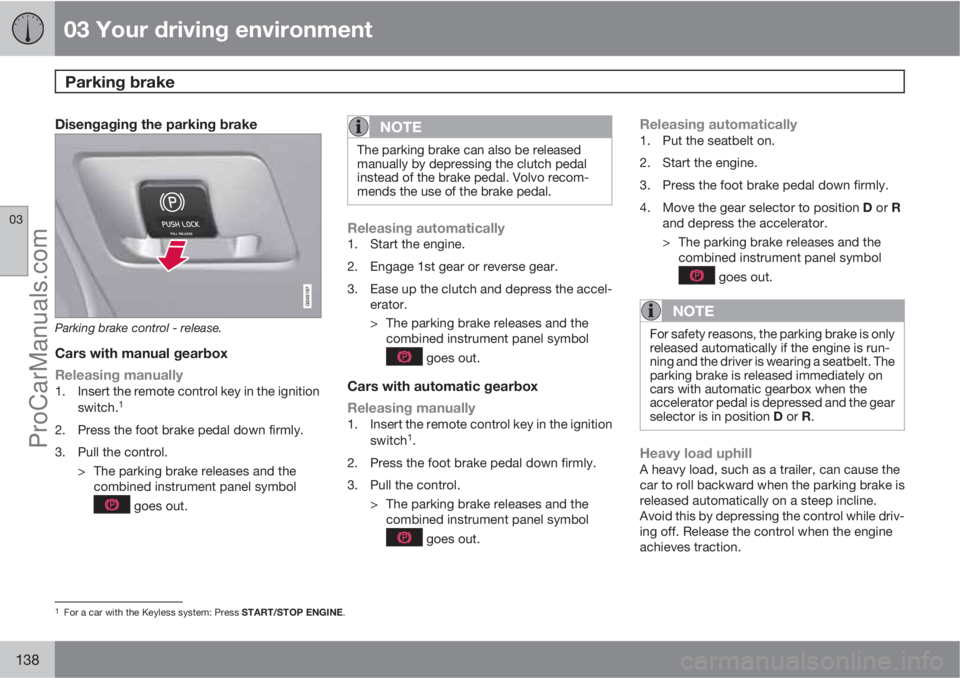
Disengaging the parking brake
Parking brake control - release.
Cars with manual gearbox
Releasing manually
1. Insert the remote control key in the ignition
switch.1
2. Press the foot brake pedal down firmly.
3. Pull the control.
> The parking brake releases and the
combined instrument panel symbol
goes out.
NOTE
The parking brake can also be released
manually by depressing the clutch pedal
instead of the brake pedal. Volvo recom-
mends the use of the brake pedal.
Releasing automatically1. Start the engine.
2. Engage 1st gear or reverse gear.
3. Ease up the clutch and depress the accel-
erator.
> The parking brake releases and the
combined instrument panel symbol
goes out.
Cars with automatic gearbox
Releasing manually
1. Insert the remote control key in the ignition
switch1.
2. Press the foot brake pedal down firmly.
3. Pull the control.
> The parking brake releases and the
combined instrument panel symbol
goes out.
Releasing automatically1. Put the seatbelt on.
2. Start the engine.
3. Press the foot brake pedal down firmly.
4.
Move the gear selector to position D or R
and depress the accelerator.
> The parking brake releases and the
combined instrument panel symbol
goes out.
NOTE
For safety reasons, the parking brake is only
released automatically if the engine is run-
ning and the driver is wearing a seatbelt. The
parking brake is released immediately on
cars with automatic gearbox when the
accelerator pedal is depressed and the gear
selector is in position D or R.
Heavy load uphillA heavy load, such as a trailer, can cause the
car to roll backward when the parking brake is
released automatically on a steep incline.
Avoid this by depressing the control while driv-
ing off. Release the control when the engine
achieves traction.
1For a car with the Keyless system: Press START/STOP ENGINE.
ProCarManuals.com
Page 148 of 422

04 Driver support
DSTC – Stability and traction control system
04
146* Option/accessory, for more information, see Introduction.
General information on DSTC
The stability and traction control system, DSTC
(Dynamic Stability & Traction Control) helps the
driver to avoid skidding and improves the car's
traction.
The activation of the system during braking
may be noticed as a throbbing sound. The car
may accelerate slower than expected when the
accelerator pedal is depressed.
Active Yaw ControlThe function limits the driving and brake force
of the wheels individually in order to stabilise
the car.
Spin ControlThe function prevents the driving wheels from
spinning against the road surface during accel-
eration.
Traction control systemThe function is active at low speed and trans-
fers power from the driving wheel that is spin-
ning to the one that is not.
Engine drag control - EDCEDC (Engine Drag Control) prevents involun-
tary wheel locking, e.g. after shifting down or
engine braking when driving in low gears on
slippery road surfaces.Involuntary wheel locking while driving can,
amongst other things, impair the driver's ability
to steer the car.
Corner Traction Control – CTCCTC compensates for understeer and allows
higher than normal acceleration in a bend with-
out wheelspin on the inner wheel, e.g. on an
arcing motorway entrance road to quickly
reach the prevailing traffic speed.
Trailer Stability Assist* - TSAThe function serves to stabilise the car and
trailer combination if it begins to snake, see
page 303.
NOTE
The function is deactivated if the driver
selects Sport mode.
Operation
Selection of level - Sport modeThe DSTC system is always activated - it can-
not be deactivated.
However, the driver can select the Sport mode,
which allows for a more active driving experi-
ence. In Sport mode the system detects
whether the accelerator pedal, steering wheel
movements and cornering are more active thanin normal driving and then allows controlled
skidding with the rear section up to a certain
level before it intervenes and stabilises the car.
If the driver stops a controlled skid by releasing
the accelerator pedal then the DSTC system
intervenes and stabilises the car.
With Sport mode, maximum traction is
obtained if the car has become stuck, or when
driving on a loose surface - e.g. sand or deep
snow.
Proceed as follows to select Sport mode:
1.
Press the centre console button MY CAR
and search in the display screen's menu
system and locate My V60
DSTC. (For
information on the menu system, see
page 202).
2. Uncheck the box and back out of the menu
system with EXIT.
> The system then allows a more sporty
driving style.
The Sport mode is active until the driver dese-
lects it or until the engine is switched off - after
the engine is started the next time the DSTC
system is back in its normal mode again.
ProCarManuals.com
Page 149 of 422

04 Driver support
DSTC – Stability and traction control system
04
147 Symbols and messages in the display
SymbolMessageSpecification
DSTC Temporarily OFFDSTC system temporarily reduced due to excessive brake disc temperature. - The function is reac-
tivated automatically when the brakes have cooled.
DSTC Service requiredDSTC system disengaged.
•Stop the car in a safe place, switch off the engine and start it again.
•Visit a workshop if the message remains - an authorised Volvo workshop is recommended.
and
"Message"There is a message on the speedometer's display - Read it!
Constant glow for 2 seconds.System check when the engine is started.
Flashing light.DSTC system is being activated.
Sport mode is activated.
ProCarManuals.com
Page 155 of 422
04 Driver support
Cruise control*
04
* Option/accessory, for more information, see Introduction.153
>
The symbol illuminates in the display (5)
and the brackets around
(---) km/h show
that cruise control is set in standby mode.
To activate cruise control:
•At the required speed - press the steering
wheel button
or .
> Current speed is stored in the memory - the
display text
(---) km/h changes to show
the selected speed, e.g. 100 km/h, without
brackets.
NOTE
Cruise control cannot be engaged at
speeds below 30 km/h.
Changing the speedTo change the stored speed:
•Press briefly on the steering wheel button,
or - most recent presses are stored
in memory.
A temporary increase in speed with the accel-
erator pedal, e.g. during overtaking, does not
affect the cruise control setting - the car returns
to the set speed when the accelerator pedal is
released.
NOTE
If any of the Cruise Control buttons are held
down for more than approx. 1 minute, it is
blocked and disabled. To be able to reacti-
vate Cruise Control, the car must be stop-
ped and the engine restarted.
Temporary deactivation - standby modeTo temporarily disengage cruise control and
set it in standby mode:
•Press the steering wheel button .
> Set speed is shown in brackets in the dis-
play (5), e.g.
(100) km/h.
Automatic standby modeCruise control is temporarily disengaged and
set in standby mode if:
•wheels lose traction
•the foot brake is used
•speed falls below approx. 30 km/h
•the clutch pedal is depressed
•the gear selector is moved to neutral posi-
tion (automatic gearbox)
•the driver maintains a speed higher than
the set speed for longer than 1 minute.
The driver must then regulate the speed.
Resume set speedCruise control in standby mode is re-activated
with one press on the steering wheel button
- the speed is then set to the last stored
speed.
NOTE
A significant increase in speed may arise
after the speed has been resumed with .
DeactivateThe cruise control is switched off with the
steering wheel button (1) or by switching off the
engine - the set speed is deleted from the
memory and cannot be resumed with the
button.
ProCarManuals.com
Page 159 of 422
04 Driver support
Adaptive cruise control*
04
* Option/accessory, for more information, see Introduction.157
Changing the speedTo change the stored speed:
•Adjust with short presses on or -
every press gives +/- 5 km/h. The last
presses made are stored in the memory.
If speed is increased using the accelerator
pedal prior to pressing the
/ button,
then it is the car's current speed when the
button is pressed that is stored in the
cruise control.
•In active mode the button has the same
function as
but results in a lower
increase in speed: + 1 km/h.
NOTE
If any of the Cruise Control buttons are held
down for more than approx. 1 minute, it is
blocked and disabled. To be able to reacti-
vate Cruise Control, the car must be stop-
ped and the engine restarted.
In certain situations, cruise control cannot
be activated. Then the display shows
Cruise control Unavailable, see
page 162.
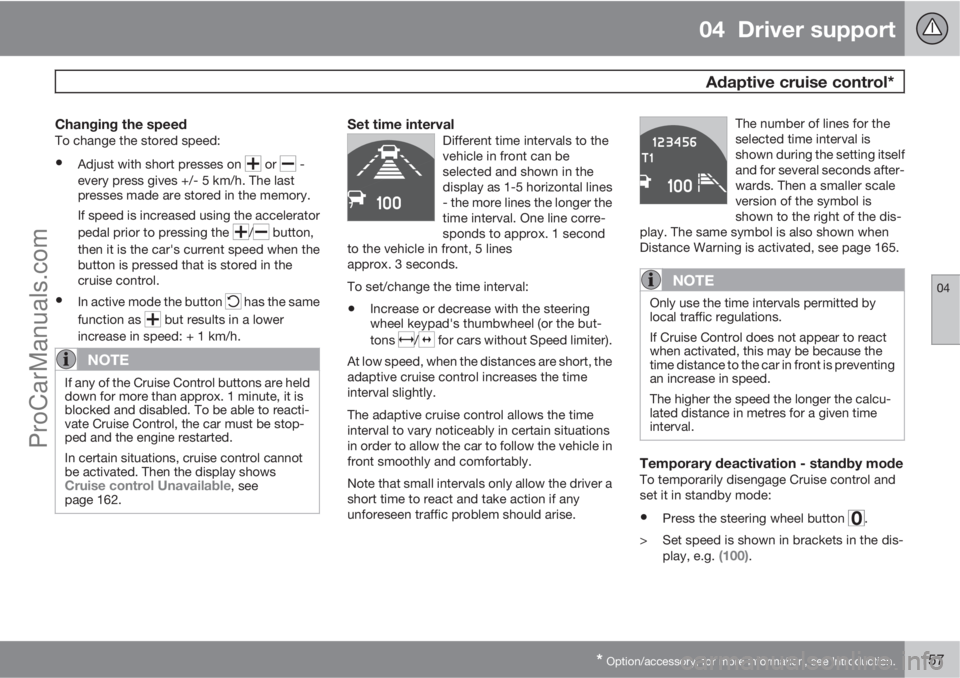
Set time intervalDifferent time intervals to the
vehicle in front can be
selected and shown in the
display as 1-5 horizontal lines
- the more lines the longer the
time interval. One line corre-
sponds to approx. 1 second
to the vehicle in front, 5 lines
approx. 3 seconds.
To set/change the time interval:
•Increase or decrease with the steering
wheel keypad's thumbwheel (or the but-
tons
/ for cars without Speed limiter).
At low speed, when the distances are short, the
adaptive cruise control increases the time
interval slightly.
The adaptive cruise control allows the time
interval to vary noticeably in certain situations
in order to allow the car to follow the vehicle in
front smoothly and comfortably.
Note that small intervals only allow the driver a
short time to react and take action if any
unforeseen traffic problem should arise.The number of lines for the
selected time interval is
shown during the setting itself
and for several seconds after-
wards. Then a smaller scale
version of the symbol is
shown to the right of the dis-
play. The same symbol is also shown when
Distance Warning is activated, see page 165.
NOTE
Only use the time intervals permitted by
local traffic regulations.
If Cruise Control does not appear to react
when activated, this may be because the
time distance to the car in front is preventing
an increase in speed.
The higher the speed the longer the calcu-
lated distance in metres for a given time
interval.
Temporary deactivation - standby modeTo temporarily disengage Cruise control and
set it in standby mode:
•Press the steering wheel button .
> Set speed is shown in brackets in the dis-
play, e.g.
(100).
ProCarManuals.com
Page 161 of 422
04 Driver support
Adaptive cruise control*
04
* Option/accessory, for more information, see Introduction.159
With a further short press the cruise control is
deactivated. The set speed is cleared and can-
not be resumed with the
button.
Queue Assistant
In cars with automatic gearbox Adaptive cruise
control is supplemented with the Queue Assis-
tant function (also referred to as "Queue
Assist").
Queue Assistant has the following functions:
•Extended speed range - also below 30 km/
h and at standstill
•Change of target
•Automatic braking ceases when stationary
•Automatic activation parking brake.
Note that the lowest programmable speed for
the cruise control is 30 km/h - even though the
cruise control is capable of following another
vehicle down to a standstill, a lower speed
cannot be selected.
Extended speed range
NOTE
In order to activate the cruise control the
driver's door must be closed and the driver
must be wearing the seatbelt.
With automatic gearbox the cruise control can
follow another vehicle within the range of
0-200 km/h.
NOTE
Activation of the cruise control below
30 km/h requires a vehicle in front within a
reasonable distance.
For shorter stops in connection with inching in
slow traffic or at traffic lights driving is auto-
matically resumed if the stops do not exceed
about 3 seconds - if it takes longer before the
car in front starts moving again then the cruise
control is set in standby mode with automatic
braking. The driver must then re-activate the
cruise control in one of the following ways:
•Press the steering wheel button .
or
•Depress the accelerator pedal.
> The cruise control will then resume follow-
ing the vehicle in front.
NOTE
Queue Assist can hold the car stationary for
a maximum of 4 minutes - then the parking
brake is applied and Cruise Control is dis-
engaged.
•The driver has to release the parking
brake before the cruise control can be
reactivated.
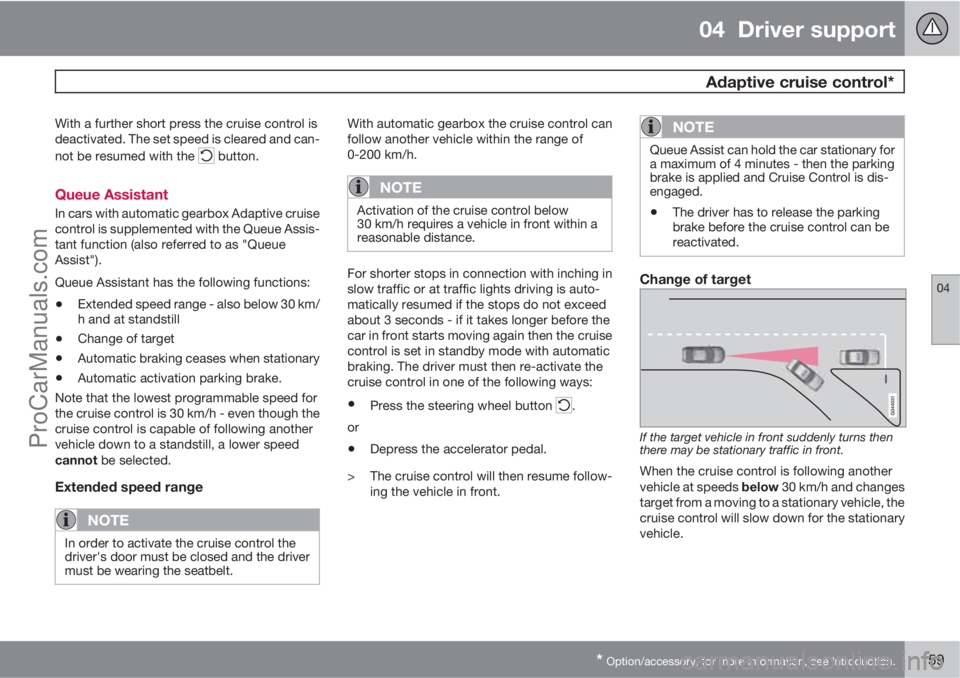
Change of target
If the target vehicle in front suddenly turns then
there may be stationary traffic in front.
When the cruise control is following another
vehicle at speeds below 30 km/h and changes
target from a moving to a stationary vehicle, the
cruise control will slow down for the stationary
vehicle.
ProCarManuals.com
Page 170 of 422
04 Driver support
City Safety™
04
168* Option/accessory, for more information, see Introduction.
General
City Safety™ is a function for helping the driver
to avoid a collision when driving in queues,
amongst other things, when changes in the
traffic ahead, combined with a lapse in atten-
tion, could lead to an incident.
The function is active at speeds
under50 km/h and it helps the driver by auto-
matically braking the car in the event of immi-
nent risk of collision with vehicles in front,
should the driver not react in time by braking
and/or steering away.
City Safety™ is activated in situations where
the driver should have started braking earlier,
which is why it cannot help the driver in every
situation.
City Safety™ is designed to be activated as
late as possible in order to avoid unnecessary
intervention.
City Safety™ must not be used as an excuse
for the driver to change his/her driving style. If
the driver solely relies on City Safety™ to do
the braking, there will be a collision sooner or
later.
The driver or passengers normally only notice
City Safety™ if a situation arises where the car
is extremely close to being in a collision.If the car is also equipped with a Collision
Warning function with Auto Brake*, these two
systems complement each other. For more
information on Collision Warning function with
Auto Brake, see page 173.
IMPORTANT
Maintenance and replacement of City
Safety™ components must only be per-
formed by a workshop - an authorised Volvo
workshop is recommended.
WARNING
City Safety™ does not engage in all driving
situations or traffic, weather or road condi-
tions.
City Safety™ does not react to vehicles
driving in a different direction from the car,
to small vehicles, motorcycles and bicycles
or to humans and animals.
City Safety™ can prevent collision at a
speed difference of less than 15 km/h - at a
higher speed difference, it is only possible
to reduce collision speed. In order to obtain
full brake function, the driver must depress
the brake pedal.
Never wait for City Safety™ to engage. The
driver always bears responsibility for main-
taining the proper distance and speed.
Function
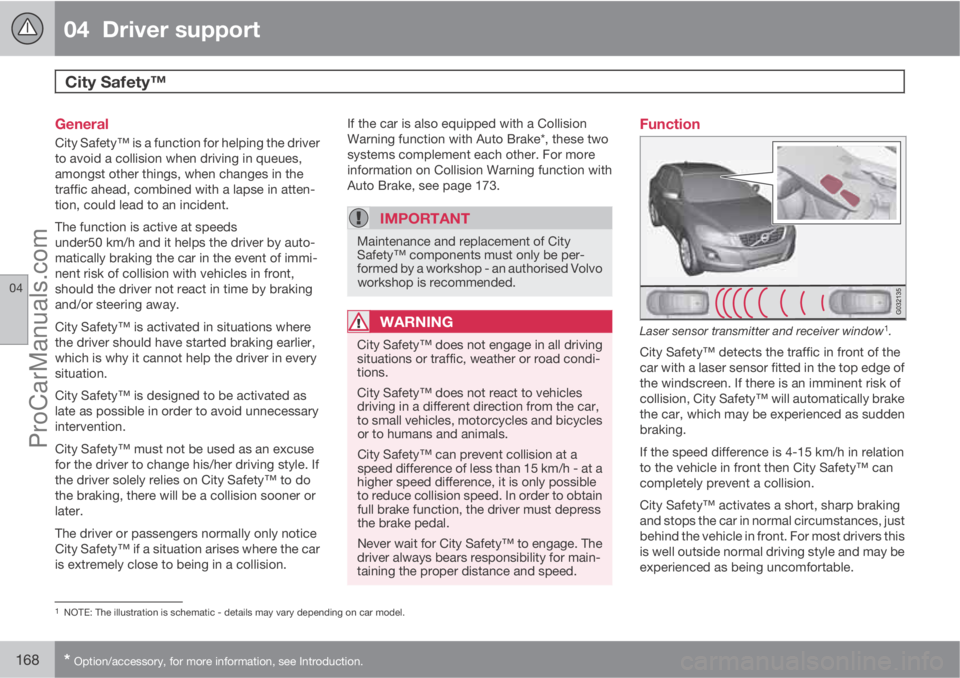
Laser sensor transmitter and receiver window1.
City Safety™ detects the traffic in front of the
car with a laser sensor fitted in the top edge of
the windscreen. If there is an imminent risk of
collision, City Safety™ will automatically brake
the car, which may be experienced as sudden
braking.
If the speed difference is 4-15 km/h in relation
to the vehicle in front then City Safety™ can
completely prevent a collision.
City Safety™ activates a short, sharp braking
and stops the car in normal circumstances, just
behind the vehicle in front. For most drivers this
is well outside normal driving style and may be
experienced as being uncomfortable.
1NOTE: The illustration is schematic - details may vary depending on car model.
ProCarManuals.com
Page 180 of 422
04 Driver support
Collision Warning with Auto Brake & Pedestrian Protection*
04
178* Option/accessory, for more information, see Introduction.
Collision Warning with Auto Brake is tempo-
rarily deactivated with reverse gear engaged.
Collision Warning with Auto Brake is not acti-
vated at low speeds - under 4 km/h, which is
why the system does not intervene in situations
where the car is approaching a vehicle in front
very slowly, e.g. when parking.
In situations where the driver demonstrates
active, aware driving behaviour, a collision
warning may be postponed slightly in order to
keep unnecessary warnings to a minimum.
When Auto Brake has prevented a collision
with a stationary object the car remains sta-
tionary for a maximum of 1.5 seconds. If the car
is braked for a vehicle in front that is moving,
then speed is reduced to the same speed as
that maintained by the vehicle in front.
On a car with manual gearbox the engine stops
when Auto Brake has stopped the car, unless
the driver manages to depress the clutch pedal
beforehand.
Camera sensor limitationsThe car’s camera sensor is also used - as well
as by Collision Warning with Auto Brake - by
the functions:
•Automatic main/dipped beam dimming -
see page 88
•Road sign information - see page 148
•Driver Alert Control – see page 182
•Lane Departure Warning – see page 185.
NOTE
Keep the windscreen surface in front of the
camera sensor clean from ice, snow, mist
and dirt.
Do not attach or fit anything to the wind-
screen in front of the camera sensor, as this
could reduce or prevent the function of one
or more camera-dependent systems.
The camera sensors have limitations similar to
the human eye, i.e. they "see" worse in dark-
ness, heavy snowfall or rain and in thick fog for
example. Under such conditions the functions
of camera-dependent systems could be sig-
nificantly reduced or temporarily disengaged.
Strong oncoming light, reflections in the car-
riageway, snow or ice on the road surface, dirty
road surfaces or unclear lane markings could
also significantly reduce camera sensor func-
tion when it is used to scan the carriageway
and detect pedestrians and other vehicles.
The field of vision of the camera sensor is lim-
ited, which is why pedestrians and vehicles
cannot be detected in some situations, or they
are detected later than anticipated.
During very high temperatures the camera is
temporarily switched off for about 15 minutesafter the engine is started in order to protect
camera functionality.
Fault tracing and action
If the display shows the message Windscreen
Sensors blocked then this means that the
camera sensor is blocked and cannot detect
pedestrians, vehicles or road markings in front
of the car.
At the same time, this means that - besides
Collision Warning with Auto Brake - the Auto-
matic main/dipped beam dimming, Road sign
information, Driver Alert Control and Lane
Departure Warning functions will not have full
functionality either.
The following table presents possible causes
for a message being shown along with the
appropriate action.
ProCarManuals.com