2013 VOLVO V60 wipers
[x] Cancel search: wipersPage 108 of 422

03 Your driving environment
Compass*
03
106* Option/accessory, for more information, see Introduction.
Operation
Rearview mirror with compass.
The upper right-hand corner of the rearview
mirror has an integrated display that shows the
compass direction in which the front of the car
is pointing. Eight different directions are shown
with English abbreviations:
N (north), NE (north
east), E (east), SE (south east), S (south), SW(south west), W (west) and NW (north west).
The compass is activated automatically when
the car is started or in key position II, see
page 78. To deactivate/activate the compass -
press in the button on the underside of the mir-
ror using a paper clip for example.
CalibrationThe earth is divided into 15 magnetic zones.
The compass is set for the geographic area to
which the car was delivered. The compassshould be calibrated if the car is moved across
several magnetic zones. Proceed as follows:
1. Stop the car in a large open area free from
steel structures and high-voltage power
lines.
2. Start the car.
NOTE
For optimum calibration - switch off all elec-
trical equipment (climate control system,
wipers etc.) and make sure that all doors are
closed.
3. Hold the button on the underside of the
rearview mirror depressed
approx. 6 seconds (using a paper clip for
example) until the character
C is shown.
G030295
Magnetic zones.
4. Hold the button on the underside of the
rearview mirror depressed
approx. 3 seconds. The number of the cur-
rent magnetic zone is shown.
5. Press the button repeatedly until the
required magnetic zone (
1–15) is shown.
See the map of magnetic zones for the
compass.
6. Wait until the display resumes showing the
character
C.
7. Drive slowly in a circle at a speed of no
more than 10 km/h until a compass direc-
tion is shown in the display, indicating that
calibration is complete. Then drive a further
2 circles to fine-tune calibration.
8. Repeat the above procedure as necessary.
ProCarManuals.com
Page 150 of 422
04 Driver support
Road sign information - RSI*
04
148* Option/accessory, for more information, see Introduction.
General information on RSI
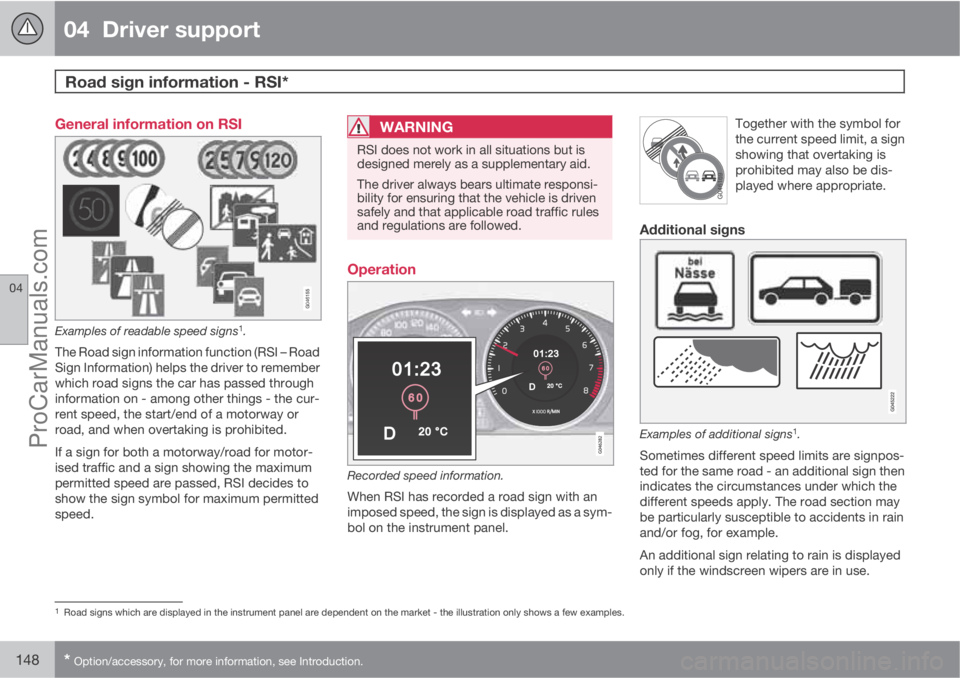
Examples of readable speed signs1.
The Road sign information function (RSI – Road
Sign Information) helps the driver to remember
which road signs the car has passed through
information on - among other things - the cur-
rent speed, the start/end of a motorway or
road, and when overtaking is prohibited.
If a sign for both a motorway/road for motor-
ised traffic and a sign showing the maximum
permitted speed are passed, RSI decides to
show the sign symbol for maximum permitted
speed.
WARNING
RSI does not work in all situations but is
designed merely as a supplementary aid.
The driver always bears ultimate responsi-
bility for ensuring that the vehicle is driven
safely and that applicable road traffic rules
and regulations are followed.
Operation
Recorded speed information.
When RSI has recorded a road sign with an
imposed speed, the sign is displayed as a sym-
bol on the instrument panel.Together with the symbol for
the current speed limit, a sign
showing that overtaking is
prohibited may also be dis-
played where appropriate.
Additional signs
Examples of additional signs1.
Sometimes different speed limits are signpos-
ted for the same road - an additional sign then
indicates the circumstances under which the
different speeds apply. The road section may
be particularly susceptible to accidents in rain
and/or fog, for example.
An additional sign relating to rain is displayed
only if the windscreen wipers are in use.
1Road signs which are displayed in the instrument panel are dependent on the market - the illustration only shows a few examples.
ProCarManuals.com
Page 172 of 422

04 Driver support
City Safety™
04
170
When City Safety™ has prevented a collision
with a stationary object the car remains sta-
tionary for a maximum of 1.5 seconds. If the car
is braked for a vehicle in front that is moving,
then speed is reduced to the same speed as
that maintained by the vehicle in front.
On a car with manual gearbox the engine stops
when City Safety™ has stopped the car, unless
the driver manages to depress the clutch pedal
beforehand.
NOTE
•Keep the windscreen surface in front of
the laser sensor free from ice, snow and
dirt (see the illustration for sensor loca-
tion, page 168).
•Do not affix or mount anything on the
windscreen in front of the laser sensor
•Remove ice and snow from the bonnet
- snow and ice must not exceed a height
of 5 cm.
Fault tracing and action
If the message Windscreen Sensors
blocked is shown on the instrument panel dis-
play, it indicates that the laser sensor is
blocked and cannot detect vehicles in front of
the car. This means that City Safety™ is not
operational.The
Windscreen Sensors blocked message
is not shown for all situations in which the laser
sensor is blocked. The driver must therefore be
diligent about keeping the windscreen and
area in front of the laser sensor clean.
The following table presents possible causes
for the message being shown, along with sug-
gestions for appropriate action.
CauseAction
The windscreen sur-
face in front of the
laser sensor is dirty
or covered with ice
or snow.Clean the wind-
screen surface in
front of the sensor
from dirt, ice and
snow.
The laser sensor
field of vision is
blocked.Remove the block-
ing object.
IMPORTANT
If there are cracks, scratches or stone chips
in the windscreen in front of either of the
laser sensor's "windows" and they cover a
surface of approx. 0.5 x 3.0 mm (or larger),
then a workshop must be contacted for
repair or replacement of the windscreen
(see the illustration for sensor location, page
168) - an authorised Volvo workshop is rec-
ommended.
Failure to take action may result in reduced
performance for City Safety™.
To avoid the risk of reducing City Safety™
performance the following also applies:
•Before replacing a windscreen, contact
an authorised Volvo workshop to verify
that the correct windscreen is ordered
and fitted. Using the wrong windscreen
may result in the City Safety function
failing to operate or operating incor-
rectly.
•The same type or Volvo-approved
windscreen wipers must be fitted during
replacement.
ProCarManuals.com
Page 343 of 422

09 Maintenance and service
Wiper blades and washer fluid09
341 Wiper blades
Service position
Wiper blades in service position.
In order to change, clean or lift the wiper blades
(for scraping off ice from the windscreen, for
example) they must be in service position.
IMPORTANT
Before placing the wiper blades in the serv-
ice position, make sure that they are not fro-
zen down.
1. Insert the remote control key in the ignition
switch1 and briefly press the START/
STOP ENGINE button to set the car's elec-trical system to key position I. (For detailed
information on key positions, see page 78.)
2.
Briefly press the START/STOP ENGINE
button again to set the car’s electrical sys-
tem in key position 0.
3. Within 3 seconds, move the right stalk
switch up and hold it in position for
approx. 1 second.
> The wipers then move to standing
straight up.
The wipers return to their starting position
when you briefly press the START/STOP
ENGINE button to set the car’s electrical sys-
tem to key position I (or when the car is
started).
IMPORTANT
If the wiper arms in service position have
been folded up from the windscreen, they
must be folded back down onto the wind-
screen before the wipers are allowed to
return to their starting position. This is to
avoid scraping the paint on the bonnet.
NOTE
Once the wiper arms have been in service
position, the wipers must be activated and
deactivated before service position can be
used again.
Replacing the wiper blades
1Not necessary in cars with Keyless function.
ProCarManuals.com
Page 344 of 422

09 Maintenance and service
Wiper blades and washer fluid 09
342
Fold up the wiper arm when it is in service
position. Press the button located on the
wiper blade mounting and pull straight out
parallel with the wiper arm.
Slide in the new wiper blade until a "click"
is heard.
Check that the blade is firmly installed.
4. Fold the wiper arm back towards the wind-
screen.
The wipers return from service position to their
starting position when you briefly press the
START/STOP ENGINE button to set the car’s
electrical system to key position I (or when the
car is started).
G021763
NOTE
The wiper blades are different lengths. The
blade on the driver's side is longer than the
blade on the passenger side.
Replacing the wiper blades, rear window
1. Fold out the wiper arm.
2. Grip the inner section of the blade (by the
arrow).
3. Turn anticlockwise to use the blade's end
position against the wiper arm as a lever to
detach the blade more easily.
4. Press the new wiper blade into position.
Check that it is firmly installed.
5. Lower the wiper arm.
CleaningFor cleaning wiper blades and windscreen, see
page 361 and onwards.
IMPORTANT
Check the wiper blades regularly.
Neglected maintenance shortens the serv-
ice life of the wiper blades.
ProCarManuals.com
Page 354 of 422

09 Maintenance and service
Fuses 09
352* Option/accessory, for more information, see Introduction.
General fuses, engine compartmentOn the inside of the cover there are tweezers
that facilitate the procedure for the removal
and fitting of fuses.
Positions (see preceding illustration)Engine compartment, upper
Engine compartment, front
Engine compartment, lower
These fuses are all located in the engine com-
partment box. The fuses in (C) are located
under (A).
On the inside of the cover is a label that shows
the location of the fuses.
•Fuses 1-7 and 42-44 are of the "Midi Fuse"
type and must only be replaced by a work-
shop
1.
•Fuses 8-15 and 34 are of the "JCASE" type
and should be replaced by a workshop1.
•Fuses 16-33 and 35-41 are of the "Mini
Fuse" type.
FunctionA
Primary fuse for the central elec-
tronic module (CEM) with fuse
box B under the glovebox
A
50
Primary fuse for the central elec-
tronic module (CEM) with fuse
box B under the glovebox50
Primary fuse for central electri-
cal unit in cargo areaA60
Primary fuse for central electri-
cal unit in passenger compart-
ment with fuse box A under the
glovebox
A
60
Primary fuse for central electri-
cal unit in passenger compart-
ment with fuse box A under the
glovebox
A
60
--
PTC element, air preheater*A100
Headlamp washers*20
Windscreen wipers30
FunctionA
Parking heater*25
Ventilation fanA40
--
ABS pump40
ABS valves20
--
Headlamp levelling*; Active
Xenon headlamps - ABL*10
Primary fuse for the central elec-
tronic module (CEM) with fuse
box B under the glovebox20
ABS5
Speed related power steering*5
Engine control module; Trans-
mission control module; Air-
bags10
Heated washer nozzles*10
1An authorised Volvo workshop is recommended.
ProCarManuals.com
Page 420 of 422

11 Alphabetical Index
11
418
Warning symbols....................................... 72
Warning triangle....................................... 318
Washer fluid, filling................................... 343
Washer nozzles, heated............................. 99
Washers
rear window.......................................... 99
washer fluid, filling.............................. 343
windscreen........................................... 99
Water and dirt-repellent coating.............. 101
Water-repellent surface, cleaning............ 362
Waxing..................................................... 362
Weights
kerb weight......................................... 373
Wheels
changing............................................. 315
installation........................................... 316
rims..................................................... 311
snow chains........................................ 312
spare wheel........................................ 314
Wheels and tyres..................................... 310
Whiplash injury, WHIPS............................. 27
WHIPS
child seat/booster cushion................... 27
whiplash injury...................................... 27
Windows, rearview and door mirrors....... 101Windscreen washing.................................. 99
Windscreen wipers.................................... 98
rain sensor............................................ 98
Winter driving........................................... 285
Winter tyres.............................................. 312
Wiper blades............................................ 341
changing............................................. 341
cleaning.............................................. 342
replacing, rear window.......................342
service position................................... 341
Wipers and washing.................................. 98
ProCarManuals.com