2013 VOLVO V60 transmission
[x] Cancel search: transmissionPage 203 of 422
05 Comfort and driving pleasure
Menus and messages
05
201
NOTE
If a warning message appears while you are
using the trip computer, the message must
be read (press OK) before the previous
activity can be resumed.
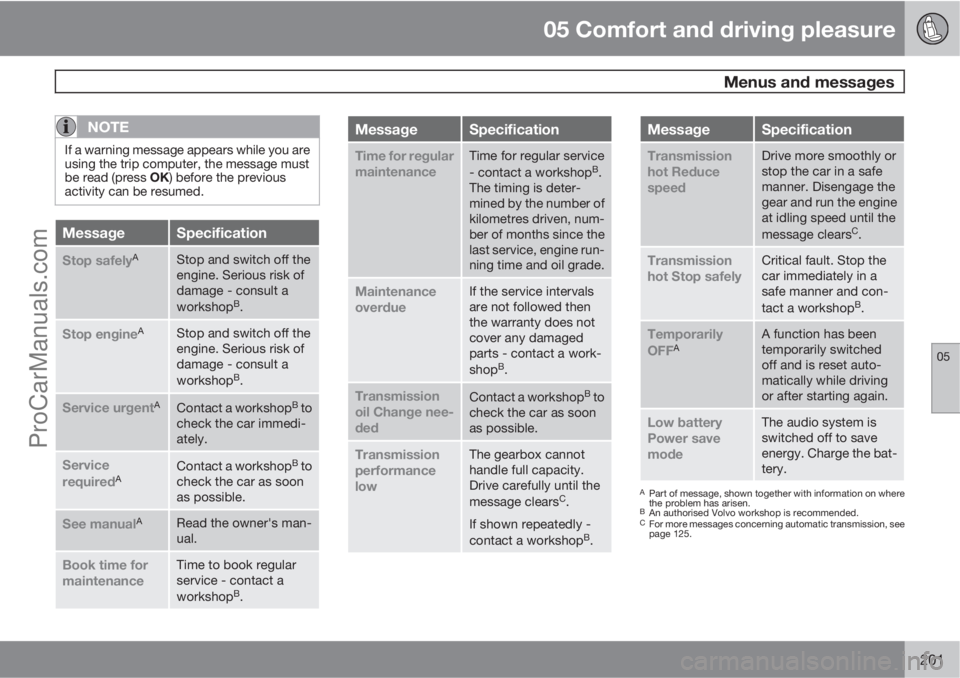
MessageSpecification
Stop safelyAStop and switch off the
engine. Serious risk of
damage - consult a
workshop
B.
Stop engineAStop and switch off the
engine. Serious risk of
damage - consult a
workshop
B.
Service urgentAContact a workshopB to
check the car immedi-
ately.
Service
requiredAContact a workshopB to
check the car as soon
as possible.
See manualARead the owner's man-
ual.
Book time for
maintenanceTime to book regular
service - contact a
workshop
B.
MessageSpecification
Time for regular
maintenanceTime for regular service
- contact a workshopB.
The timing is deter-
mined by the number of
kilometres driven, num-
ber of months since the
last service, engine run-
ning time and oil grade.
Maintenance
overdueIf the service intervals
are not followed then
the warranty does not
cover any damaged
parts - contact a work-
shop
B.
Transmission
oil Change nee-
dedContact a workshopB to
check the car as soon
as possible.
Transmission
performance
lowThe gearbox cannot
handle full capacity.
Drive carefully until the
message clears
C.
If shown repeatedly -
contact a workshop
B.
MessageSpecification
Transmission
hot Reduce
speedDrive more smoothly or
stop the car in a safe
manner. Disengage the
gear and run the engine
at idling speed until the
message clears
C.
Transmission
hot Stop safelyCritical fault. Stop the
car immediately in a
safe manner and con-
tact a workshop
B.
Temporarily
OFFAA function has been
temporarily switched
off and is reset auto-
matically while driving
or after starting again.
Low battery
Power save
modeThe audio system is
switched off to save
energy. Charge the bat-
tery.
APart of message, shown together with information on where
the problem has arisen.
BAn authorised Volvo workshop is recommended.CFor more messages concerning automatic transmission, see
page 125.
ProCarManuals.com
Page 247 of 422
06 Infotainment system
Radio
06
* Option/accessory, for more information, see Introduction.245 General
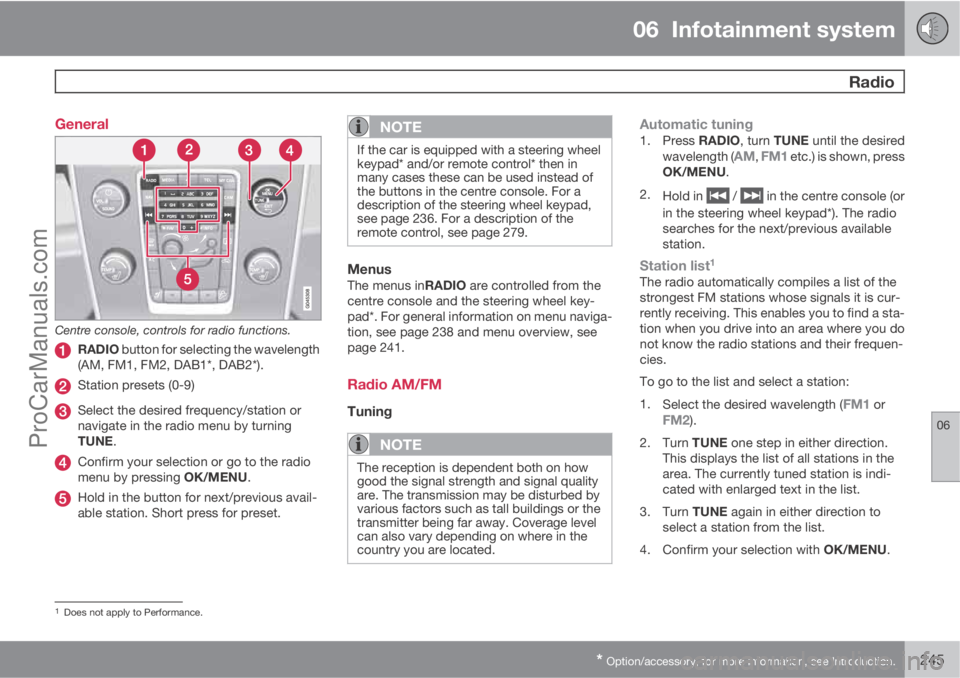
Centre console, controls for radio functions.
RADIO button for selecting the wavelength
(AM, FM1, FM2, DAB1*, DAB2*).
Station presets (0-9)
Select the desired frequency/station or
navigate in the radio menu by turning
TUNE.
Confirm your selection or go to the radio
menu by pressing OK/MENU.
Hold in the button for next/previous avail-
able station. Short press for preset.
NOTE
If the car is equipped with a steering wheel
keypad* and/or remote control* then in
many cases these can be used instead of
the buttons in the centre console. For a
description of the steering wheel keypad,
see page 236. For a description of the
remote control, see page 279.
MenusThe menus inRADIO are controlled from the
centre console and the steering wheel key-
pad*. For general information on menu naviga-
tion, see page 238 and menu overview, see
page 241.
Radio AM/FM
Tuning
NOTE
The reception is dependent both on how
good the signal strength and signal quality
are. The transmission may be disturbed by
various factors such as tall buildings or the
transmitter being far away. Coverage level
can also vary depending on where in the
country you are located.
Automatic tuning1.
Press RADIO, turn TUNE until the desired
wavelength (AM, FM1 etc.) is shown, press
OK/MENU.
2.
Hold in
/ in the centre console (or
in the steering wheel keypad*). The radio
searches for the next/previous available
station.
Station list1
The radio automatically compiles a list of the
strongest FM stations whose signals it is cur-
rently receiving. This enables you to find a sta-
tion when you drive into an area where you do
not know the radio stations and their frequen-
cies.
To go to the list and select a station:
1.
Select the desired wavelength (
FM1 orFM2).
2.
Turn TUNE one step in either direction.
This displays the list of all stations in the
area. The currently tuned station is indi-
cated with enlarged text in the list.
3.
Turn TUNE again in either direction to
select a station from the list.
4.
Confirm your selection with OK/MENU.
1Does not apply to Performance.
ProCarManuals.com
Page 249 of 422
06 Infotainment system
Radio
06
247
time and returns when the station is stored.
The preset button can now be used.
A list of pre-selected channels can be shown
2
in the TV screen. The function is activated/
deactivated in FM/AM mode under FM menu
Show presets or AM menuShow
presets.
RDS functionsRDS (Radio Data System) links FM transmitters
into a network. An FM transmitter in such a
network sends information that gives an RDS
radio the following functions:
•Automatically switches to a stronger trans-
mitter if reception in the area is poor.
•Searches for programme type, such as
traffic information or news.
•Receives text information on current radio
programme.
NOTE
Some radio stations do not use RDS or only
some if its functionality.
If a required programme type is located the
radio can switch stations interrupting the audio
source currently in use. For example, if the CDplayer is in use, it is paused. The interrupting
transmission is played at a preset volume, see
page 249. The radio returns to the previous
audio source and volume when the set pro-
gramme type is no longer broadcast.
The programme functions alarm (
ALARM!),
traffic information (TP), news (NEWS), and pro-
gramme types (PTY) interrupt one another in
order of priority, where alarm has the highest
priority and programme types has the lowest.
For additional settings of programming inter-
ruptions (
EON Distant and EON Local), see
the section "Enhanced Other Networks –
EON" below. Press EXIT to return to the inter-
rupted audio source, press the OK/MENU to
clear the message.
AlarmThis function is used to warn of serious acci-
dents and catastrophes. The alarm cannot be
temporarily interrupted or deactivated. The
message
ALARM! appears on the TV screen
when an alarm message is transmitted.
Traffic information – TPThis function allows traffic information sent
within a set station's RDS network to break
through. The
TP symbol indicates that the
function is activated. If the preset station cansend traffic information then this is shown by
TP glowing brightly in the TV screen, otherwiseTP will be grey.
–
Activate/deactivate in FM mode under FM
menu
TP.
Enhanced Other Networks – EONThis function is useful in urban areas with many
regional radio stations. It allows the distance
between the car and the radio station trans-
mitter to determine when programme functions
should interrupt the current audio source.
–Activate/deactivate in FM mode by select-
ing one of the options under FM menu
Advanced settingsEON:
•Local – interrupts only if the radio station
transmitter is close.
•Distant3 – interrupts if the station trans-
mitter is far away, even if there is a lot of
static.
TP from selected station/all stationsThe radio can only interrupt for traffic informa-
tion from the selected station or all stations
within the RDS network.
–
Go in FM mode to FM menu
Advanced
settings
Set TP favourite to change.
2Only applies to High Performance Multimedia and Premium Sound Multimedia.3Factory settings.
ProCarManuals.com
Page 277 of 422
06 Infotainment system
TV*
06
* Option/accessory, for more information, see Introduction.275 General
NOTE
This system only supports TV transmissions
in countries which transmit signals in
mpeg-2 format and follow the DVB-T stand-
ard. The system does not support TV trans-
missions in mpeg-4 format or analogue
transmissions.
NOTE
The TV picture is only shown when the car
is stationary. When the car is moving at a
speed over about 6 km/h the picture disap-
pears,
No visual media available while
driving appears on the display screen,
although the audio is heard during this time.
The picture reappears when the car has
stopped.
Cars with RSE do not shut off the rear
screens.
NOTE
The reception is dependent both on how
good the signal strength and signal quality
are. The transmission may be disturbed by
various factors such as tall buildings or the
TV transmitter being far away. Coverage
level can also vary depending on where in
the country you are located.
IMPORTANT
A TV licence is required for this product in
some countries.
MenusThe menus in MEDIA are controlled from the
centre console and the steering wheel key-
pad*. For general information on menu naviga-
tion, see page 238 and menu overview, see
page 241.
Overview
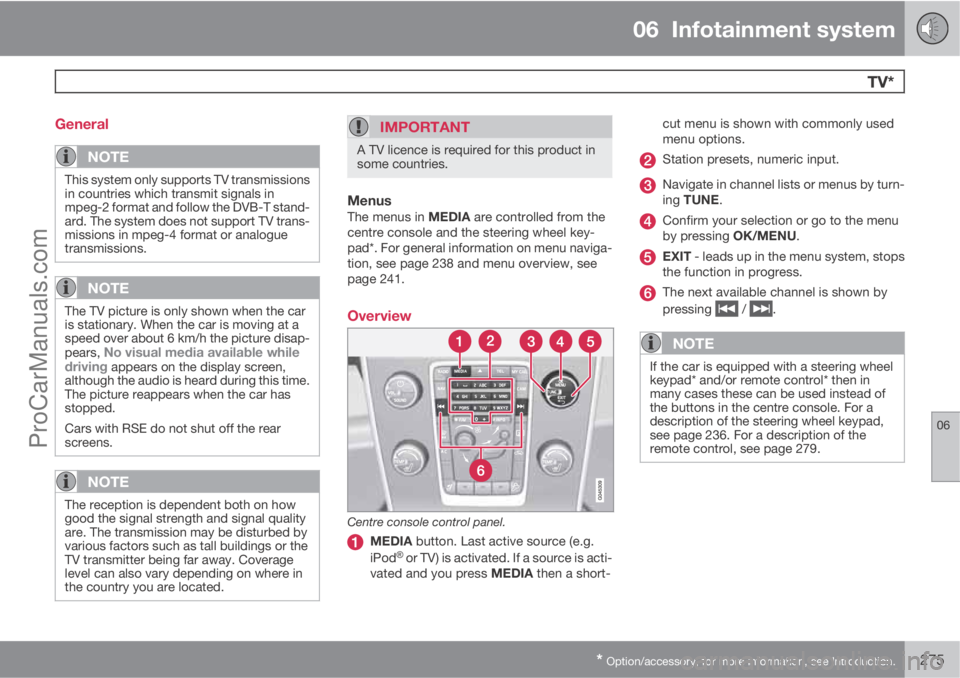
Centre console control panel.
MEDIA button. Last active source (e.g.
iPodŸ or TV) is activated. If a source is acti-
vated and you press MEDIA then a short-cut menu is shown with commonly used
menu options.
Station presets, numeric input.
Navigate in channel lists or menus by turn-
ing TUNE.
Confirm your selection or go to the menu
by pressing OK/MENU.
EXIT - leads up in the menu system, stops
the function in progress.
The next available channel is shown by
pressing
/ .
NOTE
If the car is equipped with a steering wheel
keypad* and/or remote control* then in
many cases these can be used instead of
the buttons in the centre console. For a
description of the steering wheel keypad,
see page 236. For a description of the
remote control, see page 279.
ProCarManuals.com
Page 286 of 422

07 During your journey
Recommendations during driving
07
284
General
Economical drivingDriving economically means driving smoothly
while thinking ahead and adjusting your driving
style and speed to the prevailing conditions.
•Drive in the highest gear possible, adapted
to the current traffic situation and road -
lower engine speeds result in lower fuel
consumption.
•Avoid driving with open windows.
•Avoid sudden unnecessary acceleration
and heavy braking.
•Remove unnecessary items from the car -
the greater the load the higher the fuel con-
sumption.
•Use engine braking to slow down, when it
can take place without risk to other road
users.
•A roof load and ski box increase air resis-
tance, leading to higher fuel consumption
- remove the load carriers when not in use.
•Do not run the engine to operating tem-
perature at idling speed, but rather drive
with a light load as soon as possible - a
cold engine consumes more fuel than a
warm one.
•A car with D2, D3, D4 or D5 engine in com-
bination with a 6-speed manual gearbox is
started in 2nd gear.For more information and further advice, see
the pages 12 and 384.
WARNING
Never switch off the engine while moving,
such as downhill, this deactivates important
systems such as the power steering and
brake servo.
Driving in waterThe car can be driven through water at a maxi-
mum depth of 25 cm at a maximum speed of
10 km/h. Extra caution should be exercised
when passing through flowing water.
During driving in water, maintain a low speed
and do not stop the car. When the water has
been passed, depress the brake pedal lightly
and check that full brake function is achieved.
Water and mud for example can make the
brake linings wet resulting in delayed brake
function.
•Clean the electric contacts of the electric
engine block heater and trailer coupling
after driving in water and mud.
•Do not let the car stand with water over the
sills for any long period of time - this could
cause electrical malfunctions.
IMPORTANT
Engine damage can occur if water enters
the air filter.
In depths greater than 25 cm, water could
enter the transmission. This reduces the
lubricating ability of the oils and shortens
the service life of these systems.
In the event of the engine stalling in water,
do not try restart - tow the car from the water
to a workshop - an authorised Volvo work-
shop is recommended. Risk of engine
breakdown.
Engine, gearbox and cooling systemUnder special conditions, for example hard
driving in hilly terrain and hot climate, there is
a risk that the engine and drive system may
overheat - in particular with a heavy load.
For information about overheating when driv-
ing with a trailer, see page 298.
•Remove any auxiliary lamps from in front
of the grille when driving in hot climates.
•If the temperature in the engine's cooling
system is too high the instrument panel's
warning symbol is illuminated and there is
a text message displayed there
High
engine temp Stop safely - stop the car in
a safe way and allow the engine to run at
idling speed for several minutes to cool
down.
ProCarManuals.com
Page 287 of 422
07 During your journey
Recommendations during driving
07
285
•If the text message High engine temp
Stop engine or Coolant level low, Stop
engine is shown then the engine must be
switched off after stopping the car.
•In the event of overheating in the gearbox
a built-in protection function is activated
which, amongst other things, illuminates
the instrument panel's warning symbol and
there is a text message displayed there
Transmission hot Reduce speed orTransmission hot Stop safely - follow
the recommendation given and lower the
speed and stop the car in a safe way and
allow the engine to run at idling speed for
a few minutes to allow the gearbox to cool
down.
•If the car overheats, the air conditioning
may be switched off temporarily.
•Do not turn the engine off immediately you
stop after a hard drive.
NOTE
It is normal for the engine's cooling fan to
operate for a while after the engine has been
switched off.
Open tailgate
WARNING
Do not drive with the tailgate open. Toxic
exhaust fumes could be drawn into the car
through the cargo area.
Do not overload the batteryThe electrical functions in the car load the bat-
tery to varying degrees. Avoid using the key
position II when the engine is switched off.
Instead use the I mode - which uses less
power.
Also, be aware of different accessories that
load the electrical system. Do not use functions
which use a lot of power when the engine is
switched off. Examples of such functions are:
•ventilation fan
•headlamps
•windscreen wiper
•audio system (high volume).
If the battery voltage is low the information dis-
play shows the text
Low battery Power save
mode. The energy-saving function then shuts
down certain functions or reduces certain
functions such as the ventilation fan and/or
audio system.
–In which case, charge the battery by star-
ting the engine and then running it for atleast 15 minutes - battery charging is more
effective during driving than running the
engine at idling speed while stationary.
Before a long journey
•Check that the engine is working normally
and that fuel consumption is normal.
•Make sure that there are no leaks (fuel, oil
or other fluid).
•Check all bulbs and tyre tread depths.
•Carrying a warning triangle is a legal
requirement in certain countries.
Winter drivingCheck the following in particular before the
cold season:
•The engine coolant must contain at least
50% glycol. This mixture protects the
engine against frost erosion down to
approximately –35 °C. To achieve optimum
antifreeze protection, different types of gly-
col must not be mixed.
•The fuel tank must be kept filled to prevent
condensation.
•Engine oil viscosity is important. Oils with
lower viscosity (thinner oils) facilitate star-
ting in cold weather and also reduce fuel
consumption while the engine is cold. For
more information on suitable oils, see
page 379.
ProCarManuals.com
Page 301 of 422

07 During your journey
Driving with a trailer
07
299
Diesel engine 5-cyl
•In the event of a risk of overheating the
optimal speed for the engine is 2300-3000
rpm for optimal circulation of the coolant.
Automatic gearbox
OverheatingWhen driving with a trailer in hilly terrain in a hot
climate there may be a risk of overheating.
•An automatic gearbox selects the optimum
gear related to load and engine speed.
•In the event of overheating a warning sym-
bol illuminates on the instrument panel
combined with a text message - follow the
recommendation given.
Steep inclines
•Do not lock the automatic transmission in
a higher gear than the engine "can cope
with" - it is not always a good idea to drive
at a high gear with low engine revolutions.
IMPORTANT
See also the specific information on slow
driving with trailer for cars with the
Powershift automatic transmission on page
125.
Parking on a hill1. Depress the foot brake.2. Activate the parking brake.
3.
Move the gear selector to position P.
4. Release the foot brake.
•Move the gear selector to park position P
when parking an automatic car with a
hitched trailer. Always use the parking
brake.
•Block the wheels with chocks when park-
ing a car with hitched trailer on a hill.
Starting on a hill1. Depress the foot brake.
2. Move the gear selector to driving posi-
tion D.
3. Release the parking brake.
4. Release the foot brake and start driving off.
Towing bracket
If the car is equipped with a detachable towbar,
the installation instructions for the loose sec-
tion must be followed carefully, see page 301.
WARNING
If the car is fitted with a Volvo detachable
towbar:
•Follow the installation instructions care-
fully.
•The detachable section must be locked
with the key before setting off.
•Check that the indicator window shows
green.
Important checks
•The towbar's towball must be cleaned and
greased regularly.
NOTE
If a towball hitch with vibration damper is
used, it is not necessary to grease the tow-
ball.
ProCarManuals.com
Page 306 of 422

07 During your journey
Towing and recovery
07
304
Towing
Find out the statutory maximum speed limit for
towing before towing begins.
1. Unlock the steering lock by inserting the
remote control key in the ignition switch
and giving a long press on the START/
STOP ENGINE button - key position II is
activated, see page 78 for more informa-
tion on key positions.
2. The remote control key must remain in the
ignition switch while the car is being towed.
3. Keep the towline taut when the towing
vehicle reduces speed by holding your foot
gently pressed on the brake pedal -
thereby avoiding unnecessary jerking.
4. Be prepared to brake to stop.
WARNING
•Check that the steering lock is unlocked
before towing.
•The remote control key must be in key
position II - in position I all airbags are
deactivated.
•Never remove the remote control key
from the ignition switch when the car is
being towed.
WARNING
The brake servo and power steering do not
work when the engine is switched off - the
brake pedal needs to be depressed
about 5 times more heavily and the steering
is considerably heavier than normal.
Manual gearboxPrior to towing:
–Move gear lever into neutral and release
the parking brake.
Automatic gearbox Geartronic
IMPORTANT
Note that the car must always be towed with
the wheels rolling forward.
•Cars with automatic gearbox must not
be towed at speeds above 80 km/h or
further than 80 km.
Prior to towing:
–
Move the gear selector to position N and
release the parking brake.
Automatic gearbox PowershiftThe model with Powershift transmission
should not be towed as it is dependent on the
engine running in order to receive sufficientlubrication. If towing still has to take place, the
route must be as short as possible and then
with very low speed.
In the event of uncertainty as to whether or not
the car is equipped with Powershift transmis-
sion, this can be verified by checking the des-
ignation on the transmission's label under the
bonnet - see page 370. The designa-
tion ”MPS6” means that it is Powershift – trans-
mission otherwise it is Geartronic automatic
transmission.
IMPORTANT
Avoid towing.
•However, the car can be towed for a
short distance at low speed to move it
from a dangerous position - not further
than 10 km and not faster than
10 km/h. Note that the car must always
be towed with the wheels rolling for-
ward.
•In the event of moving a longer distance
than 10 km, the car must be transported
with the drive wheels raised from the
road - professional recovery is recom-
mended.
Prior to towing:
–
Move the gear selector to position N and
release the parking brake.
ProCarManuals.com