2013 VOLVO V60 battery
[x] Cancel search: batteryPage 65 of 422

02 Locks and alarm
Alarm*
02
* Option/accessory, for more information, see Introduction.63 General
Activated alarm is triggered if:
•a door, the bonnet or the tailgate is opened
•a movement is detected in the passenger
compartment (if fitted with a movement
detector*)
•the car is raised or towed away (if fitted
with a tilt detector*)
•the battery's cable is disconnected
•the siren is disconnected.
If there is a fault in the alarm system, the infor-
mation display shows a message. In which
case, contact a workshop - an authorised
Volvo workshop is recommended.
NOTE
The movement sensors trigger an alarm in
the event of movement in the passenger
compartment - air currents are also regis-
tered. For this reason the alarm is triggered
if the car is left with a window or the sunroof
open or if the passenger compartment
heater is used.
To avoid this: Close the window/sunroof
when leaving the car. If the car's integrated
passenger compartment heater (or a porta-
ble electric heater) shall be used - direct the
airflow from the air vents so that they are not
pointing upwards in the passenger com-
partment.
NOTE
Do not attempt to repair or modify alarm
system components. All such attempts
could affect the terms of insurance.
Alarm indicator
Same LED as lock indicator, see page 45.
A red LED on the instrument panel indicates
the alarm system's status:
•LED not lit – Alarm not armed
•The LED flashes once every other second
– Alarm is armed
•The LED flashes rapidly after disarming the
alarm (and until the remote control key is
inserted in the ignition switch and key posi-
tion I is selected) – Alarm has been trig-
gered.
Arming the alarm–Press the remote control key lock button.
Deactivate the alarm–Press the remote control key unlock but-
ton.
ProCarManuals.com
Page 66 of 422
02 Locks and alarm
Alarm*
02
64* Option/accessory, for more information, see Introduction.
Deactivating a triggered alarm–Press the remote control key unlock button
or insert the remote control key in the igni-
tion switch.
Other alarm functions
Automatic re-arming of the alarmThis function prevents the car being left with
the alarm disarmed unintentionally.
If the car is unlocked with the remote control
key (and the alarm is disarmed) but none of the
doors or the tailgate is opened within 2
minutes, then the alarm is automatically re-
armed. The car is relocked at the same time.
Remote control key not workingIf the alarm cannot be deactivated with the
remote control key, e.g. if the key's battery is
discharged - the car can be unlocked, dis-
armed and the engine started as follows:
1. Open the driver's door with the detachable
key blade - see page 54.
> The alarm is triggered, the alarm indica-
tor flashes rapidly and the siren sounds.
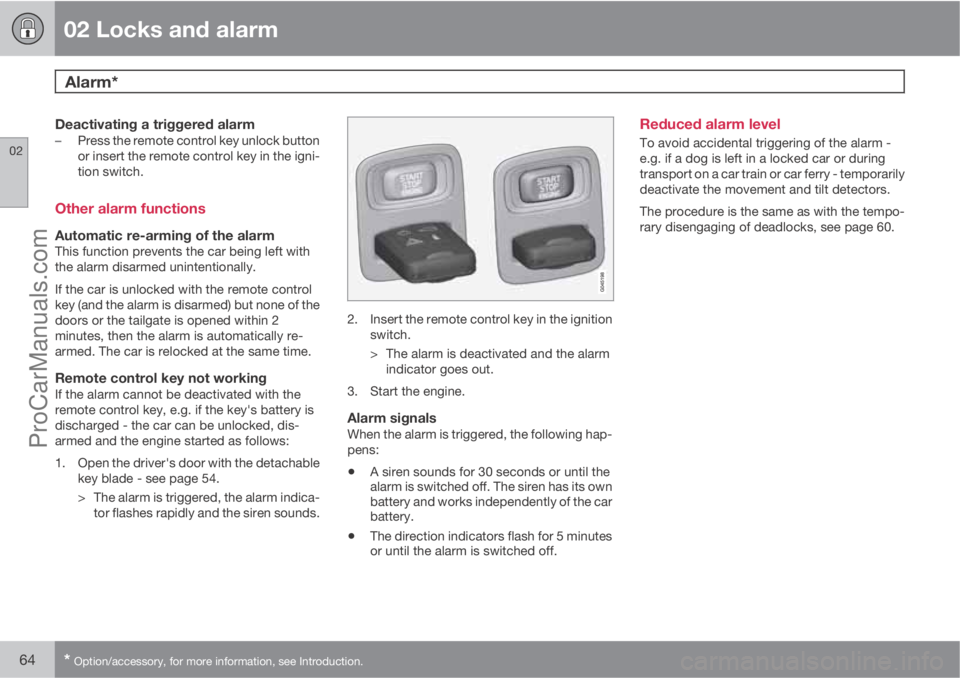
2. Insert the remote control key in the ignition
switch.
> The alarm is deactivated and the alarm
indicator goes out.
3. Start the engine.
Alarm signalsWhen the alarm is triggered, the following hap-
pens:
•A siren sounds for 30 seconds or until the
alarm is switched off. The siren has its own
battery and works independently of the car
battery.
•The direction indicators flash for 5 minutes
or until the alarm is switched off.
Reduced alarm level
To avoid accidental triggering of the alarm -
e.g. if a dog is left in a locked car or during
transport on a car train or car ferry - temporarily
deactivate the movement and tilt detectors.
The procedure is the same as with the tempo-
rary disengaging of deadlocks, see page 60.
ProCarManuals.com
Page 68 of 422

66* Option/accessory, for more information, see Introduction.
Instruments and controls........................................................................ 68
Volvo Sensus ......................................................................................... 77
Key positions.......................................................................................... 78
Seats....................................................................................................... 80
Steering wheel........................................................................................ 85
Lighting................................................................................................... 86
Wipers and washing................................................................................ 98
Windows, rearview and door mirrors....................................................101
Compass*.............................................................................................. 106
Power sunroof*..................................................................................... 107
Alcolock*............................................................................................... 109
Starting the engine................................................................................ 113
Starting the engine – Flexifuel............................................................... 118
Starting the engine – external battery................................................... 120
Gearboxes............................................................................................. 121
DRIVe Start/Stop*................................................................................. 127
All-wheel drive – AWD*.........................................................................134
Foot brake............................................................................................. 135
Parking brake........................................................................................ 137
HomeLink
Ÿ *.......................................................................................... 141
ProCarManuals.com
Page 80 of 422

03 Your driving environment
Key positions
03
78* Option/accessory, for more information, see Introduction.
Insert and remove the remote control
key
Ignition switch with remote control key extracted/
inserted.
NOTE
For cars with the Keyless* function the key
does not need to be inserted into the ignition
switch but can be stored in e.g. a pocket.
For more information on Keyless functions -
see page 53.
Insert the key1. Hold the end of the remote control key with
the detachable key blade and insert the key
in the ignition switch.
2. Then press the key in the lock up to its end
position.
IMPORTANT
Foreign objects in the ignition switch may
jeopardise the function or destroy the lock.
Do not press the remote control key incor-
rectly turned - Hold the end with the detach-
able key blade, see page 48.
Withdraw the key
•Push the remote control key, allow it to
eject, then pull it out from the ignition
switch.
Functions at different levels
In order to enable the use of a limited number
of functions with the engine switched off, the
car's electrical system can be set in 3 different
levels (key positions) - 0, I and II - with the
remote control key. Throughout this owner's
manual these levels are described using the
denomination "key positions".
The following table shows the functions avail-
able in each key position/level.
LevelFunctions
0•Odometer, clock and tem-
perature gauge are illumi-
nated.
•Power seats can be adjusted.
•The audio system can be
used for a limited time - see
page 234.
I•Sunroof, power windows, 12
V socket in the passenger
compartment, RTI, phone,
ventilation fan and wind-
screen wipers can be used.
II•The headlamps come on.
•Warning/indicator lamps illu-
minate for 5 seconds.
•Several other systems are
activated. However, heating
in seat cushions and the rear
window can only be activated
after the engine has been
started.
This key position consumes a
lot of current from the starter
battery and should therefore be
avoided!
ProCarManuals.com
Page 105 of 422

03 Your driving environment
Windows, rearview and door mirrors
03
103
ResettingIf the battery is disconnected then the function
for automatic opening must be reset so that it
can work correctly.
1. Gently raise the front section of the button
to raise the window to its end position and
hold it there for one second.
2. Release the button briefly.
3. Raise the front section of the button again
for one second.
WARNING
Resetting must be carried out to ensure that
pinch protection works.
Door mirrors
Door mirror controls.
Adjusting1.
Press the L button for the left-hand door
mirror or the R button for the right-hand
door mirror. The light in the button illumi-
nates.
2. Adjust the position with the joystick in the
centre.
3.
Press the L or R button again. The light
should no longer be illuminated.
WARNING
The mirror on the driver's side is the wide-
angle type to provide optimal vision.
Objects may appear further away than they
actually are.
Storing the position1
The mirror positions are stored in the key mem-
ory when the car has been locked with the
remote control key. When the car is unlocked
with the same remote control key the mirrors
and the driver's seat adopt the stored positions
when the driver's door is opened.
The function can be activated/deactivated in
the menu system MY CAR under Settings
Car settingsCar key memoryPersonal
settings in key memory. For a description of
the menu system, see page 203.
Angling the door mirror when parking1
The door mirror can be angled down for the
driver to view the side of the road when parking
for example.
–
Engage reverse gear and press the L or R
button.
When reverse gear is disengaged the mirror
automatically returns to its original position
1Only in combination with power seat with memory, see page 81.
ProCarManuals.com
Page 106 of 422

03 Your driving environment
Windows, rearview and door mirrors
03
104* Option/accessory, for more information, see Introduction.
after approx. 10 seconds, or sooner by press-
ing the L and R button.
Automatic angling of the door mirror
when parking1
When reverse gear is engaged the door mirror
is automatically angled down so that the driver
can see the side of the road when parking for
example. When reverse gear is disengaged the
mirror automatically returns to its original posi-
tion after a short time.
The function can be activated/deactivated in
the menu system MY CAR under Settings
Car settingsSide mirror settingsTilt
left mirror or
Tilt right mirror. For a descrip-
tion of the menu system, see page 203.
Automatic retraction when locking1
When the car is locked/unlocked with the
remote control key the door mirrors are auto-
matically retracted/extended.
The function can be activated/deactivated in
the menu system MY CAR under Settings
Car settingsSide mirror settingsFold
mirrors. For a description of the menu system,
see page 203.
Resetting to neutralMirrors that have been moved out of position
by an external force must be reset electrically
to the neutral position for electric retracting/
extending to work correctly:
1.
Retract the mirrors with the L and R but-
tons.
2.
Fold them out again with the L and R but-
tons.
3. Repeat the above procedure as necessary.
The mirrors are now reset in neutral position.
Retractable power door mirrors*The mirrors can be retracted for parking/driving
in narrow spaces:
1.
Depress the L and R buttons simultane-
ously (key position must be at least I).
2. Release them after
approximately 1 second. The mirrors auto-
matically stop in the fully retracted posi-
tion.
Fold out the mirrors by pressing down the L
and R buttons simultaneously. The mirrors
automatically stop in the fully extended posi-
tion.
Home safe and approach lightingThe light on the door mirrors illuminates when
approach lighting or home safe lighting is
selected, see page 94.
Rear window and door mirror
defrosters
Use the defroster to quickly remove misting
and ice from the rear window and the door mir-
rors.
One press of the button starts the heating. The
light in the button indicates that the function is
active. Disconnect the heating as soon as the
ice/misting is cleared in order not to load the
battery unnecessarily. However, the heating is
switched off automatically after a certain time.
1Only in combination with power seat with memory, see page 81.
ProCarManuals.com
Page 111 of 422
03 Your driving environment
Alcolock*
03
* Option/accessory, for more information, see Introduction.109 General information on the alcolock
The alcolock's1 function is to prevent the car
from being driven by individuals under the
influence of alcohol. Before the engine can be
started the driver must take a breath test that
verifies that he/she is not under the influence
of alcohol. Alcolock calibration takes place in
accordance with each market's limit value in
force for driving legally.
WARNING
The Alcolock is an aid and does not exempt
the driver from responsibility. It is always the
responsibility of the driver to be sober and
to drive the car safely.
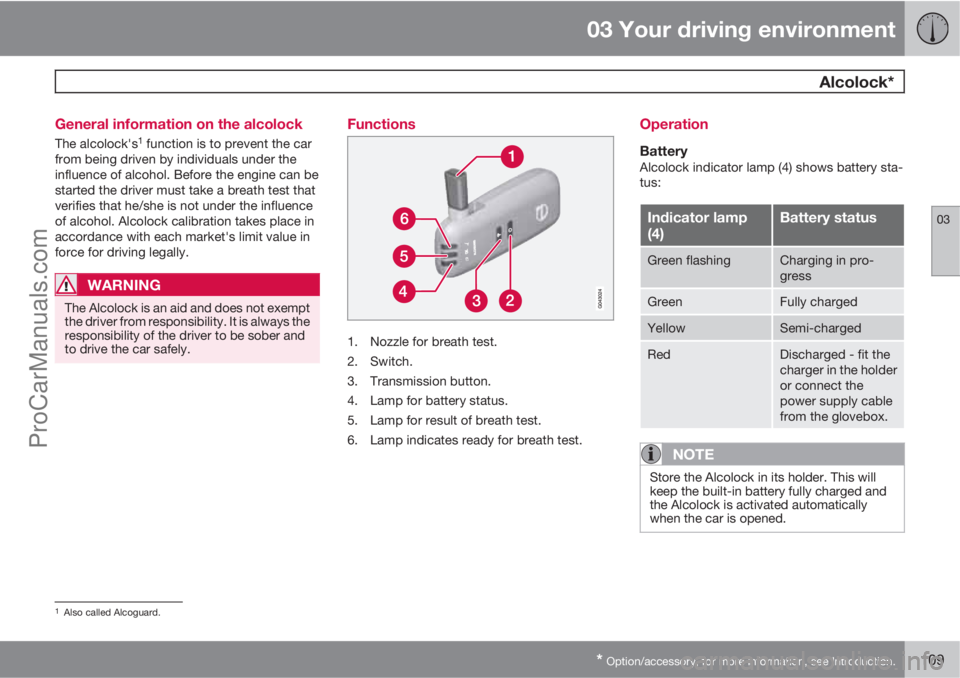
Functions
1. Nozzle for breath test.
2. Switch.
3. Transmission button.
4. Lamp for battery status.
5. Lamp for result of breath test.
6. Lamp indicates ready for breath test.
Operation
BatteryAlcolock indicator lamp (4) shows battery sta-
tus:
Indicator lamp
(4)Battery status
Green flashingCharging in pro-
gress
GreenFully charged
YellowSemi-charged
RedDischarged - fit the
charger in the holder
or connect the
power supply cable
from the glovebox.
NOTE
Store the Alcolock in its holder. This will
keep the built-in battery fully charged and
the Alcolock is activated automatically
when the car is opened.
1Also called Alcoguard.
ProCarManuals.com
Page 115 of 422

03 Your driving environment
Starting the engine
03
* Option/accessory, for more information, see Introduction.113 Petrol and diesel engines
Ignition switch with remote control key extracted/
inserted. and START/STOP ENGINE button.
IMPORTANT
Do not press in the remote control key incor-
rectly turned - Hold the end with the detach-
able key blade, see page 48.
1. Insert the remote control key in the ignition
switch and press it in to its end position.
Note that if the car is equipped with an
alcolock then a breath test must first be
approved before the engine can be started
- see page 109.2.
Hold the clutch pedal fully depressed
1. (For
cars with automatic gearbox - Depress the
brake pedal.)
3.
Press the START/STOP ENGINE button
and then release it.
The starter motor works until the engine starts
or until its overheating protection triggers.
IMPORTANT
If the engine fails to start after 3 attempts -
wait for 3 minutes before making a further
attempt. Starting capacity increases if the
battery is allowed to recover.
WARNING
Never remove the remote control key from
the ignition switch after starting the engine
or when the car is being towed.
WARNING
Always remove the remote control key from
the ignition switch when leaving the car, and
make sure that the key position is 0 - in par-
ticular if there are children in the car. For
information on how this works - see
page 79.
NOTE
The idling speed can be noticeably higher
than normal for certain engine types during
cold starting. This is so that the emissions
system can reach normal operating tem-
perature as quickly as possible, which min-
imises exhaust emissions and protects the
environment.
Keyless drive*Follow steps 2–3 for starting petrol and diesel
engines. For more information on Keyless drive
- see page 53.
NOTE
A prerequisite for the car to start is that one
of the car's remote control keys with the
Keyless drive* function is in the passenger
compartment or cargo area.
WARNING
Never remove the remote control key from
the car while driving or during towing.
Stop the engineTo switch off the engine:
•Press START/STOP ENGINE - the engine
stops.
1If the car is moving then it is enough to press the START/STOP ENGINE button to start the car.
ProCarManuals.com