Page 34 of 876

34 1-1. Key information
SIENNA_OM_OM45472U_(U)
■When required to leave the vehic le’s key with a parking attendant
Lock the glove box as circumstances demand. ( P. 587)
On vehicles without the smart key system, provide the attendant with the
valet key.
On vehicles with the smart key system, remove the mechanical key for your
own use and provide the attendant with the electronic key only.
■ Key number plate
Keep the plate in a safe place such as your wallet, not in the vehicle. In the
event that a key (without a smart key system) or mechanical key (with a
smart key system) is lost, a new key can be made by your Toyota dealer
using the key number plate. ( P. 782)
■ When riding in an aircraft
When bringing a key with wireless remote control function onto an aircra\
ft,
make sure you do not press any buttons on the key while inside the aircraft
cabin. If you are carrying the key in your bag etc., ensure that the buttons
are not likely to be pressed accidentally. Pressing a button may cause the
key to emit radio waves that could interfere with the operation of the a\
ircraft.
Page 498 of 876
498 3-3. Using the Bluetooth
® audio system
SIENNA_OM_OM45472U_(U)Vehicles without a smart key system
When the portable player is on standby for the connection, it will be
automatically connected whenever the engine switch is in either
“ACC” or “ON” position.
If a portable player that has already been paired is selected, it is nec-
essary to select “From Car” or “From audio” setting.
Vehicles with a smart key system
When the portable player is on standby for the connection, it will be
automatically connected whenever the “ENGINE START STOP”
switch is in either ACCESSORY or IGNITION ON position.
If a portable player that has already been paired is selected, it is nec-
essary to select “From Car” or “From audio” setting.
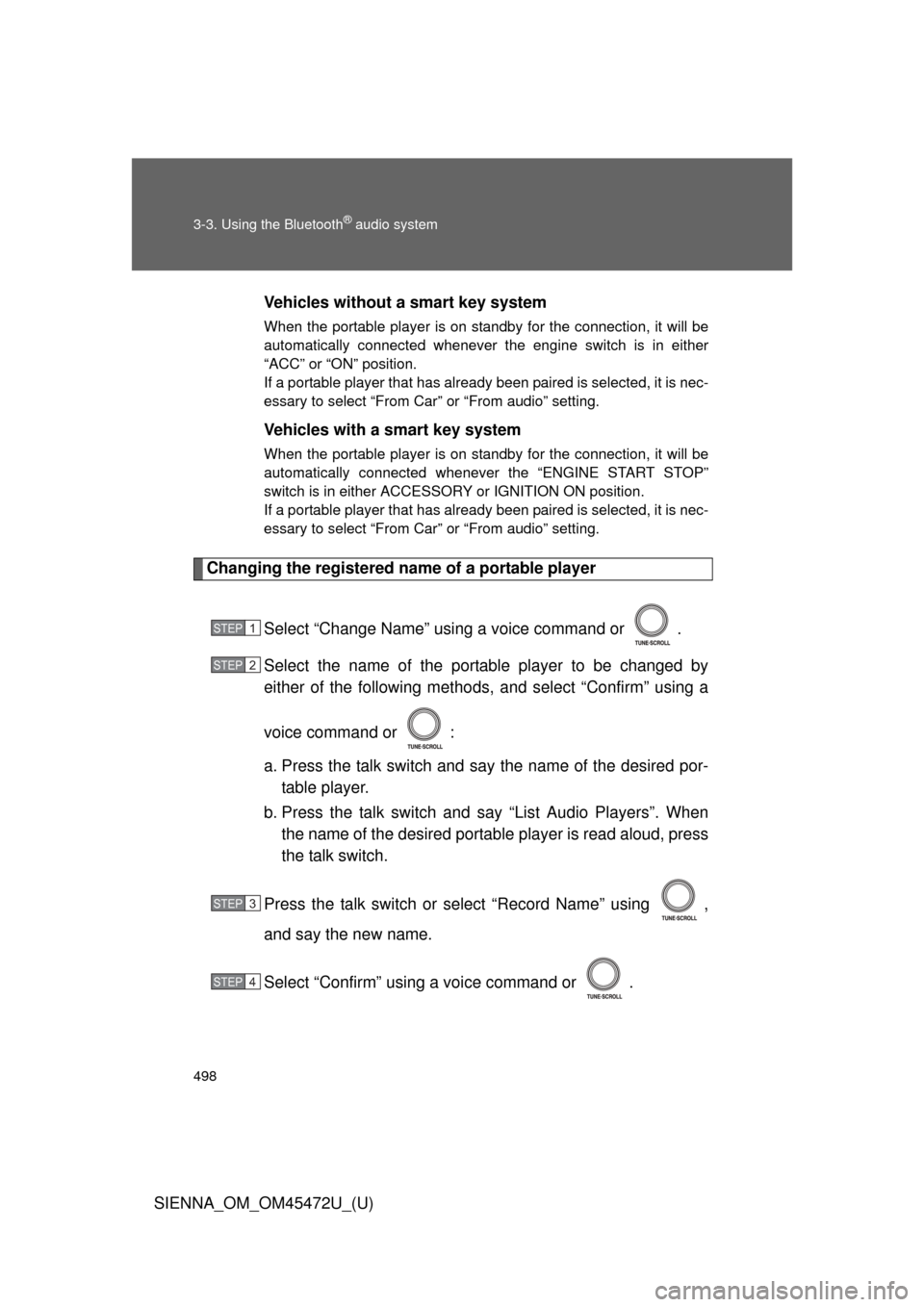
Changing the registered name of a portable player
Select “Change Name” using a voice command or .
Select the name of the portable player to be changed by
either of the following methods, and select “Confirm” using a
voice command or :
a. Press the talk switch and say the name of the desired por-table player.
b. Press the talk switch and say “List Audio Players”. When
the name of the desired portable player is read aloud, press
the talk switch.
Press the talk switch or select “Record Name” using ,
and say the new name.
Select “Confirm” using a voice command or .
STEP1
STEP2
STEP3
STEP4
Page 544 of 876
544 3-5. Using the hands-free phone system (for cellular phone)
SIENNA_OM_OM45472U_(U)
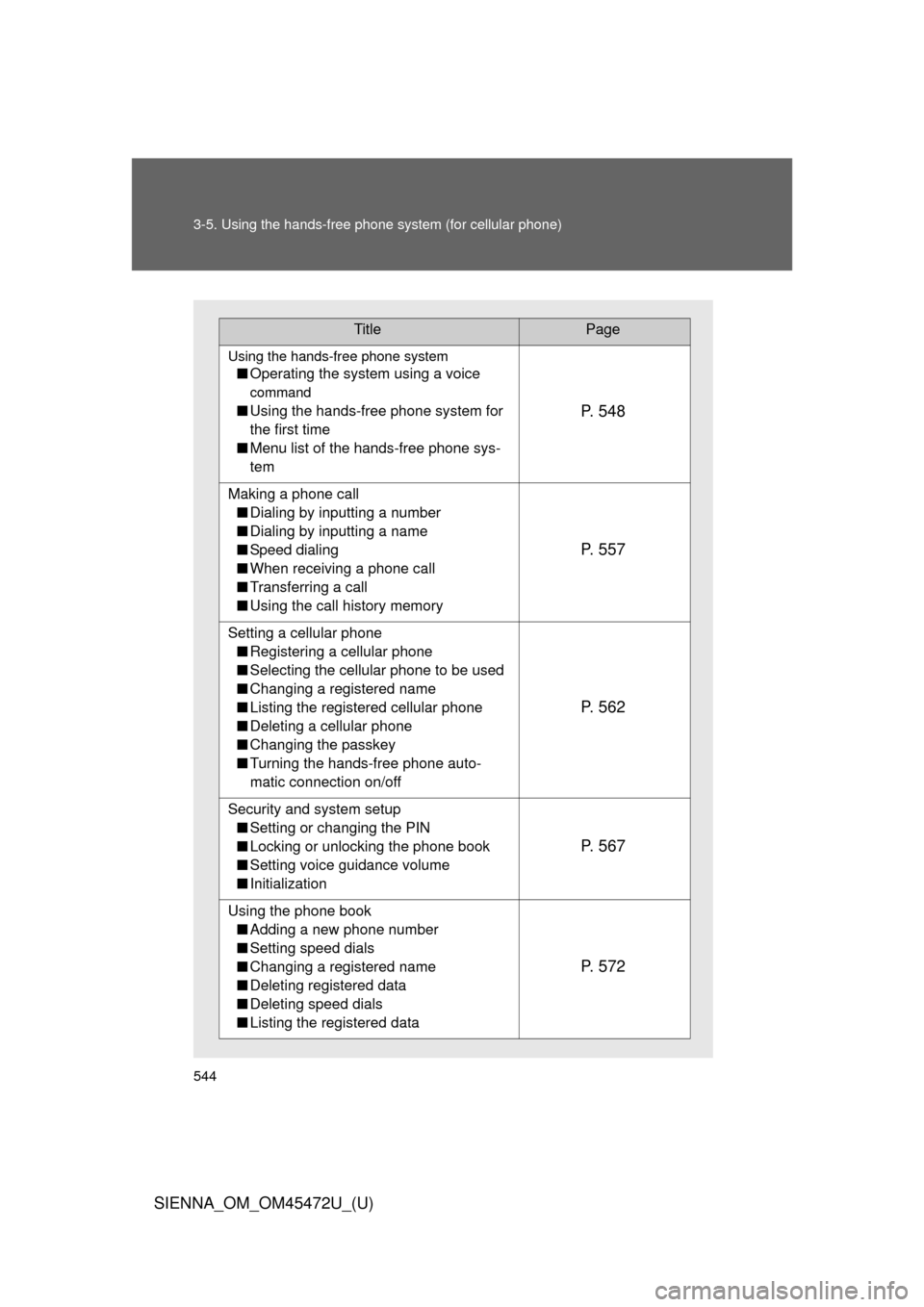
TitlePage
Using the hands-free phone system
■Operating the system using a voice
command
■Using the hands-free phone system for
the first time
■ Menu list of the hands-free phone sys-
temP. 5 4 8
Making a phone call
■ Dialing by inputting a number
■ Dialing by inputting a name
■ Speed dialing
■ When receiving a phone call
■ Transferring a call
■ Using the call history memory
P. 5 5 7
Setting a cellular phone
■ Registering a cellular phone
■ Selecting the cellular phone to be used
■ Changing a registered name
■ Listing the registered cellular phone
■ Deleting a cellular phone
■ Changing the passkey
■ Turning the hands-free phone auto-
matic connection on/off
P. 5 6 2
Security and system setup
■ Setting or changing the PIN
■ Locking or unlocking the phone book
■ Setting voice guidance volume
■ Initialization
P. 5 6 7
Using the phone book
■ Adding a new phone number
■ Setting speed dials
■ Changing a registered name
■ Deleting registered data
■ Deleting speed dials
■ Listing the registered data
P. 5 7 2
Page 555 of 876
555
3-5. Using the hand
s-free phone system (for cellular phone)
3
Interior features
SIENNA_OM_OM45472U_(U)■
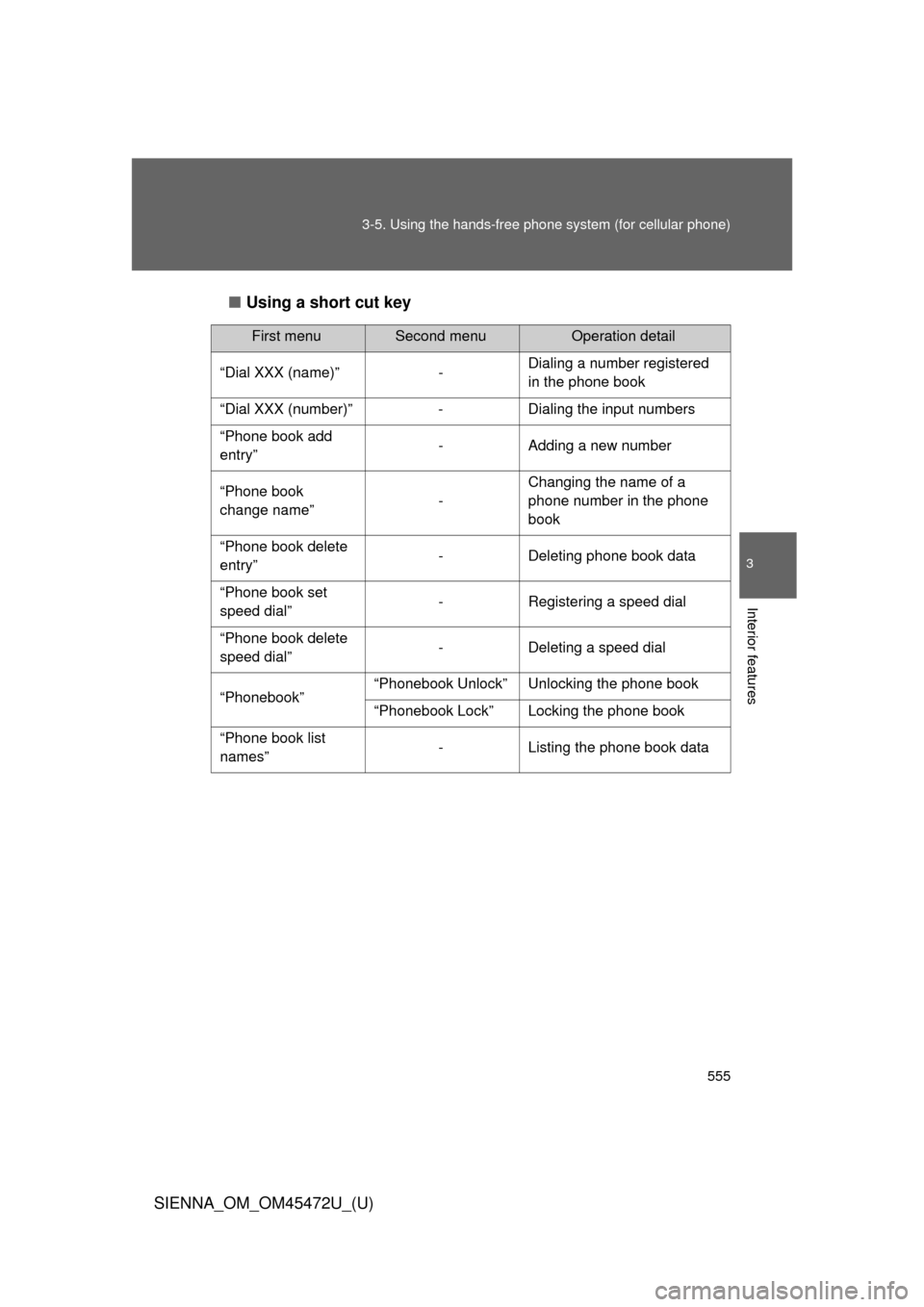
Using a short cut key
First menuSecond menuOperation detail
“Dial XXX (name)” - Dialing a number registered
in the phone book
“Dial XXX (number)” - Dialing the input numbers
“Phone book add
entry” - Adding a new number
“Phone book
change name” -Changing the name of a
phone number in the phone
book
“Phone book delete
entry” - Deleting phone book data
“Phone book set
speed dial” - Registering a speed dial
“Phone book delete
speed dial” - Deleting a speed dial
“Phonebook” “Phonebook Unlock” Unlocking the phone book
“Phonebook Lock” Locking the phone book
“Phone book list
names” - Listing the phone book data
Page 690 of 876
690 4-3. Do-it-yourself maintenance
SIENNA_OM_OM45472U_(U)
Installing tire pressure warning valves and transmittersWhen replacing tires or wheels, tire pressure warning valves and
transmitters must also be installed.
When new tire pressure warning valves and transmitters are
installed, new ID codes must be regi stered in the tire pressure warn-
ing computer and the tire pressure warning system must be initial-
ized. Have tire pressure warning valve and transmitter ID codes
registered by your Toyota dealer. ( P. 692)
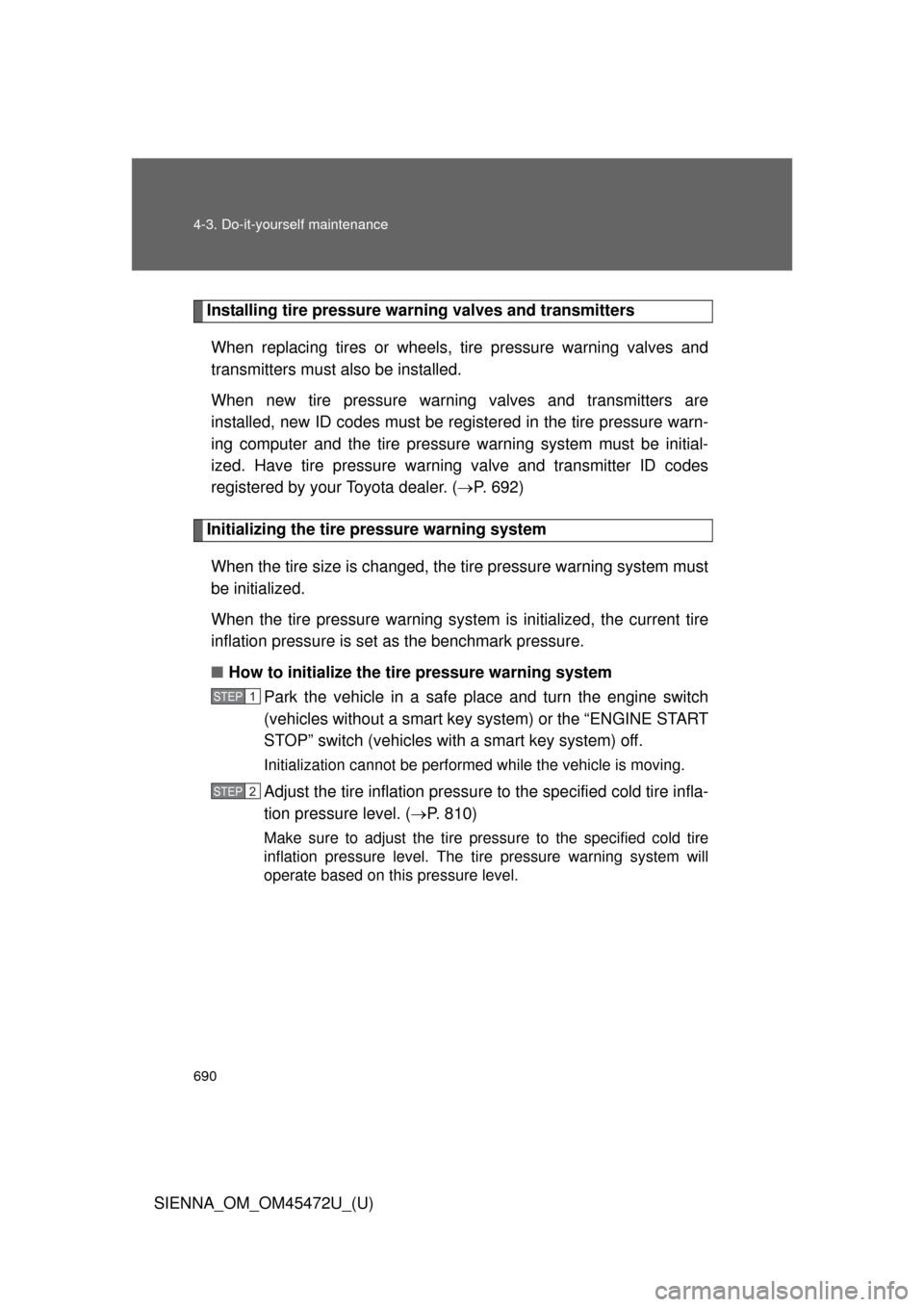
Initializing the tire pressure warning system
When the tire size is changed, the tire pressure warning system must
be initialized.
When the tire pressure warning syst em is initialized, the current tire
inflation pressure is set as the benchmark pressure.
■ How to initialize the tire pressure warning system
Park the vehicle in a safe pl ace and turn the engine switch
(vehicles without a smart key system) or the “ENGINE START
STOP” switch (vehicles with a smart key system) off.
Initialization cannot be performed while the vehicle is moving.
Adjust the tire inflation pressure to the specified cold tire infla-
tion pressure level. ( P. 810)
Make sure to adjust the tire pressure to the specified cold tire
inflation pressure level. The ti re pressure warning system will
operate based on this pressure level.
STEP1
STEP2
Page 709 of 876
709
4-3. Do-it-yourself maintenance
4
Maintenance and care
SIENNA_OM_OM45472U_(U)
Wireless remote control/electronic key batter y
Replace the battery with a new one if it is discharged.
■You will need the following items:
●Flathead screwdriver
● Lithium battery CR2032
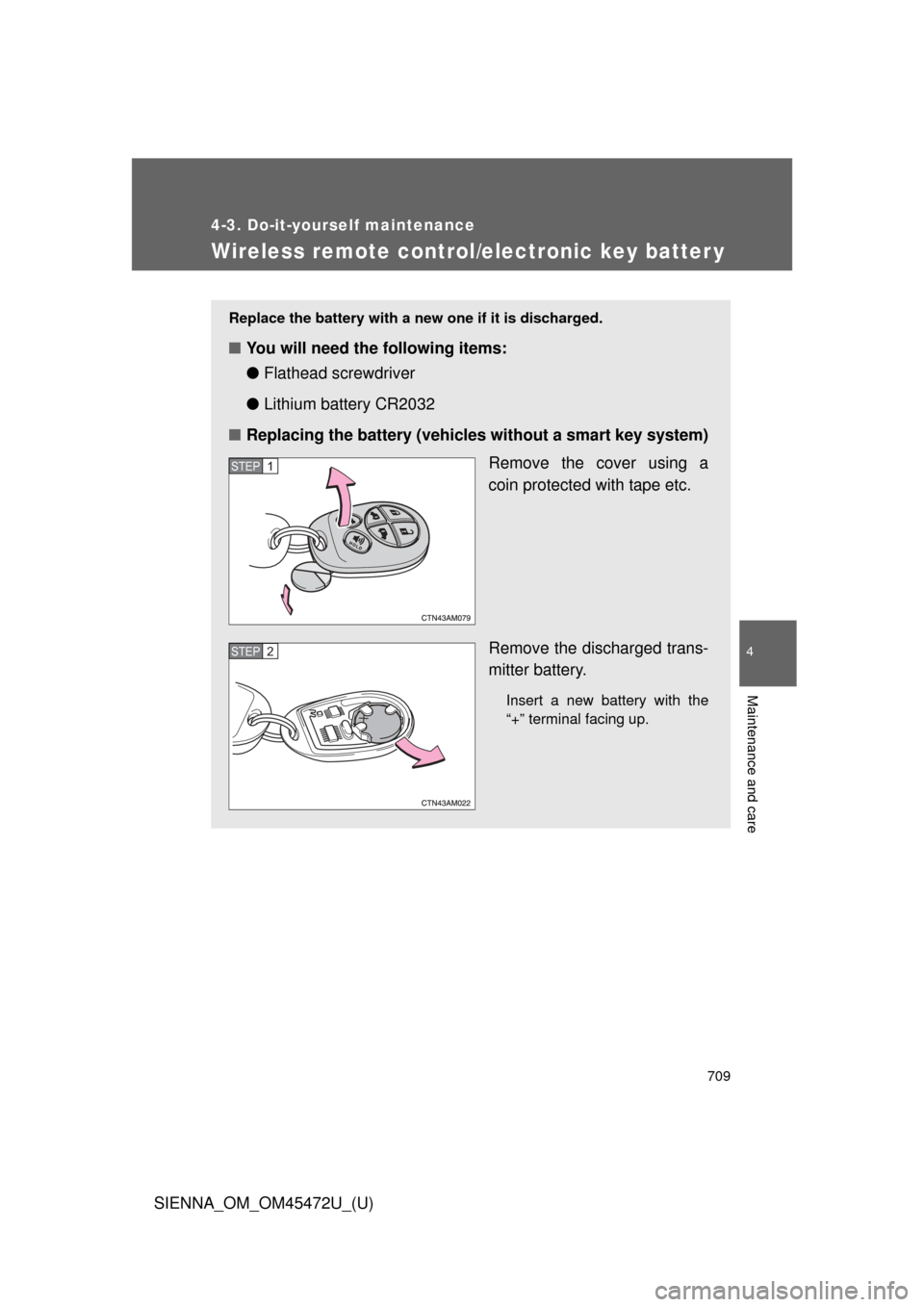
■ Replacing the battery (vehicles without a smart key system)
Remove the cover using a
coin protected with tape etc.
Remove the discharged trans-
mitter battery.
Insert a new battery with the
“+” terminal facing up.
STEP1
STEP2
Page 710 of 876
710 4-3. Do-it-yourself maintenance
SIENNA_OM_OM45472U_(U)
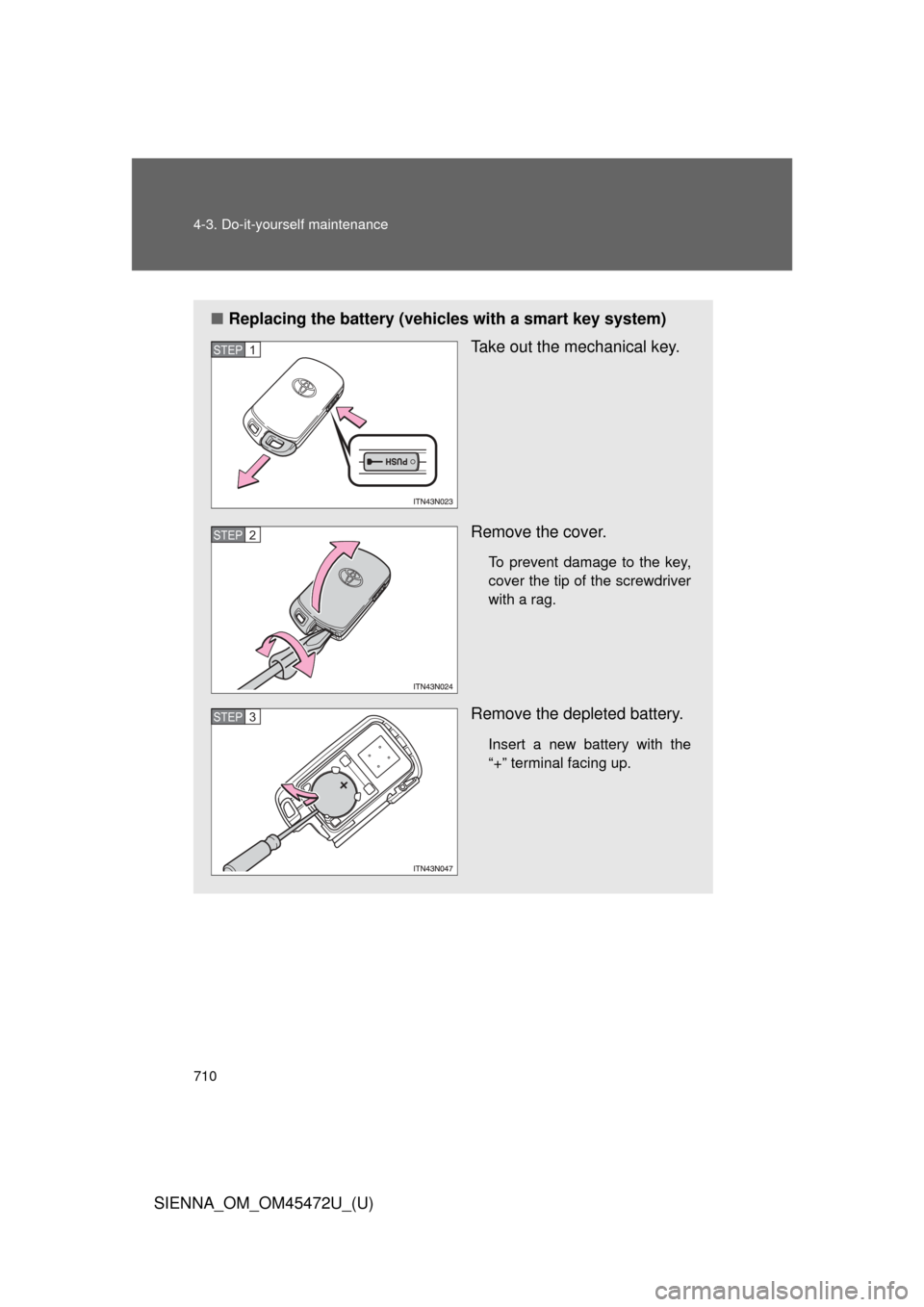
■Replacing the battery (vehicles with a smart key system)
Take out the mechanical key.
Remove the cover.
To prevent damage to the key,
cover the tip of the screwdriver
with a rag.
Remove the depleted battery.
Insert a new battery with the
“+” terminal facing up.
STEP1
STEP2
STEP3
Page 782 of 876
782
5-2. Steps to take in an emergency
SIENNA_OM_OM45472U_(U)
If you lose your keys
New genuine keys can be made by your Toyota dealer. For vehicles
with the smart key system, bring the other key and the key number
stamped on the key number plate. For vehicles without the smart key
system, bring a master key and the key number stamped on the key
number plate.