Page 5 of 876

1
2
3
4
5
6
7
5
SIENNA_OM_OM45472U_(U)
3-5. Using the hands-free phone system (for cellular phone)
Hands-free phone system (for cellular phone)
features ............................. 543
Using the hands-free phone system
(for cellular phone) ............ 548
Making a phone call ............ 557
Setting a cellular phone ...... 562
Security and system setup ................................. 567
Using the phone book ......... 572
3-6. Using the interior lights Interior lights list .................. 580
• Personal/interior light main switch ....................... 581
• Personal/interior lights ...... 582
• Personal lights .................. 584
• Rear ceiling lights ............. 584 3-7. Using the storage features
List of storage features ....... 586
• Glove boxes ..................... 587
• Console box ..................... 589
• Overhead console ............ 592
• Cup holders ...................... 593
• Bottle holders ................... 596
• Door pockets .................... 598
• Auxiliary boxes ................. 599
3-8. Other interior features Sun visors........................... 604
Vanity mirrors ..................... 605
Clock .................................. 606
Conversation mirror ............ 607
Power outlets...................... 608
Seat heaters ....................... 612
Armrests ............................. 614
Assist grips ......................... 616
Rear side sunshades.......... 617
Grocery bag hooks ............. 618
Floor mat ............................ 620
Luggage compartment features ............................ 622
Garage door opener ........... 624
Compass ............................ 632
Safety Connect ................... 637
Page 16 of 876
SIENNA_OM_OM45472U_(U)
16
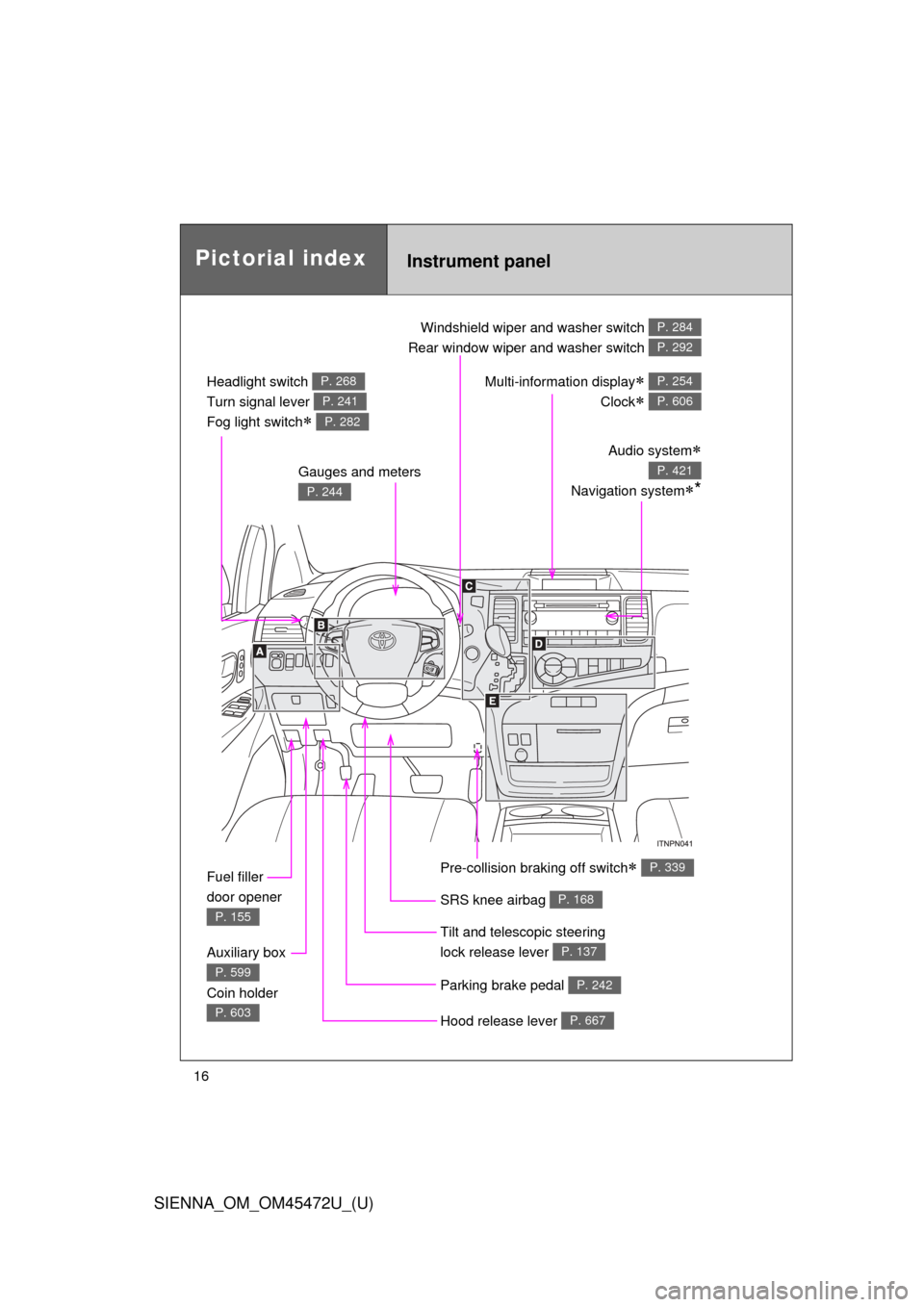
Pictorial indexInstrument panel
Headlight switch
Turn signal lever
Fog light switch
P. 268
P. 241
P. 282
Windshield wiper and washer switch
Rear window wiper and washer switch P. 284
P. 292
Gauges and meters
P. 244
Audio system
Navigation system*
P. 421
Multi-information display
Clock
P. 254
P. 606
Fuel filler
door opener
P. 155
Auxiliary box
Coin holder
P. 599
P. 603Hood release lever P. 667
Parking brake pedal P. 242
Tilt and telescopic steering
lock release lever
P. 137
SRS knee airbag P. 168
Pre-collision braking off switch P. 339
Page 254 of 876
254
2-2. Instrument cluster and information display
SIENNA_OM_OM45472U_(U)
Multi-information display
: If equipped
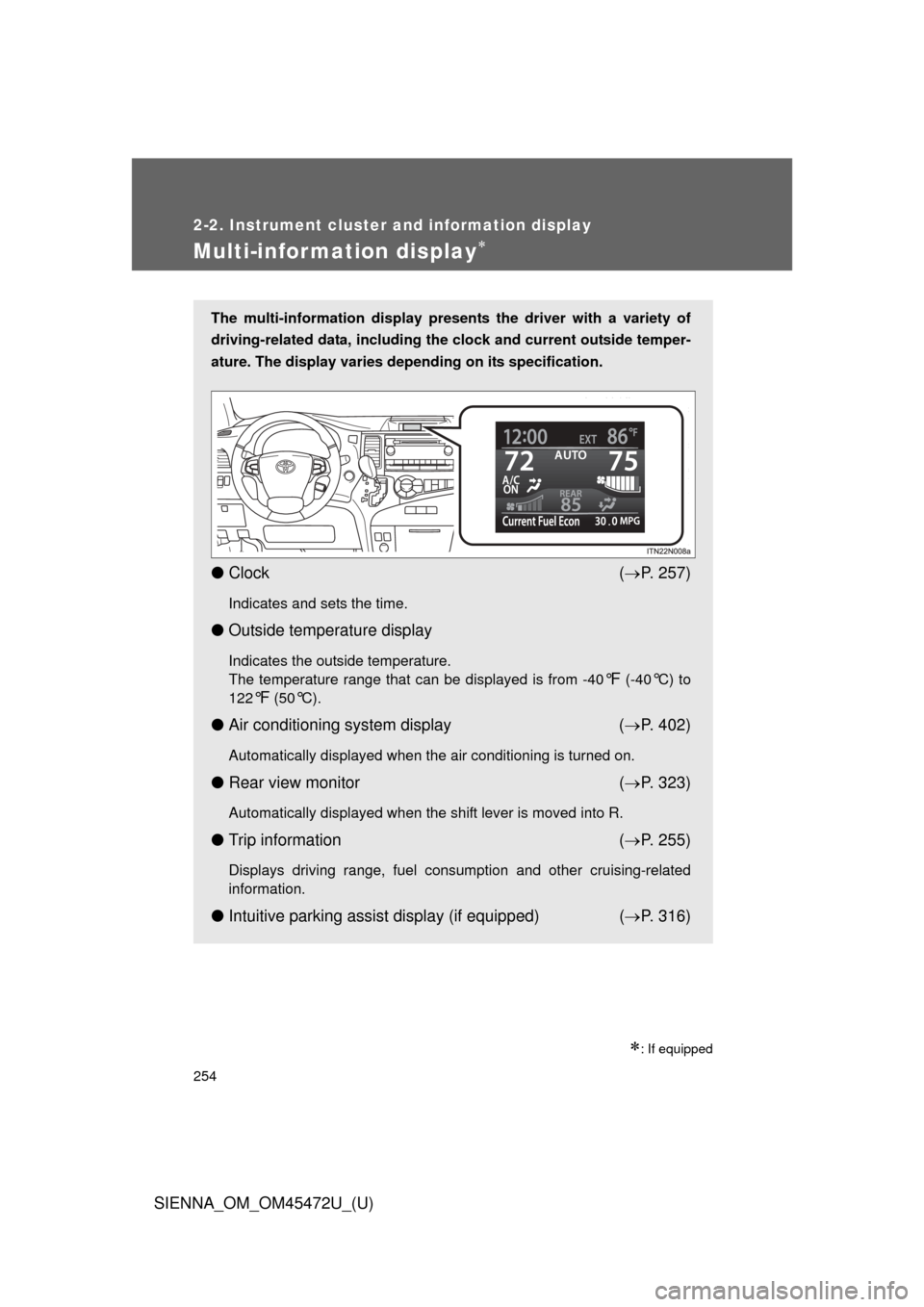
The multi-information display presents the driver with a variety of
driving-related data, including the clock and current outside temper-
ature. The display varies depending on its specification.
● Clock ( P. 257)
Indicates and sets the time.
● Outside temperature display
Indicates the outside temperature.
The temperature range that can be displayed is from -40
°F (-40°C) to
122
°F (50°C).
● Air conditioning system display ( P. 402)
Automatically displayed when the air conditioning is turned on.
● Rear view monitor ( P. 323)
Automatically displayed when the shift lever is moved into R.
● Trip information ( P. 255)
Displays driving range, fuel consumption and other cruising-related
information.
● Intuitive parking assist display (if equipped) ( P. 316)
Page 257 of 876
257
2-2. Instrument cluster and information display
2
When driving
SIENNA_OM_OM45472U_(U)
■
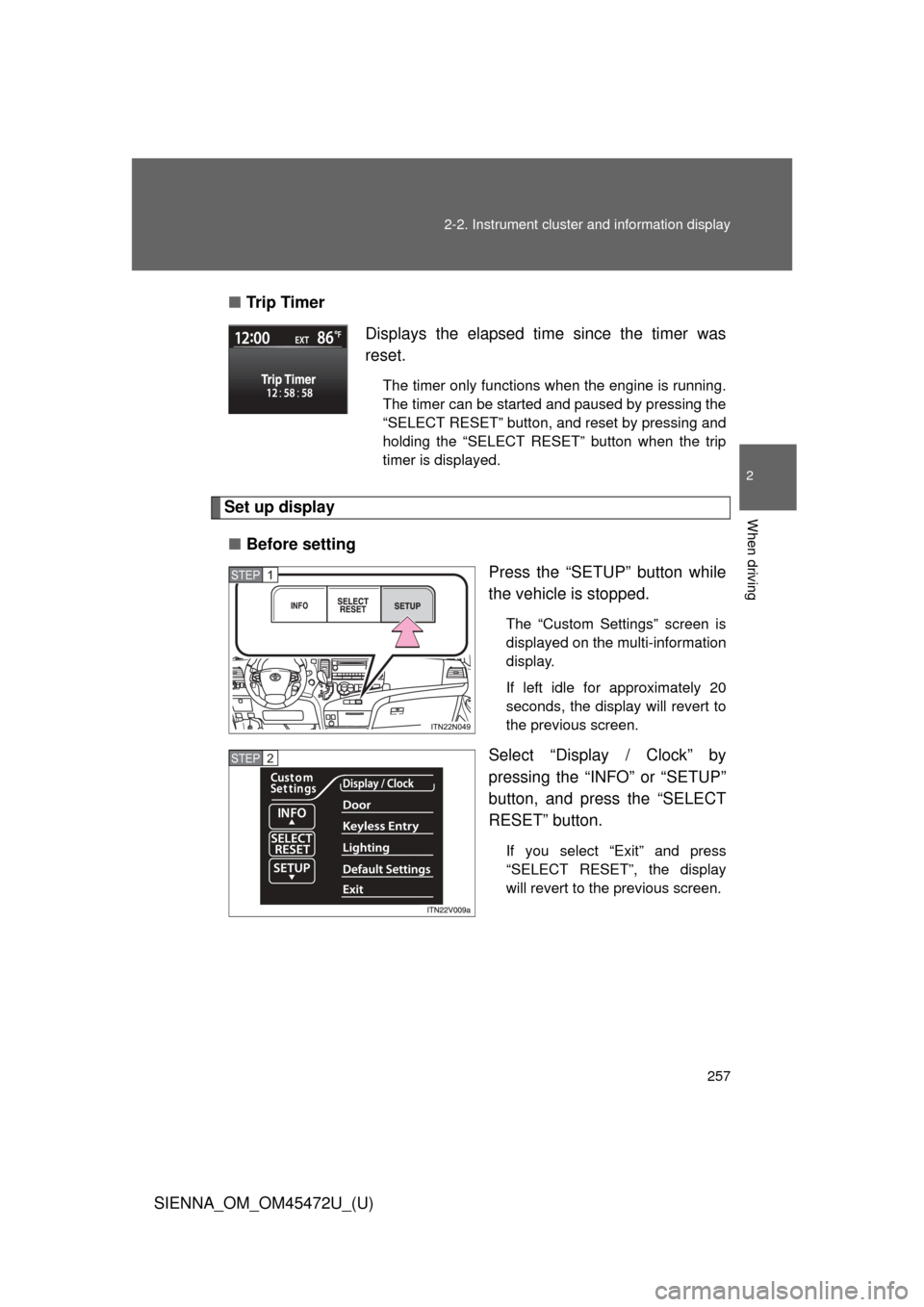
Tr i p Ti m e r
Set up display
■ Before setting
Press the “SETUP” button while
the vehicle is stopped.
The “Custom Settings” screen is
displayed on the multi-information
display.
If left idle for approximately 20
seconds, the display will revert to
the previous screen.
Select “Display / Clock” by
pressing the “INFO” or “SETUP”
button, and press the “SELECT
RESET” button.
If you select “Exit” and press
“SELECT RESET”, the display
will revert to the previous screen.
Displays the elapsed time since the timer was
reset.
The timer only functions when the engine is running.
The timer can be started and paused by pressing the
“SELECT RESET” button, and reset by pressing and
holding the “SELECT RESET” button when the trip
timer is displayed.
STEP1
STEP2
Page 258 of 876
258 2-2. Instrument cluster and information display
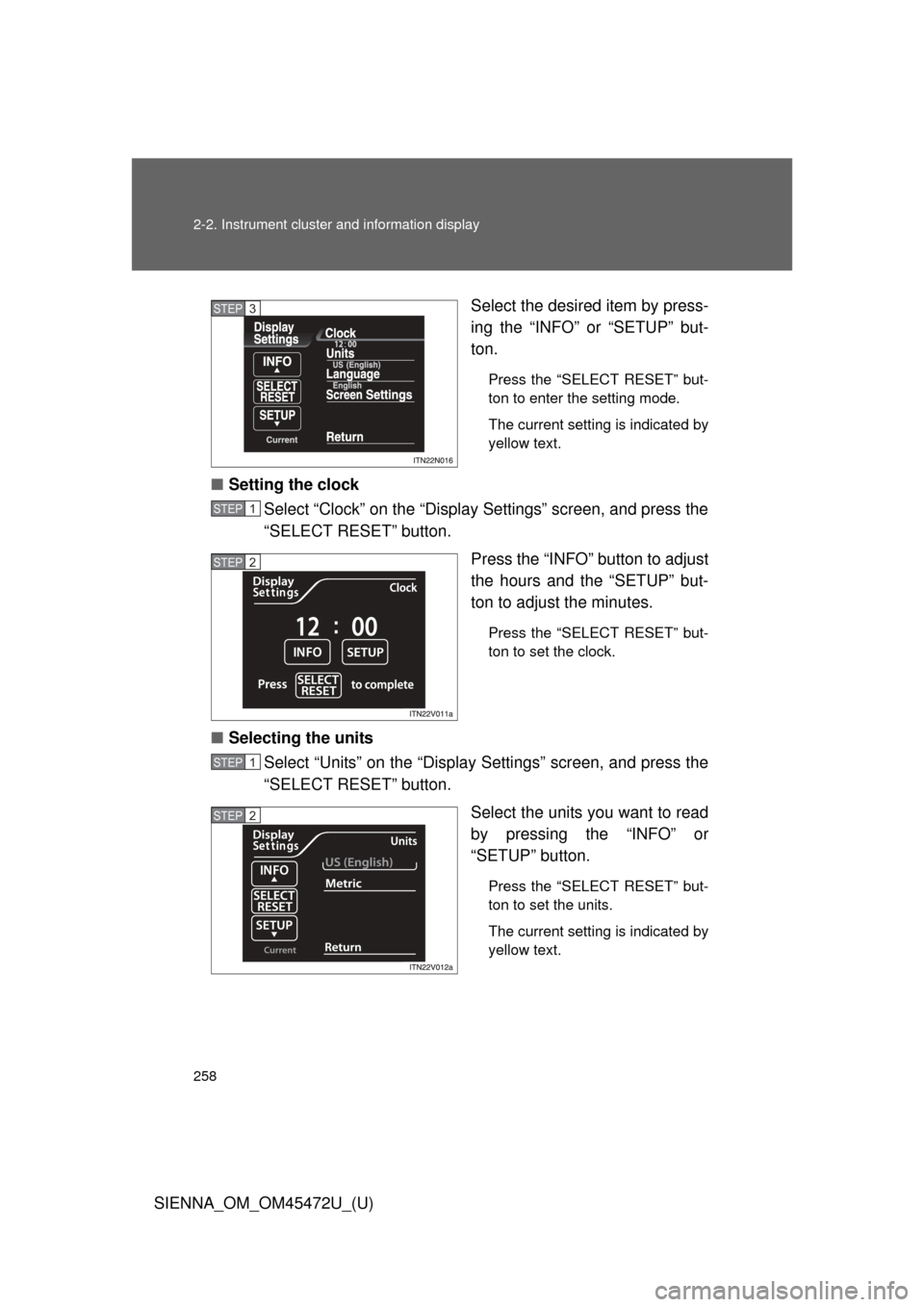
SIENNA_OM_OM45472U_(U)Select the desired item by press-
ing the “INFO” or “SETUP” but-
ton.
Press the “SELECT RESET” but-
ton to enter the setting mode.
The current setting is indicated by
yellow text.
■
Setting the clock
Select “Clock” on the “Display Settings” screen, and press the
“SELECT RESET” button.
Press the “INFO” button to adjust
the hours and the “SETUP” but-
ton to adjust the minutes.
Press the “SELECT RESET” but-
ton to set the clock.
■Selecting the units
Select “Units” on the “Display Settings” screen, and press the
“SELECT RESET” button.
Select the units you want to read
by pressing the “INFO” or
“SETUP” button.
Press the “SELECT RESET” but-
ton to set the units.
The current setting is indicated by
yellow text.
STEP3
STEP1
STEP2
STEP1
STEP2
Page 361 of 876
361
2-5. Driving information
2
When driving
SIENNA_OM_OM45472U_(U)
Roof luggage carri
er (if equipped)
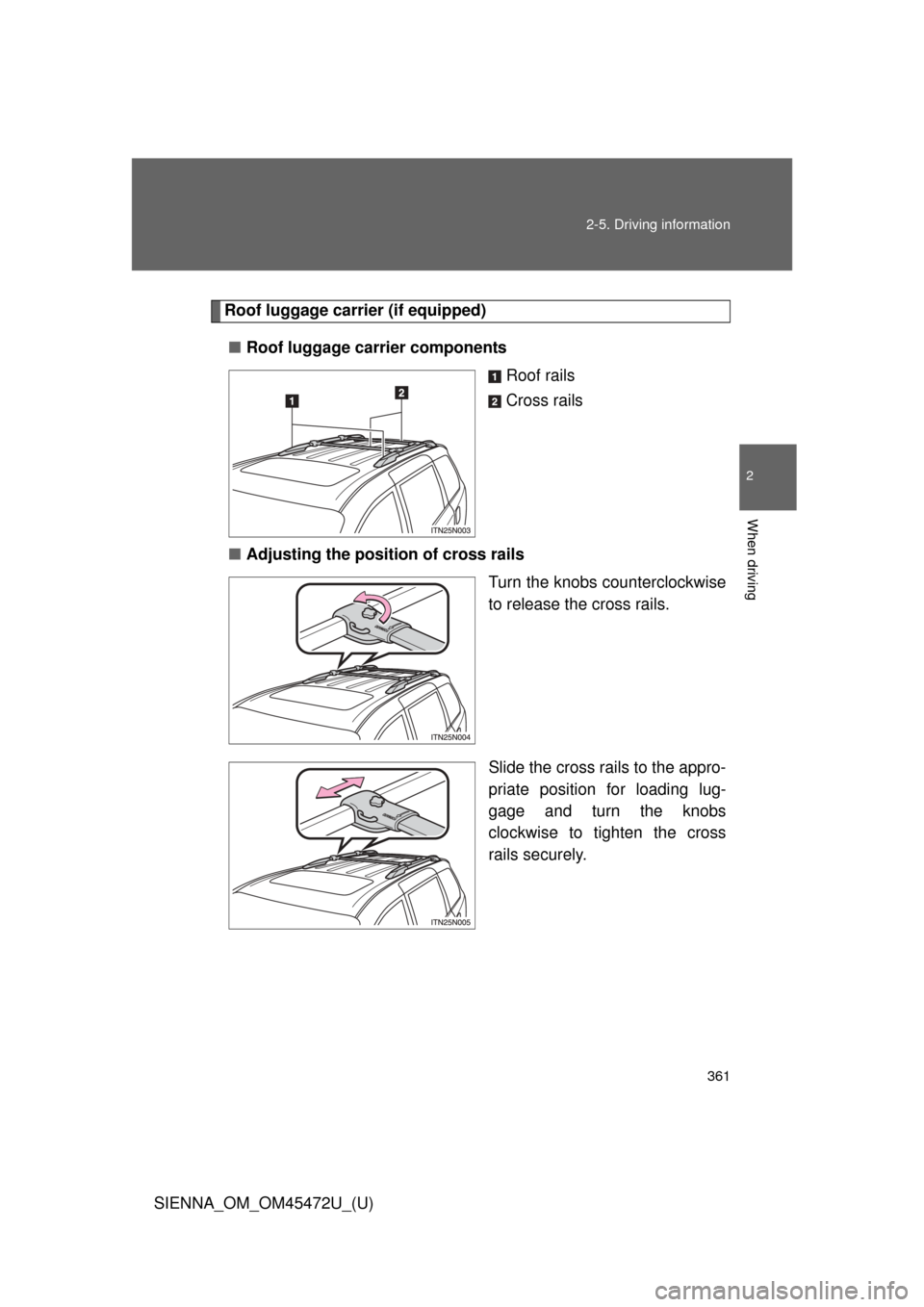
■ Roof luggage carrier components
Roof rails
Cross rails
■ Adjusting the position of cross rails
Turn the knobs counterclockwise
to release the cross rails.
Slide the cross rails to the appro-
priate position for loading lug-
gage and turn the knobs
clockwise to tighten the cross
rails securely.
Page 393 of 876
Interior features3
393
SIENNA_OM_OM45472U_(U)
3-5. Using the hands-free phone system (for cellular phone)
Hands-free phone system (for cellular phone)
features .......................... 543
Using the hands-free phone system
(for cellular phone) ......... 548
Making a phone call ......... 557
Setting a cellular phone ............................. 562
Security and system setup .............................. 567
Using the phone book ...... 572
3-6. Using the interior lights Interior lights list ............... 580
• Personal/interior light main switch .................... 581
• Personal/interior lights ... 582
• Personal lights ............... 584
• Rear ceiling lights .......... 584 3-7. Using the storage features
List of storage features .... 586
• Glove boxes ................... 587
• Console box ................... 589
• Overhead console .......... 592
• Cup holders ................... 593
• Bottle holders ................. 596
• Door pockets .................. 598
• Auxiliary boxes ............... 599
3-8. Other interior features Sun visors ........................ 604
Vanity mirrors ................... 605
Clock ................................ 606
Conversation mirror ......... 607
Power outlets ................... 608
Seat heaters..................... 612
Armrests........................... 614
Assist grips....................... 616
Rear side sunshades ....... 617
Grocery bag hooks........... 618
Floor mat .......................... 620
Luggage compartment features .......................... 622
Garage door opener......... 624
Compass .......................... 632
Safety Connect ................ 637
Page 395 of 876
395
3-1. Using the air conditioning system
and defogger
3
Interior features
SIENNA_OM_OM45472U_(U)Driver’s side temperature control dial
Turn the temperature control dial clockwise (warm) or coun-
terclockwise (cool).
If is not pressed, the system will blow ambient temperature air
or heated air.
For quick cooling, turn the temperature control dial to the “MAX A/C”
position. The air conditioning will automatically turn on and the air
circulation mode will be set to recirculated air mode.
When the dial is in the “MAX A/C” position, the air conditioning sys-
tem cannot be turned off even if is pressed.
Front passenger’s side temperature control dial
Turn the temperature control dial clockwise (warm) or counter
clockwise (cool).
STEP2