2013 TOYOTA SIENNA engine does not start
[x] Cancel search: engine does not startPage 6 of 876

TABLE OF CONTENTSIndex
6
SIENNA_OM_OM45472U_(U)
4-1. Maintenance and careCleaning and protecting the vehicle exterior ........... 646
Cleaning and protecting the vehicle interior ............ 651
4-2. Maintenance Maintenance requirements .................... 655
General maintenance ......... 658
Emission inspection and maintenance (I/M)
programs .......................... 662
4-3. Do-it-yourself maintenance Do-it-yourself service precautions ...................... 663
Hood................................... 667
Positioning a floor jack ....... 669
Engine compartment .......... 671
Tires ................................... 688
Tire inflation pressure......... 699
Wheels ............................... 703
Air conditioning filter ........... 706
Wireless remote control/ electronic key battery ....... 709
Checking and replacing fuses ................................ 712
Light bulbs .......................... 725 5-1. Essential information
Emergency flashers ............ 738
If your vehicle needs to be towed ....................... 739
If you think something is wrong ............................ 743
Fuel pump shut off system .............................. 744
5-2. Steps to take in an emergency If a warning light turns on or a warning
buzzer sounds... ............... 745
If a warning message is displayed ....................... 760
If you have a flat tire (vehicles with
run-flat tires) ..................... 761
If you have a flat tire (vehicles with
standard tires) .................. 763
If the engine will not start .... 778
If the shift lever cannot be shifted from P ................... 780
If you lose your keys ........... 782
If the electronic key does not operate properly ......... 783
If the battery is discharged ........................ 786
If your vehicle overheats..... 791
If the vehicle becomes stuck ................................. 794
If your vehicle has to be stopped in
an emergency ................... 796
4Maintenance and care5When trouble arises
Page 43 of 876

43
1-2. Opening, closing and locking the doors
1
Before driving
SIENNA_OM_OM45472U_(U)
*1: A message will be shown on the multi-information display in the instru-
ment cluster.
*2: If the engine does not start when the electronic key is inside the vehicle,the electronic key battery may be depleted or there may be difficulties
receiving signal from the key. ( P. 709)
■ Security feature
If a door is not opened within approximately 60 seconds after the vehicle is
unlocked, the security feature automatically locks the vehicle again.
AlarmSituationCorrection procedure
Interior alarm
pings once
*1
The electronic key has a
low battery Replace the electronic
key battery
An attempt was made to
start the engine without the
electronic key being
present, or the electronic
key was not functioning
normally Start the engine with
the electronic key
present
*2
Interior alarm
pings once and
exterior alarm
sounds 3 times
*1
The driver’s door was
closed after the key was
carried outside the vehicle,
and the “ENGINE START
STOP” switch was not
turned offTurn the “ENGINE
START STOP” switch
OFF and close the
driver’s door again
An occupant carried the
electronic key outside the
vehicle and closed the
door while the “ENGINE
START STOP” switch was
not off Bring the electronic
key back into the vehi-
cle
Page 49 of 876
49
1-2. Opening, closing and locking the doors
1
Before driving
SIENNA_OM_OM45472U_(U)
■
Notes for the unlocking function
● Gripping the front door handle when wearing a glove may not unlock or
lock the door.
● A sudden approach to the effective range or door handle operation may
prevent the doors from being unlocked. In this case, return the door han-
dle to the original position and check that the doors have unlocked before
pulling the door handle.
● If there is another electronic key in the detection area, it may take slightly
longer to unlock the doors after one of the front door handles is gripped
or one of sliding door handles is pulled.
■ When the vehicle is not dr iven for extended periods
● To prevent theft of the vehicle, do not leave the electronic key within 6 ft.
(2 m) of the vehicle.
● The smart key system can be deactivated in advance. ( P. 831)
■ To operate the system properly
Make sure to carry the electronic key when operating the system. Do not get
the electronic key too close to the vehicle when operating the system from
outside of the vehicle.
Depending on the position and holding condition of the electronic key, the
key may not be detected correctly and the system may not operate properly.
(The alarm may go off accidentally, or the door lock prevention may not
operate.)
■ If the smart key system does not operate properly
● Locking and unlocking the doors: Use the mechanical key. ( P. 783)
● Starting the engine ( P. 784)
Page 124 of 876

124 1-3. Adjustable components (seats, mirrors, steering wheel)
SIENNA_OM_OM45472U_(U)
■Operating the driving position memo ry after turning the engine off
Vehicles without a smart key system
Memorized positions can be activated up to 180 seconds after the driver’s
door is opened and another 60 seconds after it is closed again, even after
turning the engine switch to the “LOCK” position.
Vehicles with a smart key system
Memorized positions can be activated up to 180 seconds after the driver’s
door is opened and another 60 seconds after it is closed again, even after
turning the “ENGINE START STOP” switch off.
■ Stopping seat position ope ration part-way through
Perform any of the following operations.
● Press the “SET” button.
● Press button “1” or “2”.
● Adjust the seat using the switches (only cancels seat position recall).
CAUTION
■Seat adjustment caution
Take care during seat adjustment so that the seat does not strike the rear
passenger or squeeze your body against the steering wheel.
Page 146 of 876

146 1-4. Opening and closing the windows and moon roof
SIENNA_OM_OM45472U_(U)
■When the power window does not close normally
If the jam protection function is operating abnormally and a window cannot
be closed, perform the following operations using the power window switch
on the relevant door.
● After stopping the vehicle, the window can be closed by holding the
power window switch in the one-touch closing position while the engine
switch is turned to the “ON” position (vehicles without a smart key sys-
tem) or the “ENGINE START STOP” switch is turned to IGNITION ON
mode (vehicles with a smart key system).
● If the window still cannot be closed even by carrying out the operation
explained above, initialize the function by performing the following proce-
dure.
Hold the power window switch in the one-touch closing position.
Continue holding the switch for a further 6 seconds after the win-
dow has closed.
Hold the power window switch in the one-touch opening position.
Continue holding the switch for a further 2 seconds after the win-
dow has opened completely.
Hold the power window switch in the one-touch closing position
once again. Continue holding the switch for a further 2 seconds
after the window has closed.
If you release the switch while the window is moving, start again from the
beginning. If the window continues to close but then re-open slightly even
after performing the above procedure correctly, have the vehicle inspected
by your Toyota dealer.
STEP1
STEP2
STEP3
Page 214 of 876

214 2-1. Driving procedures
SIENNA_OM_OM45472U_(U)
■Driving in the rain
● Drive carefully when it is raining, because visibility will be reduced, the
windows may become fogged-up, and the road will be slippery.
● Drive carefully when it starts to rain, because the road surface will be
especially slippery.
● Refrain from high speeds when driving on an expressway in the rain,
because there may be a layer of water between the tires and the road
surface, preventing the steering and brakes from operating properly.
■ Engine speed while driving
In the following conditions, the engine speed may become high while driving.
This is due to automatic up-shifting control or down-shifting implementation
to meet driving conditions. It does not indicate sudden acceleration.
● The vehicle is judged to be driving uphill or downhill
● When the accelerator pedal is released
■ Breaking in your new Toyota
To extend the life of the vehicle, observing the following precautions is rec-
ommended:
● For the first 200 miles (300 km):
Avoid sudden stops.
● For the first 500 miles (800 km):
Do not tow a trailer.
● For the first 1000 miles (1600 km):
• Do not drive at extremely high speeds.
• Avoid sudden acceleration.
• Do not drive continuously in low gears.
• Do not drive at a constant speed for extended periods.
■ Drum-in-disc type parking brake system
Your vehicle has a drum-in-disc type parking brake system. This type of
brake system needs bedding-down of the brake shoes periodically or when-
ever the parking brake shoes and/or drum are replaced. Have your Toyota
dealer perform the bedding down operation.
Page 227 of 876
227
2-1. Driving procedures
2
When driving
SIENNA_OM_OM45472U_(U)
■
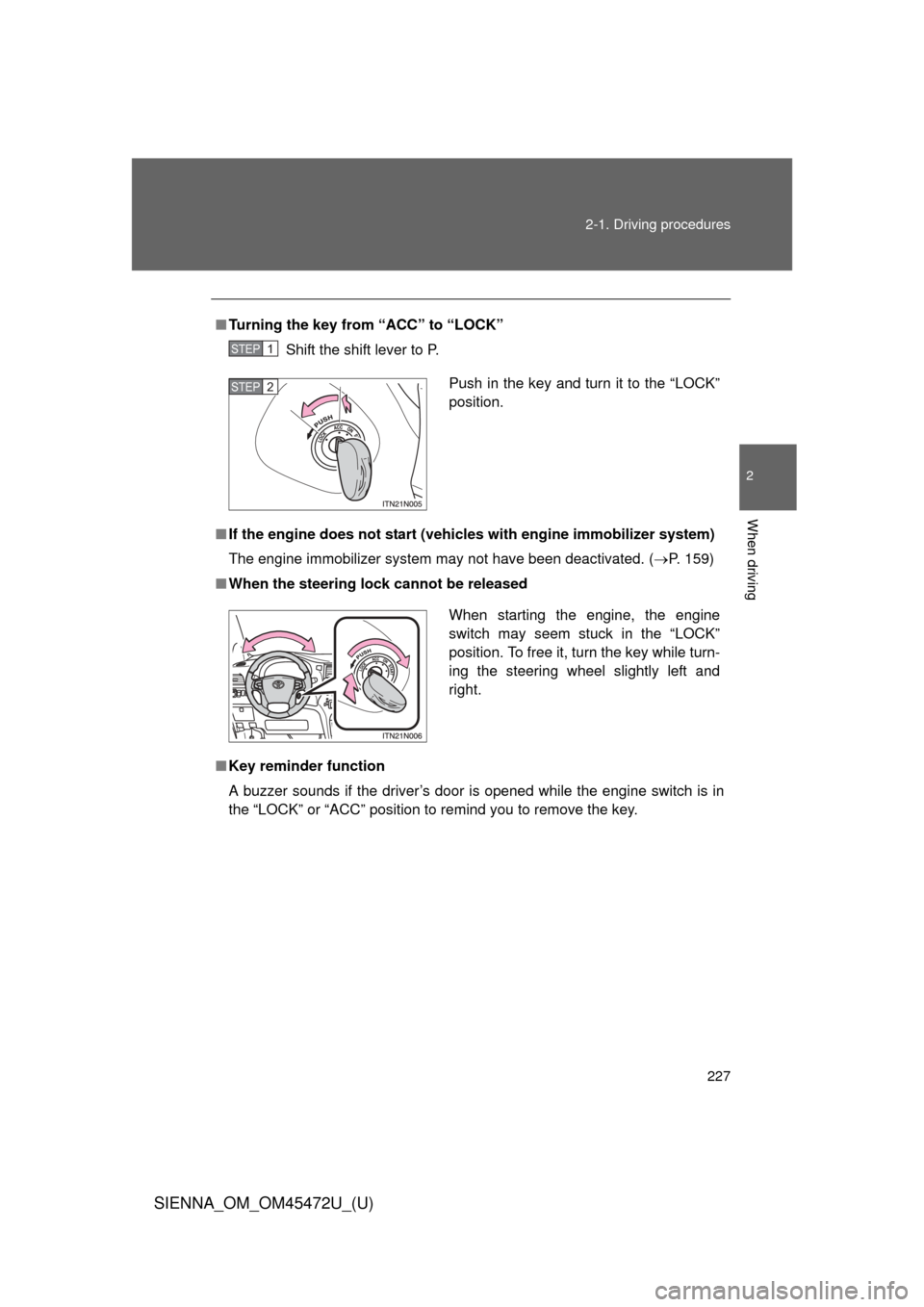
Turning the key from “ACC” to “LOCK”
Shift the shift lever to P.
■ If the engine does not start (vehic les with engine immobilizer system)
The engine immobilizer system may not have been deactivated. ( P. 159)
■ When the steering lock cannot be released
■ Key reminder function
A buzzer sounds if the driver’s door is opened while the engine switch is in
the “LOCK” or “ACC” position to remind you to remove the key\
.
STEP1
Push in the key and turn it to the “LOCK”
position.STEP2
When starting the engine, the engine
switch may seem stuck in the “LOCK”
position. To free it, turn the key while turn-
ing the steering wheel slightly left and
right.
Page 229 of 876
229
2-1. Driving procedures
2
When driving
SIENNA_OM_OM45472U_(U)
Engine (ignition) switch (vehicles with smar t key system)
Performing the following operations when carrying the electronic
key on your person starts the engine or changes “ENGINE START
STOP” switch modes.
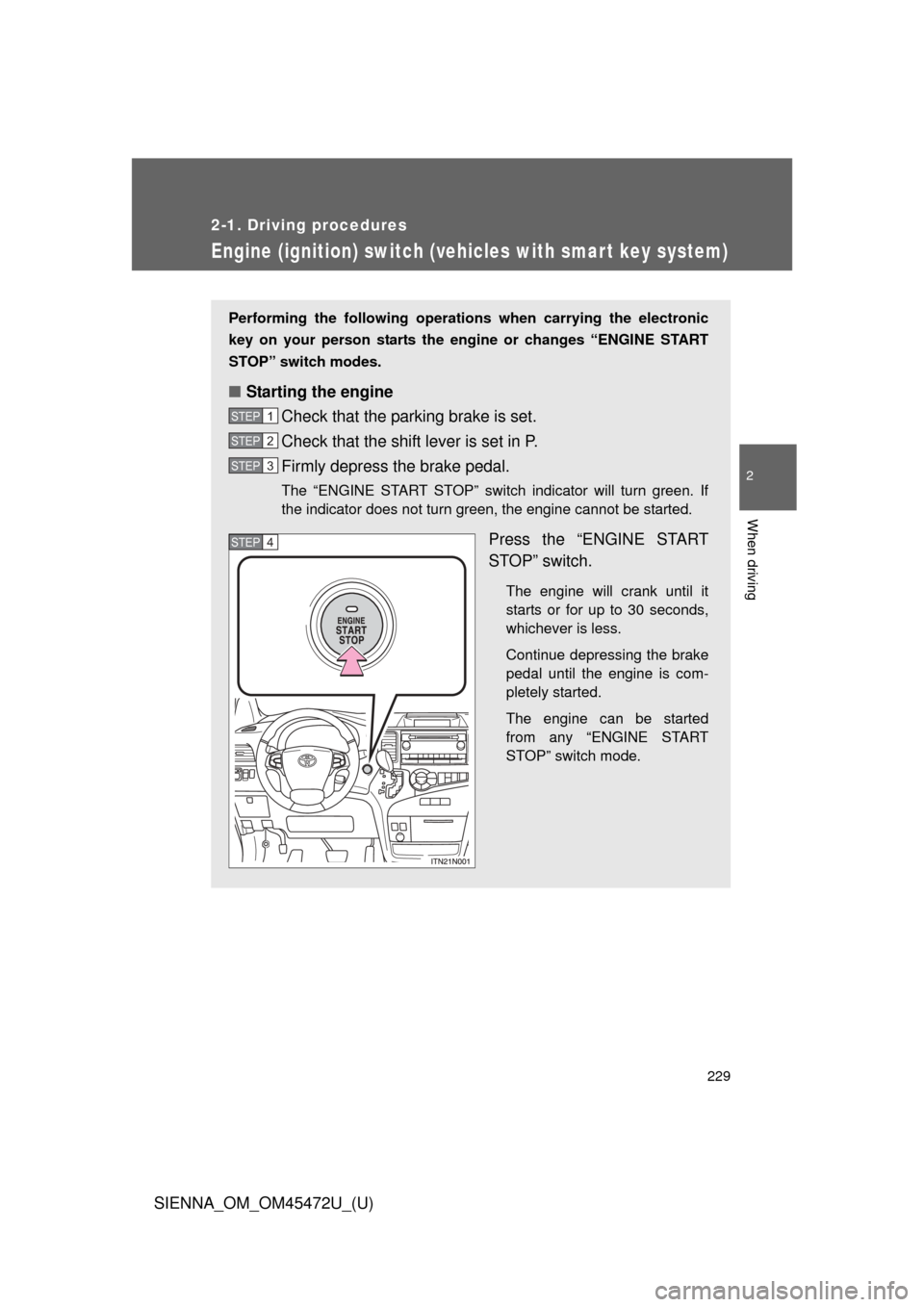
■ Starting the engine
Check that the parking brake is set.
Check that the shift lever is set in P.
Firmly depress the brake pedal.
The “ENGINE START STOP” switch indicator will turn green. If
the indicator does not turn green, the engine cannot be started.
Press the “ENGINE START
STOP” switch.
The engine will crank until it
starts or for up to 30 seconds,
whichever is less.
Continue depressing the brake
pedal until the engine is com-
pletely started.
The engine can be started
from any “ENGINE START
STOP” switch mode.
STEP1
STEP2
STEP3
STEP4