Page 122 of 876
122 1-3. Adjustable components (seats, mirrors, steering wheel)
SIENNA_OM_OM45472U_(U)
Linking driving position memory with door unlock operation
Record your driving position to button “1” or “2” before performing the
following:
Vehicles without a smart key system
Carry only the wireless remote cont rol to which you want to link the
driving position.
Unlock the vehicle with the wireless remote control to which
you want to link the driving position.
Shift the shift lever to P and close the driver’s door. Turn the
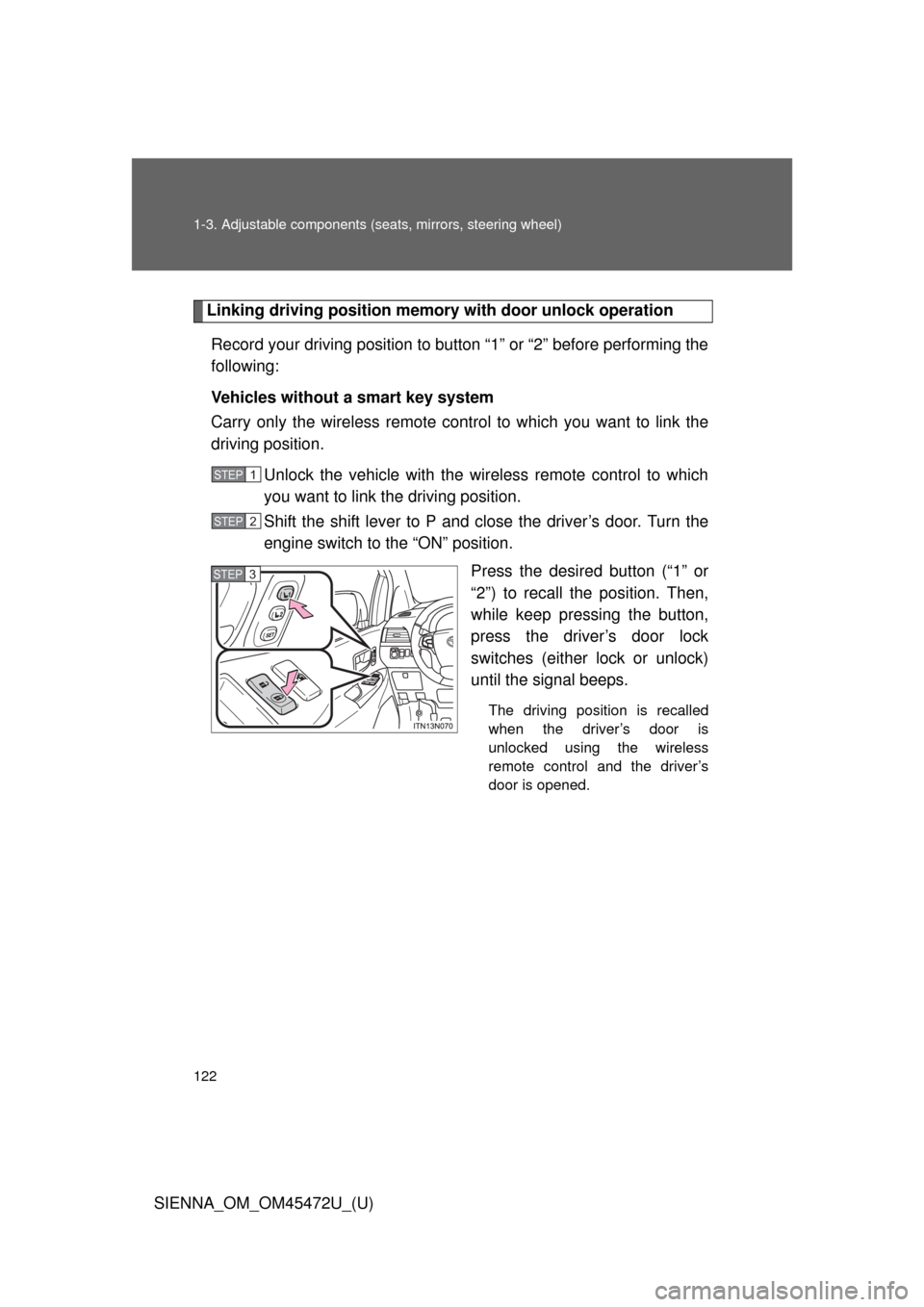
engine switch to the “ON” position. Press the desired button (“1” or
“2”) to recall the position. Then,
while keep pressing the button,
press the driver’s door lock
switches (either lock or unlock)
until the signal beeps.
The driving position is recalled
when the driver’s door is
unlocked using the wireless
remote control and the driver’s
door is opened.
STEP1
STEP2
STEP3
Page 123 of 876
123
1-3. Adjustable components (s
eats, mirrors, steering wheel)
1
Before driving
SIENNA_OM_OM45472U_(U)Vehicles with a smart key system
Carry only the electronic key to wh
ich you want to link the driving
position. If 2 or more keys are in the vehicle, the driving position can-
not be linked properly.
Shift the shift lever to P and close the driver’s door. Turn the
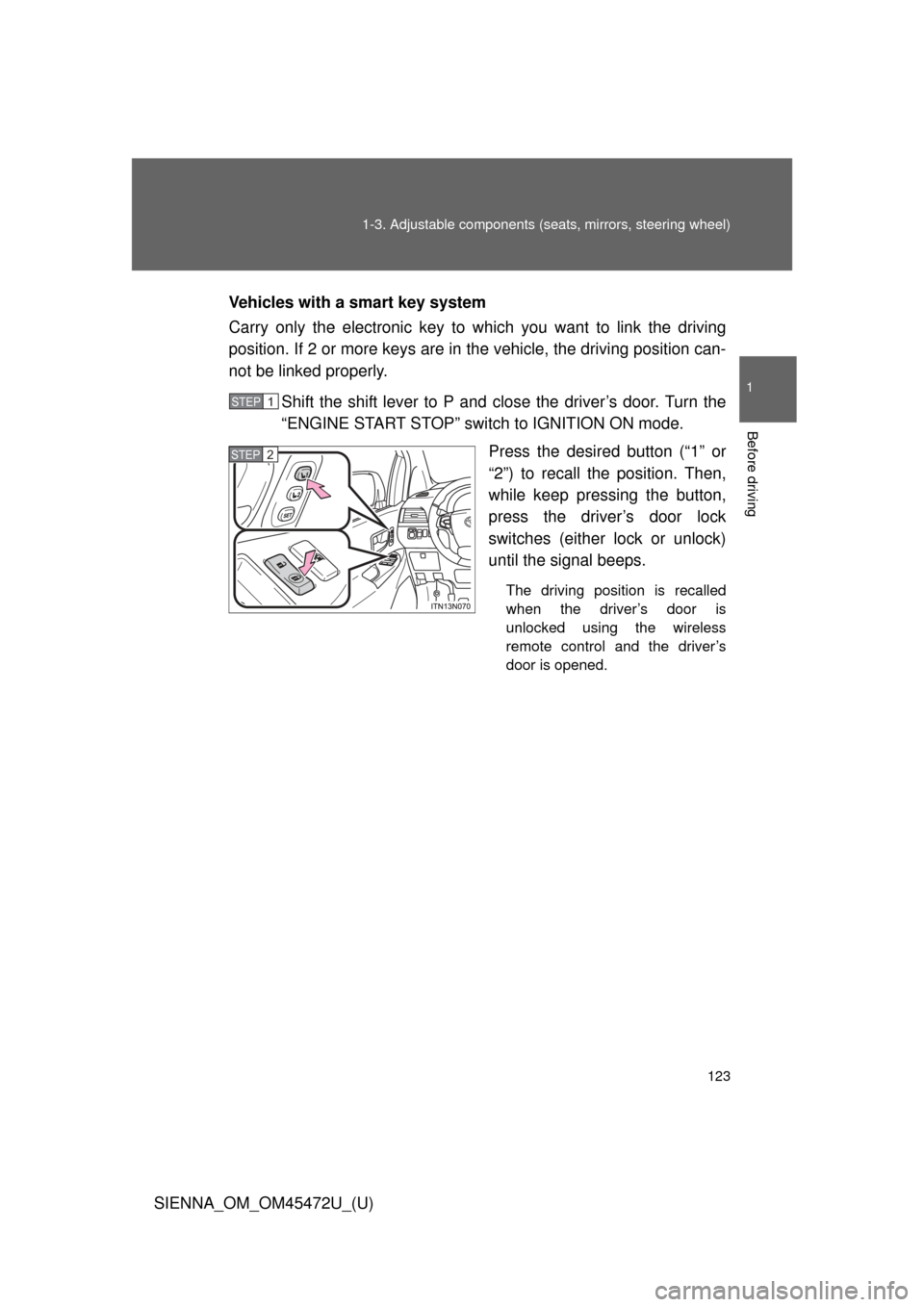
“ENGINE START STOP” switch to IGNITION ON mode. Press the desired button (“1” or
“2”) to recall the position. Then,
while keep pressing the button,
press the driver’s door lock
switches (either lock or unlock)
until the signal beeps.
The driving position is recalled
when the driver’s door is
unlocked using the wireless
remote control and the driver’s
door is opened.
STEP1
STEP2
Page 213 of 876
213
2-1. Driving procedures
2
When driving
SIENNA_OM_OM45472U_(U)
Starting off on a steep uphill
Make sure that the parking brake is set and shift the shift lever
to D.
Gently depress the accelerator pedal.
Release the parking brake.
■Parking the vehicle
With the shift lever in D, depress the brake pedal.
Set the parking brake. ( P. 242)
Shift the shift lever to P. ( P. 236)
If parking on a hill, block the wheels as needed.
Vehicles without a smart key system:
Turn the engine switch to the “LOCK” position and stop the
engine.
Vehicles with a smart key system:
Press the “ENGINE START STOP” switch to stop the
engine.
Lock the door, making sure that you have the key on your
person.
STEP1
STEP2
STEP3
STEP4
STEP5
STEP1
STEP2
STEP3
Page 222 of 876

222 2-1. Driving procedures
SIENNA_OM_OM45472U_(U)
CAUTION
■When the vehicle is parked
● Always apply the parking brake, shift the shift lever to P, stop the engine
and lock the vehicle.
Do not leave the vehicle unattended while the engine is running.
● Do not touch the exhaust pipe while the engine is running or immediately
after turning the engine off.
Doing so may cause burns.
● Do not leave the engine running in an area with snow build-up, or where it
is snowing. If snowbanks build up around the vehicle while the engine is
running, exhaust gases may collect and enter the vehicle. This may lead
to death or a serious health hazard.
■ Exhaust gases
Exhaust gases include harmful carbon monoxide (CO), which is colorless
and odorless. Inhaling exhaust gases may lead to death or a serious health
hazard.
● If the vehicle is in a poorly ventilated area, stop the engine. In a closed
area, such as a garage, exhaust gases may collect and enter the vehicle.
This may lead to death or a serious health hazard.
● The exhaust system should be checked occasionally. If there is a hole or
crack caused by corrosion, damage to a joint or abnormal exhaust noise,
be sure to have the vehicle inspected and repaired by your Toyota dealer.
Failure to do so may allow exhaust gases to enter the vehicle, resulting in
death or a serious health hazard.
Page 226 of 876
226
2-1. Driving procedures
SIENNA_OM_OM45472U_(U)
Engine (ignition) switch (vehicles without smart key system)
■Starting the engine
Check that the parking brake is set.
Check that the shift lever is set in P.
Firmly depress the brake pedal.
Turn the engine switch to the “START” position to start the
engine.
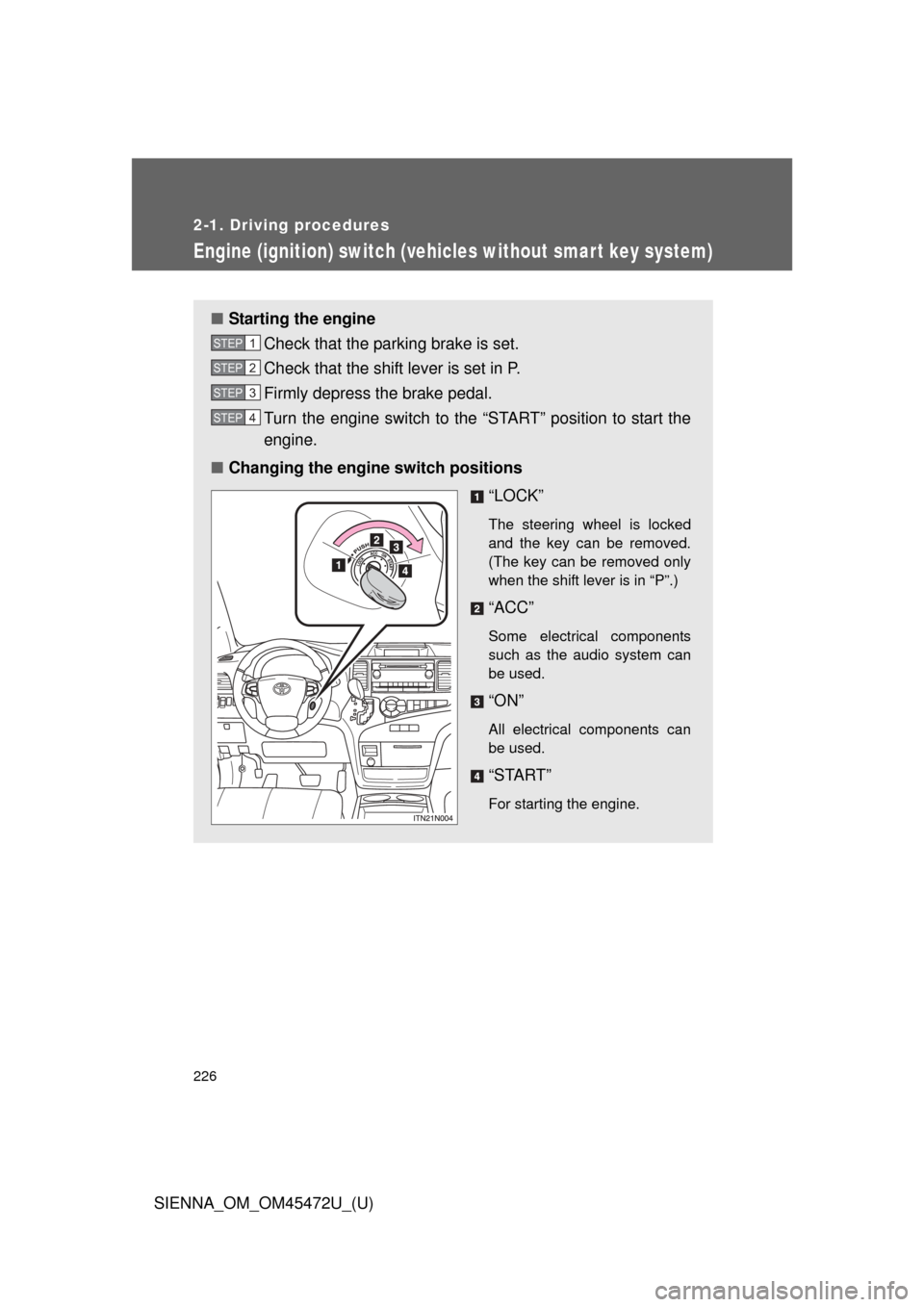
■ Changing the engine switch positions
“LOCK”
The steering wheel is locked
and the key can be removed.
(The key can be removed only
when the shift lever is in “P”.)
“ACC”
Some electrical components
such as the audio system can
be used.
“ON”
All electrical components can
be used.
“START”
For starting the engine.
STEP1
STEP2
STEP3
STEP4
Page 227 of 876
227
2-1. Driving procedures
2
When driving
SIENNA_OM_OM45472U_(U)
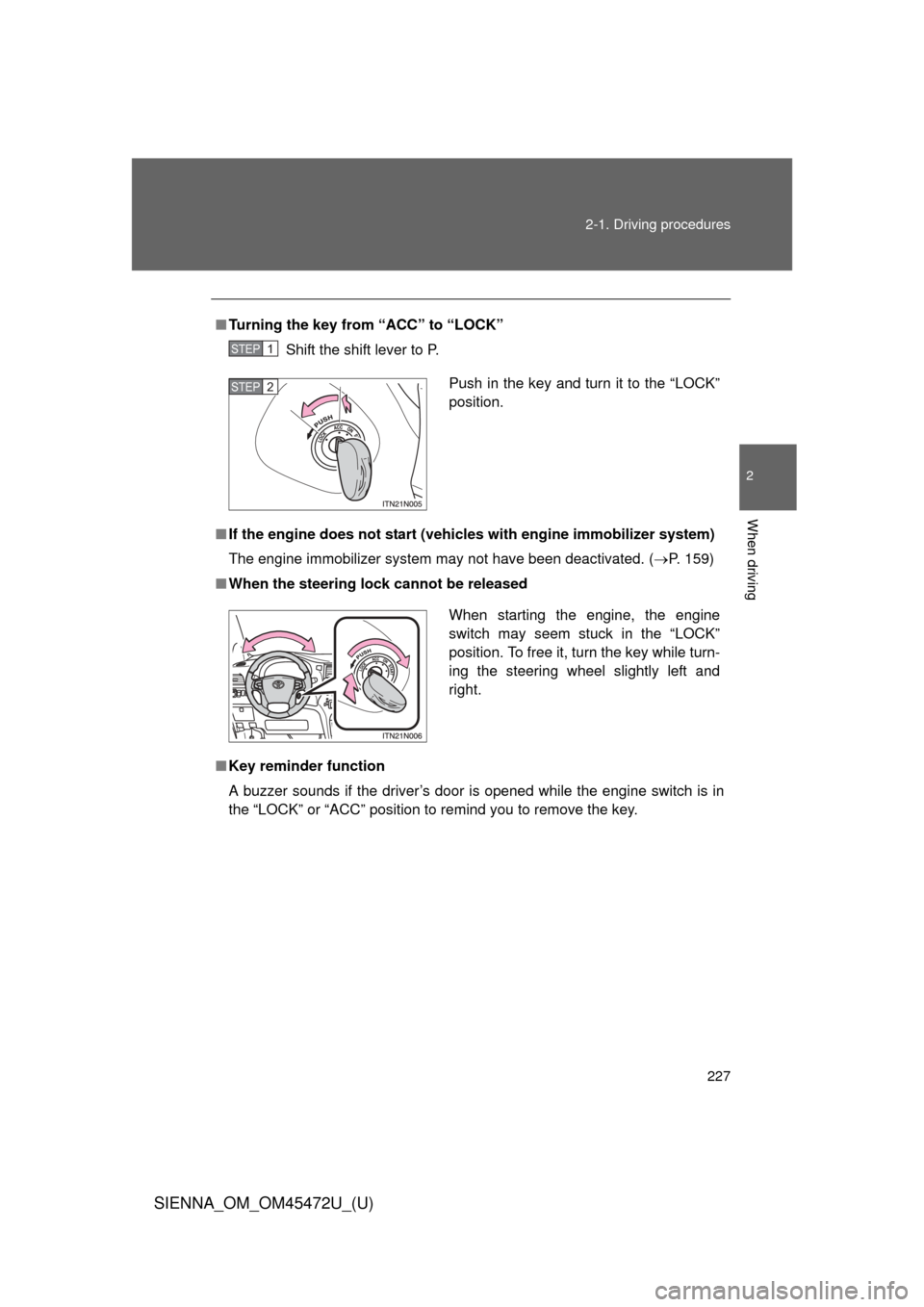
■
Turning the key from “ACC” to “LOCK”
Shift the shift lever to P.
■ If the engine does not start (vehic les with engine immobilizer system)
The engine immobilizer system may not have been deactivated. ( P. 159)
■ When the steering lock cannot be released
■ Key reminder function
A buzzer sounds if the driver’s door is opened while the engine switch is in
the “LOCK” or “ACC” position to remind you to remove the key\
.
STEP1
Push in the key and turn it to the “LOCK”
position.STEP2
When starting the engine, the engine
switch may seem stuck in the “LOCK”
position. To free it, turn the key while turn-
ing the steering wheel slightly left and
right.
Page 239 of 876
239
2-1. Driving procedures
2
When driving
SIENNA_OM_OM45472U_(U)
■
Shift ranges and their functions
●Automatically selecting gears between 1 and 6 according to
vehicle speed and driving conditi ons. But, the gear is limited
according to selected shift range.
● You can choose from 6 levels of engine braking force.
● A lower shift range will provide greater engine br aking force than
a higher shift range, and the engine speed will also increase.
■S mode
● When the shift range is 5 or lower, holding the shift lever toward “+” sets
the shift range to 6.
● To prevent excessive engine speed, a function was adopted that auto-
matically selects a higher shift range before the engine speed becomes
too high.
● To protect the automatic transaxle, a function is adopted that automati-
cally selects a higher shift range when the fluid temperature is high.
■ When driving with the cruise contro l or dynamic radar cruise control
Engine braking will not occur in S mode, even when downshifting to 5 or 4.
( P. 295, 300)
■ If the shift lever cannot be shifted from P
● P. 780
● Vehicles with AUTO ACCESS SEAT : If the AUTO ACCESS SEAT has
not been locked in place after being stowed, the shift lever cannot be
shifted from P.
For details, refer to “AUTO ACCESS SEAT OWNER’S MANUAL”.
Page 254 of 876
254
2-2. Instrument cluster and information display
SIENNA_OM_OM45472U_(U)
Multi-information display
: If equipped
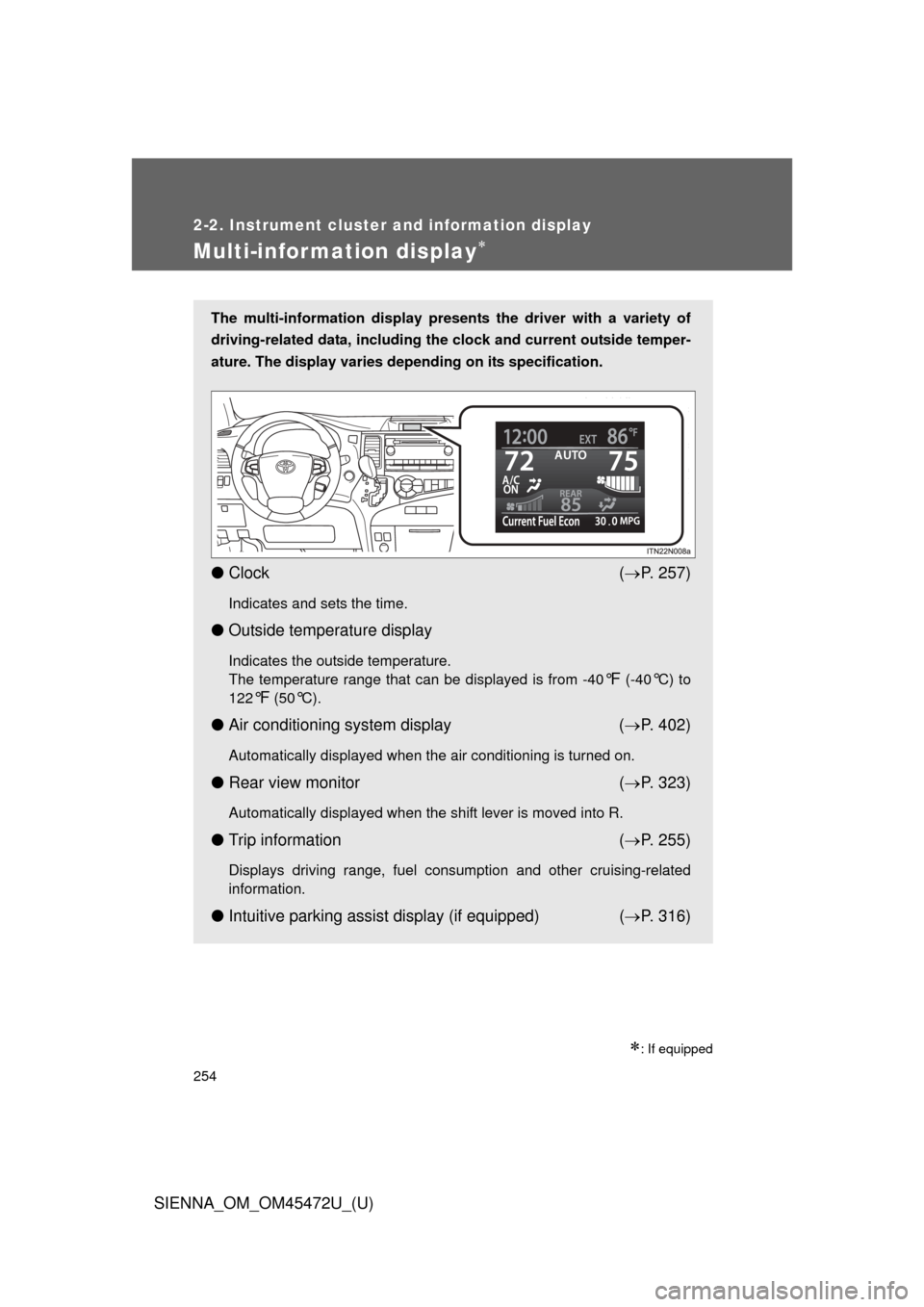
The multi-information display presents the driver with a variety of
driving-related data, including the clock and current outside temper-
ature. The display varies depending on its specification.
● Clock ( P. 257)
Indicates and sets the time.
● Outside temperature display
Indicates the outside temperature.
The temperature range that can be displayed is from -40
°F (-40°C) to
122
°F (50°C).
● Air conditioning system display ( P. 402)
Automatically displayed when the air conditioning is turned on.
● Rear view monitor ( P. 323)
Automatically displayed when the shift lever is moved into R.
● Trip information ( P. 255)
Displays driving range, fuel consumption and other cruising-related
information.
● Intuitive parking assist display (if equipped) ( P. 316)