Page 2 of 876

TABLE OF CONTENTSIndex
2
SIENNA_OM_OM45472U_(U)
1-1. Key informationKeys ..................................... 32
1-2. Opening, closing and locking the doors
Smart key system................. 36
Wireless remote control ....... 53
Front doors ........................... 60
Sliding doors ........................ 67
Back door ............................. 82
1-3. Adjustable components (seats, mirrors, steering
wheel)
Front seats ........................... 95
Rear seats .......................... 100
Driving position memory ..... 120
Head restraints ................... 125
Seat belts ........................... 128
Steering wheel ................... 137
Inside rear view mirror........ 138
Outside rear view mirrors .............................. 140 1-4. Opening and closing
the windows and moon roof
Power windows................... 144
Quarter windows................. 148
Moon roof ........................... 150
1-5. Refueling Opening the fuel tank cap .................................... 155
1-6. Theft deterrent system Engine immobilizer system .............................. 159
Alarm .................................. 162
Theft prevention labels (for U.S.A.) ....................... 165
1-7. Safety information Correct driving posture ....... 166
SRS airbags ....................... 168
Front passenger occupant classification system ......... 183
Child restraint systems ....... 189
Installing child restraints ..... 194
1Before driving
Page 6 of 876

TABLE OF CONTENTSIndex
6
SIENNA_OM_OM45472U_(U)
4-1. Maintenance and careCleaning and protecting the vehicle exterior ........... 646
Cleaning and protecting the vehicle interior ............ 651
4-2. Maintenance Maintenance requirements .................... 655
General maintenance ......... 658
Emission inspection and maintenance (I/M)
programs .......................... 662
4-3. Do-it-yourself maintenance Do-it-yourself service precautions ...................... 663
Hood................................... 667
Positioning a floor jack ....... 669
Engine compartment .......... 671
Tires ................................... 688
Tire inflation pressure......... 699
Wheels ............................... 703
Air conditioning filter ........... 706
Wireless remote control/ electronic key battery ....... 709
Checking and replacing fuses ................................ 712
Light bulbs .......................... 725 5-1. Essential information
Emergency flashers ............ 738
If your vehicle needs to be towed ....................... 739
If you think something is wrong ............................ 743
Fuel pump shut off system .............................. 744
5-2. Steps to take in an emergency If a warning light turns on or a warning
buzzer sounds... ............... 745
If a warning message is displayed ....................... 760
If you have a flat tire (vehicles with
run-flat tires) ..................... 761
If you have a flat tire (vehicles with
standard tires) .................. 763
If the engine will not start .... 778
If the shift lever cannot be shifted from P ................... 780
If you lose your keys ........... 782
If the electronic key does not operate properly ......... 783
If the battery is discharged ........................ 786
If your vehicle overheats..... 791
If the vehicle becomes stuck ................................. 794
If your vehicle has to be stopped in
an emergency ................... 796
4Maintenance and care5When trouble arises
Page 18 of 876
SIENNA_OM_OM45472U_(U)
18
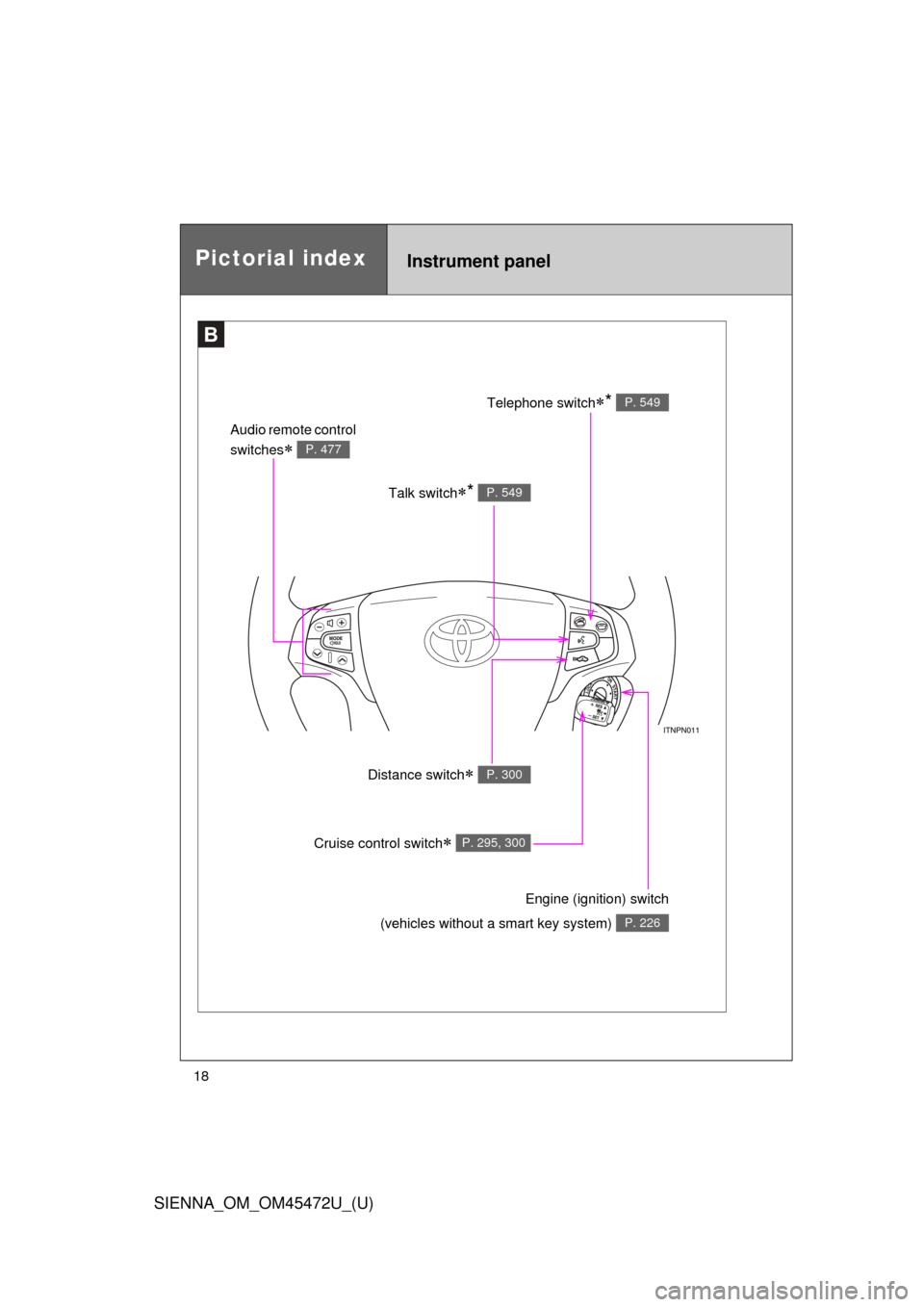
Pictorial indexInstrument panel
B
Talk switch* P. 549
Audio remote control
switches
P. 477
Telephone switch* P. 549
Distance switch P. 300
Engine (ignition) switch
(vehicles without a smart key system)
P. 226
Cruise control switch P. 295, 300
Page 31 of 876
Before driving1
31
SIENNA_OM_OM45472U_(U)
1-1. Key informationKeys ................................... 32
1-2. Opening, closing and locking the doors
Smart key system .............. 36
Wireless remote control ..... 53
Front doors......................... 60
Sliding doors ...................... 67
Back door ........................... 82
1-3. Adjustable components (seats, mirrors, steering
wheel)
Front seats ......................... 95
Rear seats........................ 100
Driving position memory .......................... 120
Head restraints................. 125
Seat belts ......................... 128
Steering wheel ................. 137
Inside rear view mirror ..... 138
Outside rear view mirrors............................ 140 1-4. Opening and closing
the windows and moon roof
Power windows ................ 144
Quarter windows .............. 148
Moon roof ......................... 150
1-5. Refueling Opening the fuel tank cap ................................. 155
1-6. Theft deterrent system Engine immobilizer system ........................... 159
Alarm................................ 162
Theft prevention labels (for U.S.A.) ..................... 165
1-7. Safety information Correct driving posture..... 166
SRS airbags ..................... 168
Front passenger occupant classification system ...... 183
Child restraint systems..... 189
Installing child restraints ........................ 194
Page 32 of 876
32
SIENNA_OM_OM45472U_(U)
1-1. Key information
Keys
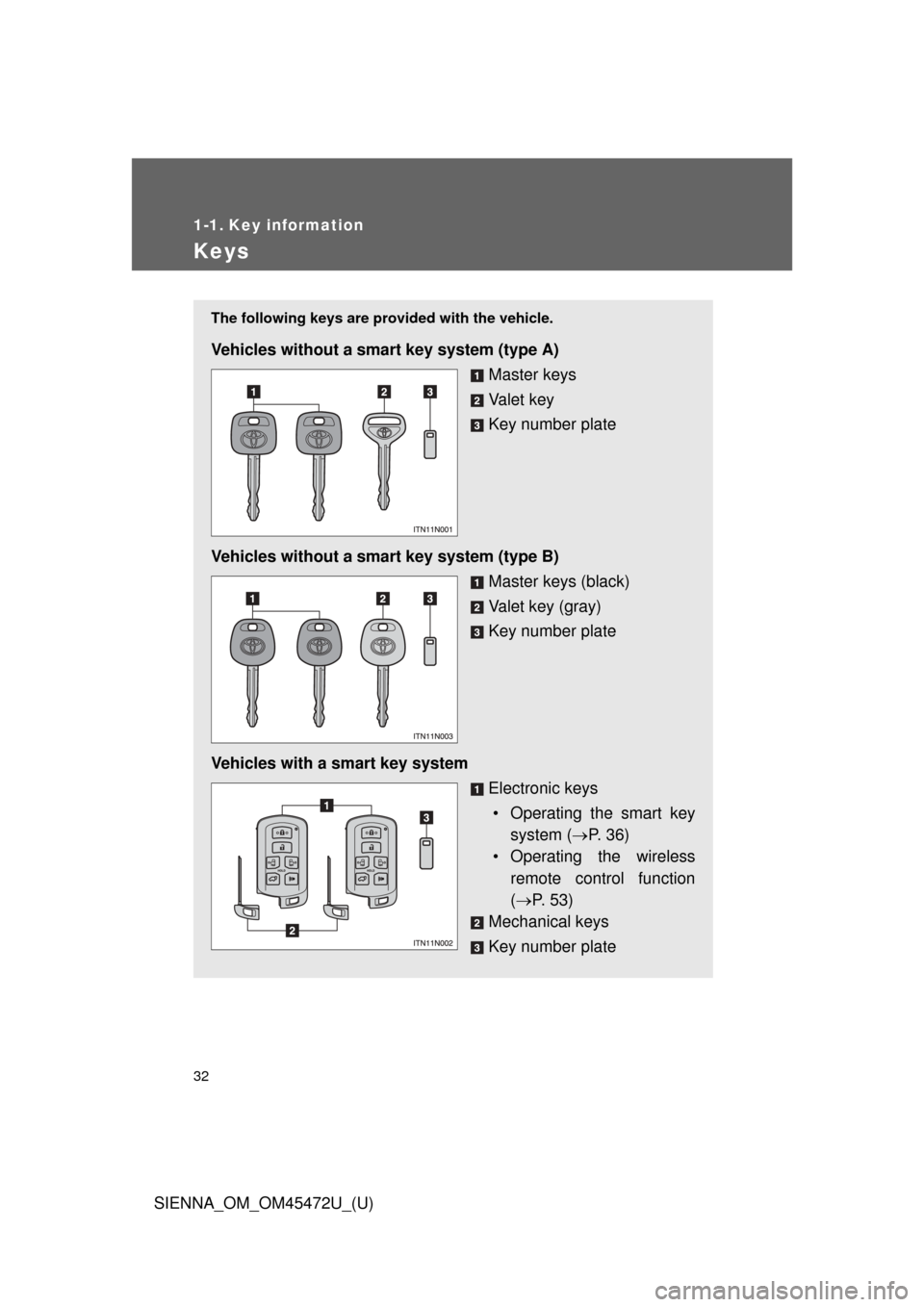
The following keys are provided with the vehicle.
Vehicles without a smart key system (type A)
Master keys
Va l e t k e y
Key number plate
Vehicles without a smart key system (type B) Master keys (black)
Valet key (gray)
Key number plate
Vehicles with a smart key system Electronic keys• Operating the smart key system ( P. 36)
• Operating the wireless
remote control function
( P. 53)
Mechanical keys
Key number plate
Page 34 of 876

34 1-1. Key information
SIENNA_OM_OM45472U_(U)
■When required to leave the vehic le’s key with a parking attendant
Lock the glove box as circumstances demand. ( P. 587)
On vehicles without the smart key system, provide the attendant with the
valet key.
On vehicles with the smart key system, remove the mechanical key for your
own use and provide the attendant with the electronic key only.
■ Key number plate
Keep the plate in a safe place such as your wallet, not in the vehicle. In the
event that a key (without a smart key system) or mechanical key (with a
smart key system) is lost, a new key can be made by your Toyota dealer
using the key number plate. ( P. 782)
■ When riding in an aircraft
When bringing a key with wireless remote control function onto an aircra\
ft,
make sure you do not press any buttons on the key while inside the aircraft
cabin. If you are carrying the key in your bag etc., ensure that the buttons
are not likely to be pressed accidentally. Pressing a button may cause the
key to emit radio waves that could interfere with the operation of the a\
ircraft.
Page 44 of 876
44 1-2. Opening, closing and locking the doors
SIENNA_OM_OM45472U_(U)
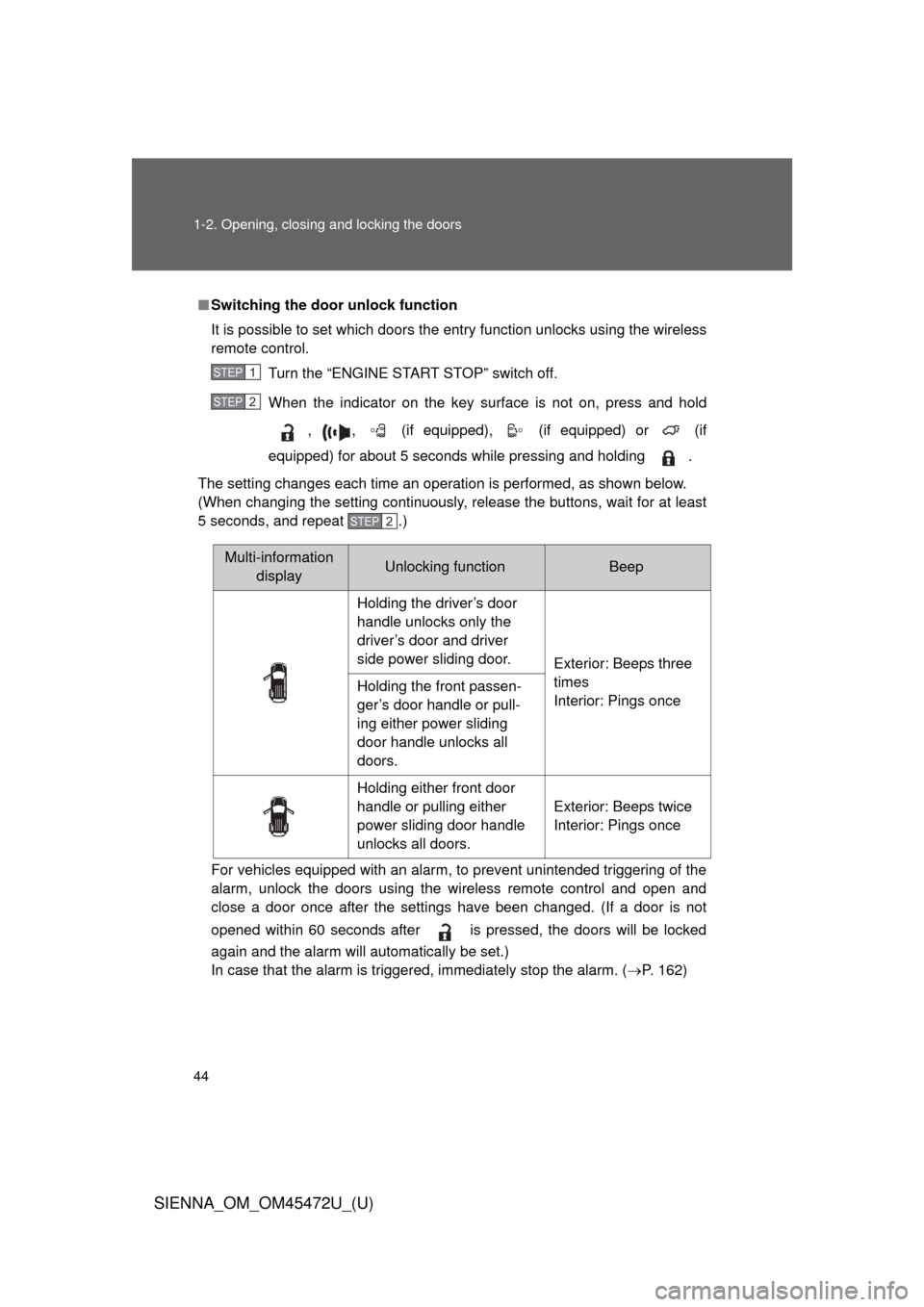
■Switching the door unlock function
It is possible to set which doors the entry function unlocks using the wireless
remote control.
Turn the “ENGINE START STOP” switch off.
When the indicator on the key surface is not on, press and hold
, , (if equipped), (if equipped) or (if
equipped) for about 5 seconds while pressing and holding .
The setting changes each time an operation is performed, as shown below.
(When changing the setting continuously, release the buttons, wait for at least
5 seconds, and repeat .)
For vehicles equipped with an alarm, to prevent unintended triggering of the\
alarm, unlock the doors using the wireless remote control and open and
close a door once after the settings have been changed. (If a door is not
opened within 60 seconds after is pressed, the doors will be locked
again and the alarm will automatically be set.)
In case that the alarm is triggered, immediately stop the alarm. ( P. 162)
STEP1
STEP2
STEP2
Multi-information
display Unlocking functionBeep
Holding the driver’s door
handle unlocks only the
driver’s door and driver
side power sliding door. Exterior: Beeps three
times
Interior: Pings once
Holding the front passen-
ger’s door handle or pull-
ing either power sliding
door handle unlocks all
doors.
Holding either front door
handle or pulling either
power sliding door handle
unlocks all doors. Exterior: Beeps twice
Interior: Pings once
Page 45 of 876
45
1-2. Opening, closing and locking the doors
1
Before driving
SIENNA_OM_OM45472U_(U)
■
Battery-saving function
In the following circumstances, the entry function is disabled in order to pre-
vent the vehicle battery from discharging and the electronic key battery from
discharging.
● When the entry function has not been used for 5 days or more
● When the electronic key has been left within approximately 6 ft. (2 m) of
the vehicle for 10 minutes or more
● If the entry function has not been used for 14 days or more, the vehicle
cannot be unlocked by a door other than the driver’s door. To unlock the
vehicle, grip the driver’s door handle or use the wireless remote control
or the mechanical key.
The system will resume operation when...
● The vehicle is locked using the lock sensor when carrying the electronic
key on your person.
● The vehicle is locked/unlocked using the wireless remote control.
(P. 5 3 )
● The vehicle is locked/unlocked using the mechanical key. ( P. 783)