Page 125 of 207

Downloaded from www.Manualslib.com manuals search engine 5-30
OTHER CONTROLS AND EQUIPMENT
60MK0-14E
Remote Audio Controls
(if equipped)Controlling of basic functions of the audio
system is available using the switches on
the steering wheel.
60MK036
Adjusting the volume
To increase the volume, hold down “+”
of the VOL switch (1). The volume will
keep on being increased until the
switch is released.
To decrease the volume, hold down “-”
of the VOL switch (1). The volume will
keep on being decreased until the
switch is released.
To mute the sound, press the switch
(2).
Selecting the mode
Press the switch (3).
Each time the button is pressed, the mode
will change as follows:
It is possible to turn on the audio system by
pressing the switch (3).Selecting the radio station (FM1, FM2,
AM mode)
To select the next preset station, press
“ ” of the switch (4) only for a moment.
To select the previous preset station,
press “ ” of the switch (4) only for a
moment.
To scan a higher frequency radio sta-
tion, press “ ” of the switch (4) for 1
second or longer.
To scan a lower frequency radio sta-
tion, press “ ” of the switch (4) for 1
second or longer.
Selecting the track (CD, USB (iPod
®),
mode)
To skip to the next track, press “ ” of
the switch (4) only for a moment.
To skip to the previous track, press “ ”
of the switch (4) twice only for a
moment.
When the switch (4) is pushed down
once only for a moment, the track cur-
rently being played will start from the
beginning again.
Fast forwarding/Rewinding a track
To fast forward, press “ ” of the switch
(4) for 1 second or longer.
To fast rewind, press “ ” of the switch
(4) for 1 second or longer.
(2)
(3)
(1)
(4)
FM1 (Radio)
FM2 (Radio)
CD
USB (iPod
®)
AM (Radio)
<
<
<<
<
<
<<
Page 126 of 207
Downloaded from www.Manualslib.com manuals search engine 5-31OTHER CONTROLS AND EQUIPMENT
60MK0-14E
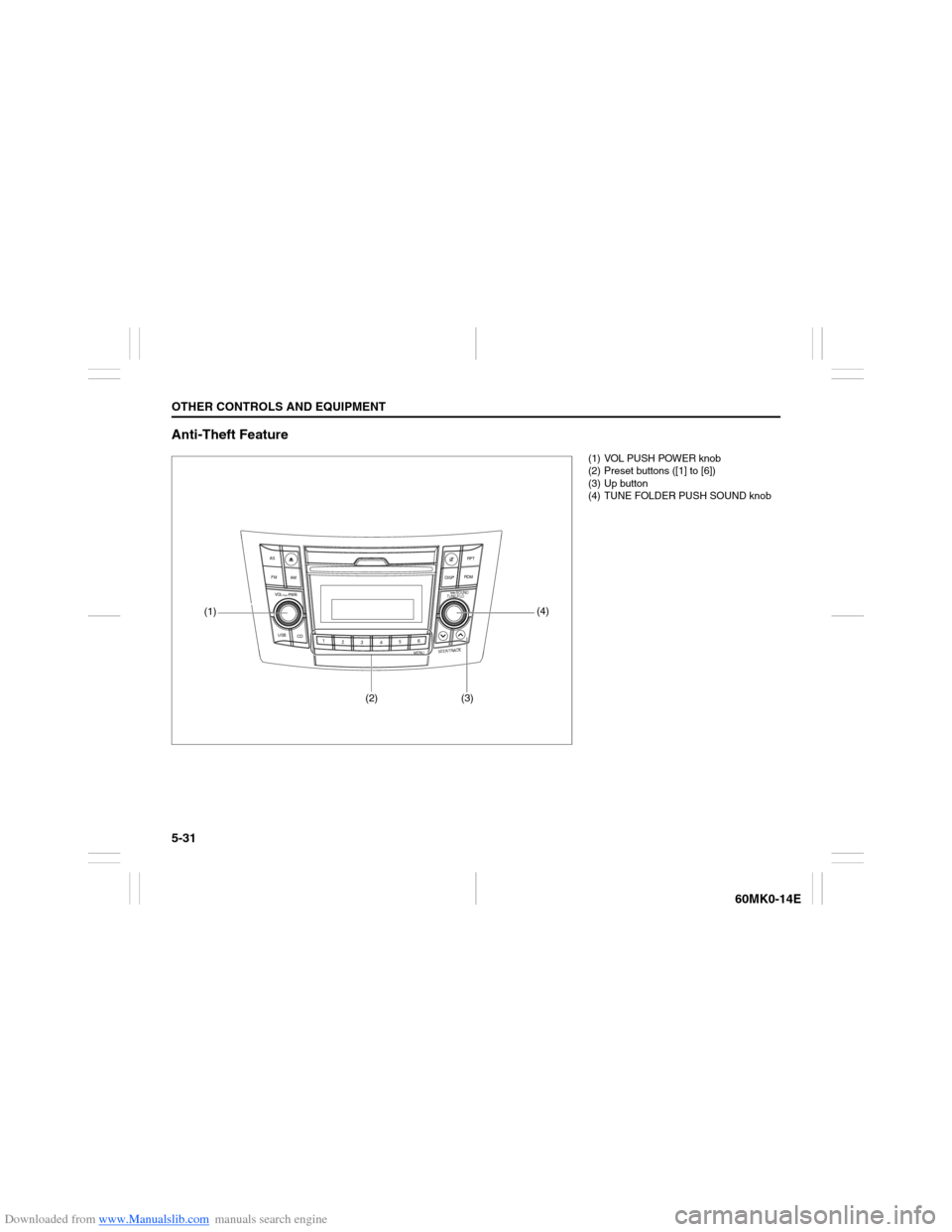
Anti-Theft Feature
USB
CD
1
2
3456
MENU
SEEK/TRACK
AS
AM FMRPT
RDM
DISP
PUSH SOUND
TUNE/FLD
VO L PUSH PWR
(4)
(3)
(2)
(1)
(1) VOL PUSH POWER knob
(2) Preset buttons ([1] to [6])
(3) Up button
(4) TUNE FOLDER PUSH SOUND knob
Page 127 of 207

Downloaded from www.Manualslib.com manuals search engine 5-32
OTHER CONTROLS AND EQUIPMENT
60MK0-14E
The anti-theft function is intended to dis-
courage thefts, such as that the audio sys-
tem becomes inoperable when it is
installed on other vehicles.
This function works by entering a Personal
Identification Number (PIN).
When the unit is disconnected from its
power source, such as when the audio
system is removed or the battery is discon-
nected, the unit will become inoperable
until the PIN is reentered.Setting the Anti-Theft Function
1) Press the VOL PUSH POWER knob (1)
to power off.
2) Hold down the buttons numbered [1]
and [6] of the Preset buttons (2) and
press the VOL PUSH POWER knob
(1).
“SECURITY” will be displayed.
3) Press the Up button (3) and the button
numbered [1] of the Preset buttons (2)
simultaneously.
4) Enter a 4-digit number to be registered
as PIN using the buttons numbered [1] -
[4] of the Preset buttons (2).
5) Hold down the TUNE FOLDER PUSH
SOUND knob (4) for 1 second or longer
to set the anti-theft function.
NOTE:
Take a note of the registered PIN and keep
it for the future use.Canceling the anti-theft feature
To cancel the anti-theft function, delete the
registered PIN.
1) Press the VOL PUSH POWER knob (1)
to power off.
2) Hold down the buttons numbered [1]
and [6] of the Preset buttons (2) and
press the VOL PUSH POWER knob
(1).
“PIN ENTRY” will be displayed.
3) Press the Up button (3) and the button
numbered [1] of the Preset buttons (2)
simultaneously.
4) Enter a 4-digit number to be registered
as PIN using the buttons numbered [1] -
[4] of the Preset buttons (2).
5) Hold down the TUNE FOLDER PUSH
SOUND knob (4) for 1 second or longer
to delete the registered PIN. The indi-
cation “----” will be displayed and the
anti-theft function will be canceled.
NOTE:
To change your PIN, first delete your cur-
rent PIN, then set a new one.
Page 128 of 207

Downloaded from www.Manualslib.com manuals search engine 5-33OTHER CONTROLS AND EQUIPMENT
60MK0-14E
Confirming the Personal Identification
Number (PIN)
When the main power source is discon-
nected such as when the battery is
replaced, etc, it is required to enter the PIN
to make the unit operable again.
1) Set the ignition switch to the “ACC”
position.
“SECURITY” will be displayed.
2) Press the Up button (3) and the button
numbered [1] of the Preset buttons (2)
simultaneously.
3) Enter a 4-digit number to be registered
as PIN using the buttons numbered [1] -
[4] of the Preset buttons (2).
4) Hold down TUNE FOLDER PUSH
SOUND knob (4) for 1 second or
longer.
When the PIN same as registered is
entered, the power of the audio system
will be turned off automatically and it
will become operable again.
NOTE:
If an incorrect PIN is entered, “ERROR”
and the total number of incorrect entry
attempts will be displayed.
If an incorrect PIN is entered 10 times or
more, “HELP” will be displayed and the
audio system will become inoperable.