2013 SKODA YETI phone
[x] Cancel search: phonePage 114 of 266

DialogueFig. 99
Multifunction steering wheel
First read and observe the introductory information given on page 110.
The voice control system (hereinafter referred to as the system) makes it possibleto use voice commands for some functions of the hands-free system.
The period of time during which the system is ready to receive voice commandsand to carry them out is called a dialogue. The system gives audible feedback and guides you if necessary through the relevant functions.
Optimum understanding of the voice commands depends on several factors. › Speak with a normal tone of voice without intonation and excessive pauses.
› Avoid a bad pronunciation.
› Close the doors, windows and sliding roof, to reduce or stop disturbing exterior
noise.
› You are recommended to speak louder at higher speeds, so that the sound of
your voice is not drowned out by the increased ambient noise.
› During the dialogue, limit additional noise in the vehicle, e.g. passengers talking
at the same time.
› Do not speak, if the system makes an announcement.
The microphone for voice control is inserted in the moulded headliner and direc- ted to the driver and front passenger. Therefore the driver and the front passen-ger can operate the equipment.
Entering a phone number
The telephone number can be entered as a continuous series of individually spo- ken digits (the whole number at once) or in the form of digital blocks (separated
by short pauses). After each order of digits (separation through brief voice pause)
all of the digits detected up to now are repeated by the system.
The digits 0 - 9, symbols +, , # are permitted. The system detects no continuous
digit combinations such as twenty-three, but only individually spoken digits (two,
three).
Activating voice control - GSM II
By briefly pressing the button 1
» Fig. 99 on the multifunction steering wheel.
Deactivating voice control - GSM II If the system is currently playing a message, the message that is currently being played must be terminated by briefly pressing button
1
» Fig. 99 on the multi-
function steering wheel.
If the system is expecting a voice command, you can end the dialogue yourself:
› with the
CANCEL voice command;
› by briefly pressing the button
1
» Fig. 99 on the multifunction steering wheel.
Activating voice control - GSM III The dialogue can be started at any time by pressing the button
1
» Fig. 99 on
the multifunction steering wheel 1)
.
Deactivating voice control - GSM III
If the system is currently playing a message, the message that is currently being
played must be terminated by pressing the button
1
» Fig. 99 on the multi-func-
tion steering wheel.
If the system is expecting a voice command, you can end the dialogue yourself:
› with the
CANCEL voice command;
› by briefly pressing the button
1
» Fig. 99 on the multifunction steering wheel.
1)
Not valid for vehicles with the Columbus navigation system.
111Communication and multimedia
Page 115 of 266
Note■The dialogue of an incoming call is immediately interrupted.■The voice control is only possible in vehicles fitted with a multifunction steering
wheel with telephone control.■
On vehicles that are factory-fitted with the Columbus navigation system, it is
only possible to operate the voice control for the telephone via this device » Oper-
ating instructions for the Columbus navigation system , chapter Voice control for
the navigation system .
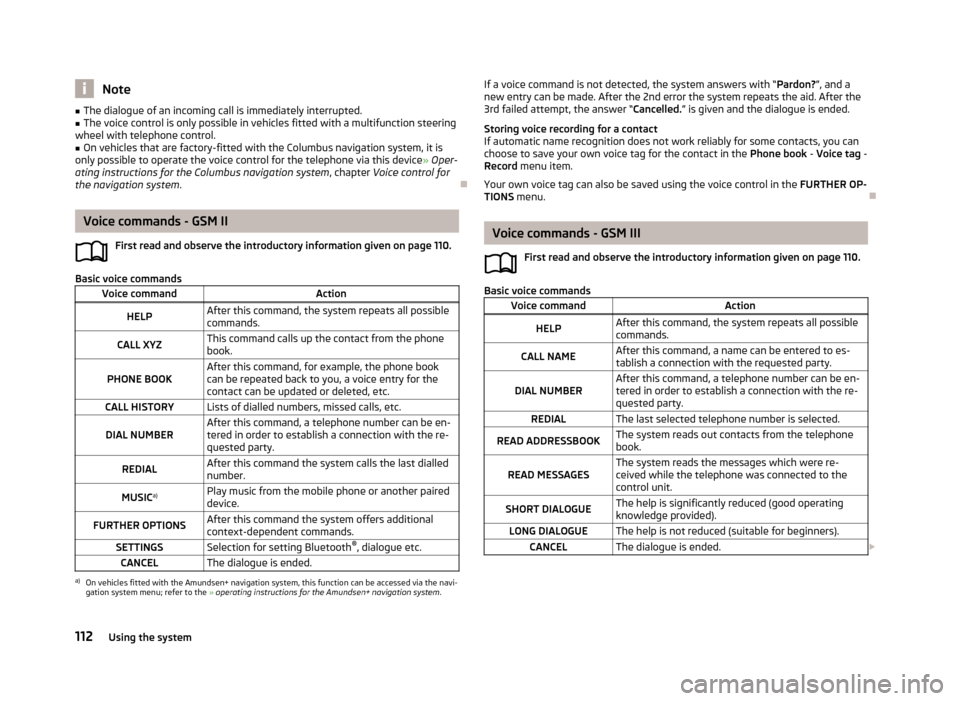
Voice commands - GSM II
First read and observe the introductory information given on page 110.
Basic voice commands
Voice commandActionHELPAfter this command, the system repeats all possible
commands.CALL XYZThis command calls up the contact from the phone book.PHONE BOOKAfter this command, for example, the phone book
can be repeated back to you, a voice entry for the
contact can be updated or deleted, etc.CALL HISTORYLists of dialled numbers, missed calls, etc.DIAL NUMBERAfter this command, a telephone number can be en-
tered in order to establish a connection with the re-
quested party.REDIALAfter this command the system calls the last dialled
number.MUSIC a)Play music from the mobile phone or another paired
device.FURTHER OPTIONSAfter this command the system offers additional
context-dependent commands.SETTINGSSelection for setting Bluetooth ®
, dialogue etc.CANCELThe dialogue is ended.a)
On vehicles fitted with the Amundsen+ navigation system, this function can be accessed via the navi-
gation system menu; refer to the » operating instructions for the Amundsen+ navigation system .
If a voice command is not detected, the system answers with “ Pardon?”, and a
new entry can be made. After the 2nd error the system repeats the aid. After the
3rd failed attempt, the answer “ Cancelled.” is given and the dialogue is ended.
Storing voice recording for a contact
If automatic name recognition does not work reliably for some contacts, you can choose to save your own voice tag for the contact in the Phone book - Voice tag -
Record menu item.
Your own voice tag can also be saved using the voice control in the FURTHER OP-
TIONS menu.
Voice commands - GSM III
First read and observe the introductory information given on page 110.
Basic voice commands
Voice commandActionHELPAfter this command, the system repeats all possible
commands.CALL NAMEAfter this command, a name can be entered to es-
tablish a connection with the requested party.DIAL NUMBERAfter this command, a telephone number can be en-
tered in order to establish a connection with the re-
quested party.REDIALThe last selected telephone number is selected.READ ADDRESSBOOKThe system reads out contacts from the telephone
book.READ MESSAGESThe system reads the messages which were re-
ceived while the telephone was connected to the
control unit.SHORT DIALOGUEThe help is significantly reduced (good operating knowledge provided).LONG DIALOGUEThe help is not reduced (suitable for beginners).CANCELThe dialogue is ended. 112Using the system
Page 116 of 266

If the system does not recognise the command, it repeats the first part of thehelp thus enabling a new entry to be completed. After the 2nd error the systemrepeats the second part of the aid. After the 3rd failed attempt, the answer “ Can-
celled. ” is given and the dialogue is ended.
Storing voice recording for a contact
If automatic name recognition does not work reliably for some contacts, you can
choose to save your own voice tag for the contact in the Phone book - Voice tag -
Record menu item.
Your own voice tag can also be saved using the voice control in the FURTHER OP-
TIONS menu.
Multimedia
Introduction
This chapter contains information on the following subjects:
Music playback via Bluetooth ®
113
Operating the radio and navigation system on the multifunction steering
wheel
113
AUX- and MDIinputs
115CD change115DVD-preinstallation116
Music playback via Bluetooth ®
First read and observe the introductory information given on page 113.
The universal telephone preinstallation makes it possible to play back music via
Bluetooth ®
from devices such as MP3 players, mobile phones or notebooks.
To ensure that music can be played via Bluetooth ®
, you must first pair the device
with the hands-free system in the Phone - Bluetooth - Media player menu.
The music playback process is performed on the connected device.
The universal telephone preinstallation GSM II ensures that the music played back
via the hands-free system can be controlled with the remote control » page 112,
Voice commands - GSM II .
Note
The device being connected must support the Bluetooth ®
A2DP profile; refer to
the operating instructions for the relevant device being connected.
Operating the radio and navigation system on the multifunction steering wheel
Fig. 100
Multifunction steering wheel: control buttons
First read and observe the introductory information given on page 113.
The multifunction steering wheel comprises buttons for setting the basic func-
tions for the factory-fitted radio and navigation system » Fig. 100.
The radio and navigation system can of course still be operated on the devices. A
description is included in the relevant operating instructions.
If the side lights are switched on, the buttons on the multifunction steeringwheel are illuminated.
The buttons apply for the respective operating mode of the current radio or navi- gation system.
The following functions can be completed by pressing or turning the buttons.
113Communication and multimedia
Page 164 of 266

What influences driving safety?First read and observe the introductory information and safety warn-
ings
on page 160.
The driver is fully responsible for himself and his occupants. If your driving safety is effected, you place yourself and the oncoming traffic at risk.
The following guidelines must therefore be observed. › Do not become distracted from concentrating on the traffic situation, e.g. by
your passengers or mobile phone calls.
› Never drive when your driving ability is impaired, e.g. due to medication, alcohol
or drugs.
› Keep to the traffic regulations and the permissible speed limit.
› Always adjust the driving speed to the road, traffic and weather conditions.
› Take regular breaks on long journeys – at least every two hours.
Correct seated position
Introduction
This chapter contains information on the following subjects:
Correct seated position for the driver
162
Correct seated position for the front passenger
162
Correct seated position for the passengers in the rear seats
162
Examples of an incorrect seating position
162WARNINGGeneral information■The front seats and head restraints must be adjusted to match the body
size at all times and the seat belt must always be fastened properly to provide the most effective levels of protection to the passengers.■
If the occupant adopts an incorrect seated position, he is exposed to life-
threatening injuries, in case he is hit by a deployed airbag.
■
If the occupants on the rear seats are not sitting upright, the risk of injury is
increased due to incorrect routing of the seat belt.
■
The seat backrests must not be tilted too far back when driving, as this will
impair the function of the seat belts and of the airbag system – risk of injury!
WARNINGInformation for the driver■Always assume the correct seated position before setting off and do not
change this position while driving. Also advise your passengers to adopt the
correct seated position and not to change this position while the car is mov-
ing.■
Maintain a distance of at least 25 cm from the steering wheel, and a dis-
tance of at least 10 cm between the legs and the dash panel at the height of
the knee airbag. Not maintaining this minimum distance will mean that the airbag system will not be able to properly protect you - hazard!
■
When driving, hold the steering wheel with both hands firmly on the outer
edge in the 9 o'clock and 3 o'clock position. Never hold the steering wheel in
the 12 o'clock position or in any other way (e.g. in the middle or inner edge of the steering wheel). In such cases, you could severely injure the arms, hands
and head when the driver airbag is deployed.
■
Ensure that there are no objects in the driver's footwell, as these may get
caught in the pedal apparatus when driving or braking. You would then no
longer be able to operate the clutch, brake or acceleration pedals.
WARNINGInformation for the front passenger■Maintain a distance of at least 25 cm to the dash panel. Not maintaining this
minimum distance will mean that the airbag system will not be able to proper-
ly protect you – hazard!■
Always keep your feet in the footwell when the car is being driven – never
place your feet on the instrument panel, out of the window or on the surfaces of the seats. You will be exposed to increased risk of injury if it becomes nec-
essary to apply the brake or in the event of an accident. If an airbag is de-
ployed, you may suffer fatal injuries when adopting an incorrect seated posi- tion!
161Passive Safety
Page 174 of 266

Front airbagsFig. 141
Locations of the airbags / gas filled airbags
Fig. 142
Safe distance to steering wheel
First read and observe the introductory information given on page 170.
In the event of a severe frontal collision, the front airbag system offers additional
protection for the head and chest area of the driver and front passenger.
The driver's front airbag is located in the steering wheel, the front passenger air-
bag is located in the instrument panel above the glove compartment » Fig. 141 -
.
When the airbags are deployed, they inflate in front of the driver and front pas-
senger » Fig. 141 -
. The forward movement of the driver and of the front pas-
senger is cushioned when they make contact with the fully inflated airbag and
the risk of injury to head and chest is thus reduced.
WARNINGCorrect seated position■For the driver and front passenger, it is important to maintain a distance of
at least 25 cm to the steering wheel or dashboard A
» Fig. 142 . Not maintain-
ing this minimum distance will mean that the airbag system will not be able to
properly protect you - hazard! The front seats and the head restraints must
always also be correctly adjusted to match the body size of the occupant.
■
The airbag develops enormous forces when triggered, which can lead to in-
juries if the sitting position or seated position is not correct.
■
There must not by any further persons, animals or objects positioned be-
tween the front seated occupants and the deployment area of the airbag.
WARNINGFront airbag and transporting children■Never transport children on the front seat of a vehicle without using a prop-
er restraint system. If airbags are deployed in the event of an accident, the
child might suffer severe or even fatal injuries!■
The front passenger airbag must be deactivated if using a rear-facing child
seat on the front passenger seat » page 175, Deactivating airbags . If this is
not done, there is a risk of the child suffering severe or even fatal injuries if
the front passenger airbag is deployed. When transporting a child on the front
passenger seat, pay attention to any relevant national regulations regarding
the use of child safety seats.
WARNINGGeneral information■The steering wheel and the surface of the airbag module in the dash panel
on the passenger side must not have stickers attached, be covered or modi-
fied in any other way. These parts should only be cleaned with a cloth that is
dry or has been moistened with water. No objects such as cup holders, mobile
phone mounts, etc. must be attached to the covers of the airbag modules or
be located within their immediate vicinity.■
Never place objects on the surface of the front passenger airbag module in
the dash panel.
171Airbag system
Page 240 of 266

›Insert a new fuse.›Replace the bracket at the original position.›
Re-insert the cover of the fuse box .
Fuse assignment in the dash panel
No.Power consumer1Heating of the gearbox ventilation (diesel engine)
Control unit for automatic gearbox DSG2-3Tow hitch4Instrument cluster, windshield wiper lever, turn signal light lever,
camera5Air blower for heating, radiator fan, air conditioning system, Clima-
tronic6Rear window wiper7Phone8Tow hitch9Vehicle voltage control unit - interior lights
Rear fog light10Rain sensor, light switch, diagnosis connector, removable light11Left side cornering lights12Right side cornering lights13Radio, DVD14Central control unit, engine control unit15Light switch16Haldex17KESSY controller, steering wheel locking18Diagnostic socket, engine control unit, brake sensor, Haldex19Control unit for ABS, ESP, switch for tyre air pressure control, control
unit for parking aid, switch for OFF ROAD mode, START STOP button20Switch and airbag control unit21WIV, tail lamp, dimming mirror, pressure sensor, telephone prepara- tion, air mass sensor, control unit for headlight range control and
headlight tilt22Instrument cluster controller for electro-mechanical power steering, control unit for data bus23Central locking system and bonnet lidNo.Power consumer24Rear power window25Rear window heater, auxiliary heating and ventilation26Power socket in the boot27Electric sliding/tilting roof, electric sun screen28Fuel pump, injection valves29Front power window30front and rear lighter31Headlight cleaning system32Front seat heating, regulator for seat heating33Heating, air conditioning, Climatronic, remote control for auxiliary
heating34Alarm, spare horn35Control unit for automatic gearbox DSG36Tow hitch
Fuses in the engine compartment
Fig. 194
Cover for the fuse box in the engine compartment / fuses
First read and observe the introductory information and safety warn-
ings
on page 236.
On some vehicles, the battery cover must be removed before removing the cover
for the fuse box » page 208.
237Fuses and light bulbs
Page 241 of 266
Replacing fuses›Move the safety catch of the cover of the fuse box A » Fig. 194 in the direction
of the arrow.
The symbol is displayed behind the catches.›
Remove the cover.
›
Replace the appropriate fuse.
›
Replace the cover on the fuse box and the safety clip
A
move against the ar-
row.
The symbol is displayed behind the catches.
The cover is locked into position.
CAUTION
The cover for the fuse box in the engine compartment must always be applied
correctly. Water may get into the fuse box if the cover is not replaced properly -
there is a risk of damage to the vehicle!
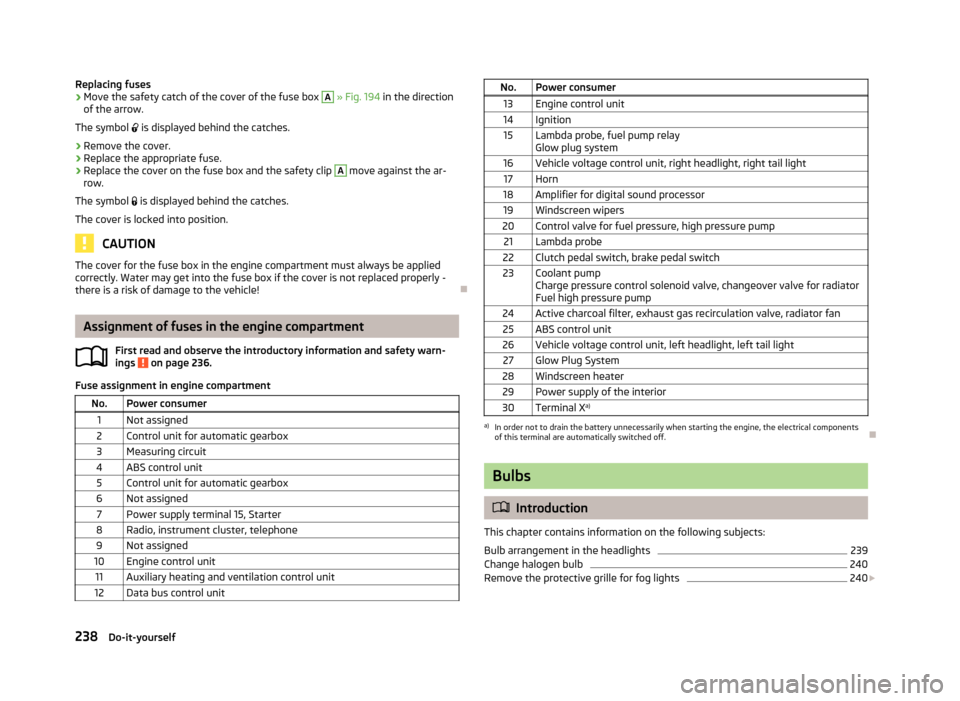
Assignment of fuses in the engine compartment
First read and observe the introductory information and safety warn-ings
on page 236.
Fuse assignment in engine compartment
No.Power consumer1Not assigned2Control unit for automatic gearbox3Measuring circuit4ABS control unit5Control unit for automatic gearbox6Not assigned7Power supply terminal 15, Starter8Radio, instrument cluster, telephone9Not assigned10Engine control unit11Auxiliary heating and ventilation control unit12Data bus control unitNo.Power consumer13Engine control unit14Ignition15Lambda probe, fuel pump relay
Glow plug system16Vehicle voltage control unit, right headlight, right tail light17Horn18Amplifier for digital sound processor19Windscreen wipers20Control valve for fuel pressure, high pressure pump21Lambda probe22Clutch pedal switch, brake pedal switch23Coolant pump
Charge pressure control solenoid valve, changeover valve for radiator
Fuel high pressure pump24Active charcoal filter, exhaust gas recirculation valve, radiator fan25ABS control unit26Vehicle voltage control unit, left headlight, left tail light27Glow Plug System28Windscreen heater29Power supply of the interior30Terminal X a)a)
In order not to drain the battery unnecessarily when starting the engine, the electrical components
of this terminal are automatically switched off.
Bulbs
Introduction
This chapter contains information on the following subjects:
Bulb arrangement in the headlights
239
Change halogen bulb
240
Remove the protective grille for fog lights
240
238Do-it-yourself
Page 259 of 266
Luggage compartment lid40
M
Main beam
49
Warning light22
Maintenance132
Decorative films190
Manual air conditioning Operating elements
94
Manual gear changing see gear changing
125
Materials defect liability5
MAXI DOT See MAXI DOT display
28
MAXI DOT display28
Main menu28
Operation23
Settings29
Maximum speed247
Memory Function for the seat63
MFD See multifunction display
25
Mirror Exterior mirrors
59
Mirrors Interior mirror
59
Vanity55
Mobile phone100, 103, 105
Connecting to the hands-free system103, 106
Modes of the automatic transmission127
Modifications184
Modifications and technical alterations Airbags
186
Service185
Spoiler186
Multifunction display Functions
25
Information26
Memory26
Operation23
Multimedia113
AUX115
MDI115
N
N1
88
Net partition86
Nets83
O
OFF ROAD
138
activation / deactivation140
operation138
OFF ROAD mode warning light
22
oil information messages
17
Oil See Engine oil
203
oil pressure information messages
17
On-board computer See multifunction display
25
Operate windscreen wipers
57
Operation in winter Diesel fuel
198
Vehicle battery209
Outside temperature26
Overhang angle246
Overview Engine compartment
201
Warning lights14
P
Paintwork See Paintwork care
189
Paintwork care189
Park assist143
Finding a parking space144
Information messages146
Parking145
Parking Automatic brake assist
146
Manoeuvring out of a parallel parking space146
Park assist143
Parking aid140
Parking aid140
Function141
Parking vehicle38
Part replacement184
Passive safety Before setting off
160
Driving safety161
Safety equipment160
Passive Safety160
Pedals126
Footmats126
Petrol refer to Fuel
197
pitch angle246
Polishing the paintwork See Taking care of your vehicle
189
Power outlet 12 V
75
Power steering118
Warning light17
Power windows Button in the front passenger door
43
Practical equipment Reflective vest
219
256Index