2013 SKODA SUPERB radio
[x] Cancel search: radioPage 131 of 274

CD changeFig. 114
The CD changer
First read and observe the introductory information given on page 126.
The CD changer for the radio and navigation system is located in the right side
compartment of the boot.
Inserting the CD
›
Touch the button
C
» Fig. 114 and guide the CD (compact disc) into the CD-case
B
. The CD is automatically loaded onto the lowest free position in the CD
changer. The indicator light in the corresponding button
D
stops flashing.
Filling the CD changer with CDs
›
Press and hold the button
C
» Fig. 114 for longer than 2 seconds and guide the
CDs one after the other (maximum 6 CDs) into the CD case
B
. The indicator
lights in the buttons
D
stop flashing.
Inserting a CD at a specific position
›
Press the button
C
» Fig. 114 . The indicator lights in the buttons
D
illuminate
the memory spaces that are already assigned and flash in the case of free mem-
ory spaces.
›
Touch the desired button
D
and guide the CD into the CD-case
B
.
Ejecting a CD
›
Press the button
A
» Fig. 114 to eject a CD. For assigned memory spaces, the
indicator lights now illuminate in the buttons
D
.
›
Press the corresponding button
D
. The CD is ejected.
Ejecting all CDs
›
Press and hold the button
A
» Fig. 114 for more than 2 seconds. All CDs in the
CD-changer are ejected consecutively.
Note■ Insert a CD, with the labelled side facing up, into the CD slot B » Fig. 114 until it
is automatically drawn in. The play function will start automatically.■
After loading a CD into the CD changer, wait until the indicator light of the cor-
responding button
D
is illuminated. Then the CD case
B
is free to load the next
CD.
■
If a position is selected, on which a CD is already located, this CD is ejected. Re-
move the ejected CD and load the desired CD.
DVD-preinstallation
Fig. 115
Seat backrest - left front seat/right front seat
First read and observe the introductory information given on page 126.
Description Openings for attachment of DVD player holder
Audio/video input
Connection input, DVD player
Only one DVD pre-installation is factory-installed in the seat backrest of the front
seat.
The DVD player holder and DVD player can be purchased from ŠKODA original ac-
cessories. For a description of the use, refer to the operating instructions for these devices and equipment.
ABC128Using the system
Page 156 of 274

FunctionFig. 132
Range of sensors / system button
First read and observe the introductory information and safety warn- ings
on page 152.
The parking aid (hereafter referred to solely as system) only works when the igni- tion is switched on.
The system supports the driver via audible signals, via the display on the radio or via the factory-installed navigation system when parking and manoeuvring » Ra-
dio user guide, Navigation system user guide.
The system uses ultrasound waves to calculate the distance between the bumper
and an obstacle. The ultrasound sensors are located on the front/rear bumper.
Explanation of graphic - range of sensors in the vicinity of the vehicle
Area » Fig. 132Range of sensors a)A120 cmB60 cmC160 cmD60 cmEb)60 cma)
These are only the approximate ranges of sensors.
b)
Applies only for vehicles with 12 sensors.
The interval between the acoustic signals becomes shorter as the clearance is re-
duced. A continuous tone sounds from a distance of approx. 30 cm - danger area.
From this moment on do not continue driving!
The length of the vehicle can be increased with an installed detachable towing device. The danger area thus begins at a distance of around 35 cm on vehicles
equipped with a factory-fitted towing device.
Towing a trailer
On vehicles equipped with a factory-fitted towing device, only system areas A
and
B
» Fig. 132 are active when towing a trailer.
Activation/deactivation
First read and observe the introductory information and safety warn-
ings
on page 152.
The system is automatically activated by selecting reverse gear or pressing the
» Fig. 132 on page 153 symbol button. The symbol
lights up in the button;
activation is confirmed by a brief acoustic signal.
The system is deactivated by moving out of reverse gear or by pressing the
symbol button, or is deactivated automatically at a speed of over 10 km/h (the
symbol in the button goes out).
On vehicles which only have rear sensors , the system can only be deactivated by
moving out of reverse gear.
Park assist
Introduction
This chapter contains information on the following subjects:
Finding a parking space
154
Parking
155
Manoeuvring out of a parallel parking space
156
Automatic brake assist
156
Information messages
156
The parking aid is part of the park assist system, therefore the information and
safety guidelines » page 152, Parking aid must be read and observed.
Park Assist (in the following referred to as the system) helps drivers park in suita- ble parallel and perpendicular parking places and also to manoeuvre out of paral-lel parking spaces.
153Assist systems
Page 200 of 274

Washing by handFirst read and observe the introductory information and safety warn-
ings
on page 196.
Soak the dirt with plenty of water and rinse as well as possible.
Clean the vehicle with a soft sponge, a washing glove or a washing brush . Work
from the top to the bottom - starting with the roof.
Only use a car shampoo for stubborn dirt.
Wash out the sponge or washing glove thoroughly at short intervals.
Clean wheels, door sills and similar parts last. Use a second sponge for such
areas.
Give the vehicle a good rinse after washing it and dry it off using a chamois leath- er.
CAUTION
■ When washing the car by hand, protect your hands and arms from sharp-edged
metal parts (e.g. when cleaning the underfloor, the inside of the wheel housings
or the wheel trims, etc.) - risk of cuts!■
Only apply slight pressure when cleaning the vehicle's paintwork.
Automatic car wash systems
First read and observe the introductory information and safety warn-
ings
on page 196.
The usual precautionary measures must be taken before washing the vehicle in
an automatic car wash system (e.g. closing the windows and the sliding/tilting
roof etc.).
If your vehicle is fitted with any particular attached parts, such as a spoiler, roof
rack system, two-way radio aerial etc., it is best to consult the operator of the car
wash system beforehand.
After an automatic wash with wax treatment, the lips of the wipers should be cleaned with cleaning agents specially designed for the purpose, and then de-
greased.
WARNINGFold in the exterior mirrors to prevent damage before washing the vehicle in
an automatic car wash system. Never manually fold in electric exterior mirrors - always use the electric controls.
Washing with a high-pressure cleaner
First read and observe the introductory information and safety warn-
ings
on page 196.
When washing the vehicle with a high-pressure cleaner, the instructions for use
of the equipment must be observed. This applies in particular to the pressure
used and to the spraying distance .
Maintain a sufficiently large distance to the parking aid sensors and soft materials
such as rubber hoses or insulation material.
WARNINGNever use circular spray nozzles or dirt cutters!
CAUTION
■ If washing the vehicle in the winter using a hose or high-pressure cleaner, en-
sure that the jet of water is not aimed directly at the locking cylinders or the
door/panel joints – risk of freezing!■
To avoid damaging the parking aid sensors while cleaning with high-pressure
cleaners or steam jets, the sensors must only be directly sprayed for short periods
while a minimum distance of 10 cm must be observed.
■
The temperature of the water used for cleaning must not exceed 60 °C – risk of
damaging the vehicle.
■
See also Washing cars with decorative films using a high-pressure clean-
er » page 199 .
197Car care
Page 221 of 274

It is not necessary to disconnect the cables of the battery if you recharge the ve-
hicle battery using low amperages (for example from a mini-charger). Refer to the
instructions of the charger manufacturer .
A charging current of 0.1 multiple of the total vehicle battery capacity (or lower)
must be used until full charging is achieved.
It is necessary to disconnect both cables before charging the battery with high
amperages, known as “ rapid charging”.
The vent plugs of the vehicle battery should not be opened for charging.WARNING“Quick-charging” the vehicle battery is dangerous and requires a special
charger and specialist knowledge.
CAUTION
On vehicles with the START/STOP system, the pole terminal of the charger must
not be connected directly to the negative terminal of the vehicle battery, but only
to the engine earth » page 236, Jump-starting in vehicles with the START-STOP
system .
Note
We therefore recommend that vehicle batteries be rapid charged by a specialist
garage.
Replace
First read and observe the introductory information and safety warn-
ings
on page 215.
When replacing a battery, the new vehicle battery must have the same capacity,
voltage, amperage and be the same size. Suitable vehicle battery types can be
purchased from a specialist garage.
We recommend having the battery replaced by a specialist garage, where the
new vehicle battery will be installed properly and the original battery will be dis-
posed of in accordance with national regulations.
Disconnecting or reconnecting
First read and observe the introductory information and safety warn-ings
on page 215.
On disconnecting and reconnecting the vehicle battery the following functions
are initially deactivated or are no longer able to operate fault-free.
OperationOperating measureElectrical power window (operational faults)» page 46Panoramic sliding roof (operational faults)» page 242Enter the radio/navigation system code num-
ber» User manual of the radio
or » user manual of the naviga-
tion systemSetting the clock» page 13Data in the multifunction display are deleted.» page 25
Note
We recommend having the vehicle checked by a specialist garage in order to en-
sure full functionality of all electrical systems.
Automatic load deactivation
First read and observe the introductory information and safety warn-ings
on page 215.
The vehicle voltage control unit automatically prevents the battery from discharg-
ing when the battery is put under high levels of strain. This manifests itself by the
following.
› The idling speed is raised to allow the generator to deliver more electricity to
the electrical system.
› Where necessary, large convenience consumers such as seat heaters and rear
window heaters have their power limited or are shut off completely in the event of an emergency.
218General Maintenance
Page 241 of 274

Rear towing eyeFig. 188
Rear bumper: Removing the cap/installing the towing eye
First read and observe the introductory information and safety warn- ings
on page 236.
›
Press onto the bottom part of the cap in the rear bumper » Fig. 188 -
and re-
move it.
›
Screw in the towing eye by turning to the left up to the stop » Fig. 188 -
and
tighten as much as possible. For tightening purposes, we recommend, for exam-
ple, using the wheel wrench, towing eye from another vehicle or a similar object
that can be pushed through the eye.
›
After unscrewing the towing eye, put the cap on and press into place. The cap must engage firmly.
On vehicles with a factory-fitted towing device, there is no mount for the screw-
in towing eye behind the cap » page 238, Vehicles with a tow hitch .
CAUTION
The towing eye must always be screwed in fully and firmly tightened, otherwise
the towing eye can tear when towing in or tow-starting.
Vehicles with a tow hitch
First read and observe the introductory information and safety warn-
ings
on page 236.
On vehicles with a factory-fitted towing device, there is no mount for the screw-
in towing eye behind the cap.
Use the built-in detachable ball rod for towing » page 162, Towing device .
Towing the vehicle using the towing device is a viable alternative solution to us-
ing the towing eye.
If the towing device is removed completely, it must be replaced with the standard
reinforcement of the rear bumper which is part of the mount for the towing eye.
If this procedure is not observed, the vehicle may not meet the national legal pro- visions.
CAUTION
The detachable ball rod and/or the vehicle can be damaged if an unsuitable towbar is used.
Note
The detachable ball rod must always be in the vehicle so that it can be used for
towing, if necessary.
Radio remote control
Introduction
This chapter contains information on the following subjects:
Replacing the battery in the remote control key
239
Synchronising the remote control
239
Replace the battery in the remote control of the auxiliary heater (parking
heater)
239
CAUTION
■ The replacement battery must have the same specification as the original bat-
tery.■
When replacing the battery, pay attention to the correct polarity.
For the sake of the environment
Dispose of the used battery in accordance with national legal provisions.
238Do-it-yourself
Page 242 of 274
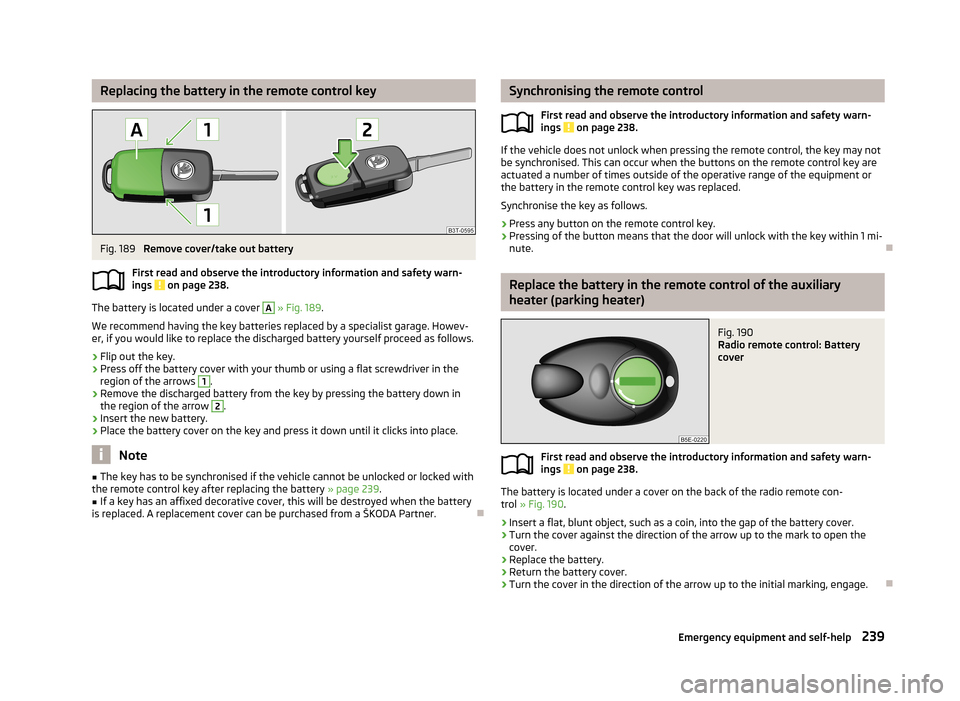
Replacing the battery in the remote control keyFig. 189
Remove cover/take out battery
First read and observe the introductory information and safety warn-
ings
on page 238.
The battery is located under a cover
A
» Fig. 189 .
We recommend having the key batteries replaced by a specialist garage. Howev- er, if you would like to replace the discharged battery yourself proceed as follows.
›
Flip out the key.
›
Press off the battery cover with your thumb or using a flat screwdriver in theregion of the arrows
1
.
›
Remove the discharged battery from the key by pressing the battery down inthe region of the arrow
2
.
›
Insert the new battery.
›
Place the battery cover on the key and press it down until it clicks into place.
Note
■ The key has to be synchronised if the vehicle cannot be unlocked or locked with
the remote control key after replacing the battery » page 239.■
If a key has an affixed decorative cover, this will be destroyed when the battery
is replaced. A replacement cover can be purchased from a ŠKODA Partner.
Synchronising the remote control
First read and observe the introductory information and safety warn-
ings
on page 238.
If the vehicle does not unlock when pressing the remote control, the key may not
be synchronised. This can occur when the buttons on the remote control key are actuated a number of times outside of the operative range of the equipment or
the battery in the remote control key was replaced.
Synchronise the key as follows.
›
Press any button on the remote control key.
›
Pressing of the button means that the door will unlock with the key within 1 mi-
nute.
Replace the battery in the remote control of the auxiliary
heater (parking heater)
Fig. 190
Radio remote control: Battery
cover
First read and observe the introductory information and safety warn-
ings on page 238.
The battery is located under a cover on the back of the radio remote con-
trol » Fig. 190 .
›
Insert a flat, blunt object, such as a coin, into the gap of the battery cover.
›
Turn the cover against the direction of the arrow up to the mark to open the
cover.
›
Replace the battery.
›
Return the battery cover.
›
Turn the cover in the direction of the arrow up to the initial marking, engage.
239Emergency equipment and self-help
Page 248 of 274

›Clip it onto the respective fuse and pry out.›Insert a new fuse.›
Return the clip to its original place.
›
Re-insert the cover of the fuse box .
Fuse assignment in the dash panel
No.Power consumer1Diagnostic socket, engine control unit, fuel pump relay, fuel pump
control unit2ABS control unit, ESC switch for tyre pressure warning, brake sensor, for START-STOP coil of the starter relay only3Switch and airbag control unit4WIV, tail lights, dimming mirrors, pressure sensor, telephone preinstal-lation5Control unit for headlight beam adjustment and headlight swivel, con-trol unit for parking aid, control unit for park assist6Instrument cluster, control unit for electromechanical power steering,
selector lever lock, power supply for data bus7Heated opening of the crankcase ventilation, air flow meter8Control unit for trailer detection9Relay for auxiliary heating and ventilation10Adaptive left main headlight11Adaptive right main headlight12Not assigned13Diagnostic socket, light switch, rain sensor, clock14Central locking system and bonnet lid15Central control unit - interior lights16The air conditioning system17Not assigned18Phone19Instrument cluster, wind-shield wiper lever and turn signal lever, the relay coil for heating wind-shield20KESSY21KESSY ELV22Air blower for Climatronic23Front power window, central locking of the front doorsNo.Power consumer24Selector lever lock25Rear window heater, relay for auxiliary heating and ventilation26Power socket in the boot27Fuel pump relay, control unit for fuel pump, injection valves28Electric boot lid29Haldex30Climate controlled front seats31DVD pre-installation32Front power window, central locking system of the rear doors33Electric sliding/tilting roof34Alarm, spare horn35front and rear lighter36Headlight cleaning system37Heated front seats38Heated rear seats39Rear window wiper40Fan air-conditioning system, relay for auxiliary heating and ventilation41Not assigned42Light switch43Control unit for trailer detection44Control unit for trailer detection45Control unit for trailer detection46Switch for seat heating47Telephone preinstallation48Preparation for the aftermarket radio49Only for START-STOP: Central control unit, DC-DC converter, the en-
gine control unit
245Fuses and light bulbs
Page 249 of 274

Fuses in the engine compartmentFig. 199
Cover for the fuse box in the en-
gine compartment
First read and observe the introductory information and safety warn-
ings on page 244.
On some vehicles, the battery cover must be removed before removing the cover
for the fuse box » page 216.
Replacing fuses
›
The safety catch of the cover of the fuse box
A
» Fig. 199 Move the arrow.
The symbol
is displayed behind the catches.
›
Remove the cover.
›
Replace the appropriate fuse.
›
Replace the cover on the fuse box and the safety clip
A
move against the ar-
row.
The symbol
is displayed behind the catches.
The cover is locked into position.
CAUTION
The cover for the fuse box in the engine compartment must always be applied
correctly. If the cover is not replaced properly, water may get into the fuse box -
leading to a risk of vehicle damage!
Assignment of fuses in the engine compartmentFig. 200
Fuses: Type A / Type B
First read and observe the introductory information and safety warn- ings
on page 244.
Fuse assignment in the engine compartment - version A
No.Power consumer1Front right main headlight, right tail light2Valves for ABS3-4Not assigned5Horn6-12Not assigned13Control unit for automatic gearbox14Not assigned15Coolant pump16Not assigned17Instrument cluster, windscreen wiper lever, and turn signal lever18Audio amplifier (sound system)19Radio20-22Not assigned23Engine control unit24Data bus control unit25-26Not assigned27Fuel dosage valve 246Do-it-yourself