2013 SKODA ROOMSTER service
[x] Cancel search: servicePage 5 of 219
Terms used
The on-board literature contains the following terms relating to the service work for your vehicle.
› “Specialist garage” - a workshop that carries out specialist service tasks for
ŠKODA vehicles A specialist garage can be a ŠKODA partner, a ŠKODA service
partner or an independent workshop.
› “ŠKODA service partner” - A Workshop that has been contractually authorized
by the manufacturer ŠKODA AUTO a.s. or its sales partner to perform service tasks on ŠKODA vehicles and to sell ŠKODA Genuine Parts.
› “ŠKODA partner” - A company that has been authorized by the manufacturer
ŠKODA AUTO a.s. or its sales partner to sell new ŠKODA vehicles and, when ap-
plicable, to service them using ŠKODA Genuine Parts and sell ŠKODA Genuine
Parts.
Owner's Manual
These operating instructions apply to all body variants of the vehicle and all rela-
ted models.
The manual describes all possible equipment variants without identifying them
as special equipment, model variants or market-dependent equipment.
Consequently, this vehicle does not necessarily contain all of the equipment
components described in this Owner's Manual.
The scope of equipment on your vehicle depends on your purchase contract for the vehicle. More information is available from the ŠKODA Partner from whom you
bought the vehicle.
The illustrations can differ in minor details from your vehicle; they are only inten-
ded for general information.
Page 6 of 219

Table of Contents
Materials defect liability and ŠKODA warranty for
new cars5
Mobility warranty and ŠKODA extended
warranty
6
Abbreviations
Operation
Cockpit
9
Overview
8
Instruments and Indicator Lights
10
Instrument cluster
10
Multifunction display (MFD)
13
Service Interval Display
16
MAXI DOT display
18
Warning lights
20
Unlocking and locking
28
Unlocking and locking
28
Central locking system
31
Remote control
34
Anti-theft alarm system
35
Luggage compartment lid
37
Electrical power windows
38
Lights and visibility
41
Lights
41
Interior lights
46
Visibility
47
Windscreen wipers and washers
48
Rear window
51
Seats and stowing
52
Front seats
52
Rear seats
54Head restraints56Boot57
Variable loading floor in the luggage
compartment (Estate)
61
Bicycle carrier in the luggage compartment
63
Roof rack system
65
Useful equipment
65
Storage compartments
68
Praktik
73
Heating and air-conditioning
77
Heating, ventilation, cooling
77
Heating
78
Air conditioning system (manual air conditioning system)
80
Climatronic (automatic air conditioningsystem)
83
Communication and multimedia
86
Universal telephone preinstallation GSM II
86
Voice control
91
Multimedia
92
Driving
Starting-off and Driving
95
Steering
95
Starting and stopping the engine
96
Brakes
98
Manual gear changing and pedals
99
Automatic transmission
100
Running in
103
Economical driving and environmental
sustainability
104
Avoiding damage to your vehicle
108
Driving abroad
109
Assist systems
110
Brake assist systems
110
Parking aid
112Cruise Control System113START-STOP115
Towing a trailer
117
Towing device
117
Trailer
120
Safety
Passive Safety
123
General information
123
Correct seated position
124
Seat belts
127
Using seat belts
127
Inertia reels and belt tensioners
130
Airbag system
132
Description of the airbag system
132
Airbag overview
133
Deactivating airbags
136
Transporting children safely
139
Child seat
139
Fastening systems
141
General Maintenance
Car care
144
Service intervals
144
Services, modifications and technical
alterations
146
Washing your car
149
Taking care of your vehicle exterior
150
Taking care of the interior
154
Inspecting and replenishing
157
Fuel
157
Engine compartment
159
Engine oil
163
Coolant
1653Table of Contents
Page 8 of 219
Materials defect liability and ŠKODAwarranty for new cars
Materials defect liability
Your ŠKODA partner, as a vendor, is liable to you for defects in your new ŠKODA
car, ŠKODA Genuine Parts or ŠKODA Genuine Accessories in accordance with stat-
utory regulations and the purchase agreement.
ŠKODA warranty for new cars
As well as the materials defect liability, ŠKODA AUTO a.s. grants you the ŠKODA warranty for new cars (hereafter referred to as “ŠKODA warranty),” according to
the terms described below.
As part of the ŠKODA warranty, ŠKODA AUTO a.s. will guarantee the following
services:
› Repair of damage to your vehicle that occurs within two years from the start of
the ŠKODA warranty;
› Repair of paint damage to your vehicle that occurs within three years from the
start of the ŠKODA warranty;
› Repair of rust perforation to the bodywork of your vehicle that occurs within
twelve years from the start of the warranty. Only rust perforation from the in- side to the outside of body panels is considered to be rust perforation of the
bodywork and is covered by the ŠKODA warranty.
The start of the warranty is the date on which the original purchaser acquires the vehicle upon purchasing it from the ŠKODA partner or the date of first registra-
tion. Whichever occurs first and is accordingly recorded by the ŠKODA partner in
the service schedule is the applicable date.
Defects may be remedied by replacement or repair of the defective part. Replacedparts become the property of the ŠKODA service partner.
There are no other entitlements arising from the ŠKODA warranty. In particular,
there are no entitlements to replacement, cancellation, provision of a courtesy
vehicle for the duration of repairs or compensation for loss.
If your ŠKODA vehicle was purchased from a ŠKODA partner in a country withinthe European Economic Area (i.e. the countries of the European Union, Norway,
Iceland and Liechtenstein) or in Switzerland, claims arising from the ŠKODA war-
ranty must also be made through a ŠKODA service partner in one of these coun-
tries.If your ŠKODA vehicle has been purchased from a ŠKODA partner outside the Eu-
ropean Economic Area and Switzerland, claims arising from the ŠKODA warranty
must also be made through a ŠKODA service partner outside the European Eco-
nomic Area and Switzerland.
One of the conditions for the assertion of the ŠKODA warranty is that all service operations have been carried out works in a timely and adequate manner and in
accordance with the manufacturer's provisions. You must prove that service oper-
ations have been carried out properly and in accordance with the manufacturer's
provisions when asserting a claim under the ŠKODA warranty. Where a service
has been missed or not carried out according to the manufacturer's provisions,
you may still be entitled to warranty claims as long as you can prove that the
missed service or the failure to carry out a service according to the manufactur-
er's provisions was not the cause of the defect.
Natural wear and tear of your vehicle is not covered by the ŠKODA warranty. The
ŠKODA warranty also does not cover defects to bodywork, installations and con-
versions provided by third-parties, nor vehicle defects caused by these. The same
is true for accessories which are not factory installed and/or supplied.
In addition, this warranty does not apply if the defect was caused by one of thefollowing:
› unauthorized use, improper handling (e.g. use in motorsport competitions or
overloading), improper care and maintenance, or unapproved modification to
your vehicle;
› non-compliance with provisions in the service schedule and the Owner's manual
or other factory-supplied instructions;
› external causes or influences (e.g. accidents, hail, flooding, etc.);
› parts fitted or installed on the vehicle the use of which is not approved by
ŠKODA AUTO a.s., or modification of the vehicle in a manner not approved by
ŠKODA AUTO a.s. (e.g. tuning);
› damage caused by you which was not immediately seen to by specialist garage
or was not fixed properly.
It is the customer's responsibility to prove that it was not the cause.
This ŠKODA warranty does not affect the purchaser's statutory rights arising from
liability for defects by the vehicle vendor and other potential claims under product liability laws.
5Materials defect liability and ŠKODA warranty for new cars
Page 9 of 219
Mobility warranty and ŠKODA extendedwarranty
Mobility warranty
Mobility warranty provides a sense of security when travelling in your vehicle.
Should your car break down when you're on the move one day as a result of an
unexpected fault, you will be eligible for services to ensure your continued mobili-
ty as part of the mobility warranty, which includes the following: Breakdown serv-ice at the breakdown location and towing to the ŠKODA service partner, technical
assistance by phone or in person.
If your vehicle is not repaired on the same day, the ŠKODA service partner may
provide further services as required, such as replacement transportation (bus,
train, etc.), a courtesy vehicle, etc.
You can obtain more information regarding terms and conditions for the provision of mobility warranty for your vehicle from your ŠKODA partner. Here you will also
be given detailed terms and conditions of the mobility warranty as it relates to
your vehicle. In the event that there is no mobility warranty coverage available for
your vehicle, you should check with any ŠKODA service partner about the possibil-
ity of concluding a contract retrospectively.
Note
The mobility warranty is only available in some countries.
Optional ŠKODA extended warranty
If you received an extended ŠKODA warranty when purchasing your new car, the
two-year ŠKODA warranty for defects in your ŠKODA vehicle will be extended by
the period you chose or until the chosen mileage limit has been reached.
The paintwork warranty and the warranty against rust perforation referred to
above stay unaffected by the extended warranty.
Detailed conditions for the extended warranty are included in the extended war-ranty terms and conditions, which your ŠKODA partner will have given you when
you purchased your new vehicle.
Note
The mobility guarantee and optional extended ŠKODA warranty are only available
in some countries.
6Mobility warranty and ŠKODA extended warranty
Page 13 of 219

Instruments and Indicator Lights
Instrument cluster
Introduction
This chapter contains information on the following subjects:
Overview
10
Engine revolutions counter
11
Speedometer
11
Coolant temperature gauge display
11
Fuel gauge
11
Counter for distance driven
12
Digital clock
12
Display of the second speed
12
Recommended gear
13
Fault display
The Error message will appear in the display if there is a fault in the instrument
cluster. Ensure that the fault is rectified as soon as possible by a specialist work-
shop.
WARNING■ Concentrate fully at all times on your driving! As the driver you are fully re-
sponsible for road safety.■
Never operate the controls in the instrument cluster while driving, only
when the vehicle is stationary!
OverviewFig. 2
Instrument cluster
First read and observe the introductory information and safety warn-
ings
on page 10.
Rev counter with warning lights » page 11
Display:
› With counter for distance driven
» page 12
› With service interval display
» page 16
› With digital clock
» page 12
› with multifunction display (MFD)
» page 13
› with the Maxi DOT display
» page 18
Speedometer with warning lights » page 11
Coolant temperature gauge 1)
» page 11
Button for display mode:
› Setting the hours/minutes
» page 12
› Enable/disable display of the second speed 2)
» page 12
› Service interval 2)
- Display of the number of days, kilometres or miles re-
maining until the next Service 3)
» page 16
123451)
Applies for vehicles using the MAXI DOT display.
2)
Applies for vehicles with a segment display.
3)
Applies for models in which where the values are indicated in British measuring units.
10Operation
Page 19 of 219

Current speed
The current speed, identical to the display on the speedometer 3 » Fig. 2 on
page 10, is displayed.
Oil temperature 1)
The current engine oil temperature is displayed. If the oil temperature is lower
than 50 °C or if a fault in the system for checking the oil temperature is present, only - -.- is displayed instead of the oil temperature.
Warning against speeding
The warning that the speed limit is being exceeded can be enabled/disabled in
the display » page 16.
Warning against speeding
First read and observe the introductory information and safety warn-
ings
on page 13.
Adjust the speed limit while the vehicle is stationary
›
Press button
A
» Fig. 5 on page 14 to select the Warning at (MAXI DOT display)
or
(segment display) menu item.
›
Press button
B
to activate the ability to set the speed limit 2)
(value flashes).
›
Use button
A
to set the required speed limit, e.g. 50 km/h.
›
Confirm the speed limit that was set with button
B
, or wait approx. 5 seconds
until the setting is saved automatically (the value stops flashing).
This allows you to set the speed in 5 km/h intervals.
Adjusting the speed limit while the vehicle is moving
›
Press button
A
» Fig. 5 on page 14 to select the Warning at (MAXI DOT display)
or
(segment display) menu item.
›
Drive at the desired speed, e.g. 50 km/h.
›
Press button
B
to accept the current speed as the speed limit (the value flash-
es).
If you wish to adjust the set speed limit, you can do so in 5 km/h intervals (e.g. the
accepted speed of 47 km/h increases to 50 km/h or decreases to 45 km/h).
›
Confirm the speed limit that was set by pressing button
B
again, or wait ap-
prox. 5 seconds until the setting is saved automatically (the value stops flash- ing).
Change or delete speed limit›Press button A » Fig. 5 on page 14 to select the Warning at (MAXI DOT display)
or (segment display) menu item.›
Pressing button
B
disables the speed limit.
›
Pressing the button
B
activates the ability to change the speed limit.
If the set speed limit is exceeded, an audible signal will sound as a warning. The
Warning at (MAXI DOT display) or (segment display) menu item appears in the
display with the limit set.
The speed limit set mode is stored even after the ignition is switched off and on.
Service Interval Display
Introduction
This chapter contains information on the following subjects:
Prompt in the segment display
17
Display in the MAXI DOT display
17
Before the next service interval is reached, a message concerning the kilometres
and days remaining until the next service is due is shown for about 10 seconds
after the ignition is switched on.
The kilometre indicator or the days indicator reduces in steps of 100 km or days until the service due date is reached.
Note
■ Information is retained in the Service Interval Display even after the vehicle bat-
tery is disconnected.■
If the instrument cluster is exchanged after a repair, the correct values must be
entered in the counter for the Service Interval Display. This work is carried out by a specialist garage.
■
For more information on the service intervals » page 144, Service intervals .
1)
Applies for vehicles using the MAXI DOT display.
2)
An initial value of 30 km/h is displayed automatically if no value has been specified.
16Operation
Page 20 of 219
Prompt in the segment displayFig. 6
Example of a message
First read and observe the introductory information given on page 16.
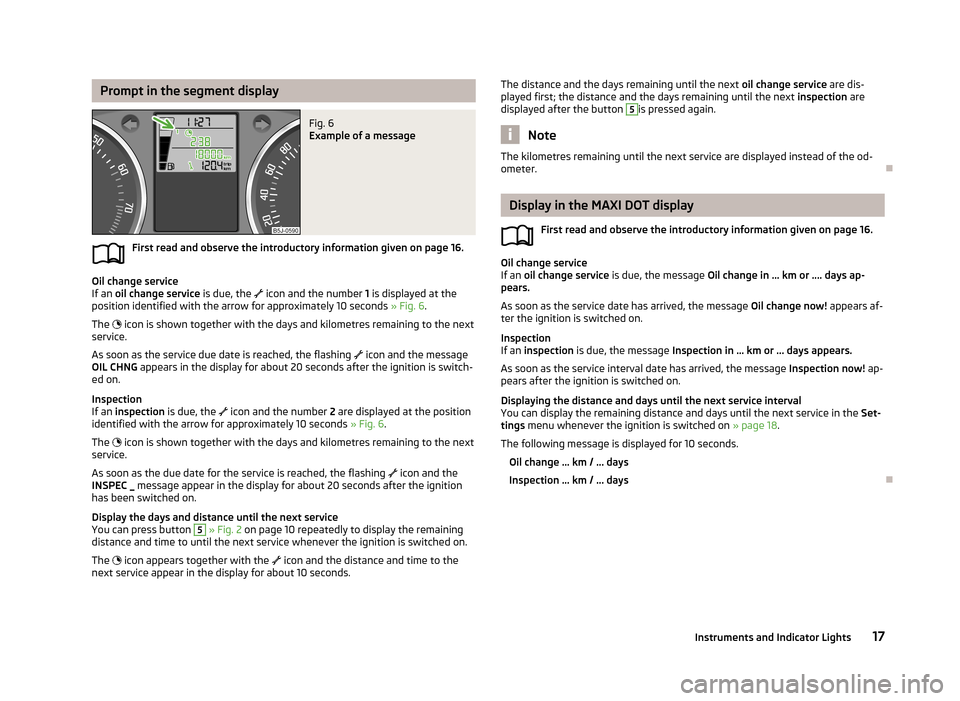
Oil change service
If an oil change service is due, the
icon and the number 1 is displayed at the
position identified with the arrow for approximately 10 seconds » Fig. 6.
The
icon is shown together with the days and kilometres remaining to the next
service.
As soon as the service due date is reached, the flashing
icon and the message
OIL CHNG appears in the display for about 20 seconds after the ignition is switch-
ed on.
Inspection
If an inspection is due, the
icon and the number 2 are displayed at the position
identified with the arrow for approximately 10 seconds » Fig. 6.
The
icon is shown together with the days and kilometres remaining to the next
service.
As soon as the due date for the service is reached, the flashing
icon and the
INSPEC _ message appear in the display for about 20 seconds after the ignition
has been switched on.
Display the days and distance until the next service
You can press button
5
» Fig. 2 on page 10 repeatedly to display the remaining
distance and time to until the next service whenever the ignition is switched on.
The
icon appears together with the
icon and the distance and time to the
next service appear in the display for about 10 seconds.
The distance and the days remaining until the next oil change service are dis-
played first; the distance and the days remaining until the next inspection are
displayed after the button 5
is pressed again.
Note
The kilometres remaining until the next service are displayed instead of the od-
ometer.
Display in the MAXI DOT display
First read and observe the introductory information given on page 16.
Oil change service
If an oil change service is due, the message Oil change in ... km or .... days ap-
pears.
As soon as the service date has arrived, the message Oil change now! appears af-
ter the ignition is switched on.
Inspection
If an inspection is due, the message Inspection in ... km or ... days appears.
As soon as the service interval date has arrived, the message Inspection now! ap-
pears after the ignition is switched on.
Displaying the distance and days until the next service interval You can display the remaining distance and days until the next service in the Set-
tings menu whenever the ignition is switched on » page 18.
The following message is displayed for 10 seconds.
Oil change ... km / ... days
Inspection ... km / ... days
17Instruments and Indicator Lights
Page 22 of 219

Winter tyres
Here, you can set the speed at which an audible signal should sound. This func-
tion is, for example, used for winter tyres where the maximum permissible speed
is lower than the maximum speed of the vehicle.
The following is shown on the information display if this speed is exceeded: Winter tyres: maximum ... km/h.
Units of measurement
The units for the temperature, consumption and distance driven can be set here.
Alt. speed dis.
Display of the second speed in mph 1)
can be activated here.
Service
The days and kilometres remaining until the next service can be displayed here.
Factory setting
The display can be restored to its factory settings here.
Door, boot lid and bonnet warning
First read and observe the introductory information and safety warn-ings
on page 18.
If at least one door is open, or the boot or bonnet is open, the MAXI DOT display
shows the vehicle with the corresponding door or boot/bonnet open.
An audible signal also sounds if the vehicle is travelling at more than 6 km/h.
Auto Check Control
First read and observe the introductory information and safety warn-
ings
on page 18.
Vehicle condition
Certain functions and conditions of individual vehicle systems are checked contin-
uously when the ignition is switched on and also while driving.
Some error messages and other information are displayed in the MAXI DOT dis-
play. The messages are displayed simultaneously with the icons in the MAXI DOT
display or with the warning lights in the instrument cluster » page 20.
The Vehicle status menu item is shown in the main menu of the MAXI DOT dis-
play whenever at least one fault message is present. The first of the fault mes-
sages is displayed after this menu item is selected. Several error messages are
shown on the display under the message e.g. 1/3. This indicates that the first of a
total of three error messages is being displayed.
As long as the operational faults are not rectified, the symbols are always indica- ted again. After they are displayed for the first time, the symbols continue to be
indicated without any extra messages for the driver.
Warning symbolsEngine oil pressure too low» page 21Clutches in the automatic gearbox are too
hot» page 19Check engine oil level,
engine oil sensor defective» page 21
Clutches in the automatic gearbox are too hot
The
symbol in the MAXI DOT display indicates that the temperature of the au-
tomatic gearbox clutches is too high.
The following message is shown in the MAXI DOT display.
Gearbox overheating. Stop. Read manual.
Stop the vehicle, switch off the engine, and wait until the
icon goes out – there
is a risk of gearbox damage. You can continue your journey as soon as the icon
disappears.
WARNINGIf you have to stop for technical reasons, park the vehicle at a safe distance
from the traffic, switch off the engine and switch on the hazard warning lights
system » page 45 . 1)
On models on which the speedometer indicates mph, the second speed is displayed in km/h.
19Instruments and Indicator Lights