2013 SKODA RAPID fuel
[x] Cancel search: fuelPage 27 of 226
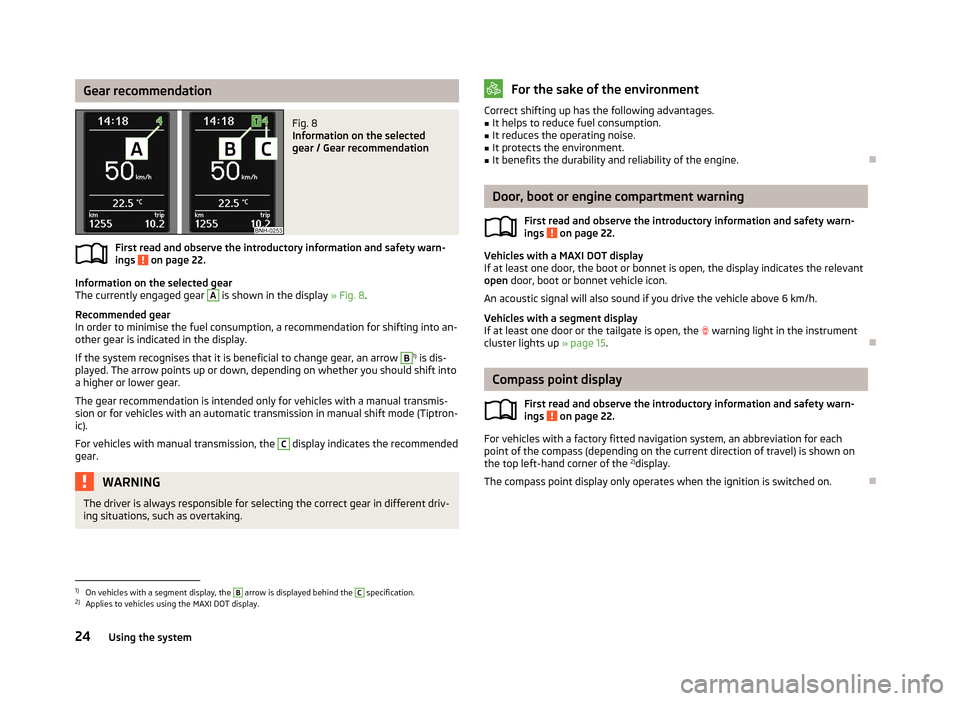
Gear recommendationFig. 8
Information on the selected
gear / Gear recommendation
First read and observe the introductory information and safety warn-
ings on page 22.
Information on the selected gear
The currently engaged gear
A
is shown in the display » Fig. 8.
Recommended gear
In order to minimise the fuel consumption, a recommendation for shifting into an-
other gear is indicated in the display.
If the system recognises that it is beneficial to change gear, an arrow
B
1) is dis-
played. The arrow points up or down, depending on whether you should shift into a higher or lower gear.
The gear recommendation is intended only for vehicles with a manual transmis-
sion or for vehicles with an automatic transmission in manual shift mode (Tiptron-
ic).
For vehicles with manual transmission, the
C
display indicates the recommended
gear.
WARNINGThe driver is always responsible for selecting the correct gear in different driv-
ing situations, such as overtaking.For the sake of the environmentCorrect shifting up has the following advantages.■It helps to reduce fuel consumption.■
It reduces the operating noise.
■
It protects the environment.
■
It benefits the durability and reliability of the engine.
Door, boot or engine compartment warning
First read and observe the introductory information and safety warn-ings
on page 22.
Vehicles with a MAXI DOT display
If at least one door, the boot or bonnet is open, the display indicates the relevant
open door, boot or bonnet vehicle icon.
An acoustic signal will also sound if you drive the vehicle above 6 km/h.
Vehicles with a segment display
If at least one door or the tailgate is open, the
warning light in the instrument
cluster lights up » page 15.
Compass point display
First read and observe the introductory information and safety warn-
ings
on page 22.
For vehicles with a factory fitted navigation system, an abbreviation for each
point of the compass (depending on the current direction of travel) is shown on
the top left-hand corner of the 2)
display.
The compass point display only operates when the ignition is switched on.
1)
On vehicles with a segment display, the
B
arrow is displayed behind the
C
specification.
2)
Applies to vehicles using the MAXI DOT display.
24Using the system
Page 28 of 226

Multifunction display (MFD)
Introduction
This chapter contains information on the following subjects:
Memory
25
Information overview
26
Warning at excessive speeds
27
The driving data is displayed on the multifunction display. The multifunction display only operates when the ignition is switched on. Afterthe ignition is switched on, the function that was last selected before switching
off the ignition is displayed.
For vehicles with a MAXI DOT display, the menu item MFA must be selected and
confirmed in the main menu » page 27, MAXI DOT display .
On vehicles with a MAXI DOT display, there is an option to fade out some of the information » page 28, Settings .
WARNING■
Concentrate fully on your driving at all times! As the driver, you are fully re-
sponsible for the operation of your vehicle.■
Even at outside temperatures of around +4 °C, black ice may still be present
on the road surface! You should therefore not rely solely on the outside tem-
perature display for an indication of whether there is black ice on the road.
Note
■ In certain national versions the displays appear in the Imperial system of meas-
ures.■
If the display of the second speed is activated in mph, the current speed is not
indicated in km/h on the display.
■
The amount of fuel consumed will not be indicated.
MemoryFig. 9
Multi-function display - Display example of the memory
First read and observe the introductory information and safety warn-
ings on page 25.
The multifunction display is equipped with two automatic memories, 1 and 2. The
selected memory is shown in the display » Fig. 9.
Single-trip memory (memory 1)
The single-trip memory collates the driving information from the moment the ig-
nition is switched on until it is switched off.
New data will also flow into the calculation of the current driving information if
the trip is continued within 2 hours after switching off the ignition.
If the trip is interrupted for more than 2 hours, the memory is automatically
erased.
Total-trip memory (memory 2)
The total trip memory collates the data from any number of individual trips up to
a total of 19 hours and 59 minutes or a 1999 km distance or, for vehicles with a
MAXI DOT display, 99 hours and 59 minutes, or a 9999 km distance.
The memory is deleted when either of these limits is reached and the calculation
starts all over again.
Unlike the single-trip memory, the total-trip memory is not deleted after a period of interruption of driving of 2 hours.
Select memory
›
Select the corresponding element of the multifunction display » page 22, Using
the information system .
Confirm the element again to switch between the individual memories.
25Information system
Page 29 of 226
Reseting›Select the corresponding element of the multifunction display » page 22, Using
the information system .›
Select the desired memory.
›
Press and hold button
B
or adjustment wheel
D
» Fig. 7 on page 22.
The following values of the selected memory are set to zero. › Average fuel consumption.
› Distance driven.
› Average speed.
› Driving time
Note
Disconnecting the vehicle battery will delete all memory data.
Information overview
First read and observe the introductory information and safety warn-
ings
on page 25.
The amount of information displayed may differ depending on the equipment.
Outside temperature
The current outside temperature is displayed.
For vehicles with a MAXI DOT display this information is always shown.
Driving time
The time travelled since the memory was last erased is displayed.
If you want to measure the time travelled from a particular moment in time, reset
the memory to zero at that point in time » page 25, Memory .
The maximum time indicated in both memories is 19 hours and 59 minutes and on vehicles which are fitted with a MAXI DOT display, it is 99 hours and 59 minutes.
The indicator is set back to zero if this period is exceeded.
Current fuel consumption
The current fuel consumption level is displayed in litres/100 km 1)
. You can use this
information to adapt your driving style to the desired fuel consumption.
The display appears in litres/hour if the vehicle is stationary or driving at a low
speed 2)
.
Average fuel consumption
The average fuel consumption since the memory was last erased is displayed in
litres/100 km 1)
.
If you wish to determine the average fuel consumption over a certain period of time, you must set the memory at the start of the new measurement tozero » page 25 , Memory . After erasing the memory, no value is displayed until you
have driven approx. 300 m.
The display is updated regularly while you are driving.
Range
The range indicates the distance you can still drive with your vehicle based on the level of fuel in the tank and with the same style of driving as before.
The display is shown in steps of 10 km. After lighting up of the indicator light
the display is shown in steps of 5 km.
The fuel consumption over the last 50 km is used to calculate the information.The range will increase if you drive in a more economical manner.
If the memory is set to zero (after disconnecting the battery), a fuel consumptionof 10 l./100 km is calculated for the range; afterwards the value is updated ac-
cording to the style of driving.
Distance travelled
The distance travelled since the memory was last erased is displayed.
If you want to measure the distance travelled from a particular moment in time,
reset the memory to zero at that moment in time » page 25, Memory .
The maximum distance indicated in both memories is 1 999 km or 9 999 km on vehicles with a MAXI DOT display. The indicator is set back to zero if this period is
exceeded.
Average speed
The average speed since the memory was last erased is displayed in km/hour .
To determine the average speed over a certain period of time, set the memory to
zero at the start of the measurement » page 25, Memory .
After erasing the memory, no data will appear for the first 300 m driven. 1)
On some models in certain countries, the display appears in kilometres/litre.
2)
On some models in certain countries, – -.- km/ltr. is displayed when the vehicle is stationary.
26Using the system
Page 34 of 226

Unlocking and opening
Unlocking and locking
Introduction
This chapter contains information on the following subjects:
Vehicle key
32
Unlocking/locking with the key
32
Unlocking/locking with the remote control
33
Safe securing system
33
Individual settings
34
Locking/unlocking the vehicle from the inside
34
Child safety lock
35
Opening/closing a door
35
Your car is equipped with a central locking system.
The central locking system allows you to lock and unlock all doors, the fuel filler
flap 1)
and tailgate at the same time.
The safe securing system » page 33 is integrated in the central locking system.
Once the car is locked from the outside, the door locks are automatically blocked
by the safe securing system »
.
The following is true after unlocking
› The doors, the boot lid and the fuel filler flap 1)
are unlocked.
› The interior light, which is switched by the door contact, comes on.
› The safe securing system is switched off.
› The indicator light in the driver door stops flashing.
› The anti-theft alarm system is deactivated 2)
.
The following is true after locking
› The doors, the boot lid and the fuel filler flap 1)
are locked.
› The interior lights connected over the door contact go off.
› The safe securing system is switched on.
›
The warning light in the driver door begins flashing.
› The anti-theft alarm system is activated 2)
.
Displaying an error
If the indicator light in the driver's door initially flashes quickly for around 2 sec-
onds, and then lights up for 30 seconds without interruption before flashing
again slowly, you will need to seek the assistance of a specialist garage.WARNING■ If the car is locked and the safe securing system activated, no people must
remain in the car as it will then not be possible to either unlock a door or open
a window from the inside. The locked doors make it more difficult for rescuers
to get into the vehicle in an emergency – risk to life!■
Locked doors prevent unwanted entry into the vehicle from outside, for ex-
ample at road crossings.
Note
■ In the event of an accident in which the airbags are deployed, the locked doors
are automatically unlocked in order to enable rescuers to gain access to the vehi- cle.■
Only the driver's door can be unlocked or locked using the key if the central
locking system fails » page 32. The other doors and the tailgate can be emer-
gency locked or emergency released. ■ Emergency locking of the door » page 194.
■ Emergency unlocking of the boot lid » page 194.
1)
Applies to vehicles with a lockable fuel filler cap.
2)
Applies to vehicles with an anti-theft alarm system.
31Unlocking and opening
Page 42 of 226

WARNING■Ensure that no persons are still left in the vehicle when locking it. In an
emergency, it will no longer be possible to open the windows from the inside.■
It is recommended to deactivate the electrically operated power windows in
the rear doors (safety switch)
S
if there are children in the rear seats » Fig. 20
on page 39.
■
The electrical power windows are fitted with a force limiter » page 40. If
there is an obstacle, the closing process is stopped and the window goes
down by several centimetres. However, the windows should be closed care-
fully – risk of injury!
CAUTION
■ Keep the windows clean to ensure the correct functionality of the electric win-
dows.■
In the event that the windows are frozen, first of all eliminate the
ice » page 155 , Windows and exterior mirrors and only then operate the electrical
power windows. Otherwise, the window sealing and the electrical power window mechanism could be damaged.
■
Make sure that the windows are closed whenever you leave the locked vehicle.
For the sake of the environment
At high speeds, you should keep the windows closed to prevent unnecessarily
high fuel consumption.
Note
When driving always use the existing heating, air conditioning and ventilation
system for ventilating the interior of the vehicle. If the windows are opened, dust
as well as other dirt can get into the vehicle and in addition the wind noise is
more at certain speeds.
Opening/closing the windowsFig. 20
Buttons on the driver's door/in the rear doors
First read and observe the introductory information and safety warn-
ings
on page 38.
Buttons for the electrical power windows » Fig. 20 .
Button for electrical power window of the driver's door
Button for electrical power window of the front passenger door
Button for power window at the rear right door
Button for power window at the rear left door
Safety pushbutton
Opening
›
The window can be opened by pressing lightly on the corresponding button. The opening process stops when one releases the button.
Additionally, the driver's window can be opened automatically (fully open) by
pressing the button to the stop. Renewed pressing of the button causes the win-
dow to stop immediately.
Closing
›
The window can be closed by pulling lightly on the top corner of the corre- sponding button. The closing process stops when one releases the button.
Safety pushbutton
The buttons for power windows in the rear doors can be deactivated by pressing
the safety switch
S
» Fig. 20 . The buttons for the electrical power windows at
the rear doors are activated again by pressing the safety push-button
S
again.
If the buttons for the rear doors are deactivated, the warning light
in the safe-
ty switch
S
lights up.
ABCDS39Unlocking and opening
Page 50 of 226

Rear window heaterFig. 29
Dash panel: Button for rear win-
dow heater
First read and observe the introductory information given on page 46.
Explanation of graphic » Fig. 29
Switch the rear window heater on/off
When the heater is switched on, a lamp lights up inside the button.
The rear window heater only operates when the engine is running.
The rear window heater switches off automatically after approx. 7 minutes.
For the sake of the environment
The heating should be switched off as soon as the window is de-iced or free from
mist. The reduced current consumption will have a favourable effect on fuel econ-
omy » page 108 , Saving electrical energy .
Note
■
If the on-board voltage drops, the rear window heater switches off automatical-
ly, in order to provide sufficient electrical energy for the engine con-
trol » page 174 , Automatic load deactivation .■
If the light is flashing inside the button the heater is off due to low battery.
Sun visorsFig. 30
Sun visor: left/right
First read and observe the introductory information given on page 46.
The sun visor for the driver or front passenger can be pulled out of the fixture and
swivelled towards the door in the direction of the arrow
1
or
2
» Fig. 30 .
The driver or front passenger sun visor has a vanity mirror
A
or
B
with a cover.
Slide the cover in the direction of arrow
3
or
4
.
WARNINGThe sun visors must not be swivelled towards the side windows in the deploy-
ment area of the head airbags if any objects, such as ball-point pens, etc. are attached to them. This might result in injuries to the occupants if the head air-
bag is deployed.
47Lights and visibility
Page 52 of 226

Activating the windscreen wipers and washersFig. 32
Operating lever: Windscreen
wipers and washer settings
First read and observe the introductory information and safety warn-
ings on page 48.
Operating lever positions » Fig. 32
Wipers off
Interval windscreen wiping
slow windscreen wiping
rapid windscreen wiping
Flick windscreen wiping, service position of the wiper arms » page 195,
(spring-loaded position)
Automatic wipe/wash for windscreen (spring-tensioned position) Wiping the rear window pane (the windscreen wiper wipes at regular inter- vals after a few seconds)
Automatic wipe/wash for the rear window (spring-tensioned position)
Switch for setting the desired interval between the individual windscreen wipes (
1
Interval windscreen wiping)
Automatic wipe/wash for windscreen
The wash system operates immediately, the windscreen wipers wipe somewhat
later.
Letting go of the operating lever will cause the windscreen wash system to stop
and the wipers to continue for another 1-3 wiper strokes (depending on the
spraying duration).
Automatic wipe/wash for the rear window The wash system operates immediately, the windscreen wiper wipes somewhatlater.
01234567ALetting go of the operating lever will cause the windscreen wash system to stop
and the wiper to continue for another 1-3 wiper strokes (depending on the spray-
ing duration). The operating lever remains in position 6
.
Headlight cleaning system
First read and observe the introductory information and safety warn-
ings
on page 48.
After the ignition is switched on, the headlights are always cleaned at the first
and after every tenth spray of the windscreen
5
» Fig. 32 on page 49 when the
low beam or main beam is switched on.
You should remove stubborn dirt (such as insect residues) from the headlight len-
ses at regular intervals, for example when refuelling. The following guidelines
must be observed » page 156, Headlight lenses .
To ensure the proper operation of the cleaning system during the winter, any
snow should be removed from the washer nozzle fixtures and ice should be
cleared with a de-icing spray.
CAUTION
Never remove the nozzles from the headlight cleaning system by hand – risk of
damage!
Rear mirror
Introduction
This chapter contains information on the following subjects:
Interior mirror
50
Exterior mirror
50
49Lights and visibility
Page 77 of 226

CAUTION■The variable loading floor can only be set to the “parking position” when in the
lower position.■
If the variable loading floor is in the “parking position”, the “parking position” on
the luggage compartment cover cannot be set » page 68.
Roof rack system
Introduction
This chapter contains information on the following subjects:
Attachment points
74
Roof load
75WARNING■ The transported items on the roof rack must be securely attached – risk of
accident!■
Always secure the load with appropriate and undamaged lashing straps or
tensioning straps.
■
Distribute the load evenly over the roof rack system.
■
When transporting heavy objects or objects which take up a large area on
the roof rack system, handling of the car may change as a result of the dis-
placement of the centre of gravity. The style of driving and speed must there-
fore be adapted to the current circumstances.
■
Avoid abrupt and sudden driving/braking manoeuvres.
■
Adjust the speed and driving style to the visibility, weather, road and traffic
conditions.
■
The permissible roof load, permissible axle loads and permissible total vehi-
cle weight must not be exceeded under any circumstance – risk of accident!
CAUTION
■ Only use roof rack systems approved by ŠKODA AUTO a.s.■When dealing with roof rack systems, the installation instructions supplied with
the roof luggage rack system must be observed.■
On models fitted with a power sliding/tilting roof, ensure that the extended
sliding/tilting roof does not hit any items of luggage transported on the roof.
■
Ensure that the boot lid does not hit the roof load when opened.
■ The height of the vehicle changes after mounting a roof luggage rack system
and the load that is secured to it. Compare the vehicle height with available clear- ances, such as underpasses and garage doors.■
Always remove the roof luggage rack system before entering an automated car
wash.
■
Ensure the roof aerial is not impaired by the secured load.
For the sake of the environment
The increased aerodynamic drag results in a higher fuel consumption.
Attachment points
Fig. 76
Attachment points for roof bars
First read and observe the introductory information and safety warn- ings
on page 74.
Installation position of the attachment points for roof bars » Fig. 76:
Rear attachment points
Front attachment points
Perform the assembly and disassembly according to the enclosed instructions.
CAUTION
Observe the information regarding the assembly and disassembly in the enclosed
instructions.
AB74Using the system