2013 Peugeot 508 RXH USB port
[x] Cancel search: USB portPage 105 of 308

3
103
Comfort
Peugeot Connect USB
This connection box, consisting of a JACKauxiliary socket and a USB port, is located in
the front armrest (under the cover).
It permits the connection of por table device,
such as a di
gital audio player of the iPod® type®
or a USB memory stick.
It reads the audio file formats (MP3, OGG,WMA, WAV, ...) which are transmitted to your audio equipment and played via the vehicle's
speakers.
You can mana
ge these files using the steeringmounted controls or the audio system control
panel and display them in the instrument panel screen.
When the USB por t is used, the por table device
charges automatically.
For more information on the use of this system, refer to the "Audio andTelematics" section.
Ski fl ap
Facility for storing and transporting longobjects.
Opening
)Lower the armrest. )Press the flap opening control.)Lower the flap. )Load the objects from inside the boot.
Page 262 of 308

260
05TRAFFIC INFORMATION
PRINCIPAL TMC SYMBOLS
Red and yellow triangle: traffi c information, for example:
Black and blue trian
gle: general information, for example:
RECEIVING TA MESSAGES
The TA (Traffi c Announcement) function gives priority to TA alert messages. To operate, this function needs good reception of a radio station transmitting this type of message. When a traffi c report
is transmitted, the current audio source (Radio, CD, USB, ...) isinterrupted automatically to play the TA message. Normal playbackof the audio source resumes at the end of the transmission of themessage.
Press RADIO
to display the menu.
Select " Guidance options " then confi rm.
Activate or deactivate " TA
" then confi rm.
The volume settin
g for TA messages can be adjusted only during the
transmission of this type of alert.
Activate or deactivate the function at an
y time by pressing
the button.
During a message, press the button to interrupt it.
Page 278 of 308
276
09MUSIC MEDIA PLAYERS
CD, MP3 CD / USB PLAYER
The audio equipment will only play audio fi les with ".wma, .aac, .fl ac, .ogg and .mp3" fi le extensions and with a bit rate of between 32 Kbps
and 320 Kbps.
It also supports VBR
(Variable Bit Rate) mode.
No other t
ype of fi le (.mp4, .m3u...) can be played.
WMA fi les must be of the standard wma 9 t
ype.
The samplin
g rates supported are 11, 22, 44 and 48 KHz.
It is advisable to restrict fi le names to 20 characters, without usin
g of special characters (e.g.: " " ?; ù) to avoid any playing and displayingproblems.
In order to be able to play a recorded
CDR or CDRW, when recording
it is preferable to select the ISO 9660 level 1, 2 or Joliet standard.
I
f the disc is recorded in another format it may not be played correctly.
It is recommended that the same recordin
g standard is always used
for an individual disc, with as low a speed as possible (4x maximum)for optimum sound quality.
In the particular case of a multi-session CD, the Joliet standard is
recommended.
INFORMATION AND ADVICE
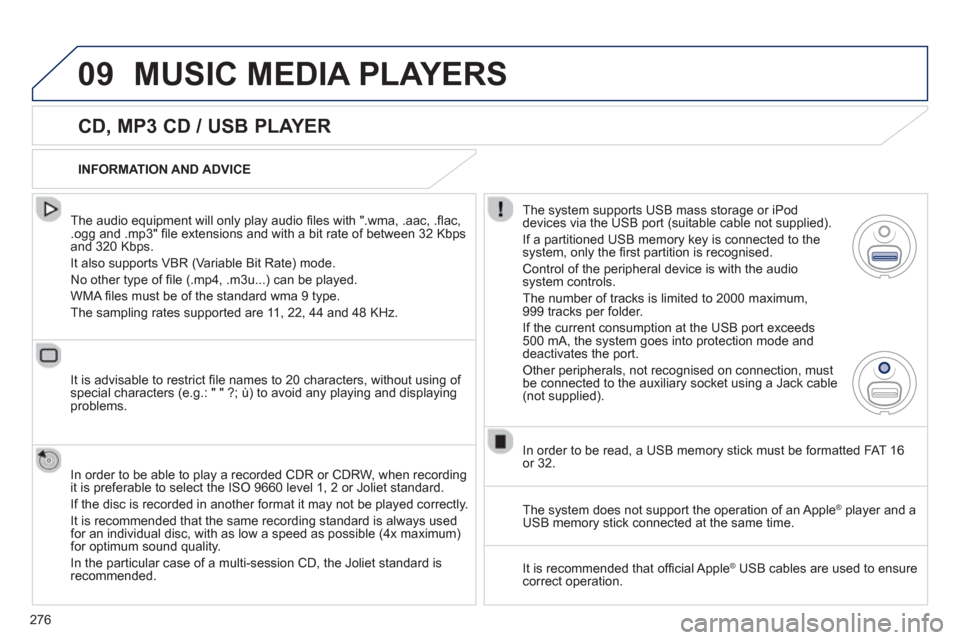
The s
ystem supports USB mass storage or iPod
devices via the USB port (suitable cable not supplied).
I
f a partitioned USB memory key is connected to the system, only the fi rst partition is recognised.
Control of the peripheral device is with the audiosystem controls.
The number of tracks is limited to 2000 maximum,
999 tracks per folder.
If the current consumption at the USB port exceeds
500 mA, the system goes into protection mode and deactivates the port.
Other peripherals, not recognised on connection, must
be connected to the auxiliary socket using a Jack cable (not supplied).
In order to be read, a U
SB memory stick must be formatted FAT 16
or 32.
The s
ystem does not support the operation of an AppleÆ
player and aÆ
USB memory stick connected at the same time.
It is recommended that o
ffi cial AppleÆ
USB cables are used to ensureÆ
correct operation.
Page 279 of 308
277
09MUSIC MEDIA PLAYERS
SOURCES
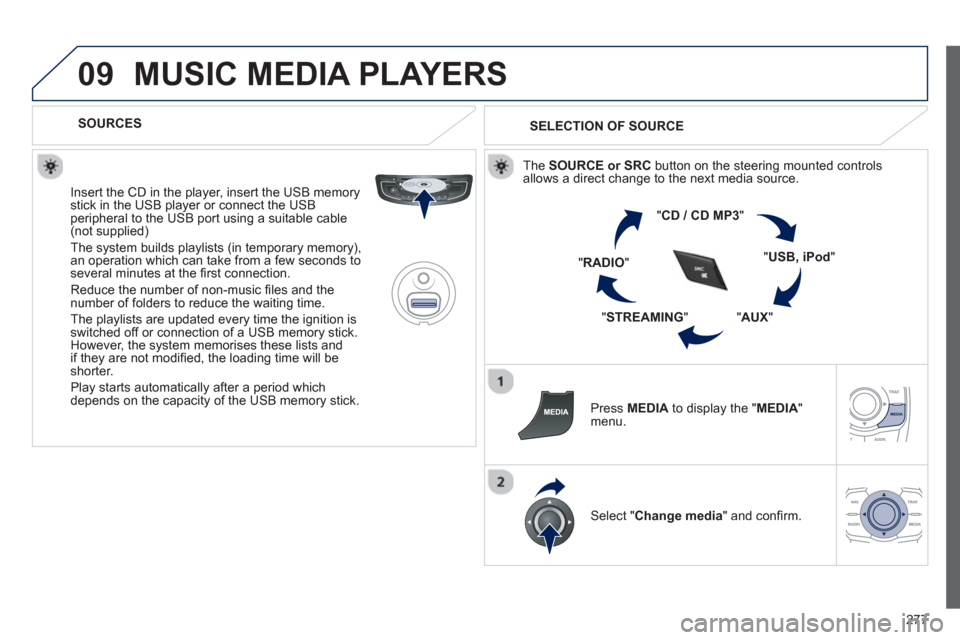
Insert the
CD in the player, insert the USB memorystick in the USB player or connect the USBperipheral to the USB port using a suitable cable (not supplied)
The system builds playlists (in temporary memory),
an operation which can take from a few seconds to several minutes at the fi rst connection.
R
educe the number of non-music fi les and the number of folders to reduce the waiting time.
The playlists are updated every time the ignition isswitched off or connection of a USB memory stick. However, the system memorises these lists and
if they are not modifi ed, the loading time will be shorter.
Pla
y starts automatically after a period which
depends on the capacity of the USB memory stick.
SELECTION OF SOURCE
Th
e SOURCE or SRCbutton on the steering mounted controlsallows a direct change to the next media source.
"CD / CD MP
3
"
"
USB, iPod"
"AUX
" "
STREAMING
" "RADIO
"
Pr
ess MEDIA
to display the " MEDIA"menu.
Select "Change media" and confi rm.
Page 281 of 308
279
09
AUDIO STREAMING
Streaming allows audio fi les on your telephone to be played via the
vehicle's speakers.
Connect the telephone: see "USING THE TELEPHONE".
Select " Audio" or " All" profi le.
I
f play does not start automatically, it may be necessary to start the audio playback from the telephone.
Control is from the peripheral device or b
y using the audio system buttons.
Once connected in streaming mode, the telephone is considered to bea media source.
It is recommended that
you activate " Repeat" on the Bluetooth
peripheral.
MUSIC MEDIA PLAYERS
CONNECTING APPLE ®
PLAYERS
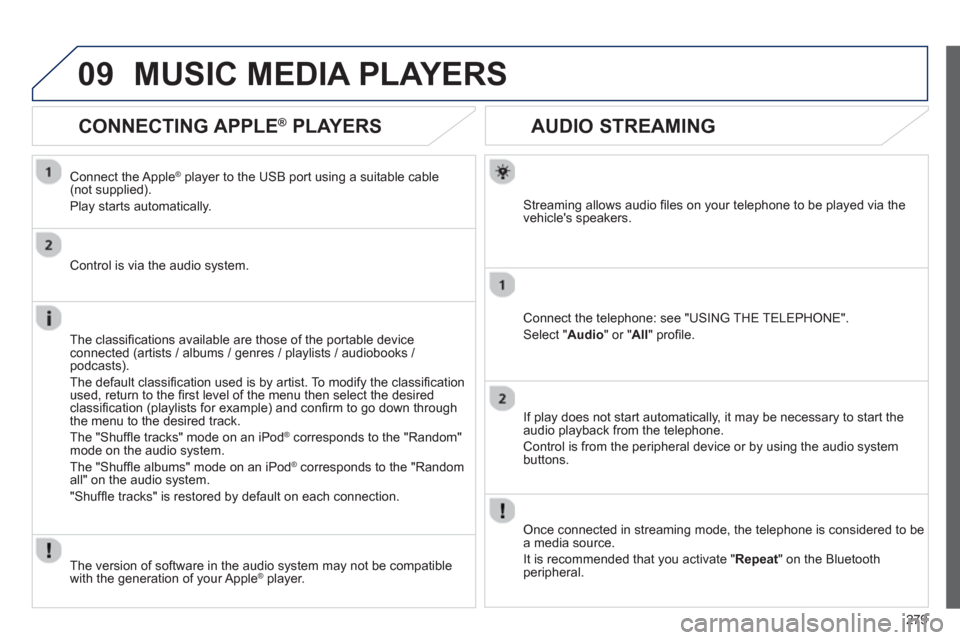
Connect the Apple®
player to the USB port using a suitable cable®
(not supplied).
Play starts automatically.
Control is via the audio system.
The classi
fi cations available are those of the portable device connected (artists / albums / genres / playlists / audiobooks / podcasts).
The default classifi cation used is b
y artist. To modify the classifi cation
used, return to the fi rst level of the menu then select the desired
classifi cation (playlists for example) and confi rm to go down through
the menu to the desired track.
The "
Shuffl e tracks" mode on an iPod Æcorresponds to the "Random"mode on the audio system.
Th
e "Shuffl e albums" mode on an iPod Æcorresponds to the "Random
all" on the audio system.
"Shuffl e tracks" is restored b
y default on each connection.
The version of software in the audio s
ystem may not be compatible
with the generation of your Apple® player.®
Page 287 of 308
285
12 SCREEN MENU MAP
2
3
3
1
4
2
2
1
4
4
2
2
1
1
1
2
1
1
2
2
2
2
2
2
2
3
3
2
2
2
1
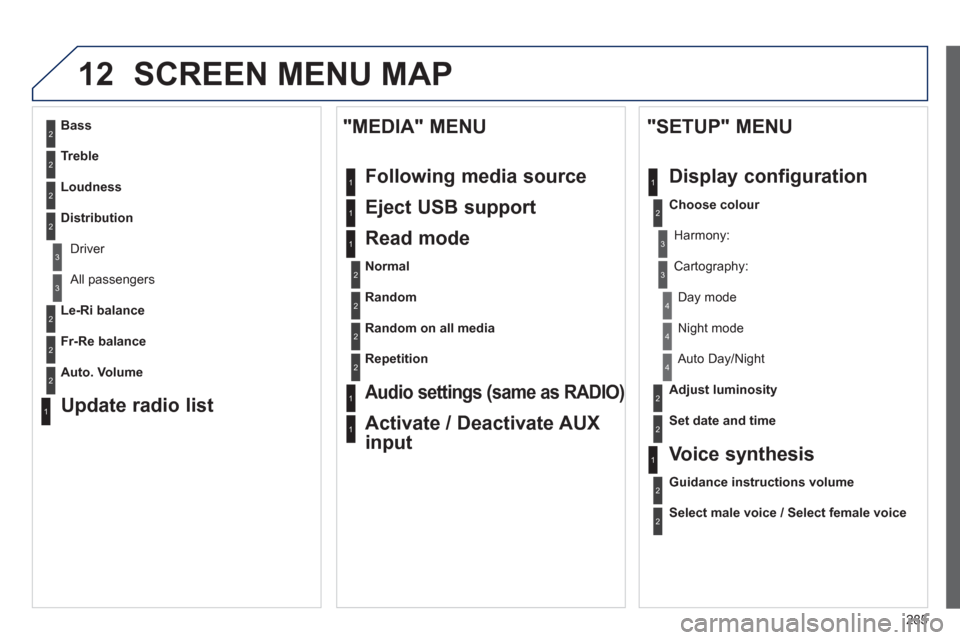
Random on all media
Repetition
Audio settings (same as RADIO)
Activate / Deactivate AUX
input
"MEDIA" MENU
Following media source
Eject USB support
Read mode
Normal
Random
All passengers
Le-Ri balance
Fr-Re balance
Auto. Volume
Update radio list
Bass
Treble
Loudness
Distribution
Driv
er
Ni
ght mode
Auto Day/Night
Ad
just luminosity
Set date and time
"SETUP" MENU
Display configuration
Choose colour
Harmony:
Carto
graphy:
Da
y mode
Voice synthesis
Guidance instructions volume
Select male voice / Select female voice
Page 293 of 308
291
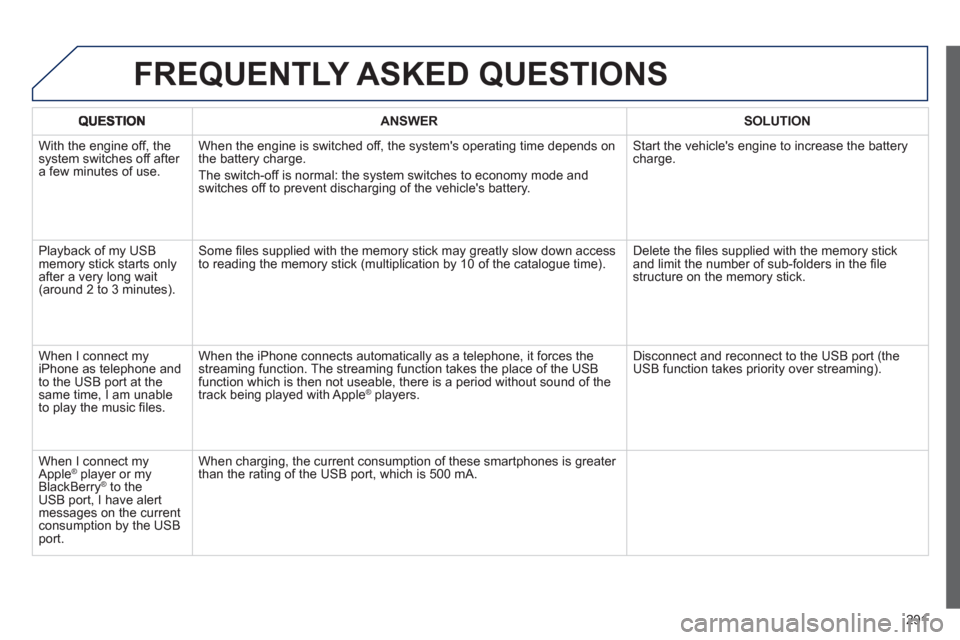
ANSWER SOLUTION
With the engine off, the system switches off after a few minutes of use.When the en
gine is switched off, the system's operating time depends on
the battery charge.
The switch-o
ff is normal: the system switches to economy mode and
switches off to prevent discharging of the vehicle's battery. Start the vehicle's en
gine to increase the batterycharge.
Pla
yback of my USB memory stick starts only
after a very long wait (around 2 to 3 minutes).Some fi les supplied with the memor
y stick may greatly slow down access
to reading the memory stick (multiplication by 10 of the catalogue time). Delete the fi les supplied with the memory stickand limit the number of sub-folders in the fi le structure on the memory stick.
When I connect m
yiPhone as telephone and
to the USB port at thesame time, I am unable
to play the music fi les. When the iPhone connects automaticall
y as a telephone, it forces the
streaming function. The streaming function takes the place of the USBfunction which is then not useable, there is a period without sound of the
track being played with AppleÆ players.Æ
Disconnect and reconnect to the USB port (the USB function takes priority over streaming).
When I connect m
yApple Æ
player or my Æ
BlackBerryÆ
to theÆ
USB port, I have alert messages on the currentconsumption by the USBport. When char
ging, the current consumption of these smartphones is greater
than the rating of the USB port, which is 500 mA.
FREQUENTLY ASKED QUESTIONS
Page 296 of 308

294
Alphabetical index
Labels, identification.....................................234Lamps, warning and indicator............r50,54, 55LED daytime running lamps..........................149Level, brake fluid ...........................................224Level, headlamp wash.......................... 157,225Level, power steering fluid............................224Levels and checks.................................223-226Lighting, guide-me home......................150,151Lighting, interior....................................r160,161Lighting bulbs (replacement).......196,200,202Lighting control stalk.............................146,150Lighting on reminder.....................................r148Loading.................................................... 40, 217Load reduction mode.................................... 210Load space cover..........................................r106Locating your vehicle......................................76Long objects, transpor ting............................103Luggage retaining strap................................104
L
Main beam...............................51, 146,196-199Maintenance....................................................40Map reading lamps.......................................160Markings, identification.................................234Massage function...........................................95Mat................................................................102Mini fuel level..................................................89Mirror, rear view ............................................ 100Mirrors, door..............................................r98,99Motorised boot..........................................85,86Motorway function(direction indicators)...................................172Mountings for ISOFIX seats.........................168Music media players .....................................275
Navigation.............................................245, 246Number plate lamps......................................202
Oil filter..........................................................r227Oil level....................................................65,224Opening the boot................................70,73,84Opening the doors..........................................70Opening the panoramic sunroof blind ............88Operation indicator lamps............50, 52, 54,57
Radio.....................................................272, 273Ready..............................................................29Ready lamp...............................................29,89Rear screen (demisting) ..........................98, 120Recharging the battery.........................207, 209Reduction of electrical load..........................210Regeneration of the particleemissions filter............................................r228Reinitialising the remote control...............77,78Remote control...............................70-72, 74,79Removable screen (snow shield)..........215, 217Removing a wheel........................................191Removing the mat.........................................102Repair kit, puncture .......................................184Replacing bulbs ...........................196,200, 202Replacing fuses ............................................203Replacing the air filter...................................r227Replacing the oil filter...................................r227Replacing the passenger compartment filter......................................r227Replacing wiper blades.........................159, 211Reset history .............................................42,67Resetting the service indicator.......................r64Reversing lamp.............................................200Risk areas (update).......................................250Roof bars.......................................................217Roof blind........................................................88Routine checks.....................................227-229Running out of fuel (Diesel)..........................222
Safety for children ................................. 166, 171Screen, colour and mapping.................243, 283Screen, instrument panel..........................50,66
M
N
O
R
S
Paint colour code..........................................234Panoramic glass sunroof................................f88Parking brake...............................126,228, 229Parking brake, electric..................................123Parking lamps...............................................150Parking sensors, front...................................143Parking sensors, rear....................................r142Parking space sensor ..................................144Particle emission filter.........................r226, 228Passenger compartment filter......................r227PEUGEOT CONNECT ASSISTA NCE..........236Peugeot Connect Navigation (RT6)..............239PEUGEOT CONNECT SOS.........................236Port, USB......................................................103Power..............................................................r32Priming the fuel system ................................222Programmable heating (Webasto)................121Protecting children........ 162,166, 168-170, 180Puncture........................................................184
P