2013 Peugeot 308 SW BL navigation
[x] Cancel search: navigationPage 55 of 382
2
53
MULTIFUNCTION SCREENS
)
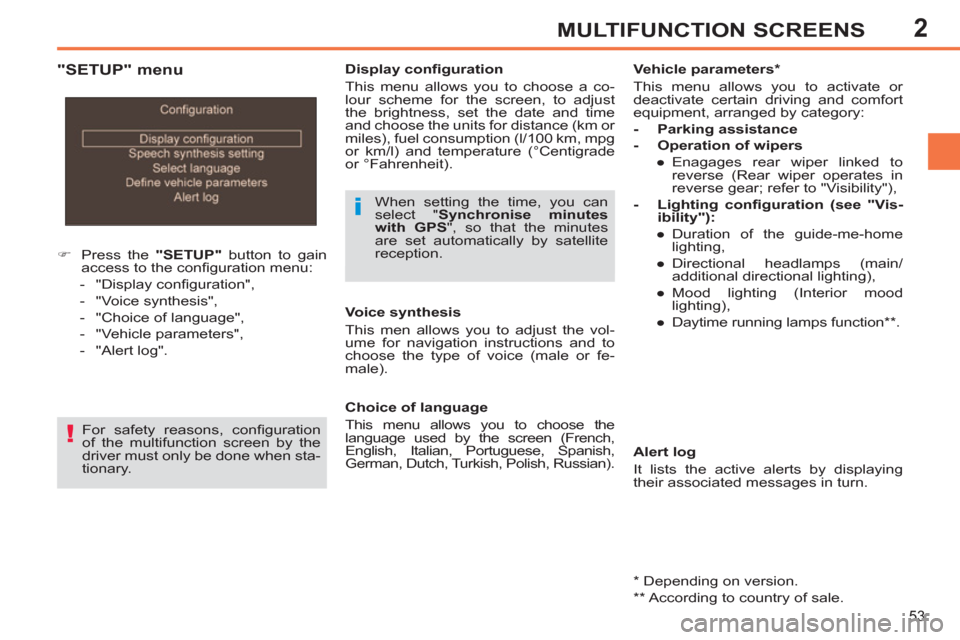
Press the "SETUP"
button to gain
access to the confi guration menu:
- "Display confi guration",
- "Voice synthesis",
- "Choice of language",
- "Vehicle parameters",
- "Alert log".
Display confi guration
This menu allows you to choose a co-
lour scheme for the screen, to adjust
the brightness, set the date and time
and choose the units for distance (km or
miles), fuel consumption (l/100 km, mpg
or km/l) and temperature (°Centigrade
or °Fahrenheit).
When setting the time, you can
select " Synchronise minutes
with GPS
", so that the minutes
are set automatically by satellite
reception.
For safety reasons, confi guration
of the multifunction screen by the
driver must only be done when sta-
tionary.
Alert log
It lists the active alerts by displaying
their associated messages in turn.
Choice of language
This menu allows you to choose the
language used by the screen (French,
English, Italian, Portuguese, Spanish,
German, Dutch, Turkish, Polish, Russian).
Voice synthesis
This men allows you to adjust the vol-
ume for navigation instructions and to
choose the type of voice (male or fe-
male).
Vehicle parameters *
This menu allows you to activate or
deactivate certain driving and comfort
equipment, arranged by category:
- Parking assistance
- Operation of wipers
●
Enagages rear wiper linked to
reverse (Rear wiper operates in
reverse gear; refer to "Visibility"),
- Lighting confi guration (see "Vis-
ibility"):
●
Duration of the guide-me-home
lighting,
●
Directional headlamps (main/
additional directional lighting),
●
Mood lighting (Interior mood
lighting),
●
Daytime running lamps function ** .
"SETUP" menu
*
Depending on version.
**
According to country of sale.
Page 56 of 382

2
54
MULTIFUNCTION SCREENS
For safety reasons, confi guration
of the multifunction screen by the
driver must only be done when sta-
tionary.
RETRACTABLE COLOUR SCREEN (WITH PEUGEOT CONNECT
MEDIA NAVIGATION (NG4 3D))
Displays in the screen
Displays according to context:
- time,
- date,
- altitude,
- ambient temperature (the value dis-
played fl ashes if there is a risk of
ice),
- parking sensor information,
- audio functions,
- telephone and address book infor-
mation,
- satellite navigation system informa-
tion,
- display screen or navigation system
parameter settings menus.
From the Peugeot Connect Media Navi-
gation (NG4 3D) control panel, to select
one of the applications:
)
press the dedicated "RADIO"
, "ME-
DIA"
, "NAV"
, "TRAFFIC"
, "ADDR
BOOK"
or "SETUP"
button for ac-
cess to the corresponding menu,
)
turn dial A
to select a function, an
item in a list,
)
press button B
to confi rm the selec-
tion,
or
)
press the "ESC"
button to abandon
the current operation and return to
the previous display.
For operation of the retractable
screen (opening, closing, adjust-
ment of the position, etc.), refer
to the "Access to the retractable
screen" section.
For more information on these applica-
tions, refer to the Peugeot Connect Media Navigation (NG4 3D) section.
Controls
Page 60 of 382
2
58
MULTIFUNCTION SCREENS
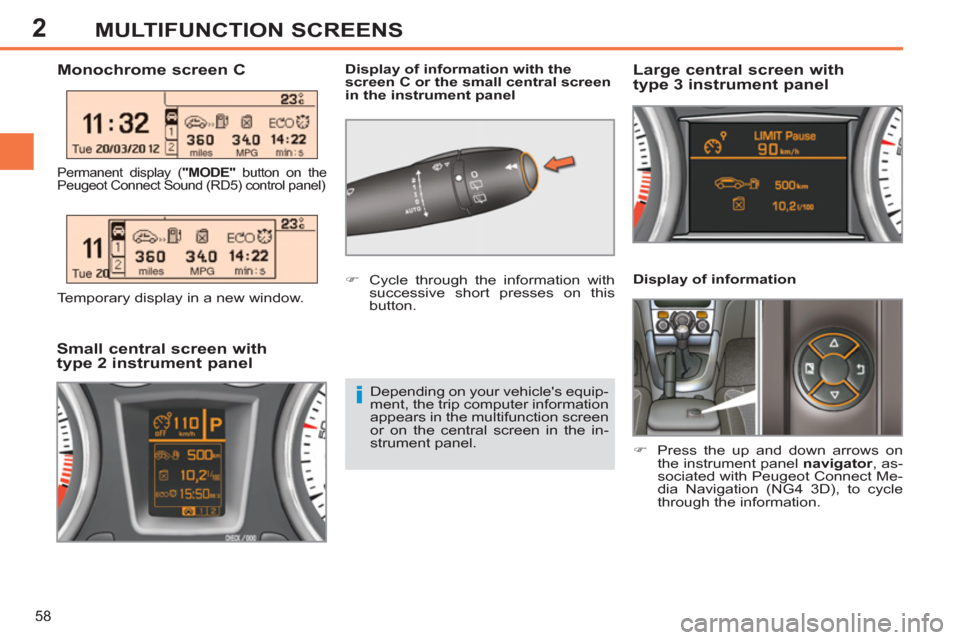
Display of information
)
Press the up and down arrows on
the instrument panel navigator
, as-
sociated with Peugeot Connect Me-
dia Navigation (NG4 3D), to cycle
through the information.
Monochrome screen C
Display of information with the
screen C or the small central screen
in the instrument panel
Large central screen with
type 3 instrument panel
Small central screen with
type 2 instrument panel
Depending on your vehicle's equip-
ment, the trip computer information
appears in the multifunction screen
or on the central screen in the in-
strument panel.
)
Cycle through the information with
successive short presses on this
button.
Permanent display ( "MODE"
button on the
Peugeot Connect Sound (RD5) control panel)
Temporary display in a new window.
Page 61 of 382
2
59
MULTIFUNCTION SCREENS
- The trip "2"
tab with:
●
the distance travelled,
●
the average fuel consumption,
●
the average speed.
)
Pressing the button again takes you
to a black screen.
A further press returns you to the
normal display.
- The current information tab,
for the trip in use, with:
●
the range,
●
the current fuel consumption,
●
the distance remaining to
be travelled or the Stop &
Start counter.
- The trip "1"
tab with:
●
the distance travelled,
●
the average fuel consumption,
●
the average speed.
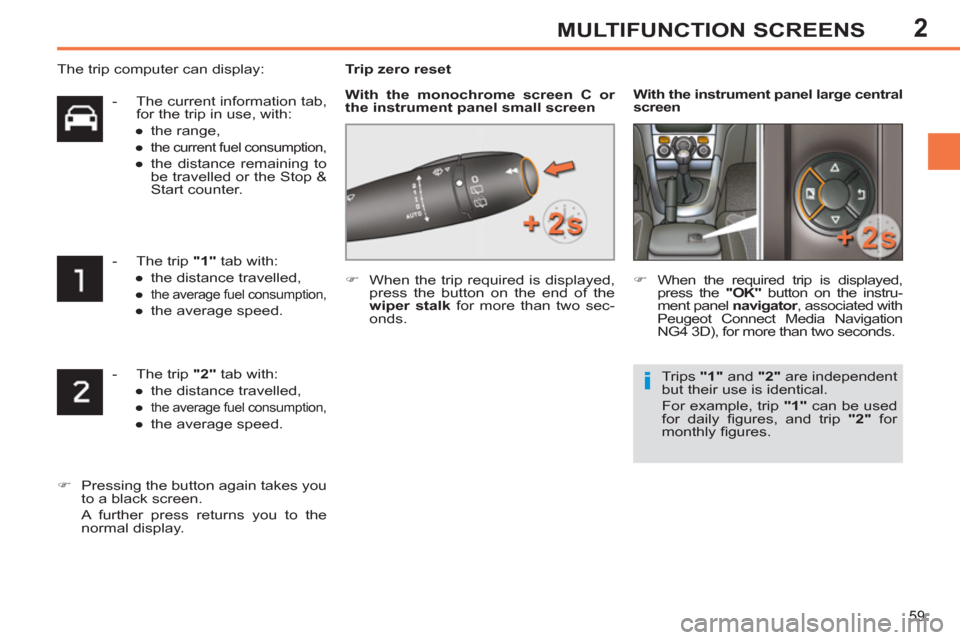
Trip zero reset
)
When the trip required is displayed,
press the button on the end of the
wiper stalk
for more than two sec-
onds.
)
When the required trip is displayed,
press the "OK"
button on the instru-
ment panel navigator
, associated with
Peugeot Connect Media Navigation
NG4 3D), for more than two seconds.
With the instrument panel
large central
screen
Trips "1"
and "2"
are independent
but their use is identical.
For example, trip "1"
can be used
for daily fi gures, and trip "2"
for
monthly fi gures.
The trip computer can display:
With the monochrome screen C or
the instrument panel small screen
Page 211 of 382

11
209
PRACTICAL INFORMATION
Charging
)
Disconnect the (+) terminal.
)
Follow the instructions for use pro-
vided by the manufacturer of the
charger.
)
Connect the charger's red cable to
the (+) terminal of the battery, then
the black cable to the (-) terminal.
)
Once the battery is fully charged,
disconnect the charger cables in re-
verse order.
Charging should be carried out in
a well-ventilated area and away
from naked fl ames and sources of
sparks, so as to avoid any risk of
explosion and fi re.
Do not try to charge a frozen bat-
tery; fi rst thaw it out so as to avoid
the risk of explosion.
If the battery had frozen, before
charging, have it checked by a
PEUGEOT dealer or qualifi ed
workshop who will ensure that
the internal components have not
been damaged and that the casing
is not cracked, which would cause
a leak of toxic and corrosive acid.
Reinitialisation after
reconnection
After any reconnection of the battery,
switch on the ignition and wait at least one
minute before starting, to allow time for the
initialisation of the electronic systems.
By referring to the corresponding sections,
you should set or initialise the following
systems yourself:
- remote control,
- one-touch electric windows,
- panoramic sunroof blind,
- time and date,
- audio and navigation system settings.
Check that no alert message or
warning lamp comes on after
switching on the ignition.
However, if minor problems per-
sist after carrying out these opera-
tions, contact a PEUGEOT dealer
or a qualifi ed workshop.
The Stop & Start battery does not
have to be disconnected for charging.
Charging the battery using
a battery charger
Before disconnecting
)
Go to the battery.
)
Check that the doors and boot are
closed but not locked.
)
Switch off the ignition and wait for at
least four minutes.
If the vehicle is to not going to be used for
more than a month, it is recommended
that the battery be disconnected.
When your vehicle's battery is dis-
charged or when the vehicle is to be
out of use for a prolonged period, you
can charge the battery using a battery
charger.
Contact a PEUGEOT dealer or a quali-
fi ed workshop for the specifi cation of
chargers compatible with your battery.
Page 212 of 382

11
210
PRACTICAL INFORMATION
A fl at battery prevents the engine
from starting (refer to the corre-
sponding section).
If the telephone is being used at this
time:
-
it will be maintained for ten min-
utes with the hands-free kit of your
Peugeot Connect Sound (RD5),
- it will be maintained for ten minutes
with the Peugeot Connect Naviga-
tion (RT6) or the Peugeot Connect
Media Navigation (NG4 3D), then
it will transfer to your telephone de-
pending on the telephone model.
System which manages the duration of
use of certain functions to conserve a
suffi cient level of charge in the battery.
After the engine has stopped, you can
still use functions such as the audio and
telematics system, windscreen wip-
ers, dipped beam headlamps, courtesy
lamps, etc. for a maximum combined
duration of thirty minutes.
This period may be greatly reduced if
the battery is not fully charged.
Exiting economy mode
These functions are reactivated auto-
matically next time the vehicle is driven.
To restore the use of these functions im-
mediately, start the engine and let it run
for at least fi ve minutes.
Switching to economy mode
Once this time has elapsed, a message
appears in the screen indicating that
the vehicle has switched to economy
mode and the active functions are put
on standby.
LOAD REDUCTION MODE
System which manages the use of cer-
tain functions according to the level of
charge remaining in the battery.
When the vehicle is being driven, the
load reduction function temporarily de-
activates certain functions, such as
the air conditioning, the heated rear
screen...
The deactivated functions are reactivat-
ed automatically as soon as conditions
permit.
Page 220 of 382

11
218
PRACTICAL INFORMATION
The fi tting of electrical equipment
or accessories which are not rec-
ommended by PEUGEOT may
result in a failure of your vehicle's
electronic system and excessive
electrical consumption.
Please note this precaution. You are
advised to contact a PEUGEOT rep-
resentative to be shown the range
of recommended equipment and
accessories.
Depending on the legislation in
force in the country, it may be com-
pulsory to have a high visibility
safety vest, warning triangle and
spare bulbs and fuses available in
the vehicle.
"Mulitmedia":
audio systems, satellite navigation sys-
tems, Bluetooth system, speakers, DVD
player, USB Box, Wi-Fi on board...
Installation of radio
communication transmitters
Before installing any after-market
radio communication transmitter,
you can contact a PEUGEOT deal-
er for the specifi cation of transmit-
ters which can be fi tted (frequency,
maximum power, aerial position,
specifi c installation requirements),
in line with the Vehicle Electro-
magnetic Compatibility Directive
(2004/104/EC).
By visting a PEUGEOT dealer, you can
also obtain products for cleaning and main-
tenance (exterior and interior) - including
products from the "TECHNATURE" range,
products for topping up (screenwash...),
paint touch-up pens and aerosols for the
exact colour of your vehicle, refi lls (sealant
cartridge for the temporary puncture repair
kit...)...
Page 249 of 382
247
2ABC3DEF5JKL4GHI6MNO8TUV7PQRS9WXYZ0*#
1
RADIO MEDIANAV ESC TRAFFIC
SETUPADDR
BOOK
The Peugeot Connect Media Navigation (NG4 3D) is protected in such a way that it will only operate in your
vehicle. If it is to be installed in another vehicle, contact
a PEUGEOT dealer for confi guration of the system.
Certain functions described in this handbook will
become available during the course of the year.
Peugeot Connect Media
Navigation(NG4 3D)
For safety reasons, it is imperative that the driver carries out operations which require prolonged attention
while the vehicle is stationary.
When the en
gine is switched off and to prevent
discharging of the battery, the Peugeot Connect MediaNavigation (NG4 3D) switches off following activation of
the Energy Economy mode.
01 First steps
02 Voice commands and
steering mounted controls
03 General operation
04 Navigation - Guidance
05 Traffic information
06 Radio
07 Music media players
08 Using the telephone
09
Screen menu map
Frequently asked questions p.
p.
p.
p.
p.
p.
p.
p.
p.
p. 248
250
253
258
267
2
69
270
275
280
285
CONTENTS
MULTIMEDIA AUDIO SYSTEM / BLUETOOTH TELEPHONE
GPS EUROPE