Page 172 of 268
11
170
TECHNICAL DATA
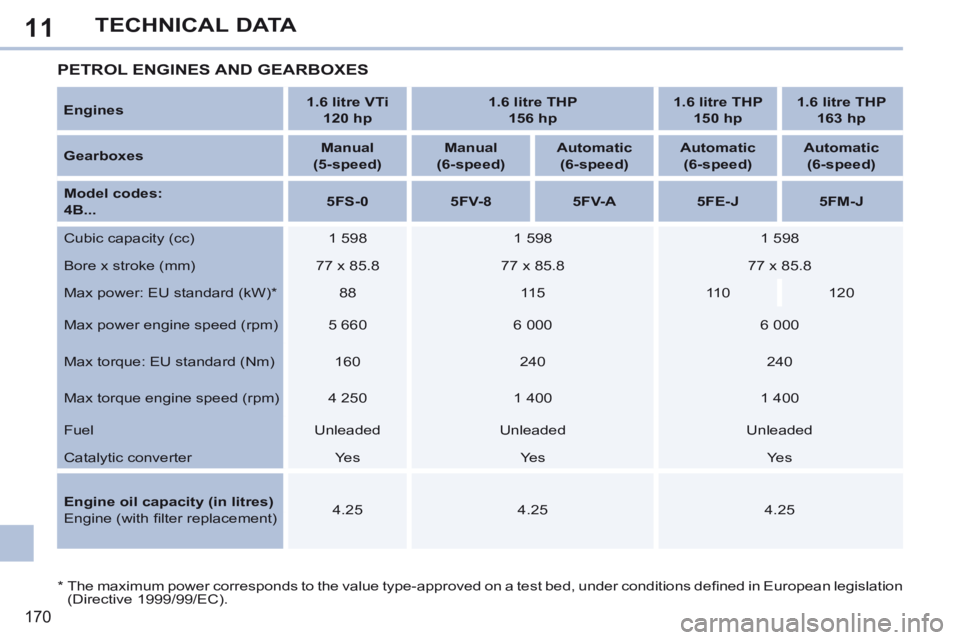
* The maximum power corresponds to the value type-approved on a test bed, under conditions defi ned in European legislation (Directive 1999/99/EC).
PETROL ENGINES AND GEARBOXES
Engines 1.6 litre VTi
120 hp 1.6 litre THP
156 hp 1.6 litre THP
150 hp 1.6 litre THP
163 hp
Gearboxes Manual
(5-speed) Manual
(6-speed) Automatic
(6-speed) Automatic
(6-speed) Automatic
(6-speed)
Model codes:
4B... 5FS-0
5FV-8 5FV-A 5FE-J 5FM-J
Cubic capacity (cc) 1 598 1 598 1 598
Bore x stroke (mm) 77 x 85.8 77 x 85.8 77 x 85.8
Max power: EU standard (kW) * 88 115 110 120
Max power engine speed (rpm) 5 660 6 000 6 000
Max torque: EU standard (Nm) 160 240 240
Max torque engine speed (rpm) 4 250 1 400 1 400
Fuel Unleaded Unleaded Unleaded
Catalytic converter Yes Yes Yes
Engine oil capacity (in litres)
Engine (with fi lter replacement) 4.25
4.25 4.25
Page 174 of 268
11
172
TECHNICAL DATA
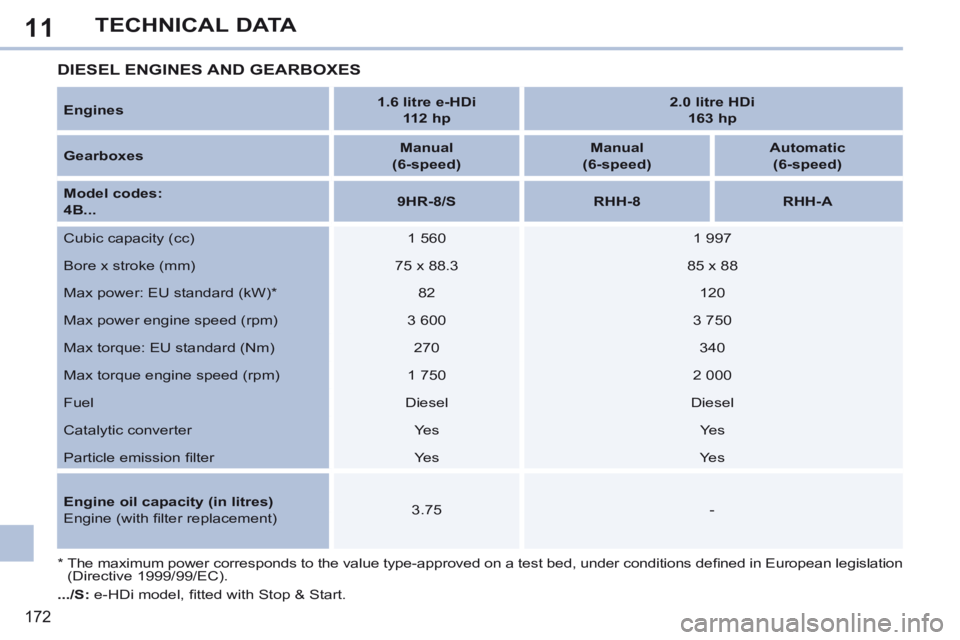
Engines 1.6 litre e-HDi
112 hp 2.0 litre HDi
163 hp
Gearboxes Manual
(6-speed) Manual
(6-speed) Automatic
(6-speed)
Model codes:
4B... 9HR-8/S
RHH-8 RHH-A
Cubic capacity (cc) 1 560 1 997
Bore x stroke (mm) 75 x 88.3 85 x 88
Max power: EU standard (kW) * 82 120
Max power engine speed (rpm) 3 600 3 750
Max torque: EU standard (Nm) 270 340
Max torque engine speed (rpm) 1 750 2 000
Fuel Diesel Diesel
Catalytic converter Yes Yes
Particle emission fi lter Yes Yes
Engine oil capacity (in litres)
Engine (with fi lter replacement) 3.75
-
* The maximum power corresponds to the value type-approved on a test bed, under conditions defi ned in European legislation (Directive 1999/99/EC).
DIESEL ENGINES AND GEARBOXES
.../S: e-HDi model, fi tted with Stop & Start.
Page 220 of 268

08
218
Audio streaming
Streaming allows audio fi les on your telephone to be played via the vehicle's speakers.
Connect the telephone: see " USING THE TELEPHONE ".
Select " Audio " or " All " profi le.
If play does not start automatically, it may be necessary to start the audio playback from the telephone.
Control is from the peripheral device or by using the audio system buttons.
Once connected in streaming mode, the telephone is considered to be a media source.
It is recommended that you activate " Repeat " on the Bluetooth peripheral.
MUSIC MEDIA PLAYERS
Connecting APPLE ® Connecting APPLE ® Connecting APPLE players ® players ®
Connect the Apple ® player to the USB port using a suitable cable (not ® player to the USB port using a suitable cable (not ®
supplied).
Play starts automatically.
Control is via the audio system.
The classifi cations available are those of the portable device connected (artists / albums / genres / playlists / audiobooks / podcasts).
The default classifi cation used is by artist. To modify the classifi cation used, return to the fi rst level of the menu then select the desired classifi cation (playlists for example) and confi rm to go down through the menu to the desired track.
The "Shuffl e tracks" mode on an iPod ® corresponds to the "Random" ® corresponds to the "Random" ®
mode on the audio system.
The "Shuffl e albums" mode on an iPod ® corresponds to the "Random ® corresponds to the "Random ®
all" on the audio system.
"Shuffl e tracks" is restored by default on each connection.
The version of software in the audio system may not be compatible with the generation of your Apple ® player. ® player. ®
Page 227 of 268
11
225
2
3
3
1
4
2
2
1
4
4
2
2
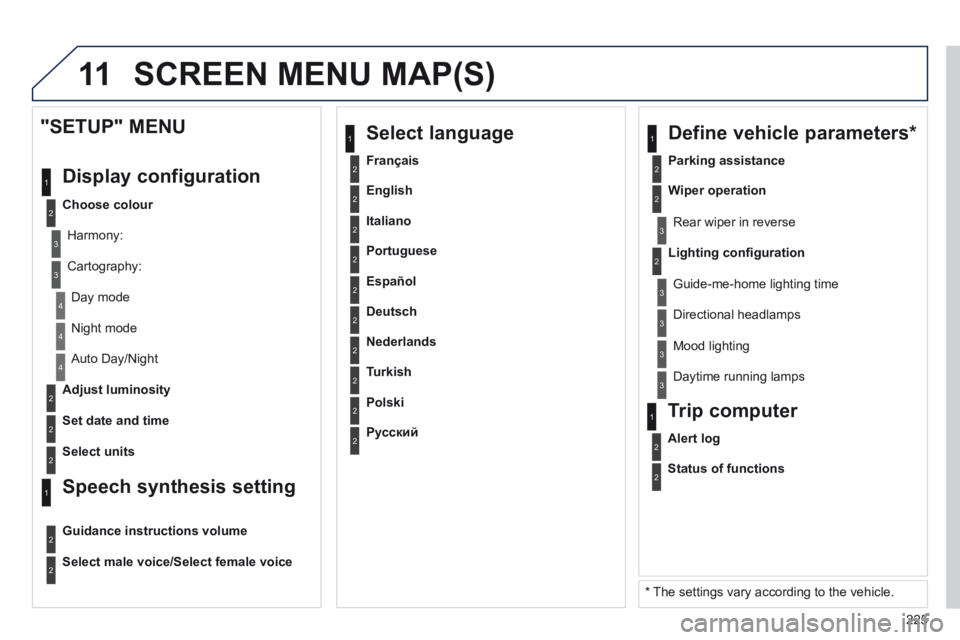
Night mode
Auto Day/Night
Adjust luminosity
Set date and time
"SETUP" MENU
Display configuration
Choose colour
Harmony:
Cartography:
Day mode
Speech synthesis setting
Guidance instructions volume
Select male voice/Select female voice
2Select units
2
3
3
2Lighting confi guration
Parking assistance
Rear wiper in reverse
Guide-me-home lighting time
1 Define vehicle parameters *
2Wiper operation
3 Directional headlamps
3 Mood lighting
3 Daytime running lamps
* The settings vary according to the vehicle.
2Alert log
1 Trip computer
2Status of functions
2Français
1 Select language
2English
2Italiano
2Portuguese
2Español
2Deutsch
2Nederlands
2Turkish
2Polski
2Русский
SCREEN MENU MAP(S)