Page 264 of 626
Features and controls
3-177
3
Auto reset mode
�When the average fuel consumption and average speed
are being displayed, if you hold down the multi-informa-
tion meter switch, these calculations will be reset to zero.
�When the ignition switch has been set to the “ACC” or
“LOCK” position for about 4 hours or more, the average
fuel consumption display and the average speed display
will automatically reset.NOTE�The average speed display and average fuel consumption
display can be reset separately in both auto reset mode and
manual reset mode.
�The average speed display memories and average fuel
consumption memories for auto reset mode and manual
reset mode are erased if the battery is disconnected.
�The initial (default) setting is “Auto reset mode”.
Changing the fuel consumption display unit
N00557100101
The fuel consumption display unit can be changed. The dis-
tance, speed, and amount units are also changed to match the
selected fuel consumption unit.
1. Press and hold the multi-information meter switch (for
about 2 seconds or more) to change from the setting mode
screen to the menu screen.
Refer to “Changing the function settings (With ignition
switch in the “ON” position)” on page 3-174.
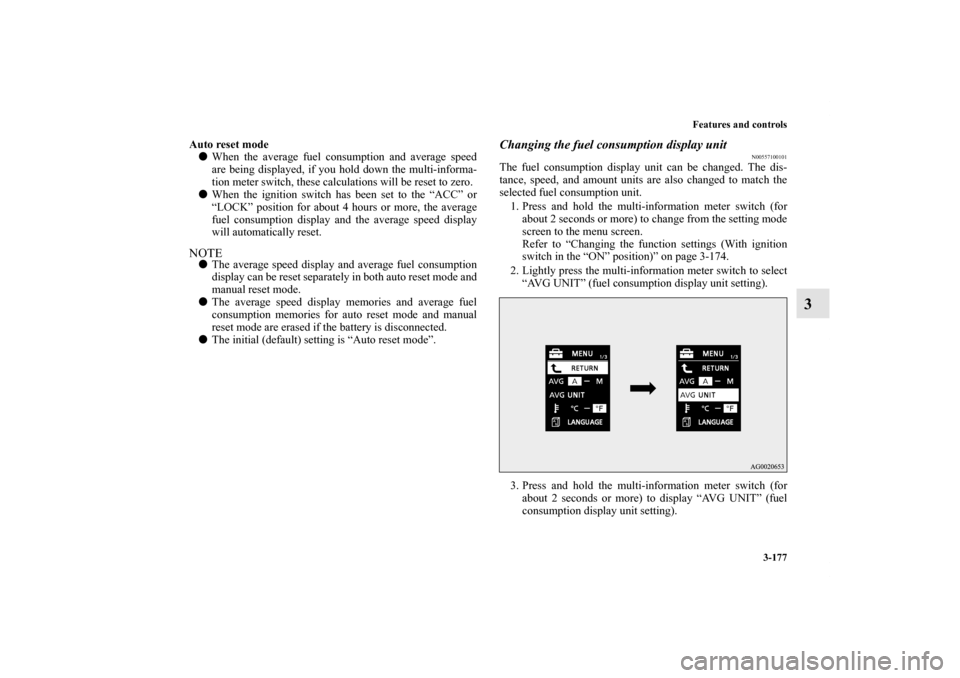
2. Lightly press the multi-information meter switch to select
“AVG UNIT” (fuel consumption display unit setting).
3. Press and hold the multi-information meter switch (for
about 2 seconds or more) to display “AVG UNIT” (fuel
consumption display unit setting).
BK0150900US.book 177 ページ 2012年5月7日 月曜日 午後12時9分
Page 265 of 626
3-178 Features and controls
3
4. Lightly press the multi-information meter switch to switch
in sequence from km/L → L/100 km → mpg (US) → mpg
(UK) → RETURN → km/L.
5. Press and hold the multi-information meter switch (for
about 2 seconds or more) to change the setting to the
selected unit.
NOTE�The display units for the driving range, the average fuel
consumption, the average speed and the momentary fuel
consumption are changed, but the units for the indicating
needle (speedometer), the odometer and the trip odometer
will remain unchanged.
�If the battery is disconnected, the memory of the unit set-
ting is erased and is automatically set to {mpg (US) or
L/100 km}.
The distance and speed units are also changed in the following
combinations to match the selected fuel consumption unit.
Fuel
economy
Distance
(driving range)
Speed
(average speed)
mpg (US) mile (s) mph
mpg (UK) mile (s) mph
km / L km km / h
L / 100 km km km / h
BK0150900US.book 178 ページ 2012年5月7日 月曜日 午後12時9分
Page 266 of 626
Features and controls
3-179
3
Changing the temperature unit
N00557200131
The temperature display unit can be switched.
1. Press and hold the multi-information meter switch (for
about 2 seconds or more) to switch from the setting mode
screen to the menu screen.
Refer to “Changing the function settings (With ignition
switch in the “ON” position)” on page 3-174.
2. Lightly press the multi-information meter switch to select
“ ” (temperature unit setting).3. Press and hold the multi-information meter switch (for
about 2 seconds or more) to change in sequence from °F
→ °C → °F.
The setting is changed to the selected temperature unit.
NOTE�If the battery is disconnected, the memory of the unit set-
ting is erased and is automatically set to °F (°C).
BK0150900US.book 179 ページ 2012年5月7日 月曜日 午後12時9分
Page 267 of 626

3-180 Features and controls
3
Changing the display language
N00557300174
The language of the multi-information display can be changed.
1. Press and hold the multi-information meter switch (for
about 2 seconds or more) to change from the setting mode
screen to the menu screen.
Refer to “Changing the function settings (With ignition
switch in the “ON” position)” on page 3-174.
2. Lightly press the multi-information meter switch to select
“LANGUAGE” (language setting).
3. Press and hold the multi-information meter switch (for
about 2 seconds or more) to display “LANGUAGE” (lan-
guage setting).
4. Lightly press the multi-information meter switch to select
the desired language.5. Press and hold the multi-information meter switch (for
about 2 seconds or more) to change the setting to the
selected language.
NOTE�If the battery is disconnected, the memory of the language
setting is erased and is automatically set to ENGLISH or
RUSSIAN.
�If “---” is selected in the language setting, a warning mes-
sage is not displayed when there is a warning display or
interrupt display.
BK0150900US.book 180 ページ 2012年5月7日 月曜日 午後12時9分
Page 268 of 626
Features and controls
3-181
3
Changing the language on Mitsubishi Multi-Communi-
cation System or Bluetooth
® 2.0 interface to match the
multi-information display
(if so equipped)
N00529800275
The language used in Mitsubishi Multi-Communication Sys-
tem (if so equipped) or Bluetooth
® 2.0 interface (if so
equipped) can be changed automatically to the same language
as that shown in the multi-information display.
1. Press and hold the multi-information meter switch (for
about 2 seconds or more) to switch from the setting mode
screen to the menu screen.
Refer to “Changing the function settings (With ignition
switch in the “ON” position)” on page 3-174.
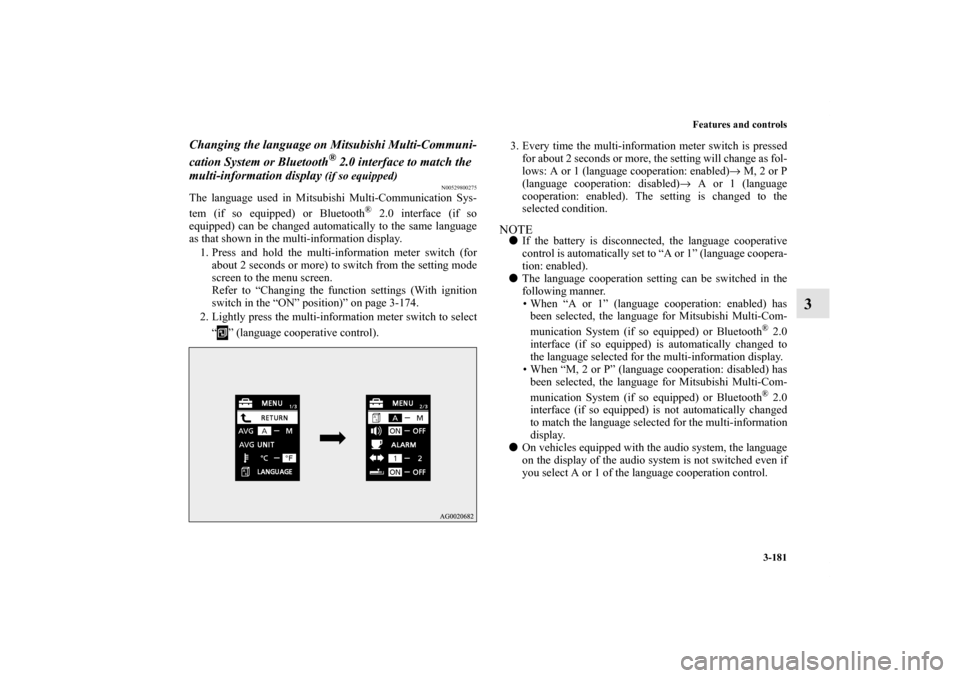
2. Lightly press the multi-information meter switch to select
“ ” (language cooperative control).3. Every time the multi-information meter switch is pressed
for about 2 seconds or more, the setting will change as fol-
lows: A or 1 (language cooperation: enabled)→ M, 2 or P
(language cooperation: disabled)→ A or 1 (language
cooperation: enabled). The setting is changed to the
selected condition.
NOTE�If the battery is disconnected, the language cooperative
control is automatically set to “A or 1” (language coopera-
tion: enabled).
�The language cooperation setting can be switched in the
following manner.
• When “A or 1” (language cooperation: enabled) has
been selected, the language for Mitsubishi Multi-Com-
munication System (if so equipped) or Bluetooth
® 2.0
interface (if so equipped) is automatically changed to
the language selected for the multi-information display.
• When “M, 2 or P” (language cooperation: disabled) has
been selected, the language for Mitsubishi Multi-Com-
munication System (if so equipped) or Bluetooth® 2.0
interface (if so equipped) is not automatically changed
to match the language selected for the multi-information
display.
�On vehicles equipped with the audio system, the language
on the display of the audio system is not switched even if
you select A or 1 of the language cooperation control.
BK0150900US.book 181 ページ 2012年5月7日 月曜日 午後12時9分
Page 269 of 626

3-182 Features and controls
3
Operation sound setting
N00557400087
You can turn off the operation sounds of the multi-information
meter switch and rheostat meter illumination button.
1. Press and hold the multi-information meter switch (for
about 2 seconds or more) to switch from the setting mode
screen to the menu screen.
Refer to “Changing the function settings (With ignition
switch in the “ON” position)” on page 3-174.
2. Lightly press the multi-information meter switch to select
“ ” (operation sound setting).
3. Press and hold the multi-information meter switch (for
about 2 seconds or more) to switch in sequence from ON
(operation sound on) → OFF (operation sound off) → ON
(operation sound on).
The setting is changed to the selected condition.
NOTE�If the battery is disconnected, the memory of the operation
sound setting is erased and is automatically set to “ON”
(operation sound on).
�The operation sound setting only deactivates the operation
sound of the multi-information meter switch and rheostat
meter illumination button. The warning display and other
sounds cannot be deactivated.
BK0150900US.book 182 ページ 2012年5月7日 月曜日 午後12時9分
Page 270 of 626

Features and controls
3-183
3
Changing the time until “REST REMINDER” is dis-
played
N00557500091
The time until the display appears can be changed.
1. Press and hold the multi-information meter switch (for
about 2 seconds or more) to switch from the setting mode
screen to the menu screen.
Refer to “Changing the function settings (With ignition
switch in the “ON” position)” on page 3-174.
2. Lightly press the multi-information meter switch to select
“ALARM” (rest time setting).3. Press and hold the multi-information meter switch (for
about 2 seconds or more) to display “ALARM” (rest time
setting).
4. Lightly press the multi-information meter switch to select
the time until the display appears.
5. Press and hold the multi-information meter switch (for
about 2 seconds or more) to change the setting to the
selected time.
NOTE�If the battery is disconnected, the memory of the unit set-
ting is erased and is automatically set to the “OFF”.
�The drive time is reset when the ignition switch is in the
“OFF” position.
BK0150900US.book 183 ページ 2012年5月7日 月曜日 午後12時9分
Page 287 of 626

3-200 Features and controls
3
NOTE�Do not disconnect the battery cable when the engine mal-
function indicator (“SERVICE ENGINE SOON” or
“Check engine light”) is on.
The engine electronic control module stores critical OBD
information (especially exhaust emission data), which
may be lost if the battery cable is disconnected while the
engine malfunction indicator is on. This will make it diffi-
cult to diagnose the cause of future problems.
Charging system warning light
N00520600296
This light comes on in the event of a malfunction in the charg-
ing system or when the ignition switch is turned to the “ON”
position (engine off). A warning is also displayed in the multi-
information display. When the engine is started, the light
should go out. Check to make sure that the light has gone out
before driving.
�If the engine malfunction indicator comes on while
the engine is running, avoid driving at high speeds.
During vehicle operation with the indicator on, the
vehicle may not accelerate when you depress the
accelerator pedal.
When the vehicle is stationary with the indicator on,
you must depress the brake pedal more firmly than
usual since the engine idling speed is higher than
usual and a vehicle with Twin Clutch SST has a
stronger tendency to creep forward.
CAUTION
!
CAUTION
!�If the warning light stays on while the engine is run-
ning, park your vehicle in a safe place as soon as
possible and contact an authorized Mitsubishi
Motors dealer or a repair facility of your choice to
have the system checked.
SC00000600-3.fm 200 ページ 2012年5月10日 木曜日 午後3時37分

