2013 MITSUBISHI iMiEV air conditioning
[x] Cancel search: air conditioningPage 59 of 258

Phenomena Cause Remedy
The Remote Climate Control cannot be
activated. After the power/communication switch
is
pressed, the following symbol blinks
for several seconds.
l ERROR symbol Any of the doors or liftgate is open. Close all the doors and liftgate.
The selector lever is at the position oth-
er than P (PARK).
Set the selector lever to the “P”
(PARK) position.
Quick charging is in progress.
(The symbol will illuminate.)
Terminate the quick charging, or wait
until the quick charging completes.
The temperature of the traction battery
has exceeded about 60 °C. Allow the temperature of the traction
battery
to reach normal operating tem-
perature. Refer to “Cautions and ac-
tions to deal with intense heat” on page
06.
The temperature of the traction battery
has been under about -25 °C. Allow the temperature of the traction
battery
to reach normal operating tem-
perature. Refer to “Cautions and ac-
tions to deal with intense cold” on page
08.
The Remote Climate Control is not ac-
tivated. The electric motor switch has been op-
erated before the system is charged.Check whether the electric motor
switch
has been operated before the sys-
tem is charged.
The temperature of the traction battery
has exceeded about 60 °C. Allow the temperature of the traction
battery
to reach normal operating tem-
perature. Refer to “Cautions and ac-
tions to deal with intense heat” on page
06.
The temperature of the traction battery
has been under about -25 °C. Allow the temperature of the traction
battery
to reach normal operating tem-
perature. Refer to “Cautions and ac-
tions to deal with intense cold” on page
08.
The Remote Climate Control cannot be
activated. The heated seat is not powered on. The heated seat switch is turned off. Turn on the heated seat switch.
The heated seat becomes hot while the
air conditioning (cooling) is activated.The heated seat switch is turned on. Turn off the heated seat switch. Charging
1-37 1
OHAE13E1
Page 103 of 258
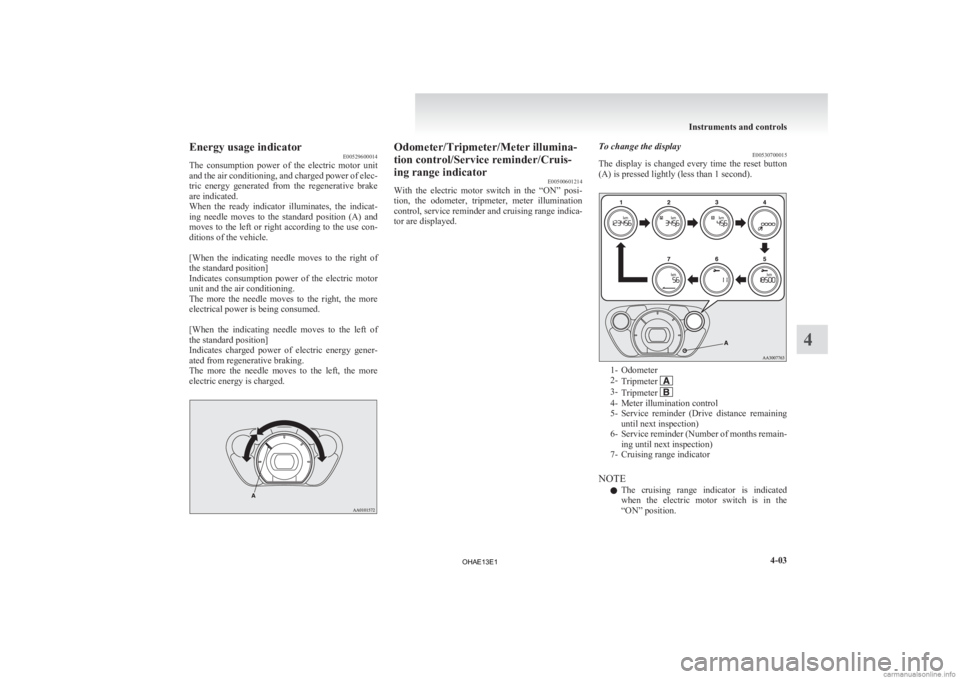
Energy usage indicator
E00529600014
The
consumption power of the electric motor unit
and the air conditioning, and charged power of elec-
tric energy generated from the regenerative brake
are indicated.
When the ready indicator illuminates, the indicat-
ing needle moves to the standard position (A) and
moves to the left or right according to the use con-
ditions of the vehicle.
[When the indicating needle moves to the right of
the standard position]
Indicates consumption power of the electric motor
unit and the air conditioning.
The more the needle moves to the right, the more
electrical power is being consumed.
[When the indicating needle moves to the left of
the standard position]
Indicates charged power of electric energy gener-
ated from regenerative braking.
The more the needle moves to the left, the more
electric energy is charged. Odometer/Tripmeter/Meter illumina-
tion control/Service reminder/Cruis-
ing range indicator
E00500601214
With
the electric motor switch in the “ON” posi-
tion, the odometer, tripmeter, meter illumination
control, service reminder and cruising range indica-
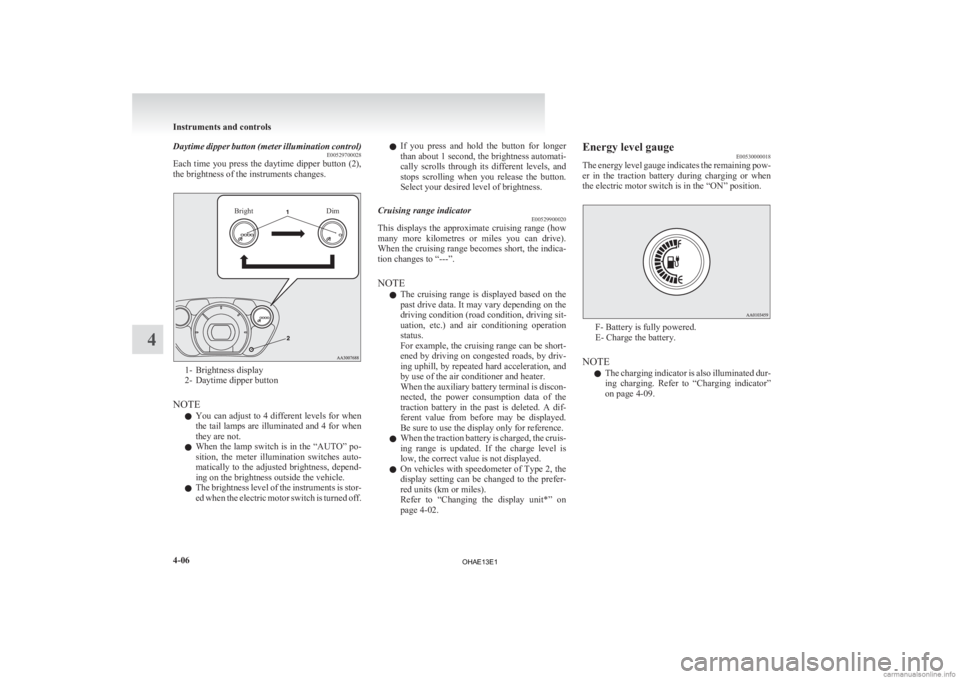
tor are displayed. To change the display
E00530700015
The
display is changed every time the reset button
(A) is pressed lightly (less than 1 second). 1- Odometer
2-
Tripmeter 3-
Tripmeter 4- Meter illumination control
5- Service
reminder (Drive distance remaining
until next inspection)
6- Service reminder (Number of months remain- ing until next inspection)
7- Cruising range indicator
NOTE l The cruising range indicator is indicated
when the electric motor switch is in the
“ON” position. Instruments and controls
4-03 4
OHAE13E1
Page 106 of 258
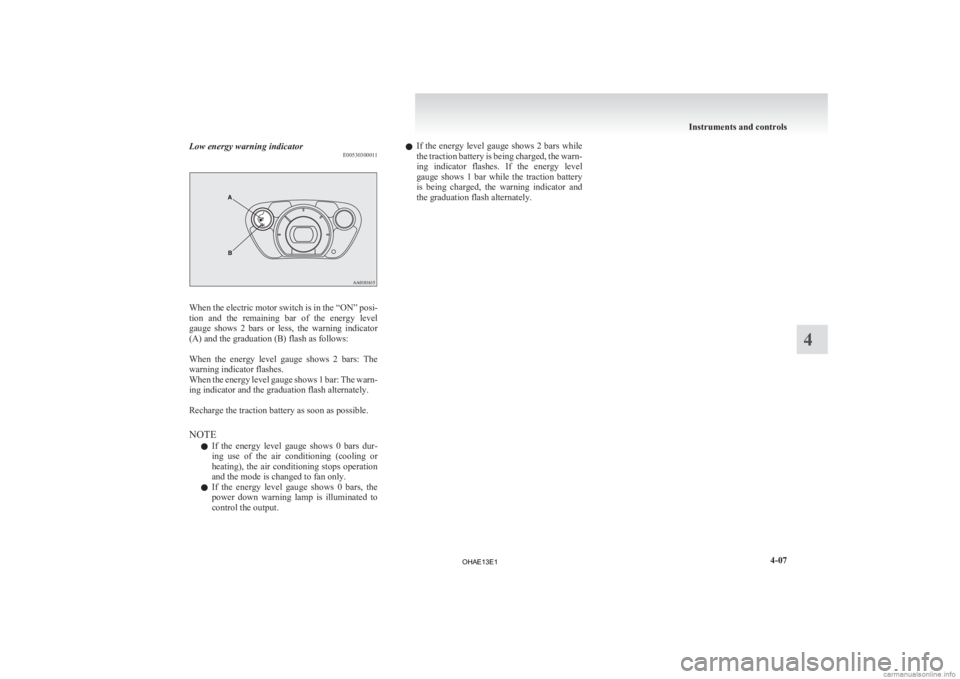
Daytime dipper button (meter illumination control)
E00529700028
Each
time you press the daytime dipper button (2),
the brightness of the instruments changes.
Bright Dim1- Brightness display
2-
Daytime dipper button
NOTE l You can adjust to 4 different levels for when
the tail lamps are illuminated and 4 for when
they are not.
l When the lamp switch is in the “AUTO” po-
sition, the meter illumination switches auto-
matically to the adjusted brightness, depend-
ing on the brightness outside the vehicle.
l The brightness level of the instruments is stor-
ed when the electric motor switch is turned off. l
If
you press and hold the button for longer
than about 1 second, the brightness automati-
cally scrolls through its different levels, and
stops scrolling when you release the button.
Select your desired level of brightness.
Cruising range indicator E00529900020
This displays the approximate cruising range (how
many
more kilometres or miles you can drive).
When the cruising range becomes short, the indica-
tion changes to “---”.
NOTE
l The cruising range is displayed based on the
past drive data. It may vary depending on the
driving condition (road condition, driving sit-
uation, etc.) and air conditioning operation
status.
For example, the cruising range can be short-
ened by driving on congested roads, by driv-
ing uphill, by repeated hard acceleration, and
by use of the air conditioner and heater.
When the auxiliary battery terminal is discon-
nected, the power consumption data of the
traction battery in the past is deleted. A dif-
ferent value from before may be displayed.
Be sure to use the display only for reference.
l When the traction battery is charged, the cruis-
ing range is updated. If the charge level is
low, the correct value is not displayed.
l On vehicles with speedometer of Type 2, the
display setting can be changed to the prefer-
red units (km or miles).
Refer to “Changing the display unit*” on
page 4-02. Energy level gauge
E00530000018
The
energy level gauge indicates the remaining pow-
er in the traction battery during charging or when
the electric motor switch is in the “ON” position. F- Battery is fully powered.
E- Charge the battery.
NOTE l The
charging indicator is also illuminated dur-
ing charging. Refer to “Charging indicator”
on page 4-09. Instruments and controls
4-06
4
OHAE13E1
Page 107 of 258
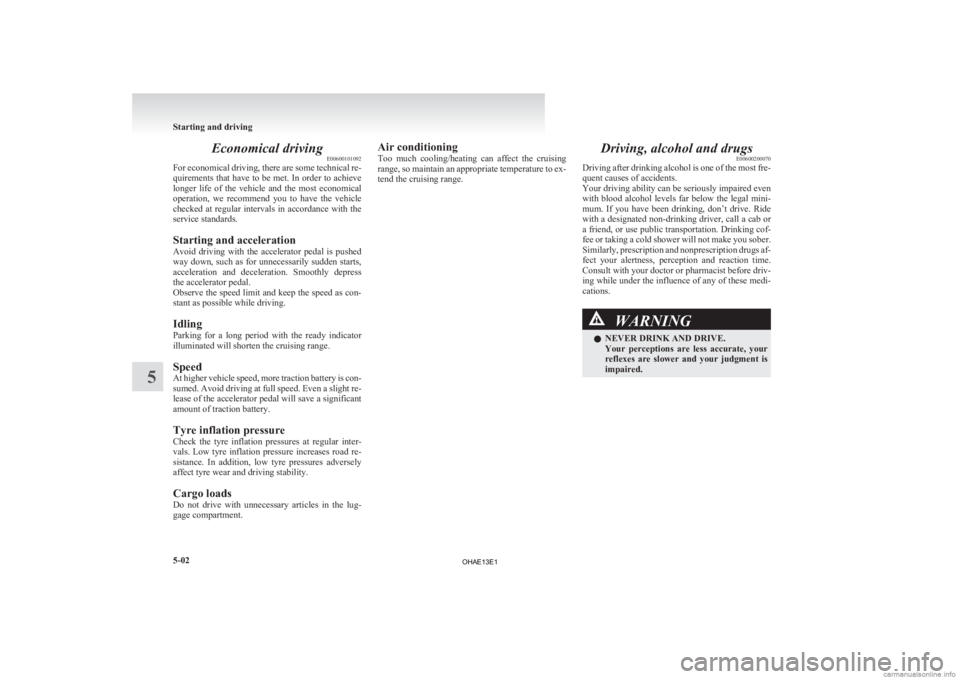
Low energy warning indicator
E00530300011When the electric motor switch is in the “ON” posi-
tion
and the remaining bar of the energy level
gauge shows 2 bars or less, the warning indicator
(A) and the graduation (B) flash as follows:
When the energy level gauge shows 2 bars: The
warning indicator flashes.
When the energy level gauge shows 1 bar: The warn-
ing indicator and the graduation flash alternately.
Recharge the traction battery as soon as possible.
NOTE
l If the energy level gauge shows 0 bars dur-
ing use of the air conditioning (cooling or
heating), the air conditioning stops operation
and the mode is changed to fan only.
l If the energy level gauge shows 0 bars, the
power down warning lamp is illuminated to
control the output. l
If
the energy level gauge shows 2 bars while
the traction battery is being charged, the warn-
ing indicator flashes. If the energy level
gauge shows 1 bar while the traction battery
is being charged, the warning indicator and
the graduation flash alternately. Instruments and controls
4-07 4
OHAE13E1
Page 122 of 258
Economical driving
E00600101092
For
economical driving, there are some technical re-
quirements that have to be met. In order to achieve
longer life of the vehicle and the most economical
operation, we recommend you to have the vehicle
checked at regular intervals in accordance with the
service standards.
Starting and acceleration
Avoid driving with the accelerator pedal is pushed
way down, such as for unnecessarily sudden starts,
acceleration and deceleration. Smoothly depress
the accelerator pedal.
Observe the speed limit and keep the speed as con-
stant as possible while driving.
Idling
Parking for a long period with the ready indicator
illuminated will shorten the cruising range.
Speed
At higher vehicle speed, more traction battery is con-
sumed. Avoid driving at full speed. Even a slight re-
lease of the accelerator pedal will save a significant
amount of traction battery.
Tyre inflation pressure
Check the tyre inflation pressures at regular inter-
vals. Low tyre inflation pressure increases road re-
sistance. In addition, low tyre pressures adversely
affect tyre wear and driving stability.
Cargo loads
Do not drive with unnecessary articles in the lug-
gage compartment. Air conditioning
Too
much cooling/heating can affect the cruising
range, so maintain an appropriate temperature to ex-
tend the cruising range. Driving, alcohol and drugs
E00600200070
Driving
after drinking alcohol is one of the most fre-
quent causes of accidents.
Your driving ability can be seriously impaired even
with blood alcohol levels far below the legal mini-
mum. If you have been drinking, don’t drive. Ride
with a designated non-drinking driver, call a cab or
a friend, or use public transportation. Drinking cof-
fee or taking a cold shower will not make you sober.
Similarly, prescription and nonprescription drugs af-
fect your alertness, perception and reaction time.
Consult with your doctor or pharmacist before driv-
ing while under the influence of any of these medi-
cations. WARNING
l NEVER DRINK AND DRIVE.
Your
perceptions are less accurate, your
reflexes are slower and your judgment is
impaired. Starting and driving
5-02
5
OHAE13E1
Page 143 of 258

Ventilators
.................................................................................... 6-02
Air conditioning ............................................................................ 6-03
Important operation tips for the air conditioning
..........................6-09
Air purifier.................................................................................... 6-09
Remote Climate Control ............................................................... 6-10
LW/MW/FM electronic tuning radio with CD player* ................6-10
To play tracks from USB device* ................................................6-20
Error codes.................................................................................... 6-26
Error codes (iPod)......................................................................... 6-27
Error codes (USB memory device) ..............................................6-28
Handling of compact discs ........................................................... 6-29
Antenna......................................................................................... 6-30
Digital clock* ............................................................................... 6-31
Link System* ................................................................................ 6-33
USB input terminal* ..................................................................... 6-33
Sun visors..................................................................................... 6-35
Accessory socket.......................................................................... 6-36
Interior lamps ................................................................................ 6-37
Storage spaces...............................................................................6-39
Cup holder.................................................................................... 6-40
Assist grips................................................................................... 6-41For pleasant driving
6
OHAE13E1
Page 144 of 258
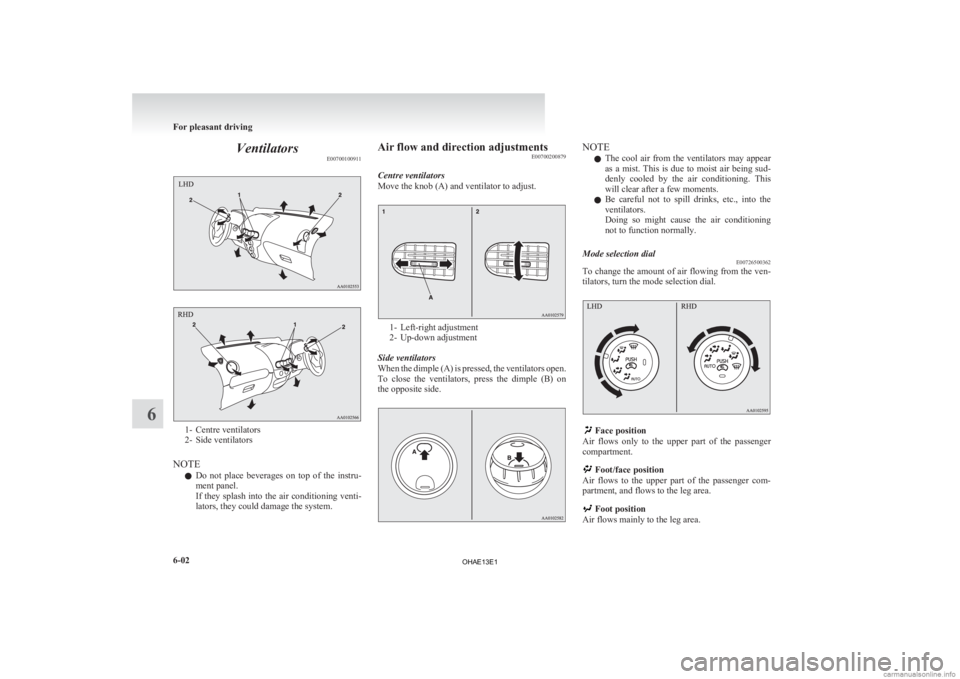
Ventilators
E007001009111- Centre ventilators
2-
Side ventilators
NOTE l Do not place beverages on top of the instru-
ment panel.
If they splash into the air conditioning venti-
lators, they could damage the system. Air flow and direction adjustments
E00700200879
Centre ventilators
Move the knob (A) and ventilator to adjust. 1- Left-right adjustment
2-
Up-down adjustment
Side ventilators
When the dimple (A) is pressed, the ventilators open.
To close the ventilators, press the dimple (B) on
the opposite side. NOTE
l The
cool air from the ventilators may appear
as a mist. This is due to moist air being sud-
denly cooled by the air conditioning. This
will clear after a few moments.
l Be careful not to spill drinks, etc., into the
ventilators.
Doing so might cause the air conditioning
not to function normally.
Mode selection dial E00726500362
To change the amount of air flowing from the ven-
tilators, turn the mode selection dial. Face position
Air
flows only to the upper part of the passenger
compartment. Foot/face position
Air
flows to the upper part of the passenger com-
partment, and flows to the leg area. Foot position
Air flows mainly to the leg area. For pleasant driving
6-02
6
OHAE13E1
Page 145 of 258
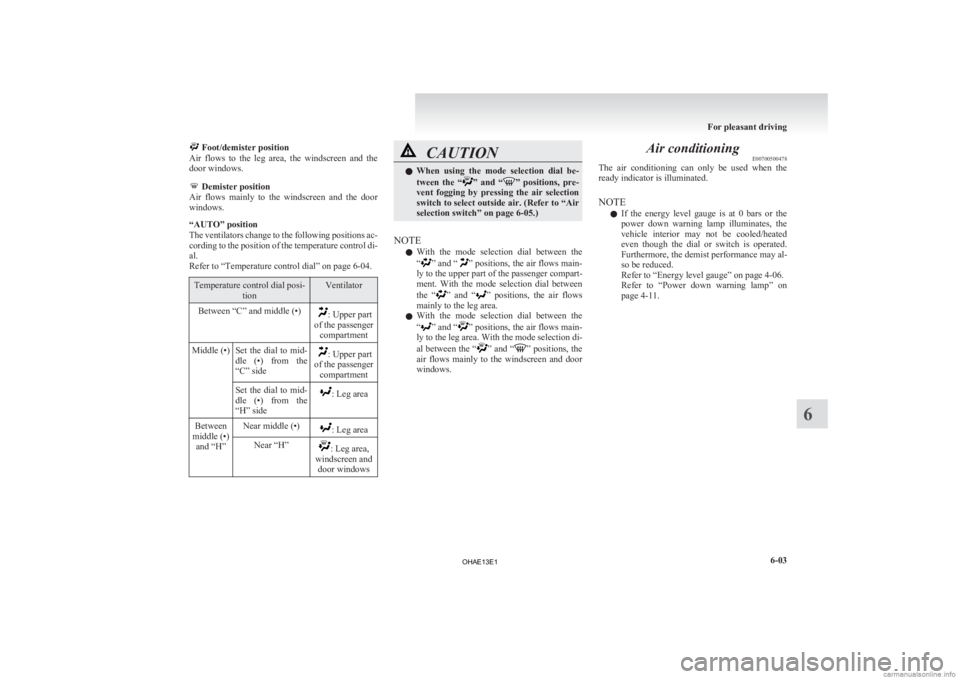
Foot/demister position
Air flows to the leg area, the windscreen and the
door windows. Demister position
Air
flows mainly to the windscreen and the door
windows.
“AUTO” position
The ventilators change to the following positions ac-
cording to the position of the temperature control di-
al.
Refer to “Temperature control dial” on page 6-04. Temperature control dial posi-
tion Ventilator
Between “C” and middle (•) : Upper part
of the passenger compartment
Middle (•) Set the dial to mid- dle
(•) from the
“C” side : Upper part
of the passenger compartment
Set the dial to mid-
dle
(•) from the
“H” side : Leg area
Between
middle (•) and “H” Near middle (•) : Leg area
Near “H” : Leg area,
windscreen and door windows CAUTION
l
When
using the mode selection dial be-
tween the “ ” and “ ” positions, pre-
vent fogging by pressing the air selection
switch to select outside air. (Refer to “Air
selection switch” on page 6-05.)
NOTE l With
the mode selection dial between the
“ ”
and “ ” positions, the air flows main-
ly to the upper part of the passenger compart-
ment. With the mode selection dial between
the “ ”
and “ ” positions, the air flows
mainly to the leg area.
l With the mode selection dial between the
“ ”
and “ ” positions, the air flows main-
ly to the leg area. With the mode selection di-
al between the “ ”
and “ ” positions, the
air flows mainly to the windscreen and door
windows. Air conditioning
E00700500478
The
air conditioning can only be used when the
ready indicator is illuminated.
NOTE
l If the energy level gauge is at 0 bars or the
power down warning lamp illuminates, the
vehicle interior may not be cooled/heated
even though the dial or switch is operated.
Furthermore, the demist performance may al-
so be reduced.
Refer to “Energy level gauge” on page 4-06.
Refer to “Power down warning lamp” on
page 4-11. For pleasant driving
6-03 6
OHAE13E1