2013 MERCEDES-BENZ SL-Class seats
[x] Cancel search: seatsPage 313 of 590

Selecting the seat
First select the seat which you wish to adjust.
X Press the 0011or000D button.
X Select Seat and press
0039to confirm.
X To switch to the lower line, for both options
slide 0012000Athe COMAND controller.
X Select Driver's Seat or
Passenger Seat by turning
003E0012003Fthe COMAND
controller and press 0039to confirm.
Adjustment functions Adjusting the seat cushion length
This function is available on M-Class and GL-
Class vehicles with multicontour seats. This function allows you to adjust the height
of the seat cushion.
X Select the seat (Y page 311).
X Select Seat Surface by turning
003E0012003Fthe
COMAND controller and press 0039to
confirm.
As cale appears. X
Turn 003E0012003F or slide 00380012000Athe COMAND
controlle rand press 0039to confirm.
X To exit the menu: press the001Fback
button.
Adjusting the seat contour in the lumbar
region of the seat backrest
This functio nis available on M-Class vehicles
with multicontour seats and on all SL-Class
vehicles, regardless of seat variant. This function allows you to adjust the air
cushions in the lumbarr
egion of the backrest
(4-way lumbar support).
X Select the seat (Y page 311).
X Select Lumbar by turning
003E0012003Fthe
COMAND controller and press 0039to
confirm.
Ac rosshair appears. You can make two
settings:
R Vertical: to move the point of greatest
lumbar support up or down
R Horizontal: to adjust the amount of
support
X Slide 00380012000A or003600120037 the COMAND controller
and press 0039to confirm.
X To exit the menu: press the001Fback
button.
Adjusting the sides of the seat backrest
(backrest side bolsters)
This function is available on M-Class, GL-
Class and SL-Class vehicles with
multicontour seats or dynamic multicontour
seats. Vehicle functions
311COMAND Z
Page 314 of 590

X
Select the sea t(Ypage 311).
X Select Backr. Sides by turning
003E0012003Fthe
COMAND controller and press 0039to
confirm.
As cale appears.
X Turn 003E0012003F or slide 00380012000Athe COMAND
controlle rand press 0039to confirm.
X To exit the menu: press the001Fback
button.
i For SL-Class vehicles with dynamic
multicontour seats: when driving dynamics
are activated due to a change of direction
(e.g. cornering), the backres tside cushion
settings can temporarily not be used.
Adjusting the seat side bolsters
This function is only available on SL-Class
vehicles with multicontour seats or dynamic
multicontour seats. This function allows you to adjust the air
cushions in the seat side bolsters. X
Selec tthe seat (Y page 311).
X Select Seat Sides by turning
003E0012003Fthe
COMAND controller and press 0039to
confirm.
As cale appears.
X Turn 003E0012003F or slide 00380012000Athe COMAND
controlle rand press 0039to confirm.
X To exit the menu: press the001Fback
button.
Balance
This functio nis available on SL-Class
vehicles. The Balance function controls the distribution
of heat on the seat backrest and cushion.
The Balance function influences the currently
set heating level of the seat heating; see the
separate vehicle Operator's Manual.
X
Select the seat (Y page 311).
X Select Balance by turning
003E0012003Fthe
COMAND controller and press 0039to
confirm.
As cale appears and shows the current
setting. Positive values indicate the heat
outpu tfor the seat backrest, negative
values indicate the heat output for the seat
cushion. The intensity is indicated by an
orange bar in the stylized seat above the
scale. 312
Vehicle functionsCOMAND
Page 315 of 590

The values stand for:
R
0 -b
ackres tand sea tcushio nare heated
equally to the maximu mlevel
R 1 to
3 -t
he heat output to the seat
cushion is reduced in one-third
increments
R -1 to
-3 -t
he heat output to the backrest
is reduced in one-third increments
X Turn 003E0012003F or slide 003600120037the COMAND
controller and press 0039to confirm.
X To exit the menu: press the001Fback
button.
Massage function
This function is available on M-Class and GL-
Class vehicles with multicontour seats and on
SL-Class vehicles with dynamic multicontour
seats. Example display (M-Class or GL-Class)
X
Select the seat (Y page 311).
X Select Massage by turning
003E0012003Fthe
COMAND controller and press 0039to
confirm.
Al ist appears.
You can selec tdifferen ttypes of massage
function:
R 0: Off R
1: Slow and Gentle R
2: Slow and Vigorous R
3: Fast and Gentle R
4: Fast and Vigorous X
Turn 003E0012003F or slide 00380012000Athe COMAND
controller and press 0039to confirm.
The massage function runs for
approximately 15 to 25 minutes,
depending on the setting.
X To exit the menu: press the001Fback
button.
Adjusting the drivin gdynamics
This function is only available on SL-Class
vehicles with dynamic multicontour seats. X
Select the seat (Y page 311).
X Select Dynamic Seat by turning
003E0012003Fthe
COMAND controller and press 0039to
confirm.
As cale appears.
You can select:
R 0 : Off
R 1 :l
evel 1(mediu msetting)
R 2 :l
evel 2(high setting)
X Turn 003E0012003F or slide 00380012000Athe COMAND
controller and press 0039to confirm.
X To exit the menu: press the001Fback
button. Vehicle functions
313COMAND Z
Page 550 of 590
i
The specifications on the sample Tire and
Loading Information placard and tire
pressure tables are examples. Tire
pressure specifications are vehicle-specific
and may deviate from the data shown here.
The tire pressure specifications that are
valid for your vehicle can be found on the
Tire and Loading Information placard and
tire pressure table on the vehicle.
General notes The recommended tire pressures for the tires
mounted at the factory can be found on the
labels described here.
Further information on tire pressures can be
obtained at a qualified specialist workshop.
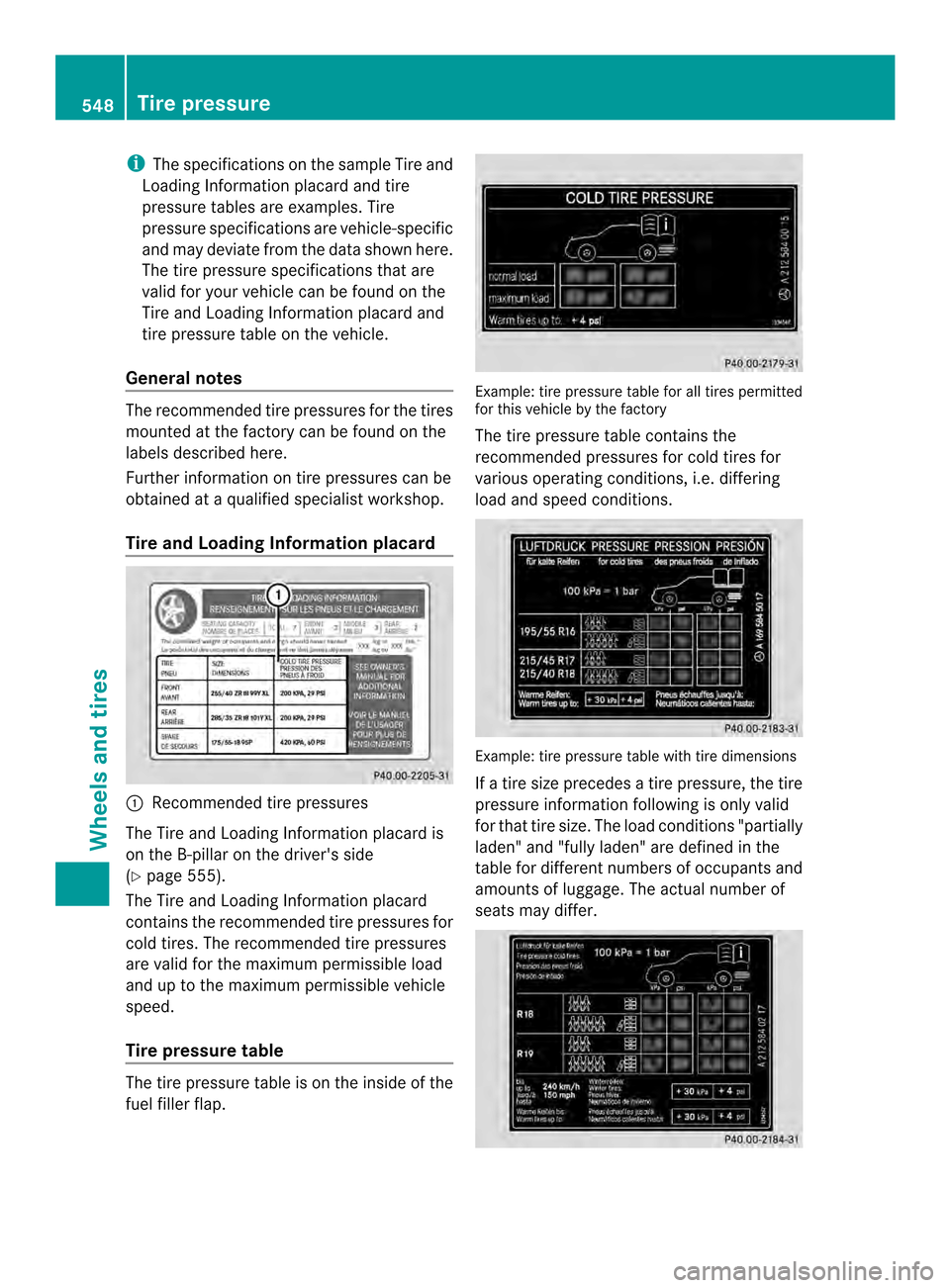
Tire and Loading Information placard 0002
Recommended tire pressures
The Tire and Loading Information placard is
on the B-pillar on the driver's side
(Y page 555).
The Tire and Loading Information placard
contains the recommended tire pressures for
cold tires. The recommended tire pressures
are valid for the maximum permissible load
and up to the maximum permissible vehicle
speed.
Tire pressure table The tire pressure table is on the inside of the
fuel filler flap. Example: tire pressure table for all tires permitted
for this vehicle by the factory
The tire pressure table contains the
recommended pressures for cold tires for
various operating conditions, i.e. differing
load and speed conditions. Example: tire pressure table with tire dimensions
If a tire size precedes a tire pressure, the tire
pressure information following is only valid
for that tire size. The load conditions "partially
laden" and "fully laden" are defined in the
table for different numbers of occupants and
amounts of luggage. The actual number of
seats may differ.548
Tire pressureWheels and tires
Page 558 of 590

Number of seats
Maximum numbe
rofseats0002indicates the
maximum number of occupants allowed to
travel in the vehicle. This information can be
found on the Tire and Loading Information
placard.
i The specifications shown on the Tire and
Loading Information placard in the
illustration are examples. The number of
seats is vehicle-specific and can differ from
the details shown. The number of seats in
your vehicle can be found on the Tire and
Loading Information placard. Determining the correct load limit
Step-by-step instructions The following steps have been developed as
required of all manufacturers under Title 49,
Code of U.S.F
ederal Regulations, Part 575
pursuant to the "National Traffic and Motor
Vehicle Safety Act of 1966".
X Step 1: Locate the statement "The
combined weight of occupants and cargo
should never exceed XXX kg or XXX lbs." on
your vehicle’s Tire and Loading Information
placard.
X Step 2: Determine the combined weight of
the driver and passengers that will be riding
in your vehicle.
X Step 3: Subtract the combined weight of
the driver and passengers from XXX
kilograms or XXX lbs. X
Step 4: The resulting figure equals the
available amount of cargo and luggage load
capacity. For example, if the "XXX" amount
equals 1,400 lbs and there will be five
150 lbs passengers in your vehicle, the
amount of available cargo and luggage load
capacity is 650 lbs (1,400 – 750 (5 x 150)
= 650 lbs).
X Step 5: Determine the combined weight of
luggage and cargo being loaded on the
vehicle. That weight may not safely exceed
the available cargo and luggage load
capacity calculated in step 4. Example: steps 1 to 3
The following table shows examples on how
to calculate total and cargo load capacities
with varying seating configurations and
number and size of occupants. The following
examples use a maximum load of 1,500 lbs
(680 kg). This is for illustration purposes
only. Make sure you are using the actual load
limit for your vehicle stated on your vehicle's
Tire and Loading Information placard
(Y page 555).
The higher the weight of all the occupants, the
smaller the maximum load for luggage.
Step 1 Example 1 Example 2
Combined
maximum
weight of
occupants
and cargo
(data from the
Tire and
Loading
Information
placard)
1500 lbs
(680 kg) 1500 lbs
(680 kg)556
Loading the vehicleWheels and tires
Page 567 of 590

the purchasers. The TIN is made up of the
manufacturer's identity code, tire size, tire
type code and the manufacturing date.
Load bearing index
The load bearing index (also load index) is a
code tha tcontains the maximum load bearing
capacity of a tire.
Traction
Traction is the result of friction between the
tires and the road surface.
Treadwear indicators
Narrow bars (tread wear bars) that are
distributed over the tire tread. If the tire tread
is level with the bars, the wear limit of 000Ain
(1.6 mm) has been reached.
Occupant distribution
The distribution of occupant sinavehicle at
their designated seating positions.
Total load limit
Rated cargo and luggage load plus
68 kilograms (150 lb) multiplied by the
number of seats in the vehicle. Changing
awheel Flat tire
Information on the procedure in the event of
a fla ttire (Y page 527). Instructions for driving
with MOExtended tires in the event of a flat
tire are also provided there. Rotating the wheels
G
WARNING
Interchanging the front and rear wheels may
severely impair the drivin gcharacteristics if
the wheels or tires have different dimensions.
The wheel brakes or suspension components
may also be damaged. There is a risk of
accident. Rotate front and rear wheels only if the wheels
and tires are of the same dimensions.
! On vehicles equipped with a tire pressure
monitor, electronic components are
located in the wheel.
Tire-mounting tools should not be used
near the valve. This could damage the
electronic components.
Only have tires changed at a qualified
specialist workshop.
! On vehicles equipped with a tire pressure
monitor, electronic components are
located in the wheel.
Tire-mounting tools should not be used
near the valve. This could damage the
electronic components.
Only have tires changed at a qualified
specialist workshop.
Always pay attention to the instructions and
safety notes when changing a wheel
(Y page 566).
The wear patterns on the front and rear tires
differ, depending on the operating conditions.
Rotate the wheels before a clear wear pattern
has formed on the tires. Front tires typically
wear more on the shoulders and the rear tires
in the center.
If your vehicle's tire configuration allows, you
can rotate the wheels according to the
intervals in the tire manufacturer's warranty
book in your vehicle documents. If this is not
available, the tires should then be replaced
every 3,000 to 6,000 miles (5,000 to
10,000 km), or earlier if the tire wear requires
this. Do not change the direction of wheel
rotation.
Cleant he contact surfaces of the wheel and
the brake disc thoroughly every time a wheel
is interchanged. Check the tire pressure and,
if necessary, restart the tire pressure loss
warning system or the tire pressure monitor. Changing
awheel
565Wheels and tires Z
Page 578 of 590

Useful information
i This Operator's Manual describes all
models and all standard and optional
equipment of your vehicle available at the
time of publication of the Operator's
Manual. Country-specific differences are
possible. Please note that your vehicle may
not be equipped with all features
described. This also applies to safety-
related systems and functions.
i Read the information on qualified
specialist workshops: (Y page 38).Information regarding technical data
i The data stated here specifically refers to
a vehicle with standard equipment .Consult
a Mercedes-Benz Center for the data for all
vehicle variants and trim levels. Genuine Mercedes-Benz parts
G
WARNING
Driving safety may be impaired if non-
approved parts, tires and wheels or safety-
relevant accessories are used.
This could lead to malfunctions in safety-
relevant systems, e.g. the brake system. This
could cause you to lose control of your vehicle
and cause an accident.
For this reason, Mercedes-Benz recommends
that you use genuine Mercedes-Benz parts or
parts of equal quality. Only use tires, wheels
and accessories that have been specifically
approved for your vehicle. H
Environmental note
Daimler AG also supplies reconditioned major
assemblies and parts which are of the same
quality as new parts. They are covered by the
same Limited Warranty entitlements as new
parts. !
Air bags and Emergency Tensioning
Devices, as well as control units and
sensors for these restraint systems, may be
installed in the following areas of your
vehicle:
R doors
R door pillars
R door sills
R seats
R cockpit
R instrument cluster
R center console
Do not install accessories such as audio
systems in these areas. Do not carry out
repairs or welding. You could impair the
operating efficiency of the restraint
systems.
Have aftermarket accessories installed at
a qualified specialist workshop.
Genuine Mercedes-Benz parts are subject to
strictq uality control .Each part has been
specially developed, manufactured or
selected for Mercedes-Ben zvehicles and
fine-tuned for them. Only genuine Mercedes-
Benzp arts should therefor ebe used.
More than 300,000 different genuine
Mercedes-Benzp arts are available for
Mercedes-Ben zmodels.
All Mercedes-Benz Centers maintain a supply
of genuine Mercedes-Benz parts for
necessary service and repair work. In
addition, strategically located parts delivery
centers provide quick and reliable parts
service.
Always specify the vehicle identification
number (VIN) (Y page 577) and the engine
number (Y page 578) when ordering
genuine Mercedes-Benz parts. Warranty
Your vehicle is covered under the terms of the
warranties printed in the Service and
Warranty Information booklet. 576
WarrantyTechnical data