2013 MERCEDES-BENZ S-Class seat adjustment
[x] Cancel search: seat adjustmentPage 118 of 542

Mirrors
Exterior mirrors
Adjusting the exterior mirrors G
WARNING
Exercise care when using the passenger-side
exterior rear view mirror. The mirror surface
is convex (outwardly curved surface for a
wider field of view). Objects in mirror are
closer than they appear. Check you rinterior
rear view mirror and glance over your
shoulde rbefore changing lanes.
The exterior mirrors are automatically heated
if the rear window defroster is switched on
and the outside temperature is low. X
Make sure that the SmartKey is in position
1or 2in the ignition lock.
X Press button 0003for the right-hand exterior
mirror or button 0026for the left-hand
exterior mirror.
The indicator lamp lights up in the button
that has been pressed.
X Press adjustment button 0002up, down, to
the left or right until you have adjusted the
exterior mirror to the correct position .You
should have a good overview of traffic
conditions. Folding the exterior mirrors in or out
electrically
X
Make sure that the SmartKey is in position
1or 2in the ignition lock.
X Briefly press button 0002.
Both exterior mirrors fold in or out.
i Make sure that the exterior mirrors are
always folded out fully while driving. They
could otherwise vibrate.
Folding the exterior mirrors in or out
automatically When the "Automatic mirror folding" function
is activated in COMAND (Y
page 266):
R the exterior mirrors fold in automatically as
soon as you lock the vehicle from the
outside.
R the exterior mirrors fold out again
automatically as soon as you unlock the
vehicle and then open the driver's or front-
passenger door.
i If the exterior mirrors have been folded in
manually, they do not fold out.
Exterior mirror out of position If an exterior mirror has been pushed out of
position, proceed as follows:116
MirrorsSeats, steering wheel and mirrors
Page 119 of 542

X
Press the mirror-folding button
(Y page 116) repeatedly until you hear the
mirror engage in position.
The mirror housing is engaged again and
you can adjust the exterior mirrors as usual
(Y page 116). Automatic anti-glare mirrors
G
WARNING
If inciden tlight fro mheadlamps is prevented
from striking the sensor in the rear-view
mirror, for instance, by luggage piled too high
in the vehicle, the mirror's automatic anti-
glare function will not operate.
Incident light could then blind you. This may
distract you from the traffic conditions and,
as a result, you may cause an accident.
The rear-view mirror and the exterior mirror
on the driver's side automatically go into anti-
glare mode if the ignition is switched on and
inciden tlight fro mheadlamps strikes the
sensor in the rear-view mirror.
The mirrors do not go into anti-glare mode if
reverse gear is engaged or the interior lighting
is switched on. Parking position for the exterior
mirror on the front-passenger side
Setting and storing the parking position You can position the front-passenger side
exterior mirror in such a way that you can see
the rear wheel on that side as soon as you
engage reverse gear. You can store this
position. X
Make sure that the vehicle is stationary and
that the SmartKey is in position 2in the
ignition lock.
X Press button 0026for the exterior mirror on
the front-passenger side.
X Engage reverse gear.
The exterior mirror on the front-passenger
side moves to the preset parking position.
X Use adjustment button 0003to adjust the
exterior mirror .You should see the rear
wheel and the curb in the exterior mirror.
The parking position is stored.
i If you shift the transmission to another
position, the exterior mirror on the front-
passenger side returns to the driving
position.
i You can also store the parking position
using memory button M0002.
X Make sure that the SmartKey is in
position 2in the ignition lock.
X With the exterior mirror on the front-
passenger side activated, use
adjustment button 0003to adjust the
exterior mirror. You should see the
rear wheel and the curb in the exterior
mirror on the front-passenger side.
X Press memory button M0002 and one of
the arrows on adjustment button 0003
within three seconds.
The parking position is stored if the
exterior mirror does not move.
If the mirror moves out of position, repeat
the steps. Mirrors
117Seats, steering wheel and mirrors Z
Page 256 of 542

X
Select Brightness ,
Contrast ,
Color or
Auto using the
000A000B buttons and
press 000Cto confirm.
An adjustment scale appears.
X Select a setting using the 000A000B
buttons and press the 000Cbutton to confirm.
Changing the picture format
X To show the menu: press the000Cbutton
on the remote control.
or
X Select Menu while the navigation menu
(Y page 246) is shown and press the 000C
button to confirm.
X Select Video DVD using
the 000B0009000C buttons and press the
000C button to confirm.
The äsymbol in front of the Auto ,
16:9 Optimized ,
4:3 or
Widescreen menu item
indicates the format currently set.
X Select a format using the 000A000B
buttons and press the 000Cbutton to confirm. System settings
Note You can adjus
talmost all system settings
individually for each screen without affecting
the other screen. You make these settings
using the remote control.
Selecting the display language X
Select System using the
000A0009000C
buttons on the remote control and press
the 000Cbutton to confirm.
You see the system menu on the selected
rear screen. X
Select Settings using the
000Bbutton
and confirm with the 000Cbutton.
X Select Language using the
000A000B
buttons and press the 000Cbutton to confirm.
The list of languages appears. The 002Cdot
indicates the current setting.
X Selec talanguage using the 000A000B
buttons and press the 000Cbutton to confirm.
The Rear Seat Entertainment System
activates the respective language.
Switching the display design X
Select Settings using the
000Bbutton
and confirm with the 000Cbutton.
X Select Day Mode ,
Night Mode or
Automatic using the
000A000B buttons
and press the 000Cbutton to confirm.
The äicon indicates the current setting. Design Explanation
Day Mode The display is set
permanently to day
design.
Night Mode The display is set
permanently to night
design.
Automatic The display design
changes depending on
the vehicle instrument
cluster illumination.254
Rear Seat Entertainment SystemCOMAND
Page 266 of 542

Displaying AUX
X Select the screen to which the external
video source is connected using the remote
control (Y page 129).
X Select AUX in the menu using the
000A0009000C buttons on the remote
control and press the 000Cbutton to confirm.
X Select Source from the AUX menu and
press the 000Cbutton to confirm.
X Select Display Aux and press the
000C
button to confirm.
You will see and hear the conten tofthe
video source if it is switched to playback. If
no video image is available from the AUX
source connected, you will see an audio
menu.
Selecting the active COMAND source
X Select AUX in the menu using the
000A0009000C buttons on the remote
control and press the 000Cbutton to confirm.
X Select Source from the AUX menu and
press the 000Cbutton to confirm.
X Select COMAND and press the
000Cbutton to
confirm.
The audio or video mode selected in
COMAND is transmitted to the Rear Seat
Entertainment System.
Operation with an active COMAND
source You can transfer an audioorv
ideo mode
selected in COMAND to the Rear Seat
Entertainment System.
i If you subsequently switch modes in
COMAND, the new source will not be
transmitted to the Rear Seat Entertainment
System.
X To switch on the function in COMAND:
switch on the desired audio mode in
COMAND or show the menu in video DVD
mode.
X Select the menu item at the bottom left,
e.g. CD in audio CD mode, by sliding
001C0006and turning
0031001C0032the COMAND controller
and press 0021to confirm.
X Select Active Source for Rear and
press 0021to confirm.
In the status bar at the top, you will see the
headphones icon and the _icon for the
source that has been switched on.
X To switch off the function in COMAND:
switch on the desired audio mode in
COMAND or show the menu in video DVD
mode.
X Select the menu item at the bottom left,
e.g. CD in audio CD mode, by sliding
001C0006
and turning 0031001C0032the COMAND controller
and press 0021to confirm.
X Select Rear OFF _
and press 0021the
COMAND controller to confirm.
Adjusting the brightness ,contrast or
color X
Select Source in the rear-compartment
screen and press the 000Cbutton on the
remote control to confirm.
X Select Display Aux or
Disk Drive Aux and press the
000Cbutton to confirm.
X Select Brightness ,
Contrast or
Color and press the
000Cbutton to confirm.
An adjustment scale appears.
X Select a setting using the 000Aor000B
button and press the 000Cbutton to confirm.
Changing the picture format X
Select Source in the AUX menu and press
the 000Cbutton on the remote control to
confirm.
X Select Display Aux or
Disk Drive Aux and press the
000Cbutton to confirm.
X Select Auto16:9 optimized ,
4:3 or
Widescreen using the
000A000B buttons
and press the 000Cbutton to confirm.
The äicon in front of a menu item
indicates the current setting. 264
Rear Seat Entertainment SystemCOMAND
Page 269 of 542

lever or press the position button of the
memory function.
If there is a risk of entrapmen tby the seat, you
can also cancel the adjustmen tprocedure by
moving the switch for seat adjustment. The
steering colum nand driver's sea tstop moving
immediately.
Never leave children unsupervised in the
vehicle. They could open the driver's door and
thereby unintentionally activate the EASY-
ENTRY/EXIT feature and become trapped.
You can make a setting in COMAND so that
the steering wheel swings upwards and/or
the driver's seat moves backwards before you
get into the vehicle. You can make the
following settings:
R Off : the function is switched off.
R Steering Column :t
he steering wheel
swings upwards.
R Steering Column and Seat :t
he steering
wheel swings upwards and the driver’s seat
moves backwards. X
To set the EASY-ENTRY/EXIT feature:
select Vehicle in the main function bar by
sliding 003C001C003Dand turning 0031001C0032the COMAND controller and press
0021to
confirm.
The main area is active.
X Select the Easy Entry/Exit Feature menu
by sliding 003C001C003Dor turning 0031001C0032the
COMAND controller.
The EASY-ENTRY/EXIT feature menu
appears. The current setting is indicated by
a 002C dot.
X Select Setting by sliding 002A001C0006or turning
0031001C0032 the COMAND controller.
The selected setting is indicated by a 002C
dot.
Setting the interior/exterior lighting
delayed switch-off time Interior lighting: you can set whether and for
how long you wish the interior lighting to
remain on in the dark after you have removed
the SmartKey from the ignition lock.
Exterior light: you can set whether and for
how long you want the exterior lighting to
remain on in the dark after the doors have
been closed. The exterior lighting
automatically switches off after the switch-off
delay has elapsed.
You may select from the following settings:
R
0s econds: delayed switch-off is
deactivated.
R 15, 30, 45, 60 seconds: delayed switch-off
is activated.
i You can reactivate this function by
opening a door within one minute. If none
of the doors are opened after the key is
removed from the ignition lock or if a door
is not closed after it has been opened, the
exterior lights switch off after 60 seconds. Vehicle
267COMAND Z
Page 276 of 542
To switch back to operation of the rear-
compartment air-conditioning system from
the front:
X
In the climate control main menu, select
Front Climate Control and press
0021.
The air-conditioning function bar shows the
climate control settings for the driver and
frontp assenger.
To switch off the rear-compartment air
conditioning:
X In the climate control main menu, select
Rear Climate Control OFF and press
0021.
To switch on automatic mod efor the rear-
compartment air conditioning:
X In the climate control main menu, select
Rear Automatic and press
0021.
Automatic mode for the rear-compartment
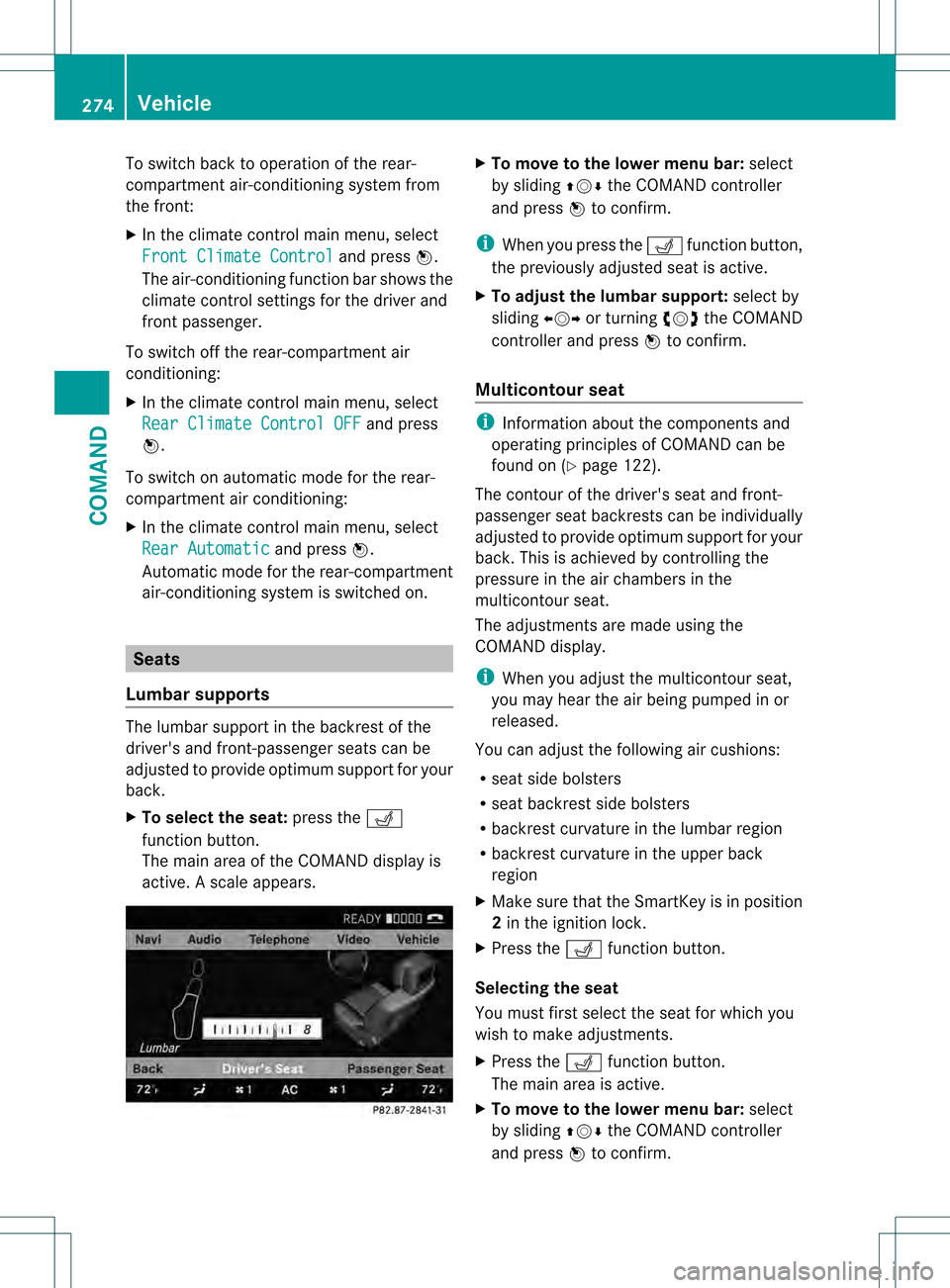
air-conditioning system is switched on. Seats
Lumbar supports The lumbar support in the backrest of the
driver's and front-passenger seats can be
adjusted to provide optimum support for your
back.
X
To select the seat: press the0012
function button.
The main area of the COMAND display is
active. Ascale appears. X
To move to the lower menu bar: select
by sliding 002A001C0006the COMAND controller
and press 0021to confirm.
i Whe nyou press the 0012function button,
the previously adjusted seat is active.
X To adjust the lumbar support: select by
sliding 003C001C003Dor turning 0031001C0032the COMAND
controller and press 0021to confirm.
Multicontour seat i
Information about the components and
operating principles of COMAND can be
found on (Y page 122).
The contour of the driver's seat and front-
passenger seat backrests can be individually
adjusted to provide optimum support for your
back. This is achieved by controlling the
pressure in the air chambers in the
multicontour seat.
The adjustments are made using the
COMAND display.
i When you adjust the multicontour seat,
you may hear the air being pumped in or
released.
You can adjust the following air cushions:
R seat side bolsters
R seat backrest side bolsters
R backrest curvature in the lumbar region
R backrest curvature in the upper back
region
X Make sure that the SmartKey is in position
2in the ignition lock.
X Press the 0012function button.
Selecting the seat
You must first select the seat for which you
wish to make adjustments.
X Press the 0012function button.
The main area is active.
X To move to the lower menu bar: select
by sliding 002A001C0006the COMAND controller
and press 0021to confirm. 274
VehicleCOMAND
Page 278 of 542

X
Select the sea t(Ypage 274).
X Select Lumbar by sliding
003C001C003Dor turning
0031001C0032 the COMAND controller and press
0021 to confirm.
Ac rosshair appears. You can make two
settings:
R Vertical: to move the point of greatest
lumbar support up or down
R Horizontal: to adjust the amount of
support X
Select Setting by sliding 002A001C0006or turning
0031001C0032 the COMAND controller and press
0021 to confirm.
Adjusting the backrest curvature in the
upper back region
This function allows you to adjust the air
cushions in the upper back regio nofthe
backrest.
X Select the seat (Y page 274).
X Select Shoulders by sliding
003C001C003Dor
turning 0031001C0032the COMAND controller and
press 0021to confirm.
As cale appears. X
Select Setting by sliding 002A001C0006or turning
0031001C0032 the COMAND controller and press
0021 to confirm.
Resetting adjustments
You can rese tthe seat settings to the factory
settings.
X Select the seat (Y page 274).
X Select Reset All by sliding
003C001C003Dor
turning 0031001C0032the COMAND controller and
press 0021to confirm.
Active multicontour seat The dynamic function of the active
multicontour seat automatically adapts the
side bolsters of the backrest to your current
driving style.
X
Select the seat (Y page 274).
X Select Dynamic Seat by sliding
003C001C003Dor
turning 0031001C0032the COMAND controller and
press 0021to confirm.
X To confirm your selection: press0021.
As cale appears.
You can select:
R 0: Off
R 1: Level 1
R 2: Level 2 276
VehicleCOMAND
Page 447 of 542

Rear window rolle
rsunblind
Important safety notes G
WARNING
When leaving the vehicle, always remove the
SmartKey from the ignition lock. Always take
the SmartKey with you and lock the vehicle.
Do not leave children unattended in the
vehicle, even if they are secured in a child
restraint system, or with access to an
unlocked vehicle. Achild's unsupervised
access to a vehicle could result in an accident
and/or serious personal injury. The children
could:
R injure themselves on parts of the vehicle
R be seriously or fatally injured through
excessive exposure to extreme heat or cold
R injure themselves or cause an accident with
vehicle equipment that can be operated
even if the SmartKey is removed from the
ignition lock or removed from the vehicle,
such as seat adjustment, steering wheel
adjustment, or the memory function
If children open a door, they could injure other
persons or get out of the vehicle and injure
themselves or be injured by following traffic.
Do not expose the child restraint system to
direct sunlight. The child restraint system's
metal parts, for example, could become very
hot, and the child could be burned on these
parts. G
WARNING
When adjusting a roller sunblind, the roller
blind moves up or down. You might become
trapped in the process.
In the event of danger, briefly press the button
for the roller sunblind to change the roller
blind's direction of movement.
Extending/retracting from the driver's
seat !
Make sure that the roller sunblind can
move freely. Otherwise, the roller sunblind
or other objects could be damaged. At temperatures below
00274 ‡ (002720 †), the
roller sunblind is deactivated. X
To extend or retract: briefly press
button 0002.
The roller sunblind fully extends or fully
retracts.
X To stop: briefly press button 0002again.
The roller sunblind stops briefly and moves
back into the out-of-use position.
Extending/retracting from the rear The switch is located on the rear door control
panel.
Extending
X
Pull switch 0002up and release it.
The roller sunblind extends fully.
X To stop: press switch 0002down briefly.
The roller sunblind stops briefly and then
retracts again. Features
445Stowage and features Z