2013 MERCEDES-BENZ GLK-CLASS SUV phone
[x] Cancel search: phonePage 15 of 380

M
M+S tires ............................................ 330
Maintenance see ASSYST PLUS
Malfunction message
see Display messages
Matte finish (cleaning
instructions) ...................................... 305
mbrace Call priority .................................... 287
Display message ............................ 234
Downloading destinations
(COMAND) ..................................... 287
Downloading routes .......................290
Emergency call .............................. 284
Geo fencing ................................... 290
Important safety notes .................. 283
Locating a stolen vehicle ............... 289
MB info call button ........................ 286
Remote vehicle locking .................. 288
Roadside Assistance button .......... 286
Search & Send ............................... 288
Self-test ......................................... 284
Speed alert .................................... 290
System .......................................... 284
Triggering the vehicle alarm ........... 291
Vehicle remote malfunction
diagnosis ....................................... 289
Vehicle remote unlocking .............. 288
Mechanical key
Function/notes ................................ 76
Locking vehicle ................................ 81
Unlocking the driver's door ..............81
Memory card (audio) ......................... 222
Memory function ............................... 106
Message memory (on-board
computer) .......................................... 231
Messages see Display messages
Mirrors
see Exterior mirrors
see Rear-view mirror
see Vanity mirror (in the sun visor)
Mobile phone
Menu (on-board computer) ............ 223
Modifying the programming
(SmartKey) ........................................... 75MOExtended run-flat system
...........313
Mounting wheels Lowering the vehicle ......................356
Mounting a new wheel ................... 355
Preparing the vehicle .....................353
Raising the vehicle .........................354
Removing a wheel
.......................... 355
Securing the vehicle against
rolling away ................................... 353
MP3
Operation ....................................... 222
see separate operating instructions
Multifunction display
Function/notes ............................. 218
Permanent display ......................... 227
Multifunction steering wheel
Operating the on-board computer . 217
Overview .......................................... 33 N
Navigation Menu (on-board computer) ............ 221
see separate operating instructions
NECK-PRO head restraints
Operation ......................................... 52
Resetting after being triggered ........ 53
NECK-PRO luxury head restraints
Operation ......................................... 52
Resetting after being triggered ........ 53
Notes on breaking-in a new
vehicle ................................................ 140 O
Occupant Classification System
(OCS) Faults ............................................... 51
Operation ......................................... 47
System self-test ............................... 50
Occupant safety
Children in the vehicle .....................58
System overview .............................. 40
OCS
Faults ............................................... 51
Operation
......................................... 47
System self-test ............................... 50 Index
13
Page 16 of 380

Odometer ...........................................
219
see Trip odometer
Off-road driving
Checklist after driving off-road ...... 167
Checklist before driving off-road .... 167
General information ....................... 167
Important safety notes .................. 167
Traveling uphill ............................... 168
Oil
see Engine oil
On-board computer
Assistance menu ........................... 224
Audio menu ................................... 222
Convenience submenu .................. 229
Displaying a service message ........ 298
Display messages ..........................231
Factory settings submenu ............. 230
Important safety notes .................. 216
Instrument cluster submenu ..........226
Lighting submenu .......................... 227
Menu overview .............................. 219
Message memory .......................... 231
Navigation menu ............................ 221
Operation ....................................... 217
Service menu ................................. 226
Settings menu ............................... 226
Standard display ............................ 219
Telephone menu ............................ 223
Trip menu ...................................... 219
Vehicle submenu ........................... 228
Video DVD operation ..................... 223
Opening and closing the side trim
panels ................................................. 119
Operating system see On-board computer
Outside temperature display ...........217
Overhead control panel ......................36
Override feature Rear side windows ........................... 63P
Paint code number ............................ 364
Paintwork (cleaning instructions) ...305
Panic alarm .......................................... 40Panorama roof with power tilt/
sliding panel
Opening/closing .............................. 91
Opening/closing the roller
sunblind ........................................... 92
Problem (malfunction) .....................92
Resetting ......................................... 92
Panorama sliding sunroof
Important safety notes .................... 89
Parking ............................................... 160
Important safety notes
..................160
Parking brake ................................ 161
Position of exterior mirror, front-
passenger side ............................... 105
Rear view camera .......................... 188
see PARKTRONIC
Parking aid
Active Parking Assist .....................184
see Exterior mirrors
see PARKTRONIC
Parking brake
Display message ............................ 233
Notes/function .............................. 161
Parking lamps
Changing bulbs .............................. 118
Switching on/off ........................... 112
PARKTRONIC
Deactivating/activating ................. 182
Driving system ............................... 180
Function/notes ............................. 180
Important safety notes .................. 180
Problem (malfunction) ...................184
Range of the sensors ..................... 181
Trailer towing ................................. 183
Warning display ............................. 182
PASSENGER AIRBAG OFF
Problems (malfunction) .................. 238
PASSENGER AIR BAG OFF indicator
lamp ...................................................... 47
Plastic trim (cleaning instructions) . 308
Power washers .................................. 304
Power windows see Side windows
PRE-SAFE ®
(anticipatory occupant
protection) Display message ............................ 234
Operation ......................................... 5214
Index
Page 20 of 380
Roadside Assistance button ..........
286
Search & Send ............................... 288
Self-test ......................................... 284
Speed alert .................................... 290
System .......................................... 284
Triggering the vehicle alarm ...........
291
Vehicle remote malfunction
diagnosis ....................................... 289
Vehicle remote unlocking .............. 288
Telephone
Accepting a call ............................. 223
Display message ............................ 255
Menu (on-board computer) ............ 223
Number from the phone book ........ 224
Redialing ........................................ 224
Rejecting/ending a call ................. 223
Temperature
Coolant .......................................... 216
Outside temperature ...................... 217
Setting (climate control) ................ 133
Theft deterrent systems
ATA (Anti-Theft Alarm system) .........71
Immobilizer ...................................... 71
Time
see separate operating instructions
Tire pressure
Calling up (on-board computer) ..... 336
Checking manually ........................335
Display message ............................ 252
Maximum ....................................... 334
Notes ............................................. 333
Pressure loss warning .................... 335
Recommended ............................... 331
see Tire pressure
Tire pressure loss warning system
Important safety notes .................. 335
Restarting ...................................... 336
Tire pressure monitoring system
Checking the tire pressure
electronically ................................. 338
Function/notes ............................. 336
Restarting ...................................... 338
Warning lamp ................................. 268
Warning message .......................... 338
Tires
Aspect ratio (definition) ................. 351
Average weight of the vehicle
occupants (definition) .................... 349Bar (definition) ...............................
349
Changing a wheel .......................... 352
Characteristics .............................. 349
Checking ........................................ 329 Definition of terms
.........................349
Direction of rotation ......................352
Display message ............................ 252
Distribution of the vehicle
occupants (definition) .................... 352
DOT, Tire Identification Number
(TIN) ............................................... 348
DOT (Department of
Transportation) (definition) ............ 349
GAWR (Gross Axle Weight Rating)
(definition) ..................................... 350
GTW (Gross Trailer Weight)
(definition) ..................................... 350
GVW (Gross Vehicle Weight)
(definition) ..................................... 350
GVWR (Gross Vehicle Weight
Rating) (definition) .........................350
Important safety notes .................. 328
Increased vehicle weight due to
optional equipment (definition) ...... 349
Kilopascal (kPa) (definition) ........... 350
Labeling (overview) ........................ 345
Load bearing index (definition) ...... 351
Load index ..................................... 348
Load index (definition) ...................350
M+S tires ....................................... 330
Maximum loaded vehicle weight
(definition) ..................................... 350
Maximum load on a tire
(definition) ..................................... 351
Maximum permissible tire
pressure (definition) ....................... 350
Maximum tire load ......................... 343
Maximum tire load (definition) .......350
MOExtended tires .......................... 313
Optional equipment weight
(definition) ..................................... 351
PSI (pounds per square inch)
(definition) ..................................... 351
Replacing ....................................... 352
Service life ..................................... 330
Sidewall (definition) .......................351
Speed rating (definition) ................ 350
Storing ........................................... 35218
Index
Page 35 of 380
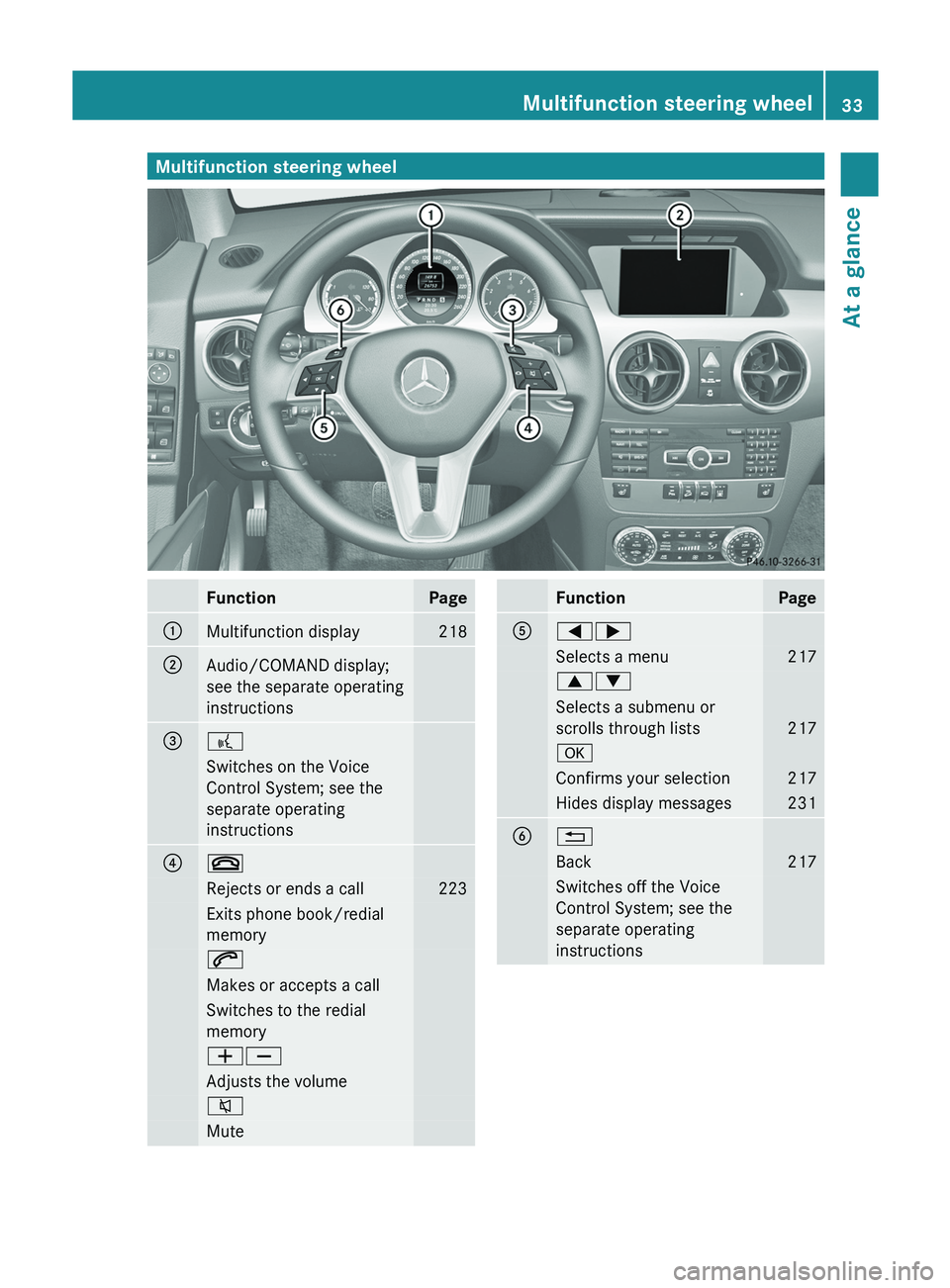
Multifunction steering wheel
Function Page
0043
Multifunction display 218
0044
Audio/COMAND display;
see the separate operating
instructions
0087
0059
Switches on the Voice
Control System; see the
separate operating
instructions
0085
0076
Rejects or ends a call 223
Exits phone book/redial
memory
0061
Makes or accepts a call
Switches to the redial
memory
00810082
Adjusts the volume
0063
Mute Function Page
0083
00590065
Selects a menu 217
00630064
Selects a submenu or
scrolls through lists
217
0076
Confirms your selection 217
Hides display messages 231
0084
0038
Back 217
Switches off the Voice
Control System; see the
separate operating
instructionsMultifunction steering wheel
33At a glance
Page 38 of 380
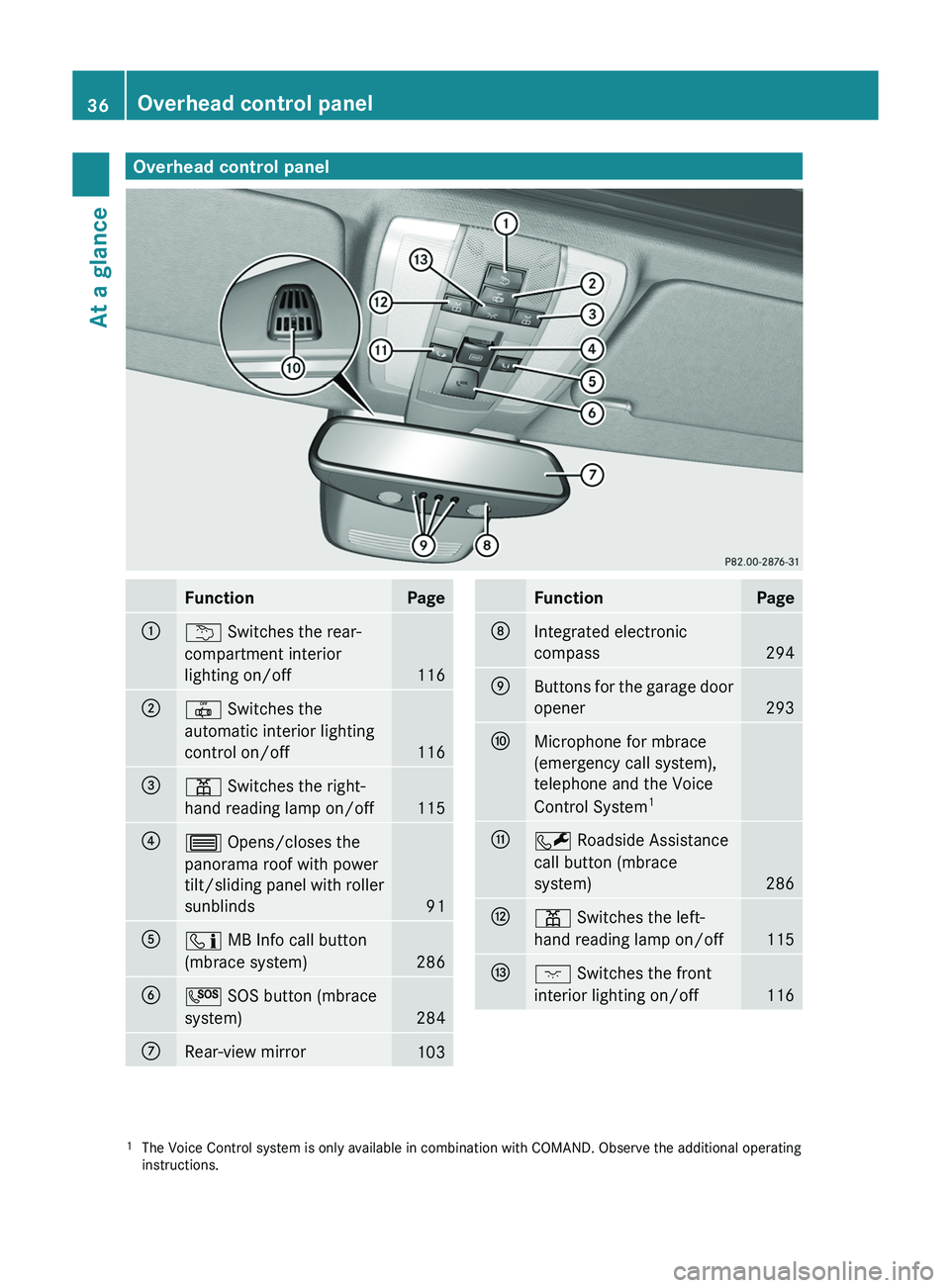
Overhead control panel
Function Page
0043
0042 Switches the rear-
compartment interior
lighting on/off
116
0044
0033 Switches the
automatic interior lighting
control on/off
116
0087
003D Switches the right-
hand reading lamp on/off
115
0085
0057 Opens/closes the
panorama roof with power
tilt/sliding panel with roller
sunblinds
91
0083
00D9 MB Info call button
(mbrace system)
286
0084
0053 SOS button (mbrace
system)
284
006B
Rear-view mirror
103 Function Page
006C
Integrated electronic
compass
294
006D
Buttons for the garage door
opener
293
006E
Microphone for mbrace
(emergency call system),
telephone and the Voice
Control System
1 006F
0052 Roadside Assistance
call button (mbrace
system)
286
0070
003D Switches the left-
hand reading lamp on/off
115
0071
004A Switches the front
interior lighting on/off
116
1
The Voice Control system is only available in combination with COMAND. Observe the additional operating
instructions.36
Overhead control panelAt a glance
Page 74 of 380

i
If the alarm stays on for more than
30 seconds, the mbrace emergency call
system (USA only) or the Tele Aid system
(Canada only) initiates a call to the
Customer Assistance Center
automatically. The Tele Aid system will
initiate the call provided that:
R you have subscribed to the Tele Aid
service.
R the Tele Aid service has been activated
properly.
R the required mobile phone, power
supply
and GPS are available. X
To arm: lock the vehicle with the SmartKey
or KEYLESS-GO.
Indicator lamp 0043 flashes. The alarm
system is armed after approximately
15 seconds.
X To disarm: unlock the vehicle with the
SmartKey or KEYLESS-GO.
X To stop the alarm using the SmartKey:
insert the SmartKey into the ignition lock.
The alarm is switched off.
or
X Press the 0036
or 0037 button on the
SmartKey.
The alarm is switched off. X
To stop the alarm using KEYLESS-GO:
grasp the outside door handle. The
SmartKey must be outside the vehicle.
The alarm is switched off.
or
X Press the Start/Stop button on the
dashboard. The SmartKey must be inside
the vehicle.
The alarm is switched off.72
Theft deterrent locking system
Safety
Page 76 of 380

Useful information
i This Operator's Manual describes all
models and all standard and optional
equipment of your vehicle available at the
time of publication of the Operator's
Manual. Country-specific differences are
possible. Please note that your
vehicle may
not be equipped with all features
described. This also applies to safety-
related systems and functions.
i Read the information on qualified
specialist workshops: ( Y page 27).SmartKey
Important safety notes
G
WARNING
If children are left unsupervised in the vehicle,
they could:
R open the doors, thus endangering other
people or road users.
R get out and disrupt traffic.
R operate the vehicle's equipment.
Additionally, children could set the vehicle in
motion if, for example, they:
R release the parking brake.
R shifting the automatic transmission out of
park position P
R Start the engine.
There is a risk of an accident and injury.
When leaving the vehicle, always take the
SmartKey with you and lock
the vehicle. Never
leave children or animals unattended in the
vehicle. Always keep the SmartKey out of
reach of children. G
WARNING
If persons, particularly children are subjected
to prolonged exposure to extreme heat or
cold, there is a risk of injury, possibly even
fatal. Never leave children unattended in the
vehicle. G
WARNING
If you attach heavy or large objects to the
SmartKey, the SmartKey could be
unintentionally turned in the ignition
lock. This
could cause the engine to be switched off.
There is a risk of an accident.
Do not attach any heavy or large objects to
the SmartKey. Remove any bulky keyrings
before inserting the SmartKey into the
ignition lock.
! Keep the SmartKey away from strong
magnetic fields. Otherwise, the remote
control function could be affected.
Strong magnetic fields can occur in the
vicinity of powerful electrical installations.
R Do not keep the KEYLESS-GO key:
-with electronic devices, e.g. a mobile
phone or another SmartKey
- with metallic objects, e.g. coins or metal
foil
- inside metallic objects e.g. a metal case
This can affect the functionality of the
SmartKey. SmartKey functions
The SmartKey centrally locks/unlocks:
R the doors
R the tailgate
R the fuel filler flap74
SmartKey
Opening and closing
Page 143 of 380
for example, the power steering and the brake
boosting effect. You will
require
considerably
more effort to steer and brake. There is a risk
of an accident.
Do not switch off the ignition while driving. G
WARNING
If the parking brake has not been fully
released when driving, the parking
brake can:
R overheat and cause a fire
R lose its hold function.
There is a risk of fire and an accident. Release
the parking brake fully before driving off.
! Warm up the engine quickly. Do not use
the engine's full performance until it has
reached operating temperature.
Only shift the automatic transmission to
the desired drive position when the vehicle
is stationary.
Where possible, avoid spinning the drive
wheels when pulling away on slippery
roads. You could otherwise damage the
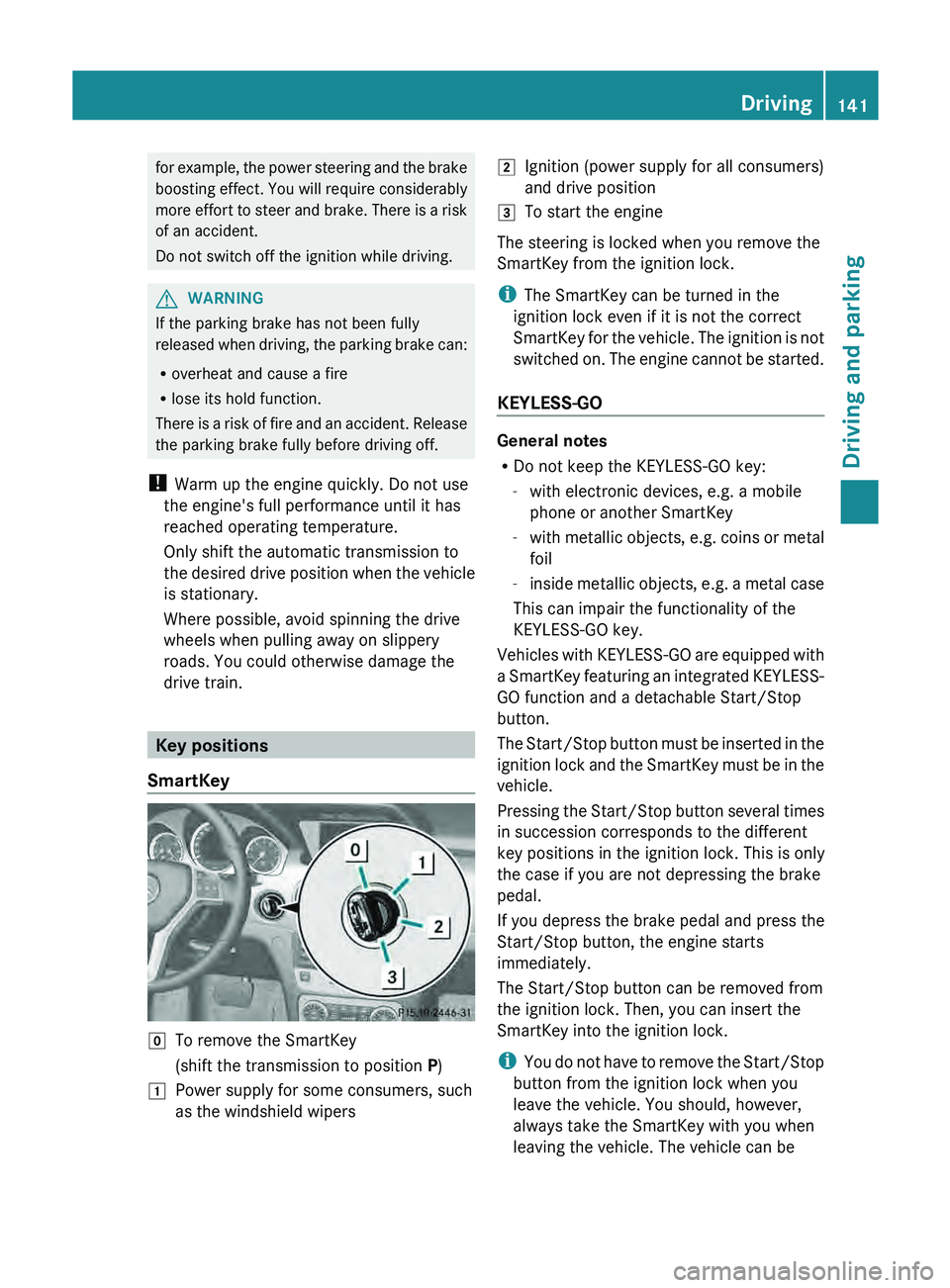
drive train. Key positions
SmartKey 005A
To remove the SmartKey
(shift the transmission to position P)
0047 Power supply for some consumers, such
as the windshield wipers 0048
Ignition (power supply for all consumers)
and drive position
0049 To start the engine
The steering is locked when you remove the
SmartKey from the ignition lock.
i The SmartKey can be turned in the
ignition lock even if it is not the correct
SmartKey for the vehicle. The
ignition is not
switched on. The engine cannot be started.
KEYLESS-GO General notes
R
Do not keep the KEYLESS-GO key:
-with electronic devices, e.g. a mobile
phone or another SmartKey
- with metallic
objects, e.g.
coins
or metal
foil
- inside metallic objects, e.g. a metal case
This can impair the functionality of the
KEYLESS-GO key.
Vehicles with KEYLESS-GO are equipped with
a SmartKey featuring an integrated KEYLESS-
GO function and a detachable Start/Stop
button.
The Start/Stop button must be inserted in the
ignition lock and the SmartKey must be in the
vehicle.
Pressing the Start/Stop button several times
in succession corresponds to the different
key positions in the ignition lock. This is only
the case if you are not depressing the brake
pedal.
If you depress the brake pedal and press the
Start/Stop button, the engine starts
immediately.
The Start/Stop button can be removed from
the ignition lock. Then, you can insert the
SmartKey into the ignition lock.
i You do not have to remove the Start/Stop
button from the ignition lock when you
leave the vehicle. You should, however,
always take the SmartKey with you when
leaving the vehicle. The vehicle can be Driving
141
Driving and parking Z