2013 MERCEDES-BENZ CLA-CLASS open bonnet
[x] Cancel search: open bonnetPage 210 of 352

Useful information
i This Owner's Manual describes all mod-
els, series and optional equipment for your
vehicle that were available at the time of
going to press. National variations are pos-
sible. Note that your vehicle may not be
equipped with all of the functions descri-
bed. This is also the case for systems and
functions relevant to safety.
i Read the information on qualified special-
ist workshops: ( Y page 24).
Important safety notes
GWARNING
Operating the integrated information systems
and communications equipment in the vehicle
while driving will distract you from traffic con-
ditions. You could then lose control of the
vehicle. There is a risk of an accident.
Only operate these devices if road traffic con-
ditions permit. If you are unsure about the
surrounding conditions, pull over to a safe
location and make entries only while the vehi-
cle is stationary.
GWARNING
If the instrument cluster has failed or mal-
functioned, you may not recognise function
restrictions relevant to safety. The operating
safety of your vehicle may be impaired. There
is a risk of an accident.
Drive on carefully. Have the vehicle checked
at a qualified specialist workshop immedi-
ately.
You must observe the legal requirements for
the country in which you are currently driving
when operating the on-board computer.
The on-board computer only shows messages
or warnings from certain systems in the mul-
tifunction display. You should therefore make
sure your vehicle is operating safely at all
times. Otherwise, a vehicle that is not oper-
ating safely may cause an accident.
For an overview, see the instrument panel
illustration ( Y page 30).
Displays and operation
Instrument cluster lighting
The lighting in the instrument cluster, in the
displays and the controls in the vehicle inte-
rior can be adjusted using the brightness con-
trol knob.
The brightness control knob is on the bottom
left of the instrument cluster ( Y page 30).
XTurn the brightness control knob clockwise
or anti-clockwise.
If the light switch is set to Ã, T or
L , the brightness is dependant upon
the brightness of the ambient light.
i The light sensor in the instrument cluster
automatically controls the brightness of
the multifunction display.
In daylight, the displays in the instrument
cluster are not illuminated.
Coolant temperature gauge
GWARNING
If you open the bonnet while the engine is
overheating or while there is a fire in the
engine compartment, you could come into
contact with hot gases or other leaking
service products. There is a danger of injury.
Allow an overheating engine to cool down
before opening the bonnet. If there is a fire in
the engine compartment, leave the bonnet
closed and notify the fire brigade.
The coolant temperature gauge is in the
instrument cluster on the right-hand side.
Under normal operating conditions and with
the specified coolant level, the coolant tem-
perature may rise to 120 †.
208Displays and operationOn-board computer and displays
ProCarManuals.com
Page 243 of 352

Display messagesPossible causes/consequences and M Solutions?
Coolant Stop car,
turn engine offThe coolant is too hot.
A warning tone also sounds.GWARNING
Never drive with an overheated engine. Driving when your engine
is overheated can cause some fluids which may have leaked into
the engine compartment to catch fire.
Steam from an overheated engine can cause serious burns, which
can occur just by opening the bonnet.
There is a risk of injury.
XStop the vehicle immediately, paying attention to road and traf-
fic conditions, and switch off the engine.XSecure the vehicle against rolling away ( Y page 162).XWait until the engine has cooled down.XMake sure that the air supply to the engine radiator is not
blocked, e.g. by frozen slush.XDo not start the engine again until the display message goes out
and the coolant temperature is below 120 †. The engine may
otherwise be damaged.XPay attention to the coolant temperature display.XIf the temperature increases again, visit a qualified specialist
workshop immediately.
Under normal operating conditions and with the specified coolant
level, the coolant temperature may rise to 120 †.
#The battery is not being charged.
A warning tone also sounds.
Possible causes:
R faulty alternator
R torn poly-V-belt
R a malfunction in the electronicsXStop the vehicle immediately, paying attention to road and traf-
fic conditions, and switch off the engine.XOpen the bonnet.XCheck whether the poly-V-belt is torn.
If the poly-V-belt is torn:
! Do not continue driving. The engine could otherwise overheat.
XConsult a qualified specialist workshop.
If the poly-V-belt is OK:
XVisit a qualified specialist workshop immediately.Display messages241On-board computer and displaysZProCarManuals.com
Page 254 of 352
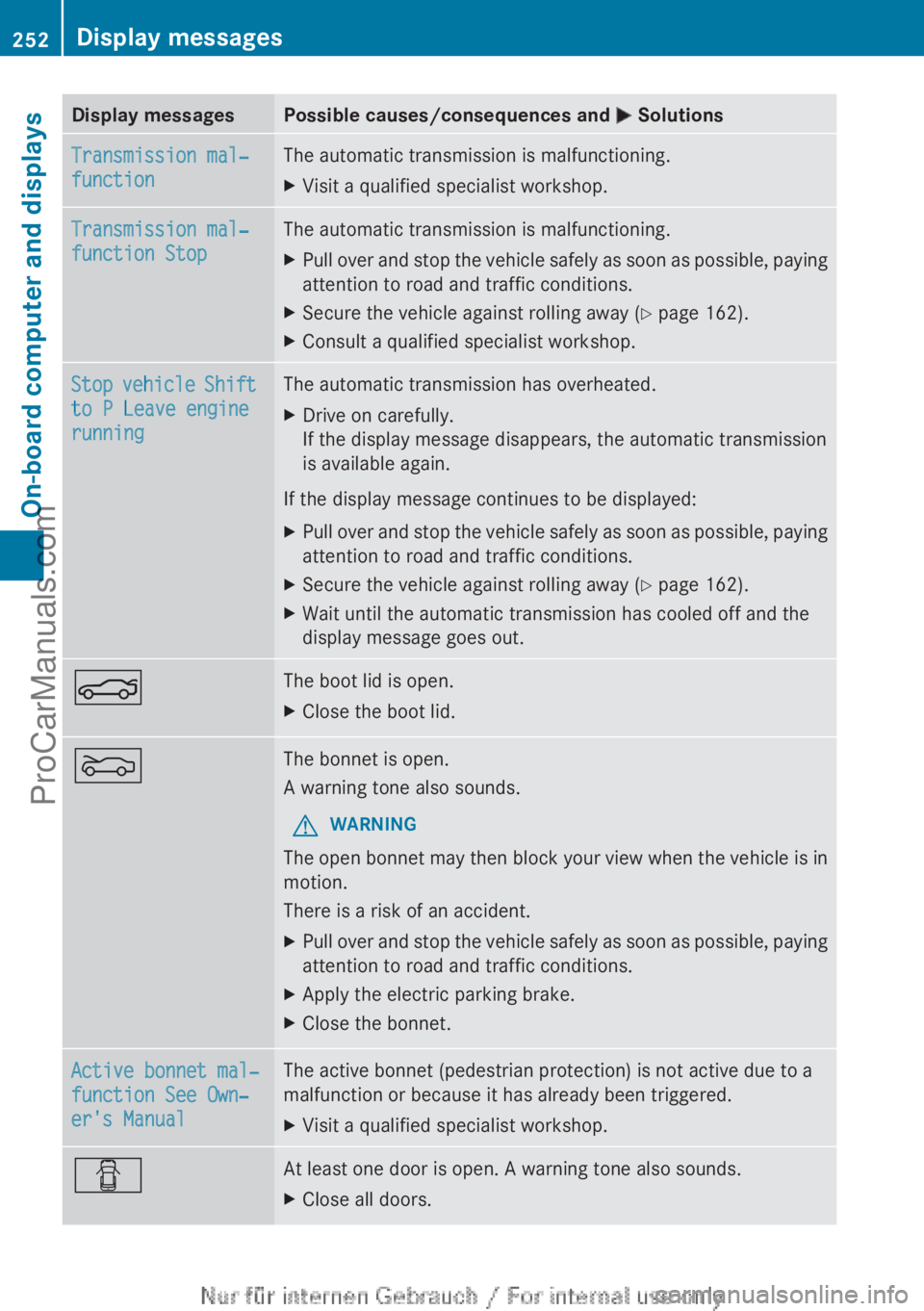
Display messagesPossible causes/consequences and M SolutionsTransmission mal‐
functionThe automatic transmission is malfunctioning.XVisit a qualified specialist workshop.Transmission mal‐
function StopThe automatic transmission is malfunctioning.XPull over and stop the vehicle safely as soon as possible, paying
attention to road and traffic conditions.XSecure the vehicle against rolling away ( Y page 162).XConsult a qualified specialist workshop.Stop vehicle Shift
to P Leave engine
runningThe automatic transmission has overheated.XDrive on carefully.
If the display message disappears, the automatic transmission
is available again.
If the display message continues to be displayed:
XPull over and stop the vehicle safely as soon as possible, paying
attention to road and traffic conditions.XSecure the vehicle against rolling away ( Y page 162).XWait until the automatic transmission has cooled off and the
display message goes out.NThe boot lid is open.XClose the boot lid.MThe bonnet is open.
A warning tone also sounds.GWARNING
The open bonnet may then block your view when the vehicle is in
motion.
There is a risk of an accident.
XPull over and stop the vehicle safely as soon as possible, paying
attention to road and traffic conditions.XApply the electric parking brake.XClose the bonnet.Active bonnet mal‐
function See Own‐
er's ManualThe active bonnet (pedestrian protection) is not active due to a
malfunction or because it has already been triggered.XVisit a qualified specialist workshop.CAt least one door is open. A warning tone also sounds.XClose all doors.252Display messagesOn-board computer and displays
ProCarManuals.com
Page 265 of 352

ProblemPossible causes/consequences and M Solutions?
The red coolant warn-
ing lamp comes on
while the engine is run-
ning.The coolant level is too low.
If the coolant level is correct, the airflow to the engine radiator
may be blocked or the electric engine radiator fan may be mal-
functioning.
The coolant is too hot and the engine is no longer being cooled
sufficiently.XObserve the additional display messages in the multifunction
display.XStop the vehicle immediately, paying attention to road and traf-
fic conditions, and switch off the engine.XSecure the vehicle against rolling away ( Y page 162).XLeave the vehicle and keep a safe distance from the vehicle until
the engine has cooled down.XCheck the coolant level and top up the coolant ( Y page 285).
Observe the warning notes as you do so.XIf you have to top up the coolant frequently, have the engine
cooling system checked.XMake sure that the air supply to the engine radiator is not
blocked, e.g. by frozen slush.XDo not start the engine again until the coolant temperature is
below 120 †. The engine may otherwise be damaged.XDrive to the nearest qualified specialist workshop.XAvoid heavy loads on the engine as you do so, e.g. driving in
mountainous terrain and stop-start traffic.?
The red coolant warn-
ing lamp comes on
while the engine is run-
ning. A warning tone
also sounds.The coolant temperature has exceeded 120 †. The airflow to the
engine radiator may be blocked or the coolant level may be too
low.GWARNING
The engine is not being cooled sufficiently and may be damaged.
Never drive with an overheated engine. Driving when your engine
is overheated can cause some fluids which may have leaked into
the engine compartment to catch fire.
Steam from an overheated engine can cause serious burns which
can occur just by opening the bonnet.
This poses a risk of injury.
XObserve the additional display messages in the multifunction
display.XStop the vehicle immediately, paying attention to road and traf-
fic conditions, and switch off the engine.XSecure the vehicle against rolling away ( Y page 162).Warning and indicator lamps in the instrument cluster263On-board computer and displaysZProCarManuals.com
Page 284 of 352
Useful information
i This Owner's Manual describes all mod-
els, series and optional equipment for your
vehicle that were available at the time of
going to press. National variations are pos-
sible. Note that your vehicle may not be
equipped with all of the functions descri-
bed. This is also the case for systems and
functions relevant to safety.
i Read the information on qualified special-
ist workshops: ( Y page 24).
Engine compartment
Bonnet
Important safety notes
GWARNING
An unlocked bonnet may open while driving
and block your view. There is a risk of an acci-
dent.
Never unlock the bonnet while driving.
GWARNING
When being opened and closed, the bonnet
may suddenly fall into the closed position.
There is a risk of injury to persons in the range
of movement of the bonnet.
Open and close the bonnet only when nobody
is in the range of movement.
GWARNING
Certain components in the engine compart-
ment could be very hot, e.g. the engine, the
radiator and parts of the exhaust system.
There is a risk of injury when accessing the
engine compartment.
As far as possible, allow the engine to cool
down and only touch the following compo-
nents.
GWARNING
If you open the bonnet while the engine is
overheating or while there is a fire in the
engine compartment, you could come into
contact with hot gases or other leaking
service products. There is a danger of injury.
Allow an overheating engine to cool down
before opening the bonnet. If there is a fire in
the engine compartment, leave the bonnet
closed and notify the fire brigade.GWARNING
There are parts in the engine compartment
that move. Certain components may continue
to run even if the ignition is switched off or
may suddenly start again, e.g. the radiator
fan. There is a danger of injury.
If you need to access the engine compart-
ment:
R switch off the ignition
R never enter the danger area of moving com-
ponents, e.g. the rotation area of the fan
R keep items of clothing away from moving
parts
GWARNING
The ignition system and the fuel injection sys-
tem operate with a high voltage. If you touch
the live components, you could receive an
electric shock. There is a danger of injury.
Never touch components of the ignition sys-
tem or the fuel injection system when the
ignition is switched on.
Active bonnet (pedestrian protection)
Operating principle
! Once triggered, an active bonnet must be
reset at a qualified specialist workshop,
e.g. a Mercedes-Benz Service Centre. The
active bonnet function will then be availa-
ble again. The additional pedestrian pro-
tection provided by the active bonnet will
then be restored.
The active bonnet is only available in certain
countries.
The active bonnet can reduce the risk of injury
to pedestrians in certain accident situations.
282Engine compartmentMaintenance and care
ProCarManuals.com
Page 285 of 352
Raising the active bonnet increases the clear-
ance to hard components, such as the engine.
If the active bonnet has been triggered, it is
raised at the rear in the area around the hinge
by approximately 60 mm.
For the drive to the workshop, reset the trig-
gered active bonnet yourself. If the active
bonnet has been triggered, pedestrian pro-
tection may be limited.
ResettingGWARNING
Certain components in the engine compart-
ment could be very hot, e.g. the engine, the
radiator and parts of the exhaust system.
There is a risk of injury when accessing the
engine compartment.
As far as possible, allow the engine to cool
down and only touch the following compo-
nents.
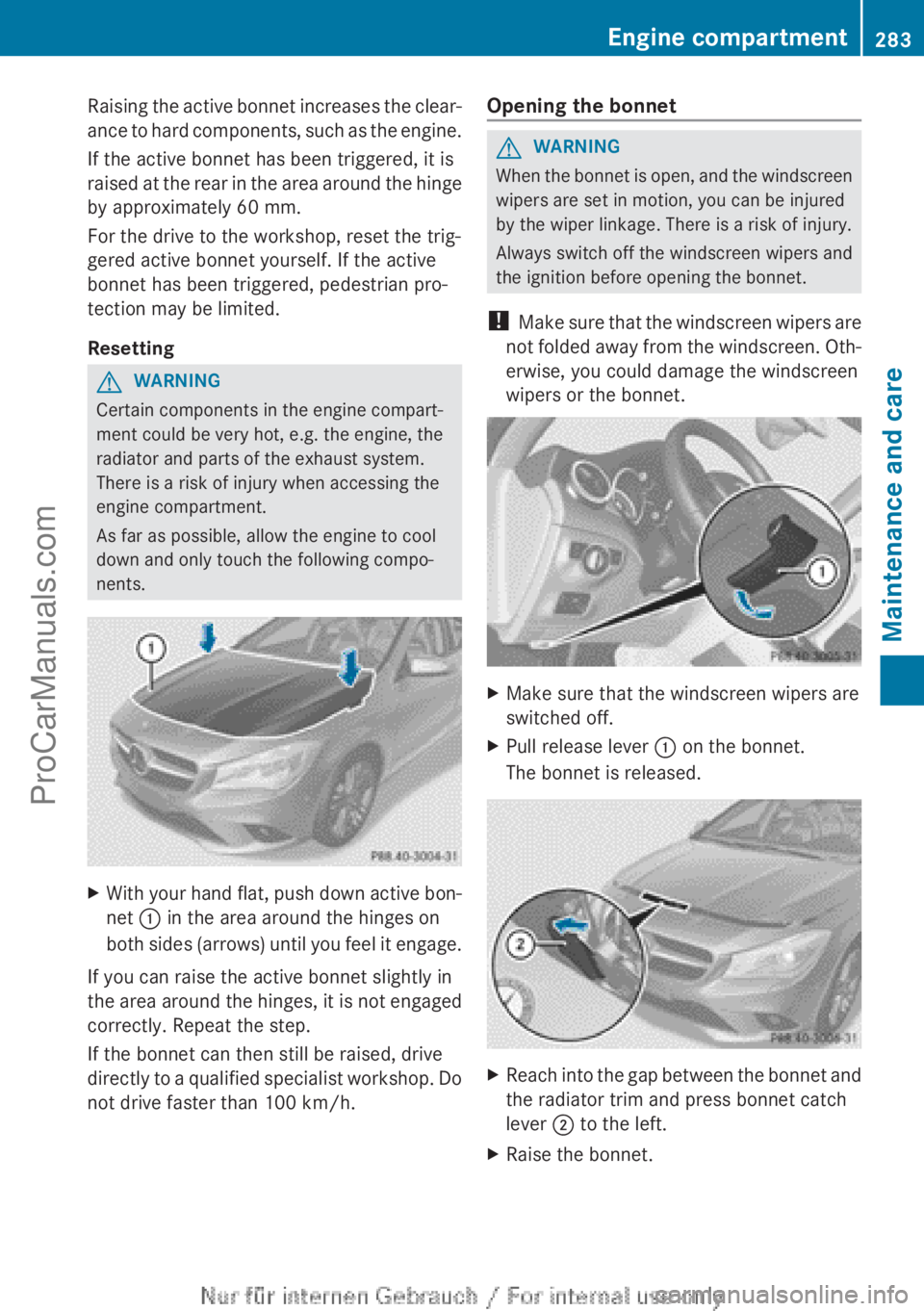
XWith your hand flat, push down active bon-
net : in the area around the hinges on
both sides (arrows) until you feel it engage.
If you can raise the active bonnet slightly in
the area around the hinges, it is not engaged
correctly. Repeat the step.
If the bonnet can then still be raised, drive
directly to a qualified specialist workshop. Do
not drive faster than 100 km/h.
Opening the bonnetGWARNING
When the bonnet is open, and the windscreen
wipers are set in motion, you can be injured
by the wiper linkage. There is a risk of injury.
Always switch off the windscreen wipers and
the ignition before opening the bonnet.
! Make sure that the windscreen wipers are
not folded away from the windscreen. Oth-
erwise, you could damage the windscreen
wipers or the bonnet.
XMake sure that the windscreen wipers are
switched off.XPull release lever : on the bonnet.
The bonnet is released.XReach into the gap between the bonnet and
the radiator trim and press bonnet catch
lever ; to the left.XRaise the bonnet.Engine compartment283Maintenance and careZProCarManuals.com
Page 286 of 352
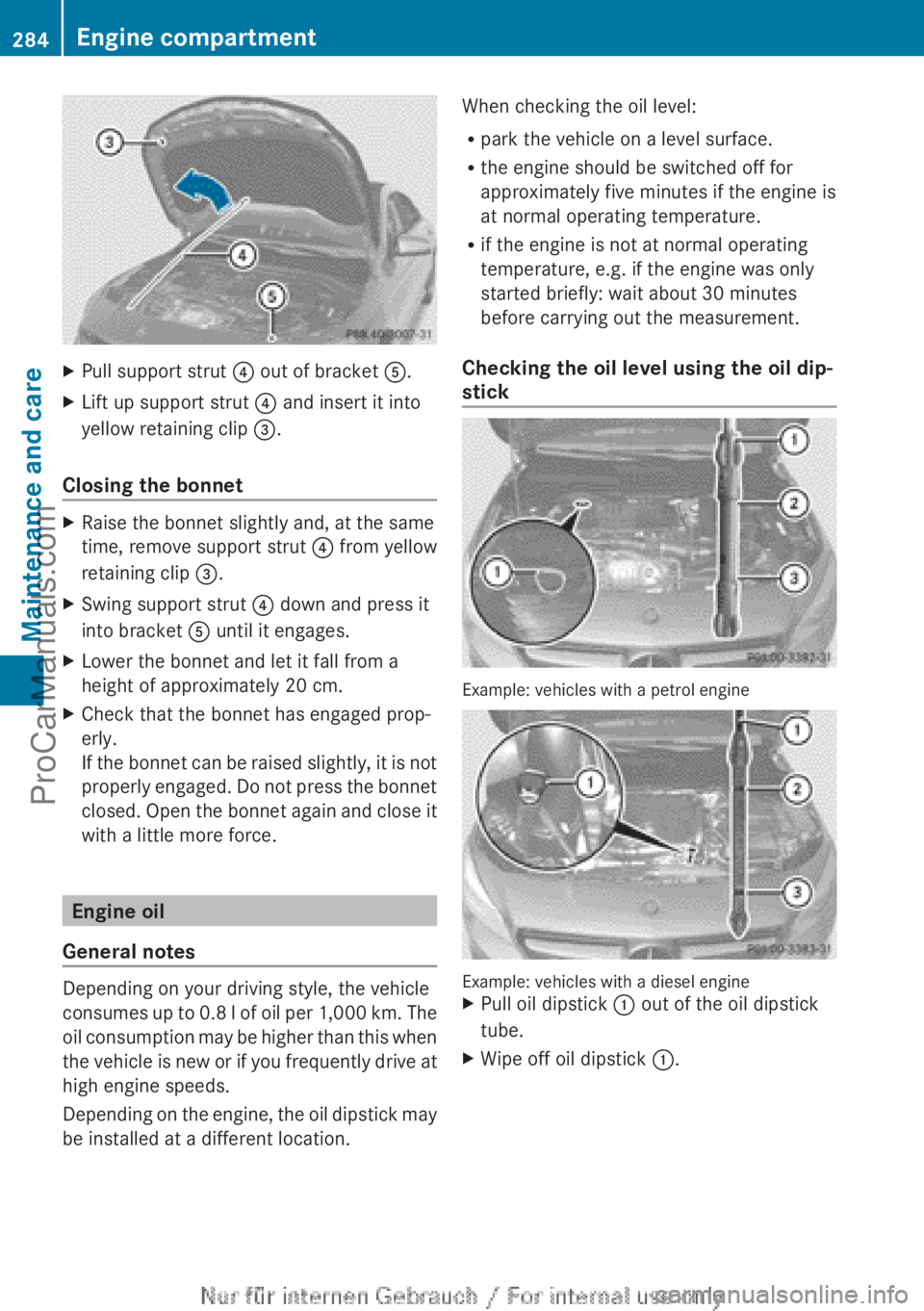
XPull support strut ? out of bracket A.XLift up support strut ? and insert it into
yellow retaining clip =.
Closing the bonnet
XRaise the bonnet slightly and, at the same
time, remove support strut ? from yellow
retaining clip =.XSwing support strut ? down and press it
into bracket A until it engages.XLower the bonnet and let it fall from a
height of approximately 20 cm.XCheck that the bonnet has engaged prop-
erly.
If the bonnet can be raised slightly, it is not
properly engaged. Do not press the bonnet
closed. Open the bonnet again and close it
with a little more force.
Engine oil
General notes
Depending on your driving style, the vehicle
consumes up to 0.8 l of oil per 1,000 km. The
oil consumption may be higher than this when
the vehicle is new or if you frequently drive at
high engine speeds.
Depending on the engine, the oil dipstick may
be installed at a different location.
When checking the oil level:
R park the vehicle on a level surface.
R the engine should be switched off for
approximately five minutes if the engine is
at normal operating temperature.
R if the engine is not at normal operating
temperature, e.g. if the engine was only
started briefly: wait about 30 minutes
before carrying out the measurement.
Checking the oil level using the oil dip-
stick
Example: vehicles with a petrol engine
Example: vehicles with a diesel engine
XPull oil dipstick : out of the oil dipstick
tube.XWipe off oil dipstick :.284Engine compartmentMaintenance and care
ProCarManuals.com
Page 307 of 352
can escape from the battery. There is a risk of
an explosion.
Allow the frozen battery to thaw out before
charging it or jump-starting.
! Only use battery chargers with a maxi-
mum charging voltage of 14.8 V.
! Only charge the battery using the jump-
start connection point.
The jump-starting connection point is in the
engine compartment ( Y page 306).XOpen the bonnet.XConnect the battery charger to the positive
terminal and earth point in the same order
as when connecting the donor battery in
the jump-starting procedure
( Y page 306).
If the indicator/warning lamps do not light up
at low temperatures, it is very likely that the
discharged battery has frozen. In this case
you may neither jump-start the vehicle nor
charge the battery. The service life of a bat-
tery that has been thawed may be reduced.
The starting characteristics may be impaired,
especially at low temperatures. Have the
thawed battery checked at a qualified spe-
cialist workshop.
Only charge the installed battery with a bat-
tery charger which has been tested and
approved by Mercedes-Benz. A battery
charger unit specially adapted for Mercedes-
Benz vehicles and tested and approved by
Mercedes-Benz is available as an accessory.
It permits the charging of the battery in its
installed position. Contact a Mercedes-Benz
Service Centre for information and availabil-
ity. Read the battery charger's operating
instructions before charging the battery.
Battery (vehicle)305Breakdown assistanceZProCarManuals.com