Page 105 of 352
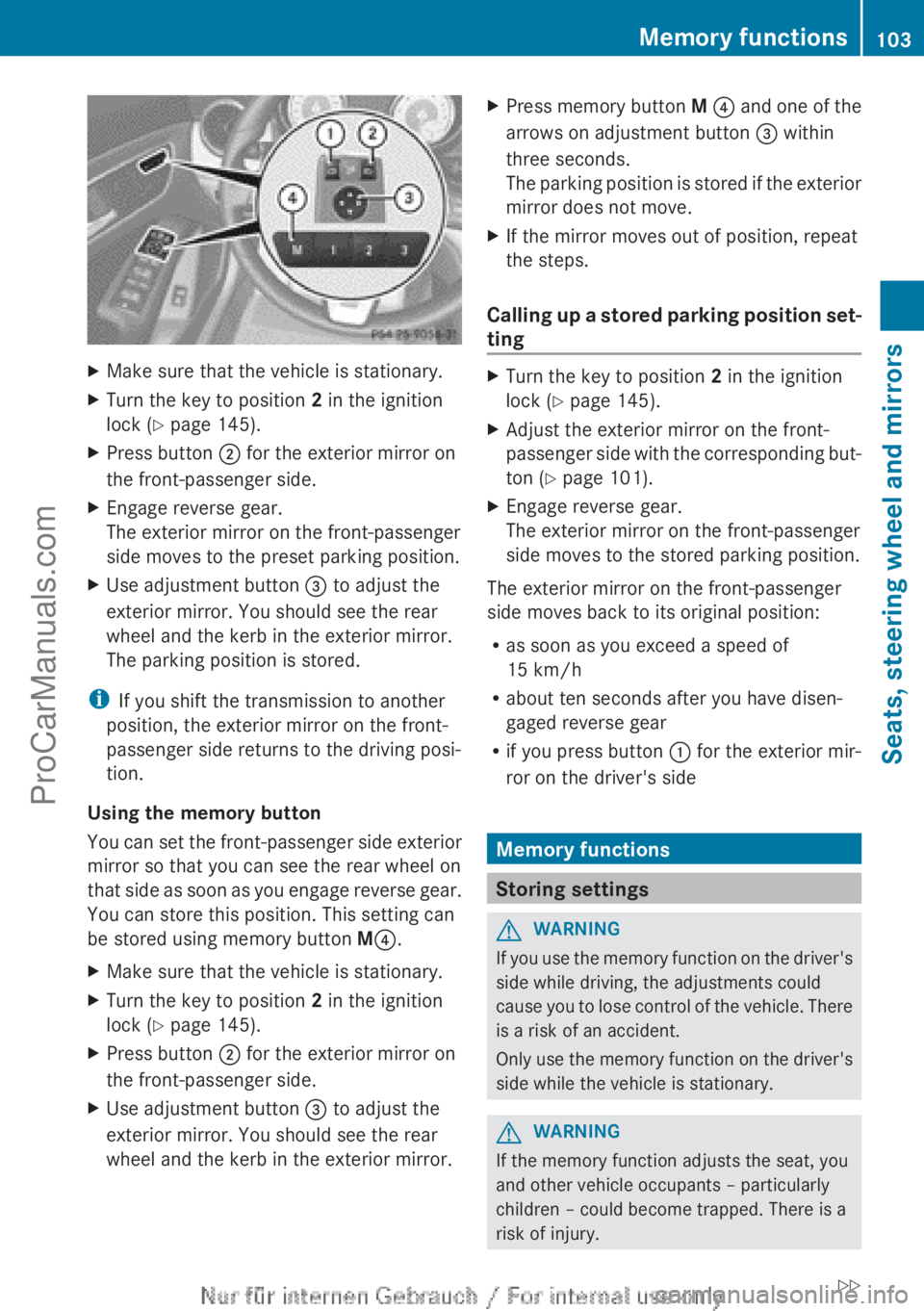
XMake sure that the vehicle is stationary.XTurn the key to position 2 in the ignition
lock ( Y page 145).XPress button ; for the exterior mirror on
the front-passenger side.XEngage reverse gear.
The exterior mirror on the front-passenger
side moves to the preset parking position.XUse adjustment button = to adjust the
exterior mirror. You should see the rear
wheel and the kerb in the exterior mirror.
The parking position is stored.
i If you shift the transmission to another
position, the exterior mirror on the front-
passenger side returns to the driving posi-
tion.
Using the memory button
You can set the front-passenger side exterior
mirror so that you can see the rear wheel on
that side as soon as you engage reverse gear.
You can store this position. This setting can
be stored using memory button M? .
XMake sure that the vehicle is stationary.XTurn the key to position 2 in the ignition
lock ( Y page 145).XPress button ; for the exterior mirror on
the front-passenger side.XUse adjustment button = to adjust the
exterior mirror. You should see the rear
wheel and the kerb in the exterior mirror.XPress memory button M ? and one of the
arrows on adjustment button = within
three seconds.
The parking position is stored if the exterior
mirror does not move.XIf the mirror moves out of position, repeat
the steps.
Calling up a stored parking position set-
ting
XTurn the key to position 2 in the ignition
lock ( Y page 145).XAdjust the exterior mirror on the front-
passenger side with the corresponding but-
ton ( Y page 101).XEngage reverse gear.
The exterior mirror on the front-passenger
side moves to the stored parking position.
The exterior mirror on the front-passenger
side moves back to its original position:
R as soon as you exceed a speed of
15 km/h
R about ten seconds after you have disen-
gaged reverse gear
R if you press button : for the exterior mir-
ror on the driver's side
Memory functions
Storing settings
GWARNING
If you use the memory function on the driver's
side while driving, the adjustments could
cause you to lose control of the vehicle. There
is a risk of an accident.
Only use the memory function on the driver's
side while the vehicle is stationary.
GWARNING
If the memory function adjusts the seat, you
and other vehicle occupants – particularly
children – could become trapped. There is a
risk of injury.
Memory functions103Seats, steering wheel and mirrorsZProCarManuals.com
Page 106 of 352
While the memory function is making adjust-
ments, make sure that no one has any part of
their body within the sweep of the seat. If
someone becomes trapped, immediately
release the memory function position button.
The adjustment is stopped.GWARNING
If children activate the memory function, they
could become trapped, especially if they are
unattended. There is a risk of injury.
When leaving the vehicle, always take the key
with you and lock the vehicle. Never leave
children unattended in the vehicle.
With the memory function, you can store up
to three different settings, e.g. for three dif-
ferent people.
The following settings are stored as a single
memory preset:
R position of the seat, backrest and head
restraint
R driver's side: position of the exterior mir-
rors on the driver's and front-passenger
sides
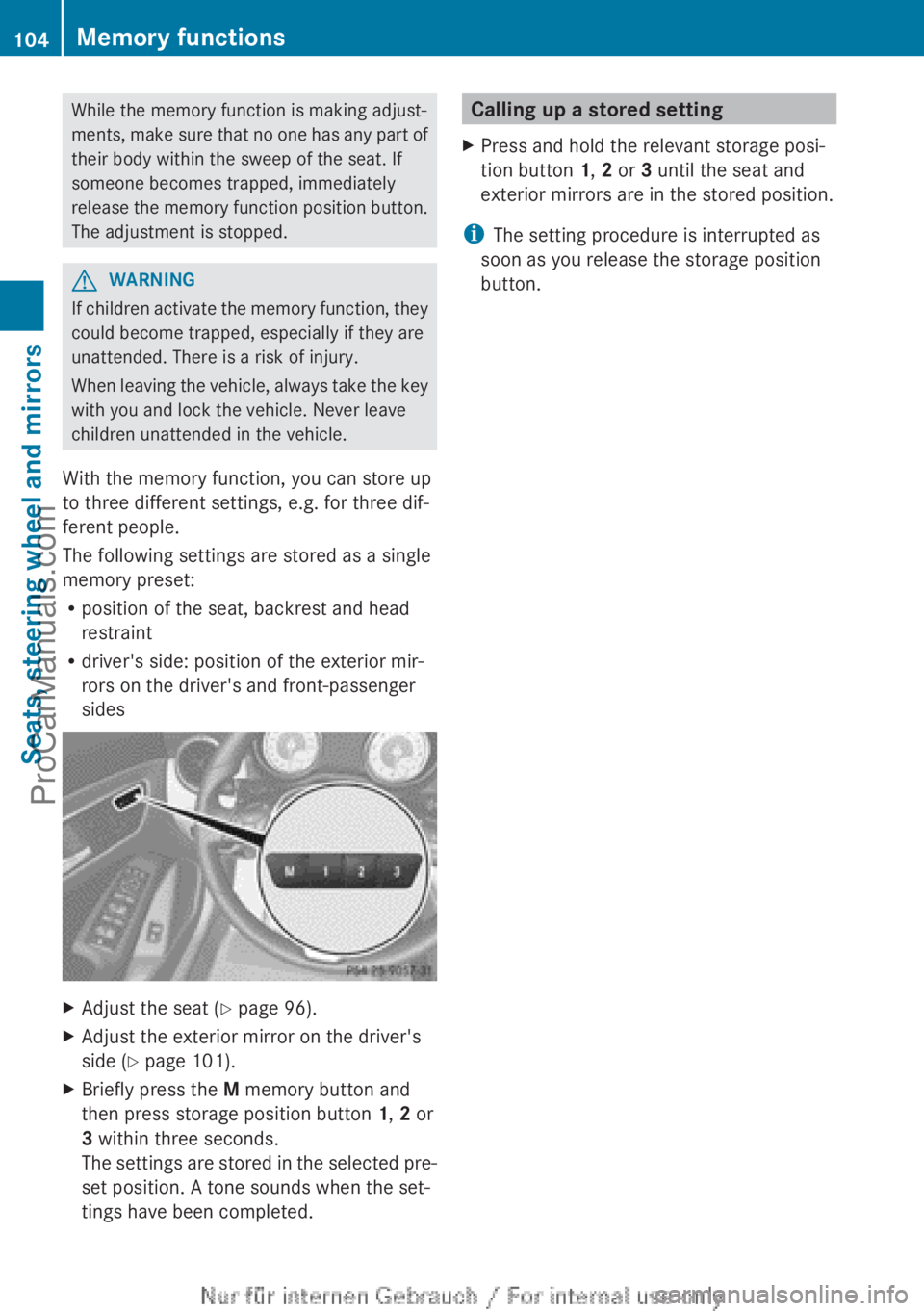
XAdjust the seat ( Y page 96).XAdjust the exterior mirror on the driver's
side ( Y page 101).XBriefly press the M memory button and
then press storage position button 1, 2 or
3 within three seconds.
The settings are stored in the selected pre-
set position. A tone sounds when the set-
tings have been completed.Calling up a stored settingXPress and hold the relevant storage posi-
tion button 1, 2 or 3 until the seat and
exterior mirrors are in the stored position.
i The setting procedure is interrupted as
soon as you release the storage position
button.
104Memory functionsSeats, steering wheel and mirrors
ProCarManuals.com
Page 227 of 352
Convenience
Switching belt adjustment on/off
XPress the = or ; button on the steer-
ing wheel to select the Settings menu.XPress the : or 9 button to select the
Convenience submenu.XPress a to confirm.XPress the : or 9 button to select the
Belt adjustment function.
When the Belt adjustment function is
activated, the vehicle seat belt is displayed
in red in the multifunction display.XPress the a button to save the setting.
For further information on belt adjustment,
see ( Y page 48).
Switching the fold in mirrors when lock-
ing function on/off
This function is only available on vehicles with
a memory function ( Y page 103).
XPress the = or ; button on the steer-
ing wheel to select the Settings menu.XPress the : or 9 button to select the
Convenience submenu.XPress a to confirm.XPress the : or 9 button to select the
Auto. fold-in mirrors.
You will see the selected setting.XPress the a button to save the setting.
If you switch on the Auto. fold-in mir‐
rors function, the exterior mirrors fold in
when you lock the vehicle. When you unlock
the vehicle and then open the driver's or
front-passenger door, the exterior mirrors
fold out again.
If you have switched the function on and you
fold the exterior mirrors in using the button
on the door ( Y page 101), they will not fold
out automatically. The exterior mirrors can
then only be folded out using the button on
the door.
Restoring the factory settingsXPress the = or ; button on the steer-
ing wheel to select the Settings menu.XPress the : or 9 button to select the
Factory setting submenu.XPress a to confirm.
The Reset all settings? message
appears.XPress the : or 9 button to select
No or Yes .XPress the a button to confirm the selec-
tion.
If you have selected Yes , the multifunction
display shows a confirmation message.
For safety reasons, not all functions are reset:
the Limit speed (winter tyres): func-
tion in permanent SPEEDTRONIC can only be
set in the VEHICLE submenu. If you want to
reset the Daytime driving lights: in the
Light submenu, you must turn the key in the
ignition lock to position 1.
Menus and submenus225On-board computer and displaysZProCarManuals.com