2013 LINCOLN MKZ ECU
[x] Cancel search: ECUPage 29 of 474

8.
Remove remaining slack from the
belt. Force the seat down with
extra weight, for example, by
pressing down or kneeling on the
child restraint while pulling down
on the lap belt in order to force
slack from the belt. This is
necessary to remove the remaining
slack that will exist once the extra
weight of the child is added to the
child restraint. It also helps to
achieve the proper snugness of the
child seat to your vehicle.
Sometimes, a slight lean toward
the buckle will additionally help to
remove remaining slack from the
belt.
9. Attach the tether strap (if the child
seat is equipped). 10. Before placing the child in the
seat, forcibly move the seat
forward and back to make sure
the seat is securely held in place.
To check this, grab the seat at the
belt path and attempt to move it
side to side and forward and
back. There should be no more
than 1 inch (2.5 centimeters) of
movement for proper installation.
Ford recommends checking with a
NHTSA Certified Child Passenger
Safety Technician to make certain the
child restraint is properly installed. In
Canada, check with your local St. John
Ambulance office for referral to a
Certified Passenger Seat Technician.
Using Lower Anchors and
Tethers for CHildren (LATCH) WARNINGS
Never attach two child safety
seats to the same anchor. In a
collision, one anchor may not be
strong enough to hold two child safety
seat attachments and may break,
causing serious injury or death. Depending on where you secure
a child restraint, and depending
on the child restraint design, you may
block access to certain safety belt
buckle assemblies or LATCH lower
anchors, rendering those features
potentially unusable. To avoid risk of
injury, occupants should only use
seating positions where they are able
to be properly restrained. 26
Child SafetyE146525 E142534
Page 31 of 474

The lower anchors at the center of the
second row rear seat are spaced 18
inches (46 centimeters) apart. A child
seat with rigid LATCH attachments
cannot be installed at the center
seating position. LATCH compatible
child seats (with attachments on belt
webbing) can only be used at this
seating position provided that the
child seat manufacturer's instructions
permit use with the anchor spacing
stated. Do not attach a child seat to
any lower anchor if an adjacent child
seat is attached to that anchor.
Each time you use the safety seat,
check that the seat is properly
attached to the lower anchors and
tether anchor, if applicable. Tug the
child seat from side to side and
forward and back where it is secured
to your vehicle. The seat should move
less than one inch when you do this
for a proper installation.
If the safety seat is not anchored
properly, the risk of a child being
injured in a crash greatly increases.
Combining Safety Belt and LATCH
Lower Anchors for Attaching Child
Safety Seats
When used in combination, either the
safety belt or the LATCH lower
anchors may be attached first,
provided a proper installation is
achieved. Attach the tether strap
afterward, if included with the child
seat.
Using Tether Straps Many forward-facing child
safety seats include a tether
strap which extends from the
back of the child safety seat and
hooks to an anchoring point called the
top tether anchor. Tether straps are
available as an accessory for many
older safety seats.
Contact the manufacturer of your
child seat for information about
ordering a tether strap, or to obtain a
longer tether strap if the tether strap
on your safety seat does not reach the
appropriate top tether anchor in your
vehicle.
Once the child safety seat has been
installed using either the safety belt,
the lower anchors of the LATCH
system, or both, you can attach the
top tether strap.
The tether strap anchors in your
vehicle are in the following positions
(shown from top view): Perform the following steps to install
a child safety seat with tether
anchors:
28
Child Safety E142537
Page 35 of 474

•
Height adjuster at the front
outboard seating positions.
• Safety belt pretensioner at the
front outboard seating positions.
• Belt tension sensor at the front
outboard passenger seating
position. •
Safety belt warning light and
chime. •
Crash sensors and monitoring
system with readiness indicator.
The safety belt pretensioners at the
front seating positions are designed
to tighten the safety belts when
activated. In frontal and near-frontal
collisions, the safety belt
pretensioners may be activated alone
or, if the collision is of sufficient
severity, together with the front
airbags. The pretensioners may also
activate when a side curtain airbag is
deployed.
FASTENING THE SAFETY
BELTS
Standard belts shown, inflatable
belts similar
The front outboard and rear safety
restraints in the vehicle are
combination lap and shoulder belts. 1. Insert the belt tongue into the
proper buckle (the buckle closest
to the direction the tongue is
coming from) until you hear a snap
and feel it latch. Make sure the
tongue is securely fastened in the
buckle. 2. To unfasten, press the release
button and remove the tongue
from the buckle.
32
Safety Belts E142587 E142588
Page 57 of 474

REMOTE CONTROL
Intelligent Access Key
Your vehicle is equipped with two
intelligent access keys which operate
the power locks and the remote start
system. The key must be in the vehicle
to activate the push button start
system.
Removable Key Blade
The intelligent access key also
contains a removable mechanical key
blade that can be used to unlock the
driver door.
Slide the release on the back of the
remote control and pivot the cover off
to access the key blade. Note:
Your vehicle ’s backup keys were
issued with a security tag that provides
important vehicle key cut information.
Keep the tag in a safe place for future
reference.
Replacing the Battery
Note: Refer to local regulations when
disposing of transmitter batteries.
Note: Do not wipe off any grease on
the battery terminals or on the back
surface of the circuit board.
Note: Replacing the battery will not
delete the transmitter from the vehicle.
The transmitter should operate
normally.
A message will appear in the
information display when the remote
control battery is low. See
Information Messages (page 105).
Intelligent Access Transmitter
The remote control uses two
coin-type three-volt lithium batteries
CR2025 or equivalent.
54
Keys and Remote ControlsE144506 E151796 E151795
Page 64 of 474

MYKEY TROUBLESHOOTING
Potential Causes
Condition
· The key in the ignition does not have
admin privileges.
I cannot program a key.
· The key in the ignition is the only
admin key (there always has to be at
least one admin key).
· The intelligent access key is not in the
backup slot (vehicles with push-
button start).
· SecuriLock® passive anti-theft
system is disabled or in unlimited
mode.
· The key in the ignition does not have
admin privileges. I cannot program the
optional settings.
I cannot program the optional settings.
· No keys are programmed to the
vehicle. See Creating a MyKey (page
59).
· The key in the ignition does not have
admin privileges.
I cannot clear the restricted keys.
· No restricted keys are programmed
to the vehicle. See Creating a MyKey
(page
59).
· Purchase a new key from your
authorized dealer.
I lost the only admin key.
· Program a spare key. See
Passive
Anti-Theft System (page 72).
I lost a key.
· An admin fob is present at engine
start-up.
No restricted key functions with intelli-
gent access key (push-button start).
· No MyKey keys are programmed to
the vehicle. See
Creating a MyKey
(page 59).
· The MyKey key is not being used by
the intended user.
MyKey miles do not accumulate.
· The key system has been reset.
61
MyKey®
Page 69 of 474

Accessory Mode Battery Saver for
Intelligent Access Keys
If you switch off the engine and leave
the ignition in the on or accessory
mode, the ignition will shut off after
30 minutes.
Luggage Compartment
From Inside Your Vehicle
Press the button on the
instrument panel to unlatch
the trunk.
With the Remote Control Press twice within three
seconds to unlatch the trunk.
From Outside Your Vehicle Press the release button above the
license plate to unlatch the trunk.
Your vehicle must be unlocked or have
an intelligent access transmitter
within 3 feet (1 meter) of the trunk. Power Decklid (If Equipped) WARNINGS
Make sure all persons are clear
of the power decklid area before
using the power decklid control. Keep keys out of the reach of
children. Do not allow children
to operate the power decklid, or to
play near to an open or moving power
decklid. Note:
Do not drive with the decklid
open unless you disable the power
feature. Make sure you secure the
decklid to you vehicle.
The power decklid can be enabled or
disabled using the information display.
The remote control and instrument
panel button will still operate the
decklid regardless of the setting.
Opening and Closing the Power
Decklid
Note: The decklid movement can be
reversed. Press of the instrument panel
or decklid button again, or press the
remote control button twice.
The decklid will only operate with your
vehicle in P.
If the decklid reverses or starts to
close after an open request, you will
hear a fast continuous chime. This
indicates excessive load on the
decklid or a possible torsion bar
failure. See your authorized dealer if
you still have a fast chime after you
remove the load.
66
LocksE138633 E138630 E144402
Page 71 of 474
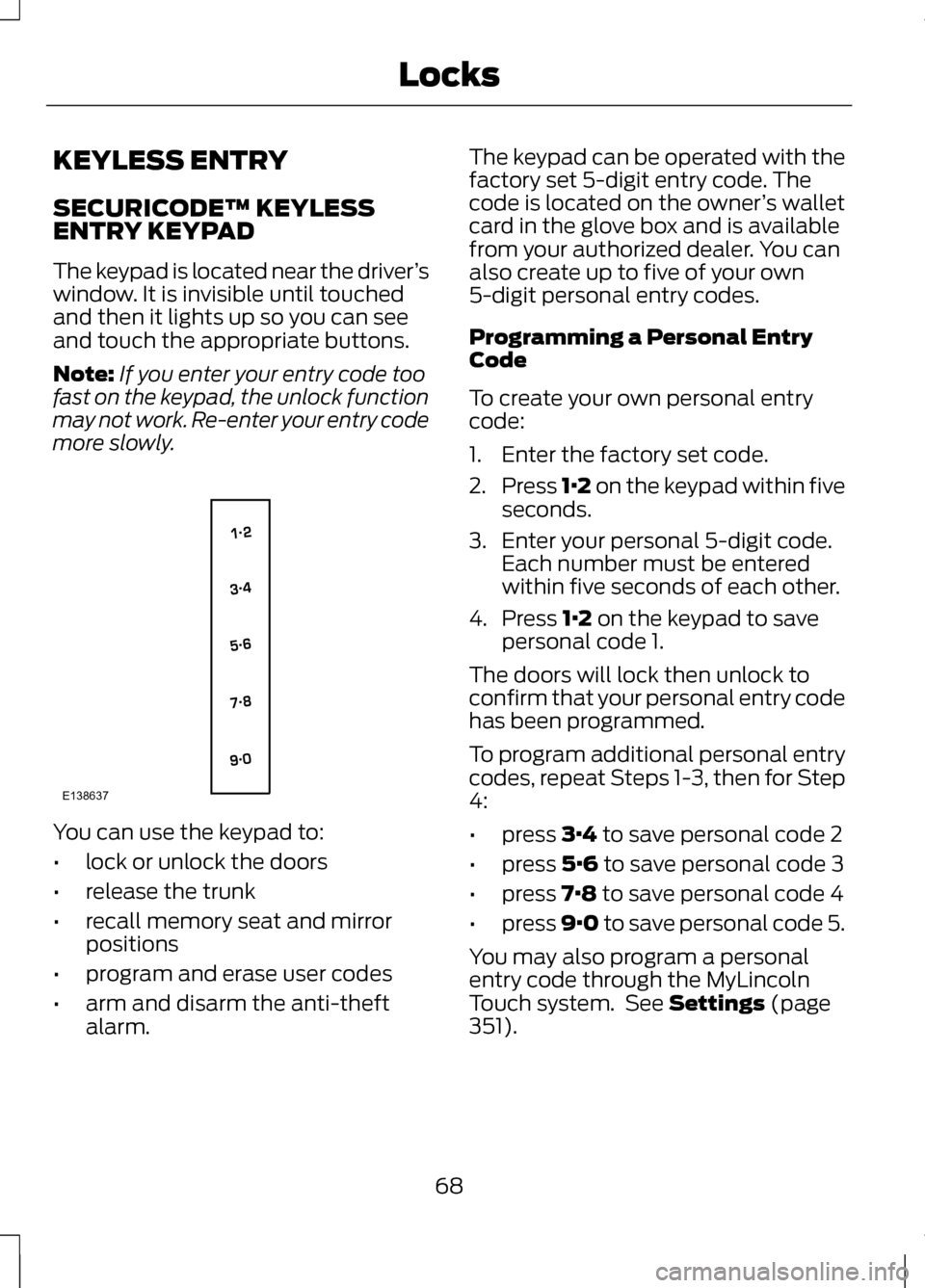
KEYLESS ENTRY
SECURICODE™ KEYLESS
ENTRY KEYPAD
The keypad is located near the driver
’s
window. It is invisible until touched
and then it lights up so you can see
and touch the appropriate buttons.
Note: If you enter your entry code too
fast on the keypad, the unlock function
may not work. Re-enter your entry code
more slowly. You can use the keypad to:
•
lock or unlock the doors
• release the trunk
• recall memory seat and mirror
positions
• program and erase user codes
• arm and disarm the anti-theft
alarm. The keypad can be operated with the
factory set 5-digit entry code. The
code is located on the owner
’s wallet
card in the glove box and is available
from your authorized dealer. You can
also create up to five of your own
5-digit personal entry codes.
Programming a Personal Entry
Code
To create your own personal entry
code:
1. Enter the factory set code.
2. Press 1·2 on the keypad within five
seconds.
3. Enter your personal 5-digit code. Each number must be entered
within five seconds of each other.
4. Press 1·2 on the keypad to save
personal code 1.
The doors will lock then unlock to
confirm that your personal entry code
has been programmed.
To program additional personal entry
codes, repeat Steps 1-3, then for Step
4:
• press
3·4 to save personal code 2
• press
5·6 to save personal code 3
• press
7·8 to save personal code 4
• press
9·0 to save personal code 5.
You may also program a personal
entry code through the MyLincoln
Touch system. See
Settings (page
351).
68
LocksE138637
Page 72 of 474

Tips:
•
Do not set a code that uses five of
the same number.
• Do not use five numbers in
sequential order.
• The factory set code will work even
if you have set your own personal
code.
Recalling Memory Positions
The programmed entry codes will
recall driver memory positions as
follows:
• Entry code 1 will recall driver 1
memory positions.
• Entry code 2 will recall driver 2
memory positions.
• Entry code 3 will recall driver 3
memory positions.
Note: Personal entry codes 4 and 5
will not recall memory positions.
Erasing a Personal Code
1. Enter the factory set 5-digit code.
2. Press and release 1·2 on the
keypad within five seconds.
3. Press and hold
1·2 for two
seconds. This must be done within
five seconds of completing Step 2.
All personal codes are now erased
and only the factory set 5–digit code
will work. Anti-Scan Feature
The keypad will go into an anti-scan
mode if the wrong code has been
entered seven times (35 consecutive
button presses). This mode disables
the keypad for one minute and the
keypad lamp will flash.
The anti-scan feature will turn off
after:
•
one minute of keypad inactivity
• pressing the unlock button on the
remote control
• the ignition is switched on
• unlocking the vehicle using
intelligent access.
Unlocking and Locking the Doors
To Unlock the Driver ’s Door
Enter the factory set 5-digit code or
your personal code. Each number
must be pressed within five seconds
of each other. The interior lamps will
illuminate.
Note: All doors will unlock if the all
door unlocking mode is enabled. See
Locking and Unlocking
(page 62).
To Unlock All Doors
Enter the factory set code or your
personal code, then press
3·4 within
five seconds.
To Lock All Doors
Press and hold
7·8 and 9·0 at the
same time (with the driver ’s door
closed). You do not need to enter the
keypad code first.
69
Locks