Page 344 of 474
Restricted Features
Pairing a Bluetooth phone
Cellular Phone
Adding phonebook contacts or uploading phone-
book contacts (from a USB)
List entries are limited for phone contacts and
recent phone call entries
Editing the keypad code
System Functionality
Enabling Valet Mode
Editing settings while the rear view camera or active
park assist are active
Editing wireless settings
Wi-Fi and Wireless
Editing the list of wireless networks
Playing video
Videos, Photos and
Graphics
Editing the screen's wallpaper or adding new wall-
paper
Composing text messages
Text Messages
Viewing received text messages
Editing preset text messages
Using the keyboard to enter a destination
Navigation
Demo navigation route
Adding or editing Address Book entries or Avoid
Areas
341
MyLincoln Touch
™
Page 355 of 474

Uploading Photos for Your Home
Screen Wallpaper
Note:
You cannot load photos directly
from your camera. You must access
the photos from either your USB mass
storage device or from an SD card.
Note: Photographs with extremely
large dimensions (i.e., 2048 x 1536)
may not be compatible and appear as
a blank (black) image on the display.
Your system allows you to upload and
view up to 32 photos. To access, press the Settings icon >
Display > Edit Wallpaper, then follow
the system prompts to upload your
photographs.
Only the photograph(s) which meets
the following conditions display:
•
Compatible file formats are as
follows: .jpg, .gif, .png, .bmp
• Each file must be 1.5 MB or less.
• Recommended dimensions: 800
x 384
Sound
Press the Settings icon > Sound, then
select from the following: Sound Settings
THX Deep Note Demo *
Bass
DSP*
Midrange
Occupancy Mode*
Treble
Speed Compensated Volume
Set Balance and Fade
* If equipped.
Vehicle
Press the Settings icon > Vehicle to
access settings for:
• Active Park Assist
• Ambient Lighting
• Vehicle Health Report
• Door Keypad Code
• Rear View Camera
• Enable Valet Mode. Active Park Assist (If Equipped)
When activated, your system displays
directions for you regarding the active
park assist process. See Active Park
Assist (page 186).
Ambient Lighting (If Equipped)
When activated, ambient lighting
illuminates footwells and cupholders
with a choice of colors. To access and
make adjustments:
352
MyLincoln Touch
™
Page 356 of 474

1. Press the Settings icon > Vehicle
> Ambient Lighting.
2. Touch the desired color.
3. Use the scroll bar to increase or decrease the intensity.
To turn the feature on or off, press the
power button.
Vehicle Health Report (If
Equipped)
Turn Automatic Reminders on and off
and set the mileage interval at which
you would like to receive the reports.
Press the ? for more information on
these selections.
When done making your selections,
press Run Vehicle Health Report Now
if you want your report.
Door Keypad Code (If Equipped)
To change the keypad code for your
keyless entry keypad system:
1. Press the Settings icon > Vehicle > Door Keypad Code.
2. Enter your current factory code, then, when prompted, enter your
new code.
Rear View Camera (If Equipped)
This menu allows you to access
settings for your rear view camera. Press the Settings icon > Vehicle >
Rear View Camera, then select from
the following settings:
•
Rear Camera Delay
• Visual Park Aid Alert
• Guidelines.
Enable Valet Mode
Note: If you are locked out and need
to reset the PIN, you can enter 3681
and the system unlocks.
Valet mode allows you to lock the
system so that none of your
information on the system can be
accessed until it is unlocked with the
correct PIN.
1. Press the Settings icon > Vehicle > Enable Valet Mode.
2. When prompted, enter a four-digit
PIN.
After you press Continue the system
is locked until the correct PIN is
entered again.
Settings
Access and adjust system settings,
voice features, as well as phone,
navigation and wireless settings.
Some of these settings can also be
accessed with regard to their specific
modes (i.e., phone and media).
System
Press the Settings icon > Settings >
System, then select from the
following:
353
MyLincoln Touch
™
Page 374 of 474

You Can
When You Select
Artist/Title/Team Alerts allows you to select
Artists, Titles and Teams that you would like the
system to alert you to when they are playing on
other channels. Press Edit Alerts to delete or turn
off alerts. You can also set all alerts to on or off.
When an alert appears on the screen, you can
choose to Tune to the channel, to Cancel the alert
or to Disable Alerts. If you are listening to a sporting
event, you can save your favorite teams so that the
system can alert you when they are playing on a
satellite radio channel.
Note:
SIRIUS does not support the Alert feature on
all channels. Ford Motor Company shall not be
responsible for Alert feature variation.
Electronic Serial Number (ESN) is required when
communicating with SIRIUS about your account.
Enter the desired satellite channel number using
the on-screen keypad.
Direct Tune
View a list of all available stations. Scroll and select
the desired station.
Browse
You can also lock or skip unwanted channels or view
the song and artist on other stations.
* SIRIUS does not support the Alert feature on all channels. Ford Motor Company
shall not be responsible for Alert feature variation.
SIRIUS Satellite Radio Information
Note: SIRIUS reserves the unrestricted
right to change, rearrange, add or
delete programming including
canceling, moving or adding particular
channels, and its prices, at any time,
with or without notice to you. Ford
Motor Company shall not be
responsible for any such programming
changes.
371
MyLincoln Touch
™
Page 407 of 474

Power: Touch to turn the climate control system on and off. When
the system is off, outside air is prevented from entering the vehicle.
A
Passenger settings:
Touch DUAL to switch passenger side
temperature controls on and off. Touch the + and - to adjust the
temperature. Touch the heated seat icon to control the heated seat
(if equipped). Touch the cooled seat icon to control the cooled seat
(if equipped).
B
Fan speed:
Touch + or - to increase or decrease the volume of air
circulated in your vehicle.
C
Recirculated air: Touch the button to switch between outside air and
recirculated air. When recirculated air is selected, the button illuminates
and the air currently in the passenger compartment recirculates. This
may reduce the time needed to cool the interior (when used with A/C)
and may also reduce unwanted odors from entering your vehicle.
Recirculated air may turn off automatically in all airflow modes except
MAX A/C to reduce the possibility of fogging.
D
MAX A/C:
Touch to switch on. Recirculated air is distributed through
the instrument panel air vents, air conditioning is automatically adjusted
to the highest speed and the temperature dial returns to the full cool
position. This re-cooling of the interior is more economical and efficient.
E
A/C:
Touch to turn air conditioning on or off. To improve air
conditioning when starting your vehicle, drive with the windows slightly
open for two to three minutes. Use A/C with recirculated air to improve
cooling performance and efficiency.
F
AUTO:
Touch to turn on fully automatic operation. Select the desired
temperature using the temperature control. The system automatically
adjusts fan speed, air distribution, A/C operation, and outside or
recirculated air, to heat or cool the vehicle to maintain the selected
temperature.
G
Rear defroster:
Touch to turn the rear window defroster and heated
mirrors (if equipped).
H
404
MyLincoln Touch
™
Page 408 of 474

Manual airflow distribution controls:Floor/Defrost: Distributes
air through the windshield defroster vents, demister vents, floor vents
and rear seat floor vents, and provides outside air to reduce window
fogging. Panel:
Distributes air through the instrument panel vents.
Panel/Floor: Distributes air through the instrument panel vents,
demister vents, floor vents and rear seat floor vents. Floor: Distributes
air through the demister vents, floor vents and rear seat floor vents.
Defrost:
Touch to clear the windshield of fog and thin ice. Touch again
to return to the previous airflow selection. When switched on, defrost
distributes outside air through the windshield defroster vents and
demister vents to reduce window fogging.
I
Driver settings:
Depending on your vehicle and option package, you
may have the following features: Touch the + and - to adjust the
temperature. Touch the heated seat icon to control the heated seat
(if equipped). Touch the cooled seat icon to control the cooled seat
(if equipped). Touch MyTemp to select your previously pre-set
temperature setpoint. Touch and hold MyTemp store a new pre-set
for temperature setpoint. Touch the heated steering wheel icon (if
equipped) to warm the steering wheel.
J
Note: If your vehicle is equipped with
a wood-trimmed steering wheel, it
does not heat between the 10 o'clock
and 2 o'clock positions. Climate Control Voice
Commands Press the voice button on the
steering wheel controls.
When prompted, say any of
the following commands: Climate Control Commands
"Climate automatic"
"Climate my temperature" "Climate off""Climate on"
"Climate temperature <15.5-29.5> degrees" "Climate temperature <60-85> degrees" "Help"
405
MyLincoln Touch
™E142599
Page 409 of 474
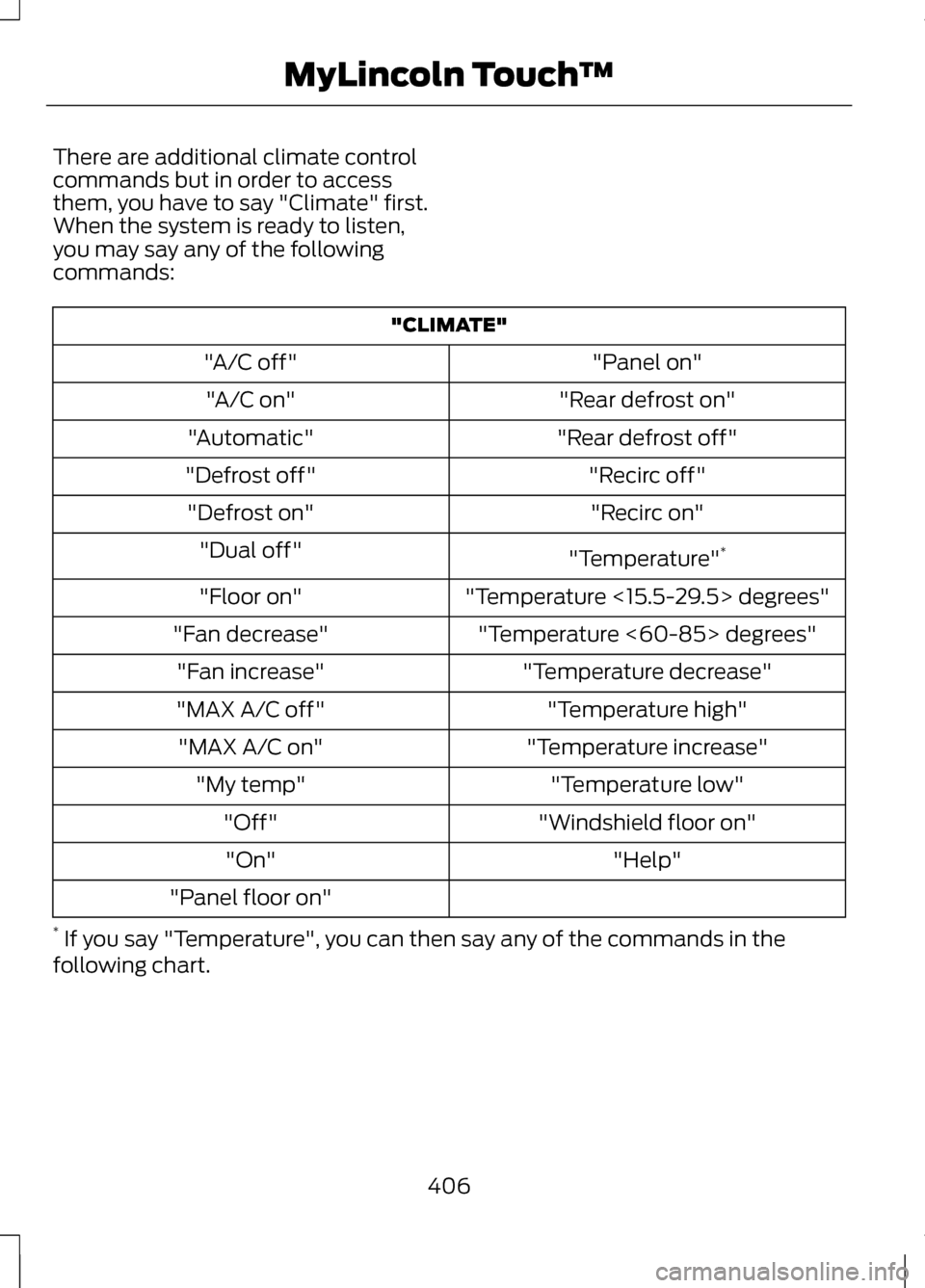
There are additional climate control
commands but in order to access
them, you have to say "Climate" first.
When the system is ready to listen,
you may say any of the following
commands:
"CLIMATE"
"Panel on"
"A/C off"
"Rear defrost on"
"A/C on"
"Rear defrost off"
"Automatic"
"Recirc off"
"Defrost off"
"Recirc on"
"Defrost on"
"Temperature"*
"Dual off"
"Temperature <15.5-29.5> degrees"
"Floor on"
"Temperature <60-85> degrees"
"Fan decrease"
"Temperature decrease"
"Fan increase"
"Temperature high"
"MAX A/C off"
"Temperature increase"
"MAX A/C on"
"Temperature low"
"My temp"
"Windshield floor on"
"Off"
"Help"
"On"
"Panel floor on"
* If you say "Temperature", you can then say any of the commands in the
following chart.
406
MyLincoln Touch
™
Page 448 of 474
When to expect the OIL CHANGE REQUIRED message
Vehicle use and example
Miles (kilometers)
Extended hot or cold operationExtreme
3000-4999
(4000-7999) Maximum load or towing
Extreme hot or cold operationAt every oil change interval as indicated by the information display
*
Change engine oil and filter. **
Rotate the tires.
Perform a multi-point inspection (recommended).
Inspect the automatic transmission fluid level. Consult your dealer for
requirements.
Inspect the brake pads, shoes, rotors, drums, brake linings, hoses and parking
brake.
Inspect the cabin air filter.
Inspect the engine cooling system strength and hoses.
Inspect the exhaust system and heat shields.
Inspect the rear axle and U-joints. Lubricate any areas with grease fittings
(AWD vehicles).
Inspect the half-shaft boots.
Inspect the steering linkage, ball joints, suspension, tire-rod ends, driveshaft
and U-joints. Lubricate any areas with grease fittings (AWD vehicles).
445
Scheduled Maintenance