Page 107 of 475
Display Mode
—
—
Instantaneous
Fuel
Engage: Split Power
+ Avg Fuel Economy
+ Battery Gauge + Fuel Gauge Apply to all
screens?
Regen Active
Battery Display
Charge Assist Yes / No
Charge Level
Help —
—
Help
—
—
Instantaneous
Fuel
Empower: Power
(with engine on/off threshold) + AvgFuel Economy +
Battery Gauge + Fuel Gauge Apply to all
screens?Yes / No
Regen Active
Battery Display
Charge AssistCharge Level Help —
—
Help
Vehicle Range
Vehicle Range
Change MyView
MyView + Battery
Gauge + Fuel Gauge Avg Fuel
Avg Fuel
Inst. Fuel
Power
Coolant Temp
Split Power
Accessory Power
Power +
Threshold
Trip 1
Tach rpm x 1000
Trip 2
Accessory Power
Fuel History
Trip 1
Coach
Trip 2
Average Speed
Fuel History
105
MKZ (CC9) Information Displays
Page 108 of 475
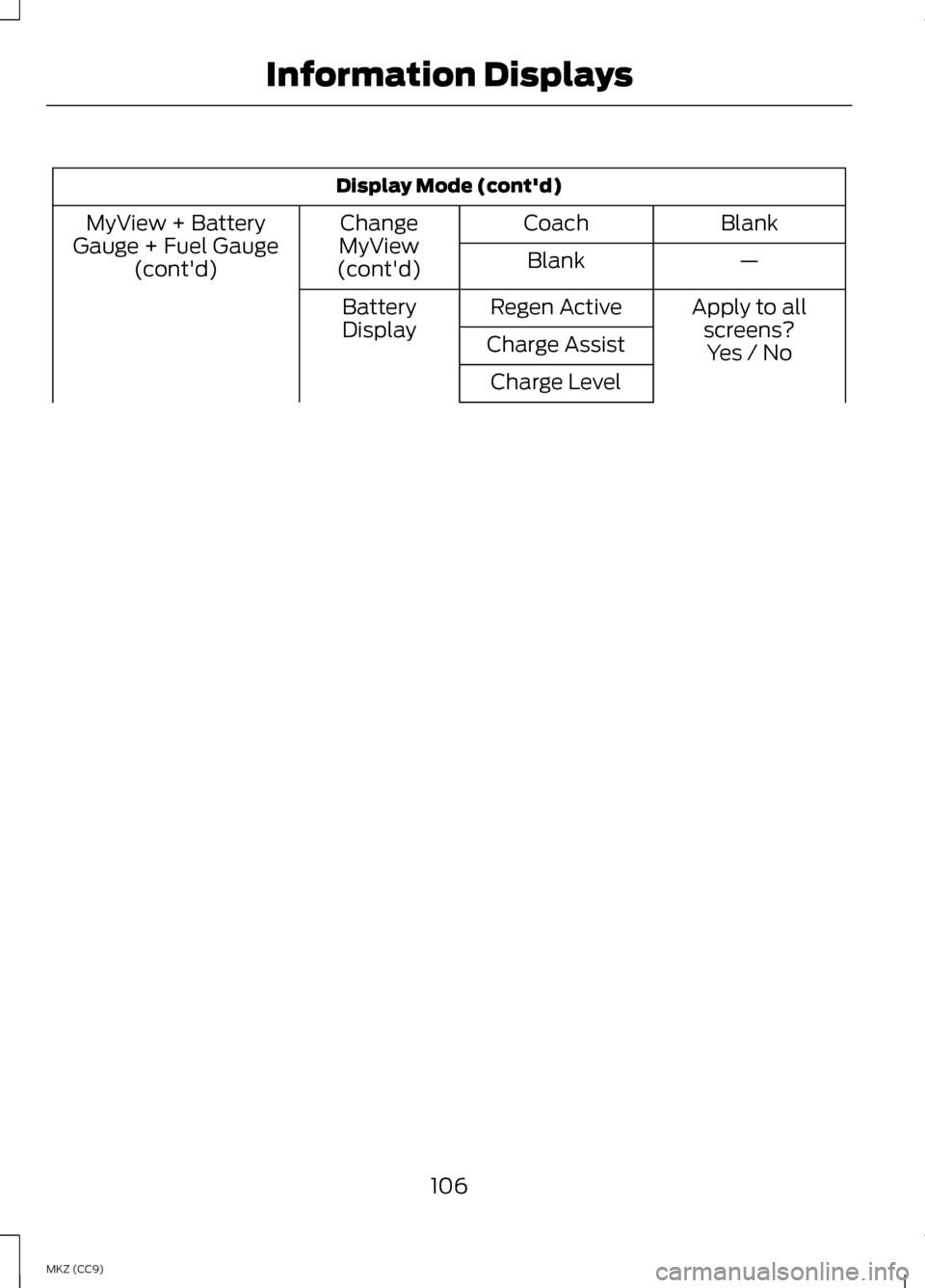
Display Mode (cont'd)
Blank
Coach
Change
MyView
(cont'd)
MyView + Battery
Gauge + Fuel Gauge (cont'd) —
Blank
Apply to allscreens?
Regen Active
Battery
Display Charge Assist Yes / No
Charge Level
106
MKZ (CC9) Information Displays
Page 110 of 475

•
Vehicle Range — Indicates the estimated distance the vehicle will travel
with the energy currently available. For Hybrid, the vehicle range estimate
is based on the fuel remaining in the gasoline tank. For Energi, the total
estimated range equals the range available in Hybrid Mode fueled by gasoline,
plus the electric range available in Plug-in Power Mode. Changes in driving
pattern may cause the values to vary.
• Inform
— Inform shows the fuel level, battery display and average fuel
economy, with options available for the Battery Display and an Instantaneous
Fuel Economy gauge. When the vehicle is operating on battery power only
with the engine off, EV is displayed.
• Enlighten
— Enlighten displays power demand in addition to the typical
information and options from Inform. The Instantaneous Fuel Economy
gauge will be displayed by default. When the vehicle is operating on battery
power only with the engine off, EV is displayed and the gauge fill is shown
in blue. When both the engine and high voltage battery are providing power
the gauge fill is white.
• Engage
— Engage replaces the power demand gauge from Enlighten with
separate gauges for engine power and high voltage battery power. The
engine power gauge fill is white and the high voltage battery power gauge
fill is blue. When the vehicle is operating on battery power only with the
engine off, EV is displayed.
• Empower — Empower adds an engine on/off threshold to the power demand
gauge from Enlighten. The threshold is shown as a blue double outline. The
gauge is designed to show you how close you are to the gasoline engine
on/off threshold and how much power you are requesting based on how far
you press the accelerator pedal.
When power demand is below the threshold the vehicle is operating on battery
power only with the engine off, EV is displayed and the gauge fill is shown in
blue.
When power demand exceeds the threshold both the engine and the high
voltage battery provide power and the gauge fill is white.
When power demand surpasses the amber indicator, this level of demand and
associated fuel economy are shown in amber.
MyView
— You can choose what to display in this view. Selecting Change
MyView in the Options menu allows you to scroll through two columns of content
choices.
108
MKZ (CC9) Information Displays
Page 111 of 475

•
Accessory Power — Indicates electrical power demands from your vehicle ’s
accessory systems. Accessories use power but do not contribute to propelling
the vehicle. The gauge separately displays power demand in kilowatts (kW)
for climate and other accessories.
Climate includes the power being used by high voltage climate control
components such as the electric A/C compressor and the electric heater (Energi
vehicles only)
Other includes all power being used by the low voltage accessories (cabin fans,
headlights, heated seats, etc.).
• Coolant Temp – Indicates engine coolant temperature. At normal operating
temperature, the level indicator will be white and will be in the normal range
(between H and C). If the engine coolant temperature exceeds the normal
range, the level indicator will change to red to indicate that the engine is
overheating. Stop the vehicle as soon as safely possible, turn off the vehicle
and let the engine cool.
The thermometer indicator next to the gauge will illuminate in blue or white to
indicate the following:
• Blue thermometer - This indicates that the hybrid system is not warm enough
to allow EV operation. The gasoline engine will typically run continuously
when the indicator is blue.
Note: During silent key start mode, the thermometer indicator will be blue, but
the gasoline engine will not run. This is the result of the vehicle computer allowing
the engine to be cooler during the silent key start period. This is normal operation
and does not indicate a problem with your vehicle. After the first engine start the
indicator will turn white when the gasoline engine is warm enough to turn off.
• White thermometer - This indicates that the hybrid system is warm enough
to allow EV operation. If the vehicle operates on battery power long enough,
it is possible that the gasoline engine may need to run to keep the system
warm. In this case, the thermometer indicator will revert back to blue.
• Tach rpm x 1000 — When the gasoline engine is running, the tachometer
gauge displays the engine speed in revolutions per minute (RPM). When the
vehicle is operating on battery power only with the engine off, EV is displayed
and the tachometer is greyed out.
Note: The trip data, and average fuel economy cannot be reset in MyView.
109
MKZ (CC9) Information Displays