2013 LINCOLN MKZ HYBRID cruise control
[x] Cancel search: cruise controlPage 217 of 475

Changing the Set Speed
•
Accelerate or brake to the desired
speed, then press and release
SET+.
• Press and hold SET+ or SET- until
the desired set speed shows on the
information display. The vehicle
speed will gradually change to the
selected speed.
• Press and release
SET+ or SET-.
The set speed will change in
approximately 1 mph (2 km/h)
increments.
The system may apply the brakes to
slow the vehicle to the new set speed.
The set speed will display
continuously in the information
display while the system is active.
Resuming the Set Speed
Note: Only use resume if you are
aware of the set speed and intend to
return to it.
Press and release
RES. The vehicle
will return to the previously set speed.
The set speed will display
continuously in the information
display while the system is active.
Low Speed Automatic
Cancellation
The system is not functional at vehicle
speeds below 12 mph (20 km/h). An
audible alarm will sound and the
automatic braking releases if the
vehicle drops below this speed. Hilly Condition Usage
Note:
An audible alarm will sound and
the system will shut down if it is
applying brakes for an extended period
of time. This allows the brakes to cool
down. The system will function
normally again when the brakes have
cooled down.
You should select a lower gear
position when the system is active in
situations such as prolonged downhill
driving on steep grades, for example
in mountainous areas. The system
needs additional engine braking in
these situations to reduce the load on
the vehicle ’s regular brake system to
prevent them from overheating.
Switching the System Off
Note: The set speed memory erases
when you switch off the system.
Press and release
OFF or turn off the
ignition.
Detection Issues
The radar sensor has a limited field of
vision. It may not detect vehicles at all
or detect a vehicle later than expected
in some situations. The lead vehicle
graphic will not illuminate if the
system does not detect a vehicle in
front of you.
215
MKZ (CC9) Cruise Control
Page 218 of 475
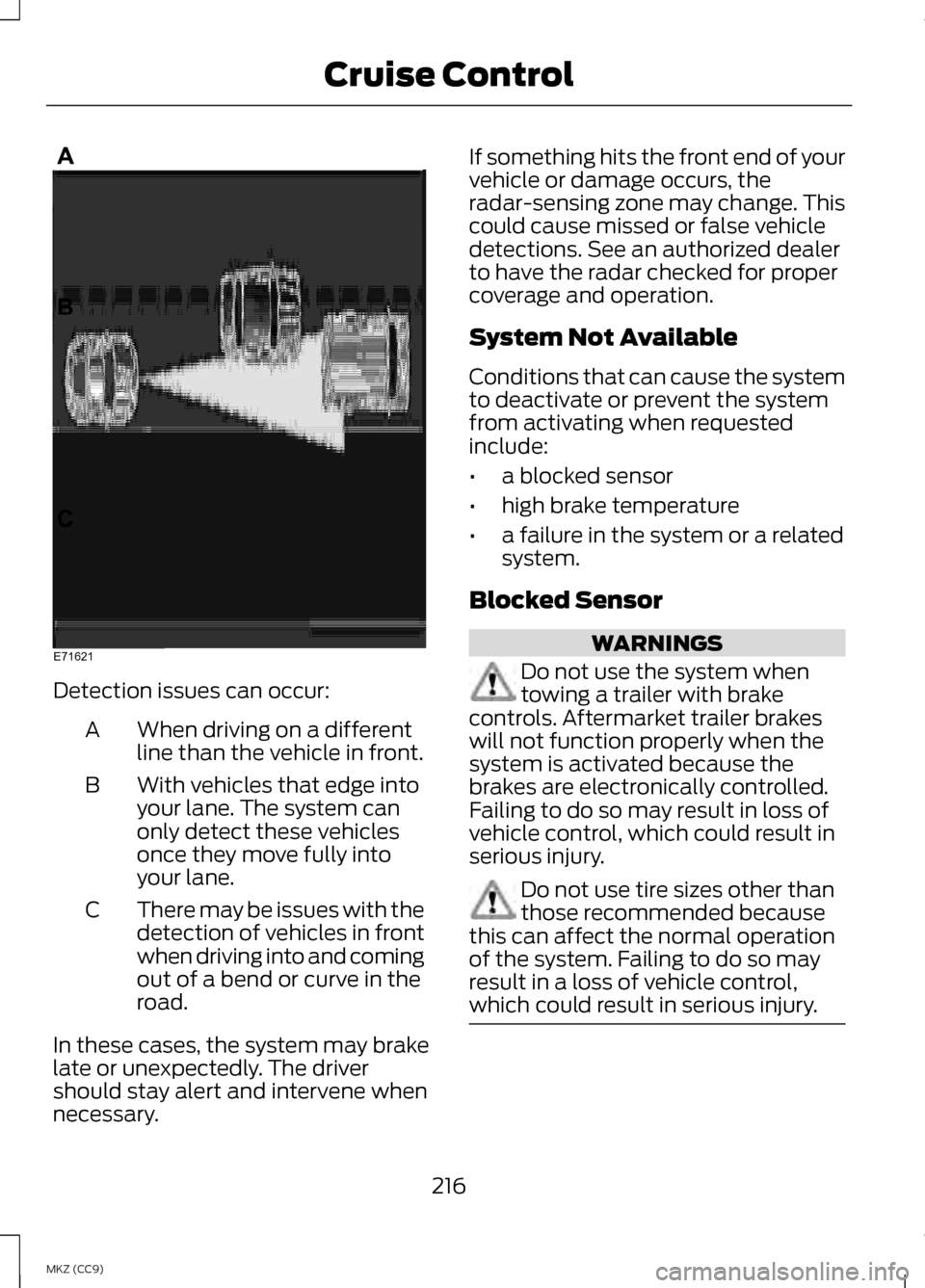
Detection issues can occur:
When driving on a different
line than the vehicle in front.
A
With vehicles that edge into
your lane. The system can
only detect these vehicles
once they move fully into
your lane.
B
There may be issues with the
detection of vehicles in front
when driving into and coming
out of a bend or curve in the
road.
C
In these cases, the system may brake
late or unexpectedly. The driver
should stay alert and intervene when
necessary. If something hits the front end of your
vehicle or damage occurs, the
radar-sensing zone may change. This
could cause missed or false vehicle
detections. See an authorized dealer
to have the radar checked for proper
coverage and operation.
System Not Available
Conditions that can cause the system
to deactivate or prevent the system
from activating when requested
include:
•
a blocked sensor
• high brake temperature
• a failure in the system or a related
system.
Blocked Sensor WARNINGS
Do not use the system when
towing a trailer with brake
controls. Aftermarket trailer brakes
will not function properly when the
system is activated because the
brakes are electronically controlled.
Failing to do so may result in loss of
vehicle control, which could result in
serious injury. Do not use tire sizes other than
those recommended because
this can affect the normal operation
of the system. Failing to do so may
result in a loss of vehicle control,
which could result in serious injury. 216
MKZ (CC9) Cruise ControlE71621
Page 219 of 475

A message displays if something
obstructs the radar signals from the
sensor. The sensor is located behind
a fascia cover near the driver side of
the lower grille. The system cannot
detect a vehicle ahead and will not
function when something obstructs
the radar signals. The following table
lists possible causes and actions for
this message displaying.
Action
Cause
Clean the grille surface in front of the
radar or remove the object causing the obstruction.
The surface of the radar in the grille is
dirty or obstructed in some way.
Wait a short time. It may take several
minutes for the radar to detect that it is no longer obstructed.
The surface of the radar in the grille is
clean but the message remains in the display.
Do not use the system in these condi-tions because it may not detect any vehicles ahead.
Heavy rain or snow is interfering with
the radar signals.
Do not use the system in these condi-tions because it may not detect any vehicles ahead.
Swirling water, or snow or ice on the
surface of the road may interfere with the radar signals.
Wait a short time or switch to normalcruise control.
You are in a desert or remote area with
no other vehicles and no roadside objects.
Due to the nature of radar technology,
it is possible to get a blockage warning
and not be blocked. This can happen,
for example, when driving in sparse
rural or desert environments. A false
blocked condition will either self clear
or clear after a key cycle. Switching to Normal Cruise
Control WARNING
Normal cruise control will not
brake due to slower vehicles.
Always be aware of which mode is
selected and apply the brakes when
necessary. 217
MKZ (CC9) Cruise ControlE145632
Page 220 of 475

You can manually change from
adaptive cruise control to normal
cruise control through the information
display.
The cruise control indicator
light replaces the adaptive
cruise control indicator light
if you select normal cruise control. The
gap setting will not display, the
system will not automatically respond
to lead vehicles and automatic
braking will activate. The system
defaults to adaptive cruise control
when you start the vehicle.
ECO Cruise Control
This feature saves vehicle energy by
relaxing acceleration compared to
standard cruise control. For example,
your vehicle may temporarily lose
speed when going uphill. ECO will
appear in the information display
when you activate ECO cruise control.
It can be switched on or off in the
information display. See
General
Information (page 103).
218
MKZ (CC9) Cruise ControlE71340
Page 224 of 475

Aid only – Provides an assistance
steering torque input toward the lane
center when an unintended lane
departure is detected.
AlertA
AidB
Alert + Aid – Provides an assistance
steering torque input toward the lane
center. If the vehicle continues drifting
out of the lane, a steering wheel
vibration is provided.
Note: The alert and aid diagrams are
meant to illustrate general zone
coverage. They are not intended to
provide the exact zone parameters.
Intensity: This setting affects the
intensity of the steering wheel
vibration used for the alert and alert
+ aid modes. This setting does not
impact the aid mode.
• Low
• Medium
• High System Display
When the system is turned on, an
overhead graphic of a vehicle with
lane markings will be displayed in the
information display. If the aid mode is
selected when the system is turned
on, a separate white icon will also
appear in the instrument cluster or in
some vehicles arrows will be
displayed with the lane markings.
When the system is turned off, the
lane marking graphics will not be
displayed.
Note:
The overhead vehicle graphic
may still be displayed if adaptive cruise
control is enabled.
While the system is on, the color of
the lane markings will change to
indicate the system status.
Gray: Indicates that the system is
temporarily unable to provide a
warning or intervention on the
indicated side(s). This may be
because:
• the vehicle is under the activation
speed
• the turn indicator is active
222
MKZ (CC9) Driving AidsA
B
A
B
E165517 E151660
Page 270 of 475

Protected components
Fuse amp rating
Fuse or relay
number
Run/start electronic power assist
steering
10A
1
19
Run/start lighting
10A 1
20
Run/start hybrid powertrain control
module
15A
1
21
Not used
-
22
Run/start: Blind spot information
system, Rear view camera, Adaptive
cruise control, Heads-up display,
Shifter
15A
1
23
Not used
-
24
Run/start anti-lock brake system
10A 2
25
Run/start powertrain control module
10A 2
26
Not used
-
27
Not used
-
28
Hybrid content vehicle power 5
15A 1
29
Not used
-
30
Not used
-
31
Cooling fan relay (Hybrid)
-
32
Not used
-
33
Not used
-
34
Not used (spare)
15A 2
35
Not used (spare)
15A 2
36
Not used
-
37
Vacuum pump #1 relay
-
38
268
MKZ (CC9) Fuses
Page 277 of 475

Protected components
Fuse amp rating
Fuse or relay
number
Passenger airbag disabled indicator,
Transmission range
5A
2
19
Adaptive headlamps
5A 2
20
Humidity and in-car temperature, Rear
climate seats
5A
2
21
Occupant classification sensor
5A 2
22
Delayed accessory (power inverter
logic, moonroof logic)
10A
1
23
Central lock/unlock
30A 1
24
Driver door (window, mirror)
30A 1
25
Front passenger door (window, mirror)
30A 1
26
Moonroof
30A 1
27
THX amplifier
20A 1
28
Rear driver side door (window)
30A 1
29
Rear passenger side door (window)
30A 1
30
Not used (spare)
15A 1
31
GPS, Voice control, Display, Adaptive
cruise control, Radio frequency
receiver
10A
1
32
Radio, Active noise control
20A 1
33
Run/start (fuse #19, 20, 21, 22, 35, 36,
37, circuit breaker)
30A
1
34
Restraints control module
5A 1
35
275
MKZ (CC9) Fuses
Page 463 of 475

A
A/C
See: Climate Control...............................138
About This Manual..................................7
Protecting the Environment......................7
ABS See: Brakes.................................................. 191
ABS driving hints See: Hints on Driving With Anti-Lock
Brakes....................................................... 192
Accessories...........................................338 Exterior style.............................................. 338
Interior style............................................... 338
Lifestyle....................................................... 338
Peace of mind........................................... 338
Accessories See: Replacement Parts
Recommendation...................................12
ACC See: Using Adaptive Cruise Control.....211
Active Park Assist................................201 Automatic Steering into Parking
Space....................................................... 203
Deactivating the Park Assist Feature.................................................... 204
Troubleshooting the System..............204
Using Active Park Assist........................202
Adaptive Headlamps
..........................86
Adjusting the Headlamps................291
Horizontal Aim Adjustment.................292
Vertical Aim Adjustment.......................291
Adjusting the Steering Wheel...........75 Power Tilt and Telescope Steering
Column....................................................... 75
AFS See: Adaptive Headlamps.....................86
Airbag Disposal.......................................51
Air Conditioning See: Climate Control...............................138
Alarm See: Anti-Theft Alarm...............................73 Anti-Theft Alarm...................................73
Arming the Alarm.......................................74
Disarming the Alarm.................................74
Appendices..........................................426
Audible Warnings and Indicators.............................................102
Headlamps On Warning Chime..........102
Key in Ignition Warning Chime .............102
Keyless Warning Alert.............................102
Parking Brake On Warning Chime....................................................... 102
Audio Control..........................................76 Seek, Next or Previous..............................76
Audio System
.......................................134
General Information................................134
Audio unit - Vehicles With: Premium AM/FM/CD..........................................135
Autolamps...............................................82
Automatic Climate Control
.............138
Automatic High Beam Control........84
Activating the System..............................85
Manually Overriding the System..........85
Automatic Transmission
..................185
Brake-Shift Interlock Override............188
If Your Vehicle Gets Stuck In Mud or
Snow......................................................... 189
Push Button Shift Transmission.........185
Automatic Transmission Fluid Check...................................................286
Autowipers..............................................79
Auxiliary Power Points......................158 110 Volt AC Power Point.........................158
12 Volt DC Power Point...........................158
Locations..................................................... 158
B
Blind Spot Monitor.............................225 Blind Spot Information System
(BLIS®) with Cross Traffic
Alert.......................................................... 225
461
MKZ Hybrid (CC9) Index