Page 193 of 1168

Features of your vehicle
114
4
Turn signals and lane change sig- nals
The ignition switch must be on for the
turn signals to function. To turn on the
turn signals, move the lever up or down
(A). Green arrow indicators on the instru-
ment panel indicate which turn signal is
operating.
They will self-cancel after a turn is com-
pleted. If the indicator continues to flash
after a turn, manually return the lever tothe OFF position.
To signal a lane change, move the turn
signal lever slightly and hold it in position
(B). The lever will return to the OFF posi-tion when released. If an indicator stays on and does not
flash or if it flashes abnormally, one of the
turn signal bulbs may be burned out andwill require replacement.
One-touch lane change function
(if equipped)
To activate an one-touch lane change
function, move the turn signal lever
slightly and then release it. The lane
change signals will blink 3 times.
You can inactivate one-touch lane
change function in “Auto triple turn” of
“User setting”. Refer to “User setting” inchapter 4.
✽✽ NOTICE
If an indicator flash is abnormally quick
or slow, bulb may be burned out or have
a poor electrical connection in the cir-cuit.OED040804
JD eng 4a(~168).qxp 7/17/2012 10:23 AM Page 114
Page 195 of 1168

Features of your vehicle
116
4
Headlight leveling device (if equipped)
Manual type
To adjust the headlight beam level
according to the number of the passen-
gers and the loading weight in the lug-
gage area, turn the beam leveling switch. The higher the number of the switch is
positioned, the lower the headlight beam
level. Always keep the headlight beam at
the proper leveling position, or headlights
may dazzle other road users.
Listed below are the examples of proper
switch settings. For loading conditions
other than those listed below, adjust the
switch position so that the beam level
may be the nearest as the conditionobtained according to the list.
Automatic type
It automatically adjusts the headlight
beam level according to the number of
passengers and loading weight in theluggage area.
And it offers proper headlight beam
under various conditions.
OJD042049
Loading condition Switch position
Driver only 0
Driver + Front passenger 0 Full passengers
(including driver) 1
Full passengers (including
driver) + Maximum permis-
sible loading 2
Driver + Maximum permis-
sible loading 3
WARNING
If it does not work properly even
though your car is inclined back-
ward according to passenger's
posture, or the headlight beam is
irradiated to the high or low posi-
tion, we recommend that the sys-
tem be inspected by an authorized
Kia dealer. Do not attempt to inspect or
replace the wiring yourself.
JD eng 4a(~168).qxp 7/17/2012 10:23 AM Page 116
Page 196 of 1168
4 117
Features of your vehicle
AFLS (Adaptive Front Lighting System) (if equipped)
Adaptive front lighting system uses the
steering angle and vehicle speed, to
keep your field of vision wide by swiveling
and leveling the headlamp.
Change the switch to the AUTO position
when the engine is running. The adaptive
front lighting system will operate when
the headlamp is ON. To turn off the
AFLS, change the switch to other posi-
tions. After turning the AFLS off, head-
lamp swiveling no longer occurs, but lev-
eling operates continuously.If the AFLS malfunction indicator comes
on, the AFLS is not working properly.
Drive to the nearest safe location and
restart the engine. If the indicator contin-
uously remains on, we recommend that
the system be checked by an authorized
Kia dealer.
OJD042090OYN049201
JD eng 4a(~168).qxp 7/17/2012 10:23 AM Page 117
Page 197 of 1168

Features of your vehicle
118
4
A : Wiper speed control (front)
· 2 – High wiper speed
· 1 – Low wiper speed
· --- – Intermittent wipe
· AUTO* – Automatic control wipe· O – Off
· – Single wipe
B : Intermittent control wipe time adjustment
C : Wash with brief wipes (front)
D : Rear wiper/washer control · – Continuous wipe
· --- – Intermittent wipe
· O – Off
E : Wash with brief wipes (rear)
* : if equipped Windshield wipers (front)
Operates as follows when the ignition
switch is turned ON.
: For a single wiping cycle, move thelever to this position and release it.
The wipers will operate continuously if
the lever is held in this position.
O : Wiper is not in operation
--- : Wiper operates intermittently at the same wiping intervals. Use this mode
in light rain or mist. To vary the speed
setting, turn the speed control knob.
1 : Normal wiper speed
2 : Fast wiper speed
✽✽ NOTICE
If there is heavy accumulation of snow
or ice on the windshield, defrost the
windshield for about 10 minutes, or
until the snow and/or ice is removed
before using the windshield wipers to
ensure proper operation.
WIPERS AND WASHERS
OXM049230L/OAM049048L
■
■
Front
■
■ Rear (if equipped)
JD eng 4a(~168).qxp 7/17/2012 10:23 AM Page 118
Page 198 of 1168

4 119
Features of your vehicle
AUTO (Automatic) control (if equipped)
The rain sensor located on the upper end of the windshield glass senses the
amount of rainfall and controls the wiping
cycle for the proper interval. The more it
rains, the faster the wiper operates. When
the rain stops, the wiper stops. To vary the speed setting, turn the speedcontrol knob (1).
If the wiper switch is set in AUTO mode
when the ignition switch is ON, the wiper
will operate once to perform a self-check
of the system. Set the wiper to off posi-
tion when the wiper is not in use.
CAUTION
When the ignition switch is ON and
the windshield wiper switch isplaced in the AUTO mode, use cau-
tion in the following situations toavoid any injury to the hands orother parts of the body:
Do not touch the upper end of the windshield glass facing the rain
sensor.
Do not wipe the upper end of the windshield glass with a damp orwet cloth.
Do not put pressure on the wind- shield glass.
OEL049900
Rain sensor
CAUTION
When washing the vehicle, set thewiper switch in the off position to
stop the auto wiper operation.
The wiper may operate and be dam-aged if the switch is set in the AUTOmode while washing the vehicle.
Do not remove the sensor coverlocated on the upper end of the pas- senger side windshield glass.Damage to system parts could occur and may not be covered by
your vehicle warranty.
When starting the vehicle in winter,set the wiper switch in the off posi-tion. Otherwise, wipers may operate
and ice may damage the windshieldwiper blades. Always remove all snow and ice and defrost the wind-shield properly prior to operating
the windshield wipers.
JD eng 4a(~168).qxp 7/17/2012 10:23 AM Page 119
Page 201 of 1168
Features of your vehicle
122
4
Interior lamp AUTO cut
When all entrances are closed, if you
lock the vehicle by using the transmit-
ter or the smart key, all interior lamp
will be off after a few seconds.
If you do not operate anything in the vehicle after turning off the engine, the
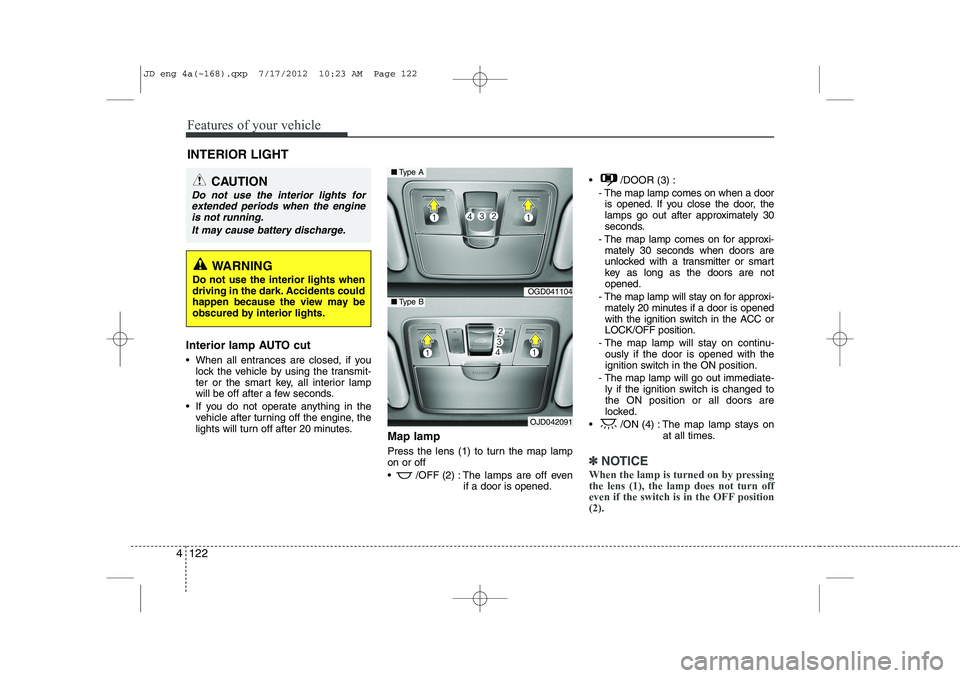
lights will turn off after 20 minutes. Map lamp
Press the lens (1) to turn the map lamp on or off
/OFF (2) : The lamps are off even
if a door is opened. /DOOR (3) :
- The map lamp comes on when a dooris opened. If you close the door, the
lamps go out after approximately 30
seconds.
- The map lamp comes on for approxi- mately 30 seconds when doors are
unlocked with a transmitter or smart
key as long as the doors are notopened.
- The map lamp will stay on for approxi- mately 20 minutes if a door is opened
with the ignition switch in the ACC orLOCK/OFF position.
- The map lamp will stay on continu- ously if the door is opened with the
ignition switch in the ON position.
- The map lamp will go out immediate- ly if the ignition switch is changed tothe ON position or all doors are
locked.
/ON (4) : The map lamp stays on at all times.
✽✽NOTICE
When the lamp is turned on by pressing the lens (1), the lamp does not turn off
even if the switch is in the OFF position(2).
INTERIOR LIGHT
CAUTION
Do not use the interior lights for extended periods when the engine
is not running.
It may cause battery discharge.
WARNING
Do not use the interior lights when
driving in the dark. Accidents could
happen because the view may be
obscured by interior lights.
OGD041104
OJD042091
■ Type A
■Type B
JD eng 4a(~168).qxp 7/17/2012 10:23 AM Page 122
Page 204 of 1168
4 125
Features of your vehicle
Headlamp welcome
When the headlight(light switch in the
headlight or AUTO position) is on and all
doors (and tailgate) are locked andclosed, the headlight, position light and
tail light will come on for 15 seconds if
any of the below is performed.
Without smart key system- When the door unlock button is pressed on the transmitter.
With the smart key system - When the door unlock button is pressed on the smart key.
At this time, if you press the door lock but-
ton (on the transmitter or smart key), the
lights will turn off immediately. Interior light
When the interior light switch is in the DOOR position and all doors (and tail-
gate) are locked and closed, the room
lamp will come on for 30 seconds if any
of the below is performed.
Without smart key system
- When the door unlock button is pressed on the transmitter.
With the smart key system - When the door unlock button is pressed on the smart key.
- When the button of the outside door handle is pressed.
At this time, if you press the door lock but-
ton, the lamps will turn off immediately. Puddle lamp (if equipped)
When all doors are locked and closed,
the puddle lamp will come on for 15 sec-
onds if any of the below is performed.
Without smart key system
- When the door unlock button is pressed on the transmitter.
With the smart key system - When the door unlock button is pressed on the smart key.
- When the button of the outside door handle is pressed.
- When the vehicle is approached with the smart key in possession.
At this time, if you press the door lock but-
ton, the lamps will turn off immediately.
WELCOME SYSTEM (IF EQUIPPED)
JD eng 4a(~168).qxp 7/17/2012 10:24 AM Page 125
Page 215 of 1168
Features of your vehicle
136
4
AUTOMATIC CLIMATE CONTROL SYSTEM (IF EQUIPPED)
OJD042109
1. Driver's temperature control knob
2. AUTO (automatic control) button
3. Fan speed control button (Higher speed)
4. Fan speed control button (Lower speed)
5. Climate control display
6. Air conditioning button
7. Air intake control button 8. Passenger's temperature control knob
9. Dual temperature control selection button
10. OFF button
11. Front windshield defroster button
12. Mode selection button
13. Rear window defroster button
JD eng 4a(~168).qxp 7/17/2012 10:25 AM Page 136

