2013 Hyundai Equus eas
[x] Cancel search: easPage 2 of 479
F2
Your Hyundai should not be modified in any way. Such modifications may adversely affect the per-
formance, safety or durability of your Hyundai and may, in addition, violate conditions of the limited
warranties covering the vehicle. Certain modifications may also be in violation of regulations estab-
lished by the Department of Transportation and other government agencies in your country.
Your vehicle is equipped with electronic fuel injection and other electronic components. It is possible
for an improperly installed/adjusted two-way radio or cellular telephone to adversely affect electronic
systems. For this reason, we recommend that you carefully follow the radio manufacturer's instruc-
tions or consult your Hyundai dealer for precautionary measures or special instructions if you choose
to install one of these devices.
CAUTION: MODIFICATIONS TO YOUR HYUNDAI
TWO-WAY RADIO OR CELLULAR TELEPHONE INSTALLATION
Page 4 of 479

F4FOREWORD
Thank you for choosing Hyundai. We are pleased to welcome you to the growing number of discriminating people who drive
Hyundais. The advanced engineering and high-quality construction of each Hyundai we build is something of which we're very
proud.
Your Owner's Manual will introduce you to the features and operation of your new Hyundai. It is suggested that you read it care-
fully because the information it contains can contribute greatly to the satisfaction you receive from your new car.
The manufacturer also recommends that all service and maintenance on your car be performed by an authorized Hyundai dealer.
Hyundai dealers are prepared to provide high-quality service, maintenance and any other assistance that may be required.
HYUNDAI MOTOR COMPANY
Note: Because future owners will also need the information included in this manual, if you sell this Hyundai, please leave the manual
in the vehicle for their use. Thank you.
Copyright 2014 Hyundai Motor Company. All rights reserved. No part of this publication may be reproduced, stored in any retrieval
system or transmitted in any form or by any means without the prior written permission of Hyundai Motor Company.
CAUTION
Severe engine and transmission damage may result from the use of poor quality fuels and lubricants that do not meet
Hyundai specifications. You must always use high quality fuels and lubricants that meet the specifications listed on Page
8-5 in the Vehicle Specifications section of the Owner's Manual.
Page 9 of 479
Introduction
2 1
HOW TO USE THIS MANUAL
We want to help you get the greatest
possible driving pleasure from your
vehicle. Your Owner’s Manual can
assist you in many ways. We strongly
recommend that you read the entire
manual. In order to minimize the
chance of death or injury, you must
read the WARNING and CAUTION
sections in the manual.
Illustrations complement the words in
this manual to best explain how to
enjoy your vehicle. By reading your
manual, you learn about features,
important safety information, and driv-
ing tips under various road conditions.
The general layout of the manual is
provided in the Table of Contents. A
good place to start is the index; it has
an alphabetical listing of all informa-
tion in your manual.
Sections: This manual has eight sec-
tions plus an index. Each section
begins with a brief list of contents so
you can tell at a glance if that section
has the information you want.You will find various WARNINGs,
CAUTIONs, and NOTICEs in this
manual. These WARNINGs were pre-
pared to enhance your personal safe-
ty. You should carefully read and follow
ALL procedures and recommenda-
tions provided in these WARNINGs,
CAUTIONs and NOTICEs.
✽ NOTICE
A NOTICE indicates interesting or
helpful information is being provided.
WARNING
A WARNING indicates a situation
in which harm, serious bodily
injury or death could result if the
warning is ignored.
CAUTION
A CAUTION indicates a situation
in which damage to your vehicle
could result if the caution is
ignored.
Page 16 of 479
Your vehicle at a glance
4 2
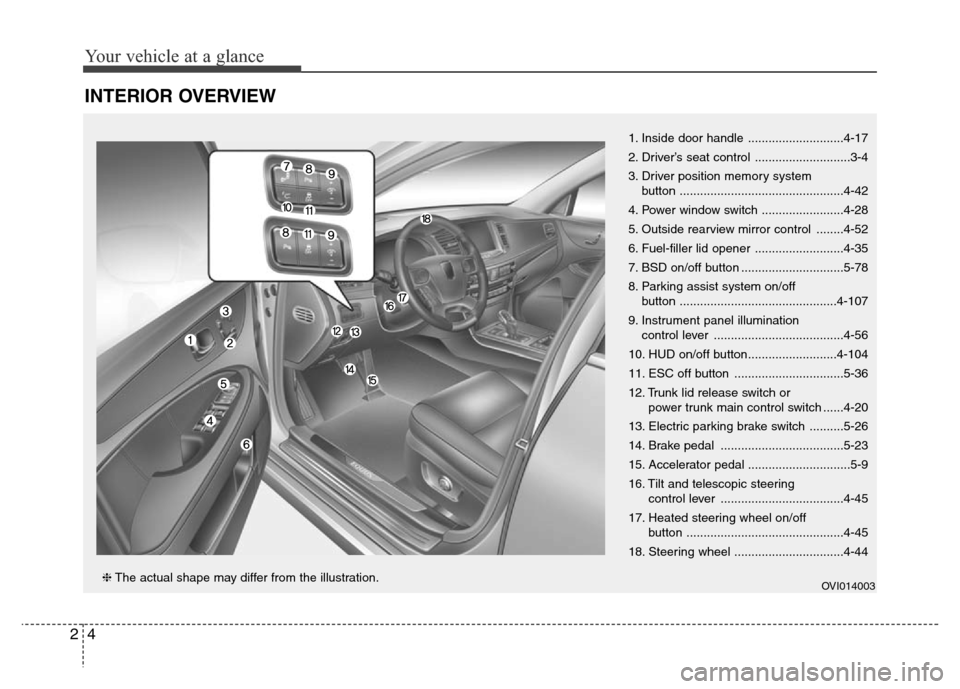
INTERIOR OVERVIEW
1. Inside door handle ............................4-17
2. Driver’s seat control ............................3-4
3. Driver position memory system
button ................................................4-42
4. Power window switch ........................4-28
5. Outside rearview mirror control ........4-52
6. Fuel-filler lid opener ..........................4-35
7. BSD on/off button ..............................5-78
8. Parking assist system on/off
button ..............................................4-107
9. Instrument panel illumination
control lever ......................................4-56
10. HUD on/off button..........................4-104
11. ESC off button ................................5-36
12. Trunk lid release switch or
power trunk main control switch ......4-20
13. Electric parking brake switch ..........5-26
14. Brake pedal ....................................5-23
15. Accelerator pedal ..............................5-9
16. Tilt and telescopic steering
control lever ....................................4-45
17. Heated steering wheel on/off
button ..............................................4-45
18. Steering wheel ................................4-44
OVI014003❈The actual shape may differ from the illustration.
Page 22 of 479

33
Safety features of your vehicle
Rear seat
(12) Seat sliding forward or back-
ward adjustment with seatback
angle adjustment
(13) Climate control system seat*
(14) Armrest
(15) Leg support angle adjustment
(16) Headrest height adjustment
(17) Easy access
(18) Front passenger side walk-in
seat
(19) Rear relaxation seat system
(20) Lumber support adjustment
(21) Return switch
(22) Foot rest adjustment
(23) Passenger seat adjustment
switch*
*: if equipped
**: The height of the driver's headrest
is automatically adjusted simulta-
neously with the driver's seat slid-
ing adjustment operation.
WARNING- Loose
objects
Loose objects in the driver’s
foot area could interfere with
the operation of the foot pedals,
possibly causing an accident.
Do not place anything under the
front seats.
WARNING- Driver
responsibility for passen-
gers
Riding in a vehicle with the
seatback reclined could lead to
serious or fatal injury in an acci-
dent. If a seat is reclined during
an accident, the occupant’s
hips may slide under the lap
portion of the seat belt applying
great force to the unprotected
abdomen. Serious or fatal inter-
nal injuries could result. The
driver must advise the passen-
ger to keep the seatback in an
upright position whenever the
vehicle is in motion.
WARNING
Do not use a seat cushion that
reduces friction between the
seat and passenger. The pas-
senger's hips may slide under
the lap portion of the seat belt
during an accident or a sudden
stop. Serious or fatal internal
injuries could result because
the seat belt can't operate nor-
mally.
WARNING- Driver’s seat
• Never attempt to adjust the
seat while the vehicle is mov-
ing. This could result in loss
of control, and an accident
causing death, serious injury,
or property damage.
(Continued)
Page 23 of 479

Safety features of your vehicle
4 3
Front seat adjustment
The front seat can be adjusted by
using the control switch located on
the doors. Before driving, adjust the
seat to the proper position so as to
easily control the steering wheel,
pedals and switches on the instru-
ment panel.WARNING
• Do not adjust the seat while
wearing seat belts. Moving the
seat cushion forward may
cause strong pressure on the
abdomen.
• Use extreme caution so that
hands or other objects are not
caught in the seat mechanisms
while the seat is moving.
• Do not put a cigarette lighter
on the floor or seat. When you
operate the seat, gas may gush
out of the lighter and cause
fire.
• Use extreme caution when
picking small objects trapped
under the seats or between the
seat and the center console.
Your hands might be cut or
injured by the sharp edges of
the seat mechanism.
• If there are occupants in the
rear seats, be careful while
adjusting the front seat posi-
tion.
(Continued)
• Do not allow anything to inter-
fere with the normal position
of the seatback. Storing items
against a seatback or in any
other way interfering with
proper locking of a seatback
could result in serious or fatal
injury in a sudden stop or col-
lision.
• Always drive and ride with
your seatback upright and the
lap portion of the seat belt
snug and low across the hips.
This is the best position to
protect you in case of an acci-
dent.
• In order to avoid unnecessary
and perhaps severe air bag
injuries, always sit as far back
as possible from the steering
wheel while maintaining com-
fortable control of the vehicle.
We recommend that your
chest be at least 250 mm (10
inches) away from the steer-
ing wheel.
WARNING
The power seat is operable with
the engine start/stop button in
OFF.
Therefore, children should never
be left unattended in the vehicle.
Page 24 of 479

35
Safety features of your vehicle
Forward and backward
Push the control switch forward or
backward to move the seat to the
desired position. Release the switch
once the seat reaches the desired
position.
When adjusting the seat position, the
headrest will be adjusted simultane-
ously to the proper position.
Cushion length adjustment
(for driver’s seat)
Push the control switch forward or
backward to move the seat cushion
to the desired length. Release the
switch once the seat cushion reach-
es the desired length.
CAUTION
• The power seat is driven by an
electric motor. Stop operating
once the adjustment is com-
pleted. Excessive operation
may damage the electrical
equipment.
• When in operation, the power
seat consumes a large amount
of electrical power. To prevent
unnecessary battery drain,
don’t adjust the power seat
longer than necessary while
the engine is not running.
• Do not operate two or more
power seat control knobs at the
same time. Doing so may result
in power seat motor or electri-
cal component malfunction.
OVI033002
OVI039003
Page 25 of 479
Safety features of your vehicle
6 3
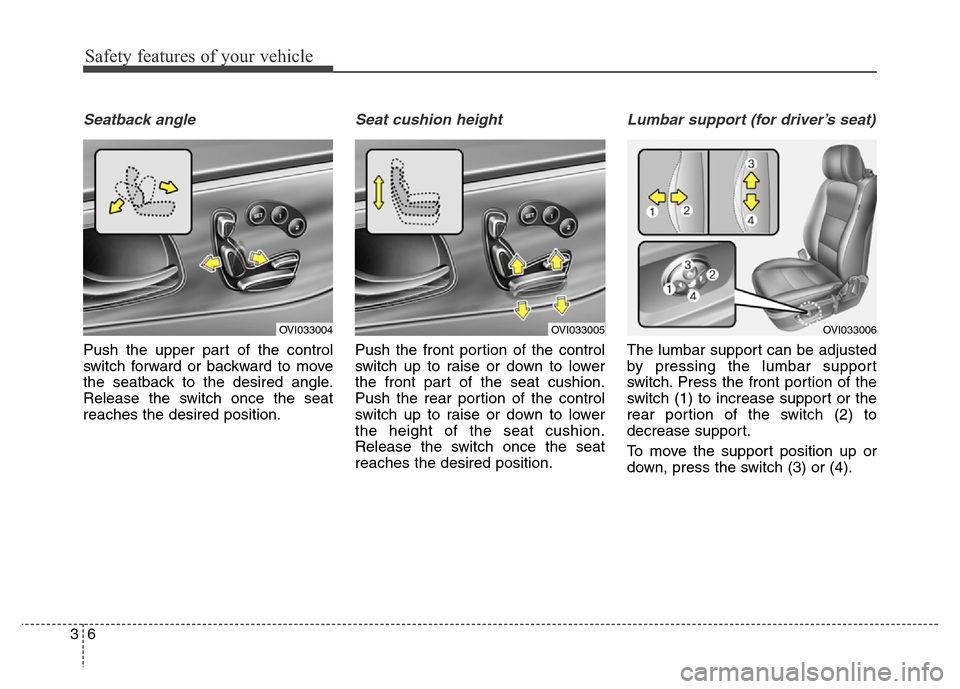
Seatback angle
Push the upper part of the control
switch forward or backward to move
the seatback to the desired angle.
Release the switch once the seat
reaches the desired position.
Seat cushion height
Push the front portion of the control
switch up to raise or down to lower
the front part of the seat cushion.
Push the rear portion of the control
switch up to raise or down to lower
the height of the seat cushion.
Release the switch once the seat
reaches the desired position.
Lumbar support (for driver’s seat)
The lumbar support can be adjusted
by pressing the lumbar support
switch. Press the front portion of the
switch (1) to increase support or the
rear portion of the switch (2) to
decrease support.
To move the support position up or
down, press the switch (3) or (4).
OVI033004OVI033005OVI033006