Page 105 of 479
Features of your vehicle
16 4
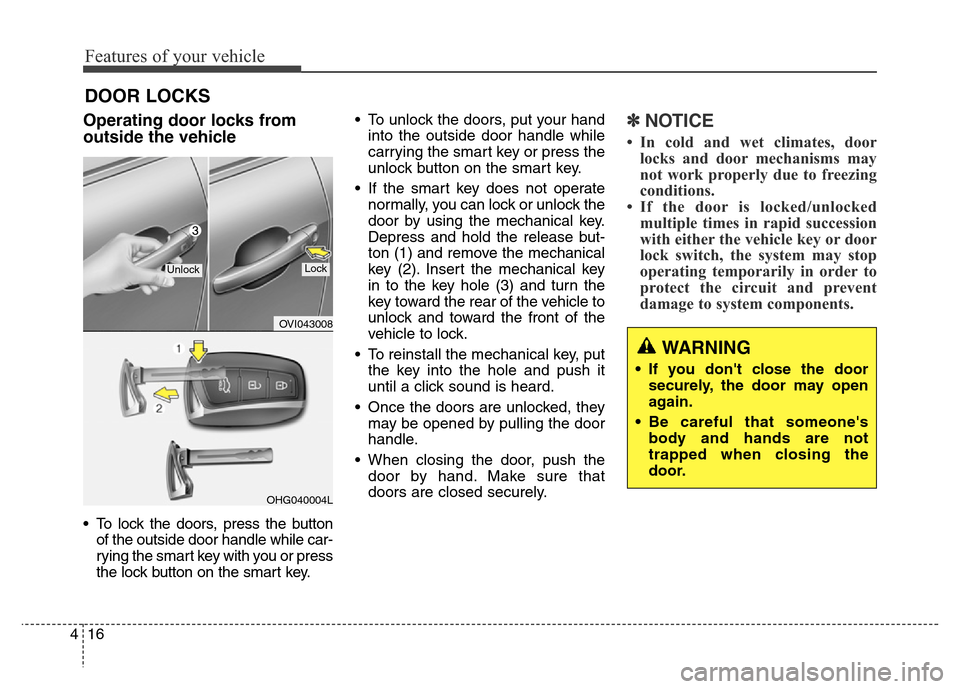
Operating door locks from
outside the vehicle
• To lock the doors, press the button
of the outside door handle while car-
rying the smart key with you or press
the lock button on the smart key.• To unlock the doors, put your hand
into the outside door handle while
carrying the smart key or press the
unlock button on the smart key.
• If the smart key does not operate
normally, you can lock or unlock the
door by using the mechanical key.
Depress and hold the release but-
ton (1) and remove the mechanical
key (2). Insert the mechanical key
in to the key hole (3) and turn the
key toward the rear of the vehicle to
unlock and toward the front of the
vehicle to lock.
• To reinstall the mechanical key, put
the key into the hole and push it
until a click sound is heard.
• Once the doors are unlocked, they
may be opened by pulling the door
handle.
• When closing the door, push the
door by hand. Make sure that
doors are closed securely.
✽NOTICE
• In cold and wet climates, door
locks and door mechanisms may
not work properly due to freezing
conditions.
• If the door is locked/unlocked
multiple times in rapid succession
with either the vehicle key or door
lock switch, the system may stop
operating temporarily in order to
protect the circuit and prevent
damage to system components.
DOOR LOCKS
OVI043008
OHG040004L
UnlockLock
WARNING
• If you don't close the door
securely, the door may open
again.
• Be careful that someone's
body and hands are not
trapped when closing the
door.
Page 106 of 479
417
Features of your vehicle
Power door latch (if equipped)
If a door isn’t closed completely but
is closed to the first detent position,
the door will be close automatically.
Operating door locks from
inside the vehicle
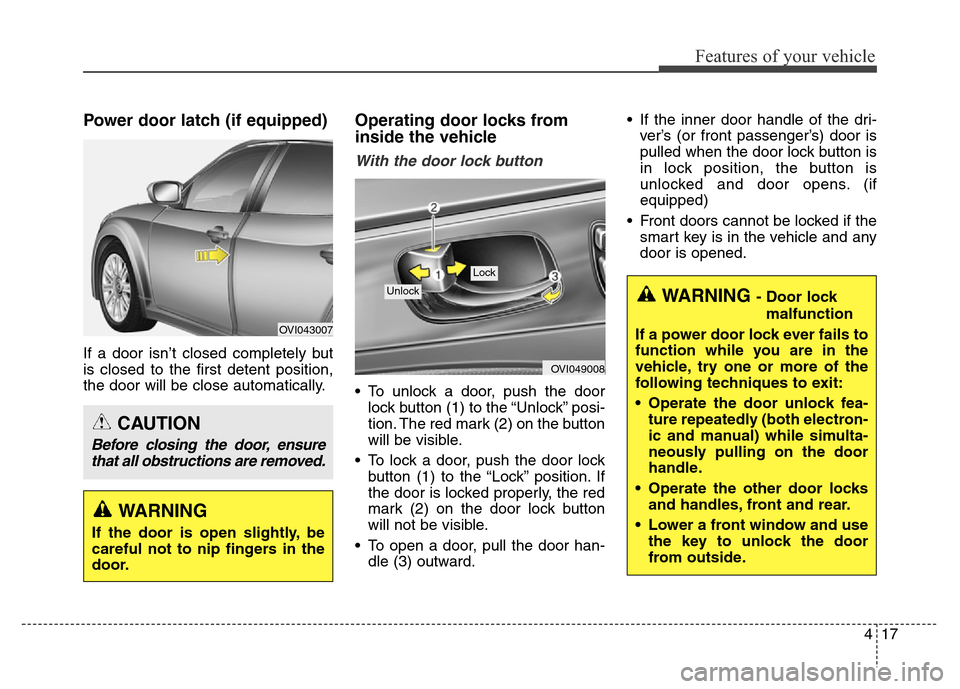
With the door lock button
• To unlock a door, push the door
lock button (1) to the “Unlock” posi-
tion. The red mark (2) on the button
will be visible.
• To lock a door, push the door lock
button (1) to the “Lock” position. If
the door is locked properly, the red
mark (2) on the door lock button
will not be visible.
• To open a door, pull the door han-
dle (3) outward.• If the inner door handle of the dri-
ver’s (or front passenger’s) door is
pulled when the door lock button is
in lock position, the button is
unlocked and door opens. (if
equipped)
• Front doors cannot be locked if the
smart key is in the vehicle and any
door is opened.
OVI049008
Lock
Unlock
OVI043007
WARNING
If the door is open slightly, be
careful not to nip fingers in the
door.
CAUTION
Before closing the door, ensure
that all obstructions are removed.
WARNING - Door lock
malfunction
If a power door lock ever fails to
function while you are in the
vehicle, try one or more of the
following techniques to exit:
• Operate the door unlock fea-
ture repeatedly (both electron-
ic and manual) while simulta-
neously pulling on the door
handle.
• Operate the other door locks
and handles, front and rear.
• Lower a front window and use
the key to unlock the door
from outside.
Page 107 of 479

Features of your vehicle
18 4
With central door lock switch
Operate by depressing the central
door lock switch.
• When pressing the right portion (1)
for the driver or the left portion (3)
of the switch for the front passen-
ger, all vehicle doors will lock.• When pressing the left portion (2)
for the driver or the right portion (4)
of the switch for the front passen-
ger, all vehicle doors will unlock.
• If the smart key is in the vehicle
and any door is opened, the doors
will not lock even though the lock
button (1) or (3) of the central door
lock switch is pressed.
OVI043009
■ Driver’s door
OVI049010L
■ Front passenger’s door
WARNING - Doors
• The doors should always be
fully closed and locked while
the vehicle is in motion to pre-
vent accidental opening of the
door. Locked doors will also
discourage potential intruders
when the vehicle stops or
slows down.
• Be careful when opening
doors and watch for vehicles,
motorcycles, bicycles or
pedestrians approaching the
vehicle in the path of the door.
Opening a door when some-
thing is approaching can
cause damage or injury.
WARNING- Unlocked
vehicles
Leaving your vehicle unlocked
can invite theft or possible harm
to you or others from someone
hiding in your vehicle while you
are gone. Always remove the
ignition key, engage the parking
brake, close all windows and
lock all doors when leaving
your vehicle unattended.
WARNING- Unattended
children
An enclosed vehicle can
become extremely hot, causing
death or severe injury to unat-
tended children or animals who
cannot escape the vehicle.
Furthermore, children might
operate features of the vehicle
that could injure them, or they
could encounter other harm,
possibly from someone gaining
entry to the vehicle. Never leave
children or animals unattended
in your vehicle.
Page 108 of 479

419
Features of your vehicle
Engine off door unlock system
All doors will automatically unlock
when the engine start/stop button is
turned to the ACC or OFF position.
Shift lever door lock/unlock system
• All doors will automatically lock
when the shift lever is moved out of
P (Park).
• All doors will automatically unlock
when the shift lever is moved into P
(Park).
You can activate or deactivate the
auto door lock/unlock features in the
vehicle. Refer to "LCD display" in this
section.
Child-protector rear door lock
The child safety lock is provided to
help prevent children from acciden-
tally opening the rear doors from
inside the vehicle. The rear door
safety locks should be used whenev-
er children are in the vehicle.
1. Open the rear door.
2. Push the child safety lock (1)
located on the rear edge of the
door to the lock ( ) position.
When the child safety lock is in the
lock position, the rear door will not
open even though the inner door
handle is pulled.3. Close the rear door.
To open the rear door, pull the out-
side door handle.
Even though the doors may be
unlocked, the rear door will not open
by pulling the inner door handle (2)
until the rear door child safety lock is
unlocked ( ).
WARNING- Rear door
locks
If children accidentally open the
rear doors while the vehicle is
in motion, they could fall out
and be severely injured or
killed. To prevent children from
opening the rear doors from the
inside, the rear door safety
locks should be used whenever
children are in the vehicle.
OVI049011
Page 109 of 479
Features of your vehicle
20 4
Non-powered trunk
Opening the trunk
• The trunk is locked or unlocked
when all doors are locked or
unlocked with the smart key or
central door lock switch.• To open the trunk only while all
doors are locked, press the trunk
unlock button on the smart key for
more than 1 second, press the but-
ton on the trunk handle with the
smart key in your possession, or
insert the mechanical key of the
smart key into the lock and turn it
clockwise.
Once the trunk is opened and then
closed, the trunk is locked auto-
matically.
• If the trunk is unlocked, it can be
opened by pulling the handle up.• To open the trunk by using the
trunk lid release button, press the
button and pull up the trunk handle.
✽NOTICE
In cold and wet climates, trunk lock
and trunk mechanisms may not
work properly due to freezing condi-
tions.
TRUNK
OVI043013
OVI043012
Page 112 of 479
423
Features of your vehicle
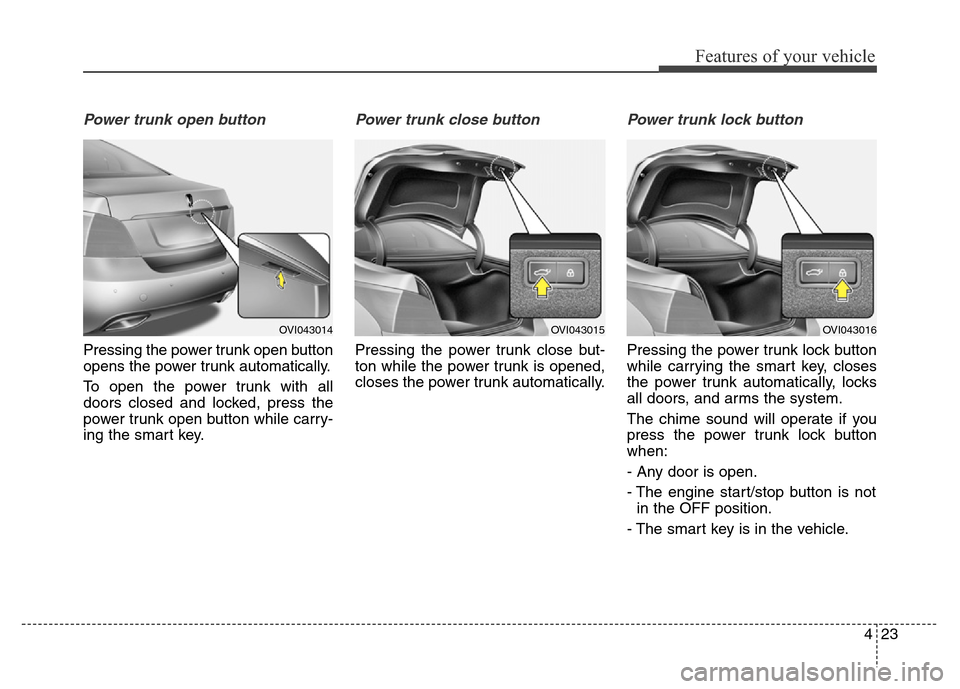
Power trunk open button
Pressing the power trunk open button
opens the power trunk automatically.
To open the power trunk with all
doors closed and locked, press the
power trunk open button while carry-
ing the smart key.
Power trunk close button
Pressing the power trunk close but-
ton while the power trunk is opened,
closes the power trunk automatically.
Power trunk lock button
Pressing the power trunk lock button
while carrying the smart key, closes
the power trunk automatically, locks
all doors, and arms the system.
The chime sound will operate if you
press the power trunk lock button
when:
- Any door is open.
- The engine start/stop button is not
in the OFF position.
- The smart key is in the vehicle.
OVI043014OVI043015OVI043016
Page 117 of 479
Features of your vehicle
28 4
(1) Driver’s door power window switch
(2) Front passenger’s door power
window switch
(3) Rear door (left) power window
switch and curtain switch (if
equipped)
(4) Rear door (right) power window
switch and curtain switch (if
equipped)
(5) Window opening and closing
(6) Automatic power window up/down
(7) Power window lock switch
✽NOTICE
In cold and wet climates, power win-
dows may not work properly due to
freezing conditions.
WINDOWS
OVI043021
Page 118 of 479
429
Features of your vehicle
Power windows
The engine start/stop button must be
in the ON position for power windows
to operate.
Each door has a power window
switch that controls the door's win-
dow. The driver has a power window
lock switch which can block the oper-
ation of passenger windows. The
power windows can be operated for
approximately 30 seconds after the
engine start/stop button turned to the
ACC or OFF position. However, if the
front doors are opened, the power
windows cannot be operated even
within the 30 second period.
✽NOTICE
While driving with the rear windows
down or with the sunroof (if
equipped) in an open (or partially
open position), your vehicle may
demonstrate a wind buffeting or
pulsation noise. This noise is a nor-
mal occurrence and can be reduced
or eliminated by taking the follow-
ing actions. If the noise occurs with
one or both of the rear windows
down, partially lower both front
windows approximately one inch.
If you experience the noise with the
sunroof open, slightly reduce the
size of the sunroof opening.
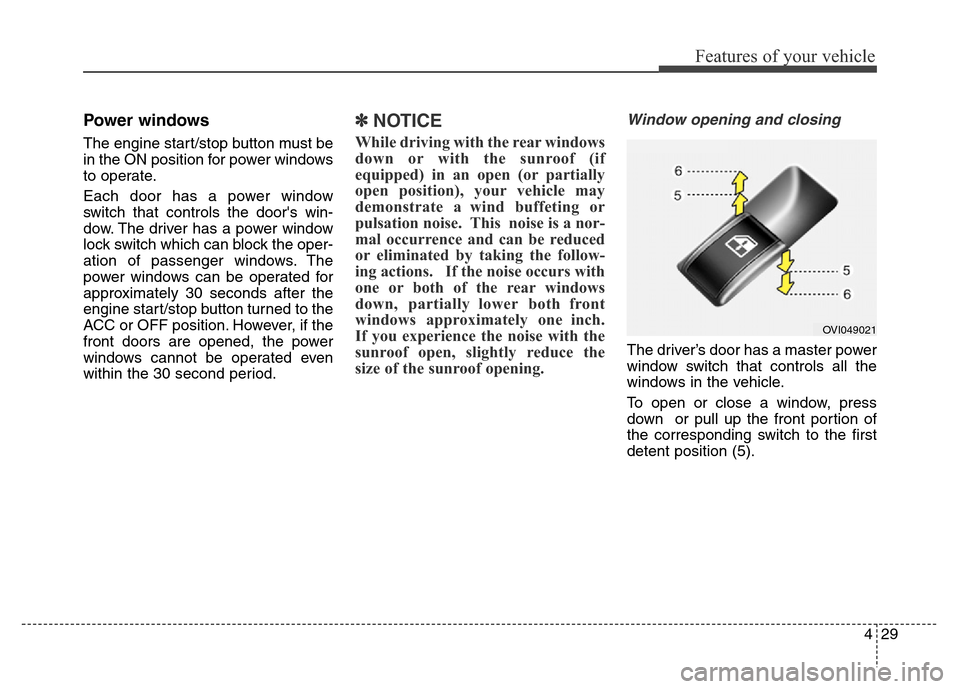
Window opening and closing
The driver’s door has a master power
window switch that controls all the
windows in the vehicle.
To open or close a window, press
down or pull up the front portion of
the corresponding switch to the first
detent position (5).
OVI049021