2013 HONDA ODYSSEY tow
[x] Cancel search: towPage 348 of 433

347
Continued
Maintenance
Replacing Light BulbsHeadlight BulbsWhen replacing, use the following bulbs.
1.Remove the clips using a flat-tip
screwdriver, then remove the upper part of
the air intake duct.High beam headlight:
60 W (HB3)
Low beam headlight:
55 W (H11 for halogen bulb type)
Low beam headlight:
35 W (D2S for high voltage discharge type)
■
High Beam Headlight
1Headlight BulbsNOTICEHalogen bulbs get very hot when lit.
Oil, perspiration, or a scratch on the glass can cause
the bulb to overheat and shatter.
The headlight aim is set by the factory, and does not
need to be adjusted. However, if you regularly carry
heavy items in the cargo area or tow a trailer, have
the aiming readjusted at a dealer or by a qualified
technician.
The HB3 and H11 types are halogen bulbs.
When replacing a bulb, handle it by its base, and
protect the glass from contact with your skin or hard
objects. If you touch the glass, clean it with
denatured alcohol and a clean cloth.
The exterior lights' inside lenses (headlights, brake
lights, etc.) may fog temporarily after a car wash or
while driving in the rain. This does not impact the
exterior light function.
However, if you see a large amount of water or ice
accumulated inside the lenses, have your vehicle
inspected by a dealer.
Clip
Driver’s side
Page 355 of 433
uuReplacing Light BulbsuBrake/Rear Side Marker/Taillight and Rear Turn Signal Light Bulbs
354Maintenance
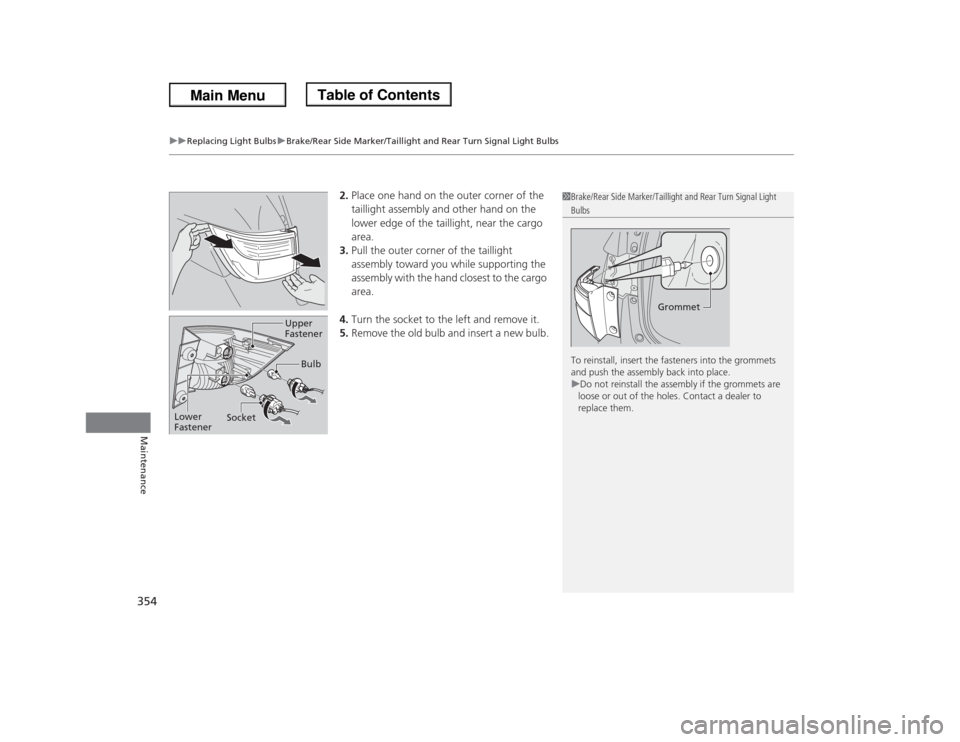
2.Place one hand on the outer corner of the
taillight assembly and other hand on the
lower edge of the taillight, near the cargo
area.
3.Pull the outer corner of the taillight
assembly toward you while supporting the
assembly with the hand closest to the cargo
area.
4.Turn the socket to the left and remove it.
5.Remove the old bulb and insert a new bulb.
1Brake/Rear Side Marker/Taillight and Rear Turn Signal Light Bulbs
To reinstall, insert the fasteners into the grommets
and push the assembly back into place.
uDo not reinstall the assembly if the grommets are
loose or out of the holes. Contact a dealer to
replace them.
Grommet
Bulb
SocketUpper
Fastener
Lower
Fastener
Page 372 of 433

371Maintenance
BatteryChecking the Battery
The battery condition is being monitored by
the sensor on the negative terminal. If there is
a problem with the sensor, the warning
message on information display
*/multi-
information display
* will let you know. Have
your vehicle checked by a dealer.
Check the battery terminals for corrosion
monthly.
If your vehicle's battery is disconnected or goes dead:
•The audio system is disabled.
2Reactivating the audio system P. 196
•The clock resets.
2Setting the Clock P. 108
•The navigation system
* is disabled.
2Refer to the navigation system manual
Charging the BatteryDisconnect both battery cables to prevent damaging your vehicle's electrical system.
Always disconnect the negative (–) cable first, and reconnect it last.
1BatteryWARNING: Battery post, terminals,
and related accessories contain lead
and lead compounds.
Wash your hands after handling.When you find corrosion, clean the battery terminals
by applying a baking powder and water solution.
Clean terminals with a damp towel. Cloth/towel dry
the battery. Coat the terminals with grease to help
prevent future corrosion.
3
WARNING
The battery gives off explosive hydrogen
gas during normal operation.
A spark or flame can cause the battery to
explode with enough force to kill or
seriously hurt you.
When conducting any battery
maintenance, wear protective clothing and
a face shield, or have a skilled technician do
it.
* Not available on all models
Page 382 of 433
381
Handling the Unexpected
This chapter explains how to handle unexpected troubles.
Tools
Types of Tools .................................. 382
If a Tire Goes Flat
Changing a Flat Tire ......................... 383
Engine Does Not Start
Checking the Engine ........................ 392
Jump Starting.................................... 393
Shift Lever Does Not Move.............. 395
Overheating
How to Handle Overheating ............. 396Indicator, Coming On/Blinking
If the Low Oil Pressure Indicator Comes
On ............................................. 398If the Charging System Indicator Comes
On ................................................. 398
If the Malfunction Indicator Lamp Comes
On or Blinks ................................... 399If the Brake System Indicator Comes On ....... 400If the Low Tire Pressure Indicator Comes
On ................................................. 401
If the TPMS Indicator Comes On ...... 401If the Low Tire Pressure/TPMS Indicator
Comes On or Blinks ....................... 402
Fuses
Fuse Locations ................................. 403
Inspecting and Changing Fuses ........ 408
Emergency Towing........................... 409
When You Cannot Open or Close the
Tailgate............................................ 410
Page 390 of 433
389
uuIf a Tire Goes FlatuChanging a Flat Tire
Continued
Handling the Unexpected
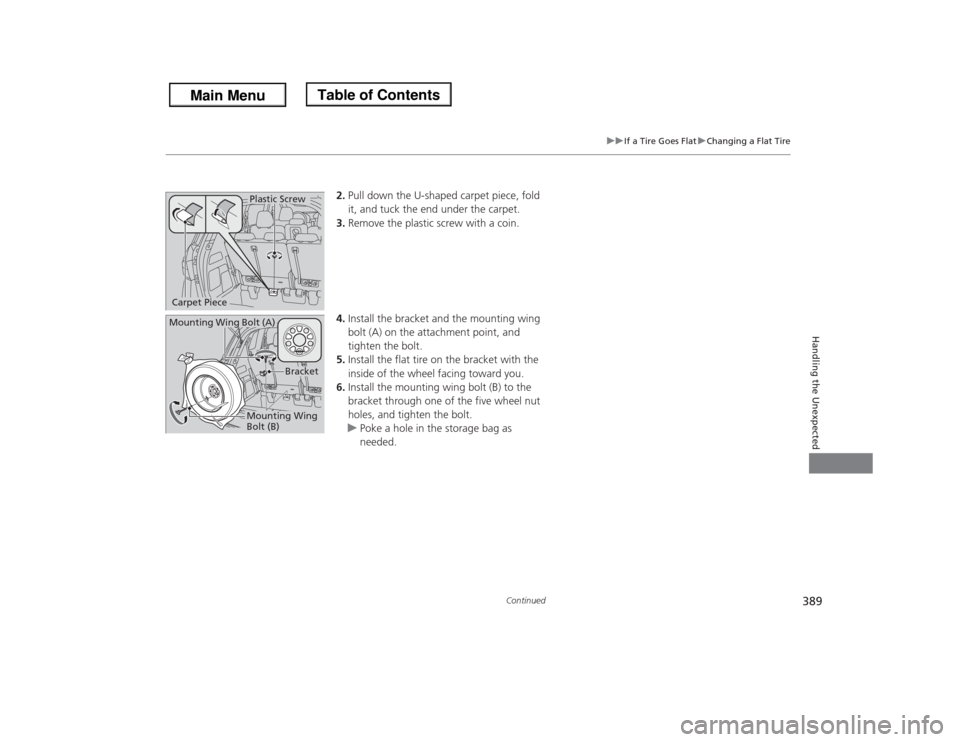
2.Pull down the U-shaped carpet piece, fold
it, and tuck the end under the carpet.
3.Remove the plastic screw with a coin.
4.Install the bracket and the mounting wing
bolt (A) on the attachment point, and
tighten the bolt.
5.Install the flat tire on the bracket with the
inside of the wheel facing toward you.
6.Install the mounting wing bolt (B) to the
bracket through one of the five wheel nut
holes, and tighten the bolt.
uPoke a hole in the storage bag as
needed.
Plastic Screw
Carpet PieceMounting Wing Bolt (A)
Mounting Wing
Bolt (B)
Bracket
Page 393 of 433
392Handling the Unexpected
Engine Does Not StartChecking the EngineIf the engine does not start, turn the ignition switch to START
(e
and check the
starter.
Starter condition
Checklist
Starter doesn’t turn or turns
over slowly.
The battery may be dead. Check
each of the items on the right and
respond accordingly.
Check brightness of the interior light.
Turn on interior lights and check brightness.●If the interior lights are dim or do not come on at all
2Battery P. 371
●If the interior lights come on normally
2 Fuses P. 403
The starter turns over normally
but the engine doesn’t start.
There may be a problem with the
fuse. Check each of the items on
the right and respond accordingly.
Review the engine start procedure.
Follow its instructions, and try to start the engine again.
2 Starting the Engine P. 291
Check the immobilizer system indicator.
When the immobilizer system indicator is blinking, the engine cannot be started.
2Immobilizer System P. 133
Check the fuel level.
There should be enough fuel in the tank.
2 Fuel Gauge P. 86
Check the fuse.
Check all fuses, or have the vehicle checked by a dealer.
2Inspecting and Changing Fuses P. 408
If the problem continues:
2Emergency Towing P. 409
1Checking the Engine
If you must start the vehicle immediately, use an
assisting vehicle to jump start it.
2Jump Starting P. 393
Page 410 of 433
409Handling the Unexpected
Emergency TowingCall a professional towing service if you need to tow your vehicle.■Flat bed equipment
The operator loads your vehicle on the back of a truck.
This is the best way to transport your vehicle.■Wheel lift equipment
The tow truck uses two pivoting arms that go under the front tires and lift them off
the ground. The rear tires remain on the ground. This is an acceptable way to
tow your vehicle.
1Emergency TowingNOTICETrying to lift or tow your vehicle by the bumpers will
cause serious damage. The bumpers are not designed
to support the vehicle's weight.NOTICEImproper towing such as towing behind a
motorhome or other motor vehicle can damage the
transmission.
Never tow your vehicle with just a rope or chain.
It is very dangerous, since ropes or chains may shift
from side to side or break.
Page 432 of 433

431Index
Security System........................................ 133
Immobilizer System Indicator..................... 80
Security System Alarm Indicator ................ 81
SEL/RESET Knob.................................... 87, 98
Select Lever........................................ 16, 295
Operation ......................................... 16, 296
Releasing ................................................ 395
Won’t Move ........................................... 395
Selecting a Child Seat................................ 58
Selector Knob (Audio)............................. 197
Setting the Clock...................................... 108
Shift Lever.......................................... 16, 295
Shift Lever Position Indicator............ 74, 296
Shifting (Transmission)............................ 295
Shoulder Anchor.................................. 34, 35
Side Airbags............................................... 46
Cutoff System ........................................... 48
Off Indicator ............................................. 48
Side Curtain Airbags.................................. 49
Sliding Door............................................. 125
Power Sliding Door ................................. 127
Sliding the Second Row Outer Seats
Outward................................................. 163
Snow Tires................................................ 370
Spare Tire......................................... 383, 413
Spark Plugs............................................... 412
Specifications........................................... 412
Specified Fuel................................... 318, 412
Speedometer.............................................. 86
SRS Airbags (Airbags)................................ 42Starting the Engine.................................. 291
Does Not Start ......................................... 392
Engine Switch Buzzer .............................. 140
Jump Starting .......................................... 393
Steering Wheel......................................... 150
Adjusting................................................. 150
Stopping.................................................... 312
Summer Tires............................................ 370
Sunglasses Holder..................................... 179
Supplemental Restraint System (SRS)........ 42
Switches
(Around the Steering Wheel)........ 2, 3, 140
System Message Indicator.......................... 79
TTachometer................................................. 86
Tailgate..................................................... 119
Unable to Open ....................................... 410
Temperature
Gauge ....................................................... 86
Outside Temperature Display ............. 89, 100
Temperature Gauge................................... 86
Temperature Sensor................... 89, 100, 191
Time (Setting)........................................... 108
Tire Pressure Monitoring System
(TPMS)..................................................... 302
Indicator .................................... 78, 401, 402
Tires........................................................... 362
Air Pressure ..................................... 363, 413
Checking and Maintaining....................... 362Inspection ............................................... 362
Labeling .................................................. 363
Puncture (Flat Tire) .................................. 383
Regulations ............................................. 365
Rotation .................................................. 369
Spare Tire ........................................ 383, 413
Summer .................................................. 370
Tire Chains .............................................. 370
Wear Indicators ....................................... 367
Winter..................................................... 370
Tools.......................................................... 382
Towing a Trailer....................................... 285
Equipment and Accessories ..................... 286
Load Limits .............................................. 285
Towing Your Vehicle
Emergency .............................................. 409
TPMS
(Tire Pressure Monitoring System)........ 302
Indicator.................................... 78, 401, 402
Transmission............................................. 295
Automatic ............................................... 295
Fluid ........................................................ 344
Number................................................... 414
Shift Lever Position Indicator.............. 74, 296
Trip Meter....................................... 88, 92, 99
Troubleshooting....................................... 381
Blown Fuse.............. 403, 404, 405, 406, 407
Brake Pedal Vibrates .................................. 20
Buzzer Sounds When Opening Door.......... 21
Emergency Towing .................................. 409
Engine Won’t Start .................................. 392