Page 218 of 433
217
uuAudio System Basic OperationuPlaying an iPod®
Continued
Features
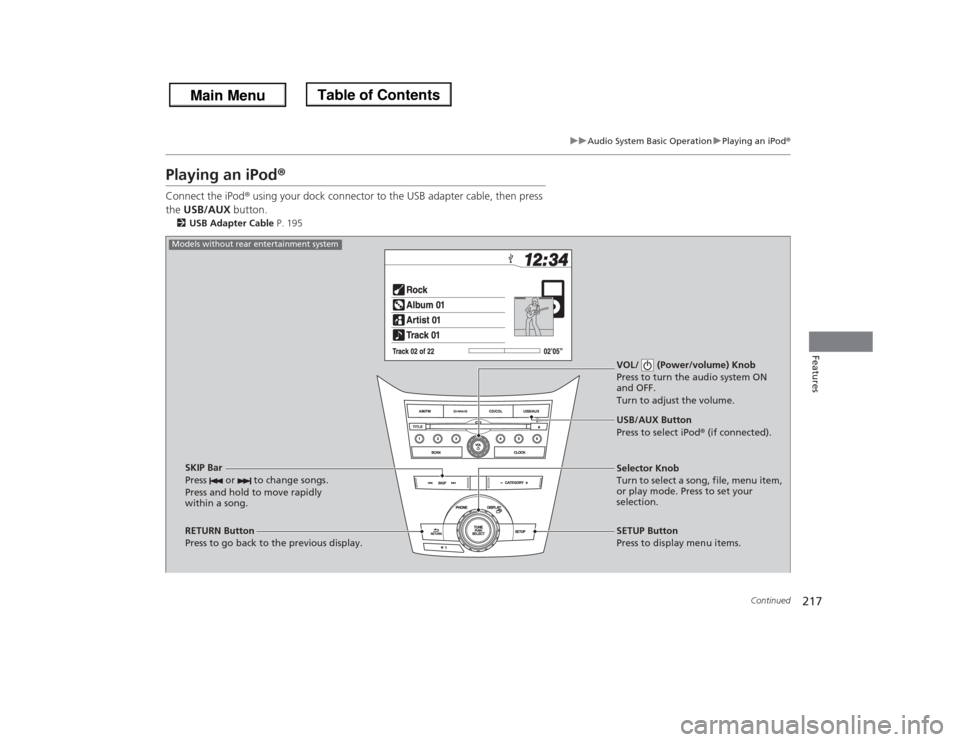
Playing an iPod®Connect the iPod® using your dock connector to the USB adapter cable, then press
the USB/AUX button.2USB Adapter Cable P. 195
VOL/ (Power/volume) Knob
Press to turn the audio system ON
and OFF.
Turn to adjust the volume.
RETURN Button
Press to go back to the previous display.Selector Knob
Turn to select a song, file, menu item,
or play mode. Press to set your
selection.
SETUP Button
Press to display menu items. USB/AUX Button
Press to select iPod® (if connected).
SKIP Bar
Press or to change songs.
Press and hold to move rapidly
within a song.
Models without rear entertainment system
Page 219 of 433
218
uuAudio System Basic OperationuPlaying an iPod®
Features
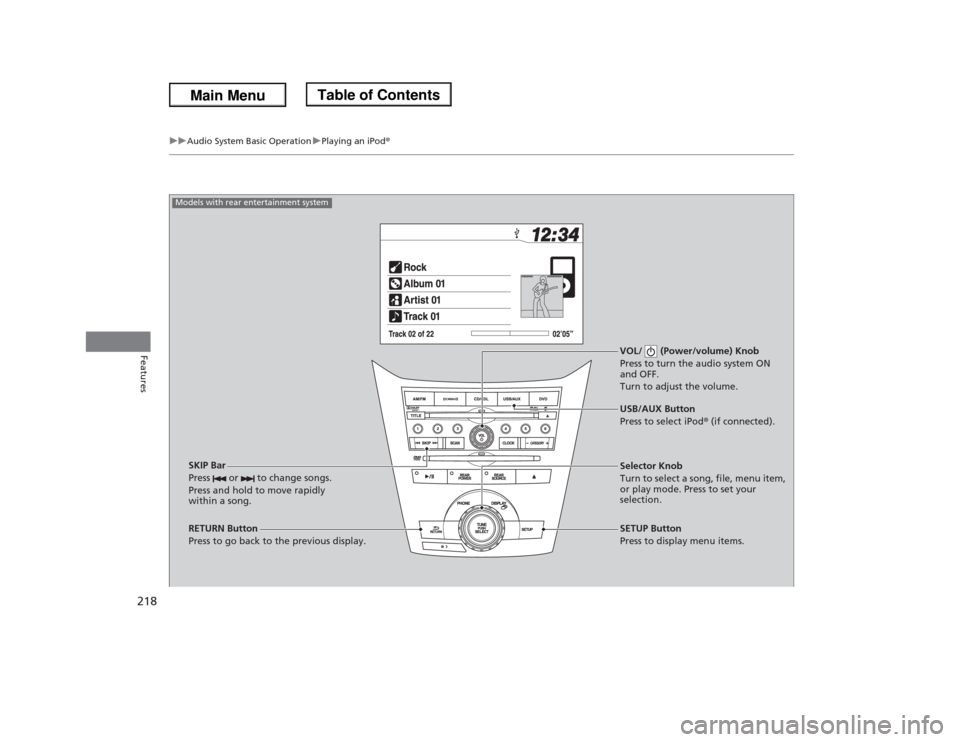
VOL/ (Power/volume) Knob
Press to turn the audio system ON
and OFF.
Turn to adjust the volume.
RETURN Button
Press to go back to the previous display.Selector Knob
Turn to select a song, file, menu item,
or play mode. Press to set your
selection.
SETUP Button
Press to display menu items. USB/AUX Button
Press to select iPod® (if connected).
SKIP Bar
Press or to change songs.
Press and hold to move rapidly
within a song.
Models with rear entertainment system
Page 220 of 433
Continued
219
uuAudio System Basic OperationuPlaying an iPod®
Features
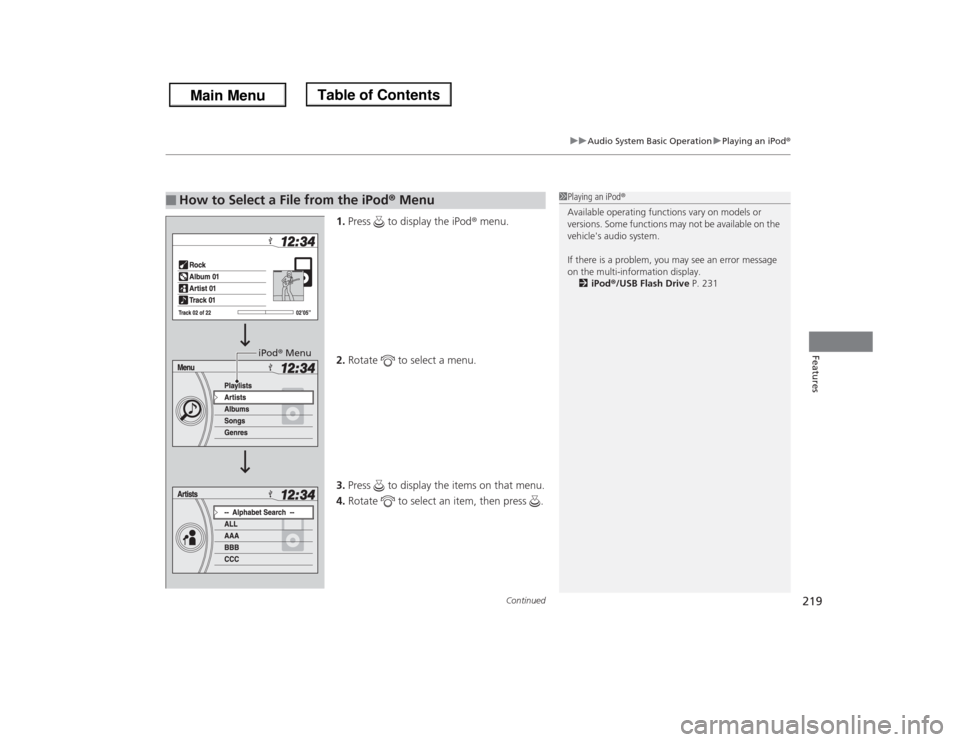
1.Press to display the iPod® menu.
2.Rotate to select a menu.
3.Press to display the items on that menu.
4.Rotate to select an item, then press .
■
How to Select a File from the iPod® Menu
1Playing an iPod®
Available operating functions vary on models or
versions. Some functions may not be available on the
vehicle's audio system.
If there is a problem, you may see an error message
on the multi-information display.
2iPod®/USB Flash Drive P. 231
iPod® Menu
Page 222 of 433
221
uuAudio System Basic OperationuPlaying a USB Flash Drive
Continued
Features
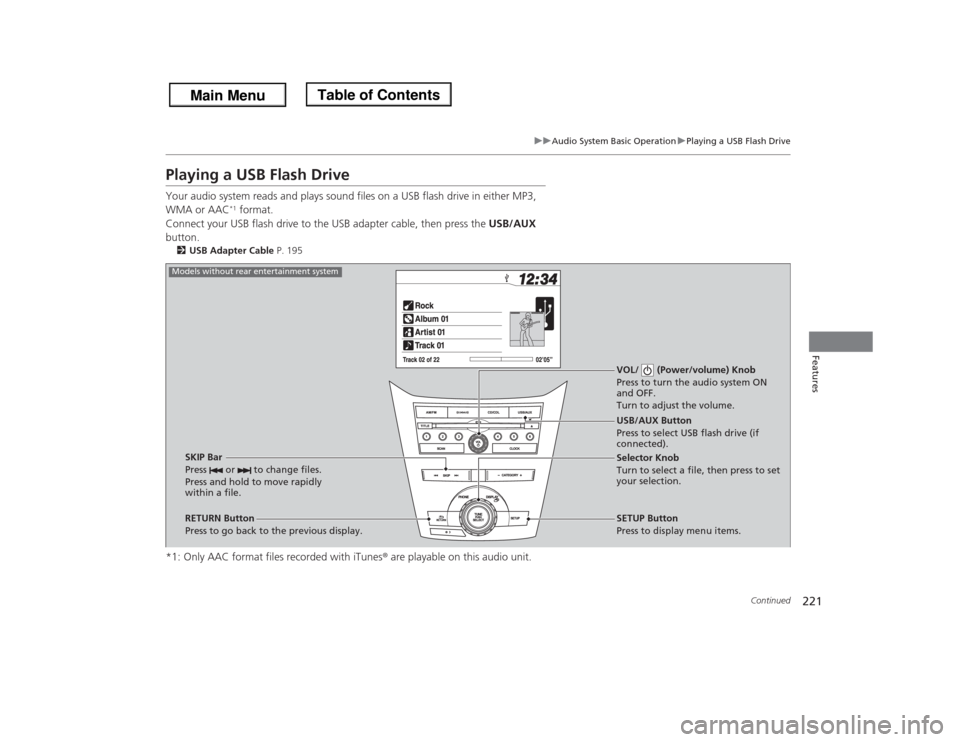
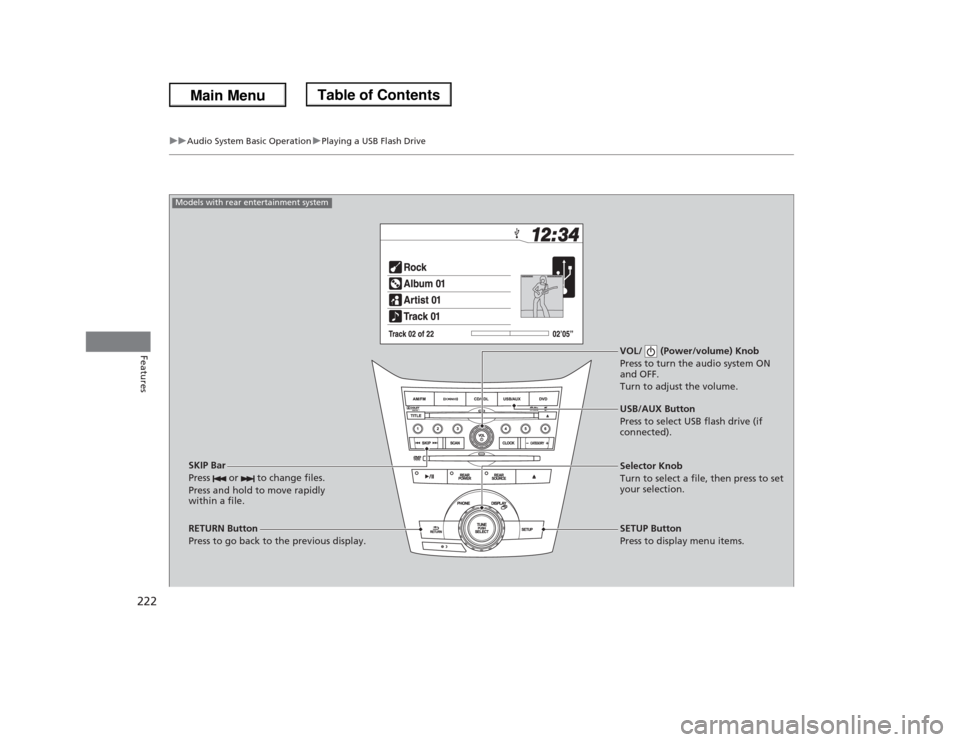
Playing a USB Flash DriveYour audio system reads and plays sound files on a USB flash drive in either MP3,
WMA or AAC
*1 format.
Connect your USB flash drive to the USB adapter cable, then press the USB/AUX
button.
2USB Adapter Cable P. 195*1: Only AAC format files recorded with iTunes® are playable on this audio unit.
VOL/ (Power/volume) Knob
Press to turn the audio system ON
and OFF.
Turn to adjust the volume.
RETURN Button
Press to go back to the previous display.Selector Knob
Turn to select a file, then press to set
your selection.
SETUP Button
Press to display menu items. USB/AUX Button
Press to select USB flash drive (if
connected).
SKIP Bar
Press or to change files.
Press and hold to move rapidly
within a file.
Models without rear entertainment system
Page 223 of 433
222
uuAudio System Basic OperationuPlaying a USB Flash Drive
Features
VOL/ (Power/volume) Knob
Press to turn the audio system ON
and OFF.
Turn to adjust the volume.
RETURN Button
Press to go back to the previous display.Selector Knob
Turn to select a file, then press to set
your selection.
SETUP Button
Press to display menu items. USB/AUX Button
Press to select USB flash drive (if
connected).
SKIP Bar
Press or to change files.
Press and hold to move rapidly
within a file.
Models with rear entertainment system
Page 224 of 433
Continued
223
uuAudio System Basic OperationuPlaying a USB Flash Drive
Features
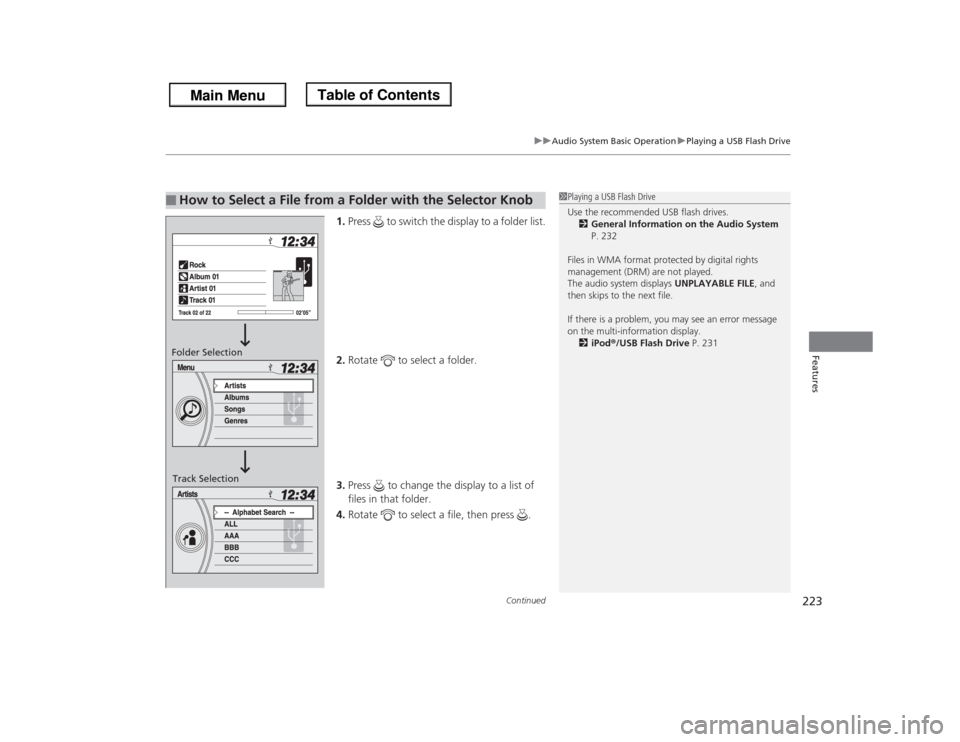
1.Press to switch the display to a folder list.
2.Rotate to select a folder.
3.Press to change the display to a list of
files in that folder.
4.Rotate to select a file, then press .
■
How to Select a File from a Folder with the Selector Knob
1Playing a USB Flash Drive
Use the recommended USB flash drives.
2General Information on the Audio System
P. 232
Files in WMA format protected by digital rights
management (DRM) are not played.
The audio system displays UNPLAYABLE FILE, and
then skips to the next file.
If there is a problem, you may see an error message
on the multi-information display.
2iPod®/USB Flash Drive P. 231
Folder Selection
Track Selection
Page 225 of 433
uuAudio System Basic OperationuPlaying a USB Flash Drive
224Features
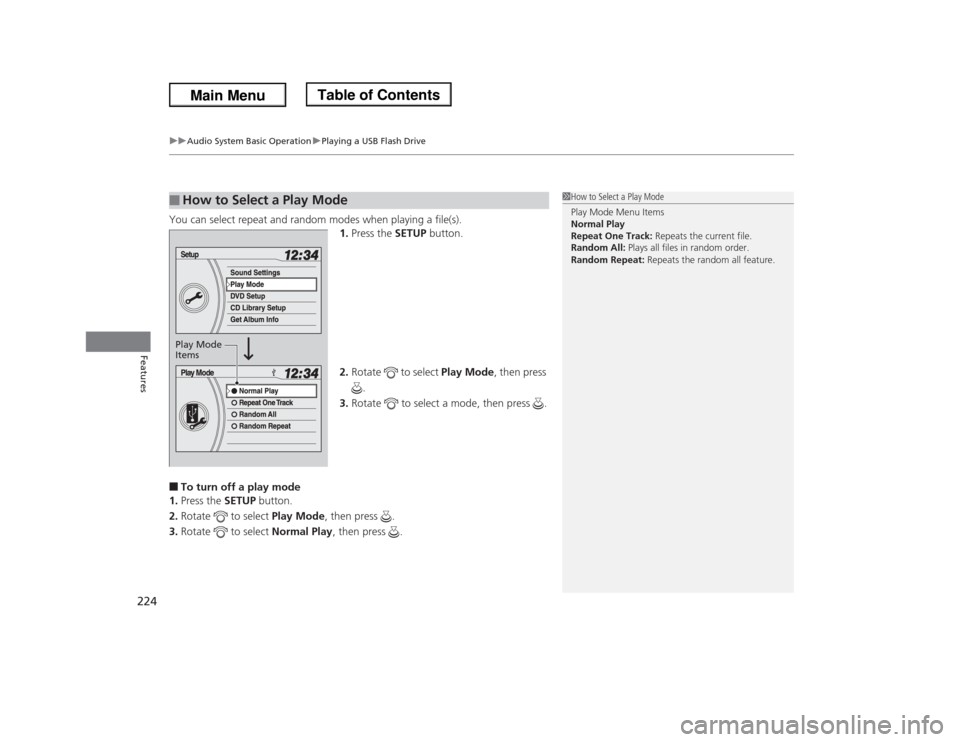
You can select repeat and random modes when playing a file(s).
1.Press the SETUP button.
2.Rotate to select Play Mode, then press
.
3.Rotate to select a mode, then press .■To turn off a play mode
1.Press the SETUP button.
2.Rotate to select Play Mode, then press .
3.Rotate to select Normal Play, then press .■
How to Select a Play Mode
1How to Select a Play Mode
Play Mode Menu Items
Normal Play
Repeat One Track: Repeats the current file.
Random All: Plays all files in random order.
Random Repeat: Repeats the random all feature.
Play Mode
Items
Page 226 of 433
225
uuAudio System Basic OperationuPlaying Bluetooth® Audio
Continued
Features
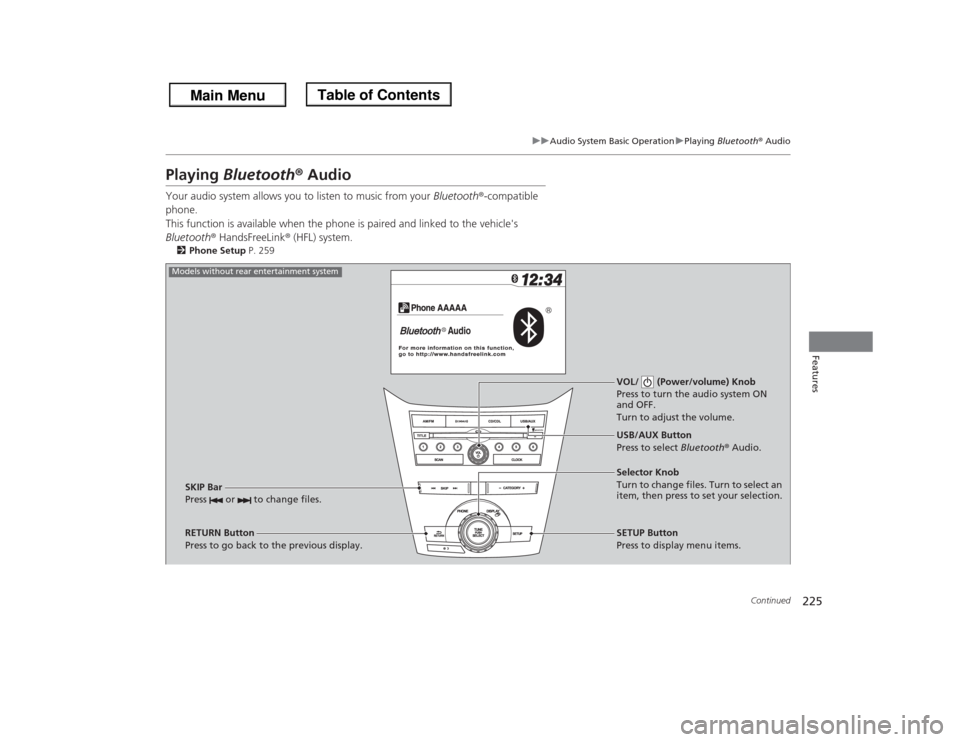
Playing Bluetooth® AudioYour audio system allows you to listen to music from your Bluetooth®-compatible
phone.
This function is available when the phone is paired and linked to the vehicle's
Bluetooth® HandsFreeLink® (HFL) system.2Phone Setup P. 259
VOL/ (Power/volume) Knob
Press to turn the audio system ON
and OFF.
Turn to adjust the volume.
RETURN Button
Press to go back to the previous display.Selector Knob
Turn to change files. Turn to select an
item, then press to set your selection.
SETUP Button
Press to display menu items. USB/AUX Button
Press to select Bluetooth® Audio.
SKIP Bar
Press or to change files.
Models without rear entertainment system