2013 HONDA ODYSSEY USB
[x] Cancel search: USBPage 227 of 433
226
uuAudio System Basic OperationuPlaying Bluetooth® Audio
Features
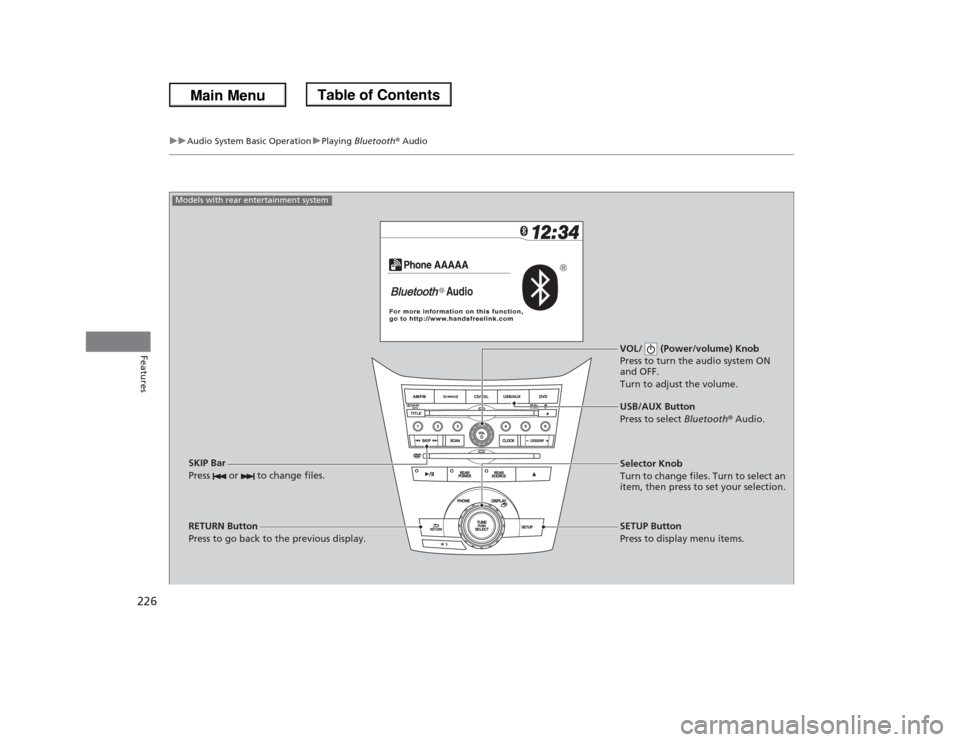
VOL/ (Power/volume) Knob
Press to turn the audio system ON
and OFF.
Turn to adjust the volume.
RETURN Button
Press to go back to the previous display.Selector Knob
Turn to change files. Turn to select an
item, then press to set your selection.
SETUP Button
Press to display menu items. USB/AUX Button
Press to select Bluetooth® Audio.
SKIP Bar
Press or to change files.
Models with rear entertainment system
Page 232 of 433
231
uuAudio Error MessagesuiPod®/USB Flash Drive
Features
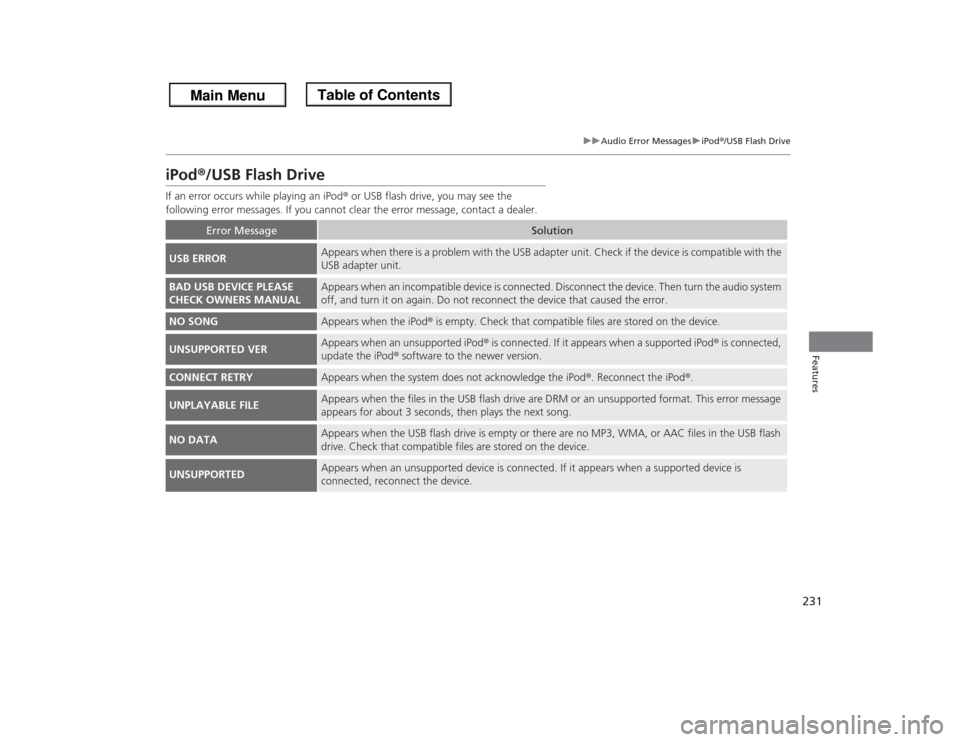
iPod®/USB Flash DriveIf an error occurs while playing an iPod® or USB flash drive, you may see the
following error messages. If you cannot clear the error message, contact a dealer.
Error Message
Solution
USB ERROR
Appears when there is a problem with the USB adapter unit. Check if the device is compatible with the
USB adapter unit.
BAD USB DEVICE PLEASE
CHECK OWNERS MANUAL
Appears when an incompatible device is connected. Disconnect the device. Then turn the audio system
off, and turn it on again. Do not reconnect the device that caused the error.
NO SONG
Appears when the iPod® is empty. Check that compatible files are stored on the device.
UNSUPPORTED VER
Appears when an unsupported iPod® is connected. If it appears when a supported iPod® is connected,
update the iPod® software to the newer version.
CONNECT RETRY
Appears when the system does not acknowledge the iPod®. Reconnect the iPod®.
UNPLAYABLE FILE
Appears when the files in the USB flash drive are DRM or an unsupported format. This error message
appears for about 3 seconds, then plays the next song.
NO DATA
Appears when the USB flash drive is empty or there are no MP3, WMA, or AAC files in the USB flash
drive. Check that compatible files are stored on the device.
UNSUPPORTED
Appears when an unsupported device is connected. If it appears when a supported device is
connected, reconnect the device.
Page 236 of 433
235
uuGeneral Information on the Audio SystemuCompatible iPod® and USB Flash Drives
Features
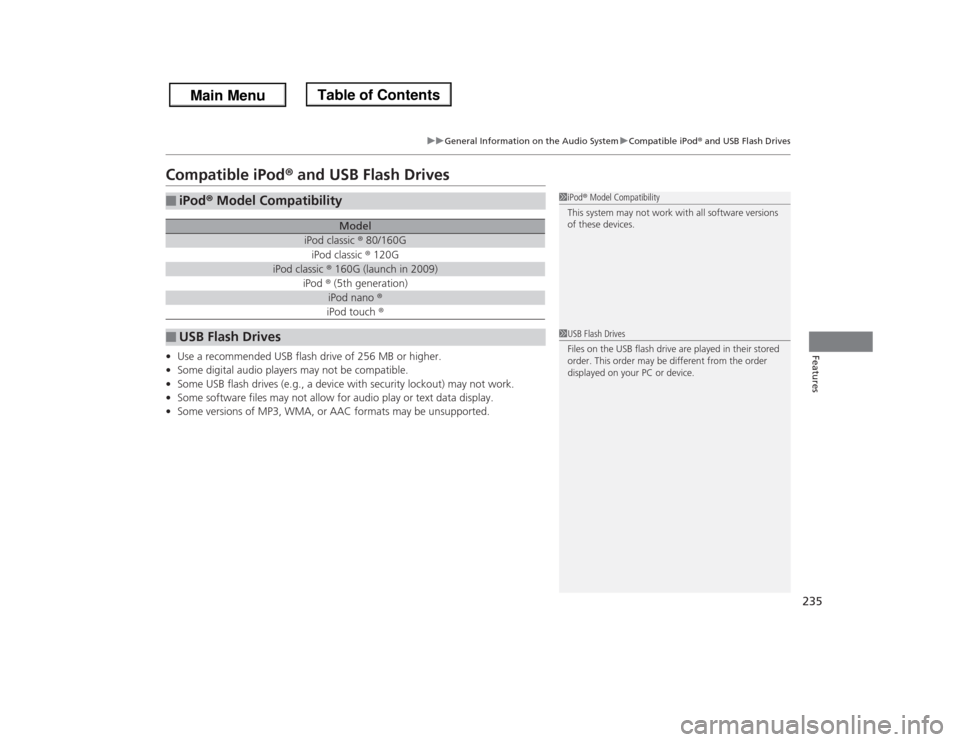
Compatible iPod® and USB Flash Drives•Use a recommended USB flash drive of 256 MB or higher.
•Some digital audio players may not be compatible.
•Some USB flash drives (e.g., a device with security lockout) may not work.
•Some software files may not allow for audio play or text data display.
•Some versions of MP3, WMA, or AAC formats may be unsupported.■
iPod® Model Compatibility
Model
iPod classic ® 80/160GiPod classic ® 120G
iPod classic ® 160G (launch in 2009)
iPod ® (5th generation)
iPod nano ®iPod touch ®
■
USB Flash Drives
1iPod® Model Compatibility
This system may not work with all software versions
of these devices.1USB Flash Drives
Files on the USB flash drive are played in their stored
order. This order may be different from the order
displayed on your PC or device.
Page 247 of 433
246
uuRear Entertainment System
*uOperating the System
Features
■
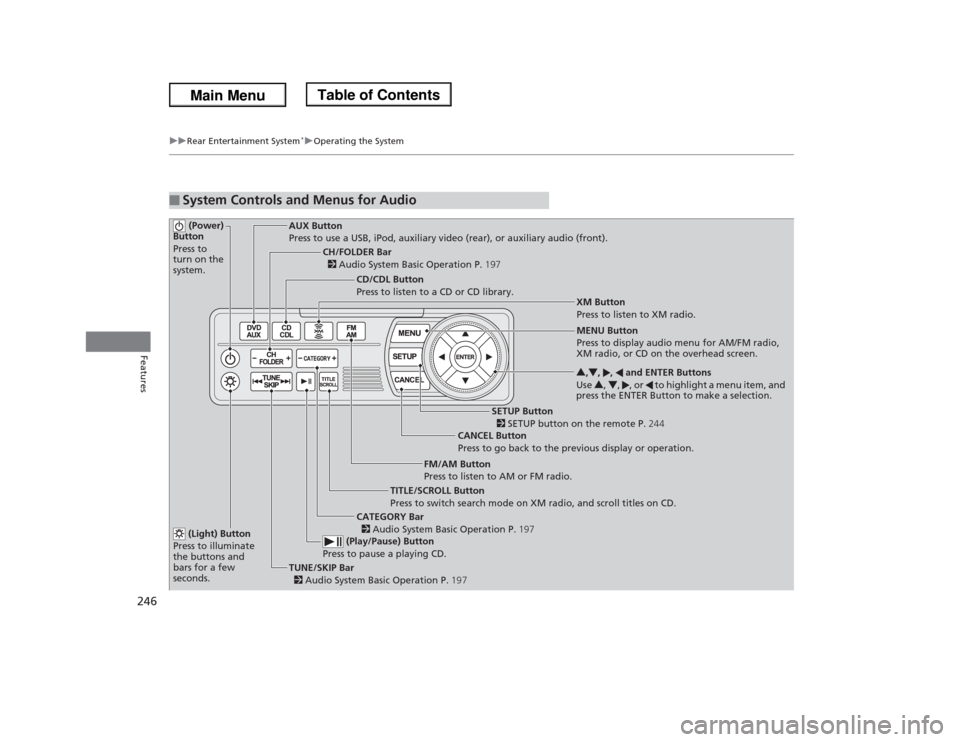
System Controls and Menus for Audio (Power)
Button
Press to
turn on the
system.
AUX Button
Press to use a USB, iPod, auxiliary video (rear), or auxiliary audio (front).
(Light) Button
Press to illuminate
the buttons and
bars for a few
seconds.TUNE/SKIP Bar
2 Audio System Basic Operation P.197 (Play/Pause) Button
Press to pause a playing CD.
TITLE/SCROLL Button
Press to switch search mode on XM radio, and scroll titles on CD.CANCEL Button
Press to go back to the previous display or operation.3,4, , and ENTER Buttons
Use 3, 4, , or to highlight a menu item, and
press the ENTER Button to make a selection.
CATEGORY Bar
2 Audio System Basic Operation P.197
CH/FOLDER Bar
2 Audio System Basic Operation P.197
CD/CDL Button
Press to listen to a CD or CD library.
FM/AM Button
Press to listen to AM or FM radio.
SETUP Button
2 SETUP button on the remote P.244 XM Button
Press to listen to XM radio.
MENU Button
Press to display audio menu for AM/FM radio,
XM radio, or CD on the overhead screen.
Page 249 of 433
uuRear Entertainment System
*uOperating the System
248Features
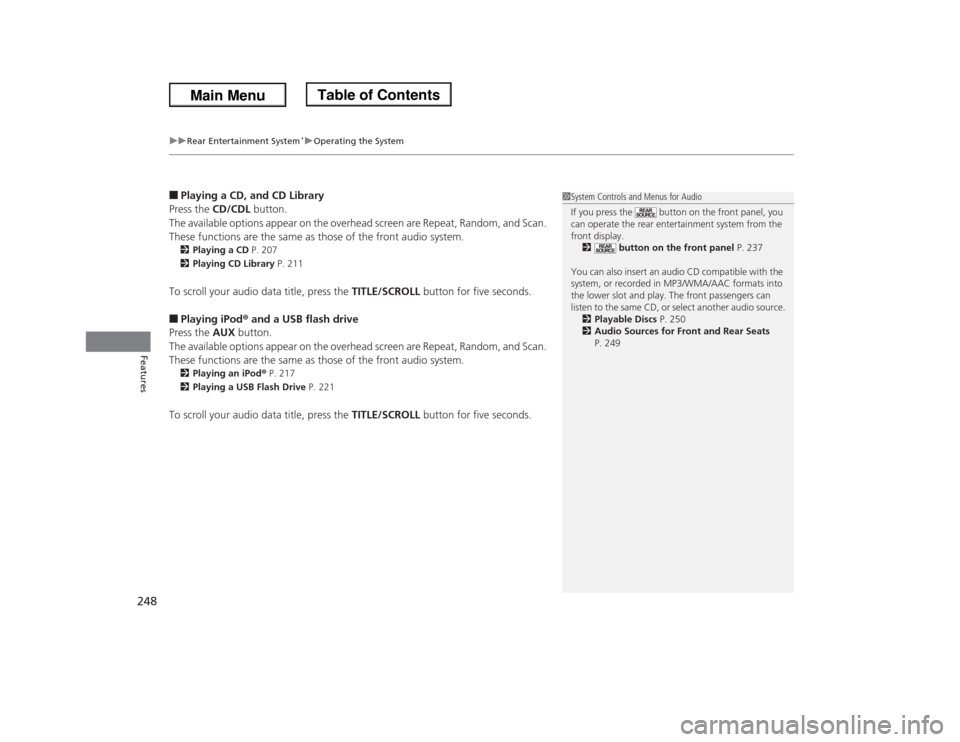
■Playing a CD, and CD Library
Press the CD/CDL button.
The available options appear on the overhead screen are Repeat, Random, and Scan.
These functions are the same as those of the front audio system.2Playing a CD P. 207
2Playing CD Library P. 211To scroll your audio data title, press the TITLE/SCROLL button for five seconds.■Playing iPod® and a USB flash drive
Press the AUX button.
The available options appear on the overhead screen are Repeat, Random, and Scan.
These functions are the same as those of the front audio system.2Playing an iPod® P. 217
2Playing a USB Flash Drive P. 221To scroll your audio data title, press the TITLE/SCROLL button for five seconds.
1System Controls and Menus for Audio
If you press the button on the front panel, you
can operate the rear entertainment system from the
front display.
2 button on the front panel P. 237
You can also insert an audio CD compatible with the
system, or recorded in MP3/WMA/AAC formats into
the lower slot and play. The front passengers can
listen to the same CD, or select another audio source.
2Playable Discs P. 250
2Audio Sources for Front and Rear Seats
P. 249
Page 250 of 433
249
uuRear Entertainment System
*uAudio Sources for Front and Rear Seats
Features
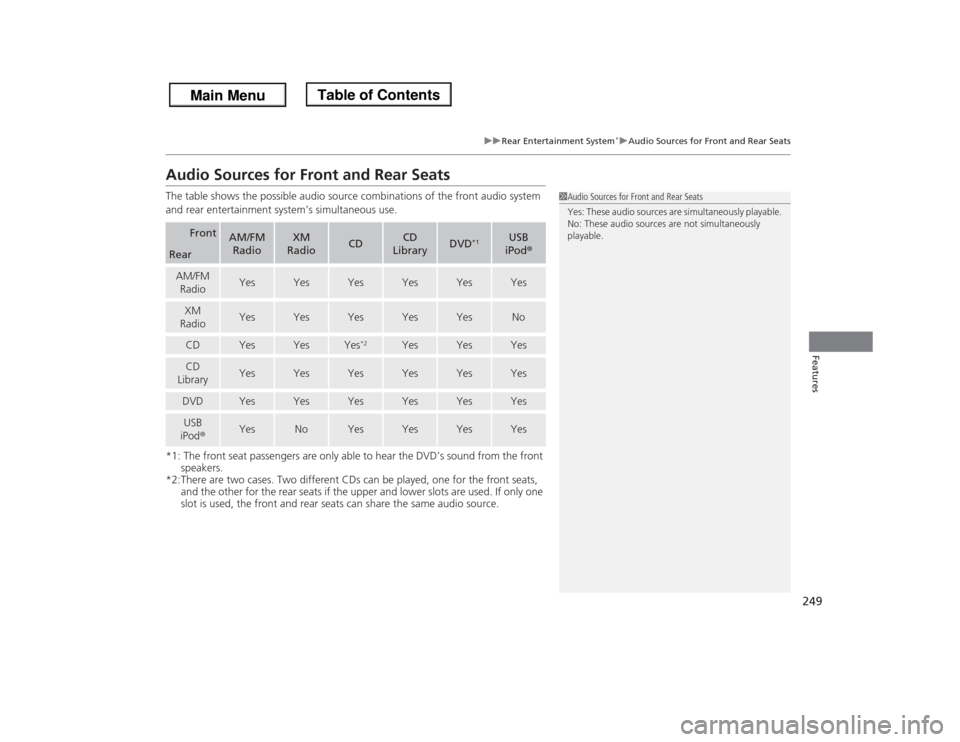
Audio Sources for Front and Rear SeatsThe table shows the possible audio source combinations of the front audio system
and rear entertainment system’s simultaneous use.
*1: The front seat passengers are only able to hear the DVD’s sound from the front
speakers.
*2:There are two cases. Two different CDs can be played, one for the front seats,
and the other for the rear seats if the upper and lower slots are used. If only one
slot is used, the front and rear seats can share the same audio source.
Front
AM/FM
Radio
XM
Radio
CD
CD
Library
DVD
*1
USB
iPod®
RearAM/FM
Radio
Yes
Yes
Yes
Yes
Yes
Yes
XM
Radio
Yes
Yes
Yes
Yes
Yes
No
CD
Yes
Yes
Yes
*2
Yes
Yes
Yes
CD
Library
Yes
Yes
Yes
Yes
Yes
Yes
DVD
Yes
Yes
Yes
Yes
Yes
Yes
USB
iPod®
Yes
No
Yes
Yes
Yes
Yes
1Audio Sources for Front and Rear Seats
Yes: These audio sources are simultaneously playable.
No: These audio sources are not simultaneously
playable.
Page 426 of 433

Index
425Index
Index
AABS (Anti-lock Brake System).................. 310
AC Power Outlet...................................... 176
Accessories and Modifications................ 322
Accessory Power Sockets......................... 175
Additives
Coolant .................................................. 342
Engine Oil ............................................... 337
Washer ................................................... 346
Additives, Engine Oil............................... 337
Adjusting
Armrest .................................................. 167
Front Seats.............................................. 153
Head Restraints ....................................... 156
Mirrors.................................................... 151
Rear Seats ............................................... 161
Steering Wheel ....................................... 150
Temperature ........................................... 100
Air Conditioning System
(Climate Control System)....................... 186
Changing the Mode................................ 186
Defrosting the Windshield
and Windows........................................ 187
Dust and Pollen Filter .............................. 376
Recirculation/Fresh Air Mode................... 186
Sensors ................................................... 191
Using Automatic Climate Control............ 186
Air Conditioning System
(Heating and Cooling System)............... 182
Cooling................................................... 184Defrosting the Windshield
and Windows ........................................ 184
Dust and Pollen Filter ............................... 376
Heating ................................................... 183
Air Pressure....................................... 363, 413
Airbags........................................................ 39
Advanced Airbags ..................................... 45
After a Collision......................................... 43
Airbag Care ............................................... 53
Event Data Recorder .................................. 22
Front Airbags (SRS) .................................... 42
Indicator ........................................ 50, 76, 80
Passenger Airbag Off Indicator .................. 51
Sensors...................................................... 39
Side Airbag Cutoff System ......................... 48
Side Airbag Off Indicator ........................... 52
Side Airbags .............................................. 46
Side Curtain Airbags .................................. 49
AM/FM Radio............................................ 200
Anti-lock Brake System (ABS).................. 310
Indicator .................................................... 75
Armrest..................................................... 167
Audio Remote Controls............................ 198
Audio System............................................ 194
Adjusting the Sound ................................ 199
Auxiliary Input Jack .................................. 195
Error Messages ........................................ 230
General Information ................................ 232
MP3/WMA/AAC ...................................... 221
Reactivating............................................. 196
Recommended CDs ................................. 233Recommended Devices............................ 235
Remote Controls ..................................... 198
Security Code .......................................... 196
Theft Protection ...................................... 196
USB Adapter Cable.................................. 195
USB Flash Drives ...................................... 235
Audio/Information Display........................ 91
Authorized Manuals................................ 421
Auto Door Locking/Unlocking................. 115
Customize ............................................... 116
Automatic Lighting.................................. 142
Automatic Transmission........................... 294
Creeping ................................................. 294
Fluid ........................................................ 344
Kickdown ................................................ 294
Operating the Shift Lever................... 16, 296
Shift Lever Does Not Move ...................... 395
Shifting ................................................... 295
Auxiliary Input Jack.................................. 195
Average Fuel Economy.................. 88, 92, 99
Average Speed................................... 92, 100
BBattery...................................................... 371
Charging System Indicator................. 73, 398
Jump Starting .......................................... 393
Maintenance (Checking the Battery) ........ 371
Maintenance (Replacing) ................. 372, 374
Belts (Seat).................................................. 30
Beverage Holders..................................... 173
Page 433 of 433

432Index
Noise When Braking .................................. 21
Overheating............................................. 396
Puncture/Flat Tire ..................................... 383
Select Lever Won’t Move ......................... 395
Sliding Door Won’t Open................... 20, 114
Warning Indicators .................................... 72
Tucking away the One-Motion Third row
magic Seat............................................... 165
Turn Signals............................................... 141
Indicators (Instrument Panel) ...................... 79UUnlocking the Doors................................. 111
Unlocking the Front Doors
from the Inside........................................ 113
USB Adapter Cable........................... 194, 195
USB Flash Drives........................................ 235VValet Key................................................... 110
Vanity Mirrors............................................... 5
Vehicle Identification Number................. 414
Vehicle Stability Assist (VSA®).................. 300
Off Button ............................................... 301
Off Indicator .............................................. 76
System Indicator ........................................ 76
Ventilation........................................ 182, 186
Viscosity (Oil)..................................... 337, 413
VSA® (Vehicle Stability Assist).................. 300
WWallpaper................................................... 94
Warning and Information Messages......... 84
Warning Indicator On/Blinking............... 398
Warning Labels........................................... 69
Warranties (Warranty Manual provided
separately).............................................. 419
Watts......................................................... 412
Wear Indicators (Tire).............................. 367
Wheel Cover............................................. 387
Wheel Nut Wrench (Jack Handle)........... 386
Window Washers..................................... 144
Adding/Refilling Fluid .............................. 346
Switch ..................................................... 144
Windows (Opening and Closing)............ 136
Windshield................................................ 144
Cleaning ................................................. 380
Defrosting ....................................... 184, 187
Washer Fluid ........................................... 346
Wiper Blades ........................................... 358
Wipers and Washers................................ 144
Winter Tires.............................................. 370
Snow Tires .............................................. 370
Tire Chains .............................................. 370
Wipers and Washers................................. 144
Checking and Replacing Wiper Blades ..... 358
WMA................................................. 207, 221
Worn Tires................................................ 362