Page 73 of 433
72Instrument Panel
IndicatorsIndicator
Name
On/Blinking
Explanation
Message
*
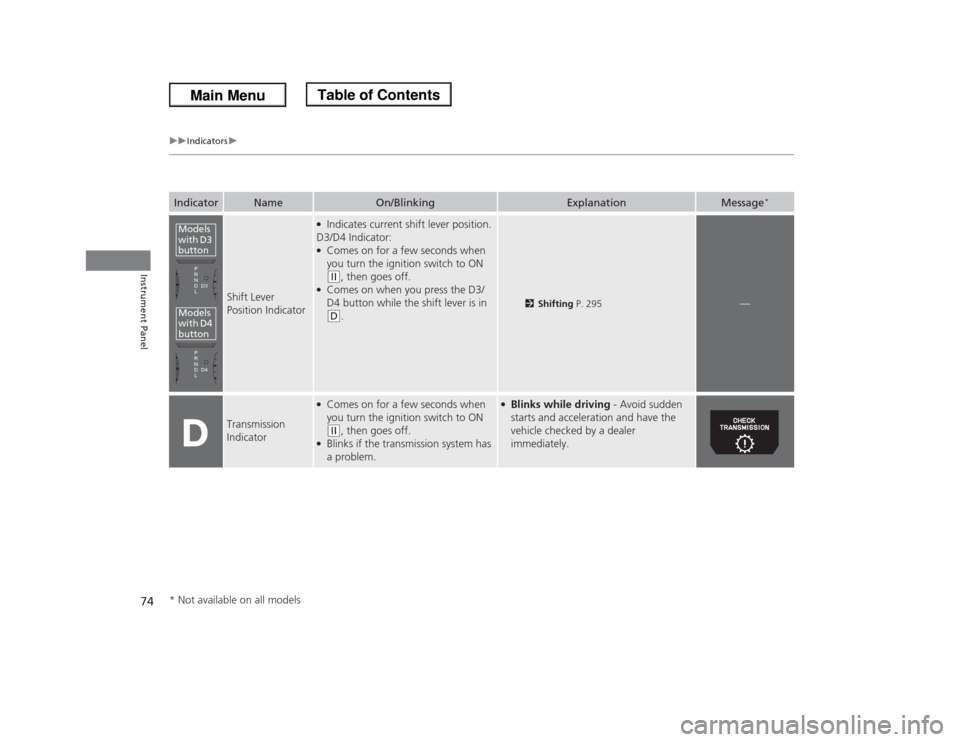
Parking Brake
and Brake
System Indicator
●Comes on for a few seconds when
you turn the ignition switch to ON (w
, then goes off.
●Comes on when the parking brake
is applied, and goes off when it is
released.●Comes on when the brake fluid
level is low.●Comes on if there is a problem
with the brake system.●The beeper sounds and the
indicator comes on if you drive
with the parking brake not fully
released.
●Comes on while driving - Make sure
the parking brake is released. Check the
brake fluid level.
2What to do when the indicator
comes on while driving P. 400
●Comes on along with the ABS
indicator - Have the vehicle checked by
a dealer.
2If the Brake System Indicator Comes
On P. 400
Low Oil Pressure
Indicator
●Comes on when you turn the
ignition switch to ON
(w
, and goes
off when the engine starts.
●Comes on when the engine oil
pressure is low.
●Comes on while driving - Immediately
stop in a safe place.
2If the Low Oil Pressure Indicator
Comes On P. 398
U.S.
Canada
U.S.
Canada
* Not available on all models
Page 74 of 433
73
uuIndicatorsu
Continued
Instrument Panel
Indicator
Name
On/Blinking
Explanation
Message
*
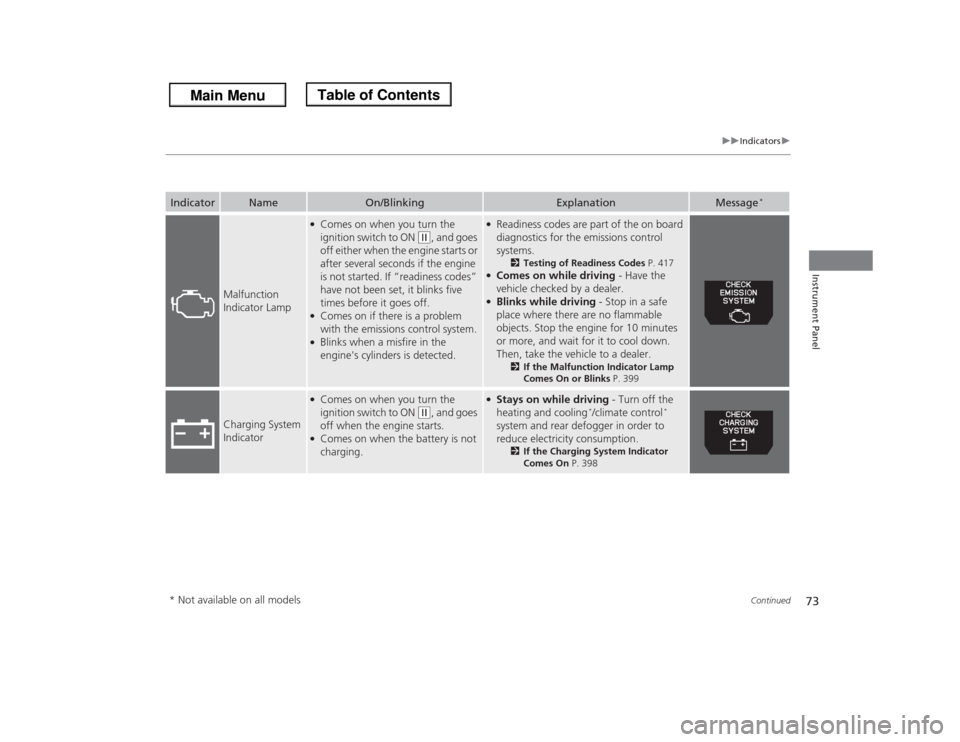
Malfunction
Indicator Lamp
●Comes on when you turn the
ignition switch to ON
(w
, and goes
off either when the engine starts or
after several seconds if the engine
is not started. If “readiness codes”
have not been set, it blinks five
times before it goes off.
●Comes on if there is a problem
with the emissions control system.●Blinks when a misfire in the
engine's cylinders is detected.
●Readiness codes are part of the on board
diagnostics for the emissions control
systems.
2Testing of Readiness Codes P. 417
●Comes on while driving - Have the
vehicle checked by a dealer.●Blinks while driving - Stop in a safe
place where there are no flammable
objects. Stop the engine for 10 minutes
or more, and wait for it to cool down.
Then, take the vehicle to a dealer.
2If the Malfunction Indicator Lamp
Comes On or Blinks P. 399
Charging System
Indicator
●Comes on when you turn the
ignition switch to ON
(w
, and goes
off when the engine starts.
●Comes on when the battery is not
charging.
●Stays on while driving - Turn off the
heating and cooling
*/climate control
*
system and rear defogger in order to
reduce electricity consumption.
2If the Charging System Indicator
Comes On P. 398
* Not available on all models
Page 75 of 433
74
uuIndicatorsu
Instrument Panel
Indicator
Name
On/Blinking
Explanation
Message
*
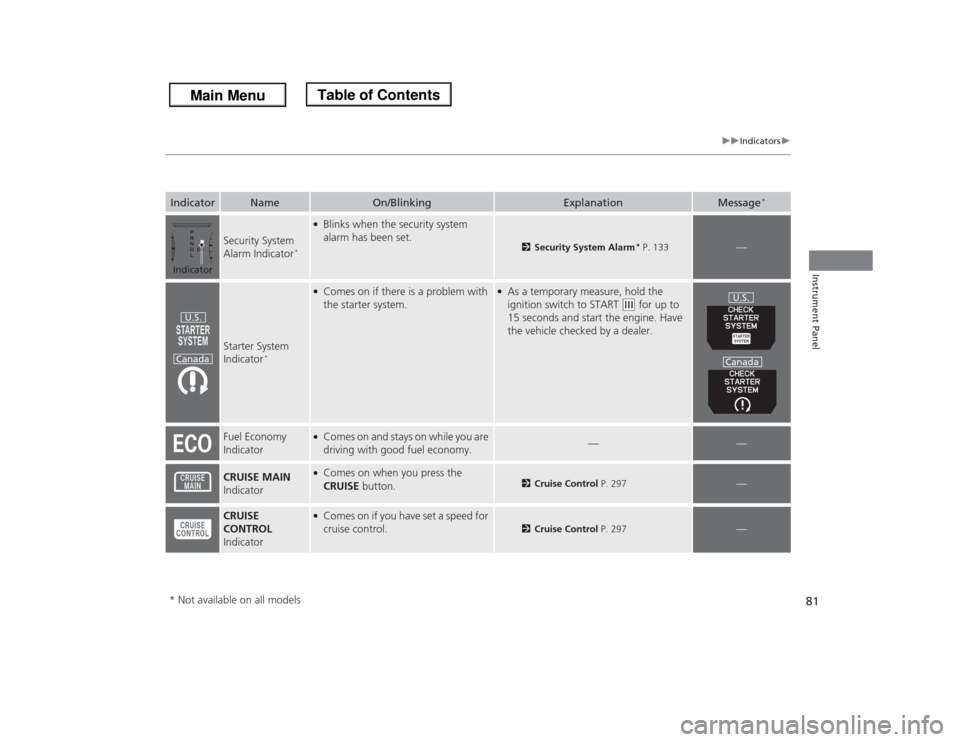
Shift Lever
Position Indicator
●Indicates current shift lever position.
D3/D4 Indicator:●Comes on for a few seconds when
you turn the ignition switch to ON (w
, then goes off.
●Comes on when you press the D3/
D4 button while the shift lever is in (D
.
2Shifting P. 295
—
Transmission
Indicator
●Comes on for a few seconds when
you turn the ignition switch to ON (w
, then goes off.
●Blinks if the transmission system has
a problem.
●Blinks while driving - Avoid sudden
starts and acceleration and have the
vehicle checked by a dealer
immediately.
Models
with D3
buttonModels
with D4
button* Not available on all models
Page 78 of 433

77
uuIndicatorsu
Instrument Panel
Door and Tailgate
Open Indicator
●Comes on for a few seconds when
you turn the ignition switch to ON (w
, then goes off.
●Comes on if any door or the tailgate
is not completely closed.●The beeper sounds and the indicator
comes on if any door or the tailgate
is opened while driving.
●Goes off when all doors and tailgate are
closed.
Parking Sensor
Indicator
*
●Comes on for a few seconds when
you turn the ignition switch to ON (w
, then goes off.
●A corresponding indicator comes on
when an obstacle is detected while
parking.●Comes on if there is a problem with
the parking sensor system. The
beeper sounds.
●Comes on without any obstacles or
when you are not parking - Check if
the area around the sensor(s) is covered
with mud, ice, snow, etc. If the
indicator(s) stays on even after you
clean the area, have the system checked
by a dealer.
—
Daytime Running
Lights Indicator
*
●Comes on for a few seconds when
you turn the ignition switch to ON (w
, then goes off.
●Comes on if there is a problem with
the DRL system.
●Have your vehicle checked by a dealer.
2Daytime Running Lights P. 143
Indicator
Name
On/Blinking
Explanation
Message
*
* Not available on all models
Page 79 of 433
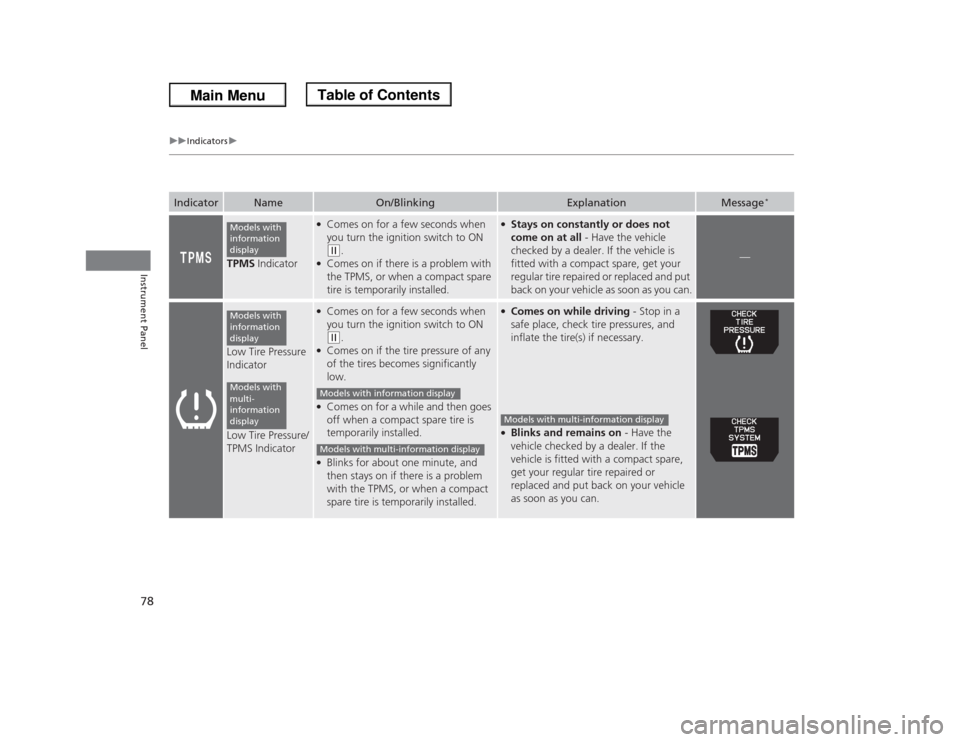
78
uuIndicatorsu
Instrument Panel
TPMS Indicator
●Comes on for a few seconds when
you turn the ignition switch to ON (w
.
●Comes on if there is a problem with
the TPMS, or when a compact spare
tire is temporarily installed.
●Stays on constantly or does not
come on at all - Have the vehicle
checked by a dealer. If the vehicle is
fitted with a compact spare, get your
regular tire repaired or replaced and put
back on your vehicle as soon as you can.
—
Low Tire Pressure
Indicator
Low Tire Pressure/
TPMS Indicator
●Comes on for a few seconds when
you turn the ignition switch to ON (w
.
●Comes on if the tire pressure of any
of the tires becomes significantly
low.●Comes on for a while and then goes
off when a compact spare tire is
temporarily installed.●Blinks for about one minute, and
then stays on if there is a problem
with the TPMS, or when a compact
spare tire is temporarily installed.
●Comes on while driving - Stop in a
safe place, check tire pressures, and
inflate the tire(s) if necessary.●Blinks and remains on - Have the
vehicle checked by a dealer. If the
vehicle is fitted with a compact spare,
get your regular tire repaired or
replaced and put back on your vehicle
as soon as you can.
Indicator
Name
On/Blinking
Explanation
Message
*
Models with
information
displayModels with
information
displayModels with
multi-
information
display
Models with information displayModels with multi-information display
Models with multi-information display
Page 80 of 433

79
uuIndicatorsu
Instrument Panel
System Message
Indicator
*
●Comes on for a few seconds when
you turn the ignition switch to ON (w
, then goes off.
●Comes on along with a beep when a
problem is detected. A system
message on the multi-information
display appears at the same time.
●While the indicator is on, press the
/ (information) button to see the
message again.●Refer to the Indicators information in
this chapter when a system message
appears on the multi-information
display. Take the appropriate action for
the message.●The multi-information display does not return
to the normal screen unless the warning is
canceled, or the / (information)
button is pressed.
—
Turn Signal and
Hazard Warning
Indicators
●The turn signal indicators blink when
you operate the turn signal lever.●If you press the hazard warning
button, both indicators and all turn
signals blink at the same time.
●Does not blink or blinks rapidly - A
turn signal light bulb has blown.
Change the bulb immediately.
2Replacing Light Bulbs
P. 352, 353
—
High Beam
Indicator
●Comes on when the high beam
headlights are on.
—
—
Lights On
Indicator
●Comes on whenever the light switch
is on, or in AUTO
* when the exterior
lights are on.
●If you remove the key from the ignition
switch while the lights are on, a chime
sounds when the driver's door is
opened.
—
Indicator
Name
On/Blinking
Explanation
Message
*
* Not available on all models
Page 81 of 433

80
uuIndicatorsu
Instrument Panel
Fog Light
Indicator
*
●Comes on when the fog lights are
on.
—
—
Side Airbag Off
Indicator
●Comes on for a few seconds when
you turn the ignition switch to ON (w
, then goes off.
●Comes on when the passenger side
airbag system is automatically shut
off.
●It does not mean there is a problem
with your side airbags.●Comes on when nobody is sitting in
the passenger seat - Have the vehicle
checked by a dealer.●Comes on when someone is sitting
in the seat - Have the passenger sit
properly.
Immobilizer
System Indicator
●Comes on briefly when you turn the
ignition switch to ON
(w
, then goes
off.
●Comes on if the immobilizer system
cannot recognize the key
information.
●Blinks - You cannot start the engine.
Turn the ignition switch to LOCK
(0
,
pull the key out, and then insert the key
and turn it to ON
(w
again.
●Repeatedly blinks - The system may
be malfunctioning. Have the vehicle
checked by a dealer.●Do not attempt to alter this system or
add other devices to it. Electrical
problems can occur.
—
Indicator
Name
On/Blinking
Explanation
Message
*
U.S.
Canada
U.S.
Canada
* Not available on all models
Page 82 of 433
81
uuIndicatorsu
Instrument Panel
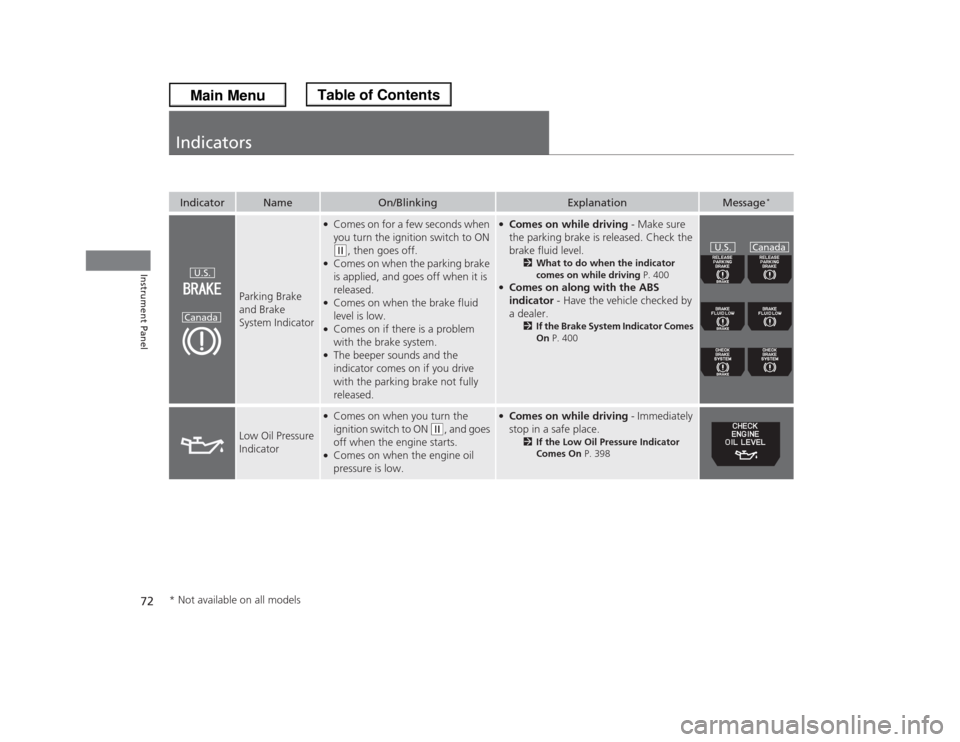
Security System
Alarm Indicator
*
●Blinks when the security system
alarm has been set.
2Security System Alarm
* P. 133
—
Starter System
Indicator
*
●Comes on if there is a problem with
the starter system.
●As a temporary measure, hold the
ignition switch to START
(e
for up to
15 seconds and start the engine. Have
the vehicle checked by a dealer.
Fuel Economy
Indicator
●Comes on and stays on while you are
driving with good fuel economy.
—
—
CRUISE MAIN
Indicator
●Comes on when you press the
CRUISE button.
2Cruise Control P. 297
—
CRUISE
CONTROL
Indicator
●Comes on if you have set a speed for
cruise control.
2Cruise Control P. 297
—
Indicator
Name
On/Blinking
Explanation
Message
*
IndicatorU.S.
Canada
U.S.
Canada
* Not available on all models