Page 299 of 573
298
uuCustomized Features*u
Features
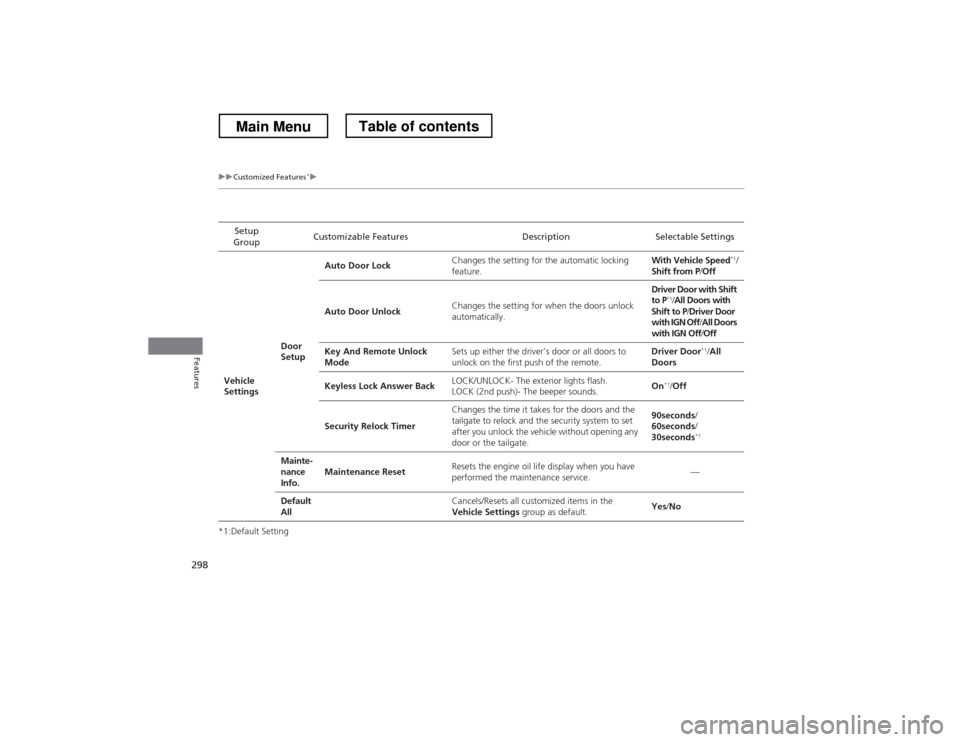
*1:Default SettingSetup
Group Customizable Features Description Selectable Settings
Vehicle
Settings Door
SetupAuto Door Lock
Changes the setting for the automatic locking feature. With Vehicle Speed
*1
/
Shift from P /Off
Auto Door Unlock Changes the setting for when the doors unlock
automatically. Driver Door with Shift
to P
*1
/All Doors with
Shift to P /Driver Door
with IGN Off /All Doors
with IGN Off /Off
Key And Remote Unlock
Mode Sets up either the driver’s door or all doors to
unlock on the first push of the remote. Driver Door
*1
/All
Doors
Keyless Lock Answer Back LOCK/UNLOCK- The exterior lights flash.
LOCK (2nd push)- The beeper sounds. On
*1
/Off
Security Relock Timer Changes the time it takes for the doors and the
tailgate to relock and the security system to set
after you unlock the vehicle without opening any
door or the tailgate. 90seconds
/
60seconds /
30seconds *1
Mainte-
nance
Info. Maintenance Reset
Resets the engine oil life display when you have
performed the maintenance service. —
Default All
Cancels/Resets all customized items in the
Vehicle Settings group as default. Yes
/No
Main MenuTable of contents
Page 309 of 573

308
uuCustomized Features*u
Features
*1:Default SettingSetup
Group Customizable Features Description Selectable Settings
Vehicle
Settings Driving
Position
Setup
Memory Position Link
Changes the driver’s seat and door mirror
positions to a stored setting. On
*1
/Off
Keyless
Access
Setup Door Unlock Mode
Changes which doors unlock when you grab the
driver’s door handle. Drivers Door Only
*1
/
All Doors
Keyless Access Light Flash Causes some exterior lights to blink when you
unlock/lock the doors. On
*1
/Off
Keyless Access Beep Causes the beeper to sound when you unlock/lock the doors.
On
*1
/Off
Lighting Setup Interior Light Dimming
Time
Changes the length of time the interior lights stay
on after you close the doors. 60seconds
/
30seconds *1
/
15seconds
Headlight Auto Off Timer Changes the length of time the exterior lights
stay on after you close the driver’s door. 60seconds
/
30seconds /
15seconds *1
/
0seconds
Auto Light Sensitivity Changes the timing for the headlights to come
on. Max
/High /Mid *1
/
Low /Min
Main MenuTable of contents
Page 310 of 573
309
uuCustomized Features*u
Continued
Features
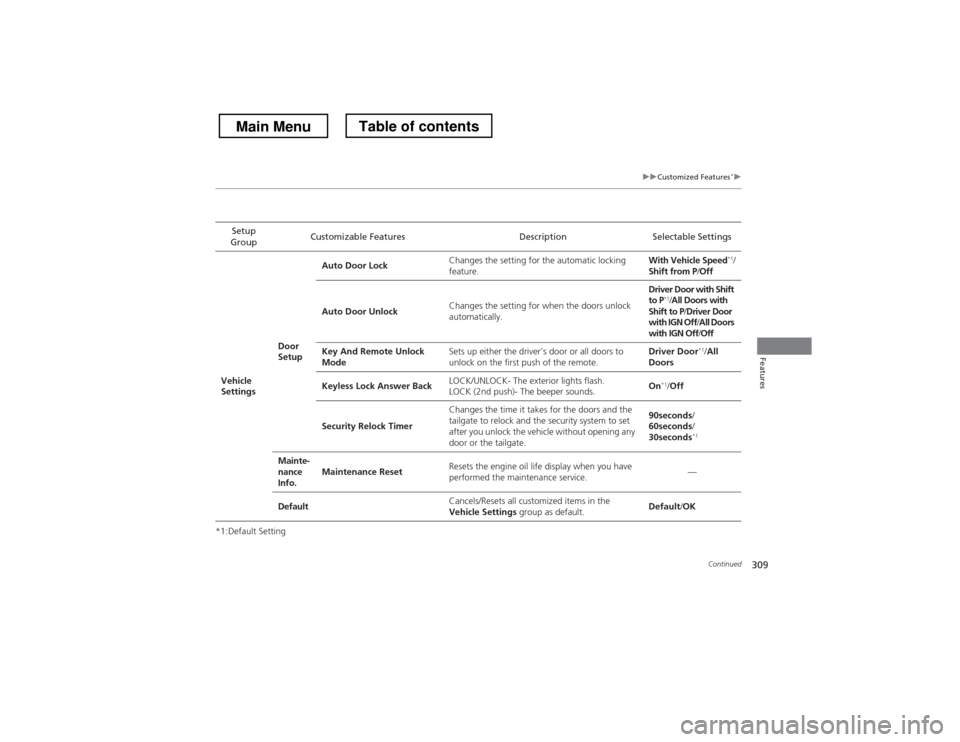
*1:Default SettingSetup
Group Customizable Features Description Selectable Settings
Vehicle
Settings Door
SetupAuto Door Lock
Changes the setting for the automatic locking
feature. With Vehicle Speed
*1
/
Shift from P /Off
Auto Door Unlock Changes the setting for when the doors unlock
automatically. Driver Door with Shift to P
*1
/All Doors with
Shift to P /Driver Door
with IGN Off /All Doors
with IGN Off /Off
Key And Remote Unlock
Mode Sets up either the driver’s door or all doors to
unlock on the first push of the remote. Driver Door
*1
/All
Doors
Keyless Lock Answer Back LOCK/UNLOCK- The exterior lights flash.
LOCK (2nd push)- The beeper sounds. On
*1
/Off
Security Relock Timer Changes the time it takes for the doors and the
tailgate to relock and the security system to set
after you unlock the vehicle without opening any
door or the tailgate. 90seconds
/
60seconds /
30seconds *1
Mainte-
nance
Info. Maintenance Reset
Resets the engine oil life display when you have
performed the maintenance service. —
Default Cancels/Resets all customized items in the
Vehicle Settings
group as default. Default
/OK
Main MenuTable of contents
Page 411 of 573

410
Driving
Before Driving
Driving Preparation
Check the following items before you start driving. •Make sure there are no obstructions on the windows, door mirrors, exterior
lights, or other parts of the vehicle.
uRemove any frost, snow, or ice.uRemove any snow on the roof, as this can slip down and obstruct your field of
vision while driving. If frozen solid, remove ice once it has softened.
uWhen removing ice from around the wheels, be sure not to damage the wheel
or wheel components.
• Make sure the hood is securely closed.
uIf the hood opens while driving, your front view will be blocked.
• Make sure the tires are in good condition.
uCheck air pressure, and check for damage and excessive wear.
2 Checking and Maintaining Tires P. 497
• Make sure there are no people or objects behind or around the vehicle.
uThere are blind spots from the inside.
■Exterior Checks1Exterior Checks
NOTICEWhen doors are frozen shut, use warm water around
the door edges to melt any ice. Do not try to force
them open, as this can damage the rubber trim
around the doors. When done, wipe dry to avoid further freezing.
Do not pour warm water into the key cylinder.
You will be unable to insert key if the water freezes in
the hole.
Heat from the engine and exhaust can ignite
flammable materials left under the hood, causing a
fire. If you’ve parked your vehicle for an extended
period, inspect and remove any debris that may have
collected, such as dried grass and leaves that have
fallen or have been carried in for use as a nest by a
small animal. Also check under the hood for leftover
flammable materials after you or someone else has
performed maintenance on your vehicle.
Main MenuTable of contents
Page 412 of 573
Continued411
uuBefore DrivinguDriving Preparation
Driving
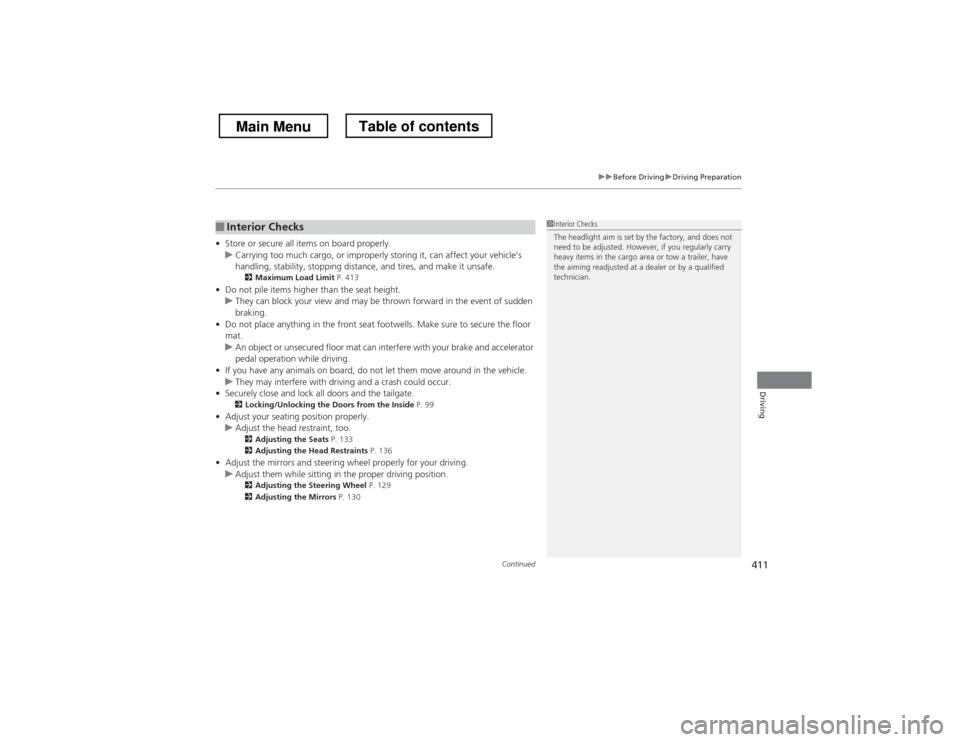
•Store or secure all items on board properly.uCarrying too much cargo, or improp erly storing it, can affect your vehicle’s
handling, stability, stopping distance, and tires, and make it unsafe. 2 Maximum Load Limit P. 413
• Do not pile items higher than the seat height.
uThey can block your view and may be thrown forward in the event of sudden
braking.
• Do not place anything in the front seat footwells. Make sure to secure the floor mat.
uAn object or unsecured floor mat can interfere with your brake and accelerator
pedal operation while driving.
• If you have any animals on board, do not let them move around in the vehicle.
uThey may interfere with driving and a crash could occur.
• Securely close and lock all doors and the tailgate.
2 Locking/Unlocking the Doors from the Inside P. 99
• Adjust your seating position properly.
uAdjust the head restraint, too.
2 Adjusting the Seats P. 133
2 Adjusting the Head Restraints P. 136
• Adjust the mirrors and steering wheel properly for your driving.
uAdjust them while sitting in the proper driving position.
2 Adjusting the Steering Wheel P. 129
2 Adjusting the Mirrors P. 130
■Interior Checks1Interior Checks
The headlight aim is set by the factory, and does not
need to be adjusted. However, if you regularly carry
heavy items in the cargo area or tow a trailer, have
the aiming readjusted at a dealer or by a qualified
technician.
Main MenuTable of contents
Page 458 of 573
457
uuRefuelinguHow to Refuel
Continued
Driving
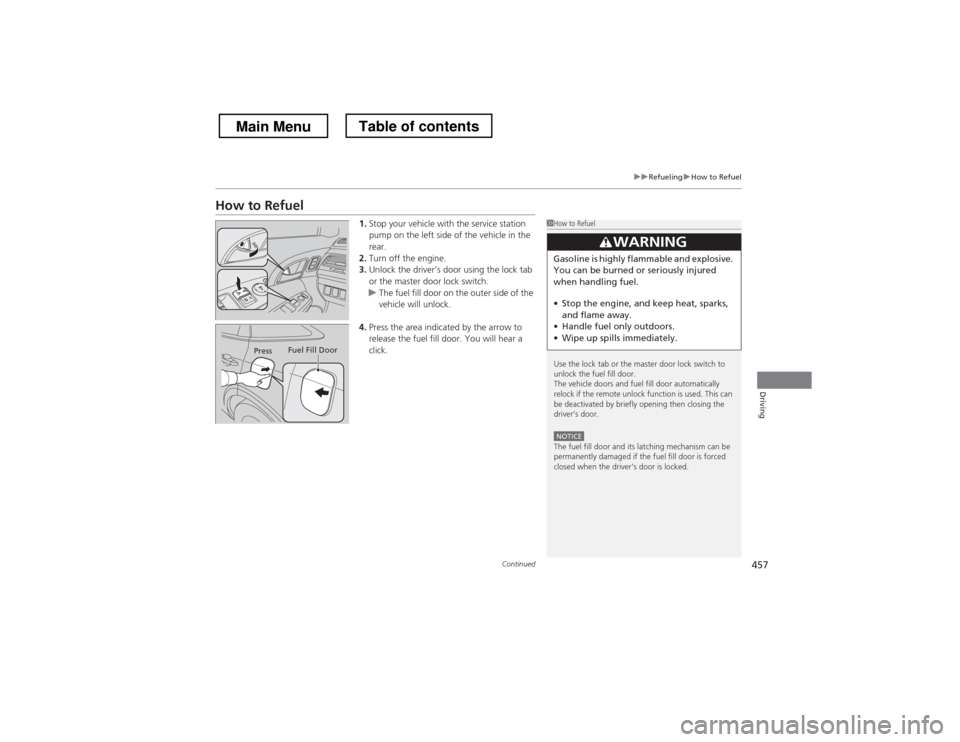
How to Refuel1.Stop your vehicle with the service station
pump on the left side of the vehicle in the rear.
2. Turn off the engine.
3. Unlock the driver’s door using the lock tab
or the master door lock switch.
uThe fuel fill door on the outer side of the
vehicle will unlock.
4. Press the area indicated by the arrow to
release the fuel fill door. You will hear a
click.
1How to Refuel
Use the lock tab or the master door lock switch to
unlock the fuel fill door.
The vehicle doors and fuel fill door automatically
relock if the remote unlock function is used. This can
be deactivated by briefly opening then closing the driver’s door.
NOTICEThe fuel fill door and its latching mechanism can be
permanently damaged if the fuel fill door is forced
closed when the driver’s door is locked.
3WARNING
Gasoline is highly flammable and explosive.
You can be burned or seriously injured
when handling fuel. • Stop the engine, and keep heat, sparks,
and flame away.
• Handle fuel only outdoors.
• Wipe up spills immediately.
Press Fuel Fill Door
Main MenuTable of contents
Page 516 of 573
515
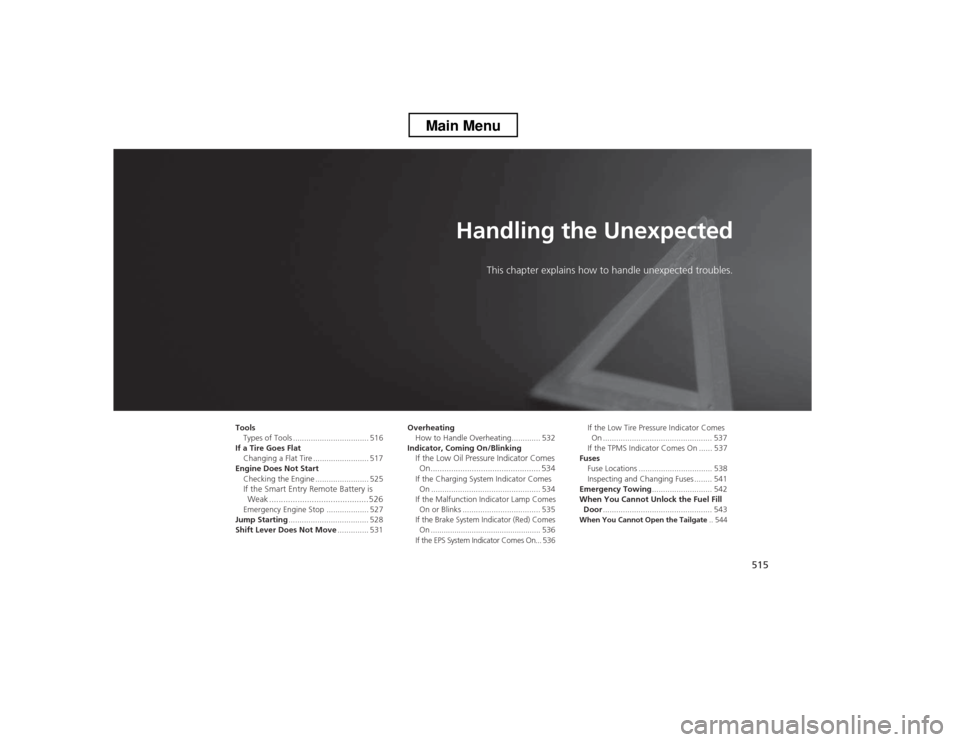
Handling the UnexpectedThis chapter explains how to h andle unexpected troubles.
Tools
Types of Tools .................................. 516
If a Tire Goes Flat Changing a Flat Tire ......................... 517
Engine Does Not Start Checking the Engine ........................ 525
If the Smart Entry Remote Battery is
Weak ..........................................526
Emergency Engine Stop ................... 527
Jump Starting .................................... 528
Shift Lever Does Not Move .............. 531Overheating
How to Handle Overheating............. 532
Indicator, Coming On/Blinking If the Low Oil Pressure Indicator Comes
On................................................ 534
If the Charging System Indicator Comes On ................................................. 534
If the Malfunction Indicator Lamp Comes On or Blinks ................................... 535
If the Brake System Indicator (Red) Comes
On ................................................... 536
If the EPS System Indicator Comes On... 536 If the Low Tire Pressure Indicator Comes
On ................................................. 537
If the TPMS Indicator Comes On ...... 537
Fuses
Fuse Locations ................................. 538
Inspecting and Changing Fuses ........ 541
Emergency Towing ........................... 542
When You Cannot Unlock the Fuel Fill Door ................................................. 543
When You Cannot Open the Tailgate .. 544
Main Menu
Page 541 of 573

540
uuFusesuFuse Locations
Handling the Unexpected
*1:4-cylinder models
*2:6-cylinder models
*3:Sub fuse box
17Accessory, Key, Lock7.5 A18Accessory7.5 A19Left Power Seat Sliding20 A20Moonroof20 A21Left Power Seat Reclining20 A22Rear Left Power Window20 A
23Front Accessory Power Socket15 A
24Front Left Power Window20 A25Left Door Lock15 A26Front Left Fog Light10 A27Left Small Lights (Exterior)10 A28Left Headlight High Beam10 A29TPMS7.5 A30Left Headlight Low Beam15 A31−−
32*3 ST MG DIODE
*, *1
7.5 A
Stop *, *2
7.5 A
33*3STRLD *7.5 A
Circuit ProtectedAmps
Circuit ProtectedAmps1Right Headlight High Beam10 A2Right Small Lights (Exterior)10 A3Front Right Fog Light10 A4Right Headlight Low Beam15 A5−−6Interior Lights7.5 A7−−8Right Power Seat Reclining20 A9Right Power Seat Sliding20 A10Right Door Lock10 A11Rear Right Power Window20 A12SMART *10 A13Front Right Power Window20 A14−−15Audio Amp20 A
16Accessory Power Socket
(Cargo Area)15 A
17−−18Power Lumbar *7.5 A19Seat Heaters
*15 A20−−21−−22−−
Passenger side
* Not available on all models
Main MenuTable of contents