Page 117 of 573
uuOperating the Switches Around the Steering WheeluENGINE START/STOP Button*
116
Controls
If you leave the vehicle for 30 to 60 minutes with the shift lever in (P and the power
mode in ACCESSORY, the vehicle automatically goes into the mode similar to
VEHICLE OFF (LOCK) to avoid the battery drain.
When in this mode:
The steering wheel does not lock.
You cannot lock or unlock doors with the remote transmitter or the smart entry system. Press the ENGINE START/STOP button to switch the mode to VEHICLE OFF (LOCK).
■Automatic Power Off1ENGINE START/STOP Button*
If the power mode does not change from VEHICLE
OFF to ACCESSORY, press the ENGINE START/STOP
button while moving the steering wheel left and
right. The steering wheel will unlock, allowing the
mode to change.
* Not available on all models
Main MenuTable of contents
Page 120 of 573
119
uuOperating the Switches Around the Steering WheeluTurn Signals
Continued
Controls
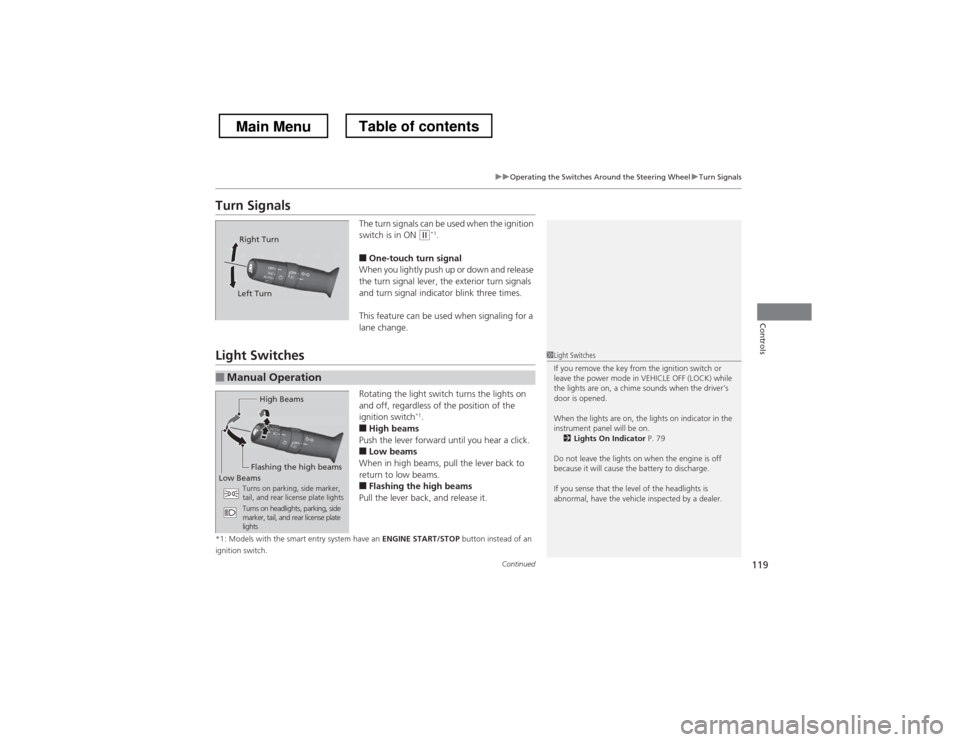
Turn SignalsThe turn signals can be used when the ignition
switch is in ON
(w*1
.
■ One-touch turn signal
When you lightly push up or down and release
the turn signal lever, the exterior turn signals
and turn signal indicator blink three times.
This feature can be used when signaling for a
lane change.
Light Switches
Rotating the light switch turns the lights on
and off, regardless of the position of the
ignition switch*1
.
■ High beams
Push the lever forward until you hear a click.
■ Low beams
When in high beams, pull the lever back to
return to low beams.
■ Flashing the high beams
Pull the lever back, and release it.
*1: Models with the smart entry system have an ENGINE START/STOP button instead of an
ignition switch.
Right Turn
Left Turn
■Manual Operation
1Light Switches
If you remove the key from the ignition switch or
leave the power mode in VEHICLE OFF (LOCK) while
the lights are on, a chime sounds when the driver’s
door is opened.
When the lights are on, the lights on indicator in the
instrument panel will be on. 2 Lights On Indicator P. 79
Do not leave the lights on when the engine is off
because it will cause the battery to discharge.
If you sense that the level of the headlights is
abnormal, have the vehicle inspected by a dealer.
High Beams
Flashing the high beams
Low Beams Turns on parking, side marker,
tail, and rear license plate lights
Turns on headlights, parking, side
marker, tail, and rear license plate lights
Main MenuTable of contents
Page 122 of 573
121
uuOperating the Switches Around the Steering WheeluLight Switches
Controls
The headlights, all other exterior lights, and the instrument panel lights turn off
within 15 seconds after you remove the key and close the driver’s door.
The headlights, all other exterior lights, and the instrument panel lights turn off
within 15 seconds after you set the power mode to VEHICLE OFF (LOCK), take the
remote with you, and close the driver’s door.
uYou can change the headlight auto off timer setting.
2 Customized Features *
P. 281
If you turn the ignition switch to LOCK
(0 *1
with the headlight switch on, but do
not open the door, the lights turn off after 10 minutes (three minutes, if the switch is in the AUTO position).
The lights turn on again when you unlock or open the driver’s door. If you unlock
the door, but do not open it within 15 seconds, the lights go off. If you open the
driver’s door, you will hear a lights on reminder chime.
*1: Models with the smart entry system have an ENGINE START/STOP button instead of an
ignition switch.
■Automatic Lighting Off Feature
Models without smart entry system
Models with smart entry system
All models
* Not available on all models
Main MenuTable of contents
Page 128 of 573
127
uuOperating the Switches Around the Steering WheeluDriving Position Memory System*
Continued
Controls
Driving Position Memory System *
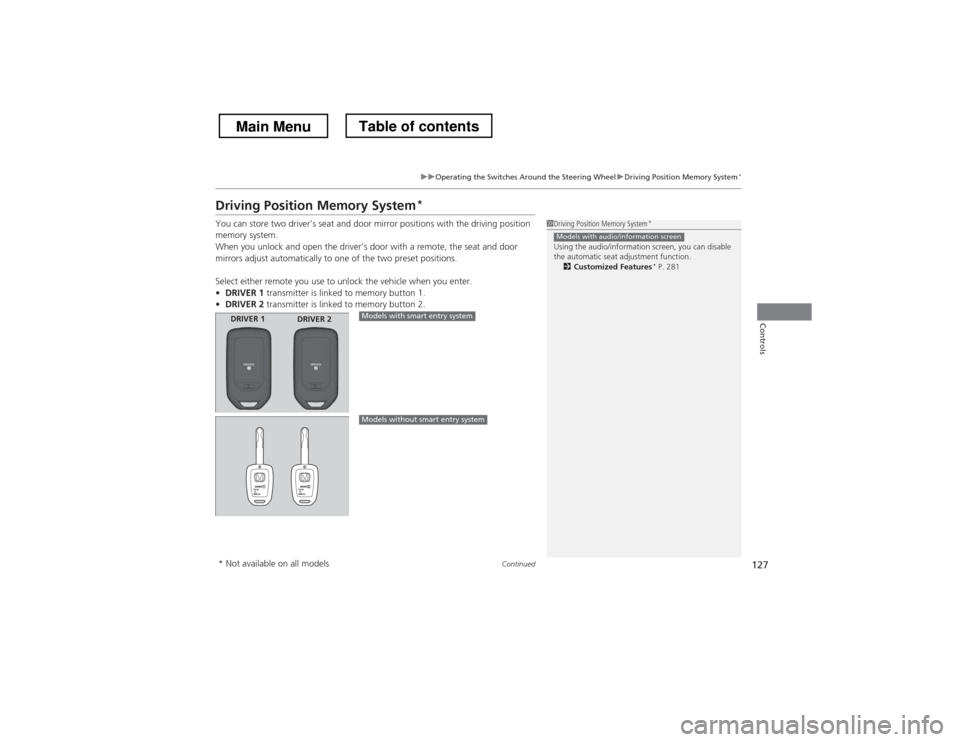
You can store two driver’s seat and door mirror positions with the driving position
memory system.
When you unlock and open the driver’s door with a remote, the seat and door
mirrors adjust automatically to one of the two preset positions.
Select either remote you use to unlock the vehicle when you enter. • DRIVER 1 transmitter is linked to memory button 1.
• DRIVER 2 transmitter is linked to memory button 2.
1Driving Position Memory System *
Using the audio/information screen, you can disable
the automatic seat adjustment function. 2 Customized Features *
P. 281
Models with audio/information screen
DRIVER 1 DRIVER 2Models with smart entry system
Models without smart entry system
* Not available on all models
Main MenuTable of contents
Page 143 of 573
142
Controls
Interior Lights/Interior Convenience Items
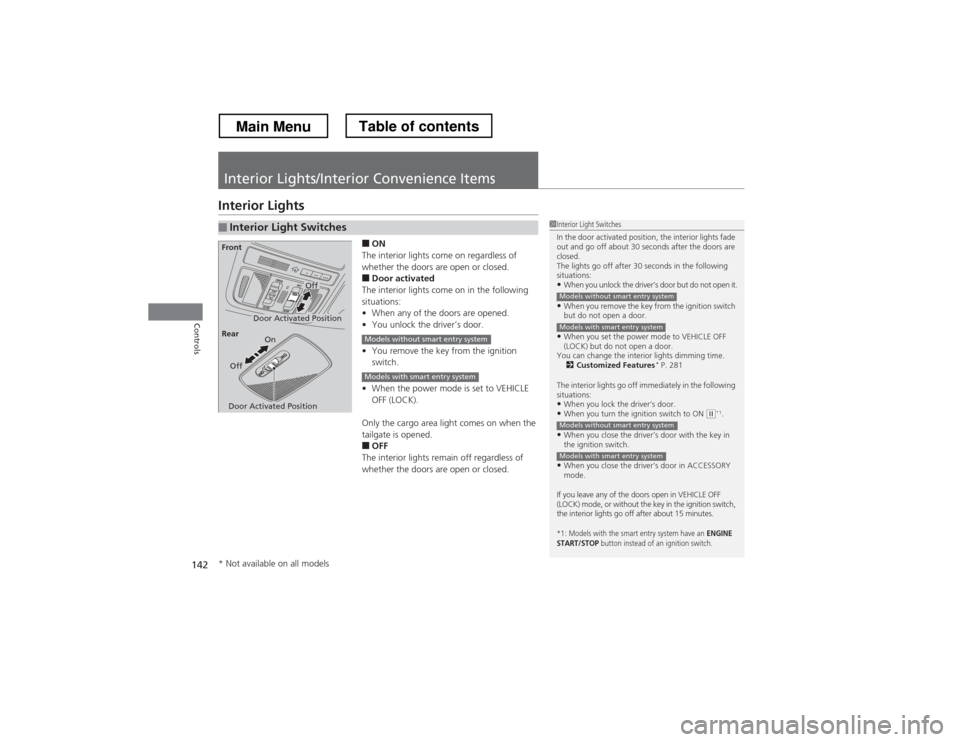
Interior Lights■ON
The interior lights come on regardless of
whether the doors are open or closed. ■ Door activated
The interior lights come on in the following
situations: • When any of the doors are opened.
• You unlock the driver’s door.
• You remove the key from the ignition
switch.
• When the power mode is set to VEHICLE
OFF (LOCK).
Only the cargo area light comes on when the
tailgate is opened. ■ OFF
The interior lights remain off regardless of
whether the doors are open or closed.
■Interior Light Switches1Interior Light Switches
In the door activated position, the interior lights fade
out and go off about 30 seconds after the doors are closed.
The lights go off after 30 seconds in the following
situations:
• When you unlock the driver’s door but do not open it.
• When you remove the key from the ignition switch
but do not open a door.
• When you set the power mode to VEHICLE OFF
(LOCK) but do not open a door.
You can change the interior lights dimming time. 2 Customized Features *
P. 281
The interior lights go off immediately in the following
situations: • When you lock the driver’s door.
• When you turn the ignition switch to ON
(w *1
.
• When you close the driver’s door with the key in
the ignition switch.
• When you close the driver’s door in ACCESSORY
mode.
If you leave any of the doors open in VEHICLE OFF
(LOCK) mode, or without the key in the ignition switch,
the interior lights go off after about 15 minutes.
*1: Models with the smart entry system have an ENGINE
START/STOP button instead of an ignition switch.
Models without smart entry system
Models with smart entry system
Models without smart entry system
Models with smart entry system
Door Activated Position
Off
Front
Door Activated Position On
Off
Rear
Models without smart entry system
Models with smart entry system
* Not available on all models
Main MenuTable of contents
Page 285 of 573
284
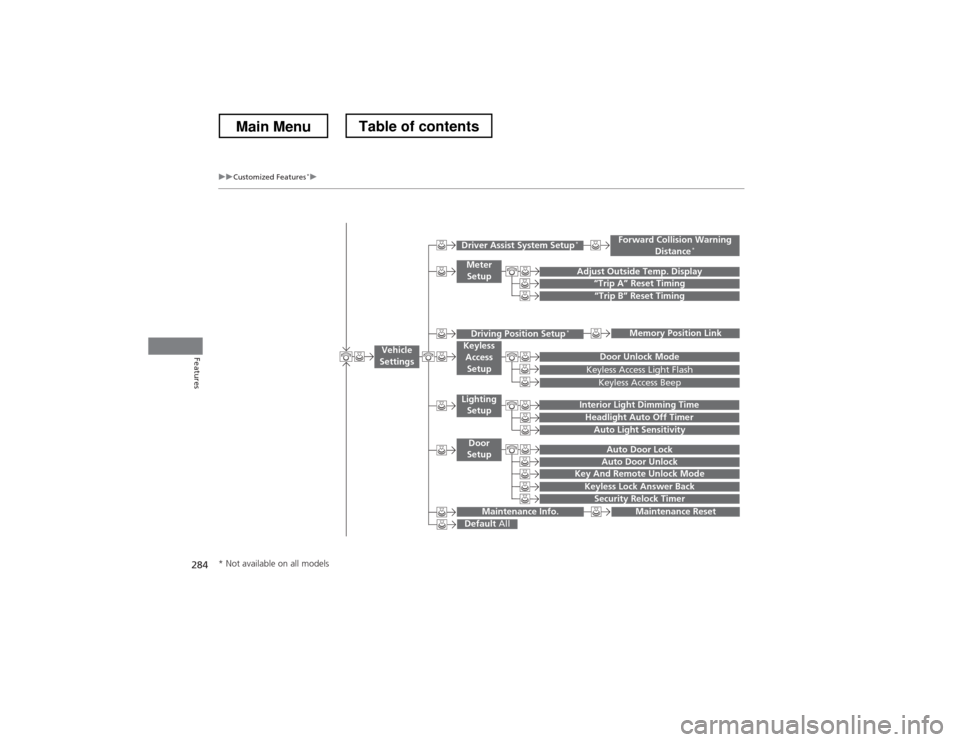
uuCustomized Features*u
Features
“Trip B” Reset Timing
Adjust Outside Temp. Display“Trip A” Reset Timing
Keyless Access Light Flash
Auto Light Sensitivity
Auto Door Lock
Auto Door Unlock
Forward Collision Warning
Distance *
Door Unlock Mode
Interior Light Dimming Time
Headlight Auto Off Timer
Memory Position Link
Key And Remote Unlock Mode
Keyless Lock Answer Back
Security Relock Timer
Maintenance Reset
Default
All
Vehicle
Settings
Driver Assist System Setup *
Meter
Setup
Driving Position Setup *Keyless
Access Setup
Lighting
Setup
Door
Setup
Maintenance Info.
Keyless Access Beep
* Not available on all models
Main MenuTable of contents
Page 291 of 573
290
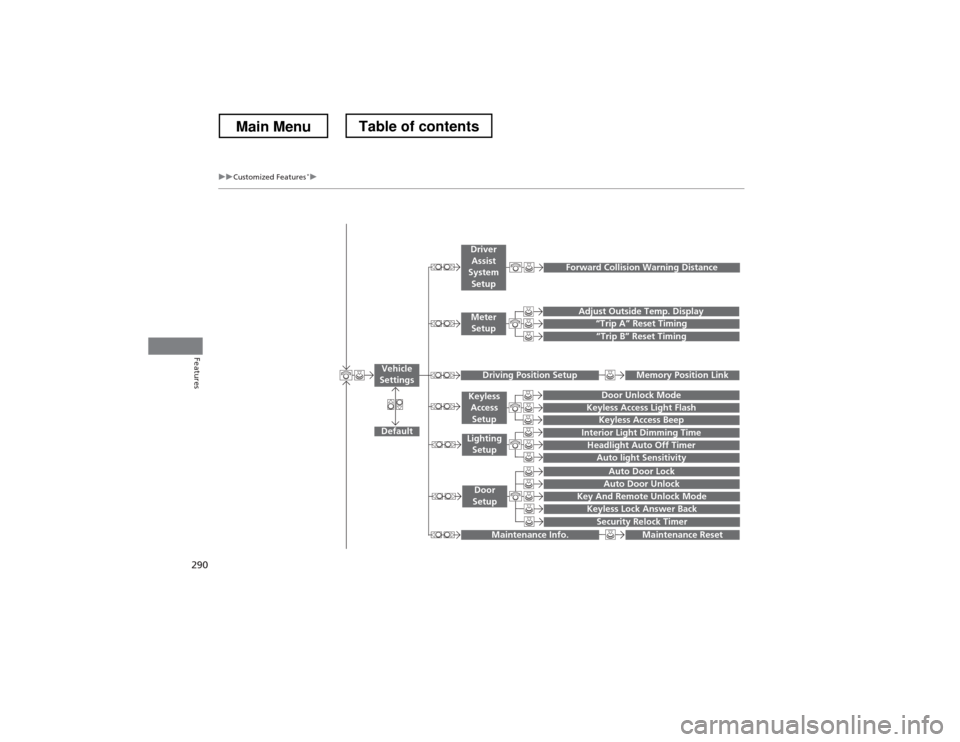
uuCustomized Features*u
Features
“Trip A” Reset Timing
“Trip B” Reset Timing
Adjust Outside Temp. Display
Forward Collision Warning Distance
Default
Memory Position Link
Door Unlock Mode
Keyless Access Light Flash
Interior Light Dimming Time
Headlight Auto Off Timer
Auto light Sensitivity
Key And Remote Unlock Mode
Keyless Lock Answer Back
Security Relock Timer
Auto Door Lock
Auto Door Unlock
Maintenance Reset
Vehicle
Settings
Meter Setup
Driver Assist
System Setup
Driving Position Setup
Keyless
Access Setup
Lighting
Setup
Door
Setup
Maintenance Info.
Keyless Access Beep
Main MenuTable of contents
Page 298 of 573
297
uuCustomized Features*u
Continued
Features
*1:Default SettingSetup
Group Customizable Features Description Selectable Settings
Vehicle
Settings Keyless
Access
Setup
Door Unlock Mode
Changes which doors unlock when you grab the
driver’s door handle. Driver Door Only
*1
/
All Doors
Keyless Access Light Flash Causes some exterior lights to blink when you
unlock/lock the doors.
On
*1
/Off
Keyless Access Beep Sets the beeper sound or not when you grab
either front door handle. On
*1
/Off
Lighting Setup Interior Light Dimming
Time
Changes the length of time the interior lights stay
on after you close the doors. 60seconds
/
30seconds *1
/
15seconds
Headlight Auto Off Timer Changes the length of time the exterior lights
stay on after you close the driver’s door. 60seconds
/
30seconds /
15seconds *1
/
0seconds
Auto Light Sensitivity Changes the timing for the headlights to come on. Max
/High /Mid *1
/
Low /Min
Main MenuTable of contents