Page 105 of 573
104
uuLocking and Unlocking the DoorsuCustomizing the Auto Door Locking/Unlocking Setting*
Controls
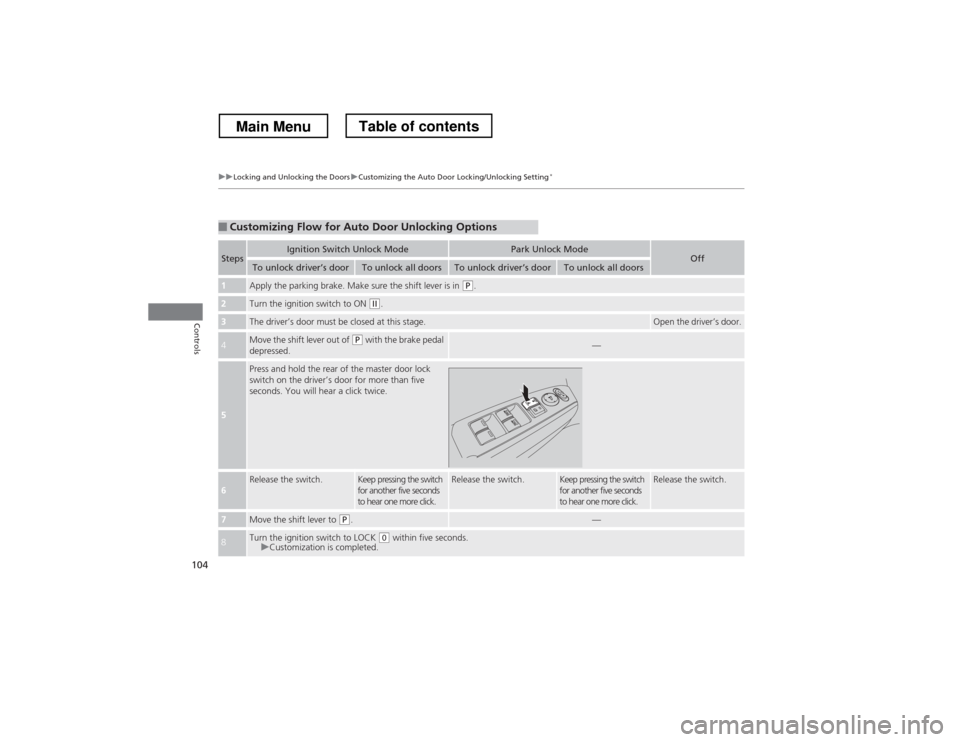
■Customizing Flow for Auto Door Unlocking Options
StepsIgnition Switch Unlock ModePark Unlock ModeOffTo unlock driver
Page 107 of 573
106
uuOpening and Closing the TailgateuUsing the Tailgate Release Button
Controls
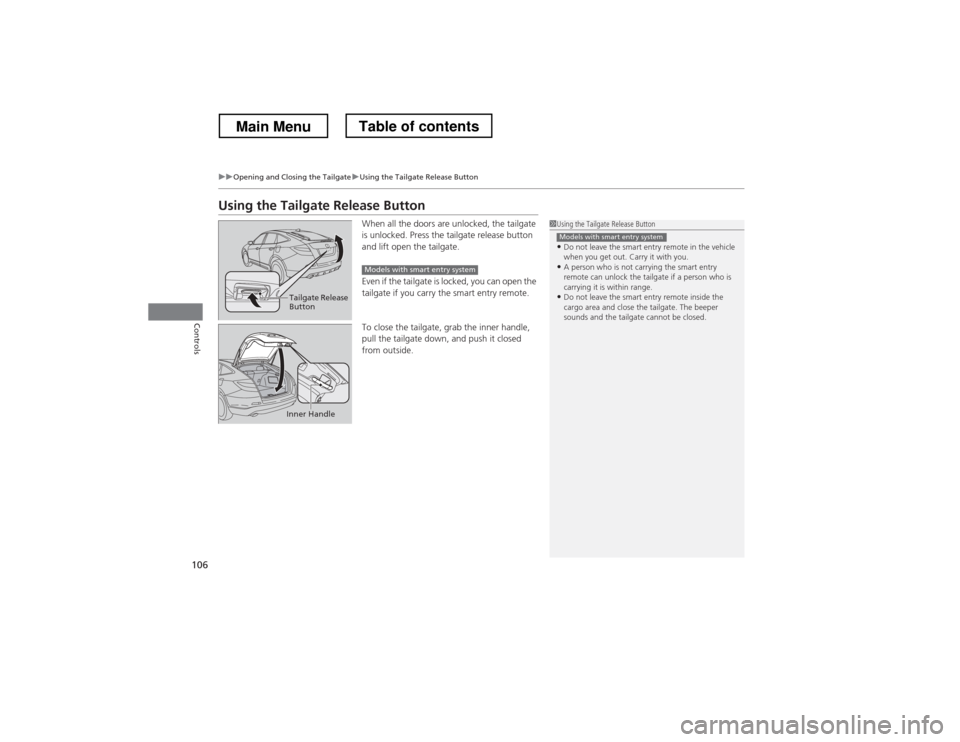
Using the Tailgate Release ButtonWhen all the doors are unlocked, the tailgate
is unlocked. Press the tailgate release button
and lift open the tailgate.
Even if the tailgate is locked, you can open the
tailgate if you carry the smart entry remote.
To close the tailgate, grab the inner handle,
pull the tailgate down, and push it closed from outside.
1Using the Tailgate Release Button
• Do not leave the smart entry remote in the vehicle
when you get out. Carry it with you.
• A person who is not carrying the smart entry
remote can unlock the tailgate if a person who is
carrying it is within range.
• Do not leave the smart entry remote inside the
cargo area and close the tailgate. The beeper
sounds and the tailgate cannot be closed.
Models with smart entry system
Tailgate Release
Button
Models with smart entry system
Inner Handle
Main MenuTable of contents
Page 108 of 573
107
Continued
Controls
Security System
Immobilizer System
The immobilizer system prevents a key that has not been pre-registered from
starting the engine. Each key contains electronic transmitters that use electronic
signals to verify the key.
Pay attention to the following when inserting the key into the ignition switch or
pressing the
ENGINE START STOP button:
• Do not allow objects that emit strong radio waves near the ignition switch or the
ENGINE START STOP button.
• Make sure the key is not covered by or touching a metal object.
• Do not bring a key from another vehicle’s immobilizer system near the ignition switch.
Security System Alarm
The security system alarm activates when the doors, tailgate, or hood are opened
without the key, remote transmitter, or smart entry system. ■ When the security system alarm activates
The horn sounds intermittently and all of the exterior lights flash.
■ To deactivate the security system alarm
Unlock the vehicle using the key, remote transmitter or smart entry remote, or turn
the ignition switch to ON
(w *1
. The system, along with the horn and flashing lights,
is deactivated.
*1: Models with the smart entry system have an ENGINE START/STOP button instead of an
ignition switch.
1Immobilizer System
NOTICELeaving the ignition key in the vehicle can result in
theft or accidental movement of the vehicle.
Always take the ignition key with you whenever you
leave the vehicle unattended.
Do not alter the system or add other devices to it.
Doing so may damage the system and make your
vehicle inoperable.
1Security System Alarm
The security alarm continues for a maximum of two
minutes until the security system deactivates.
Main MenuTable of contents
Page 109 of 573
uuSecurity SystemuSecurity System Alarm
108
Controls
■ Setting the security system alarm
The security system alarm automatically sets when the following conditions have
been met: • The ignition switch is in LOCK
(0 *1
, and the key has been removed from the
ignition switch.
• The hood and tailgate are closed.
• All doors are locked with the key, remote transmitter, or smart entry system.
■ When the security system alarm sets
The security system alarm indicator in the instrument panel blinks. When the
blinking interval changes after about 15 seconds, the security system alarm is set.
■ To cancel the security system alarm
The security system alarm is canceled when the vehicle is unlocked using the key,
remote transmitter, or smart entry system, or the ignition switch is turned to ON
(w *1
. The security system alarm indicator goes off at the same time.
*1: Models with the smart entry system have an ENGINE START/STOP button instead of an
ignition switch.
1Security System Alarm
Do not set the security system alarm when someone
is in the vehicle or a window is open. The system can
accidentally activate when:
• Unlocking the door with the lock tab or the master
door lock switch.
If the battery goes dead after you have set the
security system alarm, the security alarm may go off
once the battery is recharged or replaced.
If this occurs, deactivate the security system alarm by
unlocking a door using the key or remote transmitter.
Do not attempt to alter this system or add another device to it.
Main MenuTable of contents
Page 111 of 573
110
Controls
Opening and Closing the Windows
Opening/Closing the Power Windows
The power windows can be opened and closed when the ignition switch is in ON
(w*1
, using the switches on the doors. The driver side switches can be used to open
and close all of the windows.
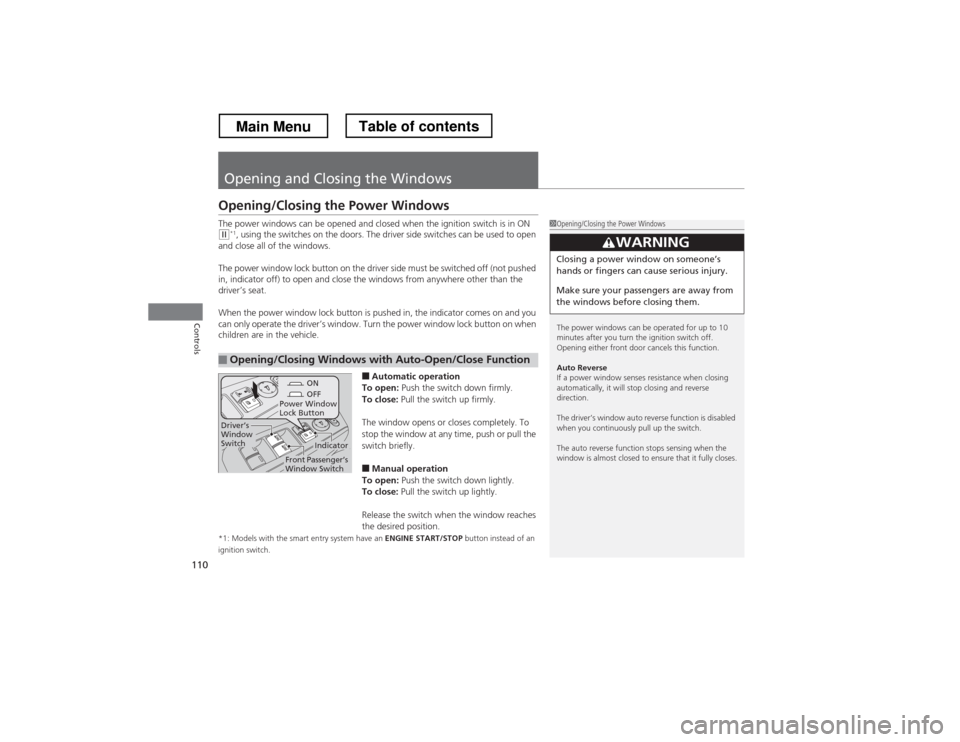
The power window lock button on the driv er side must be switched off (not pushed
in, indicator off) to open and close the windows from anywhere other than the
driver’s seat.
When the power window lock button is pushed in, the indicator comes on and you
can only operate the driver’s window. Turn the power window lock button on when
children are in the vehicle.
■Automatic operation
To open: Push the switch down firmly.
To close: Pull the switch up firmly.
The window opens or closes completely. To
stop the window at any time, push or pull the
switch briefly. ■ Manual operation
To open: Push the switch down lightly.
To close: Pull the switch up lightly.
Release the switch when the window reaches
the desired position.
*1: Models with the smart entry system have an ENGINE START/STOP button instead of an
ignition switch.
■Opening/Closing Windows with Auto-Open/Close Function
1Opening/Closing the Power Windows
The power windows can be operated for up to 10
minutes after you turn the ignition switch off.
Opening either front door cancels this function.
Auto Reverse
If a power window senses resistance when closing
automatically, it will stop closing and reverse direction.
The driver’s window auto reverse function is disabled
when you continuously pull up the switch.
The auto reverse function stops sensing when the
window is almost closed to ensure that it fully closes.
3WARNING
Closing a power window on someone
Page 113 of 573
112
uuOpening and Closing the WindowsuOpening/Closing the Power Windows
Controls
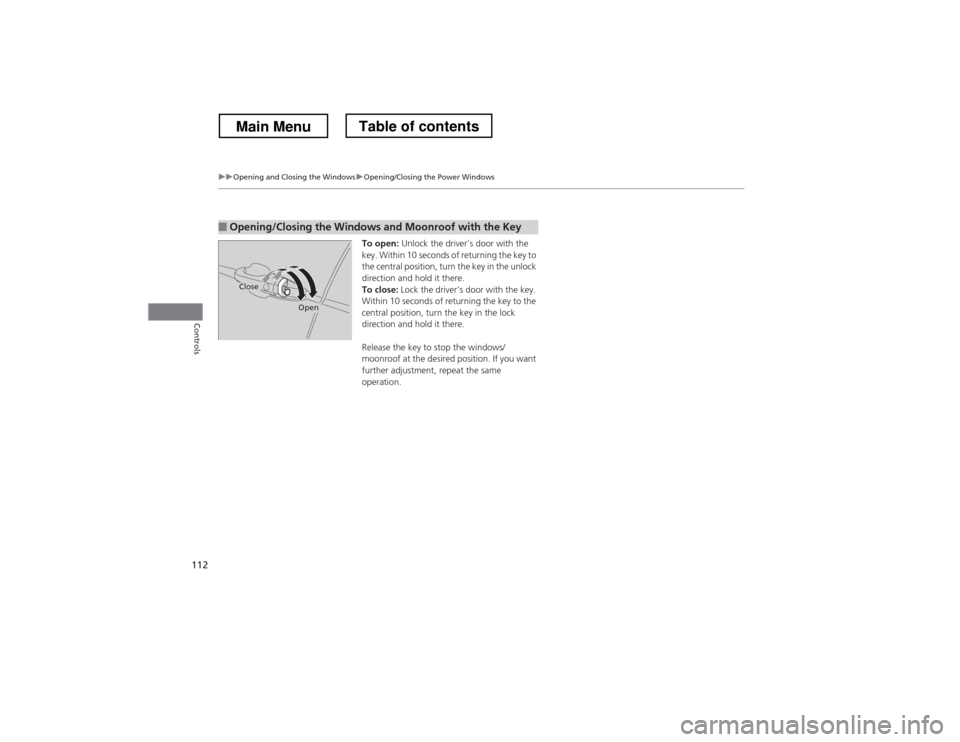
To open: Unlock the driver’s door with the
key. Within 10 seconds of returning the key to
the central position, turn the key in the unlock
direction and hold it there.
To close: Lock the driver’s door with the key.
Within 10 seconds of returning the key to the
central position, turn the key in the lock
direction and hold it there.
Release the key to stop the windows/
moonroof at the desired position. If you want
further adjustment, repeat the same
operation.
■Opening/Closing the Windows and Moonroof with the Key
Close
Open
Main MenuTable of contents
Page 115 of 573
114
Controls
Operating the Switches Around the Steering Wheel
Ignition Switch*
1Ignition Switch
*
You cannot take the key out unless the shift lever is in
(P .
If you open the driver’s door when the key is in LOCK
(0 or ACCESSORY (q , a warning buzzer will sound
to remind you to take the key out.
If the key won’t turn from LOCK
(0 to ACCESSORY (q, turn the key while moving the steering wheel left
and right. The steering wheel will unlock, allowing
the key to turn.
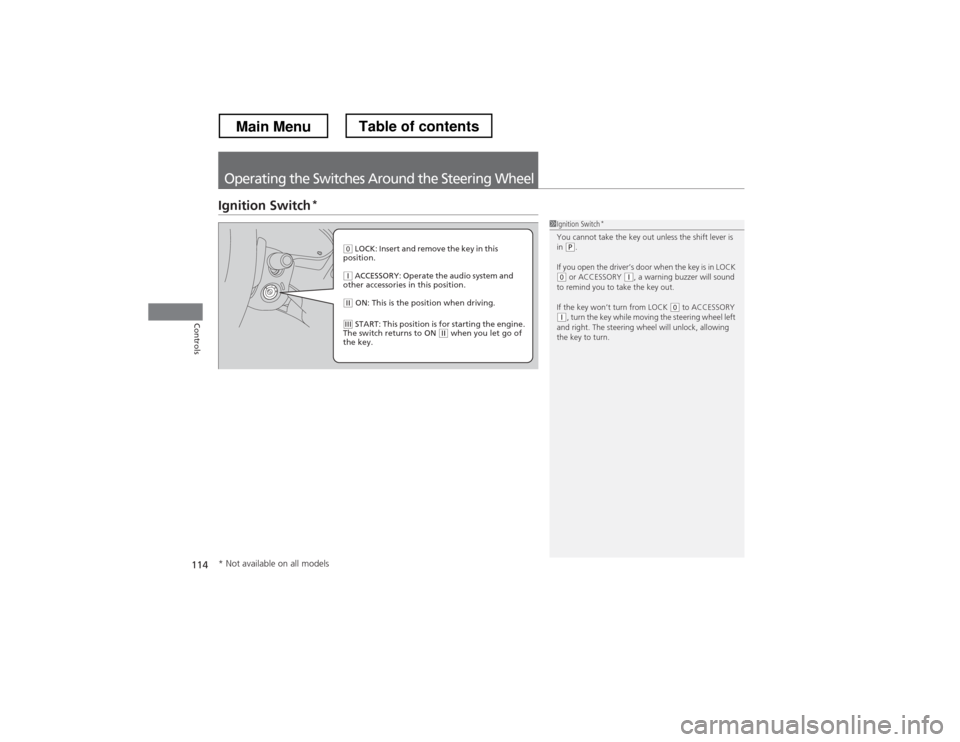
(0 LOCK: Insert and remove the key in this
position.
(q ACCESSORY: Operate the audio system and
other accessories in this position.
(w ON: This is the position when driving.
(e START: This position is for starting the engine.
The switch returns to ON (w when you let go of
the key.
* Not available on all models
Main MenuTable of contents
Page 116 of 573
115
uuOperating the Switches Around the Steering WheeluENGINE START/STOP Button*
Continued
Controls
ENGINE START/STOP Button *
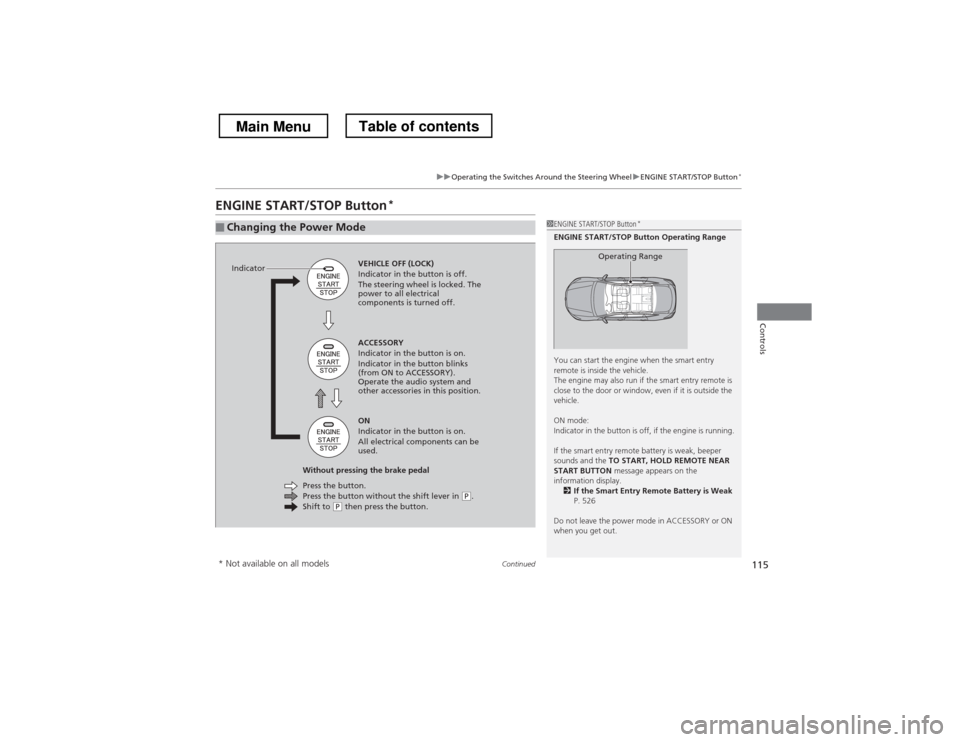
■Changing the Power Mode1ENGINE START/STOP Button
*
ENGINE START/STOP Button Operating Range
You can start the engine when the smart entry
remote is inside the vehicle.
The engine may also run if the smart entry remote is
close to the door or window, even if it is outside the
vehicle.
ON mode:
Indicator in the button is off, if the engine is running.
If the smart entry remote battery is weak, beeper
sounds and the TO START, HOLD REMOTE NEAR
START BUTTON message appears on the
information display. 2 If the Smart Entry Remote Battery is Weak
P. 526
Do not leave the power mode in ACCESSORY or ON
when you get out.
Operating RangeVEHICLE OFF (LOCK)
Indicator in the button is off.
The steering wheel is locked. The
power to all electrical
components is turned off.
Press the button without the shift lever in
(P .
Shift to (P then press the button.
Press the button.
Without pressing the brake pedal ACCESSORY
Indicator in the button is on.
Indicator in the button blinks
(from ON to ACCESSORY).
Operate the audio system and
other accessories in this position. ON
Indicator in the button is on.
All electrical components can be
used.
Indicator
* Not available on all models
Main MenuTable of contents