2013 HONDA CROSSTOUR brake
[x] Cancel search: brakePage 435 of 573
uuWhen DrivinguCruise Control
434
Driving
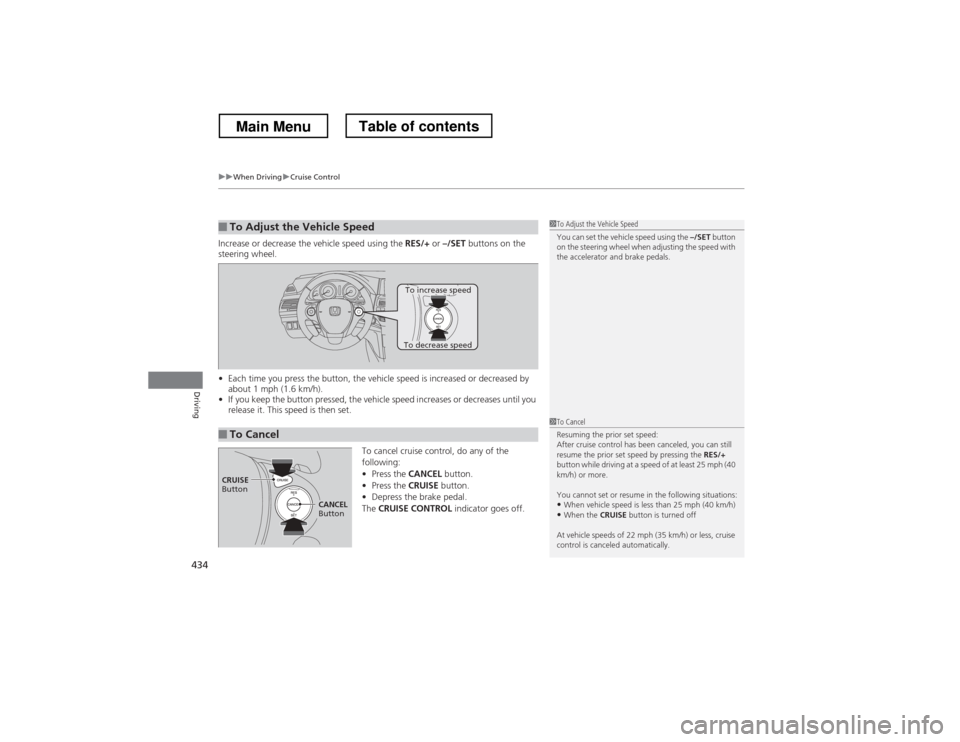
Increase or decrease the vehicle speed using the RES/+ or –/SET buttons on the
steering wheel. • Each time you press the button, the vehicle speed is increased or decreased by
about 1 mph (1.6 km/h).
• If you keep the button pressed, the vehicle speed increases or decreases until you
release it. This speed is then set.
To cancel cruise control, do any of the
following:•Press the CANCEL button.
• Press the CRUISE button.
• Depress the brake pedal.
The CRUISE CONTROL indicator goes off.
■To Adjust the Vehicle Speed1To Adjust the Vehicle Speed
You can set the vehicle speed using the –/SET button
on the steering wheel when adjusting the speed with
the accelerator and brake pedals.
■To Cancel
To decrease speed
To increase speed
1To Cancel
Resuming the prior set speed:
After cruise control has been canceled, you can still
resume the prior set speed by pressing the RES/+
button while driving at a speed of at least 25 mph (40
km/h) or more.
You cannot set or resume in the following situations:
• When vehicle speed is less than 25 mph (40 km/h)
• When the CRUISE button is turned off
At vehicle speeds of 22 mph (35 km/h) or less, cruise
control is canceled automatically.
CRUISE
Button
CANCEL
Button
Main MenuTable of contents
Page 436 of 573
435
uuWhen DrivinguForward Collision Warning (FCW)*
Continued
Driving
Forward Collision Warning (FCW) *
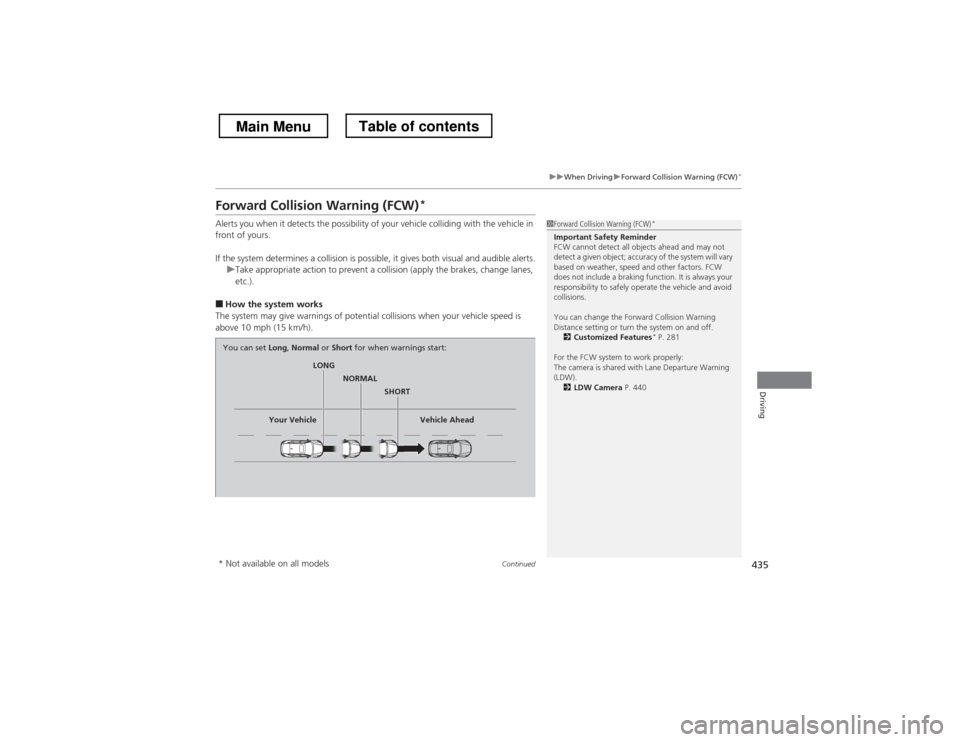
Alerts you when it detects the possibility of your vehicle colliding with the vehicle in
front of yours.
If the system determines a collision is possible, it gives both visual and audible alerts.
uTake appropriate action to prevent a collision (apply the brakes, change lanes, etc.).
■ How the system works
The system may give warnings of potential collisions when your vehicle speed is
above 10 mph (15 km/h).
1Forward Collision Warning (FCW) *
Important Safety Reminder
FCW cannot detect all objects ahead and may not
detect a given object; accuracy of the system will vary
based on weather, speed and other factors. FCW
does not include a braking function. It is always your
responsibility to safely operate the vehicle and avoid collisions.
You can change the Forward Collision Warning
Distance setting or turn the system on and off. 2 Customized Features *
P. 281
For the FCW system to work properly:
The camera is shared with Lane Departure Warning
(LDW). 2 LDW Camera P. 440
LONG
NORMAL
SHORT
Your Vehicle Vehicle Ahead
You can set
Long, Normal or Short for when warnings start:
* Not available on all models
Main MenuTable of contents
Page 439 of 573
438
uuWhen DrivinguForward Collision Warning (FCW)*
Driving
FCW may not activate or may not detect a vehicle in front of your vehicle, and may activate even when you are aware of a vehicl
e ahead
of you, or when there is no vehicle ahead under the following conditions.
■FCW Limitations
Condition
● The distance between your vehicle and the vehicle ahead of you is too short.
● A vehicle cuts in front of you at a slow speed, and it brakes suddenly.
● A vehicle suddenly crosses in front of you.
● When either your vehicle or the vehicle ahead of you accelerates rapidly.
● The vehicle ahead of you is a motorcycle, a small vehicle, or a unique vehicle such as a tractor.
● When you drive off-road or on a mountain road, or curved and winding road for an extended period that makes it difficult for th e camera to properly
detect a vehicle in front of you.
● When there are pedestrians or animals in front of your vehicle.
● When you drive in bad weather (rain, fog, etc.).
● A heavy load in the rear or modifications to the suspension tilts your vehicle.
● An abnormal tire condition is detected (wrong tire size, flat tire, etc.).
● When the windshield is blocked by dirt, mud, leaves, wet snow, etc.
● When the temperature inside the system is high.
● A sudden change between light and dark such as an entrance or exit of a tunnel.
● You drive into the sunlight (e.g. at dawn or dusk).
● When the windshield is dirty or cloudy.
● When streetlights are perceived as the taillight of a vehicle in front of yours.
● When driving at night, the vehicle ahead of you is running with either taillight bulb burned out.
● When you drive in the shadows of trees, buildings, etc.
● When your vehicle is towing a trailer.
Main MenuTable of contents
Page 441 of 573
uuWhen DrivinguLane Departure Warning (LDW)*
440
Driving
The system begins to search for lane markings when all the following conditions are met: • The vehicle is traveling between at 40-90 mph (64-145 km/h).
• The vehicle is on a straight or slightly curved road.
• The turn signals are off.
• The brake pedal is not pressed.
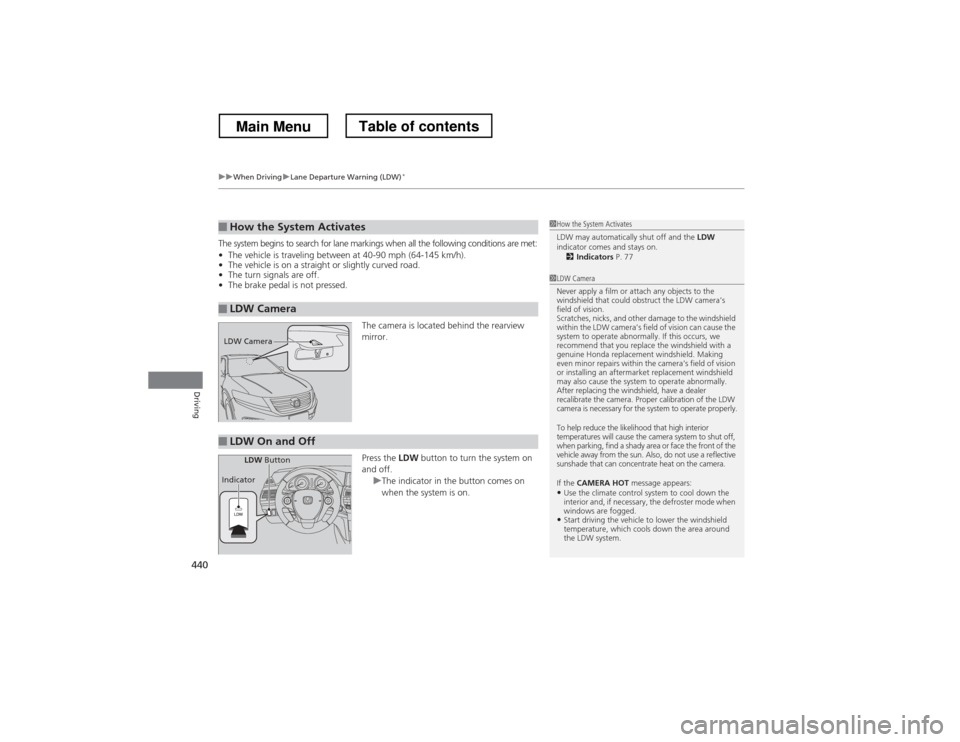
The camera is located behind the rearview mirror. Press the LDW button to turn the system on
and off.
uThe indicator in the button comes on
when the system is on.
■How the System Activates
■LDW Camera
1How the System Activates
LDW may automatically shut off and the LDW
indicator comes and stays on.
2 Indicators P. 77
1LDW Camera
Never apply a film or attach any objects to the
windshield that could obstruct the LDW camera’s
field of vision.
Scratches, nicks, and other damage to the windshield
within the LDW camera’s field of vision can cause the
system to operate abnormally. If this occurs, we
recommend that you replace the windshield with a
genuine Honda replacement windshield. Making
even minor repairs within the camera’s field of vision
or installing an aftermarket replacement windshield
may also cause the system to operate abnormally.
After replacing the windshield, have a dealer
recalibrate the camera. Proper calibration of the LDW
camera is necessary for the system to operate properly.
To help reduce the likelihood that high interior
temperatures will cause the camera system to shut off,
when parking, find a shady area or face the front of the
vehicle away from the sun. Also, do not use a reflective
sunshade that can concentrate heat on the camera.
If the CAMERA HOT message appears:
• Use the climate control system to cool down the
interior and, if necessary, the defroster mode when
windows are fogged.
• Start driving the vehicle to lower the windshield
temperature, which cools down the area around
the LDW system.
LDW Camera
■LDW On and Off
LDW Button
Indicator
Main MenuTable of contents
Page 443 of 573
442
uuWhen DrivinguVSA® (Vehicle Stability Assist), aka ESC (Electronic Stability Control), System
Driving
VSA ® (Vehicle Stability Assist), aka ESC (Electronic
Stability Control), System VSA ® helps to stabilize the vehicle during cornering if the vehicle turns more or less
than what was intended. It also assists in maintaining traction on slippery surfaces.
It does so by regulating engine output and selectively applying the brakes.
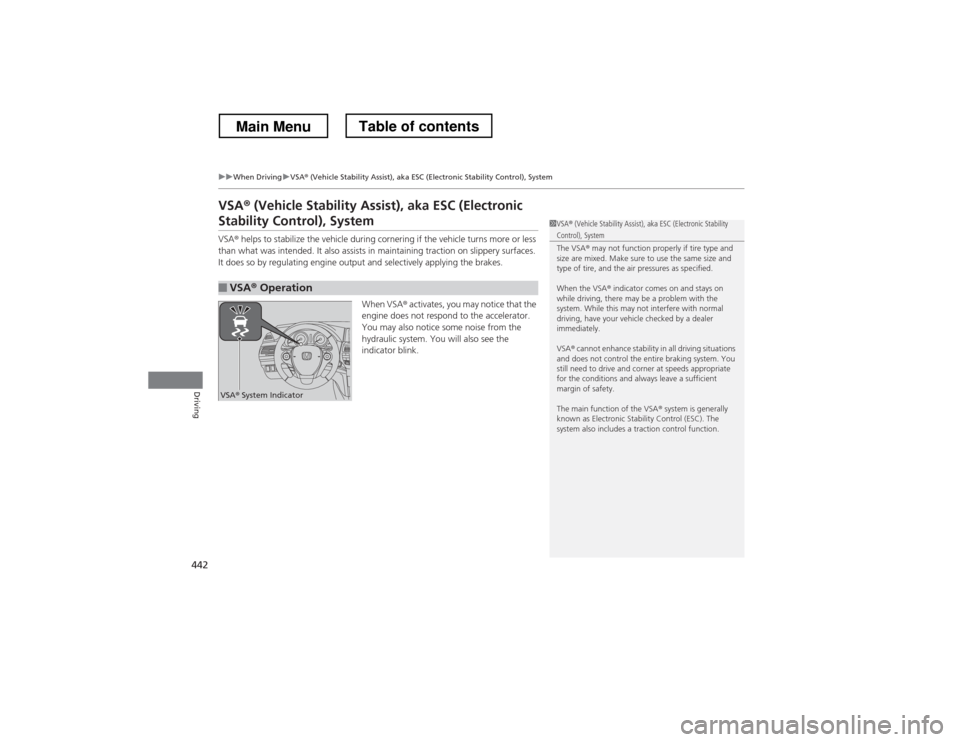
When VSA® activates, you may notice that the
engine does not respond to the accelerator.
You may also notice some noise from the
hydraulic system. You will also see the
indicator blink.
■VSA ® Operation
1VSA ® (Vehicle Stability Assist), aka ESC (Electronic Stability Control), System
The VSA ® may not function properly if tire type and
size are mixed. Make sure to use the same size and
type of tire, and the air pressures as specified.
When the VSA ® indicator comes on and stays on
while driving, there may be a problem with the
system. While this may not interfere with normal
driving, have your vehicle checked by a dealer immediately.
VSA ® cannot enhance stability in all driving situations
and does not control the entire braking system. You
still need to drive and corner at speeds appropriate
for the conditions and always leave a sufficient
margin of safety.
The main function of the VSA ® system is generally
known as Electronic Stability Control (ESC). The
system also includes a traction control function.
VSA ® System Indicator
Main MenuTable of contents
Page 450 of 573
449
Continued
Driving
Braking
Brake System
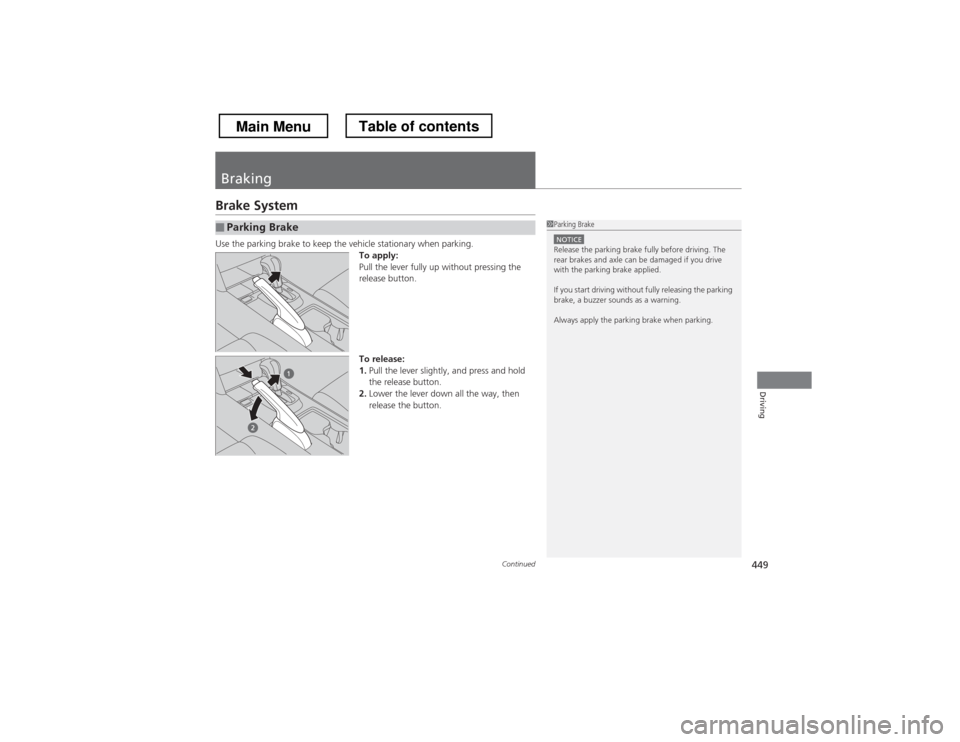
Use the parking brake to keep the vehicle stationary when parking.
To apply:
Pull the lever fully up without pressing the
release button.
To release: 1.Pull the lever slightly, and press and hold
the release button.
2. Lower the lever down all the way, then
release the button.
■Parking Brake1Parking Brake
NOTICERelease the parking brake fully before driving. The
rear brakes and axle can be damaged if you drive
with the parking brake applied.
If you start driving without fully releasing the parking
brake, a buzzer sounds as a warning.
Always apply the parking brake when parking.
Main MenuTable of contents
Page 451 of 573

uuBrakinguBrake System
450
Driving
Your vehicle is equipped with disc brakes at all four wheels. A vacuum power assist
helps reduce the effort needed on the brake pedal. The brake assist system increases
the stopping force when you depress the brake pedal hard in an emergency
situation. The anti-lock brake system (ABS) helps you retain steering control when
braking very hard. 2 Brake Assist System P. 452
2 ABS (Anti-lock Brake System) P. 451
■Foot Brake1Foot Brake
Check the brakes after driving through deep water,
or if there is a buildup of road surface water. If
necessary, dry the brakes by lightly depressing the
pedal several times.
If you hear a continuous metallic friction sound when
applying the brakes, the brake pads need to be
replaced. Have the vehicle checked by a dealer.
Constantly using the brake pedal while going down a
long hill builds up heat, which reduces the brake
effectiveness. Apply engine braking by taking your
foot off the accelerator pedal and downshifting to a
lower gear.
Do not rest your foot on the brake pedal while
driving, as it will lightly apply the brakes and cause
them to lose effectiveness over time and reduce pad
life. It will also confuse drivers behind you.
Main MenuTable of contents
Page 452 of 573
451
uuBrakinguABS (Anti-lock Brake System)
Driving
ABS (Anti-lock Brake System)
Helps prevent the wheels from locking up, and helps you retain steering control by
pumping the brakes rapidly, much faster than you.
The electronic brake distribution (EBD) system, which is part of the ABS, also
balances the front-to-rear braking distribution according to vehicle loading.
You should never pump the brake pedal. Let the ABS work for you by always
keeping firm, steady pressure on the brake pedal. This is sometimes referred to as
“stomp and steer.” ■ABS operation
The brake pedal may pulsate slightly when the ABS is working. Keep holding the
pedal firmly down. On dry pavement, you will need to press on the brake pedal very
hard before the ABS activates. However, you may feel the ABS activate immediately
if you are trying to stop on snow or ice.
When the vehicle speed goes under 6 mph (10 km/h), the ABS stops.
■ABS1ABS (Anti-lock Brake System)
NOTICEThe ABS may not function correctly if you use an
incorrect tire type and size.
When the ABS indicator comes on while driving,
there may be a problem with the system.
While normal braking is not affected, there is a
possibility of the ABS not operating. Have the vehicle checked by a dealer immediately.
The ABS does not reduce the time or distance it takes
to stop the vehicle. It only helps with steering control
during hard braking.
In the following cases, your vehicle may need more
stopping distance than a vehicle without the ABS: • When driving on rough road surfaces, including
when driving on uneven surfaces, such as gravel or
snow.
• When tire chains are installed.
You may hear a motor sound coming from the
engine compartment while system checks are being
performed immediately after starting the engine or
while driving. This is normal.
Main MenuTable of contents