Page 140 of 573
139
uuAdjusting the SeatsuRear Seats
Continued
Controls
Rear Seats
Separately fold down the left and right halves of the rear seat to make room for
cargo. ■To fold down the seat
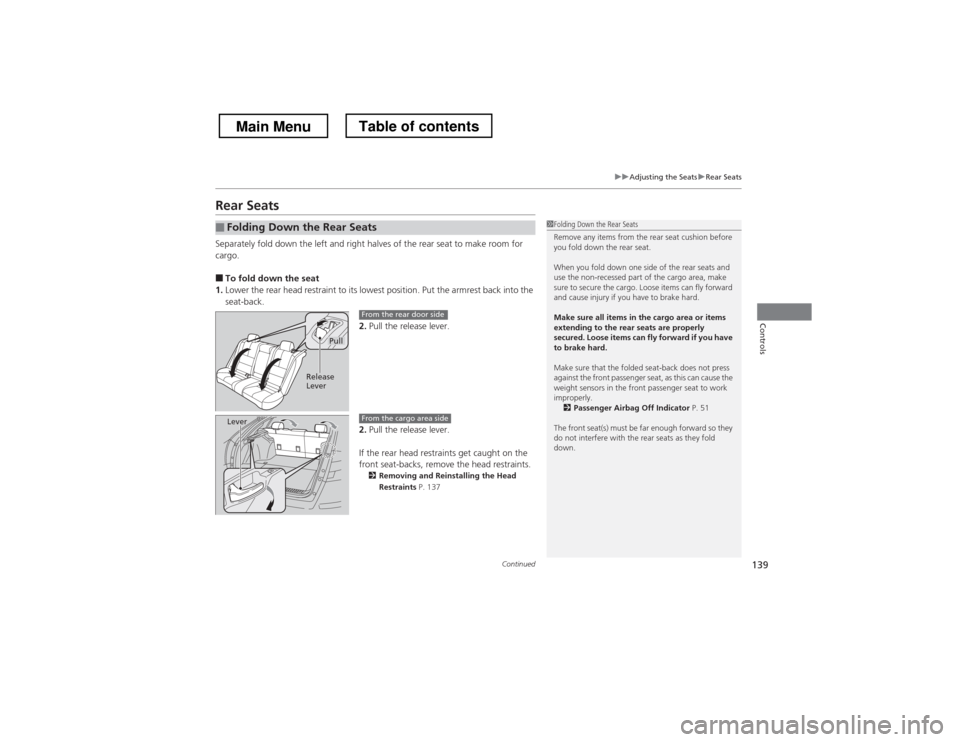
1. Lower the rear head restraint to its lowest position. Put the armrest back into the seat-back.
2.Pull the release lever.
2. Pull the release lever.
If the rear head restraints get caught on the
front seat-backs, remove the head restraints. 2 Removing and Reinstalling the Head
Restraints P. 137
■Folding Down the Rear Seats1Folding Down the Rear Seats
Remove any items from the rear seat cushion before
you fold down the rear seat.
When you fold down one side of the rear seats and
use the non-recessed part of the cargo area, make
sure to secure the cargo. Loose items can fly forward
and cause injury if you have to brake hard.
Make sure all items in the cargo area or items
extending to the rear seats are properly
secured. Loose items can fly forward if you have to brake hard.
Make sure that the folded seat-back does not press
against the front passenger seat, as this can cause the
weight sensors in the front passenger seat to work
improperly.
2 Passenger Airbag Off Indicator P. 51
The front seat(s) must be far enough forward so they
do not interfere with the rear seats as they fold
down.
Pull
Release
Lever
From the rear door side
LeverFrom the cargo area side
Main MenuTable of contents
Page 410 of 573
409
Driving
This chapter discusses driving, refueling, and information on items such as accessories.
Before Driving Driving Preparation .......................... 410
Maximum Load Limit........................ 413
Towing a Trailer
Towing Preparation .......................... 415
Driving Safely with a Trailer .............. 418
Towing Your Vehicle ........................ 419
When Driving Starting the Engine .......................... 420
Precautions While Driving................. 424
Automatic Transmission ................... 425
Shifting ............................................ 426 Cruise Control ................................. 432
Forward Collision Warning (FCW)
*
.. 435
Lane Departure Warning (LDW) *
..... 439
VSA ® (Vehicle Stability Assist), aka ESC
(Electronic Stability Control), System .. 442
LaneWatch TM
*
.................................. 444
TPMS (Tire Pressure Monitoring System) .. 446Tire Pressure Monitoring System (TPMS) -
Required Federal Explanation ......... 447
Braking
Brake System ................................... 449
ABS (Anti-lock Brake System) ........... 451 Brake Assist System ......................... 452
Parking Your Vehicle
When Stopped ................................ 453
Rearview Camera ............................. 454
Multi-View Rear Camera .................. 455
Refueling Fuel Information .............................. 456
How to Refuel ................................. 457
Fuel Economy .................................... 459
Improving Fuel Economy .................. 459
Accessories and Modifications ........ 460
* Not available on all models
Main Menu
Page 412 of 573
Continued411
uuBefore DrivinguDriving Preparation
Driving
•Store or secure all items on board properly.uCarrying too much cargo, or improp erly storing it, can affect your vehicle’s
handling, stability, stopping distance, and tires, and make it unsafe. 2 Maximum Load Limit P. 413
• Do not pile items higher than the seat height.
uThey can block your view and may be thrown forward in the event of sudden
braking.
• Do not place anything in the front seat footwells. Make sure to secure the floor mat.
uAn object or unsecured floor mat can interfere with your brake and accelerator
pedal operation while driving.
• If you have any animals on board, do not let them move around in the vehicle.
uThey may interfere with driving and a crash could occur.
• Securely close and lock all doors and the tailgate.
2 Locking/Unlocking the Doors from the Inside P. 99
• Adjust your seating position properly.
uAdjust the head restraint, too.
2 Adjusting the Seats P. 133
2 Adjusting the Head Restraints P. 136
• Adjust the mirrors and steering wheel properly for your driving.
uAdjust them while sitting in the proper driving position.
2 Adjusting the Steering Wheel P. 129
2 Adjusting the Mirrors P. 130
■Interior Checks1Interior Checks
The headlight aim is set by the factory, and does not
need to be adjusted. However, if you regularly carry
heavy items in the cargo area or tow a trailer, have
the aiming readjusted at a dealer or by a qualified
technician.
Main MenuTable of contents
Page 417 of 573
uuTowing a TraileruTowing Preparation
416
Driving
Towing equipment varies by the size of your trailer, how much load you are towing,
and where you are towing. ■ Hitches
The hitch must be of an approved type and properly bolted to the underbody.
■ Safety chains
Always use safety chains when you tow a trailer. Leave enough slack to allow the
trailer to turn corners easily, but do not allow the chains to drag on the ground.
■ Trailer brakes
There are two common types of trailer brakes: surge and electric. Surge brakes are
common for boat trailers, since the brakes will get wet. If you choose electric brakes,
be sure they are electronically actuated. Do not attempt to attach trailer brakes to
your vehicle’s hydraulic system, as it will lower braking effectiveness and create a
potential hazard.
■ Additional towing equipment
Many states and provinces/territories require special outside mirrors when towing a
trailer. Even if mirrors are not required in your locale, you should install special
mirrors if visibility is restricted in any way.
■Towing Equipment and Accessories1Towing Equipment and Accessories
Make sure that all equipment is properly installed and
maintained, and that it meets federal, state, province/
territory, and local regulations.
Consult your trailer sales or rental agency if any other
items are recommended or required for your towing
situation.
The lighting and wiring of trailers can vary by type
and brand. If a connector is required, it should only
be installed by a qualified technician.
Main MenuTable of contents
Page 418 of 573
417
uuTowing a TraileruTowing Preparation
Driving
■Trailer light
Trailer lights and equipment must comply with federal, state, province/territory, and
local regulations. Check with your local trailer sales or rental agency for the
requirements in the area where you plan to tow.
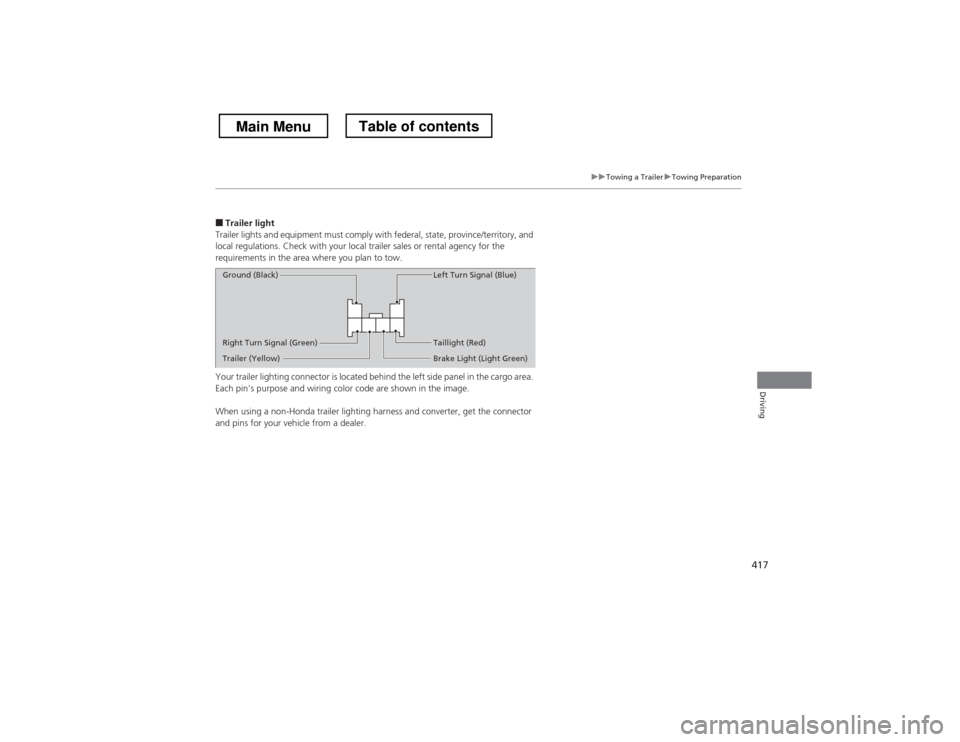
Your trailer lighting connector is located behind the left side panel in the cargo area.
Each pin’s purpose and wiring color code are shown in the image.
When using a non-Honda trailer lighting ha rness and converter, get the connector
and pins for your vehicle from a dealer.
Right Turn Signal (Green)
Ground (Black)
Left Turn Signal (Blue)
Taillight (Red)
Brake Light (Light Green)
Trailer (Yellow)
Main MenuTable of contents
Page 419 of 573
418
uuTowing a TraileruDriving Safely with a Trailer
Driving
Driving Safely with a Trailer •Have the trailer properly serviced and keep it in good condition.
• Make sure that all the weights and load in the vehicle and trailer are within limits.
2 Towing Load Limits P. 415
• Securely attach the hitch, safety chains, and other necessary parts to the trailer.
• Securely store all the items in and on the trailer so that they do not shift while
driving.
• Check if the lights and brakes on the trailer are working properly.
• Check the pressures of the trailer tires, including the spare.
• Drive slower than normal.
• Obey posted speed limits for vehicles with trailers.
• Use the
(D position when towing a trailer on level roads.
• Turn more slowly and with a wider turning arc than normal.
• Allow more time and distance for braking.
• Do not brake or turn suddenly.
■Things You Need To Know Before Towing a Trailer
■Towing Speeds and Gears
■Turning and Braking
1Driving Safely with a Trailer
Parking
In addition to the normal precautions, place wheel
chocks at each of the trailer’s tires.
Main MenuTable of contents
Page 421 of 573

420
Driving
When Driving
Starting the Engine1.Make sure the parking brake is applied.
2. Check that the shift lever is in
(P , then
depress the brake pedal.
uAlthough it is possible to start the vehicle
in (N , it is safer to start it in (P.
Models without smart entry system
1Starting the Engine
Keep your foot firmly on the brake pedal when
starting the engine.
The engine is harder to start in cold weather and in
thinner air found at altitudes above 8,000 feet (2,400 meters).
When starting the engine in cold weather, turn off all
electrical accessories such as the lights, heating and
cooling system *
/climate control system *
, and rear
defogger in order to reduce battery drain.
If you live in a region where winter is extremely cold,
an engine block heater will improve starting and
warming of the engine. If temperatures consistently
below -22°F (-30°C) are expected, the coolant
mixture should be charged to a higher concentration
to prevent freezing. Consult a dealer for details.
If the exhaust system sounds abnormal or you can
smell exhaust gas inside the vehicle, have your vehicle
checked by a dealer. There may be a problem with
the engine or exhaust system.
Brake Pedal
* Not available on all models
Main MenuTable of contents
Page 422 of 573
421
uuWhen DrivinguStarting the Engine
Driving
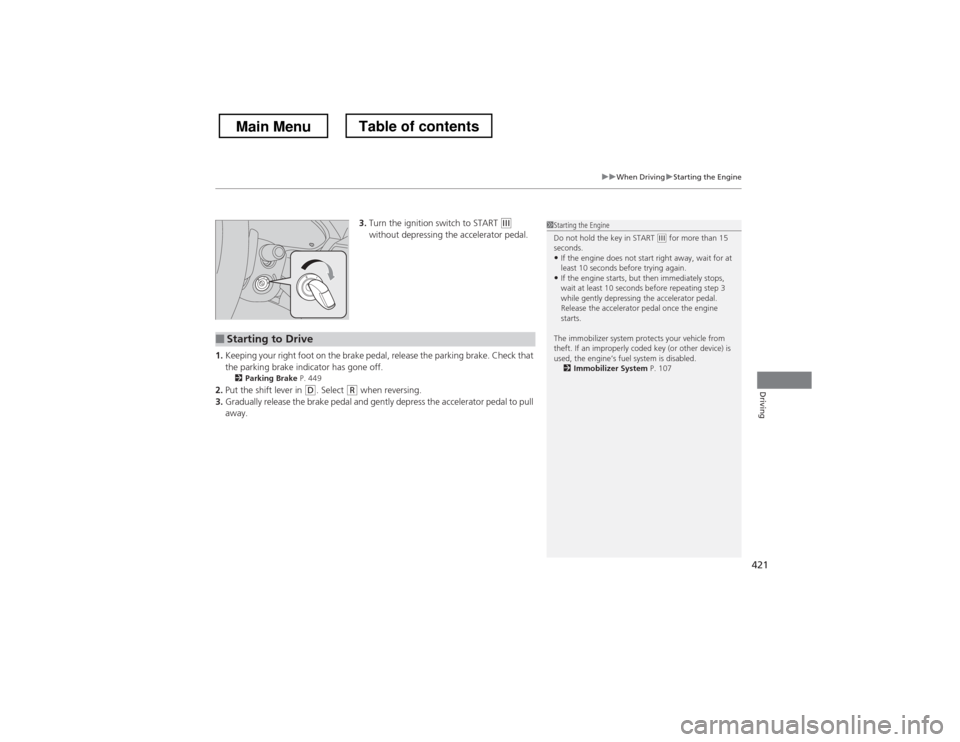
3.Turn the ignition switch to START (e
without depressing the accelerator pedal.
1. Keeping your right foot on the brake pedal, release the parking brake. Check that
the parking brake indicator has gone off.
2 Parking Brake P. 449
2. Put the shift lever in
(D . Select (R when reversing.
3. Gradually release the brake pedal and gently depress the accelerator pedal to pull away.
■Starting to Drive
1Starting the Engine
Do not hold the key in START
(e for more than 15
seconds.
• If the engine does not start right away, wait for at
least 10 seconds before trying again.
• If the engine starts, but then immediately stops,
wait at least 10 seconds before repeating step 3
while gently depressing the accelerator pedal.
Release the accelerator pedal once the engine starts.
The immobilizer system protects your vehicle from
theft. If an improperly coded key (or other device) is
used, the engine’s fuel system is disabled. 2 Immobilizer System P. 107
Main MenuTable of contents