Page 80 of 573

79
uuIndicatorsu
Continued
Instrument Panel
*1:Models with the smart entry system have an ENGINE START/STOP button instead of an ignition switch.
IndicatorNameOn/BlinkingExplanation
High Beam
Indicator●
Comes on when the high beam headlights are on.—
Lights On
Indicator
●Comes on whenever the light switch is on, or in AUTO when the exterior lights are on.●
If you remove the key from the ignition switch or set
the power mode to ACCESSORY or VEHICLE OFF
(LOCK) while the exterior lights are on, a chime
sounds when the driver’s door is opened.
Fog Light
Indicator● Comes on when the fog lights are on.—
Daytime Running
Lights Indicator
●Comes on for a few seconds when you turn
the ignition switch to ON
(w *1
, then goes
off.
● Comes on if there is a problem with the DRL system.
●Have your vehicle checked by a dealer.
2Daytime Running Lights P. 122
Side Airbag Off
Indicator
●
Comes on for a few seconds when you turn
the ignition switch to ON
(w *1
, then goes
off.
● Comes on when the passenger side airbag
system is automatically shut off.
●It does not mean there is a problem with your side airbags.
● Comes on when nobody is sitting in the
passenger seat - Have the vehicle checked by a
dealer.
● Comes on when someone is sitting in the seat -
Have the passenger sit properly.U.S.
Canada
Main MenuTable of contents
Page 81 of 573
80
uuIndicatorsu
Instrument Panel
*1:Models with the smart entry system have an ENGINE START/STOP button instead of an ignition switch.
IndicatorNameOn/BlinkingExplanation
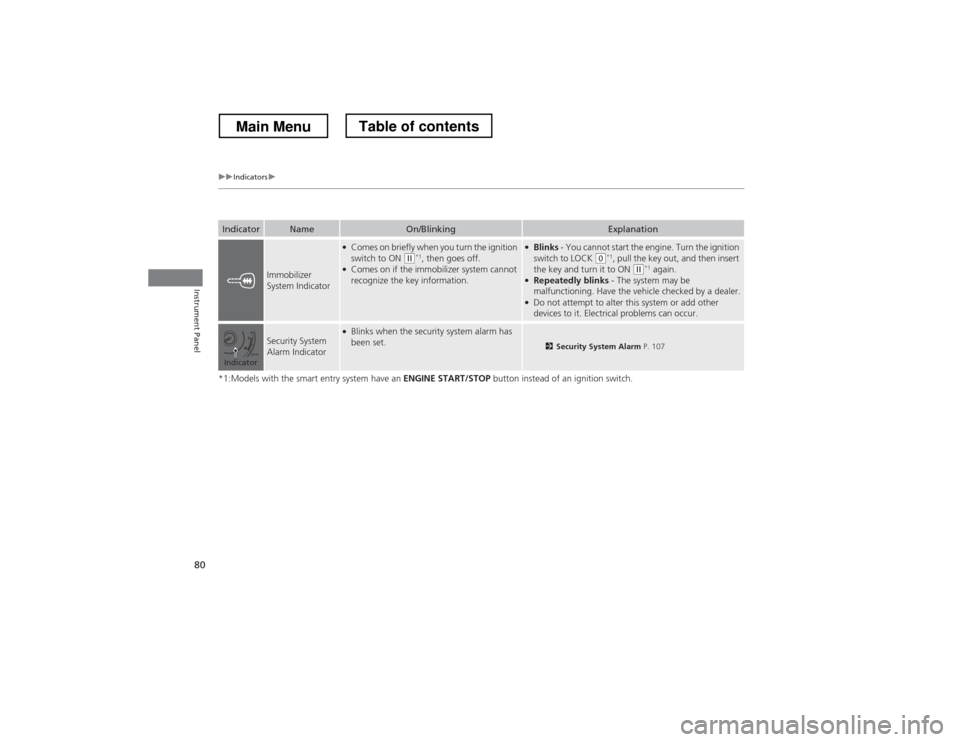
Immobilizer
System Indicator
●
Comes on briefly when you turn the ignition
switch to ON
(w *1
, then goes off.
● Comes on if the immobilizer system cannot recognize the key information.
●Blinks - You cannot start the engine. Turn the ignition
switch to LOCK
(0 *1
, pull the key out, and then insert
the key and turn it to ON (w *1
again.
● Repeatedly blinks - The system may be
malfunctioning. Have the vehicle checked by a dealer.
● Do not attempt to alter this system or add other
devices to it. Electrical problems can occur.
Security System
Alarm Indicator●Blinks when the security system alarm has been set.
2 Security System Alarm P. 107
Indicator
Main MenuTable of contents
Page 82 of 573
81
uuIndicatorsu
Instrument Panel
*1:Models with the smart entry system have an ENGINE START/STOP button instead of an ignition switch.
IndicatorNameOn/BlinkingExplanation
CRUISE MAIN
Indicator● Comes on when you press the CRUISE
button.2 Cruise Control P. 432
CRUISE
CONTROL
Indicator● Comes on if you have set a speed for cruise control.
2 Cruise Control P. 432
Washer Level
Indicator*●
Comes on when washer fluid gets low.●Refill washer fluid.
2Refilling Window Washer Fluid P. 483
Maintenance
Minder Indicator
●
Comes on when you turn the ignition switch to ON
(w *1
, then goes off.
● Comes on when the scheduled maintenance
is due soon.2 Maintenance Minder
Page 84 of 573
83
Instrument Panel
Gauges and Displays
Gauges
Gauges include the speedometer, tachometer, fuel gauge, and related indicators.
They are displayed when the ignition switch is in ON
(w*1
.
Displays your driving speed in mph (U.S.) or km/h (Canada).
Shows the number of engine revolutions per minute.
Displays the amount of fuel left in the fuel tank.
Displays the temperature of the engine coolant.
*1: Models with the smart entry system have an ENGINE START/STOP button instead of an
ignition switch.
■Speedometer
■Tachometer
■Fuel Gauge
■Temperature Gauge
1Fuel Gauge
NOTICEYou should refuel when the reading approaches .
Running out of fuel can cause the engine to misfire,
damaging the catalytic converter.
The actual amount of remaining fuel may differ from
the fuel gauge reading.E
1Temperature Gauge
NOTICEDriving with the temperature gauge pointer in the
upper zone can cause serious engine damage. Pull
safely to the side of the road and allow engine
temperature to return to normal. 2 Overheating P. 532
Main MenuTable of contents
Page 88 of 573
87
Controls
This chapter explains how to operate the various controls necessary for driving.
Setting the Clock ................................ 88
Locking and Unlocking the Doors Key Types and Functions ... ................. 91
Low Smart Entry Remote Signal Strength*.. 93Locking/Unlocking the Doors from the
Outside ............................................ 94
Locking/Unlocking the Doors from the
Inside ............................................... 99
Childproof Door Locks ..................... 100
Auto Door Locking/Unlocking .......... 101
Opening and Closing the Tailgate ... 105
Security System ................................ 107
Immobilizer System .......................... 107
Security System Alarm ...................... 107
Opening and Closing the Windows ..... 110
Opening and Closing the Moonroof.. 113Operating the Switches Around the
Steering Wheel
Ignition Switch *
............................... 114
ENGINE START/STOP Button *
........... 115
Ignition Switch and Power Mode Comparison ................................... 118
Turn Signals ..................................... 119
Light Switches.................................. 119
Fog Lights ........................................ 122
Daytime Running Lights ................... 122
Wipers and Washers ........................ 123
Brightness Control ........................... 125
Rear Defogger/Heated Door Mirror Button.. 126Driving Position Memory System *
.... 127 Adjusting the Steering Wheel .......... 129
Adjusting the Mirrors ....................... 130
Interior Rearview Mirror ................... 130
Power Door Mirrors ......................... 131
Adjusting the Seats .......................... 133
Adjusting the Seat Positions ............. 133
Interior Lights/Interior Convenience Items ................................................ 142
Interior Lights .................................. 142
Interior Convenience Items .............. 144
Heating and Cooling System *
......... 154
Using Vents, Heating and A/C.......... 154
Climate Control System *
.................. 157
Using Automatic Climate Control .... 157
Automatic Climate Control Sensors ... 162
* Not available on all models
Main Menu
Page 89 of 573
88
Controls
Setting the Clock
Clock
You can adjust the time in the clock display with the ignition switch is in ON
(w*1
.
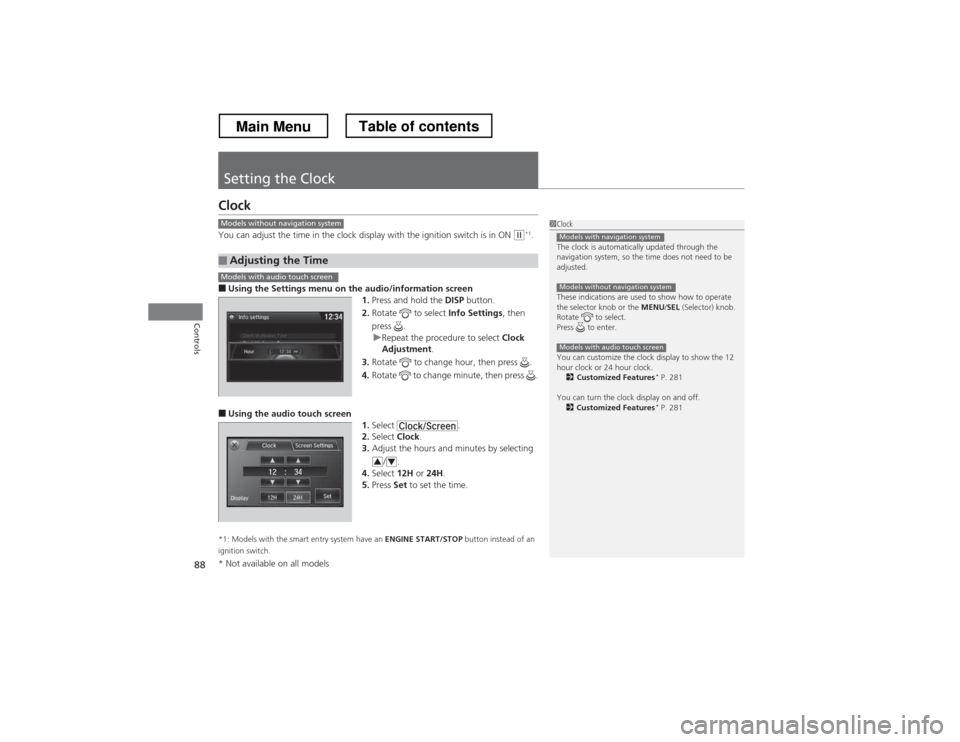
■ Using the Settings menu on th e audio/information screen
1. Press and hold the DISP button.
2. Rotate to select Info Settings, then
press .
uRepeat the procedure to select Clock
Adjustment .
3. Rotate to change hour, then press .
4. Rotate to change minute, then press .
■ Using the audio touch screen
1.Select .
2. Select Clock.
3. Adjust the hours and minutes by selecting
/.
4. Select 12H or 24H .
5. Press Set to set the time.
*1: Models with the smart entry system have an ENGINE START/STOP button instead of an
ignition switch.
■Adjusting the Time
1Clock
The clock is automatically updated through the
navigation system, so the time does not need to be
adjusted.
These indications are used to show how to operate
the selector knob or the MENU/SEL (Selector) knob.
Rotate to select.
Press to enter.
You can customize the clock display to show the 12
hour clock or 24 hour clock. 2 Customized Features *
P. 281
You can turn the clock display on and off. 2 Customized Features *
P. 281
Models with navigation system
Models without navigation system
Models with audio touch screen
Models without navigation system
Models with audio touch screen
34
* Not available on all models
Main MenuTable of contents
Page 95 of 573
94
uuLocking and Unlocking the DoorsuLocking/Unlocking the Doors from the Outside
Controls
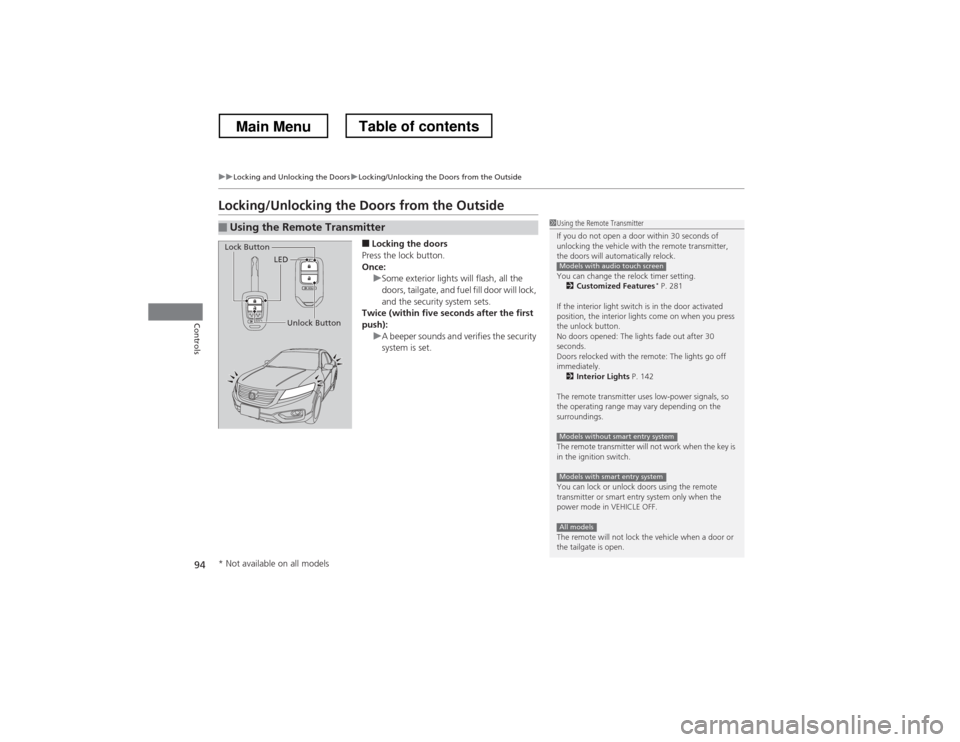
Locking/Unlocking the Doors from the Outside■Locking the doors
Press the lock button.
Once:
uSome exterior lights will flash, all the
doors, tailgate, and fuel fill door will lock,
and the security system sets.
Twice (within five seconds after the first
push):
uA beeper sounds and verifies the security
system is set.
■Using the Remote Transmitter1Using the Remote Transmitter
If you do not open a door within 30 seconds of
unlocking the vehicle with the remote transmitter,
the doors will automatically relock.
You can change the relock timer setting. 2 Customized Features *
P. 281
If the interior light switch is in the door activated
position, the interior lights come on when you press
the unlock button.
No doors opened: The lights fade out after 30
seconds.
Doors relocked with the remote: The lights go off immediately. 2 Interior Lights P. 142
The remote transmitter uses low-power signals, so
the operating range may vary depending on the
surroundings.
The remote transmitter will not work when the key is
in the ignition switch.
You can lock or unlock doors using the remote
transmitter or smart entry system only when the
power mode in VEHICLE OFF.
The remote will not lock the vehicle when a door or
the tailgate is open.
Models with audio touch screen
Models without smart entry system
Models with smart entry system
All models
LED
Unlock Button
Lock Button
* Not available on all models
Main MenuTable of contents
Page 103 of 573
102
uuLocking and Unlocking the DoorsuCustomizing the Auto Door Locking/Unlocking Setting*
Controls
Customizing the Auto
Door Locking/Unlocking Setting *
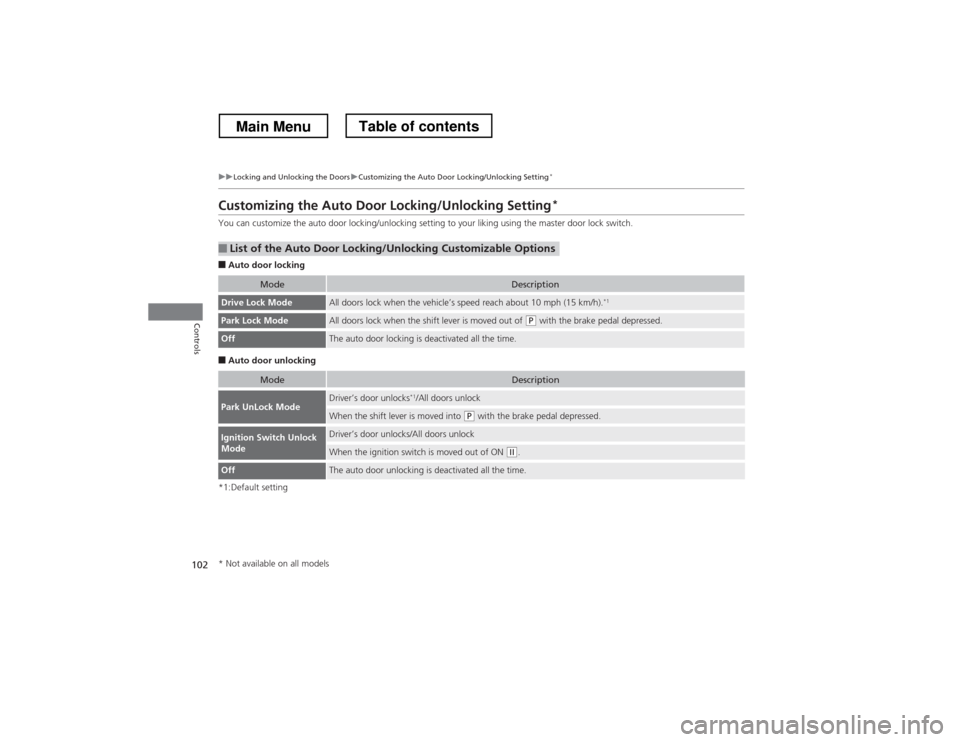
You can customize the auto door locking/unlocking setting to your liking using the master door lock switch. ■ Auto door locking
■ Auto door unlocking
*1:Default setting
■List of the Auto Door Locking/Unlocking Customizable Options
ModeDescription
Drive Lock ModeAll doors lock when the vehicle’s speed reach about 10 mph (15 km/h). *1
Park Lock ModeAll doors lock when the shift lever is moved out of (P
with the brake pedal depressed.
OffThe auto door locking is deactivated all the time.
ModeDescription
Park UnLock ModeDriver’s door unlocks *1
/All doors unlock
When the shift lever is moved into (P with the brake pedal depressed.
Ignition Switch Unlock
ModeDriver’s door unlocks/All doors unlock
When the ignition switch is moved out of ON (w.
OffThe auto door unlocking is deactivated all the time.
* Not available on all models
Main MenuTable of contents