Page 2 of 325

Contents
Child Safety P. 54 Exhaust Gas Hazard P. 62 Safety Labels P. 63
Opening and Closing the Hatch P. 104 Security System P. 106 Opening and Closing the Windows P. 108
Adjusting the Mirrors P. 119Adjusting the Seats P. 121
Climate Control System P. 134
General Information on the Audio System P. 155 Bluetooth® HandsFreeLink ® P. 158
When Driving P. 178 Braking P. 208 Parking Your Vehicle P. 212
Rearview Camera P. 214
Accessories and Modifications P. 220
Maintenance Under the Hood P. 229 Replacing Light Bulbs P. 242
Checking and Maintaining Tires P. 253 12 Volt Battery P. 262 Remote Transmitter Care P. 263
Cleaning P. 265
Engine Does Not Start P. 286 Jump Starting P. 287 Shift Lever Does Not Move P. 289
Fuses P. 297 Emergency Towing P. 301 When You Cannot Open the Hatch P. 303
Devices that Emit Radio Waves P. 309 Reporting Safety Defects P. 310
Authorized Manuals P. 315 Customer Service Information P. 316
Quick Reference GuideP. 2
Safe DrivingP. 27
Instrument PanelP. 65
ControlsP. 97
FeaturesP. 137
DrivingP. 171
MaintenanceP. 221
Handling the UnexpectedP. 269
InformationP. 305
IndexP. 317
Note: All page numbers referenced in this document are hyperlinked.
2013 CR-Z Online Reference Owner's Manual
Page 15 of 325

14
Quick Reference Guide
Instrument Panel (P65)
Tachometer
CHRG
/ASST
Indicators
IMA Battery Charge Level Indicator
Shift UP/DOWN Indicator * Multi-Information
Display
7-Speed Manual Shift Mode Indicator
*
System Indicators
Lights Reminders
Instant Fuel
Economy GaugeSpeedometer
Fuel Gauge
Security System
Alarm Indicator
Shift Lever
Position Indicator
Gauges
(P81)/Multi-Information Display (P83)/System Indicators (P66)
Ambient Meter
System Indicators System Indicators System Indicators
Lights On Indicator
High Beam Indicator
Fog Light Indicator
*
Malfunction
Indicator Lamp
Low Oil Pressure Indicator
12 Volt Battery
Charging System Indicator
Anti-lock Brake
System (ABS) Indicator
Vehicle Stability Assist (VSA
®) System
Indicator
VSA ® OFF Indicator
Turn Signal and
Hazard Warning
Indicators
Electric Power
Steering (EPS) System Indicator
Immobilizer System Indicator
IMA System Indicator
Auto Idle Stop
Indicator
Seat Belt Reminder
Indicator
Parking Brake and
Brake System Indicator (Red)
Supplemental
Restraint System
Indicator
Side Airbag Off
Indicator
Low Tire Pressure/
TPMS Indicator
U.S. models only
Door/Hatch Open
Indicator
CRUISE MAIN
Indicator
CRUISE CONTROL
Indicator
System Message
IndicatorHigh Temperature Indicator
Low Temperature Indicator
SPORT Mode
Indicator
NORMAL Mode
Indicator
ECON Mode
Indicator Low Fuel Indicator
Plus Sport System
Indicator
Plus Sport READY
Indicator
Plus Sport Indicator
Main Menu
Page 24 of 325
23
Quick Reference Guide
What to Do If
The ignition switch does
not turn from
(0 to (q.
Why?
● The steering wheel may be locked.
● Move the steering wheel left and right
while turning the ignition key.
The ignition switch does
not turn from
(q to (0 and
I cannot remove the key.
Why?
The shift lever should be moved to (P on
the automatic transmission (CVT) model.
Why does the brake pedal
pulsate slightly when
applying the brakes?This can occur when the ABS activates, and does not indicate a
problem. Apply firm, steady pressu re on the brake pedal. Never
pump the brake pedal.
Why do the doors lock
after I unlocked the doors using a remote
transmitter?If you do not open the doors within 30 seconds, the doors are
relocked automatically for security.
Main Menu
Page 60 of 325
59
uuChild SafetyuSafety of Infants and Small Children
Safe Driving
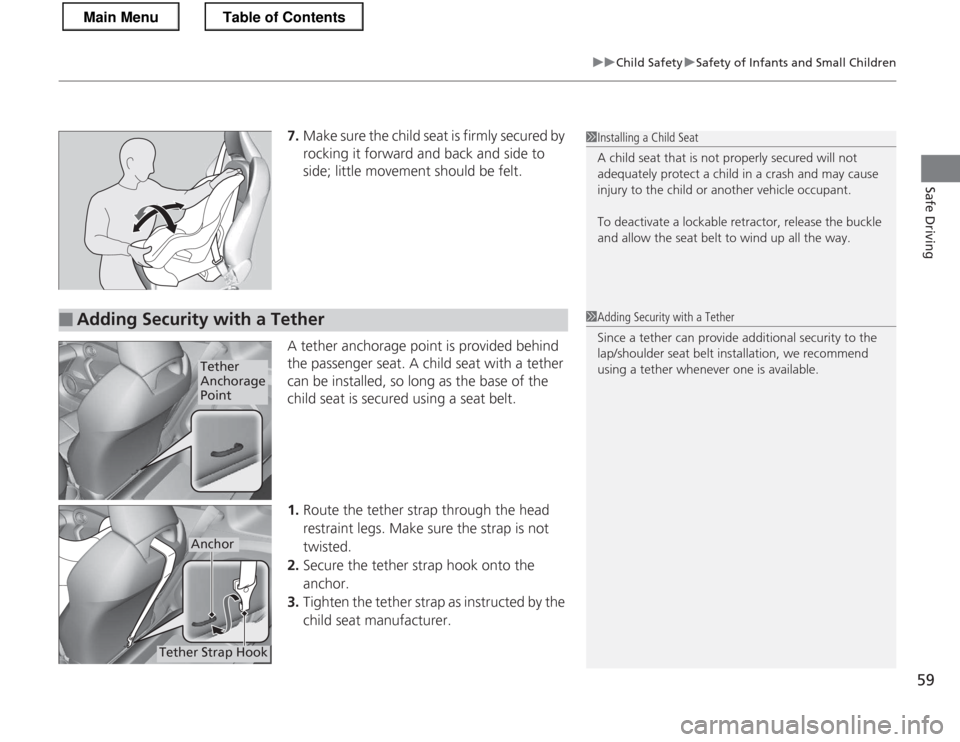
7.Make sure the child seat is firmly secured by
rocking it forward and back and side to
side; little movement should be felt.
A tether anchorage point is provided behind
the passenger seat. A child seat with a tether
can be installed, so long as the base of the
child seat is secured using a seat belt. 1. Route the tether strap through the head
restraint legs. Make sure the strap is not twisted.
2. Secure the tether strap hook onto the anchor.
3. Tighten the tether strap as instructed by the
child seat manufacturer.1Installing a Child Seat
A child seat that is not properly secured will not
adequately protect a child in a crash and may cause
injury to the child or another vehicle occupant.
To deactivate a lockable retractor, release the buckle
and allow the seat belt to wind up all the way.
■Adding Security with a Tether1Adding Security with a Tether
Since a tether can provide additional security to the
lap/shoulder seat belt installation, we recommend
using a tether wheneve r one is available.
Tether
Anchorage
Point
Tether Strap Hook
Anchor
Main MenuTable of Contents
Page 76 of 325

75
uuIndicatorsu
Continued
Instrument Panel
IndicatorNameOn/BlinkingExplanationMessage
Immobilizer System
Indicator
●Comes on briefly when you turn
the ignition switch to ON
(w , then
goes off.
● Comes on if the immobilizer
system cannot recognize the key
information.
●Blinks - You cannot start the engine.
Turn the ignition switch to LOCK
(0 , pull
the key out, and then insert the key and
turn it to ON
(w again.
● Repeatedly blinks - The system may be
malfunctioning. Have the vehicle
checked by a dealer.
● Do not attempt to alter this system or
add other devices to it. Electrical
problems can occur.
—
Security System
Alarm Indicator
●
Blinks when the Security System Alarm has been set.
2 Security System Alarm P. 106—
CRUISE MAIN
Indicator● Comes on when you press the CRUISE button.
2Cruise Control P. 200—
CRUISE
CONTROL
Indicator● Comes on if you have set a speed
for cruise control.
2 Cruise Control P. 200—
Auto Idle Stop
Indicator●
Blinks when Auto Idle Stop is in
operation. The engine
automatically shuts off.
2 Auto Idle Stop P. 191, 194—
Indicator
Main MenuTable of Contents
Page 92 of 325
91
uuGauges and Multi-Information DisplayuMulti-Information Display
Continued
Instrument Panel
■Customization flow
Press the button.
DEFAULT ALL
EXIT
DOOR SETUP
ADJUST OUTSIDE TEMP. DISPLAY
TRIP A RESET with REFUEL
ELAPSED TIME RESET
INTERIOR LIGHT DIMMING TIME
AUTO LIGHT SENSITIVITY *
AUTO DOOR UNLOCK
DOOR LOCK MODE
KEYLESS LOCK ACKNOWLEDGMENT
SECURITY RELOCK TIMER
AUTO DOOR LOCK
LANGUAGE SELECTIONSEL/RESET
SEL/RESET
SEL/RESET
SEL/RESET
SEL/RESET
SEL/RESET
METER SETUP
LIGHTING SETUP
CHG SETTING
EXIT
CUSTOMIZE SETTINGS
HOLD ECON MODE
METER COLOR CHANGE
DISPLAY KM/MILES
Auto Light Sensitivity
*
4
3
4
3
4
3
4
3
4
3
4
3
4
3
* Not available on all models
Main MenuTable of Contents
Page 94 of 325

93
uuGauges and Multi-Information DisplayuMulti-Information Display
Continued
Instrument Panel
*1: Default Setting
*2: Default Setting on automatic transmission (CVT) models
*3: Default Setting on manual transmission modelsSetup Group Customizable Features Description Selectable settings
Door Setup
Auto Door LockChanges the setting for the automatic locking
feature.Shift from (P
(A/T only), With
VEH SPD *1
, OFF
Auto Door UnlockChanges the setting for when the doors and the
hatch unlock automatically.Shift to (P *2
, IGN off *3
, OFF
Driver Door *1
, All Doors
Door Lock ModeSets up either the driver’s door or both doors and
the hatch to unlock on the first push of the remote.Driver Door *1
All Doors
Key Lock AcknowledgmentLOCK/UNLOCK - The exterior lights flash
LOCK (2nd push) - The beeper soundsON*1
, OFF
Security Relock Timer
Changes the time it takes for the doors and the
hatch to relock and the security system to set after
you unlock the vehicle without opening either door
or the hatch.
90 sec , 60 sec , 30 sec *1
Default All Sets/Cancels all the customized settings as default. Set, Cancel
Main MenuTable of Contents
Page 98 of 325

97
Controls
This chapter explains how to operate the various controls necessary for driving.
Setting the Clock................................ 98
Locking and Unlocking the Doors
Key Types and Functions .................... 99
Locking/Unlocking the Doors from the Outside .......................................... 100
Locking/Unlocking the Doors from the Inside ............................................. 102
Auto Door Locking/Unlocking .......... 103
Opening and Closing the Hatch ....... 104
Security System Immobilizer System .......................... 106
Security System Alarm ...................... 106
Opening and Closing the Windows ..... 108Operating the Switches Around the
Steering Wheel
Ignition Switch ................................. 110
Turn Signals ..................................... 111
Light Switches.................................. 111 Fog Lights *
...................................... 113
Daytime Running Lights ................... 113
Wipers and Washers ........................ 114
Brightness Control ........................... 116
Rear Defogger/Heated Door Mirror *
Button ........................................... 117
Adjusting the Steering Wheel........... 118 Adjusting the Mirrors
Interior Rearview Mirror ................... 119
Power Door Mirrors ......................... 120
Adjusting the Seats Adjusting the Seat Positions ............. 121
Interior Lights/Interior Convenience ItemsInterior Lights .................................. 126
Interior Convenience Items .............. 127
Climate Control System Using Automatic Climate Control .... 134
Automatic Climate Control Sensors ...... 136
* Not available on all models
Main Menu

